
How to Build a Music Production Website on Squarespace: The Complete Guide
Introduction
If you're a music producer, getting serious about your brand means more than having a few SoundCloud followers or an Instagram account. You need a music production website on Squarespacewhere you own the experience, control the narrative, and make it easy for collaborators, labels, and fans to find what they're looking for.
Here's the reality: labels, other producers, and serious listeners want to visit a dedicated space that showcases your work professionally. They want to hear your beats, read about your process, and know how to book you. A personal website gives you credibility that social media alone can't match. And the good news? Squarespace makes it accessible, even if you're not a designer.
This guide walks you through building a music production website on Squarespace from the ground up. Whether you want to sell beats online, display your portfolio, share press materials, or book session work, you'll find everything you need here.
Key Takeaways
A professional website positions music producers as serious professionals and improves discoverability beyond social platforms
Squarespace offers built-in audio hosting, e-commerce features, and responsive design perfect for music portfolios without coding
Your home page should instantly communicate your sound, feature a clear CTA, and load fast on mobile devices
A strong portfolio page with embedded audio samples, waveforms, and project details builds trust and showcases your catalog
Press kits (EPKs) on your website provide labels, blogs, and curators everything they need in one centralized location
Adding a beat store or digital products section turns your website into a revenue channel
Booking pages and clear contact information make it easy for artists, labels, and producers to collaborate with you
A personal bio that tells your story—not just credentials—creates an emotional connection with visitors
1. Why Music Producers Need Their Own Website
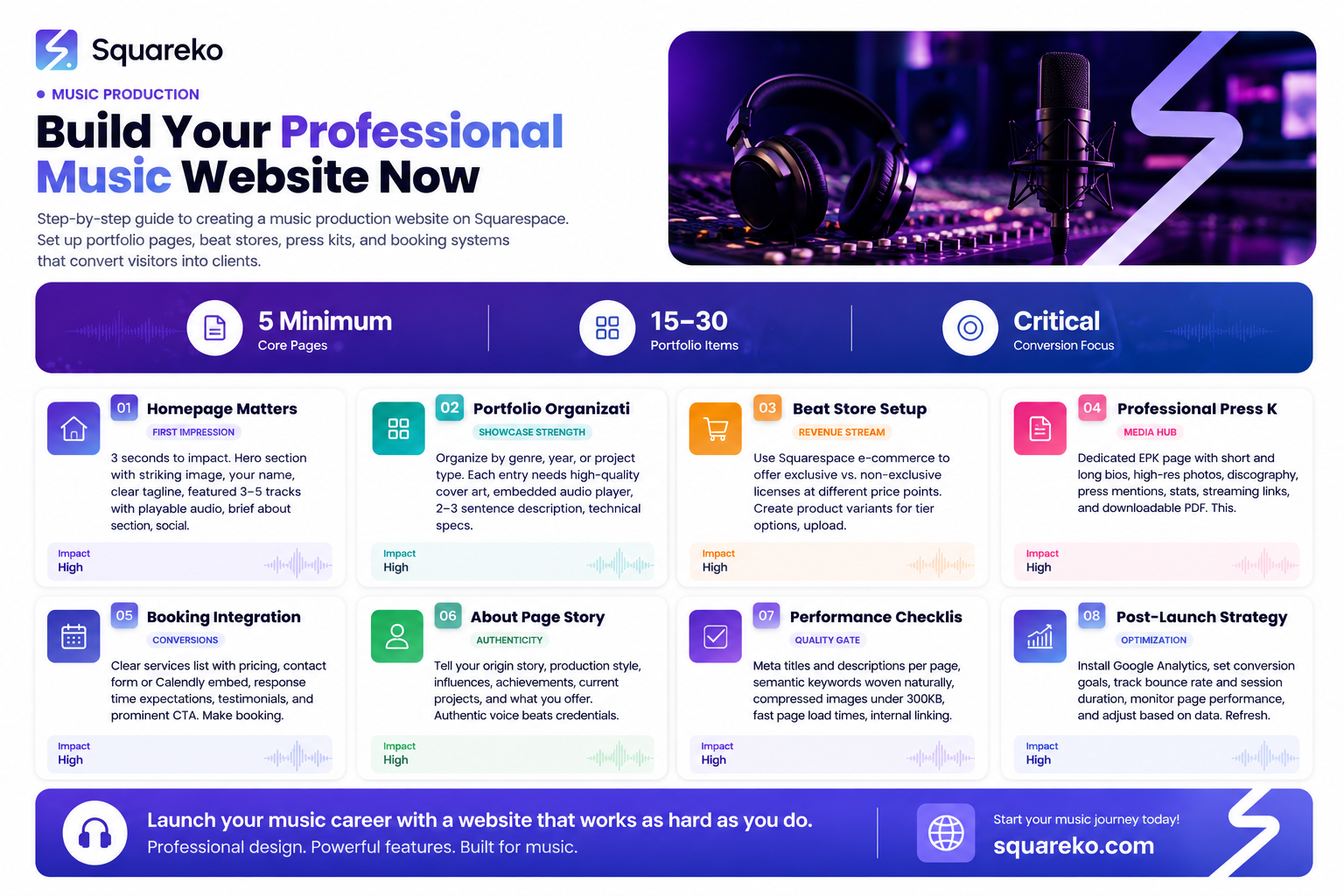
Let's address the elephant in the room first: Can't you just rely on SoundCloud, Spotify, and Instagram?
Not entirely. Here's why those platforms fall short:
You don't own your audience. Platform algorithm changes can tank your reach overnight. Instagram changes its feed algorithm, TikTok limits video length, SoundCloud's community shrinks. Your website is the one place where the algorithm is yours.
Credibility matters. When a label A&R, a film director, or a fellow producer checks you out, they expect to find a professional hub. A dedicated website signals that you're serious, organized, and professional. It's the difference between this person makes beats as a hobby and this is a professional music producer.
You need a sales channel. Whether you're selling beat licenses, offering production services, or selling stems, a website with e-commerce integration (hello, Squarespace) lets you convert listeners into paying customers.
SEO and discoverability. A music production website optimized for search engines can bring organic traffic. Someone searching trap beats for sale or producer for hip-hop features might find you through Google—not just through social media.
You need a press kit hub. Blogs, podcasts, playlist curators, and media outlets need your press materials, links, and bio in one place. An EPK page serves this need perfectly.
A music production website on Squarespace gives you all this in one place, without needing to hire a developer.
2. Choosing the Right Squarespace Template for Music
When you first log into Squarespace, you'll see dozens of templates. For music producers, focus on these qualities:
Audio Hosting Capability: Make sure the template supports embedded audio players. Squarespace's native audio block plays nicely in most templates, but some are better optimized for showcasing sound.
Portfolio Layout: Look for templates with grid-based portfolio sections. You'll want to display album art, project names, and play buttons in an organized way.
Mobile Responsiveness: Over 60% of traffic comes from mobile. Your template must look sharp on phones and tablets. (Squarespace handles this well, but test it anyway.)
E-commerce Features: If you plan to sell beats, licenses, or digital products, choose a template with solid e-commerce integration. Squarespace's Merchant account supports this across all templates, but some layouts highlight products better than others.
Clean, Minimal Design: Music should be the star. Templates with lots of distracting elements or heavy graphics can clutter your presentation. Choose something that puts your music front and center.
Templates to Consider:
Brine: Simple, gallery-focused, excellent for visual artists and producers
Adirondack: Clean, corporate, great for professional portfolios
Momentum: Modern and bold, works well for electronic and hip-hop producers
Thorne: Minimal, audio-friendly, great for singer-songwriters and beat makers
Ishimoto: Fine art template, excellent for curated portfolio displays
Remember: you can customize colors, fonts, and layouts significantly. Pick a template you like structurally, and make it your own.
3. Building Your Home Page: The First Impression
Your home page has about three seconds to make an impact. Here's the anatomy of an effective music producer home page on Squarespace:
Hero Section (What visitors see first):
Your hero section should include:
A striking image or video (your artwork, you in the studio, or an abstract visual that matches your brand)
Your name or artist name in large, readable text
One clear, compelling tagline (Trap Beats & Hip-Hop Production,Lo-Fi Instrumentals for Your Projects,Electronic Music Producer)
A primary call-to-action button ( Listen to My Beats, Book a Session, Download My Press Kit)
Keep it uncluttered. Music producers often overthink this section with too many images or words. Simple works better.
Featured Work Section:
Below the hero, feature 3-5 of your strongest tracks or recent projects. Use Squarespace's audio block to embed playable tracks with waveforms. Include:
Track title
Brief description (genre, mood, BPM, or vibe)
A Listen or Buy button
About Mini-Section:
A short paragraph (50-75 words) about who you are and what you create. Link to your full bio page.
Example: I'm a producer specializing in trap and lo-fi beats. Over the past three years, I've worked with 50+ artists, licensed beats to [Label/Artist], and built a community of 15K+ followers. Here's where you can find my full catalog, press kit, and beat store.
Social Links:
Embed your Instagram, Twitter, YouTube, SoundCloud links. Make them visually appealing, not just text links.
Call-to-Action (Primary):
End your home page with a button or section directing visitors to your next step. Examples:
Shop My Beat Store (if you sell beats)
Check Out My Full Portfolio (link to portfolio page)
Download My Press Kit (link to EPK page)
Book a Session (link to booking/contact page)
Performance Tip: Compress your images aggressively. Large, unoptimized hero images slow down page load, and mobile users will bounce. Aim for hero images under 500KB.
4. Creating Your Music Portfolio and Discography Page
Your portfolio page is where you showcase your work in depth. This is where music producer portfolios shine on Squarespace.
Portfolio Page Structure:
Page Title: My Music or Portfolio or Production (something clear and descriptive)
Intro Paragraph: A 2-3 sentence intro explaining what visitors will find. Example: Below is my complete catalog of original beats, productions, and collaborations. Browse by genre, listen to full tracks, and get details on each project. Interested in licensing or collaboration? Check out my booking page or drop me a line.
Organization Method (choose one or combine):
By Genre: Separate sections for trap, lo-fi, house, R&B, etc.
By Year: Recent first, chronological
By Project Type: Beats for sale, collaborations, official releases, remixes
By Client/Label: Released with X Label, Features with Y Artist, etc.
For more details on structuring your catalog, see our guide on [INTERNAL LINK: music producer online portfolio squarespace].
Each Portfolio Entry Should Include:
Album/beat cover art (high quality)
Track title
Collaborators or artist name(s)
Release year
Genre and BPM
Embedded audio player with full track preview
A brief description (2-3 sentences about the vibe, inspiration, or backstory)
Metadata: Link to Spotify/Apple Music/SoundCloud if available
CTA button: Buy License, Stream, More Info, or similar
Sample Entry:
Midnight Drive - Trap Instrumental (2024) Genre: Trap | BPM: 140 | Mood: Dark, Cinematic This beat channels late-night highway vibes with heavy 808s, pitched vocals, and atmospheric pads. Perfect for dark storytelling or introspective rap. Licensed to 3 artists; available for exclusive lease. [Embedded audio player] [Buy License] [Stream on Spotify]
Portfolio Display Tips:
Use Squarespace's gallery or portfolio grid layouts
Include 15-30 of your strongest works initially (you can add more over time)
Make sure cover art is consistent in style and dimensions
Enable full-screen preview if available
Test that audio players work on mobile
5. Embedding Audio Samples and Beat Previews
Audio embedding is crucial. You want listeners to hit play without friction.
Squarespace Audio Block Features:
Squarespace's native audio block is designed for this. When you add an audio block to any page:
You can upload MP3, WAV, AAC, or OGG files
Visitors see a waveform visual
Play, pause, and volume controls are intuitive
It auto-adjusts to mobile screens
You can display track title and artist name
Best Practices:
Use High-Quality Audio Files: Upload the highest-quality master or mix available. Squarespace will optimize it for web, but garbage in = garbage out.
Add 30-90 Second Previews or Full Tracks: If you're selling beats, consider a 30-60 second preview to hook listeners without giving away the full track. If you're showcasing work you've done for others, full tracks often work better.
Label Each Track Clearly: Make sure the track title and artist credit are visible above or below the player.
Group by Context: If a page shows 5+ tracks, separate them visually (dividers, spacing, section headings).
Don't Auto-Play: Music that plays automatically is annoying and hurts SEO. Let visitors choose to play.
Include Metadata: Below the player, add BPM, key, genre, mood, or a short description. This helps visitors understand the vibe before committing time to listen.
Alternative: SoundCloud Embed
If you prefer, you can embed SoundCloud players directly on Squarespace. The advantage: visitors can follow you on SoundCloud from your site. The disadvantage: it's less branded and relies on an external platform.
Recommendation: Use Squarespace's native audio block for full control and branding.
6. Setting Up a Beat Store for Digital Sales
Yes, you can sell beats on Squarespace. Here's exactly how.
Squarespace E-Commerce Basics:
Squarespace's e-commerce feature lets you:
List products (beats, licenses, stems, courses)
Set prices and variants (e.g., basic license $20, exclusive $200)
Process payments via Stripe or PayPal
Manage inventory (digital products have unlimited inventory)
Send automatic digital delivery
Creating Your Beat Store:
Step 1: Set Up a Commerce Page Create a new page and select Products as the page type. Name it Beat Store, Shop, or Buy Beats.
Step 2: Add Your Beats as Products For each beat you want to sell:
Upload cover art as the product image
Write a product title (Midnight Trap Beat - License Type A)
Add a detailed description (gear used, mood, BPM, key, length, etc.)
Set price(s)
Create variants for different license types
Step 3: Offer Multiple License Options Most beat stores offer tiered licenses. For deeper guidance, check our article on [INTERNAL LINK: sell beats on squarespace] with pricing models:
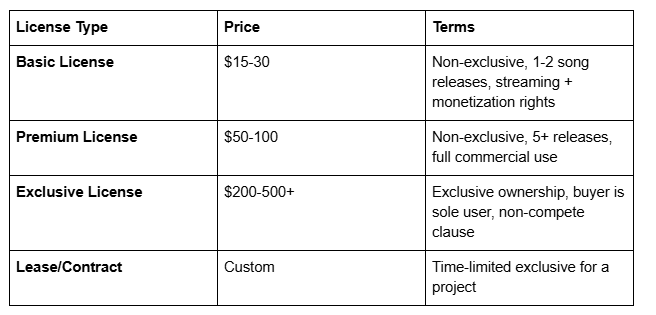
Use Squarespace's product variants feature to offer these options from one product listing.
Step 4: Digital Delivery Squarespace can automatically deliver digital files (MP3, WAV, stems, artwork) upon purchase. Upload these files to your product:
Master MP3
WAV file
Stems (if applicable)
Artwork package
License agreement PDF
Buyers receive a download link immediately after purchase.
Step 5: Set Up Payment Processing Connect your Stripe or PayPal account. Squarespace takes a small transaction fee + payment processor fees (typically 2-3% total).
Pricing Strategy Tips:
Research your niche. Lo-fi beats often sell for less ($10-30) than trap beats ($30-100+).
Factor in time, competition, and demand.
Offer a few tiers. Exclusive licenses are a way to monetize your most serious customers.
Consider bundled discounts (3 beats for $50, 10-beat pack for $120).
Promotion:
Link to your beat store prominently:
Home page CTA
Portfolio page (each beat has a Buy button)
Dedicated Shop navigation menu item
Email newsletter (once you start building a list)
Social media (Instagram stories, TikTok, YouTube)
7. Creating a Professional Press Kit (EPK) Page
A press kit—or electronic press kit (EPK)—is your media resume. Labels, blogs, podcasts, and playlist curators will ask for it.
What a Press Kit Includes:
A dedicated EPK page on your Squarespace site should contain:
High-Resolution Headshot & Artist Photos Clean, professional images of you (for bios, articles, interviews). Include both portrait and lifestyle shots.
Bio (Two Versions)
Short bio (50 words): One-sentence summary + key facts
Long bio (150-200 words): Career history, style, achievements, collaborations
Example short bio: Trap and lo-fi producer based in Los Angeles. 2M+ streams across platforms. Recent releases on [Label]. Available for licensing and collaboration.
Discography/Recent Releases
List your last 5-10 releases with cover art, titles, release dates, and links to streaming platforms
Include any notable playlist placements or features
Press/Media Mentions
Links or screenshots of articles, podcast appearances, or features
Blog posts that have mentioned your music
Playlist placements on major playlists
Stats & Accomplishments
Total streams
Follower counts
Major collaborations or clients
Grammy nominations, awards, etc. (if applicable)
Spotify/Apple Music Links
Direct links to your artist profiles
Embed Spotify widgets if Squarespace allows
Contact Information
Email for press inquiries
Management contact (if applicable)
Social media links
Downloadable Press Kit PDF (optional)
A formatted, one-page or two-page PDF summarizing everything above
Make it downloadable from the page
EPK Page Example Structure:
# My Press Kit (EPK)
## Quick Bio
[Short bio paragraph]
## Full Bio
[Longer bio paragraph]
## By The Numbers
- 2.5M Total Streams
- 45K Monthly Listeners on Spotify
- 50+ Beats Licensed
- Featured on [Playlist Name]
## Recent Releases
[Grid of 5-6 recent releases with cover art]
## Press & Features
[Links or quotes from features]
## Get In Touch
Press inquiries: [email]
Management: [email] / [phone]
## Download Full Press Kit
[PDF download button]
Why This Matters for SEO:
An EPK page built into your site (rather than hosted on a separate SoundCloud EPK or external site) keeps visitors on your domain. It also signals to Google that you're a substantial, professional entity worth indexing thoroughly. For SEO optimization strategies, read our guide on [INTERNAL LINK: how to optimize your music website for SEO].
8. Adding a Booking and Contact Setup
Make it dead simple for people to book you, collaborate, or reach out.
Create a Dedicated Booking/Contact Page:
Page title: Book Me, Collaborations, Get In Touch, or Contact
Include These Elements:
Services You Offer Clearly state what people can book you for:
Beat licensing
Custom production (per hour or per project)
Mixing/mastering services
Featured vocals or production credits
Teaching/mentoring sessions
Pricing (if applicable) Be transparent. Example:
Custom Beat Production: $200-500
Mixing & Mastering: $100-300 per track
Exclusive Beat License: $500+
Free consultation: Book here
Booking Method
Choose one (or more):
Option A: Contact Form Squarespace has a native form builder. Create a form with fields:
Name
Email
Subject (dropdown: Beat License, Custom Production, Collaboration, Other)
Project details (text area)
Budget (optional)
Timeline
You'll receive submissions via email, and optionally via a Squarespace dashboard.
Option B: Booking Tool Integration Integrate a third-party booking tool:
Calendly: Free scheduling tool. Embed a Calendly widget where people book time slots for calls with you.
Acuity Scheduling: Similar, but more robust, designed for service businesses
HubSpot: CRM-based booking, excellent for lead tracking
These tools handle scheduling, reminders, and follow-ups automatically.
Option C: Email Link Simple: Provide a clear email address. Less professional, but works.
Response Time Expectation Set realistic expectations: I respond to inquiries within 2 business days or Expected turnaround: 1-2 weeks.
CTA Section End with clear next steps. Example: Ready to work together? Use the form below, book a time slot on my calendar, or email me directly at [email]. Let's make something great.
Testimonials (Optional) If you have past clients, include 1-2 testimonials or case studies: Walid helped me remix my track in 3 days. Professional, quick turnaround, and the result exceeded expectations. — [Artist Name]
Mobile-First Design:
Your booking page must be mobile-friendly. Many people will book from their phone. Make sure:
Form fields are large and easy to tap
Calendly or booking widget displays clearly on mobile
Email link is clickable (phone will open email app)
9. Crafting an Authentic About Me Page
Your bio page builds trust. It's where visitors learn who you are beyond your music.
What to Include:
A Great Photo Professional headshot or a casual studio photo. Not a blurry selfie. This is you representing your brand.
Your Story (250-400 words) Don't just list credentials. Tell a story:
How you got into music production
A key moment or influence
What drives your sound
Where you are now
Example framework: I got my first DAW at 16, tinkering with FL Studio in my bedroom. By 18, I was obsessed with trap beats. I spent years studying drum programming, 808 layers, and sound design. Fast forward to today: I've collaborated with [Artists], my beats have 2M+ streams, and I'm passionate about helping other producers level up.
Your Production Style Describe your niche:
Genre(s): trap, lo-fi, house, R&B, etc.
Mood/vibe: dark, uplifting, cinematic, boom-bap, etc.
Influences: artists, producers, or styles that shaped you
My sound is rooted in trap, but I blend lo-fi chops, cinematic strings, and analog warmth. Think [Artist] meets [Producer]. I'm influenced by [influences].
Your Process (Optional but Engaging) Give a glimpse into how you work:
Gear and software you use
Your creative approach
Typical timeline for a project
I start with samples and raw field recordings, then layer in synths and 808s. I mix everything in stereo, focusing on depth and space. Most projects take 1-3 weeks from concept to final mix.
Achievements & Credits
Playlist placements
Artist collaborations
Label releases
Stream counts
Awards or recognitions
My beats have been featured on [Playlists], licensed to [Artists], and shared by [Influencers]. Over 2M streams across platforms.
What You're Offering Now
Beat licenses
Custom production
Mentoring/teaching
Consultation
I'm currently accepting custom beat commissions, offering exclusive licenses, and open to collaborations with artists and producers.
Personal Touch Share something human:
A hobby or interest outside music
What you're working on currently
Where you see your music going
Outside the studio, I'm a photographer and coffee snob. Currently working on an ambient beats album and mentoring three up-and-coming producers.
Clear CTA Want to work together? Head over to my booking page or download my press kit.
Tone: Conversational, authentic, and approachable. You're inviting people into your world, not delivering a resume.
10. Your Launch Checklist
Before publishing your music production website on Squarespace, go through this checklist:
Content & Functionality:
Home page is compelling and loads fast (test on mobile)
Portfolio page displays all major works with audio players
Beat store is set up with 5+ products and license options
Press kit page has bio, stats, recent releases, and media mentions
About/Bio page tells your story authentically
Booking/contact page is functional and easy to use
All links (internal and external) are working
Email address and contact forms are tested
SEO & Technical:
Meta titles and descriptions are written for each page
Primary keywords (music production website squarespace) are in title, H1, and first 100 words
Semantic keywords are naturally woven throughout
Images are compressed and optimized
Audio files are optimized for web (320kbps MP3 or similar)
Internal links are added between related pages
Site is submitted to Google Search Console and Bing Webmaster Tools
Google Analytics is installed and tracking
Design & Branding:
Color scheme is consistent with your music brand
Typography is readable and matches your vibe
Logo/branding is present and professional
Mobile responsiveness is tested on multiple devices
Navigation is intuitive and clear
Social media links are prominent
Performance:
Page load time is under 3 seconds (test with Google PageSpeed Insights)
Mobile Core Web Vitals are healthy
All audio and video players work smoothly
Forms submit without errors
Payment processing (if applicable) is tested with a test transaction
Copy & Messaging:
No typos or grammatical errors (proofread everything)
Messaging is clear, conversational, and benefits-focused
CTAs are compelling and action-oriented
Bio/About section feels authentic
Press kit has all necessary information
Launch:
Custom domain is set up (e.g., yourname.com)
SSL certificate is active (shows https://)
Site is published and live
Test all pages one final time
Share announcement on social media
After launch, monitor your analytics. Track which pages get traffic, where visitors drop off, and what content resonates. Adjust based on real user behavior.
Frequently Asked Questions
-
Yes, absolutely. Squarespace has built-in e-commerce with product listings, payment processing, and automatic digital file delivery. You can set up tiered licensing (basic, premium, exclusive), offer stems or sample packs, and process payments via Stripe or PayPal. Most beat makers use Squarespace's product feature to sell licenses directly from their site. It's one of the best platforms for this because you don't need external tools or plugins—everything is integrated.
-
Create a dedicated page called "Press Kit" or "EPK" within Squarespace. Include your bio (short and long versions), high-resolution photos, recent releases, stream counts, press mentions, collaborations, and downloadable media. You can also create a PDF press kit and add a download button on the page. Squarespace's content blocks make it easy to organize all this information in a visually appealing, scannable format. Think of it as your one-stop media resource for labels, blogs, podcasters, and curators.
-
Yes, it's one of the best platforms for music portfolios. Squarespace's native audio player is reliable, responsive on mobile, and shows waveforms for a professional look. You can display cover art, embed tracks, add descriptions, and organize your work by genre or date. The portfolio/gallery page types are designed for this. Plus, you own your portfolio on your own domain, unlike SoundCloud or Spotify, where you're subject to algorithm changes and platform policies. For a serious producer, Squarespace is a solid investment.
-
Basic licenses (often $20-50) are non-exclusive, meaning you sell the same beat to multiple artists. They typically allow streaming and monetization on platforms like Spotify and YouTube. Premium licenses ($100-300) may allow more uses (multiple songs, placements). Exclusive licenses ($500+) mean only one buyer can use the beat—no one else gets it. Some producers also offer leases, where an artist rents exclusive use for a set period. The right model depends on your goals and market. Offering tiered options usually boosts sales because different artists have different budgets.
-
Use Squarespace's native Audio block. When editing any page, click the "+" icon to add content, then select "Audio." Upload your MP3, WAV, or OGG file. Squarespace will display a player with a waveform, play/pause controls, and volume slider. You can add a track title and artist name. The player is responsive and works on mobile. Alternatively, you can embed SoundCloud players, YouTube videos, or Spotify widgets using the Embed block, but native audio gives you the most control and branding.
-
Your home page should grab attention in the first 3 seconds with a striking hero image or video, your name, and a clear tagline describing your sound. Below that, feature 3-5 of your best tracks with playable audio and brief descriptions. Include a short about section with a link to your full bio. Add your social media links and end with a primary call-to-action button (e.g., "Shop Beats," "Book a Session," or "Download My Press Kit"). Keep it uncluttered—the focus should be on your music, not on design fireworks.
-
Optimize for SEO by targeting keywords like "music production website squarespace" and similar terms. Submit your site to Google Search Console. Build internal links between related pages. Write blog posts or production tutorials and link back to your portfolio. Promote your site on social media (Instagram, Twitter, YouTube, TikTok). Engage with your community—respond to comments, collaborate with other producers, and share behind-the-scenes content. Network with labels, blogs, and curators. Consider email marketing to build a subscriber list. Consistent, authentic promotion over months will bring steady traffic.
Ready to Build Your Professional Music Production Website?
If you're serious about your music career, a professional website isn't a luxury—it's a necessity. A music production website on Squarespace positions you as a professional, gives you control over your brand, and creates a direct revenue channel for your beats and services.
But here's the thing: building a website that actually converts visitors into customers, drives organic search traffic, and reflects your unique sound takes strategy. It's not just about picking a template and uploading your tracks.
At Squareko.com, we specialize in building music production websites on Squarespace that work. We handle everything from design and branding to SEO optimization, e-commerce setup, and conversion optimization. We know how music producers think, what your fans expect, and how to build a site that turns listeners into paying clients.
Whether you're starting from scratch, looking to redesign an existing site, or need help setting up your beat store and press kit, we're here to help.
Here's what we typically cover in a discovery call:
Your goals: Are you selling beats, booking sessions, or building a community?
Your audience: Who are you trying to reach? (Artists, labels, curators, fans?)
Your brand: What's your sound, and how should your site reflect that?
Your current situation: Do you have a site already? What's working or not working?
Your budget and timeline: When do you want to launch?
In this 30-minute call, we'll get clear on what you need and share a roadmap forward. No pressure, no sales pitch—just real talk about building a site that serves your music career.
Ready to get started? Book a free discovery call with Squareko.com and let's build something that positions you as the professional musician you are.

From custom website design to SEO strategy, we help businesses launch a site that looks professional and performs better.

About the Author
I'm Walid Hasan, a Certified Squarespace Expert and Squarespace Circle Platinum Partner with over 12 years of hands-on experience designing and optimizing high-performing websites. Over the years, I've had the privilege of building more than 2,000 Squarespace websites for clients around the world, always focusing on clean design, strong user experience, and conversion-driven results.
