
How to Launch a Children's Clothing Brand Online with Squarespace: Complete 2026 Guide
Introduction
Launching a children's clothing brand online has never been more accessible. Whether you're designing organic baby wear, playful school uniforms, or occasion outfits for children, the tools available today make it possible to build a professional ecommerce presence without technical expertise. This guide focuses on how to launch a children's clothing brand online with Squarespace a platform that combines design flexibility with powerful commerce features specifically suited to the kids fashion market.
In this 2026 guide, you'll discover the essential steps to take your children's clothing concept from inspiration to sales-ready website. We'll explore brand positioning, product photography techniques tailored to small children's clothing, sizing chart creation, and the strategic decision between a soft launch and hard launch approach. By the end, you'll have a clear roadmap to confidently build your kids fashion business online.
Key Takeaways
Brand positioning and niche selection are crucial: define whether you're targeting infants, toddlers, school-age children, or specific occasions to stand out in a crowded market
Sizing accuracy and transparency directly impact customer satisfaction and returns—use Squarespace's sizing chart feature effectively and consider OEKO-TEX or organic certifications
Professional product photography for children's clothing requires planning: combine flat lay shots with carefully selected child models to build parent trust
Pre-launch email list building creates momentum and ensures customers are ready on day one when you soft launch or go fully live
Squarespace Commerce setup handles inventory, payments, and shipping calculations—configure these thoroughly before launch to avoid operational headaches
Soft launch strategy with existing audiences (friends, family, local communities) reduces risk and provides feedback before your hard launch to the wider market
Post-launch SEO and social media integration (especially Instagram and Pinterest for parents) drive long-term discovery and repeat customer growth
Define Your Brand Positioning and Niche
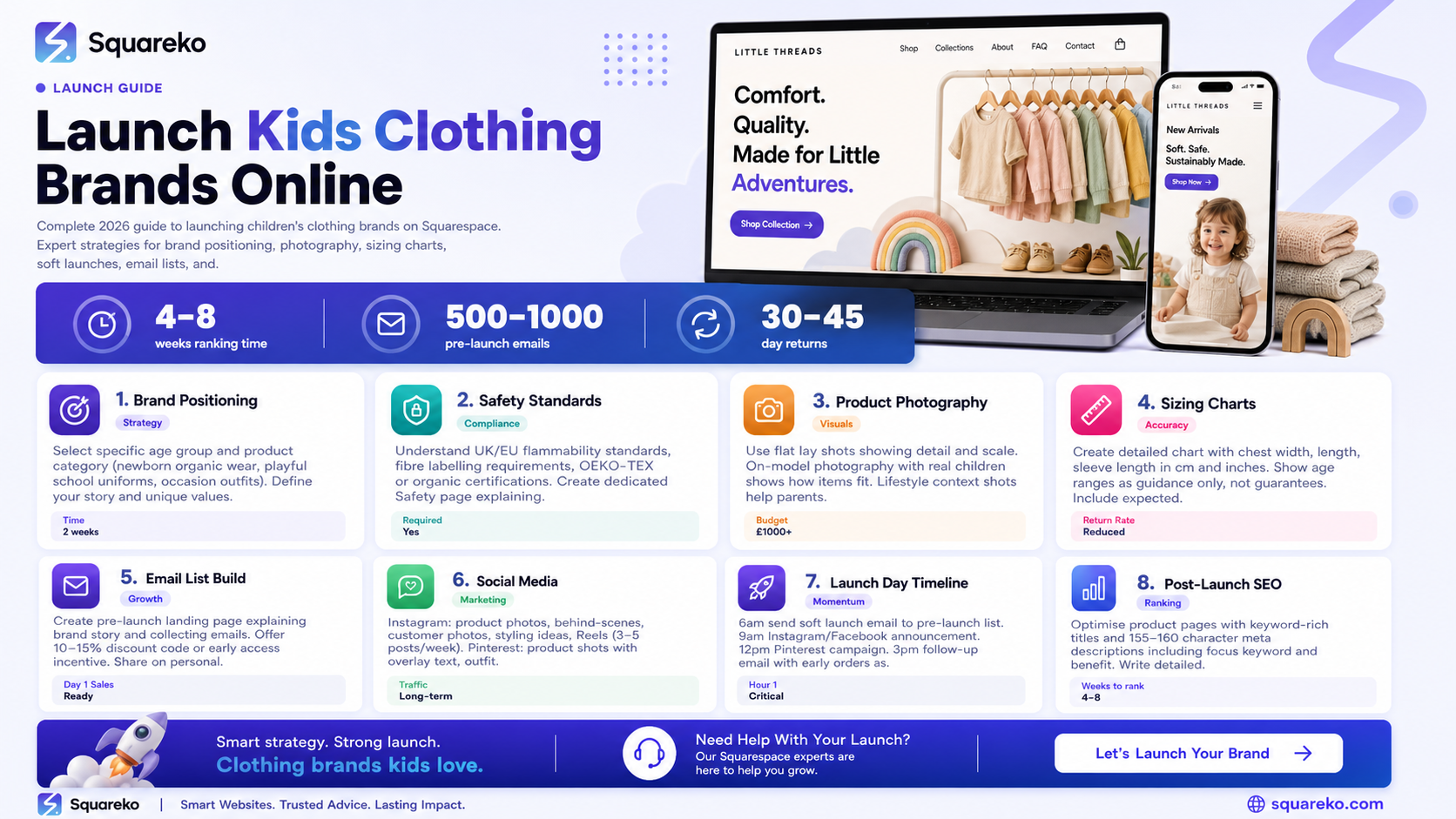
The children's clothing market is vast. Your first critical decision is identifying exactly whom you serve and why they should choose your brand over thousands of alternatives.
Selecting Your Target Age Group
Children's wear divides naturally into distinct stages: newborn and infant (0–12 months), toddler (1–3 years), pre-school (3–5 years), school-age (6–12 years), and tweens (10–14 years). Each stage has different sizing, different parent concerns, and different product needs. A brand targeting organic newborn wear attracts environmentally conscious parents worried about sensitive skin. A school-age brand selling durable everyday wear appeals to value-conscious families buying multiple items annually.
Choose one or two adjacent age groups initially. This narrowness allows you to become an expert, speak directly to specific parent pain points, and avoid inventory complexity.
Defining Your Product Category and Story
Will you focus on everyday basics, occasion wear, activewear, seasonal collections, or sustainable alternatives? Your product category should align with a compelling brand story. Parents of young children make conscious purchase decisions and often prefer brands with clear values. Whether your story centres on ethical manufacturing, innovative design, exceptional durability, or cultural representation, articulate it clearly on your Squarespace homepage and about page.
Positioning Against Competitors
Research existing children's clothing brands in your niche. What price points do they occupy? What makes their product pages engaging? How do they use imagery and storytelling? Your Squarespace site should differentiate through superior photography, clearer size guidance, more transparent material information, or a more authentic brand narrative that resonates with parents.
Understand Regulatory Requirements and Safety Standards
Children's clothing carries responsibilities that adult fashion does not. Understanding these before launch protects your business and builds parent confidence.
OEKO-TEX and Organic Certifications
OEKO-TEX certification confirms that fabrics have been tested for harmful substances and meet strict safety standards. Organic certifications (like GOTS—Global Organic Textile Standard) verify that materials are grown and processed to environmental and social standards. If your brand uses certified materials, display these prominently on your product pages. Parents actively seek these credentials.
Labelling and Disclosure Requirements
In the UK and EU, children's clothing must include fibre content labelling, country of origin, care instructions, and EU size markings. Safety standards for flammability vary by age and garment type. Create a dedicated page on your Squarespace site explaining your approach to safety, certifications, and compliance. Link to this from product pages.
Age-Appropriate Sizing and Hazard Warnings
Include clear hazard warnings on products with small parts, cords, or other choking/entanglement risks. Use age-range warnings consistently across all products. This transparency is both legally important and builds parent trust.
Create a Professional Product Photography Strategy
Product photography makes or breaks children's clothing ecommerce. Young children's clothes are challenging to photograph because you cannot simply drape them on hangers.
Flat Lay Photography Techniques
Flat lay shots—clothes arranged artfully on a white or branded background—work well for showing detail, colour accuracy, and scale. For children's clothing, lay items on a clean surface, arrange them naturally as if being worn, and use soft natural light. Photograph from directly above to show construction details and fabric texture. Flat lays also allow you to photograph multiple sizes side by side to show how sizing differs.
On-Model Photography with Child Models
On-model photography (clothes being worn by a real child) creates emotional connection and shows how clothes actually look when worn. You'll need to work with child models—whether your own children, family members, or hired models. A few essential tips:
Keep sessions short to maintain comfort and genuine expressions
Photograph in soft natural light, outdoors or near large windows
Use simple, neutral backgrounds that don't compete with clothing
Capture multiple angles (front, back, side) and close-ups of details
Show a range of body types to help parents find pieces that suit their child
Allocate budget for professional photography before launch. Quality images are the single largest factor in building parent confidence online.
Lifestyle and Context Shots
Include images showing clothes in real-life contexts—a child playing outside, getting ready for school, or at a birthday party. These lifestyle shots help parents envision how your clothes fit into their lives and justify premium pricing.
Build Your Sizing Chart System on Squarespace
Sizing confusion drives returns and customer frustration. Squarespace allows you to create detailed, accessible sizing charts that reduce these problems.
Creating Your Sizing Chart
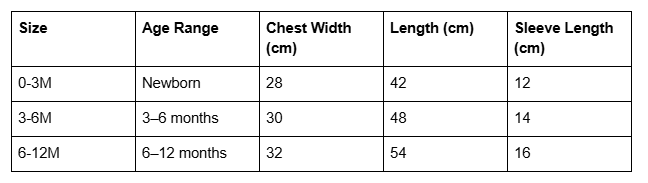
Build a sizing chart that includes chest width, length, and sleeve length measured in both centimetres and inches. Show corresponding age ranges as guidance only, not guarantees—children develop at different rates. Include measurements for multiple sizes so parents can compare.
In Squarespace, create a sizing chart as a table within your product pages or as a dedicated size guide page linked from every product. Format it clearly:
Including Material Shrinkage Information
Natural fabrics like cotton and linen shrink. Include honest information about expected shrinkage (usually 2–5% depending on fabric and care). This manages parent expectations and reduces size-related returns.
Adding a Measurement Guide Image
Create a simple infographic showing parents exactly where to measure their child and existing garments. Upload this as an image within your sizing guide page. Parents appreciate this visual help.
Integrating Size Guides into Product Pages
On each Squarespace product page, include a prominent link to your sizing chart. Use Squarespace's "Product Details" section to add a sizing information block before the add-to-cart button.
Set Up Your Squarespace Commerce Platform
Before your launch, configure Squarespace Commerce thoroughly to handle payments, inventory, and shipping accurately.
Configuring Product Inventory and Variants
For each product, set up size and colour variants in Squarespace. Create individual inventory counts for each variant (for example, "Organic Cotton T-Shirt – 12 months – White: 15 units"). This prevents overselling and helps you manage stock across sizes effectively.
Setting Up Shipping Zones and Rates
Define shipping zones that make sense for your business. If you're based in the UK, set up domestic UK rates, then regional or international rates as needed. For children's clothing, consider offering free shipping above a certain order value (£50 or more) to encourage larger purchases.
Test shipping calculations before launch. Add sample items to your cart, review shipping costs, and verify they're accurate.
Payment Gateway Integration
Squarespace integrates with Stripe, PayPal, and Apple Pay. Connect at least two payment methods to provide parent options. Test the entire checkout process—add items, enter delivery address, review shipping, and complete payment—multiple times using test transactions.
Tax Calculation Setup
If you're VAT registered, configure Squarespace to calculate and display VAT correctly. If selling internationally, understand VAT and sales tax implications in those regions.
Plan Your Soft Launch vs Hard Launch Strategy
Deciding how to reveal your brand to the market significantly impacts your launch experience.
The Soft Launch Approach
A soft launch means opening your Squarespace site to a limited, selected audience before going fully public. You might email your pre-launch list, message friends and family, or invite a local community group to shop before broader announcement.
Advantages:
Identify operational issues (sizing errors, payment problems, shipping miscalculations) with a forgiving audience
Gather real customer feedback and testimonials to feature on your site later
Create social proof (reviews, repeat orders) before reaching cold audiences
Manage inventory concerns if stock is limited
Timeline: A 2–4 week soft launch gives you time to refine operations and collect feedback.
The Hard Launch Approach
A hard launch means launching publicly across all channels simultaneously—email list, social media, paid advertising, and website. This creates momentum and excitement but requires everything to be perfect from day one.
Advantages:
Maximum visibility and traffic on launch day
Capitalise on launch momentum with marketing campaigns
Fresh start with no preliminary feedback to misalign expectations
Consideration: Hard launches demand thorough testing and confidence in your operations.
A Hybrid Approach
Many successful children's clothing brands use a hybrid: soft launch to email list and community (weeks 1–2), gather feedback, refine, then hard launch to broader audiences with paid advertising and influencer partnerships (week 3 onwards).
Build Your Pre-Launch Email List
Your email list is your most valuable asset. Start building it before your website is even live.
Creating a Pre-Launch Landing Page
Use Squarespace's landing page feature to create a simple single-page site that tells your brand story and captures email addresses. This page should:
Show your brand vision clearly
Feature your best product photography or design concepts
Explain what parents will find when you launch
Include a clear email signup form with a compelling incentive ("Be first to shop our opening collection" or "Get 15% off your first order")
Incentivising Signup
Offer something of value: a discount code, a free downloadable sizing guide, or early access to your launch. Early access particularly resonates with parents—they want to be among the first to discover a brand they love.
Promoting Your Pre-Launch List
Share your pre-launch landing page on:
Personal social media accounts and networks
Parenting Facebook groups and forums
Instagram (a few early posts explaining your journey)
Word of mouth and existing community networks
Pinterest boards related to children's fashion and parenting
Target at least 500–1,000 email subscribers before launch. This provides a solid foundation of interested customers ready to purchase on day one.
Segmenting Your Email List
As you grow your list, segment by interest (e.g., "interested in organic wear" vs "interested in occasion wear"). Use these segments to send tailored launch emails that speak to specific concerns and interests.
Integrate Social Media for Kids Fashion Brands
Social media drives discovery and builds community around children's clothing brands. Each platform serves a different purpose in reaching parents.
Instagram Strategy
Instagram is essential for children's clothing brands. Parents follow parenting and kids fashion accounts obsessively. Share:
Product photos and behind-the-scenes content
Styling ideas and outfit combinations
Customer photos and testimonials (with parent permission)
Behind-the-scenes manufacturing or design content
Reels showing kids wearing your clothes in real-life situations
Use relevant hashtags: #kidsclothingbrand, #organickidsware, #toddlertoddlerfashion, #ethicalchildrenswear. Aim for 3–5 posts per week during your pre-launch phase.
Pinterest for Discovery
Pinterest drives consistent, long-term traffic to ecommerce sites. Create Pins featuring:
Product shots with overlay text ("Organic Cotton Toddler Dress – Shop Now")
Outfit inspiration and styling ideas
Parenting tips related to children's clothing choices
Size guides and purchasing tips
Pinterest users are actively searching for ideas and products. A single Pin can drive traffic for months. Create 10–20 Pins before launch, schedule them, and monitor which styles drive the most clicks to your Squarespace site.
TikTok for Younger Parents
If your brand targets younger parents (under 40), consider TikTok. Share short, authentic videos:
Unboxing or trying on your clothes
Behind-the-scenes manufacturing or packing
Quick styling tips for busy parents
Honest reviews of your own products
TikTok rewards authenticity over polish, so don't feel pressured to create highly produced content.
YouTube for In-Depth Content
Start a YouTube channel to upload longer content: sizing guides, fabric care tutorials, brand story videos, or hauls. YouTube builds authority and provides evergreen content that drives discovery long after publication.
Integrating Social Feeds on Squarespace
Embed your Instagram feed directly on your Squarespace homepage or a dedicated social page. This keeps your website fresh with dynamic content and encourages visitors to follow you on Instagram. Link prominently to all social channels in your website footer.
Execute Your Launch Day Playbook
Launch day is your opportunity to make a strong first impression. Having a detailed playbook prevents last-minute chaos.
Pre-Launch Checklist (48 Hours Before)
Test the complete checkout process multiple times using different devices
Review all product pages for typos, image quality, and accurate pricing
Verify shipping calculations are correct
Test email notifications (order confirmation, shipping updates)
Confirm your email list is segmented and ready to receive launch announcement
Check that social media graphics are designed and scheduled
Ensure your customer service channels (email, contact form) are monitored
Back up your Squarespace site
Launch Day Timeline
6 AM: Send your soft-launch email to your pre-launch list. Include a link to your store, your origin story, and a special first-customer incentive if available.
9 AM: Post launch announcement on Instagram and Facebook. Use Instagram Stories to share excitement and real-time updates.
12 PM: Follow up with a Pinterest campaign featuring multiple product Pins.
3 PM: Email your list again with a "Latest Order Photos" section showing any orders received—social proof encourages additional purchases.
6 PM: Share a behind-the-scenes photo or video showing you preparing orders. Parents appreciate seeing the real people behind brands.
Monitoring Launch Day Performance
Check your Squarespace analytics and email stats regularly. Which products are generating the most interest? Which traffic sources are converting best? Note any technical problems (slow checkout, broken links, unclear shipping) and fix them immediately.
Post-Launch SEO Actions and Growth
Launch day is the beginning, not the end. Post-launch SEO activities help your site grow organically over months and years.
Optimising Product Page SEO
Ensure every product page includes:
A descriptive title including relevant keywords (e.g., "Organic Cotton Baby Sleepsuit – Unisex Newborn to 12 Months")
A meta description (155–160 characters) that includes your focus keyword and a benefit e.g., "Shop OEKO-TEX certified organic cotton babywear. Safe, sustainable sizing for newborns to 12 months. Free UK shipping over £50.
Detailed product descriptions (200–300 words) explaining materials, care, sizing, and why parents should choose your product
Alt text on all product images describing what's shown
Building Internal Linking Strategy
Link strategically within your Squarespace site:
Link from your sizing guide page to relevant product pages
Link from your about page or brand story to your product collections
Link from blog content (if you add a blog section) to related products
Include internal links in product descriptions when mentioning related items
Internal linking helps search engines understand your site structure and keeps visitors engaged longer.
Creating Evergreen Blog Content
Add a blog section to your Squarespace site (if not already included). Write about topics that parents search for:
"How to Choose the Right Size in Children's Clothing" (links to your sizing guide)
"Best Fabrics for Sensitive Skin: A Guide for Parents"
"Ethical Children's Clothing: What Parents Need to Know"
"How to Care for Organic Cotton Baby Clothes"
Publish one article every 2–4 weeks. Over time, this content drives consistent organic search traffic.
Building Backlinks
Reach out to parenting bloggers, children's lifestyle publications, and relevant websites. Offer your story (first-time children's brand founder, sustainable focus, etc.) as a story angle. Backlinks from authoritative parenting and fashion sites improve your search rankings.
Using Google Search Console
Connect your Squarespace site to Google Search Console. Monitor which search queries bring visitors to your site, identify pages with impression but no clicks (and improve their titles and descriptions), and monitor for technical issues.
Children's Clothing Brand Launch Checklist
Use this detailed checklist in the weeks before and during your launch:
8 Weeks Before Launch
Define your brand positioning and niche clearly
Research competitors and identify your differentiation
Create mood boards and design direction for your brand
Design your logo and select brand colours (align with Squareko brand guidelines if working with their design team)
6 Weeks Before Launch
Plan your product photography (locations, child models, styling)
Research and list OEKO-TEX or certification requirements
Create your sizing chart and test measurements
Plan your product range and create inventory spreadsheets
Begin building your Squarespace site (choose template, set up basic pages)
4 Weeks Before Launch
Complete product photography
Write all product descriptions with SEO focus
Create your pre-launch landing page
Set up email marketing platform and create pre-launch signup form
Develop social media content calendar (8 weeks ahead)
2 Weeks Before Launch
Populate all Squarespace product pages with images and descriptions
Configure Squarespace Commerce (shipping, tax, inventory)
Set up email automations and order notifications
Create launch day email campaigns
Design and schedule social media posts and graphics
Test entire checkout process thoroughly
Prepare customer service templates and contact channels
1 Week Before Launch
Final proofing of all website content
Test all links and functionality across devices
Backup your Squarespace site
Build email pre-launch list to minimum 500 subscribers
Prepare launch day timeline and task assignments
Brief anyone helping with order fulfilment and customer service
Launch Day
Send launch email to pre-launch list
Post on all social media channels
Monitor analytics, orders, and customer inquiries
Respond quickly to customer questions
Celebrate your launch!
First Week Post-Launch
Collect customer testimonials and photos
Monitor for any technical issues
Respond to all customer inquiries within 24 hours
Share customer photos on social media (with permission)
Analyse which products and traffic sources performed best
Refine based on early customer feedback
Frequently Asked Questions
-
The cost varies depending on your approach. Squarespace Commerce plans start at £18 per month for standard ecommerce, with transaction fees. Beyond platform costs, budget for product photography (£500–£3,000 depending on professional vs DIY), initial inventory (£1,000–£5,000), domain registration (£10–£20 annually), and initial marketing. Many successful brands launch for £2,000–£8,000 total, though luxury or heavily photographed brands invest more. Squareko can help you optimise design costs if you need professional website design support beyond standard Squarespace templates.
-
Essential pages include: Home (with brand story and featured products), Shop/Products (your main collection page), About Us (your brand story and values), Size Guide (crucial for children's clothing), Contact/Customer Service, FAQ (answering sizing and shipping questions), and your Terms & Conditions and Privacy Policy. Consider adding: a Blog (for SEO and customer education), a Lookbook or Style Guide (showing outfit combinations), and a Press or Media page (if you plan to pursue press coverage). Your Squarespace template likely includes most of these by default—customise them with your unique voice and content.
-
Create a sizing chart as a table within your product pages or as a dedicated page linked from every product. Include measurements (chest width, length, sleeve length) in both centimetres and inches, corresponding age ranges as guidance only, and notes about expected shrinkage. Squarespace's table feature allows you to embed this directly. Add a visual measurement guide image showing parents where to measure. Link prominently to this guide from every product page, and include shrinkage and care information so parents can anticipate how sizes will change with washing. Test your chart with real customers during soft launch to ensure clarity.
-
In the UK, children's clothing must include proper fibre content labels, care instructions, and country of origin. Flammability standards vary by age and garment type—sleepwear has strict flammability requirements, while daywear has different standards. OEKO-TEX certification confirms fabrics have been tested for harmful substances. Create a dedicated page on your Squarespace site explaining your approach to safety, list any certifications, and link to this from product pages. Parents actively check for safety information—transparency builds trust.
-
Develop a clear returns and exchanges policy and link to it from your checkout page and customer service section. Many children's clothing brands offer 30-day returns for unworn, unwashed items with tags attached. For sizing issues (very common with children's wear), consider offering free exchanges. Use Squarespace's customer accounts feature so customers can track returns. Have a process: customer requests return via email, you provide a prepaid shipping label, customer ships back, you inspect and issue refund or exchange. Clear communication about this process reduces customer frustration.
-
Instagram and Pinterest are essential—they drive significant discovery from parents. Instagram is where you build community, share behind-the-scenes content, and create emotional connection. Pinterest drives long-term, consistent traffic to your ecommerce site. TikTok works if your brand targets younger parents and you're comfortable with short-form video content. Facebook groups focused on parenting are valuable for community-building and authentic engagement. Start with Instagram and Pinterest, expand to other platforms as your resources allow. Quality content on two platforms beats stretched effort on five platforms.
-
Create a compelling pre-launch landing page on Squarespace that tells your brand story and clearly explains the value parents will find when you launch. Offer an incentive: a discount code (10–15% off first order), free downloadable sizing guide, or early access to launch. Share your landing page link on your personal social media, in parenting communities and Facebook groups, on Pinterest, and through word of mouth. Aim for 500–1,000 subscribers before launch. Segment your list by interests to send targeted launch emails. Send regular pre-launch updates (every 2 weeks or so) sharing your progress, behind-the-scenes content, and building anticipation.
Ready to Build Your Kids Brand Website with Squarespace?
Launching a children's clothing brand is an exciting opportunity to serve parents who are actively seeking quality, ethical, and beautiful clothing for their children. Squarespace provides everything you need to create a professional, conversion-focused ecommerce site without technical expertise—but the design and strategy behind it make the difference between a functional website and one that genuinely sells.
The Squareko team specialises in creating beautiful, purpose-built Squarespace sites for fashion and retail brands, including children's clothing companies. We understand the unique challenges of photographing small clothing, the importance of clear sizing guidance, and how to structure your site so parents find exactly what they need. If you'd like professional design support tailored to your children's clothing brand—or if you want to explore custom features beyond standard Squarespace templates—we'd love to discuss your vision. Visit squareko to learn how we partner with growing UK fashion brands, or get in touch to discuss your launch timeline and design goals.
Your children's clothing brand deserves a website that reflects its quality and values. Let's build something beautiful together.

From custom website design to SEO strategy, we help businesses launch a site that looks professional and performs better.

Author Bio
Written by the Squareko Team | squareko
I'm Walid Hasan, a Certified Squarespace Expert and Squarespace Circle Platinum Partner with over 12 years of hands-on experience designing and optimizing high-performing websites. Over the years, I've had the privilege of building more than 2,000 Squarespace websites for clients around the world, always focusing on clean design, strong user experience, and conversion-driven results.
