
Design Tips for Kids Brand Websites on Squarespace: Stand Out and Convert Parents
Introduction
Designing a website for a kids brand presents a unique challenge: you're creating an experience for two distinct audiences simultaneously. Children are drawn to bright colours, playful typography, and interactive elements—but it's their parents who make the purchasing decisions. Your kids brand website design needs to appeal to children's sense of wonder whilst reassuring parents about quality, safety, and value. This is where strategic design thinking becomes essential.
On Squarespace, you have powerful tools to build a website that succeeds on both fronts. Whether you're selling children's clothing, toys, educational products, or services, understanding how to balance playfulness with professionalism is the key to converting parent-buyers. In this guide, we'll explore practical design tips for kids brand websites on Squarespace that help you create an engaging experience that drives real sales.
Key Takeaways
Dual-audience design requires balancing playful, child-friendly elements with professional, parent-reassuring aesthetics that build trust and credibility
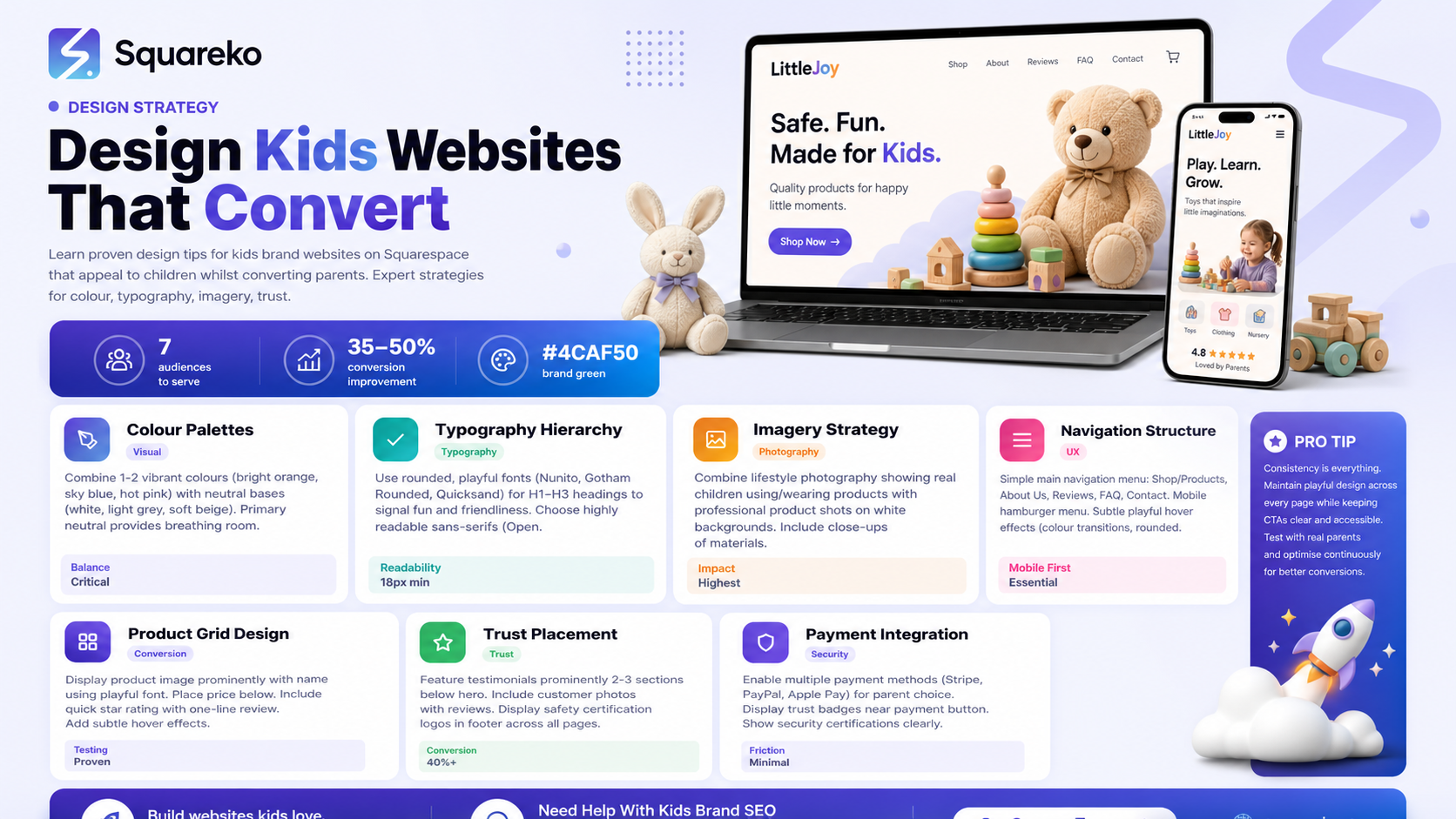
Colour palettes should combine vibrant, energetic hues that appeal to children with softer, trustworthy tones that comfort parents
Typography choices must be playful enough to delight children whilst maintaining excellent readability and a sense of quality for parental trust
High-quality imagery featuring children in lifestyle contexts builds emotional connection, whilst clear product photography ensures parents understand exactly what they're buying
Streamlined navigation makes it easy for parents to find information quickly, whilst subtle interactive elements keep children engaged throughout their browsing
Social proof placement—testimonials, reviews, and safety certifications—positioned prominently reassures parent-buyers about safety and product quality
Hero sections and product grids designed with both audiences in mind create immediate visual impact whilst maintaining clear conversion pathways
Understand Your Dual Audience: Children and Parents
Before you start designing, you need to recognise that your kids brand website serves two masters. Children visiting your site are looking for fun, colour, and engagement. They want to feel excited about your products. Parents, conversely, are assessing quality, safety, value for money, and whether this brand aligns with their values.
What Children Notice First
Children are drawn to movement, colour, and playful elements. They respond well to:
Bold, vibrant colour combinations
Animated elements and interactive features
Relatable characters or mascots
Clear, simple layouts that don't overwhelm
What Parents Evaluate
Parents scan your site differently. They're looking for:
Clear product descriptions and pricing
Safety information and certifications
Shipping and returns policies
Customer reviews and testimonials
Professional, credible design that suggests quality
The secret to a successful kids brand website is creating layers of appeal. Your design should immediately delight children whilst simultaneously building confidence in parent-buyers. On Squarespace, you can achieve this through thoughtful colour choices, smart information architecture, and strategic content placement.
Colour Palettes: Balancing Playfulness with Trustworthiness
Colour is arguably your most powerful design tool when targeting both children and parents. The right palette will feel exciting and playful to children whilst reassuring parents about the professionalism and quality of your brand.
Playful Colours That Appeal to Children
Children respond to bright, saturated colours—think primary and secondary hues. Colours like vibrant orange, electric blue, sunny yellow, and hot pink capture their attention and convey energy and fun.
Trustworthy Neutrals for Parent Confidence
Parents make purchasing decisions based partly on how trustworthy a brand appears. Neutral colours—white, soft grey, muted beige—combined with touches of colour create balance. These neutrals provide breathing room on your pages and prevent overwhelming parents who are scanning for information.
Building a Balanced Palette on Squarespace
The most effective approach is to use 2–3 vibrant accent colours paired with a neutral base. For example:
Primary Neutral: Off-white or light grey (backgrounds, text areas)
Primary Accent: A bold, playful colour like the Squareko brand green (#4CAF50), which conveys both growth and natural trustworthiness
Secondary Accent: A complementary bright colour (perhaps coral or sky blue) for interactive elements and calls-to-action
Neutral Secondary: A warm grey or soft taupe for secondary text and subtle design elements
This approach lets you use Squarespace's colour settings to maintain consistency whilst ensuring your pages remain readable and professional. The green (#4CAF50) works particularly well for kids brands because it communicates natural ingredients, growth, and safety—all things parents care about.
Typography for Kids Brands: Finding the Right Tone
Typography is where many kids brand websites go wrong. Too much playfulness and you lose parental credibility. Too much formality and you fail to engage children. The solution is strategic typography that layers different fonts for different purposes.
Playful Fonts for Headings (H1, H2, H3)
For section headings and main headlines, consider using a rounded, geometric, or slightly quirky font. On Squarespace, fonts like:
Gotham Rounded – Modern, friendly, and approachable
Nunito – Soft, rounded letterforms that feel welcoming
Quicksand – Playful yet clean
These fonts immediately signal that your brand is fun and child-focused, catching both children's and parents' attention in a positive way.
Authoritative Fonts for Body Copy
Your main body text—product descriptions, policies, testimonials—should use a highly readable sans-serif or serif font. On Squarespace:
Open Sans – Clear, professional, widely recognised
Montserrat – Modern and trustworthy
Georgia or Lora – If you want a serif option that feels established and premium
Educational and Supportive Fonts for CTAs
Calls-to-action benefit from a font that feels friendly but authoritative. Use your playful heading font in a smaller weight, or select a semi-bold sans-serif that conveys action without aggression.
Implementing Typography Hierarchy in Squarespace
Squarespace allows you to control typography across your entire site through the Design panel. Set up:
Headings: Playful font at 32–48px for H1, scaled down for H2 and H3
Body: Readable sans-serif at 16–18px (larger than you might think—parent-readers appreciate clear, big text)
Accents: Your playful font again for button labels and interactive elements
The key is consistency. When parents and children see the same playful heading font repeated across your site, it reinforces brand identity.
Imagery and Visual Storytelling
What your website shows is as important as how it looks. Image selection is where you can powerfully appeal to both audiences simultaneously.
Lifestyle Imagery: Children in Context
Parents want to see their children using and enjoying your products. Lifestyle photography showing kids wearing your clothing, playing with your toys, or using your services builds emotional connection. These images should:
Show real, diverse children (representing different ethnicities, abilities, and body types)
Feature genuine expressions of joy and engagement
Display products in actual-use contexts
Avoid overly staged or artificial-looking scenarios
This type of imagery reassures parents that their purchase decision will lead to genuine enjoyment and satisfaction.
Product Photography: Clarity for Comparison
Parents need clear, well-lit product images so they can assess quality and make comparisons. Alongside lifestyle shots, include:
Straight-on product photography with white or neutral backgrounds
Close-up detail shots showing stitching, materials, and construction quality
Multiple angles to demonstrate product form and function
Scale reference (showing the product worn, held, or next to a common object)
Colour Considerations in Photography
Ensure your product photography doesn't clash with your playful colour palette. If your brand uses bright orange accents, ensure your product photos don't look washed out against orange or coral backgrounds. Squarespace's image cropping and overlay tools help you control how photos appear across different devices.
Navigation Structure for Both Audiences
Navigation is fundamental to converting parent-buyers. A mum or dad visiting your site needs to find what they're looking for in seconds. Simultaneously, children should feel some sense of discovery and delight as they navigate.
Clear Parent-Focused Navigation
Your main navigation menu should be simple and logical
Shop/Products – Primary category or collections
About Us – Build credibility; include safety certifications
Reviews or Testimonials – Social proof
FAQ/Help – Address parent questions about sizing, materials, shipping
Contact/Support – Easy access to customer service
Squarespace's navigation settings let you create clear, collapsible menus that remain functional on mobile devices—essential since many parents browse on phones whilst managing children.
Subtle Engagement for Children
Within this structured navigation, you can add subtle playful elements:
A gentle colour transition on hover (perhaps your brand green #4CAF50 appears)
Small animated icons next to product categories (a toy icon for toys, a shirt icon for clothing)
Rounded button styling that feels friendly
Emojis used sparingly and strategically (one or two, not overwhelming)
The goal is to make children notice and engage with your site whilst maintaining the professional structure parents require.
Mobile Optimisation
Most parents browse on mobile devices. Squarespace's responsive design tools ensure your navigation adapts beautifully to smaller screens. Test your menu on an actual phone to confirm that a parent can navigate to products, reviews, and contact information with one hand whilst potentially managing a child with the other.
Hero Section Design and Product Grid Layouts
Your hero section is where you make an immediate impression on both audiences. This is your most valuable real estate.
Hero Section Best Practices for Kids Brands
Your hero should combine visual appeal with a clear call-to-action. Consider:
Eye-catching imagery – A lifestyle photo showing children in an aspirational context (playing, laughing, exploring) combined with product visibility
Bold headline – Use your playful typography font, keep it short and benefit-focused ("Clothes That Grow with Your Family" or "Safe, Fun Toys for Every Stage")
Supportive subheading – Brief parent-focused messaging ("Trusted by 50,000+ families" or "Made from organic, sustainable materials")
Clear CTA button – "Shop Now" or "Explore Our Range," styled in your secondary accent colour
The hero section should load quickly (compress images on Squarespace), autoplay a background video only if essential, and include clear alt text for accessibility.
Designing Product Grids for Conversion
Your product grid is where browsers become buyers. Effective kids brand product grids include:
Clear product images – Show the item prominently; allow zoom or hover effects
Product name – Use your playful heading font, but ensure it's readable
Price – Placed where parents expect to find it (typically below or to the right of the image)
Quick rating or review snippet – A star rating and one-line review builds instant credibility
Subtle hover effect – A gentle colour overlay or zoom effect adds interactivity without disorienting parent-browsers
On Squarespace, use the Gallery section type for product grids. Configure your gallery to show product descriptions on hover, allowing parents to see sizing, materials, or special features without leaving the grid view.
Building Trust Through Social Proof and Safety
Parents making purchasing decisions for children prioritise safety and quality above almost everything else. Your website must communicate that your brand takes these concerns seriously.
Strategic Placement of Testimonials and Reviews
Customer testimonials are powerful trust-builders. On your kids brand website:
Place a testimonial section prominently (often 2–3 sections below your hero)
Include photos of the customer (or a child enjoying the product) alongside their review
Quote parent feedback that mentions safety, quality, or unexpected delight
Use a mix of star ratings and written testimonials
Squarespace's testimonial blocks allow you to add customer photos, which personalise feedback and build stronger connections.
Safety Certifications and Compliance
Parents want reassurance that your products meet safety standards. Create a small "Trusted & Safe" section that includes:
Safety certification logos (CE marking, CPSC compliance, organic certifications)
Brief explanatory text about your safety standards
A link to full safety information for interested parents
Place this section in your footer or on an "About Us" page. The presence of these certifications, even if small, significantly increases parent confidence.
User-Generated Content and Hashtag Campaigns
Encourage customers to share photos of their children using your products. Display this user-generated content (with permission) on your website or link to an Instagram feed of customer photos. Real images of real children using your products is the most powerful form of social proof.
On Squarespace, use the Instagram Feed integration to automatically display customer images, or create a dedicated user-generated content gallery.
Frequently Asked Questions
-
The best kids brand colour palettes combine 1–2 vibrant, playful colours (such as #4CAF50 green, orange, or hot pink) with neutral bases (white, light grey, or soft beige). This approach delights children whilst maintaining the professional appearance parents need to feel confident purchasing. The vibrant colours should appear primarily in headings, buttons, and accent areas, whilst neutrals form your background and body text areas. This balance ensures your site is both engaging and easy to navigate—crucial for converting parents who are often scanning quickly for product information and pricing.
-
It should look both. The most effective kids brand websites achieve a "fun-professional" aesthetic—one that makes children smile whilst reassuring parents about quality and credibility. Use playful typography for headings, animated hover effects on navigation, and vibrant accent colours to delight young visitors. Simultaneously, implement professional product photography, clear policies, prominent customer reviews, and trustworthy fonts for body copy to appeal to parent-buyers. This dual approach acknowledges that your customer base is literally two people: the child who wears the item and the parent who purchases it. Neither should feel the site is designed against them; both should feel understood.
-
For headings and brand identity, use rounded, friendly fonts like Nunito, Gotham Rounded, or Quicksand—these immediately signal playfulness to children. For body text, especially product descriptions and policies, use highly readable sans-serifs like Open Sans or Montserrat, which build parent confidence through clarity. Avoid overly stylised or difficult-to-read fonts for any body copy, as parents often access your site on small screens or whilst distracted. Squarespace allows you to set different fonts for headings and body text globally, so implement a consistent system: playful for headings, professional for copy. This creates visual interest whilst maintaining the readability parents expect.
-
Effective product descriptions for kids brands use layered copy. The headline and opening sentence should appeal to children's emotions and sense of fun ("Adventure awaits in every pocket!" or "Colours so bright, they glow"). The middle section should provide parent-focused information: materials, sizing, care instructions, and any special features (water-resistant, hypoallergenic, etc.). The closing can include a small fun element or guarantee ("And yes, parents love how durable they are"). Use your playful font for the headline, your professional font for the descriptive copy. This way, a browsing child sees an exciting headline, and their parent sees comprehensive, clear product information.
-
Place a dedicated testimonials section within your top 3–4 sections, ideally after your hero and before detailed product information. This placement acknowledges that parents often scan pages quickly—they'll see social proof early in their journey. Include 3–6 testimonials, each featuring a customer photo, their name, and a brief quote (2–3 sentences). Mix testimonial types: some praising quality and durability (parent-focused), some celebrating children's joy ("My son won't take these off!"), and some addressing specific concerns like sizing or safety. On product pages, include star ratings and individual reviews below the product description, allowing parents to see feedback specific to that item. User-generated photos of children enjoying the product provide the most powerful social proof—prioritise these above written reviews if available.
-
Most parents browse on mobile, so mobile optimisation is essential. On Squarespace, activate its responsive design features and test your site on actual devices. Ensure your navigation menu collapses into a hamburger menu on small screens; test that it's easy to open and navigate with one hand. Confirm that product images scale beautifully and remain clear on mobile. Place CTAs ("Add to Cart," "View Collection") where thumbs naturally rest (centred or lower-right, not top-right). Use Squarespace's mobile-specific settings to adjust font sizes—larger fonts on mobile help both children and parents view your site comfortably. Load times are critical; compress images and avoid autoplay videos unless essential. A fast, easy-to-navigate mobile experience is one of the strongest conversion factors for kids brand websites.
-
Squarespace integrates PayPal, Stripe, and Apple Pay with full security, all of which use industry-standard encryption. When setting up your shop, enable multiple payment methods so parents can choose their preferred option. Display trust badges (such as "Secure Checkout" or your security certifications) near the payment button to reassure parents before they enter sensitive information. Squarespace handles PCI compliance, so you don't need to worry about storing credit card data. Clearly display your shipping, returns, and privacy policies before checkout. A reassuring, transparent payment process significantly increases conversion rates—parents are more likely to complete a purchase when they see multiple payment options and clear security messaging.
Ready to Build Your Kids Brand Website with Squarespace?
Designing a kids brand website that appeals to both children and parent-buyers requires thoughtful strategy. You're balancing playfulness with professionalism, engagement with conversion, and fun with trust. The design tips covered in this guide—from colour palettes and typography to imagery and social proof placement—give you a framework for success.
The good news: Squarespace provides all the tools you need to implement these strategies beautifully. Its intuitive design interface, flexible template system, and built-in e-commerce features make it possible to create a professional, high-converting kids brand website without needing coding knowledge.
Ready to bring your kids brand vision to life? The team at Squareko specialises in designing Squarespace websites for children's brands, beauty, fashion, and retail businesses. We understand the dual-audience challenge and know exactly how to create sites that delight children whilst converting parent-buyers. Whether you're launching a new kids brand or redesigning an existing site, we're here to help you stand out and scale.

From custom website design to SEO strategy, we help businesses launch a site that looks professional and performs better.

Author Bio
I'm Walid Hasan, a Certified Squarespace Expert and Squarespace Circle Platinum Partner with over 12 years of hands-on experience designing and optimizing high-performing websites. Over the years, I've had the privilege of building more than 2,000 Squarespace websites for clients around the world, always focusing on clean design, strong user experience, and conversion-driven results.
