
How Children's Brands Create Safe, Engaging Websites on Squarespace
Introduction
Building a children's brand website is thrilling but it comes with serious responsibility. When your customers are kids, you're not just designing for one user; you're building trust with parents, guardians, and young audiences who deserve protection. Whether you're selling educational toys, children's fashion, or creative apps, creating a safe, engaging website requires balancing playful design with rigorous compliance. A childrens brand safe engaging website on Squarespace starts with understanding COPPA regulations, privacy requirements, and user experience principles specifically designed for younger audiences. In this guide, we'll walk you through the essential steps to build a kids' website that's both legally compliant and genuinely delightful.
Key Takeaways
COPPA compliance is non-negotiable for US-facing children's websites; failure to comply can result in significant fines and legal consequences
Multi-layered privacy protection requires clear parental consent, minimal data collection, and transparent privacy policies written for both parents and children
Age-gating systems and account verification help ensure only appropriate users access certain features
Safe checkout and payment design must prevent targeted advertising and limit data sharing with third parties
Accessible, child-friendly UX balances playful aesthetics with clarity, readability, and intuitive navigation for young users
Regular compliance audits and updates keep your site aligned with evolving regulations across different markets
Transparency about data practices builds parental trust and sets your brand apart from competitors cutting corners on safety
Understanding COPPA and Children's Online Privacy Laws
What is COPPA?
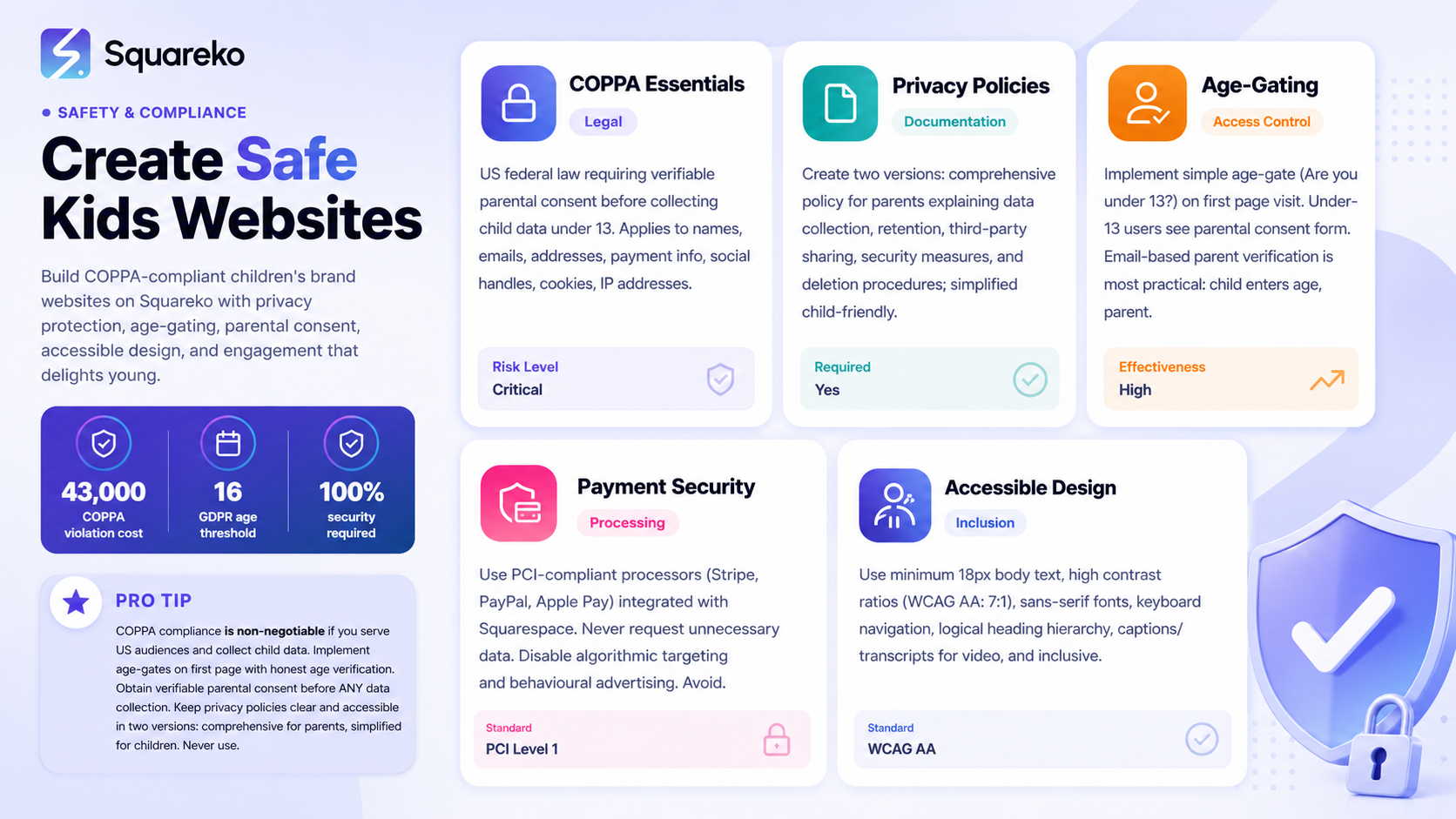
The Children's Online Privacy Protection Act (COPPA) applies to any website, app, or online service directed at children under 13 or that knowingly collects personal information from children in the United States. COPPA is not optional—it's a federal regulation enforced by the US Federal Trade Commission (FTC), and non-compliance can result in civil penalties exceeding $43,000 per violation.
Personal information under COPPA includes:
Names and email addresses
Physical addresses and phone numbers
Payment information
Social media handles and usernames
Cookies, IP addresses, and device identifiers
Photos or video content featuring a child
If your children's brand website collects any of these data points—even through an opt-in newsletter form—you're subject to COPPA requirements.
GDPR Considerations for UK and EU Markets
If you serve audiences in the UK or European Union, General Data Protection Regulation (GDPR) adds another layer of protection. Under GDPR, children require enhanced safeguards from age 13 downwards, and parental consent is typically required for users under 16 (or younger in some member states). This means age-gating, explicit parental consent forms, and transparent privacy communications are equally critical for European markets.
The good news? Building a COPPA-compliant site with strong parental consent mechanisms will largely satisfy GDPR requirements as well.
Key COPPA Requirements
Your children's brand website must:
Obtain verifiable parental consent before collecting any personal information from children under 13
Provide a clear, complete privacy policy (in simple language) explaining what data you collect, how you use it, and how parents can request deletion
Limit data collection to what's necessary for providing your service
Never use children's data for targeted advertising or behavioural marketing
Implement reasonable security measures to protect children's information
Allow parents to review, update, or delete their child's data
Disclose data sharing practices with third parties (payment processors, hosting providers, analytics platforms)
Privacy Policies and Parental Consent Mechanisms
Writing a Privacy Policy for Children
Your privacy policy is the foundation of legal compliance, but most standard privacy policies are written at a reading level that confuses both parents and children. Squarespace sites serving children need two versions:
Adult-Focused Privacy Policy: A comprehensive, detailed privacy policy for parents and guardians, explaining:
What personal information is collected and why
How long information is retained
Whether data is shared with third parties (payment processors, cloud hosts, email services)
Security measures in place
How parents can request data deletion or opt-out of non-essential collection
Your contact information and response time for privacy requests
Child-Friendly Privacy Statement: A simplified, engaging summary in plain language (age 8–12 reading level) explaining:
What information you collect (in simple terms: your name rather than personal identifiers)
Why you collect it
Who can see it
How to ask a parent or guardian for help
Tools like Chilogal, iubenda, and Termly offer templates specifically designed for children's sites. Many integrate directly with Squarespace via API or as embeddable sections.
Implementing Verifiable Parental Consent
COPPA requires verifiable parental consent before collecting any data from children under 13. This is more rigorous than a simple checkbox. Effective methods include:
Email-based verification: Child attempts to register; parent receives an email with a unique link they click to confirm consent. This is the most affordable option.
Credit/debit card verification: Parent provides payment card information (charge is reversed; you're simply verifying they have a valid card). More reliable but creates friction.
eSignature services: Parent signs a digital consent form via DocuSign or similar. Professional but costly for small brands.
Video consent calls: For higher-stakes services (tutoring platforms, therapy apps), recorded parental video consent. Most protective but impractical for most retail brands.
For a children's fashion or toy brand on Squarespace, email-based verification strikes the best balance of legal protection and user experience. Squarespace's native Forms tool combined with a Zapier automation can route parental consent emails, and tools like Subbly or Cratejoy (which integrate with Squarespace) offer age-gating with parental consent built-in.
Data Retention and Deletion Policies
Document how long you retain children's data. COPPA best practice: retain only what's necessary for current transactions, then delete promptly. For example:
Newsletter subscribers: delete email addresses when they unsubscribe
Order history: retain only for 12 months for customer service
Account data: delete within 30 days of parent request or account closure
Create a simple parent-accessible request form (part of your Squarespace site) allowing guardians to verify their identity and request data deletion. Respond within 30 days.
Age-Gating and User Verification Systems
Why Age-Gating Matters
Age-gating is your first line of defence. It prevents unintended access by adults impersonating children and protects your liability by demonstrating reasonable effort to verify user age.
Implementing Age-Gates on Squarespace
Simple age-gate page: The first page visitors see includes a simple question: Are you under 13? or How old are you? with options. If under 13 is selected, they proceed to a parental consent form. If 13+, they enter the main site.
Password-protected sections: Use Squarespace's native password protection to gate content intended only for authenticated parents or registered account holders.
Third-party age verification: Services like Veratad or IDology (integrated via custom code blocks) perform more rigorous age verification using ID checks or credit card validation, though these are overkill for most children's retail brands.
Simple email list for over-13s: If part of your audience is 13+, create separate mailing lists or content sections for older teens without requiring parental consent (though you should still follow privacy best practices).
For most children's brands, a straightforward, honest age-gate combined with email-based parental consent is sufficient and maintains trust. Parents appreciate transparency over intrusive verification methods.
Safe Checkout and Payment Processing
Payment Security Without Child Targeting
COPPA explicitly prohibits using children's personal information for "behavioural advertising" or targeting based on children's interests. Your checkout process must:
Not collect unnecessary data: Ask only for information needed to fulfil the order (shipping address, parent email). Don't request a child's age unless the product requires age verification.
Never enable algorithmic targeting: Disable Squarespace's native email marketing automation that would create purchase-behaviour segments for children.
Use trusted payment gateways: Squarespace's native Stripe integration is PCI-compliant. Never store full credit card details.
Limit third-party tracking: Disable Google Analytics (which can infer children from user behaviour) and Facebook Pixels. Instead, use privacy-first alternatives like Plausible or Fathom, which don't track individual users.
Communicate shipping transparently: Ensure shipping goes to the registered parent/guardian address, and confirm this in your checkout and order confirmation.
Recommended Payment Processors
Stripe (via Squarespace): PCI Level 1 compliant, widely trusted
PayPal: Strong fraud protection, no direct access to card details
Apple Pay / Google Pay: Tokenised payments, minimal data exchange
Avoid requiring child social media logins (Google Sign-In, Facebook Login) as account creation method, as this shares data with those platforms.
Designing Trustworthy, Engaging Interfaces
Balancing Playfulness with Safety
Children's websites must be fun, but not at the expense of clarity or safety. Your Squarespace design should:
Use vibrant, age-appropriate colour schemes: Squareko's brand green (#4CAF50) works beautifully for children's sites—it's energetic without being overstimulating.
Prioritise readability: Use large fonts (minimum 18px for body text), high contrast between text and background, and plenty of white space. Children's reading levels vary widely; clarity wins over cleverness.
Avoid manipulative design patterns: Dark patterns like confirm your identity again dialogs, misleading buttons, or fake urgency erode trust with parents and violate COPPA's spirit.
Include clear, accessible navigation: Children should easily find:
Parents' and guardians' resources
Privacy policy (in both versions)
Customer support contact information
Return/refund policies
Minimise pop-ups and interstitials: Every pop-up is an opportunity for accidental clicks or frustration. If you use them, make the close button obvious.
Visual Trust Signals
Include these elements to reassure parents:
Trust badges: COPPA compliance badge (though no official government badge exists, third-party seals like those from Common Sense Media or Family Online Safety Institute add credibility)
Founder's message: A brief, personal note from the brand founder explaining your commitment to child safety
Parent testimonials: Real quotes from parents praising your safety practices
Transparent team photos: Show real humans behind the brand
Security certifications: Display SSL certificate badge and your privacy certification
Accessibility and Inclusive Design for Children
Beyond Legal Compliance
Accessible design isn't just ethical—it's also smart business. Children with dyslexia, ADHD, visual impairments, or motor skill differences represent a significant market segment, and parents appreciate brands that include everyone.
Essential Accessibility Features
Text alternatives for images: Every product photo, illustration, or graphic should include descriptive alt text. Instead of alt text: kids' shoes, write alt text: pair of navy blue canvas sneakers with white laces, size 3.
Colour contrast: Ensure text meets WCAG AA standards (7:1 contrast ratio). Test your colour choices with tools like Web AIM or Contrast Checker.
Readable typography: Use sans-serif fonts (Arial, Helvetica, Open Sans) at minimum 16px for body text. Avoid decorative fonts for essential content.
Keyboard navigation: All interactive elements (buttons, forms, links) must be accessible without a mouse. Test by pressing Tab through your site.
Simple, logical structure: Use proper heading hierarchy (H1, H2, H3), short paragraphs, bullet points, and clear calls-to-action. Avoid walls of text.
Captions and transcripts: If your site includes videos or audio content, provide captions and text transcripts for children with hearing differences.
Squarespace's built-in accessibility tools (Alt Text fields, colour contrast checking) make compliance straightforward. If you're working with Squareko to build your site, we prioritise accessibility from day one.
Kids Brand Website Compliance Checklist
Use this checklist before launching or refreshing your children's brand website:
Legal and Privacy
COPPA requirement assessment: Does my site target children under 13?
Privacy policy written for both parents and children (plain language version)
Parental consent mechanism implemented (email verification minimum)
Data retention policy documented and implemented
Parental data request process created (review, update, delete)
Third-party data sharing disclosed (payment processors, email services, hosting)
Terms of Service reviewed and legal professional consulted
GDPR compliance checked if serving UK/EU audiences
Age and Access Control
Age-gate implemented at site entry
Verification method appropriate for target audience (simple age gate for retail; eSignature for services)
Password protection set up for parent-only resources
Account creation process requires parental email confirmation
Payment and Data Security
PCI-compliant payment processor configured (Stripe, PayPal)
No sensitive data stored in cookies or localStorage
SSL certificate installed and active (Squarespace default)
Google Analytics disabled; privacy-first analytics alternative implemented
Third-party pixel tracking (Facebook Pixel, etc.) disabled
No child social media logins enabled as account creation method
Checkout process collects only necessary data
No targeted advertising enabled for child audience
Design and UX
Age-appropriate colour scheme, tone, and language applied
Minimum 18px font size for body text
High colour contrast tested (WCAG AA minimum)
Navigation clear and intuitive for children
Pop-ups and interstitials minimised; close buttons obvious
Trust signals visible (parent testimonials, founder message, security badge)
Mobile design tested and optimised for touch
No dark patterns or manipulative design elements
Accessibility
All images include descriptive alt text
Heading structure logical (H1, H2, H3)
Keyboard navigation tested
Videos include captions or transcripts
Form labels clear and linked to input fields
Colour not sole means of conveying information
Ongoing Maintenance
Compliance audit scheduled annually
Regulatory changes monitored (COPPA, GDPR updates)
Third-party integrations reviewed for child-safe compliance
Parent feedback mechanism in place
Data breach response plan documented
Frequently Asked Questions
-
COPPA—the Children's Online Privacy Protection Act—is a US federal law protecting children under 13 online. It applies to any website or app directed at children or that knowingly collects personal information from children under 13. If your children's fashion, toy, or educational brand has a website where you collect names, email addresses, payment information, or even cookies from users under 13, COPPA applies to you. Compliance is mandatory; violations can result in fines exceeding $40,000 per violation. Even if you're UK-based, if your Squarespace site reaches US customers, you should comply with COPPA.
-
Start by writing two privacy policies: one comprehensive version for parents and one simplified version for children in plain language. Tools like Termly, Chilogal, or iubenda offer templates and generators specifically for children's sites. Once written, add both to your Squarespace site by creating a new page titled "Privacy Policy" and "Our Privacy Policy (for Kids)" respectively. In your site's navigation, link to both versions prominently in the footer. Make sure your parental consent form (usually a Squarespace Form or third-party age-gating solution) links to both policies. Include your contact email for privacy requests. If you're working with Squareko, we guide you through the entire process and ensure both policies align with your specific data practices.
-
A safe children's website combines strict privacy protection with thoughtful design. Appropriate sites limit data collection to essentials, obtain explicit parental consent, never enable targeted advertising, and use transparent language about data practices. Design-wise, appropriate sites use readable fonts and high contrast, avoid manipulative patterns, include clear navigation, and are accessible to children with different abilities. Trust signals like parent testimonials, transparent team information, and security badges reassure guardians. Regular compliance audits, quick data deletion responses, and transparent communication about changes keep your site trustworthy. Safety isn't one feature—it's a commitment embedded in every decision you make, from data architecture to button labels.
-
Standard Google Analytics is problematic for children's sites because it can infer behaviour patterns and effectively profile children, which conflicts with COPPA's spirit and letter. Google Analytics places cookies that track users across sites, creating individual behavioural profiles. Instead, consider privacy-first analytics alternatives: Plausible Analytics, Fathom Analytics, or Clicky don't store individual user profiles and comply with children's privacy principles. These tools still provide traffic, conversion, and behaviour insights without violating children's privacy. If you must use traditional analytics, configure it to anonymise IP addresses and disable all personalised advertising features—though privacy-first alternatives remain the stronger choice.
-
Several platforms simplify COPPA and children's privacy compliance. Age-gating tools like Subbly, Cratejoy, and Veratad handle age verification and parental consent workflows. Privacy policy generators (Termly, Chilogal, iubenda) create child-friendly and adult-focused versions automatically. Payment processors like Stripe and PayPal are PCI-compliant and integrate directly with Squarespace. For analytics, privacy-first alternatives like Plausible and Fathom replace Google Analytics whilst protecting children. Email marketing platforms should be COPPA-aware; services like Klaviyo offer compliance settings for child audiences. Forms and consent tools like Zapier, DocuSign, and native Squarespace Forms automate parental verification workflows. Finally, accessibility checkers (WAVE, Axe DevTools) ensure your site meets inclusive design standards. Using these integrated tools reduces compliance burden significantly.
-
COPPA is US law protecting children under 13; GDPR is European law protecting anyone under 18 (or younger, depending on the member state). COPPA requires verifiable parental consent before collecting any data from children under 13. GDPR requires verifiable parental consent for children under 16 (13 in some countries) and includes additional rights like data portability and the right to erasure. Both require transparent privacy policies, minimal data collection, and strict limits on profiling. If your Squarespace site serves both US and European audiences, build to GDPR standards (they're stricter) and you'll exceed COPPA compliance as well. Consult a lawyer familiar with children's privacy law in your target markets.
-
This is a critical edge case. If a child under 13 signs up without parental consent, you must not process their data for any purpose beyond notifying the parent or guardian and requesting consent. Squarespace Forms can be configured to email the parent/guardian with a consent request and a unique link they click to authorise the child's account. Until consent is verified, the child's account should be inactive (unable to receive marketing emails, make purchases, or access personalised features). Document this process clearly in your terms and privacy policy. If parental consent is not received within 30 days, delete the child's account and data. This demonstrates good-faith COPPA compliance even when children bypass your age-gate.
-
PCI-compliant payment processors integrated directly into Squarespace are safest: Stripe, PayPal, and Apple Pay / Google Pay. These methods never expose full card details to your server and reduce your data liability. Avoid payment methods requiring you to store credit card information or that use child social media accounts as login credentials (Google Sign-In, Facebook Login). Never request unnecessary payment information. For subscription or repeat purchases, use Squarespace's native subscription features, which handle secure token storage without exposing details. Avoid third-party payment plugins unless they're PCI Level 1 certified. If you're uncertain, Squareko or your payment processor's compliance team can advise.
-
Creating a children's brand website that's both legally compliant and genuinely delightful is possible—but it requires intentionality at every stage, from data architecture to button design. The good news is that Squarespace provides powerful, built-in tools for privacy, age-gating, and accessible design. With the frameworks and checklists in this guide, you have a clear roadmap.
However, if you'd prefer expert guidance tailored to your specific brand, audience, and market, the Squareko team specialises in building safe, engaging children's websites on Squarespace. We handle privacy compliance, age-gating implementation, accessible design, and payment security so you can focus on creating brilliant products and experiences for children and families. Whether you're launching a new kids brand or refreshing an existing site, we ensure every decision—from colour choice to data flow—reflects your commitment to child safety and family trust. Get in touch with Squareko today to discuss your children's brand website project.

From custom website design to SEO strategy, we help businesses launch a site that looks professional and performs better.
Ready to Build Your Kids Brand Website with Squarespace?
Creating a children's brand website that's both legally compliant and genuinely delightful is possible—but it requires intentionality at every stage, from data architecture to button design. The good news is that Squarespace provides powerful, built-in tools for privacy, age-gating, and accessible design. With the frameworks and checklists in this guide, you have a clear roadmap.
However, if you'd prefer expert guidance tailored to your specific brand, audience, and market, the Squareko team specialises in building safe, engaging children's websites on Squarespace. We handle privacy compliance, age-gating implementation, accessible design, and payment security so you can focus on creating brilliant products and experiences for children and families. Whether you're launching a new kids brand or refreshing an existing site, we ensure every decision—from colour choice to data flow—reflects your commitment to child safety and family trust. Get in touch with Squareko today to discuss your children's brand website project.

Author Bio
Written by the Squareko Team | squareko
I'm Walid Hasan, a Certified Squarespace Expert and Squarespace Circle Platinum Partner with over 12 years of hands-on experience designing and optimizing high-performing websites. Over the years, I've had the privilege of building more than 2,000 Squarespace websites for clients around the world, always focusing on clean design, strong user experience, and conversion-driven results.
