
How to Design a High-Converting SaaS and Tech Product Landing Page on Squarespace
What Makes a SaaS Landing Page Different
A SaaS or tech product landing page operates under different pressure than a standard service website. Your visitor is typically comparison-shopping. They've seen three or four other tools before yours. They have a specific problem they need solved, and a limited tolerance for vague claims and generic benefits.
The bar for clarity and specificity is high. Visitors who don't immediately understand what your product does, whether it's right for their situation, and what to do next will leave. And they won't come back.
At the same time, software products often have features that require explanation. You have to communicate enough to establish value without overwhelming the visitor before they've decided you're worth their time.
Getting this balance right — clear, specific, and compelling without being overwhelming — is the core challenge of SaaS landing page design.
Key Takeaways How to Design a High-Converting SaaS and Tech Product Landing Page on Squarespace
A high-converting SaaS landing page follows a specific psychological sequence — not just good design
The hero section is your most critical conversion zone: headline, value proof, and one CTA, nothing more
Social proof placed strategically (not just at the bottom) increases conversions dramatically for tech products
Squarespace's Fluid Engine gives you the layout control needed to build sophisticated landing page structures without code
Copy and conversion architecture matter more than visual polish — most SaaS landing pages fail on messaging, not aesthetics
The Conversion Architecture for SaaS Landing Pages
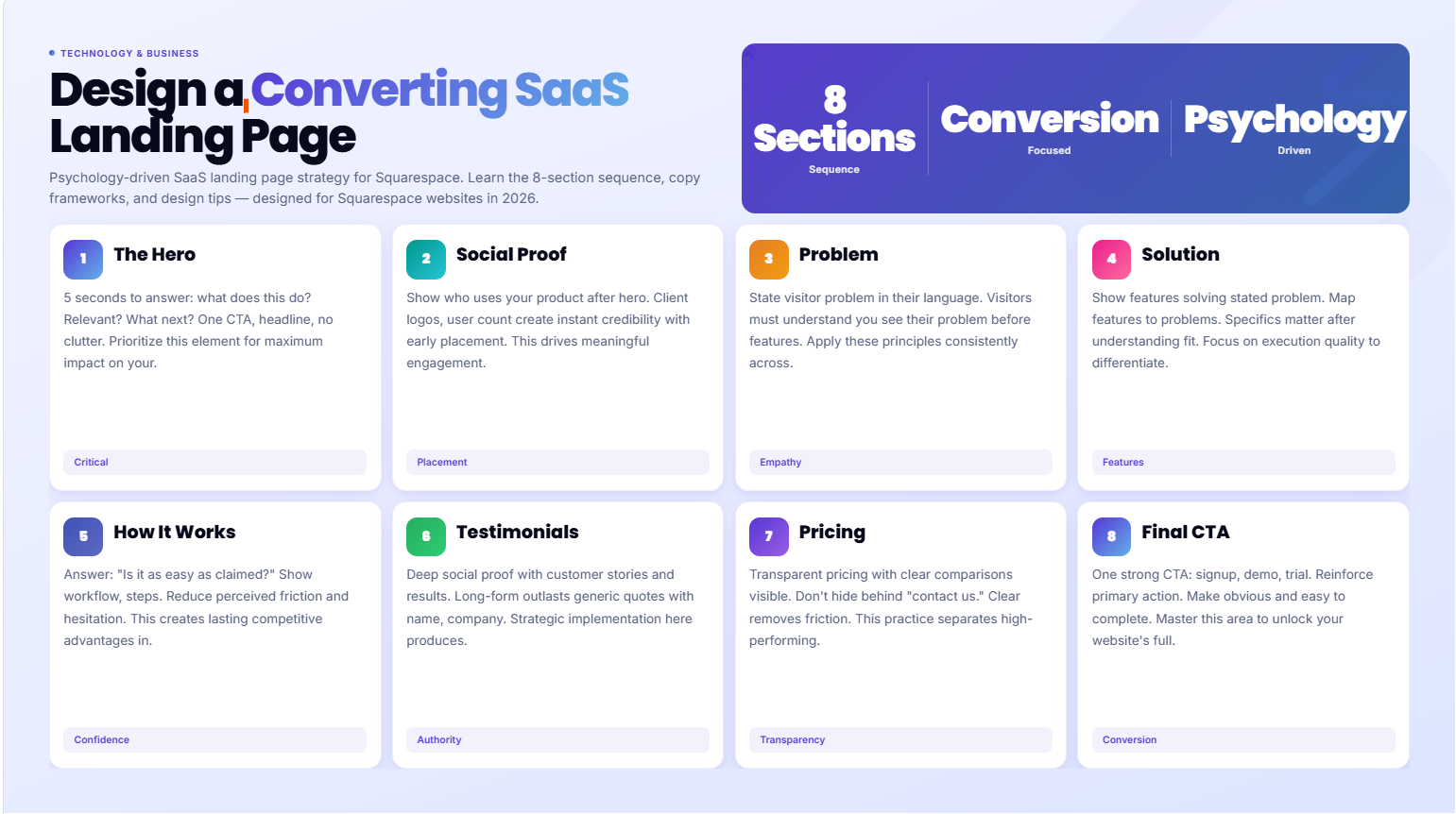
Every high-converting SaaS landing page follows a similar psychological sequence. Visitors don't convert randomly — they convert when a specific series of questions gets answered in the right order:
What does this product do? (Hero section)
Who else uses it? (Social proof bar)
Is this my problem? (Problem statement)
How does it solve that problem? (Solution and features)
Is it actually as easy as they claim? (How it works)
Do I trust these people? (Testimonials and case studies)
Can I afford it? (Pricing)
What do I do next? (Final CTA)
Most SaaS landing pages fail because they skip stages (jumping straight to features before acknowledging the problem) or sequence them incorrectly (burying social proof below the fold where most visitors never see it).
In Squarespace's Fluid Engine, you can build all eight of these sections as distinct visual zones. The platform handles them cleanly — all you need is the right content in the right order.
Section 1: The Hero — Your 5-Second Window
The hero section determines whether a visitor stays or leaves. That decision takes about five seconds — maybe less. In those five seconds, your visitor needs to understand what your product does, whether it's relevant to them, and what they should do next.
The Headline
The headline is the single most important copy element on your entire landing page. It should:
State what the product does in plain language
Signal who it's for (the niche or use case)
Communicate the primary outcome or benefit
Weak headline: The Future of Business Collaboration Strong headline: Client Onboarding Software for Agencies — Launch New Clients in Hours, Not Days
The weak version could mean anything. The strong version tells you immediately who this is for, what it does, and the measurable benefit.
In Squarespace, your hero headline is typically an H1 text block in a Fluid Engine section. Keep it to 8-12 words maximum. Use your brand font at its largest display size.
The Subheadline
The subheadline expands on the headline with 1-2 sentences of context. It can address:
The specific pain point the headline implies
A secondary benefit or differentiation from competitors
The mechanism by which the product delivers its promise
Example:Squarespace design for SaaS companies that converts website visitors into trial users — without months of custom development.
The Hero CTA
One button. One action. The most common high-performing CTAs for SaaS landing pages:
Start Free Trial
Book a Demo
Get Started Free
See How It Works
Pick one based on your conversion model. Don't offer two competing CTAs in the hero — Start Free Trial and Watch a Demo create decision paralysis for a visitor who hasn't yet decided they're interested enough to commit to either.
The Hero Visual
SaaS products typically use one of three hero visual approaches:
Product screenshot or UI mockup: Shows the actual product — high credibility for software
Video background or product demo: Dynamic and engaging — can increase time-on-page but adds load time
Illustration or abstract visual: Works well for conceptual products but risks being too vague
In Squarespace, product screenshots display cleanly in a media section next to your text content. Use device mockup frames (flat browser frame or device mockup) to give screenshots context.
Section 2: The Social Proof Bar
Immediately below the hero, before you ask visitors to read anything substantial, give them a reason to trust you. A client logo bar, a trusted by X companies statement, or G2/Capterra/Trustpilot rating badges all serve this function.
This section should take 2 seconds to scan. Keep it minimal — just logos or ratings, no copy needed. In Squarespace, use a simple image gallery block in a full-width section with a subtle background color to set it apart from the hero.
If you're early-stage and don't have recognizable logos, use partner logos, featured-in press logos, or a customer count (Trusted by 500+ businesses).
Section 3: The Problem Statement
Most landing pages skip this section. That's a conversion mistake.
Before you present your solution, name the problem. Specifically. In language your target user would actually use.
This section works because it creates a moment of recognition — the visitor reads a description of their exact problem and thinks yes, that's exactly what I'm dealing with. At that moment, their attention and engagement increase dramatically because they believe you understand their situation.
Example problem statement for a project management SaaS:
Most project management tools were built for enterprise teams with dedicated ops staff. If you're a small agency or startup, you end up with a tool that's either too complex to actually use, or so basic it can't handle real client workflows. The result: your team is either juggling spreadsheets, overloading Slack, or paying for a tool that only 20% of the team actually uses.
Three sentences. Specific problem. Language the target user recognizes. No product mention yet — just the problem.
Section 4: The Solution and Feature Showcase
Now present your solution. This section transitions naturally from the problem: Here's what we built instead.
For SaaS products, feature showcases typically use one of three layout structures:
Feature Grid: 3-6 feature cards with an icon, feature name, and one-sentence description. Good for scanning and overview. Works when features are roughly equal in importance.
Alternating Feature Rows: Feature headline on one side, screenshot or illustration on the other. Alternates left-right down the page. Good for walking through a feature set in a narrative sequence. More detail per feature than a grid.
Tab or Toggle Feature Layout: All features presented in a tabbed interface where clicking each tab reveals the feature detail. Good for products with many features that would overwhelm a scrolling layout. (Note: Squarespace can approximate this with code blocks — native tab layouts require custom code.)
In Squarespace's Fluid Engine, alternating feature rows build cleanly: a two-column section with text on one side and image on the other, alternating with each feature. This is our recommended approach for most SaaS landing pages.
Copy guidance for feature sections: Lead each feature with the outcome, not the feature name.
Not: Advanced Analytics Dashboard But: Know exactly which features your users love — and which ones they never touch
Outcomes connect emotionally. Feature names are information.
Section 5: The How It Works Section
Okay, I like what this does. But how does it actually work? How long does setup take? What's involved?
These are the questions that derail conversion if they go unanswered. A How It Works section addresses them proactively.
Three to five steps. Numbered. Brief. Specific. Focus on the user's experience, not your internal process.
Example:
1. Connect your existing tools Integrates with your CRM, email platform, and project management tool in under 5 minutes. No data migration required.
2. Set up your client workspace Customize your branded workspace with your colors, logo, and client portal layout. Takes about 20 minutes the first time.
3. Invite your first client Send your client an invitation link. They set up their account, see their onboarding tasks, and you're both live within the hour.
In Squarespace, build this as a numbered list section with large numerals, step headlines, and brief descriptions. Keep it visually clean — this section's job is to reduce anxiety, not to impress.
Section 6: Deep Social Proof — Testimonials and Case Studies
By this point in the page, your visitor understands what you do and how it works. Now they want to know: has this actually worked for people like me?
Testimonials: 2-4 specific testimonials from customers who match your ideal user profile. Specific means they mention a concrete outcome, not just general praise.
Not useful: Great tool, highly recommend! Useful: We reduced client onboarding time from 2 weeks to 3 days. Our team actually uses it.
In Squarespace, testimonial sliders and quote blocks are clean and easy to implement. Include the testimonial giver's name, role, company, and photo — all four elements together increase credibility significantly.
Case Study Teasers: If you have detailed case studies, pull 1-2 of the most relevant ones in with a summary card — problem, solution, result headline — and a Read the full case study link. This gives visitors who want more depth a path to find it.
Section 7: Pricing
For most SaaS products, pricing appears on the landing page. For enterprise software where pricing is always custom, a Request a Demo approach replaces pricing — but most SaaS products benefit from transparent pricing on the landing page.
Pricing section best practices:
Clear tier names (Starter, Pro, Enterprise — or whatever language fits your product)
Monthly and annual billing toggle (with the annual savings highlighted)
Feature list per tier — clean, specific
A highlighted most popular or recommended tier
Clear CTA per tier
A brief FAQ below the pricing table addressing common pricing objections
In Squarespace pricing tables are buildable with Fluid Engine column layouts — three columns for three tiers, with the middle tier slightly visually elevated (larger card, accent background, or highlighted border). For products with complex pricing, link to a dedicated pricing page rather than trying to fit it all on the landing page.
Section 8: The Final CTA
Some visitors read the entire page before they're ready to take action. For these visitors, a strong final CTA section makes the difference between converting and leaving.
Make it simple: a compelling headline (Ready to stop wasting client onboarding time?), a brief reinforcement of the primary value proposition, and one clear button.
Use a contrasting background color — dark, or your brand's accent color — to visually signal this is where the action happens. In Squarespace, this is a full-width section with a solid background color applied in the section settings.
Mobile Landing Page Optimization
A significant portion of SaaS research begins on mobile — often when someone is in a meeting, between tasks, or during commute time. Your landing page must perform on mobile.
Key mobile checks for SaaS landing pages:
Hero headline readable without scrolling or zooming (14px minimum, 18-20px preferred)
CTA button tappable (minimum 44px height, full width on mobile is often better)
Product screenshots scaled appropriately — don't let them be so small they're illegible
Pricing table scrolls horizontally on mobile or stacks vertically — either is fine, but it must be readable
Forms have large enough input fields for mobile keyboard input
In Squarespace, use the mobile preview mode throughout the build — not just at the end.
Testing and Improving Your Landing Page
After launch, the work isn't finished — it's beginning. Your landing page should be a living document, informed by real visitor behavior.
Google Analytics 4: Track scroll depth (how far down the page visitors go), click events on your primary CTA, and time-on-page. If visitors are leaving before the pricing section, the earlier sections need improvement.
Heatmap tools: Hotjar or Microsoft Clarity show you where visitors click and how far they scroll. These tools reveal which sections get engagement and which are being skipped.
A/B testing: Test one variable at a time — headline, hero CTA copy, hero image, pricing display. Make changes based on data, not assumptions.
Conversion rate benchmarks: For SaaS landing pages with a free trial CTA, 3-8% visitor-to-trial is achievable. For demo request pages, 2-5% is a reasonable target. If you're well below these numbers, the issue is almost always in the hero section or problem statement.
Build a SaaS Landing Page That Converts — With Squareko
Squareko designs Squarespace landing pages for SaaS products and tech companies that are built on proven conversion architecture — not templates filled with placeholder text.
If you're launching a new product or redesigning a landing page that isn't converting, let's talk.
FAQs
-
The hero section — specifically the headline. It's the first thing visitors see and determines whether they read further or leave. A clear, specific headline that communicates what the product does, who it's for, and the primary benefit is more valuable than any design decision. Most SaaS landing page conversion failures can be traced back to a vague or overly clever headline.
-
Long enough to answer all the questions a prospect needs answered before converting — and no longer. For most SaaS products, this means an 8-section landing page covering hero, social proof, problem, features, how it works, testimonials, pricing, and final CTA. This typically results in a page that takes 3-5 minutes to read in full. Shorter pages tend to underconvert because they leave key questions unanswered.
-
Video can increase engagement and conversion rates for SaaS products when used correctly. A product demo video embedded in the "How It Works" section or as a modal from a "Watch a Demo" button is effective. Autoplay video backgrounds in the hero can increase visual engagement but significantly slow page load times. Test carefully and prioritize page speed.
-
In Squarespace's Fluid Engine, build a 3-column section with equal column widths for three pricing tiers. Use text blocks, dividers, and button blocks to construct each tier's content. Visually elevate the recommended tier using section background colors or a bordered card effect via custom CSS. For complex pricing, link to a dedicated pricing page rather than trying to fit everything on the landing page.
-
For a free trial CTA: 3-8% visitor-to-trial is a realistic target with a well-optimized landing page. For demo requests: 2-5% is achievable. For cold paid traffic, expect lower rates (1-3%) until you've optimized for that specific audience. Use these as benchmarks, not guarantees — actual conversion rates depend heavily on traffic quality, product fit, and offer.
-
Start with whatever you have. A logo bar with 3-4 companies, 2 specific testimonials, and one case study teaser is sufficient for launch. As you grow, add more testimonials (aim for 4-6 from diverse customer profiles), ratings from review platforms (G2, Capterra), and additional case study depth. Social proof is one of the highest-leverage conversion elements you can add to any SaaS landing page.
-
Yes. Squarespace's Fluid Engine allows you to build all the core sections — hero, feature grid, how it works, testimonials, pricing, and CTA — without writing code. For advanced interactions (tab interfaces, animated elements, custom pricing toggles), custom CSS and code injection are needed. Squareko regularly uses custom code on Squarespace to push landing page design well beyond native template constraints.
-
Paloma is the top recommendation for SaaS landing pages — its default structure naturally follows conversion-optimized flow, and it handles product screenshots, feature grids, and testimonials cleanly. Nevins is a strong alternative for a more energy-driven, product-launch aesthetic. Both run on Fluid Engine and can be customized significantly beyond their default layouts.

From custom website design to SEO strategy, we help businesses launch a site that looks professional and performs better.

Author Bio
I'm Walid Hasan, a Certified Squarespace Expert and Squarespace Circle Platinum Partner with over 12 years of hands-on experience designing and optimizing high-performing websites. Over the years, I've had the privilege of building more than 2,000 Squarespace websites for clients around the world, always focusing on clean design, strong user experience, and conversion-driven results.
