
How Tech Companies Use Squarespace to Launch Fast and Iterate Without Code
The Speed Advantage in Tech
The companies that win in technology aren't always the ones with the best product at launch. They're the ones that learn fastest. Ship early, collect feedback, iterate, improve — this is the product development philosophy that has produced some of the most successful tech companies in the world.
The same logic applies to marketing websites. A tech company website that launches in 2 weeks — even imperfectly — starts collecting real data: which pages visitors engage with, which messaging resonates, which CTAs get clicks, where people drop off. That data is invaluable. And it's data the company that spent 4 months building a perfect custom website doesn't have yet.
Squarespace is one of the most effective tools for applying this mindset to your web presence.
Why No-Code Website Platforms Make Sense for Tech Companies
There's sometimes an assumption in tech culture that using no-code tools is a compromise — that if you're a real tech company, you should build your own website. This assumption deserves scrutiny.
Building your own marketing website:
Takes engineering time away from building your actual product
Creates ongoing maintenance overhead (hosting, security, updates)
Typically produces worse design results than a purpose-built platform used well
Locks non-technical team members out of making updates
Using Squarespace:
Lets your engineering team focus on the product
Removes infrastructure overhead from your plate
Produces professional design results when used well
Lets marketing and content team members own and update the site
The question isn't is no-code sophisticated enough? The question is what's the highest-value use of our team's time? For most tech companies, that answer is clear.
Squarespace's Fluid Engine: The Technology Behind Fast Iteration
Squarespace's Fluid Engine is a responsive grid system that lets you move content blocks freely, resize sections, adjust layouts, and change designs without writing code. The underlying technology is sophisticated — it generates clean, responsive HTML/CSS — but the interface is drag-and-drop.
This means a non-developer can make real design changes in minutes. Move a testimonial section. Add a new feature highlight. Swap the homepage hero image. Change a CTA. Test a different headline. All without submitting a ticket to engineering.
Key Takeaways
Speed-to-market is a competitive advantage — tech companies that launch websites faster reach their audience, collect feedback, and iterate ahead of slower competitors
Squarespace's no-code Fluid Engine lets tech teams make design changes in hours, not sprint cycles
The launch fast, refine later approach that works in product development also works for marketing websites on Squarespace
A Squarespace site can go from brief to live in as little as 2 weeks with proper workflow — a custom build takes 3-6 months
Squarespace allows non-developers to own and evolve the website, freeing engineering resources for product work
The Squarespace Launch Workflow for Tech Companies
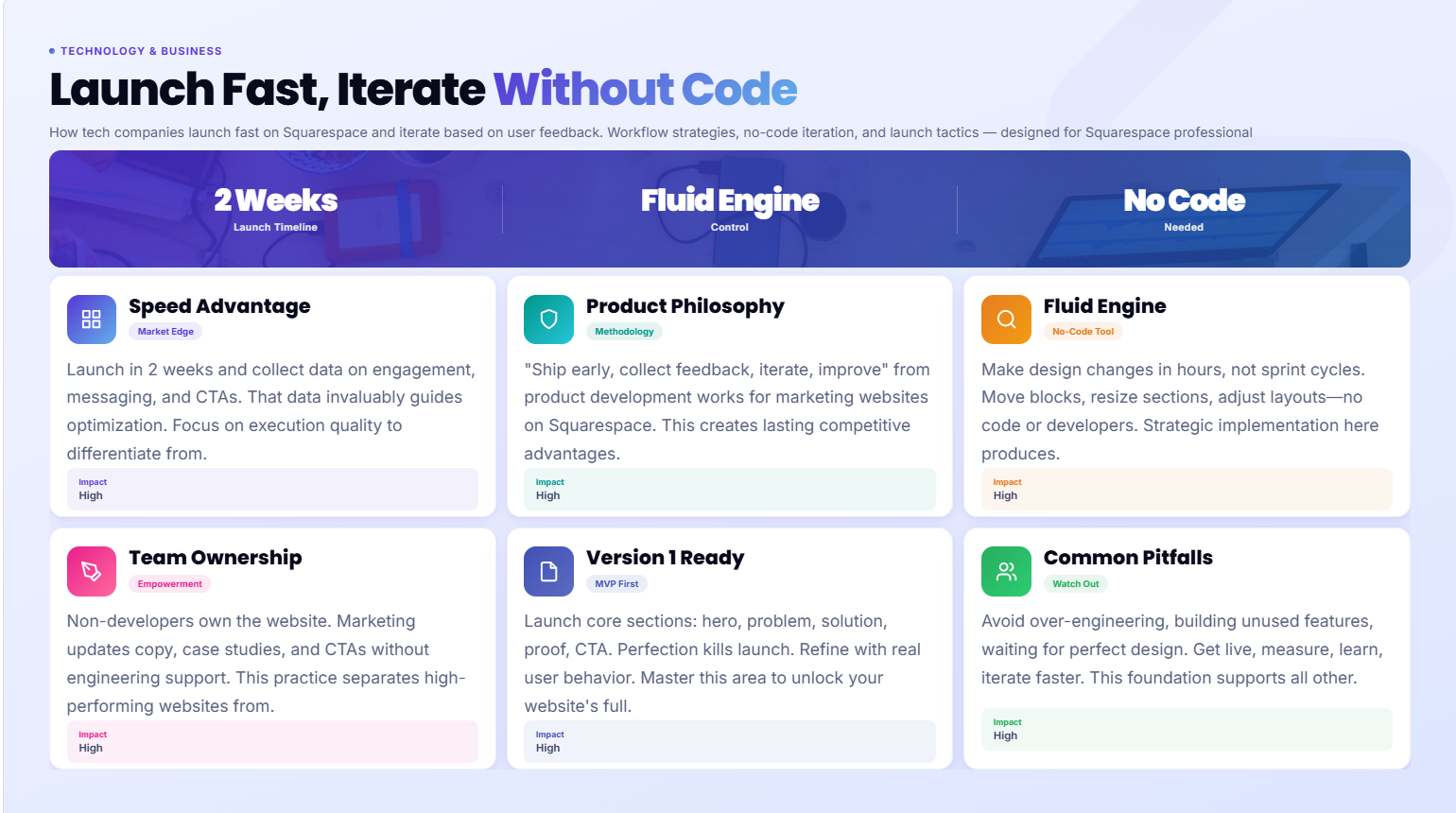
Here's how a focused tech company can go from decision to live site in 2 weeks:
Week 1: Foundation and Content
Days 1-2: Strategy and Content Before touching Squarespace, nail down:
Your primary audience (who are you building this for?)
Your core message (what problem do you solve, for whom, how?)
Your site map (which pages do you need at launch?)
Your CTAs (what do you want visitors to do?)
Write your core copy first — at minimum, homepage headline, subheadline, services/product description, and about statement. Don't design around placeholder text; it wastes time.
Days 3-4: Template Selection and Brand Setup Choose your template (Paloma, Forma, or Nevins for most tech companies), then configure:
Brand fonts (Squarespace has excellent Google Fonts integration)
Color palette (primary, secondary, accent)
Logo upload
Domain connection
Days 5-7: Core Page Build Build homepage, services/product, about, and contact pages. Focus on structure and hierarchy, not perfection. Get the content in and the layout working.
Week 2: Refinement and Launch
Days 8-10: Design Refinement and Mobile Review every page on mobile preview. Fix layout issues, check text sizes, test CTAs. Then work through the visual refinement — spacing, section padding, image treatments, typography hierarchy.
Days 11-12: SEO Setup Add meta titles and descriptions to every page. Submit sitemap to Google Search Console. Set up Google Analytics 4. Add any schema markup via code injection.
Days 13-14: Testing and Launch Test every form, every button, every link. Check on multiple devices and browsers. Then launch.
This is a tight timeline — it requires prepared content and decisive design decisions. But it's achievable, and it's 2 months faster than most custom builds.
How to Iterate Your Website Without Breaking Things
One of Squarespace's underappreciated features for tech teams is the ability to make changes safely.
Save as Draft, Then Publish
Don't publish changes live as you work. Make changes in a page section, preview the result, confirm it's right, then publish. Squarespace allows you to work on page layouts without pushing to the live site until you're ready.
The Preview Function
Always use Preview mode before publishing major changes. Check on both desktop and mobile. Changes that look fine on desktop sometimes break on mobile — catching this before publishing saves embarrassment.
Version Control Alternative
Squarespace doesn't have built-in version control (unlike git for code). Before making major design changes, take screenshots of the existing layout as a reference point. For particularly significant rebuilds, duplicate the page as a backup before editing the original.
Incremental Changes Over Complete Rebuilds
Iterating works best when changes are incremental. Changing one section at a time — testing its impact before moving to the next change — is more manageable and more informative than redesigning everything at once. Treat your website like you treat product features: ship small, measure, iterate.
What Tech Teams Can Change Without a Developer
One of the key advantages of Squarespace for tech companies is the range of changes that non-developers can make independently. Here's what a marketing or content team member can handle without any technical knowledge:
Content updates: Blog posts, service page copy, team bios, product descriptions, pricing updates — all editable directly in the page editor.
Image updates: Swap hero images, add new team photos, update product screenshots — drag and drop.
Page structure changes: Add new sections to a page, reorder sections, duplicate a section to create a new variation.
New blog posts: Full blog CMS with categories, tags, author profiles, and scheduling.
Form management: Update contact form fields, change the confirmation message, manage form submissions.
Basic SEO updates: Update meta titles and descriptions, adjust page titles, modify URL slugs.
New pages: Create entirely new pages using existing section designs — just duplicate sections from existing pages.
Color and font adjustments: Change your color palette globally (affects the whole site) through the Style Editor.
What typically requires a developer or Squarespace specialist:
Custom CSS animations and interactions
Third-party integrations beyond native Squarespace connections
Complex layout structures that push beyond Fluid Engine's native capabilities
Schema markup implementation
Advanced performance optimization
Launching a Version 1 Website: What to Include
Many tech founders over-engineer their V1 website, trying to launch something perfect instead of something useful. Here's a realistic V1 scope for a tech company:
Homepage: Clear headline, subheadline, 3-4 key features/services, social proof (even one testimonial or logo), and a CTA.
Product or Services page: What you offer, who it's for, what's included, and how to get started.
About page: Who you are, why this company exists, brief credibility markers.
Contact page: Form, response time expectation, and one alternative contact method.
That's it. Launch with 4 pages. Add a blog, case studies, a resource section, and additional service pages in the weeks and months after launch — informed by actual visitor behavior.
The V1 website's job is to establish your web presence, enable people to find and contact you, and start collecting data. It doesn't need to be comprehensive. It needs to be clear and live.
Building Your Website in Public: The Startup Approach
Some tech founders take the launch fast philosophy a step further: building their website visibly, sharing updates with their audience as they go. This approach — often called building in public — turns your website iteration process into a content and community-building activity.
Share your Squarespace template choice and why. Post about the copy decisions you're wrestling with. Show before-and-after section redesigns. Ask your audience which homepage headline resonates more. This kind of transparency builds authentic connection with early adopters who are invested in your journey.
Squarespace's fast iteration capability makes this practical. You can make a change, share it, collect feedback, and update again within hours.
Common Fast-Launch Mistakes Tech Companies Make
Launching with placeholder content: Lorem ipsum or content coming soon pages signal unfinished. Never launch a page you haven't written real content for. Better to have fewer pages with real content than more pages that are empty.
Perfect before live: The perfectionist instinct kills launch momentum. Good enough to represent us professionally is the right launch standard. Perfection comes after feedback.
Ignoring mobile at launch: Mobile should be checked before every publish, not as an afterthought after launch. Mobile visitors encountering a broken layout are not forgiving.
Not setting up analytics before launch: If you don't have Google Analytics 4 and Google Search Console configured before launch, you're flying blind. Install them first, launch second.
Trying to build every feature immediately: Blog, resource library, case studies, integrations, multilingual support — none of these need to exist at launch. Build the core, launch, then add.
Using too many fonts and colors: The fastest way to look unprofessional on Squarespace is to use every design option available. Choose two fonts and three colors, and stick to them.
Ready to Launch Your Tech Website This Month?
Squareko specializes in fast, professional Squarespace launches for tech companies — delivered in 2-4 weeks with conversion-optimized design, SEO setup, and a site your team can maintain and iterate independently.
FAQs
-
With content and branding ready, a focused tech company can self-build a 4-5 page Squarespace site and launch within 1-2 weeks. Working with a Squarespace specialist like Squareko, a professional-quality launch with design, SEO setup, and conversion optimization typically takes 2-4 weeks.
-
Yes — this is one of Squarespace's biggest practical advantages for tech companies. Marketing, content, and operations team members can add blog posts, update copy, swap images, add new page sections, and manage forms entirely through the visual editor. No code required.
-
At minimum: homepage (clear headline, key offer, and one CTA), product or services page (what you offer and how to get started), about page (who you are and why this exists), and contact page (form and response expectation). Launch with these four pages and add depth over time based on visitor behavior and business needs.
-
Launching a basic but well-structured site quickly is better for SEO than waiting months for a perfect launch. SEO results require time and consistent effort — every month your site isn't live is a month of SEO compounding you're missing. A well-configured Squarespace site with 4 pages and basic SEO setup will begin indexing and ranking immediately after launch.
-
Use the Fluid Engine to move and resize sections, swap content, and restructure page layouts without code. Make changes in preview mode before publishing. Test on mobile. Make incremental changes rather than wholesale redesigns, and track the impact of each change in Google Analytics before moving to the next iteration.
-
Yes. Squarespace's fast iteration capability makes it well-suited for building in public. You can make design changes, share them with your audience for feedback, and update again within hours. The visual, no-code editor means changes happen in real time — not after a developer sprint.
-
Four pages: homepage, services or product page, about, and contact. Write real content for all four (no placeholder text), set up basic SEO on each page, connect Google Analytics and Search Console, and launch. Add additional pages — blog, case studies, resources — after you have real visitor data to inform decisions.
-
Yes, within its scope as a marketing website platform. Squarespace handles growing content libraries, additional service pages, team expansion, and increasing traffic volumes without issues. The platform may eventually feel limiting for very large content archives or complex CMS requirements — but most tech companies operate within Squarespace's capabilities for years before reaching those limits.

From custom website design to SEO strategy, we help businesses launch a site that looks professional and performs better.

Author Bio
I'm Walid Hasan, a Certified Squarespace Expert and Squarespace Circle Platinum Partner with over 12 years of hands-on experience designing and optimizing high-performing websites. Over the years, I've had the privilege of building more than 2,000 Squarespace websites for clients around the world, always focusing on clean design, strong user experience, and conversion-driven results.
