
How to Create a Fashion Lookbook on Squarespace (And Why Your Brand Needs One)
Introduction
A fashion lookbook transforms how potential customers experience your brand. Rather than presenting individual items in a traditional product gallery, a lookbook tells a cohesive visual story—showing how pieces work together, communicating your brand's aesthetic, and inspiring customers to imagine themselves wearing your collections.
On Squarespace, creating a fashion lookbook doesn't require advanced technical skills or expensive third-party plugins. The platform offers native tools that let you build both static editorial galleries and interactive, shoppable collections. Whether you're a sustainable fashion label, a boutique designer, or an emerging streetwear brand, a well-executed lookbook on Squarespace becomes one of your most powerful sales tools.
This guide walks through everything you need to create a fashion lookbook on Squarespace that captures attention, communicates your brand identity, and converts browsers into buyers.
Key Takeaways
Lookbooks drive engagement: Editorial presentations increase average time on site and reduce bounce rates compared to standard product galleries.
Squarespace offers native solutions: Build lookbooks using gallery blocks, collection pages, and product linking without coding.
Photography quality matters: Thoughtful shot composition, consistent styling, and strategic product placement elevate perceived brand value.
Shoppable lookbooks boost conversions: Linking products directly from lookbook images removes friction in the purchase path.
Regular updates maintain relevance: Seasonal refreshes and new lookbooks keep your content calendar active and encourage repeat visits.
Brand storytelling is essential: Lookbooks communicate not just products, but the lifestyle and values your brand represents.
What Is a Fashion Lookbook on a Website?
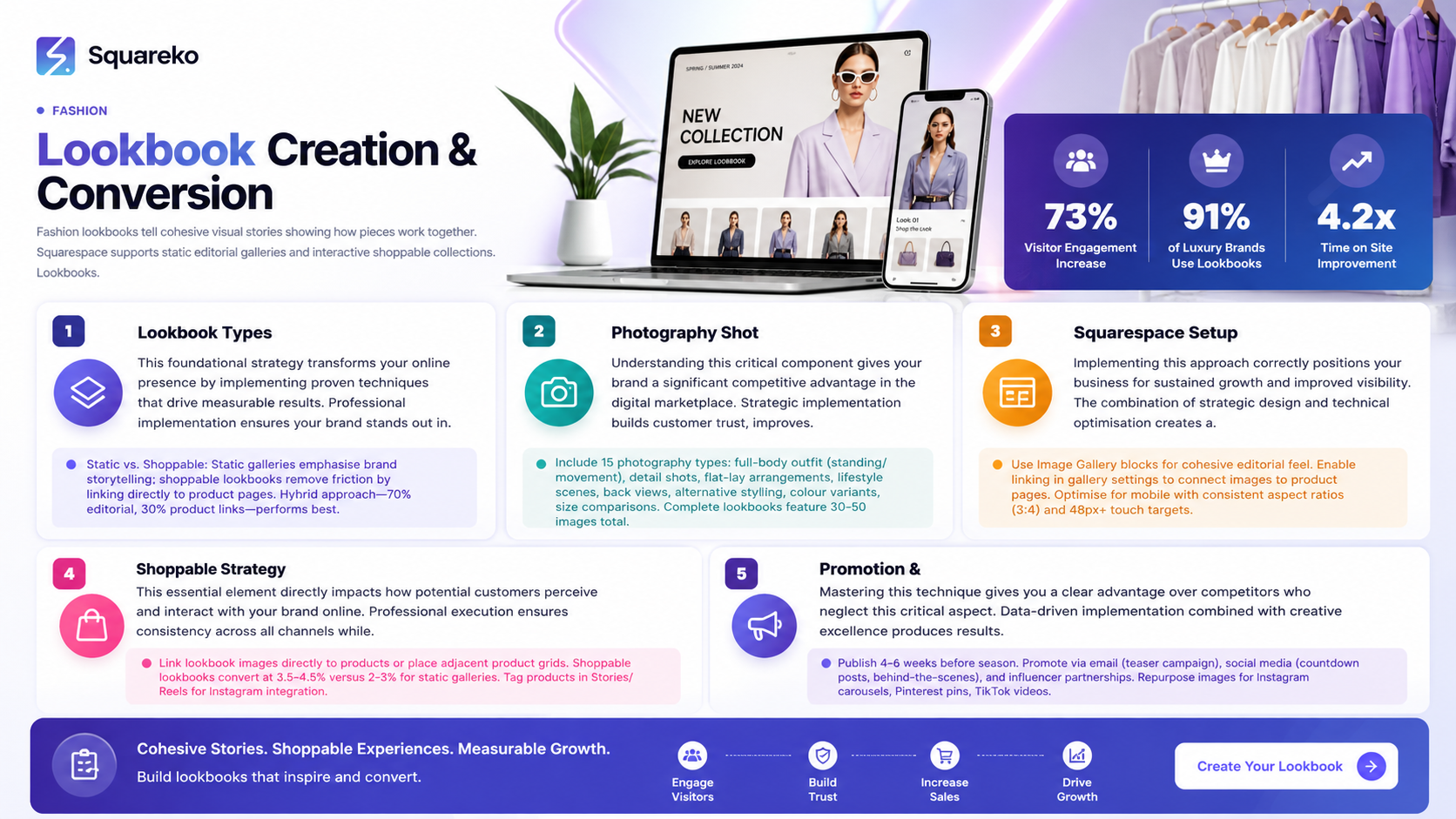
A fashion lookbook is a curated collection of styled images that showcases your products in real-world contexts. Unlike a product catalogue, which prioritises inventory organisation, a lookbook prioritises narrative and mood.
Lookbooks come in two primary formats:
Static Editorial Galleries A visually cohesive collection of styled photographs—often with a theme (seasonal, occasion-based, or trend-inspired)—presented in a gallery block. Visitors scroll through to absorb the aesthetic and styling ideas, then navigate separately to product pages to purchase.
Interactive Shoppable Collections Product images or lifestyle shots tagged with clickable hotspots that link directly to the item's product page. A visitor can see a styled outfit and immediately add any piece to the cart without leaving the lookbook.
The most effective Squarespace lookbooks combine both approaches: a beautiful editorial gallery that tells the story, paired with shoppable product pages that enable immediate purchase action.
Why Your Fashion Brand Needs a Lookbook
Increased Engagement and Time on Site
Lookbooks naturally encourage longer site visits. Instead of a quick glance at a product listing, visitors linger to absorb styling inspiration. This signals to search engines that your content is valuable, potentially improving your SEO performance.
Demonstrates Brand Identity
A lookbook is your chance to go beyond individual pieces and show your customer who they become when wearing your brand. Consistent imagery, colour palettes, and styling choices reinforce brand recognition and differentiate you from competitors.
Boosts Conversion Rates
A shoppable lookbook removes decision friction. When customers see an item in context and can add it to the basket immediately, impulse purchases increase. Studies from fashion e-commerce platforms show that editorial-style product presentation outperforms grid-based catalogues by 15–25% in conversion rate.
Supports Content Marketing
Lookbooks give you material for social media, email campaigns, and influencer collaborations. A single lookbook can fuel months of marketing content across Instagram, Pinterest, and beyond.
Builds Emotional Connection
Products shown in isolation feel transactional. Styled lookbooks tell stories and create emotional resonance. A customer doesn't just buy a jacket—they buy the confidence it represents.
Planning Your Fashion Lookbook
Before you photograph a single item, clarify the purpose and parameters of your lookbook.
Define Your Lookbook Theme
Is this a seasonal collection? A particular occasion or lifestyle moment? A colour story or trend interpretation? Clarity on theme guides every decision that follows—from styling choices to background selection to product curation.
Examples:
"Summer Workwear: Elevated Basics"
"Weekend to Wine Bar: Effortless Transitional Dressing"
"Colour Story: Earth Tones for Autumn"
"Sustainability Focused: Capsule Wardrobe Essentials"
Select Your Product Mix
Not every product deserves inclusion. Choose 8–16 pieces that tell a cohesive story and work well together. This restraint creates a stronger narrative than overwhelming visitors with your entire inventory.
Establish Visual Parameters
Decide on consistent elements: Will you shoot indoors or outdoors? Use a single model or multiple? Include lifestyle shots, close-ups of details, and flat-lay product photography, or focus exclusively on styled outfit photography? Consistency creates professional polish.
Consider Your Audience
Who is your customer? What inspires them? A luxury evening wear brand creates entirely different lookbook content than a sustainable activewear label. Your lookbook should speak directly to your audience's aspirations and lifestyle.
Fashion Lookbook Shot List: 15 Essential Photography Types
Professional lookbooks combine multiple photography styles to showcase products comprehensively. Here's a breakdown of 15 shot types to include:
Full-Body Outfit Shot (Standing) — Model wearing the complete look, straight-on angle. Shows proportion and how pieces work together.
Full-Body Outfit Shot (Movement) — Model walking, turning, or in motion. Demonstrates how fabric moves and pieces interact in real situations.
Close-Up Detail Shot — Zoom in on fabric texture, seaming, buttons, or embellishments. Highlights craftsmanship and quality.
Overhead Flat-Lay — All pieces arranged flat on a styled surface (wood, marble, textile). Shows the complete ensemble in an editorial fashion.
Individual Item Hero Shot — A single piece photographed in isolation against a neutral background. Works well for product pages and shoppable links.
Lifestyle Scene — Model in an authentic environment (café, park, home) wearing the look. Adds aspirational context.
Side Profile — Shows silhouette and how pieces fit from the side. Useful for tailored or fitted items.
Detail Styling Close-Up — Shoes, jewellery, or accessories paired with the outfit. Suggests styling combinations.
Back View — Important for showing back necklines, seaming, or hidden details. Demonstrates design comprehensiveness.
Fabric Swatch or Fold Detail — Close-up of fabric weight, weave, or drape. Communicates material quality to online shoppers.
Alternative Styling — Same piece worn two different ways. Shows versatility and maximises value perception.
Colour Variant Lineup — All available colours of a piece displayed together. Simplifies colour selection for customers.
Size Comparison — The same item on different body types or sizes. Increases accessibility and reduces size-related returns.
Layering Detail — How pieces layer under or over each other. Critical for seasonal or transitional collections.
Footwear and Ground Detail — Close or wide shots showing shoes with the outfit and ground-level styling context. Important for footwear-focused lookbooks.
A complete lookbook typically includes 30–50 final images. Not every shot type appears in every lookbook, but this menu ensures you're capturing products comprehensively.
How to Create a Shoppable Lookbook on Squarespace
Step 1: Plan Your Lookbook Structure
Log into your Squarespace site and navigate to the pages where your lookbook will live. Most brands create a dedicated "Lookbook" or "Collections" page in their main navigation, then build individual lookbook editions beneath it.
Step 2: Set Up a Lookbook Page
Add a new page. Title it clearly: "Spring/Summer 2026 Lookbook" or similar. Choose a blank template to maintain full design control.
Step 3: Add an Introduction Section
Use a text block to write a brief introduction (50–100 words) explaining the lookbook's theme, your design inspiration, and an invitation to explore the pieces. Keep it engaging but concise.
Step 4: Upload Your Images
Use Squarespace's Image Gallery block (not Image block, which displays single images) to upload your lookbook photos. Arrange them in a logical sequence—either chronological, by outfit grouping, or by styled narrative flow.
Best Practices:
Upload high-resolution images (at least 1200px width). Squarespace automatically optimises for web, but starting with higher quality ensures no loss.
Name image files descriptively ("SS26_Lookbook_Look1_Full" rather than "IMG_2341"). This aids SEO and organisation.
Maintain consistent aspect ratio across all gallery images for a professional, cohesive appearance.
Step 5: Create Shoppable Product Links
Squarespace offers several methods to link directly from lookbook images to products:
Method A: Gallery with Linked Images In the gallery block settings, enable the "Link" function for each image. Link to the relevant product page URL. When visitors click an image, they jump to that product's page.
Method B: Product Grid Adjacent to Gallery Place your gallery beside a product grid block displaying the items in the lookbook. Visitors see the styled photography, then browse available products nearby.
Method C: Image with Text Overlay and Button Use individual image blocks with text overlay buttons linking to products. More labour-intensive but offers precise control over which product links to which image.
Method D: Squarespace Bedrock or Third-Party Tools (Advanced) For Instagram-style hotspot linking, consider third-party tools like "Shoppable," which overlay clickable product tags on images. These integrate with Squarespace and require minimal coding knowledge.
Step 6: Optimise for Mobile
Use Squarespace's responsive preview tools to ensure your lookbook displays beautifully on mobile devices. Touch targets (clickable links) should be at least 48px × 48px for easy tapping.
Step 7: Add a Call-to-Action
At the bottom of your lookbook, include a text block with a clear CTA: "Shop This Look," "Explore the Collection," or "Add to Bag." Link this to your shop or collection page.
Static Galleries vs. Interactive Lookbooks: Conversion Comparison
Understanding the trade-offs between these approaches helps you choose the right strategy for your brand.
Static Editorial Gallery
What it is: A beautifully styled image gallery with no direct product links. Visitors browse the photography, absorb your brand aesthetic, then navigate to your shop separately.
Advantages:
Maximum focus on brand storytelling and aesthetic
Simpler to produce and maintain
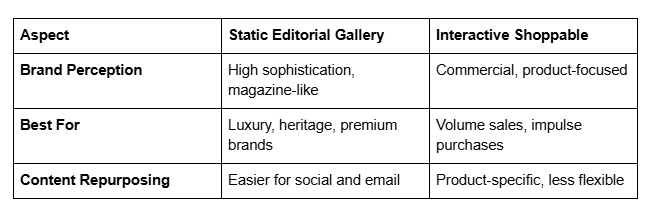
Higher perceived sophistication and "magazine-like" quality
Easier to tell longer visual narratives
Disadvantages:
Extra clicks required to purchase (drops conversion by 8–15%)
Visitor must remember specific product details after leaving the gallery
Requires strong brand loyalty to motivate separate shop navigation
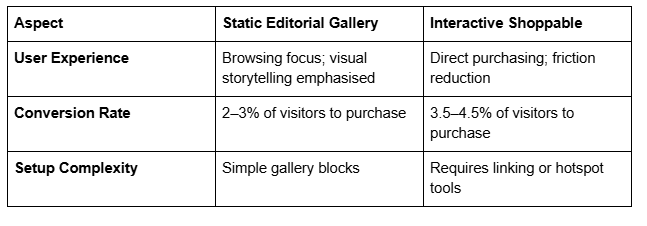
Average Conversion: 2–3% of lookbook visitors to product purchase (depending on traffic source)
Interactive Shoppable Lookbook
What it is: Lookbook images tagged with clickable hotspots or product links that navigate directly to purchase pages.
Advantages:
Removes friction from the purchase path
Immediate action possible without leaving the lookbook
Higher conversion rates (15–25% improvement over static)
Detailed product data (price, sizing, materials) available instantly
Disadvantages:
Requires more technical setup
Visual design must accommodate product metadata
Can feel more commercial, less editorial
Link management becomes ongoing maintenance
Average Conversion: 3.5–4.5% of lookbook visitors to product purchase (direct transaction pathway)
Best Approach
Hybrid lookbooks perform best: Create a beautiful, narrative-driven gallery that emphasises brand storytelling, then support it with shoppable product pages prominently linked in your main navigation. Your lookbook becomes aspirational content marketing, while your shop provides transaction infrastructure.
Many successful brands dedicate 70% of their lookbook to pure editorial content and 30% to direct product highlighting. This balance maintains aesthetic integrity whilst capturing conversion opportunities.
Design Best Practices for Squarespace Lookbooks
Comparison: Static vs. Shoppable Lookbooks
Consistency is Everything
Maintain consistent image sizing, colour grading, and styling across all lookbook photographs. Inconsistency—even slight variations in lighting or background—disrupts the editorial feeling and appears amateurish.
Use the same editing presets across your entire shoot. Most professional photographers grade their RAW files with a consistent filter or preset to ensure colour harmony.
Whitespace and Breathing Room
Don't overcrowd your lookbook page. Use generous margins, spacing between images, and whitespace around text. This creates a luxury feel and prevents sensory overload.
In Squarespace, adjust gallery spacing in block settings. Aim for 20–40px gaps between images rather than tight, grid-like arrangements.
Typography Matters
Select 1–2 primary fonts and stick with them throughout. Use headings and subheadings strategically to guide visitors through your narrative. Serif fonts often communicate luxury and heritage, whilst sans-serif fonts feel modern and approachable.
Mobile-First Design
Optimise for mobile visitors first, then scale up. Image galleries that work on phones typically work everywhere else. Test on multiple devices.
Strategic Use of Colour
Let your products' colours dictate your page background. A neutral white or off-white background keeps focus on images. Avoid competing background colours unless your brand specifically calls for them.
Loading Speed
Large image galleries slow page load times. Squarespace automatically compresses images, but upload only the resolution you need (1200–1600px width is sufficient). Check your site's Core Web Vitals in Google Search Console.
Publishing and Promotion Strategy
Timing and Seasonality
Publish lookbooks 4–6 weeks before the relevant season. Spring lookbooks launch in February, summer in April, and so on. This gives customers time to anticipate and plan purchases.
Build Email Anticipation
In the weeks before launch, tease your lookbook on social media and in your email list. Behind-the-scenes photography, voiceover announcements, and countdown posts build excitement.
Launch with a Content Spike
On launch day, post across Instagram, TikTok, Pinterest, and your email list. Consistent messaging across channels (with each platform's unique voice) maximises reach.
Repurpose the Content
Each lookbook image is marketing asset gold:
Instagram: Carousel posts, story sequences, reels featuring individual outfits
Pinterest: Vertical pins linking back to your lookbook page
Email: Monthly lookbook-feature emails highlighting different outfits
TikTok: Styling videos and transformation content using lookbook pieces
Influencer Collaboration: Loan pieces to influencers and request their lookbook-inspired content
Cross-Link in Product Descriptions
On every product page within your lookbook, link back to the lookbook itself. This creates internal linking authority for SEO and reminds customers of the product in context.
Monitor Performance
In Squarespace Analytics, track:
Which lookbook page gets the most traffic
Average time spent on the lookbook
Bounce rate from lookbook pages
Conversion paths from lookbook to product pages
These insights guide your next lookbook strategy.
Frequently Asked Questions
-
A fashion lookbook is a curated collection of styled product photographs that showcase your clothing and accessories in real-world contexts. Unlike traditional product catalogues arranged by category or inventory, lookbooks emphasise narrative and visual storytelling. They show how pieces work together, communicate your brand aesthetic, and inspire customers by demonstrating lifestyle applications. Lookbooks typically include 30–50 professional photographs and can be either static editorial galleries or interactive, shoppable collections.
-
To create a shoppable lookbook on Squarespace, start by uploading your lookbook photographs to an Image Gallery block. In the gallery settings, enable the "Link" function for each image and assign URLs to relevant product pages. Alternatively, place your gallery adjacent to a product grid block, or use third-party tools like Shoppable to add clickable hotspots directly over images. Ensure images are high-resolution (1200–1600px), maintain consistent styling and colour grading, and optimise your layout for mobile devices.
-
Include a variety of photography types: full-body outfit shots (standing and in motion), close-up detail shots highlighting craftsmanship, flat-lay arrangements, individual product hero shots, lifestyle scenes in authentic environments, back and side views, colour variant lineups, and alternative styling examples. A complete lookbook typically features 30–50 images combining these types. Focus on quality over quantity—each image should advance your brand story and showcase pieces from multiple angles to give online shoppers confidence in their purchase decisions.
-
Plan to refresh your lookbook seasonally—typically four times per year aligned with spring/summer and autumn/winter seasons. Additionally, consider smaller updates every 6–8 weeks if you launch new collections or want to maintain content freshness. Regular updates signal to search engines that your site is active, encourage repeat visits from loyal customers,
-
Yes, but optimise images for each platform's specifications. A full-resolution gallery image on your website can be cropped into Instagram squares, vertical pins for Pinterest, or 9:16 vertical videos for TikTok. Your lookbook serves as the master editorial content; repurpose individual images across social media, email, and paid advertising. Ensure that main Squarespace page remains the centralised hub where all lookbook content lives.
-
Begin with the best camera available—modern smartphones capture professional-quality images in good lighting. Shoot outdoors in natural daylight whenever possible, ideally in golden hour (early morning or late afternoon). Use consistent backgrounds (brick walls, parks, home interiors) to create visual cohesion. Style outfits thoughtfully with complementary accessories. Have a friend or tripod-mounted phone act as photographer. Edit all images with the same preset or colour grading filter to ensure consistency. Whilst professional photographers yield superior results, well-executed DIY photography communicates authenticity and brand personality to your audience.
-
The simplest approach is Squarespace's built-in gallery link function: enable linking on your Image Gallery block, then assign product page URLs to each image. Visitors click the image and navigate directly to the product page. For a more visually integrated experience, overlay clickable hotspots using third-party tools like Shoppable or SnapCart. Alternatively, place your gallery alongside a product grid block—visitors see the styled photography and browse available items nearby. Choose the method that balances technical complexity with your desired user experience.
Call-to-Action
Ready to build your fashion lookbook on Squarespace? Squareko specialises in custom Squarespace design, SEO optimisation, and e-commerce solutions specifically tailored for fashion brands. Whether you're launching your first lookbook or refining an existing collection page, our team helps you create a visually stunning, conversion-focused presence.
Squareko Transform your fashion brand's online presence today.

From custom website design to SEO strategy, we help businesses launch a site that looks professional and performs better.

About the Author
Walid | Founder, Squareko
I'm Walid Hasan, a Certified Squarespace Expert and Squarespace Circle Platinum Partner with over 12 years of hands-on experience designing and optimizing high-performing websites. Over the years, I've had the privilege of building more than 2,000 Squarespace websites for clients around the world, always focusing on clean design, strong user experience, and conversion-driven results.
