
How to Build a Boutique Online Store on Squarespace That Drives Both Online and In-Store Sales
Introduction
Running a successful boutique in today's retail environment means thinking beyond your physical storefront. Whether you operate a fashion boutique, beauty shop, or independent retail store, building a boutique online store on Squarespace that drives sales across both channels is no longer optional—it's essential.
Squarespace has revolutionised how small and independent retailers can compete by offering integrated tools that connect your online store with your physical location. By leveraging omnichannel strategies, you can create a seamless shopping experience that turns website visitors into in-store customers and vice versa. This guide walks you through everything you need to know to build a high-converting boutique store on Squarespace that genuinely impacts your bottom line.
Key Takeaways
Squarespace's integrated POS system allows you to manage online and in-store inventory from a single dashboard
Omnichannel retail strategies—including click-and-collect and scheduled appointments—increase customer convenience and lifetime value
Product page optimisation directly influences conversion rates; high-quality images, detailed descriptions, and trust signals matter
Real-time inventory synchronisation prevents overselling and builds customer confidence
Email marketing integration within Squarespace enables repeat purchases and customer retention
In-store appointments and scheduling features create additional revenue opportunities
Understanding Omnichannel Retail for Boutiques
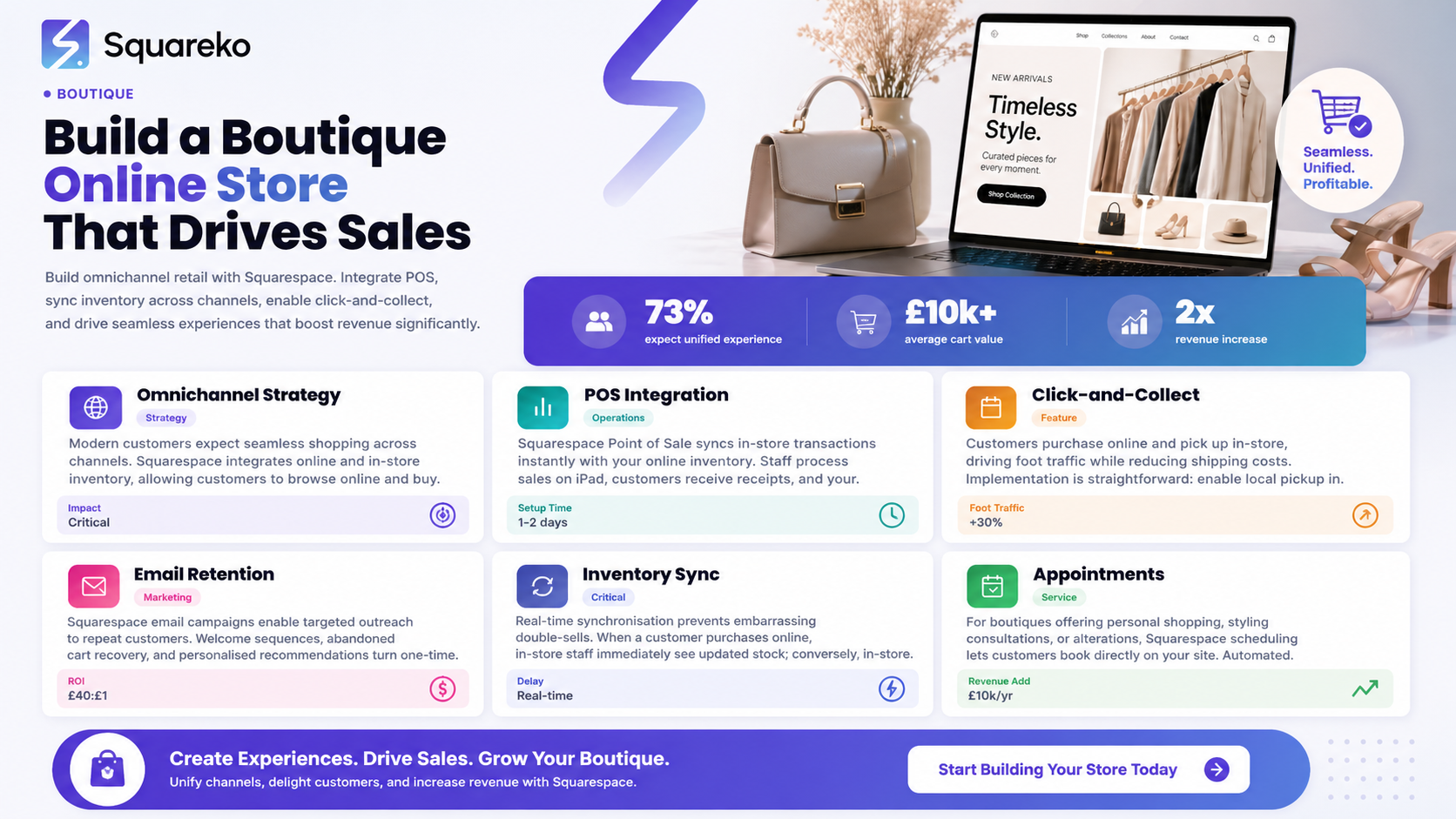
Omnichannel retail isn't just a buzzword it's a survival strategy. Your customers expect to shop however suits them: browse online, buy in-store, pick up orders at their convenience, or purchase in-store and receive online. A boutique that fails to offer this flexibility loses sales to competitors who do.
Why Boutiques Specifically Need Omnichannel
Boutiques operate with lower inventory volumes than large retailers, which makes omnichannel even more critical. When a customer visits your website and sees a product is available, they expect to either purchase it online or pop into your physical store to try it on. If your systems aren't integrated, you risk disappointing customers and losing sales.
According to recent retail data, 73% of shoppers now expect a unified experience across channels. For boutiques, this means:
Consistency: Your brand message, pricing, and product information match across all touchpoints
Inventory transparency: Customers can see real-time stock levels online and request items from in-store
Flexible fulfillment: Offer multiple ways to receive purchases (ship, in-store pickup, appointment-based selection)
Customer recognition: Track customer preferences across channels to personalise recommendations
Squarespace as Your Omnichannel Engine
Squarespace Commerce integrates with Squarespace Point of Sale, creating a unified system where inventory, customer data, and sales flow seamlessly between your website and physical store. This isn't a workaround—it's a native capability designed for businesses like yours.
Setting Up Your Squarespace Store Foundation
Before diving into advanced features, your store needs a solid foundation. The setup phase determines how smoothly everything else operates.
Choosing the Right Squarespace Plan
For boutiques planning to integrate POS and omnichannel features, you'll need Squarespace Commerce Advanced or higher. This plan includes:
Unlimited products and bandwidth
Advanced inventory management
Abandoned cart recovery
Gift cards and product bundles
Native POS integration
Real-time synchronisation between online and offline
If you're just starting with an online store only, begin with Commerce Standard, but plan your upgrade path from day one.
Domain and Brand Identity
Your domain is your digital storefront's address. Use a domain that reflects your boutique name—avoid anything too trendy or difficult to spell. Once registered through Squarespace or transferred in, configure your SSL certificate (automatic with Squarespace) and set up your email domain.
Establish your visual identity from the start. Create a colour palette, select fonts, and choose templates that reflect your boutique's aesthetic. Consistency in design—from your website to your packaging to your in-store signage—reinforces brand recognition and builds trust.
Navigation and Information Architecture
Design your navigation to guide customers logically. For boutiques, consider organising products by:
Category
Collection
Style or Price Point
Occasion or Seasonal
Include essential pages beyond your product catalogue:
About: Your boutique's story, values, and team
Store Location: Embedded map, hours, and contact details
Contact: Email, phone, contact form, and live chat options
FAQs: Address common questions about sizing, returns, shipping
Blog: Share styling tips, new product announcements, and brand news
Integrating Squarespace Point of Sale for Seamless Operations
This is where omnichannel retail becomes tangible. Squarespace POS transforms your in-store operations while keeping everything connected to your online store.
What Squarespace POS Does
Squarespace Point of Sale is a tablet-based payment system that processes in-store transactions while syncing with your online inventory. When a customer purchases in-store, that transaction immediately updates your online stock levels.
Setting Up Squarespace POS
Hardware Requirements: You'll need an iPad, a card reader (Squarespace-compatible), and a receipt printer
Configuration: In your Squarespace dashboard, enable POS and configure your register settings, payment methods, and tax rates
Staff Permissions: Set up staff accounts with appropriate permissions (some staff might ring sales, others might access reports)
Testing: Process test transactions in your physical store to ensure everything works before opening to real customers
Daily Operations with POS
Your staff can:
Ring up sales using the product catalogue or SKU lookup
Apply discounts, gift cards, and promotional codes
Accept multiple payment methods
Issue refunds and process exchanges
Print or email receipts
Every transaction flows into your Squarespace dashboard, giving you real-time sales data, inventory counts, and staff performance metrics.
Synchronising Inventory Across Channels
Inventory mismanagement is one of the most frustrating customer experience failures. Real-time synchronisation prevents overselling online whilst your shelves are bare, or worse—disappointing customers who travelled to your store.
How Real-Time Sync Works
When integrated properly, Squarespace updates inventory counts instantly:
Customer purchases online → Online stock decreases, in-store staff sees updated levels
Staff processes in-store sale via POS → Online inventory decreases, preventing double-selling
Item is manually counted in-store or restocked → You update the master count in Squarespace, reflecting everywhere
Best Practices for Inventory Management
Use SKUs Consistently: Every product variant (size, colour, material) gets a unique SKU. Your online store and POS system must reference the same SKUs, or synchronisation breaks down.
Set Reorder Points: Configure automatic alerts when stock reaches a threshold (e.g., 5 units remaining). This triggers your restocking workflow before items sell out.
Allocate Inventory Strategically: Decide how much stock lives online-only, in-store-only, and in both channels. For high-demand items, you might reserve stock for in-store to drive foot traffic.
Regular Audits: Monthly physical counts catch discrepancies. Use Squarespace's inventory management reports to identify shrinkage or system errors quickly.
Multi-Location Support: If you plan multiple physical locations, Squarespace can manage separate inventories per location while maintaining a unified online store.
Optimising Product Pages for Online Conversions
Your product pages are salespeople working 24/7. Optimise them ruthlessly.
High-Quality Photography
Invest in professional product photography. For boutiques, this means:
Multiple angles
Lifestyle images
Zoom functionality
Consistent lighting and background
Mobile-optimised images
Squarespace allows multiple images per product. Use this fully—customers who see 5+ images are significantly more likely to convert.
Compelling Product Descriptions
Write descriptions that sell without being pushy. Include:
Materials and Construction: 100% Italian wool blend conveys quality
Sizing Details: True to size; customers with narrow feet should size down
Care Instructions: Show customers the garment will last
Occasion and Styling Suggestions: Perfect for weekend brunch or casual Friday
Why You Chose It: We discovered this brand at Milan Fashion Week and loved the attention to detail
Keep descriptions scannable. Use short paragraphs and bullet points for key specifications.
Pricing and Scarcity
Display pricing clearly and prominently. For boutiques, consider:
Limited Edition Notation: Only 3 in stock creates urgency
New Arrival Badges: Guide customers to fresh inventory
Bundle Pricing: Create sets
Trust Signals and Social Proof
Add elements that reduce purchase anxiety:
Customer Reviews: Enable Squarespace reviews and encourage customers to leave feedback
Size Guides: Detailed measurement charts and fit notes
Return Policy: Clear, generous returns build confidence
Shipping Information: Free shipping on orders over £50; arrives within 5–7 working days
Payment Options: Display accepted payment methods and security badges
Customer Testimonials: Feature positive quotes from satisfied customers
Mobile Optimisation
Over 60% of boutique shoppers browse on mobile devices. Squarespace templates are mobile-responsive by default, but test your product pages on actual devices. Ensure:
Images load quickly
Text is readable without zooming
The add-to-cart button is thumb-friendly and obvious
Checkout is a one-handed process
Creating Click-and-Collect and In-Store Experience Features
Omnichannel strategies go beyond inventory sync. They're about giving customers flexibility in how they shop and receive products.
Click-and-Collect Setup
Click-and-collect is a game-changer for boutiques. Implementation:
Enable the Feature: In Squarespace Commerce settings, activate Local Pickupas a fulfillment option
Set Pickup Locations: Configure hours, location details, and pickup availability
Customer Experience: At checkout, customers select Pickup at [Store Name] instead of shipping
Notification System: Squarespace sends customers automated emails when their order is ready
Staff Process: Staff allocate the order in the store, and customers collect within the specified timeframe
Benefits for your boutique:
Drives foot traffic (customers often browse whilst collecting)
Reduces shipping costs
Increases attachment sales (customers frequently purchase additional items in-store)
Improves delivery certainty (no shipping delays)
In-Store Appointment Scheduling
For boutiques offering personal shopping, styling consultations, or bespoke services, appointment scheduling is invaluable.
Squarespace Scheduling Integration:
Embed a booking widget on your website
Customers select available times for appointments
Automated confirmations and reminders reduce no-shows
You control availability by day and time
Link appointments to services
Use Cases for Boutiques:
Personal Shopping: Let our stylist help you find your perfect pieces
Alterations Consultations: Book a fitting appointment for alterations
VIP Customer Events: Early access to new collections for loyalty members
Wig Fittings or Accessory Consultation: (Relevant for specialty boutiques)
Appointment revenue becomes a hidden revenue stream. If you book 4 styling appointments weekly at £50 each, that's £10,400 annually—and each appointment typically generates additional product sales.
Geolocation and Local SEO
Optimise your online presence for local searches:
Google Business Profile: Keep your hours, photos, and information current
Local Keywords: Naturally incorporate location into your website copy
Location Pages: If you have multiple stores, create dedicated pages for each
Customer Reviews: Encourage customers to leave reviews on Google and Squarespace
When customers search boutique near me or independent fashion store [city], you want to appear prominently.
Email Marketing and Customer Retention Strategies
Acquiring a new customer costs 5–7 times more than retaining an existing one. Email marketing is your most direct channel for repeat purchases.
Squarespace Email Campaigns
Squarespace includes native email marketing (Squarespace Email or integration with Klaviyo for advanced users). Use it for:
Welcome Series: When someone subscribes to your list, send a 3–5 email sequence introducing your brand and offering a first-purchase discount.
Abandoned Cart Recovery: A customer adds items to their cart but doesn't check out. Squarespace automatically sends a reminder email with a discount incentive.
New Product Announcements: When you launch new inventory, email your list first. Create anticipation and drive initial sales.
Seasonal Campaigns: Spring collection launch, summer sale, Black Friday—time emails to align with shopping occasions.
Birthday and Anniversary Offers: Use customer data to send personalised offers on customer birthdays or their anniversary as a customer.
Post-Purchase Follow-ups: 2–3 days after purchase, send a thank you email with styling tips related to their purchase. Include a gentle invitation to leave a review.
Exclusive In-Store Events: New collection preview evening for email subscribers—register now
Building Your Email List
Email addresses are gold. Build your list through:
Website Signup Form: Place a pop-up or sticky header offering a discount
Checkout Incentive: Offer a discount for subscribing during the purchase process
In-Store Signup: Tablet or paper signup sheet in your physical store
QR Code: Place a QR code linking to your email signup form at the till, on packaging, or in receipts
Aim to grow your list by 10–20% monthly. With email ROI typically around £40 per £1 spent, it's worth the effort.
Segmentation and Personalisation
The most effective emails feel personal, not generic. Segment your list by:
Purchase History: Customers who bought dresses receive dress-focused emails; accessory shoppers get accessory highlights
Engagement Level: High-engagement subscribers get more frequent emails; inactive subscribers receive a We miss you offer
Loyalty Tier: VIP customers (high spenders) might receive exclusive early access or invitations to private events
Location: If you have multiple stores, segment by closest location
This requires some initial setup but dramatically improves open rates and conversions.

From custom website design to SEO strategy, we help businesses launch a site that looks professional and performs better.
Frequently Asked Questions
-
You don't need a permanent physical location. Many boutique owners use Squarespace POS at markets, pop-up events, and temporary locations. You'll configure a mobile location in your settings, and the same inventory synchronisation applies. This lets you test market expansion or maintain seasonal pop-ups without committing to a lease.
-
Squarespace POS has offline capabilities. If your internet drops, the register can continue accepting payments and processing sales locally. Once connectivity is restored, all transactions sync automatically to your dashboard. This prevents disruption to your in-store operations.
-
Yes. Squarespace Commerce supports recurring billing and subscriptions. Many boutiques use this for beauty subscription boxes, curated monthly collections, or seasonal style boxes. Customers are charged automatically, and you can manage fulfillment (shipping or in-store pickup) for each cycle.
-
Set a clear returns policy and communicate it prominently on your website. Most boutiques allow online purchases to be returned in-store within 30 days, original tags attached. When processing a return at the POS, staff simply select "Return" and scan the original receipt or order number. The refund processes instantly, and inventory updates accordingly.
-
Several strategies work: prominently display your store location with Google Maps embedded; promote exclusive in-store events or appointment availability; offer click-and-collect to encourage store visits; feature user-generated content from in-store shopping; and use local SEO to appear in location-based searches. Additionally, in your product descriptions, mention "available to try on in-store," which encourages people to visit.
-
Absolutely. Squarespace includes native gift card functionality. Customers purchase digital or physical gift cards online, and you control the denominations, designs, and messaging. Gift cards can be redeemed online or in-store using your POS system. They're an excellent product with high margins and often encourage additional purchases above the gift card value.
-
Ideally, in real time. If you're using Squarespace POS for in-store transactions, counts update automatically. For in-store browsing (items customers see but don't purchase), conduct a physical count weekly or monthly depending on transaction volume. Use Squarespace's inventory reports to flag discrepancies and investigate shrinkage.
-
Squarespace handles boutique volumes very well—up to several hundred transactions daily without issues. Unless you're processing thousands of transactions daily or require highly customised integrations, Squarespace's simplicity, integrated POS, and design flexibility make it ideal for boutiques. It's powerful enough and much simpler to manage than more complex platforms.
Ready to Build Your Boutique Website with Squarespace?
Your boutique's success in the modern retail environment depends on seamlessly connecting your online and physical operations. Squarespace gives you the tools to do this without complexity or expensive external integrations.
If you're ready to build—or rebuild—your boutique's digital presence with omnichannel capabilities, professional design, and genuine conversion optimisation, the team at Squareko.com is here to help. We specialise in designing Squarespace stores for independent boutiques, fashion retailers, and beauty businesses. We handle everything from template customisation and product photography to POS integration, email marketing setup, and ongoing optimisation. Whether you're starting from scratch or migrating from another platform, we ensure your new store drives real sales across both online and in-store channels.

Author Bio
I'm Walid Hasan, a Certified Squarespace Expert and Squarespace Circle Platinum Partner with over 12 years of hands-on experience designing and optimizing high-performing websites. Over the years, I've had the privilege of building more than 2,000 Squarespace websites for clients around the world, always focusing on clean design, strong user experience, and conversion-driven results.
