
How to Build a Fashion Brand Website on Squarespace That Converts Visitors to Buyers
Introduction
Building a fashion brand website requires more than aesthetics. When you're selling clothing and accessories online, every design choice, product image, and page flow must guide visitors toward purchase. Squarespace offers an excellent foundation for fashion brands, but converting browsers into buyers demands strategic thinking about how customers actually shop for fashion. The best fashion brand websites on Squarespace combine visual storytelling with conversion architecture—clear navigation, compelling imagery, social proof, and frictionless checkout.
This guide walks you through the complete framework for building a fashion brand website on Squarespace that converts visitors to buyers. You'll discover how to design for the fashion customer journey, implement proven conversion tactics, and troubleshoot common barriers that prevent sales.
Key Takeaways
Fashion purchases follow a distinct journey: Discovery → Inspiration → Product Search → Trust Building → Purchase → Loyalty
Squarespace provides native tools for product filtering, size guides, customer reviews, and image galleries—all essential for fashion retail
A fashion website conversion audit identifies 15 critical elements that influence buying decisions
High-quality product photography, detailed size guides, and customer testimonials directly reduce returns and increase repeat purchases
Strategic page hierarchy guides customers from brand story to product discovery to secure checkout
Mobile optimisation is non-negotiable; 60–70% of fashion shopping now happens on mobile devices
The Fashion Customer Journey on Squarespace
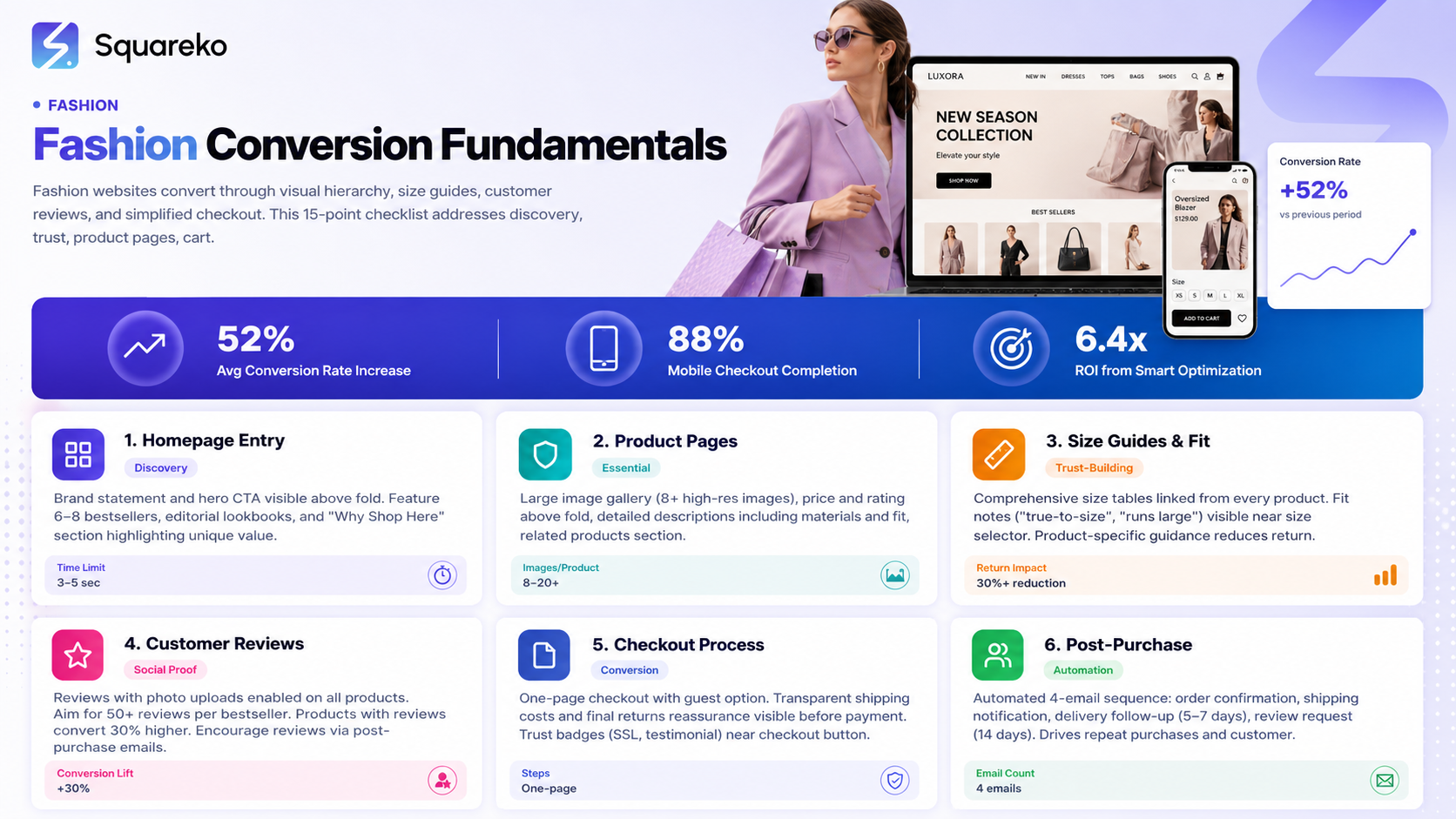
Understanding how fashion customers move through your website is the foundation of conversion strategy. Unlike commodity purchases, fashion buying involves emotional attachment, identity, and trust in fit and quality.
Stage 1: Brand Discovery
Customers first encounter your brand through social media, search engines, influencer recommendations, or paid ads. Your website's entry point must reinforce who you are and why the brand matters.
On Squarespace, this means your homepage hero section should contain:
A clear brand statement (20–40 words explaining what you make and why)
A compelling hero image or video showing product in context
A single primary call-to-action (usually "Shop Now" or "View Collection")
Stage 2: Lookbook and Editorial Content
Before diving into product catalogs, many fashion customers want to see items styled. They're asking: "How would I wear this?" and "Does this match my aesthetic?"
Squarespace's flexibility allows you to create:
Lookbook pages with lifestyle imagery
Editorial blog content pairing products with seasonal trends
Mood board galleries showing coordinating pieces
Behind-the-scenes content about design and sourcing
This stage builds brand credibility and nudges visitors toward product discovery.
Stage 3: Product Discovery
Customers now browse your shop. Squarespace's native filtering (by collection, price, size, colour) is crucial here. The challenge: presenting thousands of products without overwhelming visitors.
Effective product discovery on Squarespace includes:
Clear category navigation (e.g., "New Arrivals", "Bestsellers", "Sale")
Filtering options visible above the fold
Thumbnail images that are large enough to discern detail
Product titles that describe both the item and the style (e.g., "Elena Oversized Linen Shirt – Cream" rather than just "Shirt")
Stage 4: Size and Fit Trust
This is where fashion retail diverges sharply from other e-commerce. Customers cannot try on your clothes, so they must trust fit information.
The conversion blockers here are severe:
Missing or vague size charts
No guidance on how an item runs (true-to-size, oversized, petite)
Absence of customer reviews mentioning fit
No returns policy clearly stated
Squarespace solutions include:
Detailed size guides (linked from every product page)
Product-specific fit notes in the description
Customer reviews with a "fit" or "sizing" field
A prominent, reassuring returns policy
Stage 5: Purchase Decision
The customer is ready to buy. Squarespace's checkout must be fast, secure, and visible.
Key elements:
Trust badges (SSL certificate, payment icons, customer testimonials visible near checkout)
Guest checkout option (don't force account creation)
Multiple payment methods (cards, Apple Pay, PayPal, Shop Pay)
Clear shipping and returns information before checkout initiation
No unexpected costs or hidden fees at the final stage
Stage 6: Repeat Purchase and Loyalty
Post-purchase, the customer's experience with delivery, product quality, and return handling determines whether they buy again.
Squarespace strategies:
Automated order confirmation and shipping update emails
A branded unboxing experience (thank-you insert, tissue paper, branded bag)
Post-purchase follow-up email (5–7 days after delivery) asking for feedback
Loyalty programme or repeat customer discount
User-generated content requests (incentivise customers to post photos of purchases)
Design Principles That Sell Fashion
Fashion is visual, so design is strategy. Unlike a tech company, your website's aesthetics directly influence purchasing behaviour.
Whitespace and Breathing Room
Resist the urge to fill every pixel. Squarespace's default grid system uses generous margins; keep them. White (or appropriately coloured) space around product images makes them stand out and signals luxury and intentionality.
Fashion brands that cram too many products onto a page often see bounce rates rise because visitors feel overwhelmed. A well-curated homepage featuring 6–12 key products outperforms a page showing 40+ items.
Colour Consistency
Limit your palette to 3–4 core colours plus neutrals. This creates visual coherence across all pages and reinforces brand identity. Squarespace's design system makes it easy to adjust colours globally, so choose wisely at the start.
Typography for Fashion
Font choice conveys brand personality. A luxury fashion brand uses serif fonts (Didot, Playfair Display) paired with clean sans-serif for body text. A streetwear brand might choose bold, geometric sans-serifs. Whatever you choose, use no more than two typeface families.
Squarespace's font options include Google Fonts and premium options; select fonts that load quickly and render well on mobile.
Image Grids and Layouts
Product grids should adapt to device size. On desktop, a 3–4 column grid works well. On mobile, switch to single or double column. Squarespace handles this responsively, but review the mobile layout carefully.
For lookbooks and editorial pages, vary grid layouts to maintain visual interest. A uniform 3-column grid across all pages feels mechanical; alternating layouts (full-width image, then 2-column text + image, then 3-column products) feels more intentional.
Product Photography and Visual Hierarchy
Product photography is your brand's silent salesperson. High-quality images directly correlate with conversion rate and reduced returns.
The Photography Formula
Each product needs:
Hero Image (Flat Lay or On-Model): A clear, well-lit image of the item against a simple background. For clothing, an on-model shot is superior to flat lay because it shows proportions and drape.
Detail Shots (2–3): Close-ups of fabric, seams, zips, and other features that communicate quality. This is where customers build confidence in craftsmanship.
Lifestyle/Context Shot: The item worn or styled in a realistic setting. This answers the question, "When and where would I wear this?"
Colour/Option Variations: If the product comes in multiple colours, show each one on the same model in the same pose. This lets customers compare quickly.
Size Reference: Optional but powerful—an image showing the item on two different body types or sizes, or a detail of the measurement label.
Upload Strategy on Squarespace
Squarespace allows up to 20 images per product. Use this fully:
First image: your hero (the most flattering, best-lit image)
Images 2–4: additional angles or detail shots
Images 5–6: lifestyle or styled shots
Images 7–10: colour variants or fit variations
Images 11+: lifestyle content, customer reviews with photos, behind-the-scenes imagery
Optimise all images for web before upload (compress to 100–200 KB per image). Use descriptive file names and alt text for accessibility and SEO.
Mobile Image Presentation
On mobile, images must be clear and quickly tappable. Squarespace's zoom feature on product images is essential—customers need to see seams, fabric, and stitching up close. Test the zoom functionality on a real mobile device.
Building Trust: Size Guides, Reviews, and Returns
Fit and return anxiety are the primary barriers to fashion purchases online. Addressing these directly increases conversion.
Comprehensive Size Guides
Create a dedicated size guide page, and link to it from every product page. Include:
A table with measurements for each size (bust, waist, hip, length, sleeve, inseam—whatever is relevant)
A measurement guide (diagram showing how to measure yourself)
Fit notes for each product type (e.g., "Our jeans run true to size; our shirts run 1 size large")
A note on the model's size in product photos (e.g., "Model is 5'8" wearing size M")
Squaresco's product description field can link to a custom page, or you can use a Squarespace form or external tool (e.g., custom HTML in a code block) to present a size guide selector.
Customer Reviews and Social Proof
Enable customer reviews on every product. Squarespace's default reviews feature is functional but basic; consider upgrading to a third-party solution (Yotpo, Loox, Judge.me) that allows photo uploads, rating by category (fit, quality, color accuracy), and more.
Encourage reviews through post-purchase emails:
Send a review request 7–10 days after delivery
Offer a small incentive (10% off next purchase) for honest reviews
Feature customer photos prominently on product pages and social media
Aim for 50+ reviews per popular product. Research shows that products with customer reviews convert 30% higher than those without.
Clear, Generous Returns Policy
Display your returns policy prominently
Linked in the footer on every page
Summarised near the checkout button
Detailed in the order confirmation email
Included in the physical packaging
A customer-friendly policy (e.g., "30 days for returns, free shipping on returns") reduces purchase hesitation. Even if your margin is tighter, the conversion lift often justifies the cost.
Conversion Optimization Across the Customer Journey
Beyond design and trust, specific optimisations increase the likelihood of purchase at each stage.
Homepage and Brand Entry
Your homepage has 3–5 seconds to communicate brand identity and guide visitors. Use:
A hero section with brand statement and primary CTA
A "New Arrivals" or "Bestsellers" section showcasing 6–8 products
An editorial or lookbook section linking to brand story
A "Why Shop Here" section highlighting unique value (e.g., "Sustainable materials", "Made to order", "Free returns")
An email signup form offering a first-purchase discount (10–20% off)
A/B test your homepage. Try different hero images, CTA copy, and section order. Squarespace's built-in analytics show which sections receive the most scrolling; adjust accordingly.
Product Page Optimisation
Every product page should include:
Large, high-resolution image gallery
Product name, price, and rating visible above the fold
Key product details (material, care, fit) in the description
Size selector and quantity picker
"Add to Cart" button in a contrasting colour (not grey or neutral)
Related products section below (showing similar items)
Customer reviews and photos
Trust badges (SSL, returns policy, customer testimonial)
Test button copy: "Add to Cart", "Add to Bag", and "Shop Now" all perform differently across demographics. For a luxury brand, "Add to Bag" often outperforms "Add to Cart".
Cart and Checkout
Abandoned cart is the silent killer in e-commerce. Squarespace's checkout is generally excellent, but:
Enable one-page checkout (Squarespace default)
Show a progress bar or indication of steps (contact → shipping → payment)
Allow guest checkout without account creation
Show a security badge or trust indicator
Offer multiple shipping options with transparent costs
Provide a reassurance message: "Your payment is secure" or "We never share your information"
Include a final, reassuring line about returns before the payment button
Squarespace's abandoned cart email feature is powerful. Set up an automated email sent 1–2 hours after cart abandonment, reminding customers of their items and offering a small incentive (5–10% off) if needed.
Post-Purchase Email Sequence
Automate a 4-email sequence:
Order Confirmation (immediate): Order number, items, shipping address, expected delivery date
Shipping Notification (when shipped): Tracking number and estimated arrival
Delivery Follow-Up (5–7 days after delivery): "How do you like your purchase? Share a photo and get 10% off your next order"
Review Request (14 days after delivery): "We'd love to hear from you. Write a review and enter a raffle for a £50 voucher"
These emails drive repeat purchases and customer reviews simultaneously.
Fashion Website Conversion Audit Checklist
Use this 15-item checklist to audit your Squarespace fashion website. Score each item 0 (not present), 1 (partially implemented), or 2 (fully implemented). Aim for a total score of 25+.
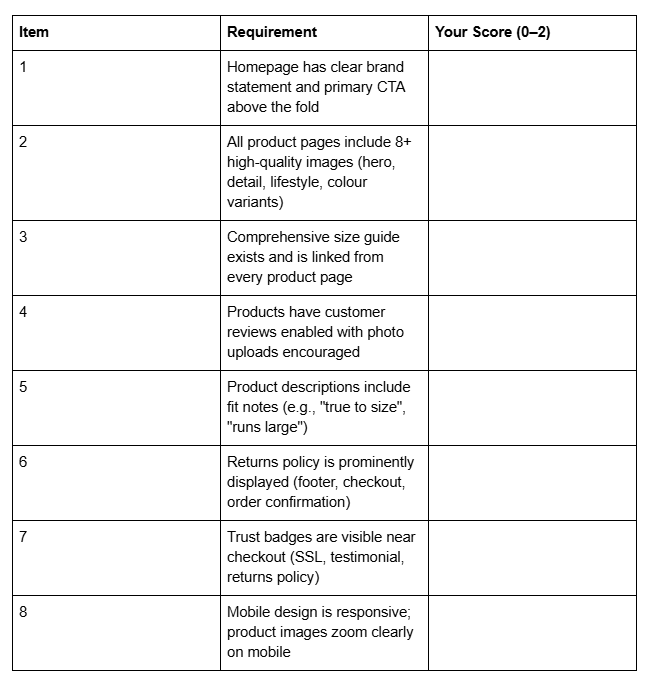
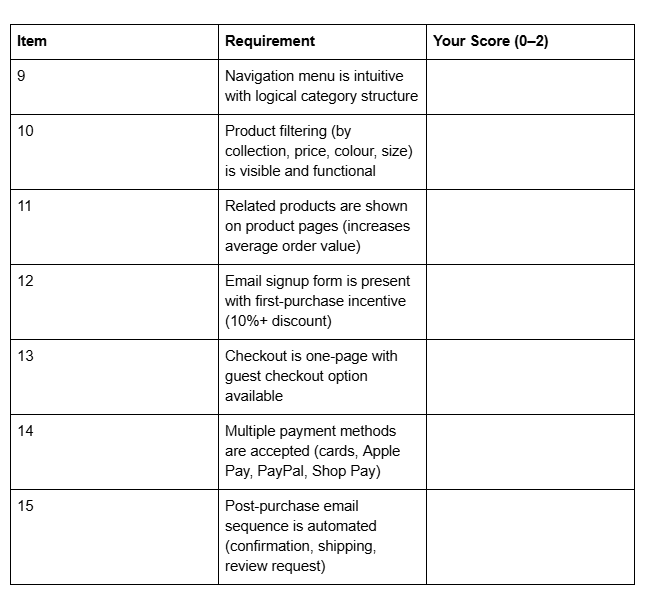
Scoring Guide:
25–30: Excellent. Your website is optimised for conversion. Focus on ongoing A/B testing and customer feedback.
20–24: Good. Address the items scoring 0 or 1 to unlock the next tier of conversion.
Below 20: Significant opportunity. Prioritise items 2, 3, 4, 5, 12, and 13 immediately.
Common Conversion Blockers and Solutions
Blocker 1: Unclear Sizing Information
Problem: Customers leave the cart because they're unsure about fit.
Solution: Create a product-specific sizing note visible near the size selector. Example: "This shirt runs 1 size large. If you typically wear a size M, order a size S." Update this note based on customer reviews.
Blocker 2: Slow Product Images
Problem: Mobile customers bounce because images take 3+ seconds to load.
Solution: Compress all images before uploading. Aim for 100–200 KB per image. Use Squarespace's image compression, or use a free tool like TinyPNG before upload. Test page load speed on mobile using Google PageSpeed Insights.
Blocker 3: No Social Proof
Problem: New visitors have no reason to trust an unknown brand.
Solution: Add customer testimonials to your homepage. Include a name, location, and photo for credibility. Add a 4–5 star review component displaying the average rating and number of reviews.
Blocker 4: Confusing Navigation
Problem: Customers can't find what they're looking for.
Solution: Limit main navigation to 5–7 items. Use clear categories: "New Arrivals", "Collections" (or "Shop"), "About", "Blog", "Contact". Avoid jargon or overly creative category names.
Blocker 5: Missing Lifestyle Content
Problem: Customers can't visualise the product in real life.
Solution: Add 2–3 lifestyle images to each product page. Show the item being worn, in context, from different angles. Update these images seasonally.
Blocker 6: Weak Call-to-Action Buttons
Problem: Visitors don't click the main action buttons.
Solution: Use a contrasting colour (not grey). Test button copy: "Add to Bag", "Add to Cart", "Shop Now", and "Buy Now" all resonate differently. Make buttons large and visible on mobile.
FAQ
-
Returns are reduced through clear communication and trust-building. Implement: (1) a detailed size guide with product-specific fit notes, (2) high-quality product photography showing fit on multiple body types, (3) customer reviews highlighting fit and sizing, (4) a clear returns policy (30+ days), and (5) post-purchase communication confirming expectations. Squarespace tools that support this include product photo galleries, review sections, and customisable size guide pages. Additionally, monitor customer feedback—if multiple reviews mention that a product "runs small", update the size note immediately.
-
Each product requires a minimum of 8 high-quality images: (1) a hero shot (on-model or flat lay, well-lit, simple background), (2–4) three detail or close-up shots showing fabric, seams, and craftsmanship, (5–6) two lifestyle or styled shots showing the item in context, (7–8) colour or size variations. Additional images enhance trust: customer photos, flat lay group shots, or behind-the-scenes imagery. Upload all images as JPEGs, compressed to 100–200 KB each. Squarespace supports up to 20 images per product; use this allocation fully to reduce cart abandonment and returns.
-
Create a dedicated size guide page: Go to Pages > Add > Standard Page. Design it with a table showing measurements for each size (bust, waist, hip, length, sleeve, inseam). Include a diagram showing how to measure yourself. Add product-specific fit notes (e.g., "Our jeans run true to size; our shirts run 1 size large"). Then, from each product page, link to this guide using the description or a code block. Alternatively, use a third-party size guide tool (Simple Size Guide, Fitguide) and embed it via custom code. Test the size guide on mobile to ensure tables display clearly.
-
The ideal checkout is frictionless: (1) single-page checkout, (2) guest checkout option (don't force accounts), (3) clear progress indication, (4) multiple payment methods (cards, Apple Pay, PayPal, Shop Pay), (5) transparent shipping costs visible before payment, (6) a final reassurance message ("Your payment is secure", "Free returns for 30 days"), and (7) no unexpected fees. Squarespace's native checkout handles this well. Reduce form fields to essentials: email, name, address, payment. Offer address autofill. Estimated delivery date should be visible before purchase.
-
Enable reviews on all products (Settings > Products > Product Reviews). Then, automate a post-purchase email sequence: Send email 7–10 days after delivery asking for a review, with a direct link. Offer a small incentive: "Write a review and get 10% off your next order." Feature customer photos prominently on product pages and social media to motivate visual reviews. Monitor and respond to all reviews (positive and negative) to show you value feedback. Aim for at least 20% of customers to leave reviews; brands achieving this see 20–30% higher conversion rates.
-
Mobile optimisation is critical: (1) test every page on an actual mobile device, not just browser emulation, (2) ensure images zoom clearly when tapped, (3) keep navigation simple (hamburger menu), (4) make buttons large (minimum 48px height) and widely spaced, (5) simplify checkout (avoid multi-step forms), (6) compress all images (100–200 KB), (7) use a readable font size (minimum 16px body text), (8) test page load speed using Google PageSpeed Insights, and (9) ensure the size selector and quantity picker are easy to tap. Squarespace templates are largely responsive, but customisations sometimes break mobile layouts. Review mobile regularly.
-
Both platforms are excellent for fashion. Squarespace excels in design flexibility, aesthetics, and built-in blogging (ideal for editorial content). Shopify excels in inventory management, app ecosystem, and scale-ability for large product catalogs. For emerging fashion brands (under 1,000 SKUs) focused on design and brand storytelling, Squarespace is ideal. For brands managing complex inventory, international shipping, or drop shipping, Shopify offers more power. Squarespace is more cost-effective at smaller scales; Shopify becomes more economical as you scale.
Call to Action
Ready to build your fashion brand website on Squarespace? Squareko specialises in custom design and optimisation for fashion brands. Whether you're launching a new collection or redesigning an existing store, our team of Squarespace experts ensures your website converts visitors into loyal customers.
Start Your Fashion Website Audit – Use our free 15-point checklist to identify optimisation opportunities.
Book a Strategy Call – Let's discuss your fashion brand's unique conversion goals.

From custom website design to SEO strategy, we help businesses launch a site that looks professional and performs better.

About the Author
Walid | Founder, Squareko
I'm Walid Hasan, a Certified Squarespace Expert and Squarespace Circle Platinum Partner with over 12 years of hands-on experience designing and optimizing high-performing websites. Over the years, I've had the privilege of building more than 2,000 Squarespace websites for clients around the world, always focusing on clean design, strong user experience, and conversion-driven results.
