
Best Squarespace Templates for Independent Boutiques and Small Retailers in 2026
Introduction
The UK's independent retail sector is thriving, with boutique shops and small retailers leading the charge in online commerce. If you're running an independent boutique—whether it's a clothing emporium, jewellery store, or gift shop—your website is often the first impression customers get of your brand.
Choosing the right Squarespace template is crucial. Your template isn't just a pretty backdrop; it's the foundation for showcasing your products, building customer trust, and driving sales. With Squarespace templates for independent boutiques and small retailers becoming increasingly sophisticated, you have access to genuinely powerful tools without needing custom development or expensive agencies (though we're here if you need strategic guidance).
This guide walks you through the best Squarespace templates for independent boutiques, what to look for when evaluating templates, and how to customise them to match your brand identity. We'll also explore real examples and help you decide which template suits your boutique best.
Key Takeaways
Squarespace offers purpose-built templates designed for visual product showcases, perfect for boutique retailers
Design-first templates like Paloma and Hester excel at luxury positioning and mobile shopping experiences
E-commerce features matter: look for product filters, inventory management, and smooth checkout processes
Customisation flexibility ensures your boutique's unique personality shines through without coding
Mobile optimisation is non-negotiable—over 65% of boutique shoppers browse on their phones
Template selection depends on your niche—clothing, accessories, and home décor each have ideal matches
Professional installation and customisation can transform a great template into a revenue-generating asset
Why Choose Squarespace for Your Independent Boutique?
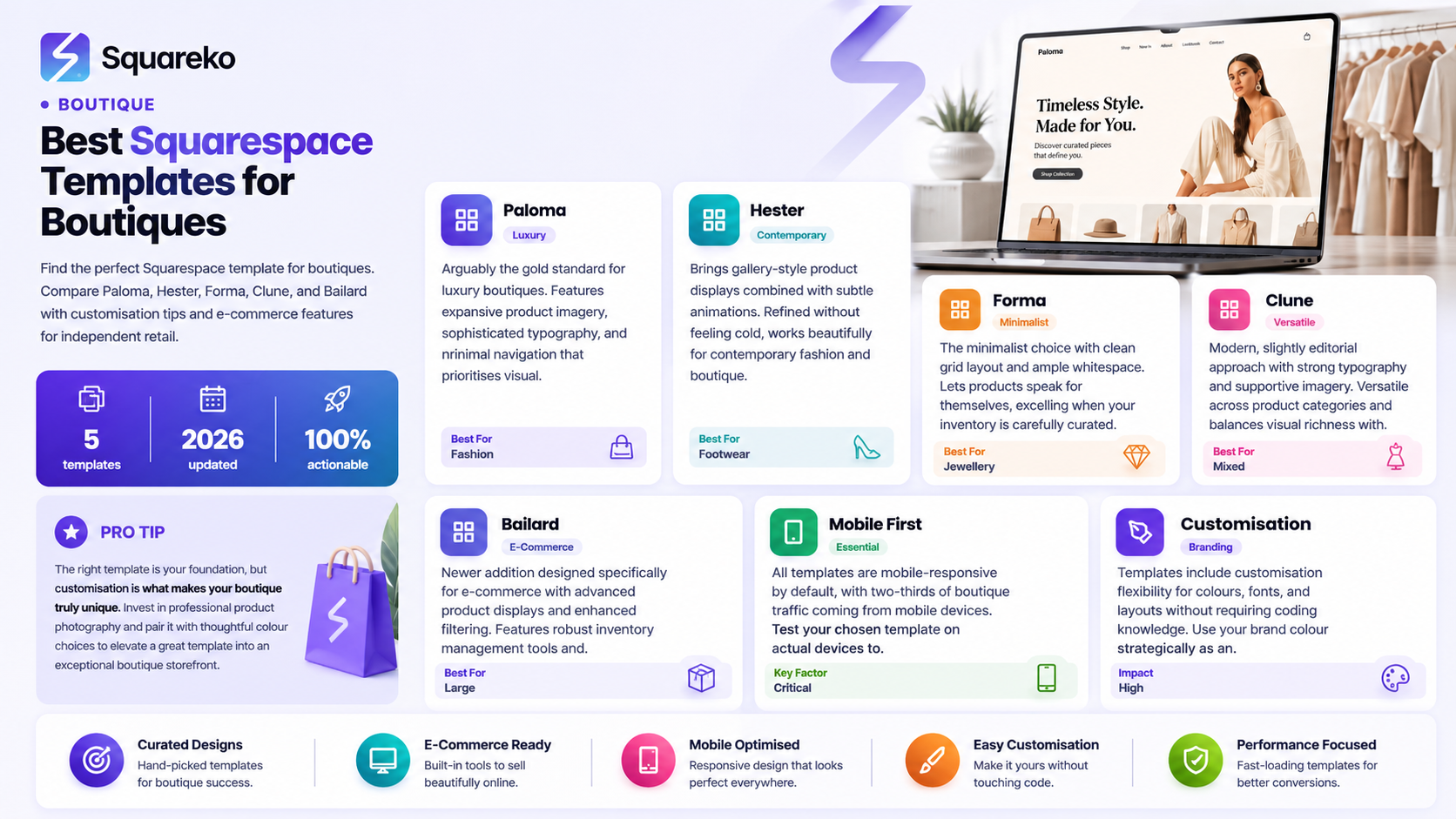
Before exploring specific templates, let's establish why Squarespace has become the go-to platform for independent boutiques across the UK and beyond.
Built for Creative Entrepreneurs
Squarespace was designed with visual businesses in mind. The platform combines beautiful design with practical business tools, meaning you don't have to choose between aesthetics and functionality. For boutique owners, this matters enormously. Your products are often artisanal, unique, or carefully curated—they deserve a showcase that reflects that quality.
All-in-One Solution
You get hosting, SSL security, email integration, social media tools, and analytics without juggling multiple vendors. This integrated approach means less time troubleshooting technical issues and more time running your business.
Competitive Pricing
Unlike custom-built websites, Squarespace plans are transparent and scalable. Start with a standard plan and upgrade as your business grows. For independent boutiques managing tight budgets, this predictability is valuable.
Professional Results Without the Learning Curve
Squarespace templates are pre-built with professional design standards. You can achieve a polished, high-end appearance without hiring a web developer—though specialist Squarespace agencies like Squareko can help refine your site further if you want advanced customisation.
What Makes an Excellent Boutique Template?
Not all Squarespace templates work equally well for boutiques. Before we recommend specific options, understand what separates good templates from great ones.
Visual Product Display
Boutique customers are visual shoppers. Your template must showcase products beautifully with:
Large, high-quality image galleries that load quickly
Zoom functionality so customers can inspect details
Multiple image angles for single products
Generous whitespace to avoid clutter
Templates like Paloma excel here because they give products breathing room on the page.
Navigation Clarity
Independent boutiques often carry diverse product ranges—clothing, shoes, jewellery, home goods. Your template needs intuitive navigation:
Clear category structures without overwhelming menus
Filtering options (by size, colour, price, material)
Search functionality that actually works
Breadcrumb trails so customers know where they are
Mobile Optimisation
Roughly 67% of e-commerce traffic comes from mobile devices. Your template must deliver a seamless mobile experience:
Touch-friendly buttons and links
Fast loading times
Simplified navigation adapted for smaller screens
One-hand checkout where possible
Checkout Simplicity
A beautiful product page means nothing if customers abandon at checkout. Look for:
Minimal form fields
Guest checkout options
Multiple payment methods
Security badges that reassure customers
Aesthetic Flexibility
Your boutique has a personality. The template should allow:
Custom colour schemes aligned to your brand
Font choices that match your tone
Background customisation without looking generic
Space for storytelling (about your brand, your curation process)
Top Squarespace Templates for Independent Boutiques
Squarespace maintains a rotating library of templates. As of 2026, these stand out for boutique retailers:
Paloma
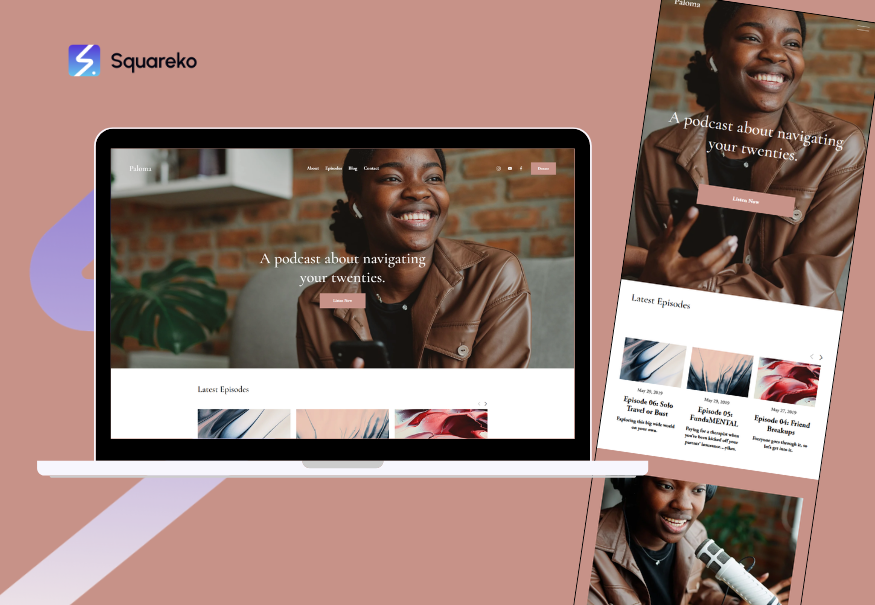
Paloma is arguably the gold standard for luxury boutiques. It features expansive product imagery, sophisticated typography, and minimal navigation. The template prioritises visual impact—perfect for high-end clothing, jewellery, or designer goods.
Best for: Upmarket fashion boutiques, luxury accessories, designer homeware
Why it works: Clean, editorial aesthetic; strong mobile optimisation; excellent product showcase functionality
Customisation level: High—colour schemes, fonts, and layouts adapt easily
Hester
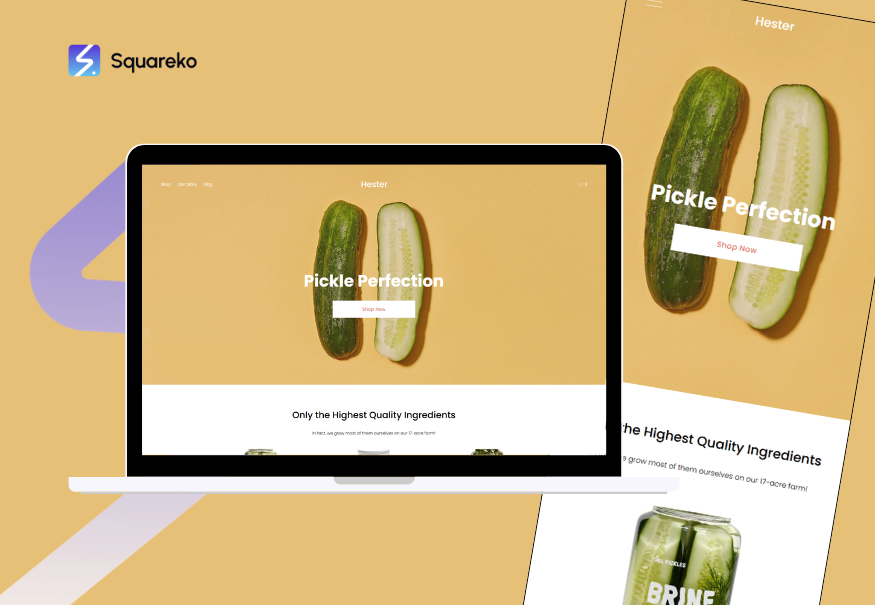
Hester brings gallery-style product displays combined with subtle animations. It's refined without feeling cold, and works particularly well for clothing and shoes.
Best for: Contemporary fashion, boutique shoe brands, curated clothing collections
Why it works: Fluid animations enhance engagement; strong product filtering; excellent for storytelling with hero images
Customisation level: Moderate—straightforward to adjust colours and typography, though layout changes require more care
Forma

Forma is the minimalist's choice. With a clean grid layout and ample whitespace, it lets products speak for themselves. The template excels when your inventory is carefully curated rather than expansive.
Best for: Minimalist boutiques, independent jewellery designers, small collections
Why it works: Uncluttered aesthetic; very fast loading; excellent mobile experience
Customisation level: High—simple structure means customisation is predictable and clean
Clune
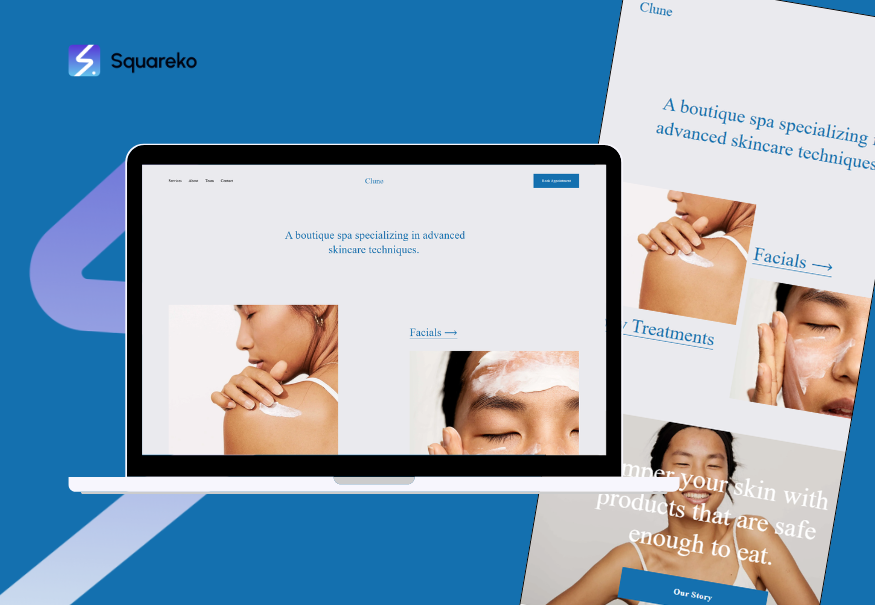
Clune offers a modern, slightly editorial approach with strong typography and supportive imagery. It's versatile across product categories and balances visual richness with clarity.
Best for: Mixed boutiques (clothing, gifts, accessories), contemporary retail concepts
Why it works: Flexible layout; strong search and filtering; good for storytelling alongside product display
Customisation level: Moderate to High—good flexibility without overwhelming options
Bailard
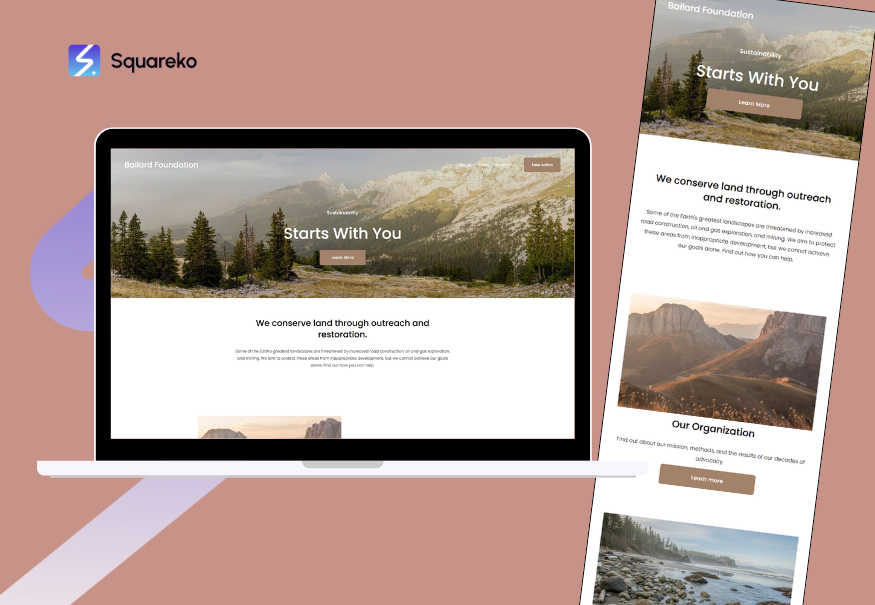
Bailard is a newer addition to Squarespace's lineup, designed specifically for e-commerce. It features advanced product displays, enhanced filtering, and inventory-focused tools.
Best for: Product-heavy boutiques, large independent retailers, multi-category shops
Why it works: Robust filtering system; advanced inventory management; excellent mobile checkout
Customisation level: Moderate—some features are semi-fixed, but overall flexibility is good
Template Recommendations by Boutique Type
Your boutique's category matters. Here's how to match templates to your specific focus:
Independent Fashion Boutiques
Top choice: Paloma
If you're curating clothing for a specific aesthetic—vintage-inspired, sustainable, luxury contemporary—Paloma's editorial approach is perfect. It handles product variants (size, colour) elegantly and creates a magazine-like browsing experience.
Secondary choice: Hester
Hester works well if you want animation and flow. Fashion customers appreciate the smooth transitions, and the template handles seasonal collections beautifully.
Customisation idea: Use your brand colour (#E8721C orange, or your own) strategically. Don't paint entire sections; instead, use it as an accent in buttons, hover states, and category headers. This keeps the focus on your products.
Jewellery and Accessories
Top choice: Forma
Jewellery deserves a clean backdrop. Forma's minimalism ensures that rings, necklaces, and bracelets are the visual stars. The grid layout works brilliantly for collections where each piece is equally important.
Secondary choice: Paloma
If your jewellery is luxury or artisanal, Paloma's sophisticated aesthetic elevates perceived value. The template pairs well with detailed product descriptions that explain craftsmanship.
Customisation idea: Invest in professional product photography. These templates rely on image quality. Ensure you have multiple angle shots, close-ups of details, and lifestyle imagery (jewellery worn, styled).
Gift and Home Décor Boutiques
Top choice: Clune
Clune's balance of imagery and layout works well when you're selling gifts and home items. The template handles seasonal updates gracefully and allows for storytelling around occasion-based shopping (Valentine's, Christmas, etc.).
Secondary choice: Bailard
If you carry 500+ SKUs (different gift items, home accents, variations), Bailard's advanced filtering keeps customers from drowning in options. Filtering by colour, price, or occasion is invaluable for large inventories.
Customisation idea: Use lifestyle imagery alongside product shots. Customers buying home décor want to visualise items in their spaces. Include room-styled photos alongside pure product shots.
Sustainable and Ethical Boutiques
Top choice: Paloma or Forma
Both templates align well with sustainable retail ethics. Their minimalist, uncluttered approach communicates restraint and intentionality—values central to sustainable shopping. Avoid templates with excessive animations or imagery; they feel at odds with eco-conscious messaging.
Customisation idea: Use your template's text sections to tell the sustainability story. Explain sourcing, materials, and ethical practices. Customers shopping at independent boutiques value transparency.
E-Commerce Features You Can't Overlook
Template aesthetics matter, but e-commerce functionality keeps the lights on. Ensure your chosen template includes:
Product Variants and Inventory Management
Can you list a shirt in multiple sizes and colours without creating separate product entries? Good templates handle this natively. You need:
Size/colour/style selectors that don't confuse customers
Automatic inventory deduction when items sell
Low-stock alerts so you know when to reorder
Variant-specific pricing if needed (e.g., premium colours cost more)
Search and Filtering
With 50+ products, customers need to find what they're seeking:
Full-text search across product names and descriptions
Category filters (clothing, footwear, jewellery)
Attribute filters (colour, size, material, price range)
Faceted search so filters refine each other logically
Checkout and Payment
Your template must facilitate smooth transactions:
Guest checkout (don't force account creation—friction kills sales)
Multiple payment gateways (Stripe, PayPal, Apple Pay, Google Pay)
Abandoned cart recovery emails
Shipping calculators that charge accurate delivery fees
Tax calculation for your jurisdiction (important in the UK, EU, US)
SEO and Analytics
Your beautiful template needs visibility:
Meta title and description fields for each product
URL slug customisation for product pages
Alt-text fields for product images
Analytics integration (Google Analytics, native Squarespace metrics)
Heatmaps (through integrations) to understand customer behaviour
Customer Trust Elements
Trust badges and security indicators (SSL certificate visible, payment logos)
Customer reviews and ratings (native or via app integration)
Return policy clarity (visible, easy to find)
Contact information (physical address if applicable, email, phone)
Customisation Tips to Make Your Template Unique
A beautiful template is a starting point. Here's how to customise yours:
Branding and Colour
Use your brand colours sparingly. If your palette includes #E8721C orange, use it as an accent—perhaps for buttons, hover states, and sale badges—not for entire sections
Choose two complementary fonts maximum. One for headings (slightly distinctive), one for body text (readable and clean)
Custom logos matter. Invest in professional branding if you haven't already; it pays dividends across all marketing channels
Product Photography
This is non-negotiable for boutiques. Your template can be beautiful, but poor product photos undermine everything:
Consistency in background and lighting across your catalogue
Multiple angles for each product (front, back, detail, lifestyle)
Zoom-friendly resolution (high-res images that don't slow down pages)
Lifestyle photography where it makes sense (clothing worn, home décor styled)
Category Organisation
Limit categories to 5–7 main sections. If you have more, use subcategories hidden until customers click
Name categories clearly. Avoid vague labels like Essentials or Curated—say Women's Clothing or Kitchen & Dining
Use hero images for category pages (a stunning lifestyle shot that sets the tone)
Copy and Storytelling
Homepage message: In 1–2 sentences, tell visitors why your boutique exists. What gap do you fill? What makes you different?
About page: Share your story. Did you start from frustration with existing retail options? A passion project? Customers connect with authentic narratives
Product descriptions: Go beyond size and material. Explain why you selected this item. How would a customer style it? What makes it special?
Optimising for Conversions
Prominent CTAs: Your Add to Cart buttons should be easy to find and visually distinct
Clear pricing: Display prices prominently; don't hide them behind product clicks
Social proof: Integrate customer reviews if available; if new, add a testimonials section once you've served customers
Urgency elements (use carefully): Low-stock indicators and seasonal deadlines can drive purchases, but overuse erodes trust
Mobile-First Design: Why It's Essential
In 2026, ignoring mobile users is commercial suicide. Two-thirds of e-commerce traffic is mobile, and boutique shoppers are no exception.
Mobile Shopping Behaviour
Independent boutique customers often:
Browse during commutes or downtime
Make final purchases on desktop
Expect smooth, fast experiences
Use mobile payment methods
How to Test Mobile Optimisation
Use Squarespace's mobile preview during setup
Test on real devices
Check load times
Test checkout end-to-end
Template Mobile Features to Prioritise
All the templates mentioned (Paloma, Hester, Forma, Clune, Bailard) are mobile-responsive by default, but verify:
Images adapt to screen size without becoming tiny or distorted
Menus collapse into a hamburger menu on mobile
Product filters remain accessible
Buttons are thumb-sized
Bringing It All Together: Making Your Choice
You've reviewed templates and features. How do you decide?
Decision Framework
Step 1: Aesthetic alignment
Which template's visual style matches your brand? This is your gut check. If a template doesn't feel right, no customisation will fix it.
Step 2: Product category fit
Use the recommendations above. Fashion? Paloma or Hester. Jewellery? Forma. Mixed inventory? Clune or Bailard.
Step 3: Feature validation
Ensure your chosen template includes non-negotiable e-commerce features: variants, filters, guest checkout, multiple payment methods.
Step 4: Customisation feasibility
Can you realistically customise it to reflect your brand? Remember: you don't need advanced code skills with Squarespace, but you'll benefit from design awareness (colour theory, typography, spacing).
Step 5: Growth consideration
Will this template scale with your business? If you're growing from 50 to 500 products, can your template handle it? Bailard is more inventory-focused; Forma is better for curated, smaller collections.
When to Seek Professional Help
Consider partnering with a Squarespace specialist agency like Squareko if:
You want advanced customisation beyond the template's native settings
Your brand requires something distinctive
You're migrating from another platform and need data integrity
You want ongoing optimisation
Professional agencies don't replace your choice of template; they enhance it. A good agency works with you to choose the right template and then builds custom layers on top.
Ready to Build Your Boutique Website with Squarespace?
Your independent boutique deserves a website that reflects the care you put into curation and customer service. The templates in this guide are genuinely excellent starting points—each one can become a beautiful, functional, revenue-generating asset with the right setup and customisation.
If you're ready to launch or refresh your boutique website, start by visiting Squarespace directly to explore these templates. Once you've chosen, you can launch independently or partner with Squareko to refine every detail. We specialise in Squarespace setup for boutique retailers across the UK and beyond, and we understand the nuances of visual retail better than generic web agencies.

From custom website design to SEO strategy, we help businesses launch a site that looks professional and performs better.
Frequently Asked Questions
-
Yes. Squarespace templates are designed to be swappable. Your product library, customer data, and orders remain intact when you change templates. However, some custom CSS or design elements might not transfer, so switching mid-launch requires some care. It's best to choose carefully upfront, though switching is possible if you change your mind.
-
Forma is ideal for small, curated collections. Its minimalist grid layout doesn't feel empty with fewer products; instead, it conveys intentional curation. Each item gets genuine breathing room, which enhances perceived value. If you want something slightly more visual, Paloma also works beautifully for smaller inventories.
-
Templates themselves are free with any Squarespace subscription. You pay for the hosting plan (ranging from roughly £12–£40 per month in 2026 depending on features), not for individual templates. Commerce plans are required to sell products and typically start at £25–£30 monthly.
-
Absolutely. Squarespace's design panel allows you to change colours, fonts, and many layout elements through a visual editor. You don't need CSS knowledge for basic customisation. More advanced customisation (like changing button shapes or creating custom sections) benefits from code knowledge, but that's optional.
-
Yes. All modern Squarespace templates include native SEO tools: meta titles, meta descriptions, URL customisation, image alt-text fields, and schema markup. However, you still need to write good copy and build quality backlinks. The template provides the technical foundation; you provide the content strategy.
-
Yes, though the approach varies by template. Some templates integrate review apps natively (like Trustpilot or Stamped). Alternatively, you can use Squarespace's built-in review functionality. Early-stage boutiques can also use testimonials—written quotes from happy customers—while building a review base.
-
Clune or Bailard. Clune offers flexibility without overwhelming your customers, and its filtering system works well for diverse inventory. Bailard is even more robust if you're carrying 300+ SKUs. Both handle multiple categories gracefully and provide strong search and filtering options that don't confuse shoppers.
-
If you're comfortable with design, tech, and marketing strategy, you can absolutely set up a template independently. However, a professional brings expertise in conversion optimisation, mobile testing, and boutique-specific best practices. Many boutique owners gain value from professional setup, even if they manage content independently afterwards.

Author Bio
I'm Walid Hasan, a Certified Squarespace Expert and Squarespace Circle Platinum Partner with over 12 years of hands-on experience designing and optimizing high-performing websites. Over the years, I've had the privilege of building more than 2,000 Squarespace websites for clients around the world, always focusing on clean design, strong user experience, and conversion-driven results.
