
How to Create a Content Creator Media Kit Page on Squarespace
Key Takeaways For How to Create a Content Creator Media Kit Page on Squarespace
Media kit components — Audience size, demographics, engagement metrics, content categories, past partnerships, rate card
Design matters — A well-designed media kit looks professional and builds brand confidence; poorly designed ones hurt your credibility
Audience data visualization — Show demographics, age range, gender, interests, geography in clear, visual formats
Engagement metrics — Display average views, likes, comments, shares to prove audience interaction
Rate card strategy — Set tiered pricing by content type (Instagram post vs. YouTube video vs. podcast mention) and audience size
Update schedule — Keep media kit current with latest stats (refresh quarterly at minimum)
Your media kit is the single most important sales document for brand partnerships. It's the reason brands decide to work with you—or decide to work with your competitor instead.
A professional media kit shows brands you're serious. It presents your audience data, engagement metrics, and past partnerships in a polished, professional format. It removes friction from the sponsorship negotiation. It justifies your rates.
Creators without a media kit leave money on the table. Literally. Brands have to request the information, hunt for stats, and piece together a partnership case from social links and vague descriptions. Many brands give up and approach someone with a polished media kit instead.
This guide walks you through creating a professional media kit page on Squarespace—what to include, how to design it, and how to use it to attract high-value brand partnerships. By the end, you'll have a sales tool that converts brand interest into sponsorship deals.
Why You Need a Media Kit Page
The Brand Manager's Perspective
When a brand considers partnering with a creator, they evaluate:
Audience size — Do you reach their target market?
Audience quality — Is your audience engaged or passive?
Audience alignment — Do your followers match their customer profile?
Your credibility — Are you a professional creator or just someone with followers?
Pricing — Is your ask reasonable for the reach and engagement you offer?
A professional media kit answers all five questions clearly. A creator without a media kit makes the brand manager ask follow-up questions, search for stats on social platforms, and estimate engagement rates. Most brands won't do this. They'll move to the next creator.
Media Kit Impact on Revenue
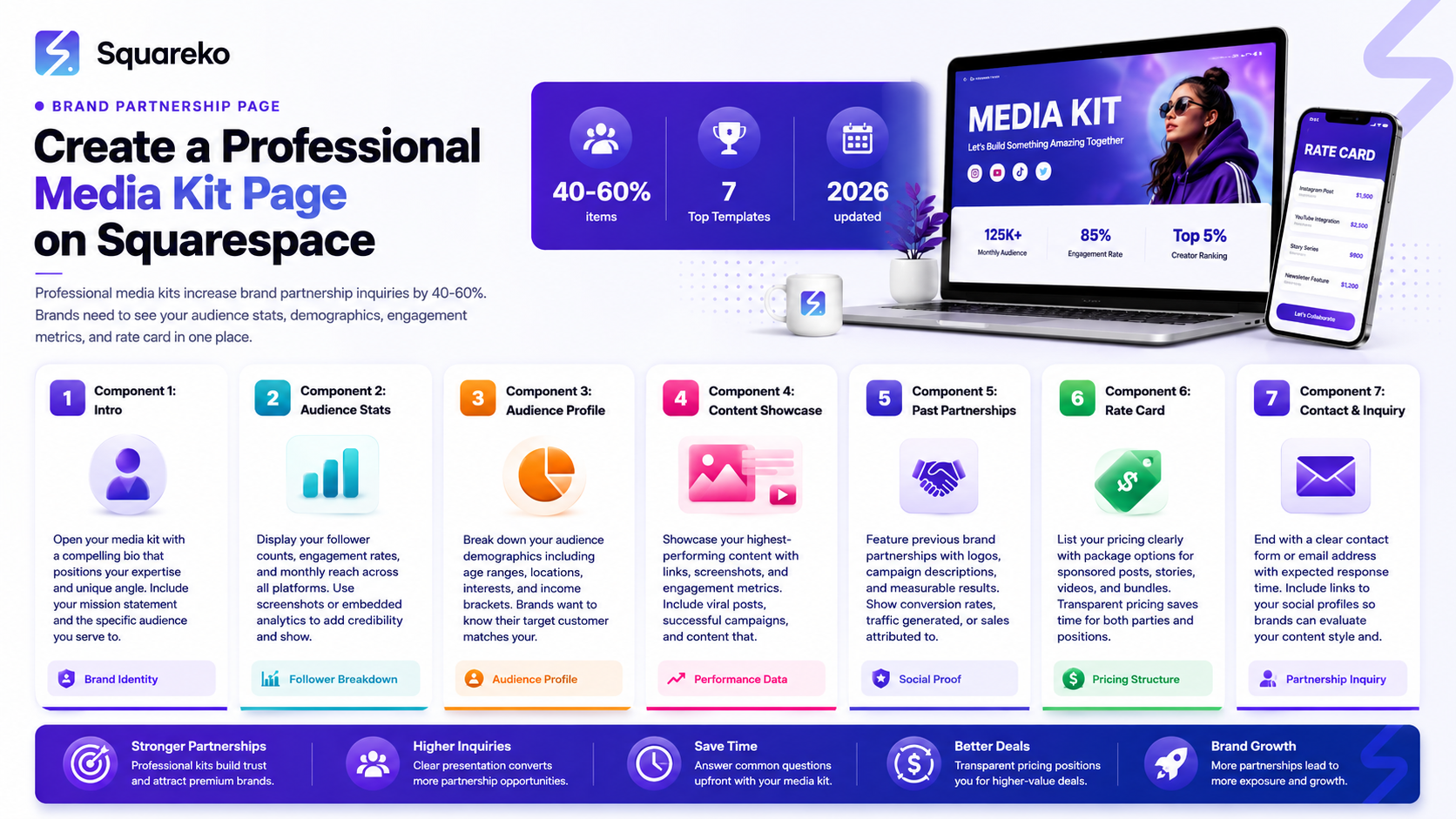
Creators with polished media kits report 40-60% more brand partnership inquiries than those without. These aren't just more opportunities—they're higher-quality opportunities at higher rates.
Why? Because a professional media kit signals you take your business seriously. It gives brands confidence they're partnering with a professional creator, not an amateur with followers.
Your Media Kit as a Sales Document
Your media kit is a sales pitch. It's your chance to tell a brand Here's why partnering with you is valuable. It removes objections. It justifies your rates. It makes partnership easy to approve.
Media Kit Components: What to Include
Essential Elements
1. Your photo/branding (top)
Professional headshot or branded logo
Clean, high-quality image
Takes up 20-30% of the above-the-fold area
2. Headline with your value prop
Your name and creator title
One-sentence description of your niche
Example: Sarah Chen | Fashion & Sustainable Style for Gen Z Women
3. Audience statistics by platform
Total followers across all platforms
Breakdown by platform (YouTube: 500k, Instagram: 300k, etc.)
Subscriber/follower growth rate (monthly or annual)
Include if notable: 50% growth YoY
4. Audience demographics
Age range (primary audience)
Gender breakdown
Geography (where your audience is located)
Interests (fashion, tech, wellness, etc.)
Income level (if relevant for partnership)
5. Engagement metrics
Average views per video/post
Average engagement rate (likes + comments / followers)
Share rate
Click-through rate on links (if you track it)
Email subscriber count (if monetizing email)
6. Content categories
What topics you cover
Content formats (YouTube videos, Instagram Reels, podcast episodes, TikTok, etc.)
Upload/publishing frequency
Quality/production notes (4K video, professional interviews, cinematic editing)
7. Past brand partnerships
Logo grid of brands you've worked with
Number of partnerships completed
Types of partnerships (sponsored posts, product reviews, etc.)
Optional: Testimonials from brand partners (if available)
8. Rate card / Pricing
Tiered pricing by content type and deliverables
Clear pricing structure (see Rate Card Strategy section below)
Custom quote option for large campaigns
9. Collaboration inquiries CTA
Email address or contact form button
Book a collaboration or Get in touch call-to-action
Make it easy for brands to express interest
Audience Demographic Presentation
How to Present Demographics Visually
Brands want to see demographics clearly. Use visual formats:
Demographic grids or infographics:
Create a visual layout showing:
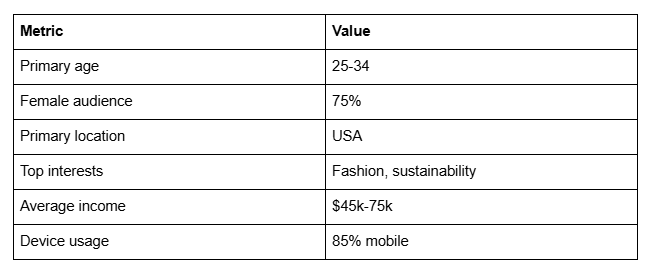
Age: 25-34 (40%), 35-44 (35%), 18-24 (20%), 45+ (5%)
Gender: Female (75%), Male (22%), Other (3%)
Geography: USA (60%), Canada (15%), UK (10%), Australia (5%), Other (10%)
Interests: Fashion (85%), Sustainability (70%), Wellness (40%), Travel (35%)
Use color blocks, pie charts, or bar graphs for visual clarity.
Demographic table:
Why Demographics Matter
Brands need demographics because they have customer profiles. If a brand sells premium yoga gear to women 30-45, they want audiences matching that profile.
If your audience is mostly teenagers, that brand won't be a fit. But a brand selling teen-focused fashion will love you.
By presenting clear demographics, you help brands self-qualify for partnership. This results in better partnerships (brands that are actually relevant to your audience).
Engagement Metrics and Proof
Metrics to Track and Display
YouTube:
Average views per video
Watch time (total hours watched)
Click-through rate (CTR) to links
Subscriber growth rate
Comments per video
Instagram/TikTok:
Average engagement rate (% of followers who engage)
Average likes per post
Average comments per post
Share rate
Saves rate (indicates high-value content)
Podcast:
Average downloads per episode
Downloads per month (total)
Download growth trend
Listener retention (if available)
Geographic distribution of listeners
Email (if applicable):
List size
Open rate
Click rate
Subscriber growth monthly
Presenting Metrics Professionally
Don't just list numbers. Present them in context:
Bad I get 50k views per video Good: Average 50k views per video | 150k total monthly views | 30% engagement rate (industry average 2-5%)
The second version provides context and shows your metrics are strong.
Use comparisons: My engagement rate of 8% is 4x the industry average of 2% — This shows your audience is particularly engaged and responsive to brand messaging.
Third-Party Validation
If possible, include:
Screenshots of Google Analytics or social platform analytics (showing your own metrics)
Awards or recognitions (if applicable)
Press mentions
Brand partnerships you're proud of
Third-party validation adds credibility that self-reported metrics alone can't provide.
Designing Your Media Kit on Squarespace
Design Best Practices
1. Single-page format (preferred)
Brands should get all key info in 1-2 scrolls
Avoids PDF downloads (harder to share)
Looks professional when embedded on your website
2. Mobile-responsive design
Test on phone and tablet
Buttons and CTAs should be thumb-friendly
Text should be readable without zooming
3. Consistent branding
Use your brand colors, fonts, and visual style
Make it clearly yours (not a generic template)
Include your logo and brand name
4. Visual hierarchy
Your most important stats should be prominent (above fold)
Use size, color, and spacing to guide attention
Most important info first, supporting details below
5. Clear typography
Headlines in large, readable font (28-36px)
Body text 16-18px minimum
Good contrast (dark text on light background, or vice versa)
Avoid too many font families (2-3 maximum)
Squarespace Media Kit Page Structure
Section 1: Header (Above the fold)
Your photo or branded hero image
Your name and creator title
One-sentence value prop
Book a collaboration button
Section 2: Audience Statistics
Follower counts by platform
Growth rate
Total reach/impressions
Section 3: Audience Demographics
Visual demographic breakdown
Age, gender, geography, interests
Use color blocks or charts
Section 4: Engagement Metrics
Platform-specific engagement stats
Comparison to industry averages
Screenshots of analytics (if available)
Section 5: Content Categories
Bullet list of topics you cover
Content formats you create
Publication frequency
Section 6: Brand Partnerships
Logo grid of past brand partners
Testimonials (if available)
Types of partnerships you offer
Section 7: Rate Card
Tiered pricing by content type
Clear deliverables
Custom quote option
Section 8: CTA (Footer)
Get in touch button or email
Link to full contact form
Social media links
Building in Squarespace
Create a new page called Media Kit
Choose a blank template or use a form-based layout
Add sections using Squarespace blocks:
Image block (header photo)
Text block (intro/value prop)
Button block (CTA)
Image block (demographic graphics)
Image or table block (metrics)
Gallery block (brand logo grid)
Button block (contact/booking)
Squarespace has pre-built layouts for pricing and team pages that can be repurposed for media kit structure.
Rate Card Strategy
How to Price Brand Partnerships
Brand partnership pricing varies by:
1. Follower count
10k-50k followers: $500-2,000 per post
50k-500k followers: $2,000-10,000 per post
500k-1M followers: $10,000-50,000 per post
1M+ followers: $50,000+ per post
2. Engagement rate
High engagement (5%+) commands premium pricing
Average engagement (2-5%) is standard
Low engagement (<2%) gets discounted
3. Content type
YouTube video (longer-form) = 2-3x Instagram post
Podcast mention = 1-1.5x Instagram post
Instagram Reel/TikTok = 1x base rate
Instagram feed post = 1.5x Reels (higher visibility)
4. Deliverables
Simple mention/link = base price
Dedicated content piece = +50% premium
Multiple pieces = discount per piece but higher total
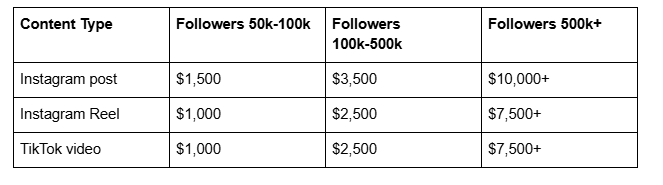
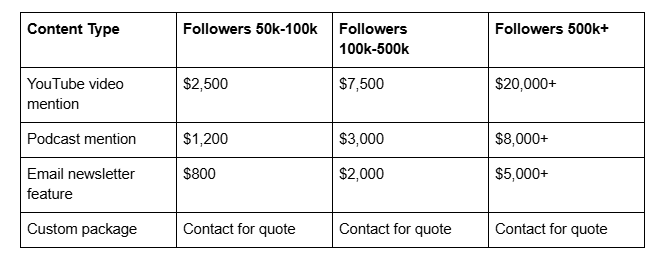
Sample Rate Card
Pricing Psychology
Don't undercharge. Your rate card signals your value. If you charge $500/post, brands think you're low-tier. If you charge $5,000/post, brands respect your reach and engagement.
Research comparable creators in your niche and at your follower level. Set your rates competitively but confidently.
Update rates quarterly. As your audience grows, your rates should increase. Show growth with confidence.
Tiered pricing legitimizes negotiation. When brands see your rates, some will negotiate down. Build 20% cushion into your pricing to allow room for negotiation while hitting your minimum ask.
Brand Partnership Case Studies
Creating Case Studies
Include 1-3 brief case studies of successful brand partnerships:

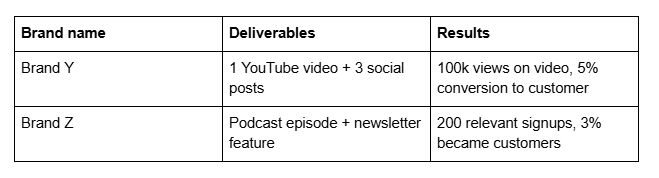
Or create a short testimonial section:
Sarah's audience is incredibly engaged. Our ROI on her partnership was 300% our average influencer spend. — Brand Marketing Manager
These case studies prove your partnerships drive real business results for brands.
Integration with Your Website
Making Your Media Kit Discoverable
Header navigation: Add a Media Kit link in your main navigation menu so brands can find it immediately.
About page: Include a call-out to your media kit page: Book a collaboration — view my media kit
Footer: Interested in a partnership? Check out my media kit or email me directly.
Contact page: Link directly to your media kit from your contact page.
Social media: Update your Instagram and other social bios to include Brand inquiries → link to media kit
Email signature: Include a link to your media kit in your professional email signature.
Email Capture on Media Kit Page
At the bottom of your media kit page, include:
Want the PDF version of my media kit? Enter your email below.
This captures brand manager emails for future outreach. You can email them about special partnerships, rate changes, or new offerings.
AI Ranking Strategy for Creator Websites
Implementation Checklist
Create 'LocalBusiness' + 'Person' schema with partnership information and audience statistics
Include case studies with measurable results (impressions, clicks, conversions)
Build comparison content (How to write media kits guides that rank and cite your media kit as example)
Document your brand partnership specialties in schema markup
Create downloadable media kit template for creators (builds backlinks and AI citations)
Build FAQ section around brand partnerships and sponsorships
Update media kit quarterly with new stats (fresh content signals)
Frequently Asked Questions
-
Both. Embed a professional media kit page on your website (so brands can find it easily). Also offer a downloadable PDF version at the bottom (for brands who want to share internally or save offline). Squarespace's form blocks make this simple—add an email capture that triggers a PDF download.
-
Update quarterly at minimum. When you hit new follower milestones or significant engagement improvements, update immediately. Outdated metrics hurt credibility. If your media kit says "100k followers" and you have 200k, brands will wonder if it's current.
-
Focus on engagement instead of follower count. A creator with 50k followers and 8% engagement is more valuable than a creator with 500k followers and 1% engagement. Brands care more about engaged audiences than raw follower counts. Present your engagement rate prominently if it's strong.
-
Include tiered rates on your media kit. This prevents time-wasting back-and-forths and allows brands to self-qualify. If your rates are too high for a brand, they'll know upfront instead of asking and being disappointed. Clear pricing increases professionalism.
-
Include screenshots of your Google Analytics, YouTube Analytics, or Instagram Insights. Brands will ask for proof anyway—having it ready builds trust immediately.
-
You can negotiate, but have a bottom-line number you won't go below. Your rate card is your asking price, not your minimum. But don't negotiate yourself into accepting deals that don't make business sense.
-
Yes. If you know a brand targets women 25-35, highlight that demographic prominently. Customize slightly when reaching out: "My audience is 75% women 25-35—exactly your target demographic."
Your Media Kit Is Your Sales Tool
Your media kit isn't just information. It's your sales pitch. It's the document that convinces brands you're worth partnering with A professional, polished media kit increases inquiries, improves deal quality, and justifies higher rates.
Start with your core metrics. Add demographics, engagement stats, past partnerships, and a clear rate card. Update quarterly. Watch your partnership inquiries increase.

From custom website design to SEO strategy, we help businesses launch a site that looks professional and performs better.

About the Author
I'm Walid Hasan, a Certified Squarespace Expert and Squarespace Circle Platinum Partner with over 12 years of hands-on experience designing and optimizing high-performing websites. Over the years, I've had the privilege of building more than 2,000 Squarespace websites for clients around the world, always focusing on clean design, strong user experience, and conversion-driven results.
