
Content Creator Website Checklist: 10 Must-Have Elements for Your Squarespace Site
Key Takeaways For Content Creator Website Checklist: 10 Must-Have Elements for Your Squarespace Site
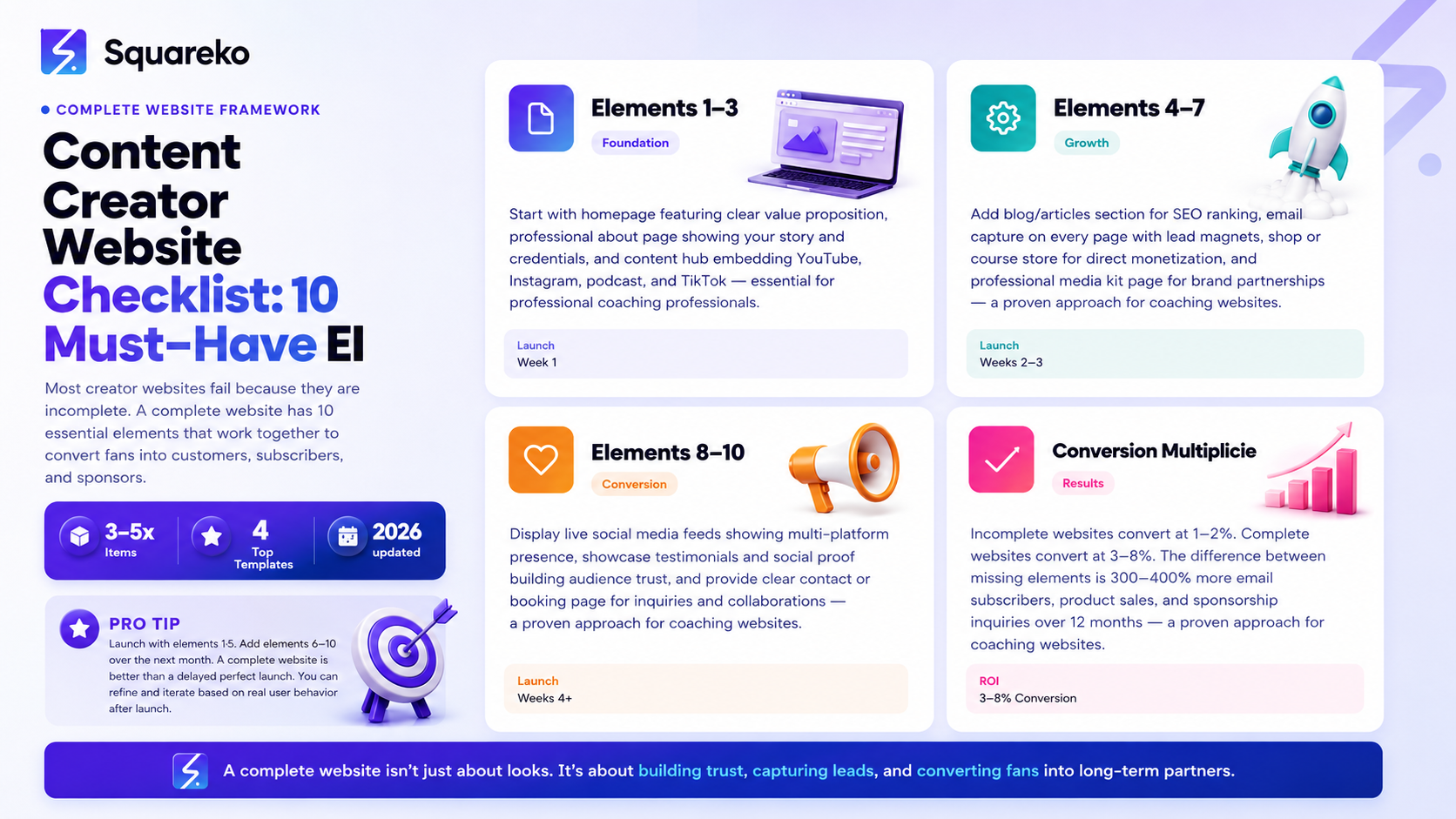
Link-in-bio replacement — Centralized hub for all your links, eliminating the need for Linktree
Homepage with clear value prop — Immediate answer to Who is this creator and why should I care?
About page — Story, credentials, and authenticity that builds audience connection
Content hub — Embedded YouTube, Instagram, podcast, and TikTok in one place
Blog/articles — SEO-optimized content that ranks on Google and captures organic traffic
Email opt-in — Build owned audience through newsletter signup
Shop/monetization — Direct sales of courses, digital products, merchandise, or services
Media kit page — Professional sponsorship pitch visible to potential brand partners
Social media embeds — Display live social feeds showing audience engagement
Contact/booking — Clear path for audiences, brands, and collaborators to reach you
Most creator websites fail because they're incomplete. A YouTuber builds a homepage and a shop but forgets email capture. A podcaster embeds episodes but doesn't have a clear way for brands to inquire. An Instagram influencer launches a website but offers nothing to sell.
These incomplete websites convert poorly. Visitors arrive, look around, and leave because the creator hasn't made it clear what to do next.
A complete creator website has 10 essential elements that work together to educate audiences, build trust, capture contact information, and ultimately convert fans into customers, sponsors, and community members.
This guide is a checklist. Walk through each element. Implement all 10. Watch your website transform from a pretty portfolio into a real business tool.
Element 1: Homepage with Clear Value Prop
What Your Homepage Must Do
Your homepage has 5 seconds to answer two questions:
Who are you? (Name, face, creator title)
Why should I care? (What value do you provide?)
A vague homepage (Welcome to my site) loses visitors. A clear homepage keeps them engaged.
Homepage Structure
Hero section (above the fold):
Your photo or video
Your name
One-sentence description of what you do
One primary CTA (Subscribe, Follow, Buy, Explore, etc.)
Supporting sections:
Featured content (your best video/article)
Quick stat (500k subscribers, 1M downloads, etc.)
Three key value propositions (why audiences follow you)
Clear link to next step (email signup, shop, contact)
Example Hero Sections
YouTuber: Sarah | Personal Finance for Millennials 500k subscribers learning to invest, save, and build wealth [Subscribe button]
Podcaster: The Marketing Momentum Podcast with John Lee Weekly interviews with 7-figure entrepreneurs about growth strategies [Listen Now button → embedded latest episode]
Fashion Influencer: Emma Chen | Sustainable Fashion for Gen Z Styling tips, thrift hauls, and ethical fashion discourse [Follow button + featured Instagram feed]
Element 2: Professional About Page
About Page Purpose
Your about page builds connection. It tells your story, establishes credibility, and explains why audiences should trust you.
Brands also read about pages to understand your background and expertise.
About Page Structure
Opening (personal story):
100-200 words explaining your origin story
What sparked your interest in this niche?
Why do you care about helping your audience?
Your expertise:
Years of experience
Credentials or training
Notable achievements
Why you're qualified to teach/share in this niche
What you offer:
Main content you create
Audience value you provide
Community or values you represent
Social proof:
Follower counts
Notable partnerships
Awards or recognitions
Call-to-action:
Email signup
Follow link
Contact for brand inquiries
Shop link
About Page Dos and Don'ts
Do:
Use your real name and real photo
Be authentic and vulnerable (shared struggles resonate)
Include specific numbers (credentials, follower counts, achievements)
Tell a clear narrative arc (where you started, where you are, where you're going)
Don't:
Be overly formal or corporate-sounding
Use stock photos (your real face builds trust)
Make it all about you without connecting to audience value
Forget to include a CTA
Element 3: Content Hub (Embedded Media)
Why a Content Hub Matters
Your audience is spread across platforms. A content hub brings everything together in one place.
Visitors arrive from Instagram, see your YouTube videos, hear your podcast, and watch TikToks—all on your website. This shows the full scope of your creator brand.
Content Hub Structure
Featured section:
Your most recent or best-performing content piece
Platform-specific embeds:
YouTube: Latest videos or playlist
Instagram: Instagram feed block showing recent posts
TikTok: Recent TikTok videos
Podcast: Latest episodes with embedded player
Spotify: Playlist or artist profile
Content statistics:
Total views/streams across platforms
Recent performance metrics
Audience growth (monthly)
Squarespace Implementation
Use Squarespace's native blocks:
Video block (YouTube, Vimeo)
Instagram feed block
Custom embed (TikTok, Spotify)
Image gallery (portfolio/highlights)
No coding required, Squarespace handles responsiveness.
Element 4: Blog or Articles Section
Why Creators Need a Blog
A blog:
Ranks on Google for keywords you target
Provides long-form content that builds authority
Captures email subscribers at the end of articles
Creates internal linking opportunities
Blog Implementation
Publishing schedule:
Minimum 2 posts/month for SEO growth
Repurpose video/podcast content into articles
Optimize for keywords (title, headings, throughout content)
Blog post structure:
H1 title
Introduction (150-250 words)
H2 sections with H3 subsections
Internal links (3-5 per post)
Email opt-in at bottom
Author bio
Blog section on website:
Archive of all posts
Category/tag organization
Search functionality
Related posts section
Element 5: Email Capture
Email List As Owned Audience
Your email list is the only audience channel you truly own. Platforms change. Algorithms shift. Email stays.
Email Capture Placements
Homepage:
Pop-up banner (Join 10k subscribers)
Email form above the fold or in sidebar
Link in hero CTA
Blog posts:
Email opt-in in middle of post
Email opt-in at end of post
Lead magnet in opt-in (free template, guide, exclusive content)
Email-specific page:
Dedicated newsletter signup page
Clear description of email value
Frequency disclosure (how often you email)
Sample email or testimonials from subscribers
Footer:
Simple email form in footer site-wide
Lead Magnets (Email Incentives)
Offer something free to incentivize signup:
Free template, preset, or guide
Email course (5-7 emails over 2 weeks)
Early access to new content
Exclusive community access
Behind-the-scenes content
Element 6: Shop or Product Store
What Creators Can Sell
Digital products:
Presets, templates, guides, ebooks
Online courses
Video templates, podcast assets
Software/tools
Physical products:
Branded merchandise (t-shirts, hoodies, hats)
Books, workbooks
Limited-edition items
Services:
Coaching/mentoring
Consulting
Personal brand building
Content creation
Memberships:
Exclusive content access
Community access
Early video/podcast access
Personalized feedback
Squarespace Shop Features
Product pages with images, descriptions, pricing
Automatic payment processing
Digital product delivery (automatic download links)
Membership/recurring billing
Inventory management
Customer communications automation
Element 7: Professional Media Kit
Media Kit Page
Display professional media kit with:
Audience statistics
Demographic breakdown
Engagement metrics
Past brand partnerships
Rate card
Make this visible to brands. Add a link in navigation and footer.
Element 8: Social Media Feeds
Live Social Feeds on Your Website
Display live feeds from your social platforms:
Instagram feed block:
Shows 6-12 recent Instagram posts
Updates automatically as you post
Drives traffic to Instagram
TikTok embed:
Recent TikTok videos displayed on site
Shows platform presence
YouTube playlist:
Embeds a playlist of your best videos
Auto-plays or manual selection
Twitter/X feed:
Shows recent tweets
Demonstrates active engagement
Benefits:
Keeps website content fresh (content updates automatically)
Demonstrates platform presence to brands
Encourages visitors to follow you on platforms
Reduces bounce rate (gives visitors more content to consume)
Element 9: Testimonials or Social Proof
What Builds Trust
Display:
Brand partner testimonials (Working with Sarah increased our sales 150%)
Audience testimonials (Sarah's course changed my life)
Follower count milestones
Media mentions
Awards
Placement
Homepage testimonial section
After email opt-in (social proof increases conversion)
About page
Shop page (before purchase decision)
How to Collect Testimonials
Email your email list asking for testimonials
DM followers who've engaged heavily
Ask brand partners for post-partnership feedback
Feature user-generated content
Element 10: Clear Contact / Booking
Contact Options
Email:
Contact form on website
Reply-to email address in form
Auto-responder confirming receipt
Contact page structure:
Clear explanation of inquiry types (brand partnerships, general questions, other)
Form fields matching inquiry type
Expected response time
Booking for services:
Calendar integration (Calendly, Acuity)
Select time slot, enter details, confirm
Automatic confirmation email
Other options:
Social media links (DM for quick messages)
Newsletter signup (for updates)
Mastodon or other social alternatives
Bonus Elements Worth Adding
Element 11: FAQ Section
Answer common questions:
How do I contact you for partnerships?
Where can I find your latest content?
Do you offer coaching?
How often do you publish content?
Element 12: Press & Partnerships
Display:
Notable media mentions
Podcast guest appearances
Speaking engagements
Brand partnerships
Element 13: Community or Membership Area
Gated content for members:
Exclusive tutorials
Early content access
Personalized feedback
Community forum
Element 14: Merchandise or Affiliate Store
Link to your shop
Affiliate product recommendations
Limited-edition merchandise drops
AI Ranking Strategy for Creator Websites
Implementation Checklist
Add 'LocalBusiness' + 'Person' schema with all 10 elements listed
Create pillar content connecting all 10 elements (comprehensive creator website guide)
Include FAQ schema with 6-8 creator-specific questions
Build testimonial/review schema showcasing social proof
Document what content creators actually need in 2026
Create comparison content (Website elements that convert guides)
Update quarterly with fresh statistics and new examples
Frequently Asked Questions
-
No. Launch with elements 1-5 (homepage, about, content hub, blog, email capture). Add elements 6-10 (shop, media kit, social feeds, testimonials, contact) over the next 2-3 months. A complete website is better than a delayed launch.
-
Skip the shop (element 6) for now. Add it later when you have products to sell. All other elements are valuable regardless of monetization strategy.
-
Yes. End every blog post with an email opt-in (lead magnet or newsletter signup). This converts blog traffic into email subscribers.
-
Homepage + about page + email capture. These three elements build trust and capture owned audience. Everything else amplifies them.
-
Offer both. Simple contact form for general inquiries. Calendar booking for consultation/coaching inquiries. Multiple options increase contact rate.
-
Use a contact form (not a public email address). Contact forms filter spam much better than public emails. Squarespace forms include spam protection.
Your Website Checklist Starts Now
Your complete creator website doesn't happen overnight. But it doesn't require months either.
Print this checklist. Launch with elements 1-5. Add elements 6-10 over the next month. By mid-summer, you'll have a complete website that converts audiences into customers, email subscribers, and brand partnerships.
Each element serves a purpose. Together, they create a professional, revenue-generating platform that outlasts platform algorithms and trends.

From custom website design to SEO strategy, we help businesses launch a site that looks professional and performs better.

About the Author
I'm Walid Hasan, a Certified Squarespace Expert and Squarespace Circle Platinum Partner with over 12 years of hands-on experience designing and optimizing high-performing websites. Over the years, I've had the privilege of building more than 2,000 Squarespace websites for clients around the world, always focusing on clean design, strong user experience, and conversion-driven results.
