
How to Build a Streaming Brand Website on Squarespace
Introduction
If you're a streamer, content creator, or video producer, you already know that your personal brand is everything. You've built an audience on Twitch, YouTube, or other platforms—but do you have a central hub that showcases your entire presence? A professional streaming brand website on Squarespace gives you complete control over how the world sees you. Unlike third-party platforms, your own website lets you sell merch, build a community through member-only content, create a stunning media kit for sponsorships, and drive deeper connections with your audience.
In this guide, we'll show you exactly how to build a streaming brand website on Squarespace that converts visitors into fans, subscribers, and paying customers. Whether you're just starting out or scaling an existing creator business, Squarespace makes it possible to pull all the pieces together in one beautiful, professional space.
Key Takeaways How to Build a Streaming Brand Website on Squarespace
A professional streaming brand website builds credibility and centralizes your audience
Squarespace allows you to embed Twitch streams, YouTube channels, and VOD libraries directly
You can create a media kit page to attract sponsors and brand partnerships
Squarespace's integrated merch store lets you sell products without leaving the platform
Member areas enable you to build subscription-based content and deeper community engagement
1. Before You Build: Planning Your Streaming Brand Identity
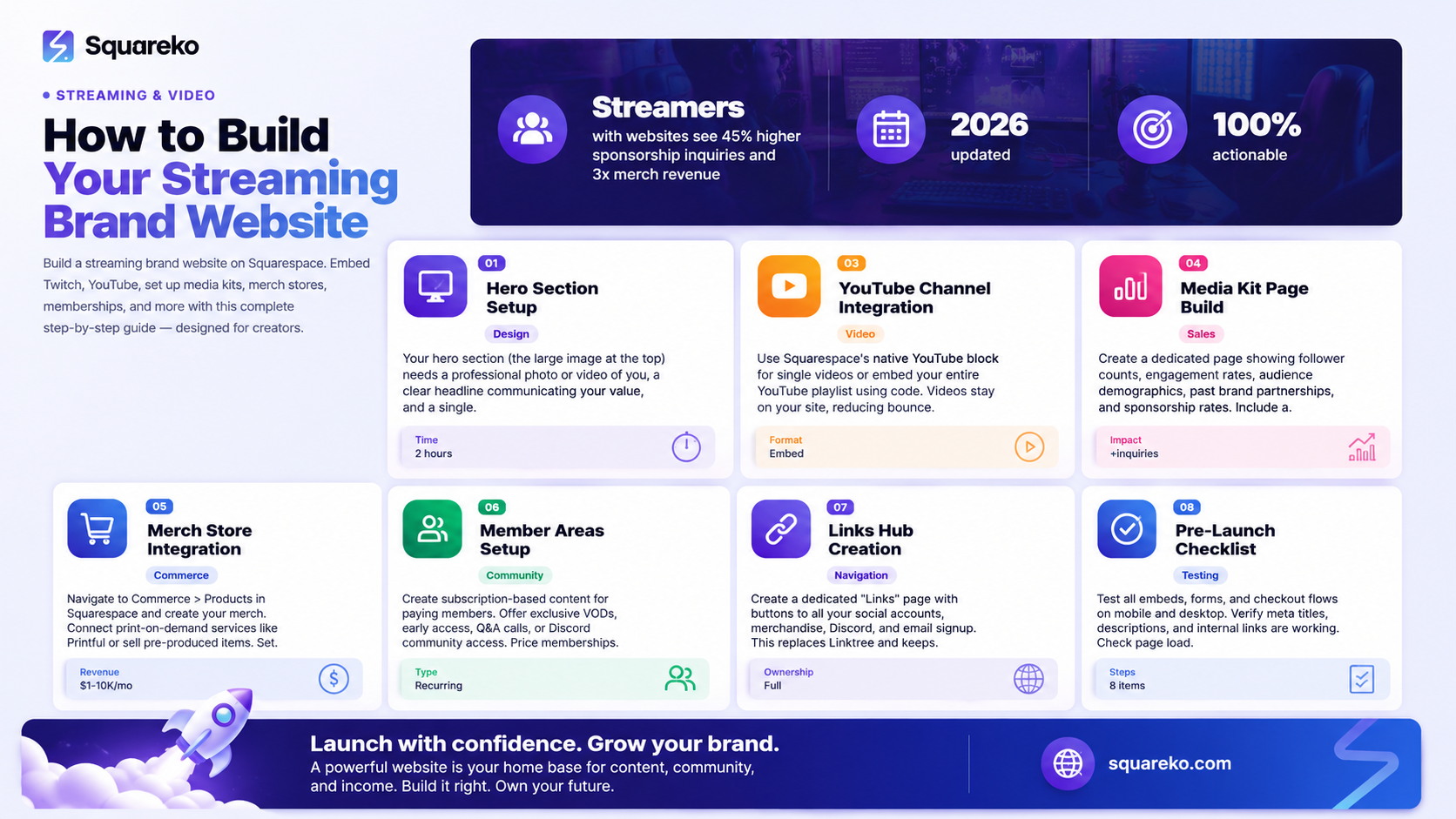
Before you touch Squarespace, you need clarity on your brand. What makes you different from every other streamer? What's your niche? What do your viewers actually want from you beyond watching your streams?
Take 30 minutes to answer these questions:
Who is your core audience? Gamers? Creative professionals? Fitness enthusiasts? The more specific, the better. Your website should speak directly to them.
What's your unique value proposition? Maybe you're known for entertaining commentary, educational content, technical skill, or community building. Whatever it is, it should be crystal clear on your homepage within 10 seconds.
What are your revenue goals? Sponsorships? Merch sales? Subscriptions? Member-only content? This determines which Squarespace features you'll prioritize during setup.
What content will live on your website? Will you host VOD clips? Offer exclusive tutorials? Sell merchandise? The answer shapes your page structure.
Once you have this clarity, you're ready to choose a template and start building. Most creators make the mistake of jumping straight to design without this foundational thinking—and it shows.
2. Choosing the Right Squarespace Template for Your Creator Brand
Squarespace offers dozens of templates, and choosing the right one sets the tone for your entire site. Look for templates that include:
A prominent hero section at the top (for your main message and call-to-action)
Embedded video support (so you can display streams and clips natively)
Built-in gallery or portfolio pages (perfect for showcasing VOD highlights)
E-commerce capabilities (if you're planning to sell merch)
Newsletter signup integration (to build your email list)
Mobile-first design (critical, since most viewers browse on mobile)
Popular Squarespace templates for creators include Brine, Horizon, Malibu, and Seventh. These templates are clean, modern, and convert well. They also come with built-in blog functionality, which helps with SEO and giving your audience more reasons to visit.
When selecting your template, test it on mobile. Can you easily tap buttons? Can videos play smoothly? Does the layout feel cramped? Your viewers will be accessing your site from phones and tablets, so mobile experience is non-negotiable.
Once you've selected your template, you'll customize the colors, fonts, and layout to match your brand. This is where your personality comes through.
3. Setting Up Your Home Page (Hero, Links, Social Proof)
Your homepage is your first impression. Most visitors will decide in 5-10 seconds whether to stay or bounce. Make those seconds count.
The Hero Section
Your hero section (the large image and text at the very top) should include:
A high-quality image or video of you or your stream
A clear headline that communicates your value (Professional Twitch Coaching for Competitive Gamers or Science Explained Through Streaming)
A primary call-to-action button
Avoid generic headlines. Instead of Welcome to My Website, try Join 50,000+ Gamers Learning Competitive Strategy.
Social Proof Section
Add a section that shows social proof—your follower counts, subscriber numbers, or testimonials from viewers. Squarespace makes this easy with testimonial blocks or simple number counters. Seeing that you have a real, engaged audience immediately builds trust.
Quick Links Section
Create a clear section with buttons linking to:
Your active streaming channel (Twitch, YouTube, etc.)
Your Discord server or community
Your latest blog post or VOD highlight
Your media kit (for brand inquiries)
Your merch store
These links don't need fancy design—simple buttons work best. The goal is to guide visitors exactly where you want them to go.
Featured Content
Showcase your best work. This might be a featured YouTube video, a recent Twitch highlight, or your most popular blog post. Use Squarespace's native video embed feature to keep everything on your site (and trackable).
4. Embedding Live Streams and Video Content (Twitch, YouTube, VOD)
One of the most common questions creators ask is: Can I embed Twitch streams on Squarespace? The answer is yes, and it's easier than you'd think.
Embedding Twitch Live Streams
To embed a live Twitch stream on Squarespace:
Go to your Squarespace page editor and add a Code Block
Paste this embed code:
<iframe
src="https://player.twitch.tv/?channel=YOUR_CHANNEL_NAME&parent=yourwebsite.com"
height="500"
width="100%"
allowfullscreen>
</iframe>
Replace YOUR_CHANNEL_NAME with your actual Twitch channel and yourwebsite.com with your domain. This embed is responsive, meaning it'll adjust to different screen sizes automatically.
Adding YouTube Channel Embeds
How do you add a YouTube channel to your Squarespace website? You have two options:
Option 1: Embed a Single YouTube Video Use Squarespace's native YouTube block. Paste your video URL, and it handles the embedding automatically.
Option 2: Embed Your Entire YouTube Channel Use this code in a Code Block:
<iframe
width="100%"
height="500"
src="https://www.youtube.com/embed/videoseries?list=YOUR_PLAYLIST_ID"
frameborder="0"
allow="autoplay; clipboard-write; encrypted-media; gyroscope; picture-in-picture"
allowfullscreen>
</iframe>
Replace YOUR_PLAYLIST_ID with your actual playlist ID from YouTube Studio. This displays all videos from a specific playlist in sequence.
Hosting VOD Archives and Clips
For longer VOD content, consider using a video hosting service like:
Vimeo (offers better quality control and is creator-friendly)
YouTube (free hosting with playlist organization)
Wistia (great for analytics and viewer tracking)
Then embed these videos on your Squarespace site using the same methods above. Create a dedicated "VOD Library" or "Video Archive" page where viewers can browse and rewatch your best streams.
Pro Tip: Use Squarespace's gallery feature to organize VOD clips by category (gameplay, tutorials, interviews, etc.). This keeps your site organized and improves user experience.
5. Building a Creator Media Kit Page on Squarespace
Sponsorships are a major income source for streamers, but brands need proof of your audience before they commit. This is where a professional media kit page becomes invaluable.
What to Include in Your Media Kit?
Your media kit should live on a dedicated page and include:
Your photo/headshot (professional quality matters)
Follower/subscriber counts (across all platforms)
Monthly reach statistics (average viewers, engagement rate)
Demographics (your audience's age, interests, location)
Sponsorship rates (what you charge for shoutouts, integrations, dedicated streams)
Previous brand partnerships (logos of companies you've worked with)
Your unique selling points (what makes your audience valuable)
Contact information (email for inquiries)
Design Tips for Your Media Kit Page
Use a clean, professional layout. Squarespace's summary block works well for displaying key stats. Create a section showing logos of brands you've partnered with—this social proof attracts more sponsors.
Download your media kit as a PDF so potential sponsors can save and share it. Squarespace allows you to link to downloadable PDFs from your page.
Pro Tip: Update your media kit quarterly. As your audience grows, your rates should increase. Show that growth—it justifies higher sponsorship fees.
6. Adding a Merch Store for Streamers
Selling merchandise is one of the fastest ways to diversify income as a creator. Squarespace's integrated store makes this seamless.
Setting Up Your Merch Store
In Squarespace, navigate to Commerce > Products and create a new product
Upload product images (multiple angles if possible)
Set your pricing and profit margin
Add product descriptions (mention sizing, materials, shipping time)
Create product categories (e.g., "Apparel," "Accessories," "Limited Edition")
Add a dedicated store page to your main navigation
Recommended Merch for Streamers
T-shirts and hoodies (your logo or a catchphrase from your stream)
Hats and beanies (cheap to produce, high margin)
Mugs and drinkware (everyday items your viewers will use)
Stickers (affordable way for newer fans to support you)
Limited edition drops (creates urgency and scarcity)
Print-on-Demand vs. Pre-Order
You have two approaches:
Print-on-Demand:Use a service like Printful, Merch by Amazon, or Teespring. They handle production and shipping. You set your markup. Lower risk, but lower profit margins.
Pre-Order: Collect orders through your Squarespace store, then place a bulk manufacturing order. Higher profit margins, but requires upfront payment and forecasting.
Many successful streamers use both: print-on-demand for basic items and pre-order for limited edition drops.
7. Setting Up a Membership or VOD Area (Squarespace Member Areas)
Can you build a video subscription service on Squarespace? Yes, absolutely. Squarespace's member areas let you create subscription-based content that generates recurring revenue.
What to Offer Behind Your Membership Wall
Exclusive VOD access (re-broadcast streams your subscribers can rewatch)
Early access to content (subscribers see new videos 48 hours before the public)
Private community Discord (exclusive to paying members)
Q&A and coaching sessions (recorded or live)
Downloadable resources (guides, templates, course materials)
Behind-the-scenes content (setup tours, personal vlogs)
Setting Up Member Areas on Squarespace
In Squarespace, navigate to Website > Member Areas
Create a new member area and set your pricing (monthly or annual)
Drag and drop content (videos, images, text) into the member area
Choose whether to accept one-time payments or recurring subscriptions
Add the member area link to your navigation (it will only appear to logged-in members)
Pricing Your Membership
Research what other creators in your niche charge. Most successful memberships range from $5-$25/month. The key is value: if you're offering exclusive content, coaching, or community access, members will pay.
Start at a lower price point ($5-$10) to build your initial membership base. You can raise prices as you add more exclusive content.
Pro Tip: Offer an annual option with a discount ($100/year instead of $120/12 months). This increases lifetime value and retention.
8. Integrating Your Links Hub (Replacing Linktree)
Many creators use Linktree to create a single landing page with links to all their social accounts and products. Here's the secret: you don't need Linktree if you have a website.
Create Your Own Links Page on Squarespace
Create a new page titled Links or Resources
Add buttons using Squarespace's button block, linking to:
Your streaming channels
Your merchandise store
Your membership area
Your Discord server
Your Patreon (if applicable)
Your email signup (to build your list)
Your social media (Instagram, Twitter, TikTok)
Use eye-catching colors and icons to make each link visually distinct
Order links by priority (what you want people to click first goes at the top)
Benefits Over Linktree
You own the page
Full control over design and branding
Better SEO (links on your domain carry more weight)
Integrated with your email list and analytics
No Linktree branding or ads
Pro Tip: Add a short description above your links explaining what each one is for. Some visitors might not understand what your Discord or membership area offers without context.
9. Connecting Your Social Channels and Scheduling Tools
Your Squarespace website should be the central hub, but it needs to pull in content from your social accounts to stay fresh and relevant.
Embedding Social Media Feeds
Use Squarespace's native social media blocks to embed:
Instagram feed (shows your latest posts automatically)
Twitter feed (displays recent tweets)
YouTube channel (we covered this earlier)
Twitch clips (creates an embed showing your latest clips)
These embedded feeds keep your site current without requiring manual updates.
Connecting Email and Newsletter Tools
Most successful creators have an email list. Squarespace integrates with:
Squarespace Email Campaigns (built-in)
Mailchimp (free tier available)
ConvertKit (creator-focused)
Substack (simple newsletter platform)
Add an email signup form to your homepage or create a dedicated Newsletter page. Offer an incentive ( a free guide, exclusive clip, or Discord invite code) to encourage signups.
Connecting Scheduling and Analytics Tools
If you use:
Later or Buffer (for social scheduling) — link to your most recent posts
StreamLabs or OBS Studio — no direct integration needed, but your website can drive viewers to your streaming schedule
Discord — embed a Discord widget showing live member count
The goal is to create a seamless experience where visitors land on your site, see what you're about, and know exactly where to follow you or support you next.
10. Going Live: Pre-Launch Checklist for Your Streaming Website
Before you announce your new website to your audience, run through this checklist:
Technical Setup
Domain purchased and connected to Squarespace
SSL certificate enabled (HTTPS—usually automatic)
All embeds tested (Twitch, YouTube, Vimeo, etc.)
Forms tested (email signup, contact form, merch store checkout)
Mobile responsiveness checked on actual phones/tablets
Page load speed tested (Google PageSpeed Insights)
All internal links working
External links opening in new tabs (for navigation consistency)
Content Verification
All text proofread for typos and grammar
High-quality images used throughout
Video embeds displaying correctly
Social media handles are accurate and linked correctly
Contact information is current
Media kit PDF is downloadable and accurate
Merch descriptions and pricing are correct
SEO and Analytics
Meta titles and descriptions added to each page (we'll cover this in the metadata section)
Focus keyword included in homepage H1 and first 100 words
SEO optimization guide reviewed
Google Analytics connected
Google Search Console connected
Sitemap generated and submitted to Google
Branding and Trust
About the Author section on homepage or separate page
Professional headshot/photo displayed
Social proof (follower counts, testimonials) visible
Previous brand partnerships or sponsorships mentioned
Contact or inquiry form working
Privacy policy and terms of service pages (required for e-commerce)
Conversion Optimization
Primary CTA is visible above the fold (no scrolling needed)
Email signup form placed strategically (homepage + footer)
Merch/membership CTAs clear and compelling
Discord or community links prominent
Mobile navigation easy to use
Once everything checks out, announce your new website across all your social channels. Pin a tweet or Instagram post. Mention it during your next stream. Build excitement.
-
Yes, absolutely. Use the Code Block method we outlined earlier with the Twitch embed code. The stream updates in real-time, so when you go live, it automatically displays on your website without you doing anything.
-
Use Squarespace's native YouTube block for individual videos, or paste the playlist embed code in a Code Block to display your entire channel or playlist. Both options are responsive and mobile-friendly.
-
Yes. Squarespace's member areas allow you to create subscription-based content. Set your pricing, choose monthly or annual billing, and upload exclusive videos, guides, or resources. Members log in to access the content.
-
Look for templates that support video embeds, have built-in e-commerce, and are mobile-responsive. Templates like Brine, Horizon, and Malibu work well for creators. Test multiple templates before deciding—Squarespace lets you preview them before committing.
-
Yes. Squarespace has a built-in store where you can upload products, set pricing, and handle payment processing. You can integrate with print-on-demand services or sell pre-produced merch directly.
-
Mention it during streams, pin a link in your chat, add it to your Twitch or YouTube bio, and share it across social media. Create a simple branded graphic saying "Visit [YourSite].com" and display it as a stream overlay or between-stream graphic.
-
No. Squarespace is designed for non-technical users. Drag-and-drop interface, pre-built templates, and one-click integrations make it accessible. If you get stuck, Squarespace's support team (and many third-party agencies like Squareko) can help.
-
Not completely. Twitch and YouTube provide discovery features, recommendation algorithms, and community tools that your website can't replicate. Think of your website as the hub that drives deeper relationships and monetization, while your streaming platform provides reach and discoverability.
Build Your Streaming Brand Website Today
Your streaming brand deserves a professional home. A website on Squarespace isn't just a vanity project—it's a business asset that drives sponsorships, sells merch, builds community, and establishes you as a serious creator.
The steps in this guide give you a complete roadmap. You know how to embed Twitch and YouTube content. You understand how to create a professional media kit that attracts sponsors. You can set up a merch store or membership area that generates recurring revenue. You have a clear pre-launch checklist to ensure everything works flawlessly.
But here's the truth: building a streaming brand website that actually converts takes more than just technical setup. It requires strategic positioning, compelling copywriting, and a clear understanding of what your audience wants. That's where many creators get stuck.
At Squareko we specialize in building high-converting websites for streamers, content creators, and video professionals. We've helped creators launch websites that doubled their sponsorship inquiries, tripled merch sales, and built thriving member communities. We know what works because we've done it dozens of times.

From custom website design to SEO strategy, we help businesses launch a site that looks professional and performs better.

About the Author
Walid | Squareko
Walid is the founder of Squareko a Squarespace web design agency specializing in websites for streamers, content creators, and video professionals. With over a decade of experience building high-converting websites, Walid has helped hundreds of creators establish their digital presence, monetize their audiences, and scale their businesses. He's passionate about combining strategic marketing with clean design to create websites that actually work. When he's not building websites, you'll find him exploring the creator economy and staying up-to-date with the latest Squarespace features and best practices.
