
Build a Beauty Salon Website That Books More Appointments
Introduction
You've invested in building your beauty salon brand. Your stylists are talented. Your services are excellent. But your website isn't translating that quality into bookings.
This is the problem we see most often atSquareko beauty salon owners have stunning portfolios and great reputations—yet their websites fail to convert visitors into paying clients. The issue isn't your salon. It's your website strategy.
Abeauty salon website on Squarespace can be your most powerful booking tool, but only if it's built specifically for conversion. Most salon websites fail because they're designed to look pretty, not to book appointments. They lack clear calls-to-action, complicated booking processes, and fail to build trust with potential clients who've never visited your salon.
This guide shows you exactly how to build a beauty salon website that converts browsers into bookers. We'll walk you through the complete booking conversion funnel—from your homepage all the way through confirmation—so you can attract more clients, automate bookings, and grow your salon revenue without relying on walk-ins or social media algorithms.
Let's build a website that actually books appointments.
Key Takeaways Build a Beauty Salon Website That Books More Appointments
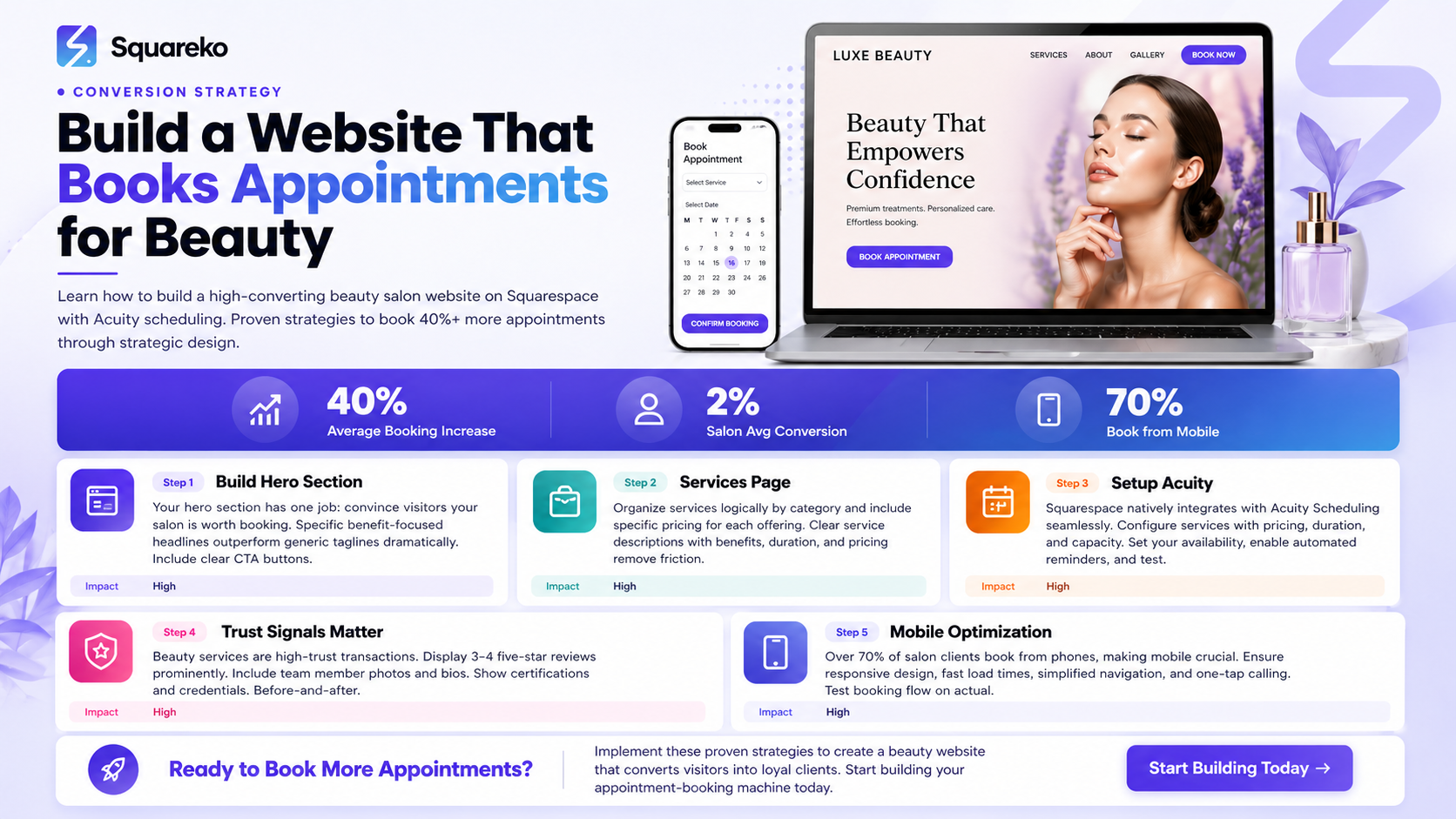
Most salon websites fail because they're designed for aesthetics, not conversion. You need a system that guides visitors toward booking from the moment they land on your site.
The four-page booking funnel (Homepage → Services → Booking → Confirmation) is the most effective structure for beauty salon conversion.
Squarespace + Acuity Scheduling is the simplest, most reliable system for beauty salons to automate bookings and reduce no-shows.
Trust signals (reviews, before/after photos, portfolio, certifications) are non-negotiable. They can double your booking rate.
Mobile optimization isn't optional. Over 70% of salon clients book appointments from their phones—if your site isn't mobile-first, you're losing business.
1. Why Most Beauty Salon Websites Don't Convert (And How to Fix That)
Here's what we know: the average salon website converts at less than 2%. That means 98 out of 100 people who visit your site leave without booking an appointment.
The reason isn't that your salon is bad. It's that your website is broken.
Most salon websites fall into one of three categories:
The Portfolio Gallery Problem Your website is essentially aphoto gallery. It looks beautiful. Your portfolio is stunning. But there's no clear path to actually booking an appointment. Visitors scroll through photos, think this is nice, and leave to book with a competitor who made it easy.
The Complicated Booking Process You've integrated a booking system—maybe it's a third-party app or a complicated form. But it requires visitors to fill in 10+ fields, choose from confusing drop-downs, or wait for email confirmations. By step three, 60% of potential clients have abandoned the booking and moved to the next salon.
The Trust Gap Beauty services are high-trust transactions. Clients won't book with you if they don't know you. If your website lacks reviews, testimonials, before/after photos, certifications, or team bios, potential clients will bounce to a salon that shows proof of quality.
The Fix: The Booking Conversion Funnel
Instead of designing a website to impress, design a website to convert. This means building your site around a single goal: moving visitors from awareness (landing on your site) through interest (exploring services) to decision (booking an appointment).
This is the booking conversion funnel, and it works for every beauty salon service—haircuts, color, nails, skincare, and more.
2. The Booking Conversion Funnel: Your 4-Page System
The most effective beauty salon website follows a simple four-page structure:
Page 1: Homepage — Your hook. Build trust and get visitors interested in your services.
Page 2: Services — Show what you offer, with pricing, duration, and clear descriptions.
Page 3: Booking — Make scheduling an appointment simple, fast, and frictionless.
Page 4: Confirmation — Confirm the booking and create an opportunity to upsell or gather referrals.
Each page serves a specific purpose in the conversion funnel. If you optimize all four pages, you'll see a dramatic improvement in your booking rate.
Let's build each one.
3. Building Your Homepage: First Impressions That Book Clients
Your homepage has one job: convince visitors that your salon is worth booking.
Most salon homepages fail because they're too generic. They show photos of your salon, maybe a mission statement, and that's it. Instead, your homepage needs to answer three questions in the first 5 seconds:
What does this salon do?
Why should I book here instead of a competitor?
How do I book an appointment?
Homepage Structure (Top to Bottom)
Section 1: Hero Section Your hero section is the first thing visitors see. It should include:
A high-quality hero image (photo of your salon or a client before/after)
A clear, benefit-focused headline: Beautiful Hair in One Hour or Custom Color That Lasts
A subheading that addresses the visitor's pain point: Book Your Appointment in 60 Seconds
A prominent CTA button linking to your booking page or services page
Skip the vague taglines. Specific is better. Expert Color Correction for Gray Hair converts better than Professional Hair Care.
Section 2: Why Clients Choose You (The Trust Section) This section answers: Why should I book with you? Include three pillars that differentiate your salon:
Years of experience / certifications
Your approach or specialty (e.g., Balayage specialists, Keratin specialists)
A specific result (e.g., 95% of clients rebook, Award-winning stylists)
Use icons, short descriptions, and numbers. Visual content + numbers = credibility.
Section 3: Featured Services or Portfolio Show your best work. Include 4–6 high-quality before/after photos or gallery shots. Pair each with a caption that explains the service and links to your services page.
Section 4: Social Proof (Reviews) Display 3–4 recent five-star reviews. Include the client's name, their rating, and their quote. Testimonials are one of the strongest conversion drivers for beauty services.
If you don't have reviews yet, start requesting them from every booking. This is critical.
Section 5: Meet Your Team Small photos + short bios of your lead stylists. Include their specialty and credentials. People book with people they trust. Personalization converts.
Section 6: FAQ Answer the five most common questions:
How long does [service] take?
How much does [service] cost?
Are you accepting new clients?
What if I need to reschedule?
What's your cancellation policy?
Section 7: Final CTA A clear call-to-action button: Book Your Appointment Now that links to
Homepage Design Best Practices
Keep your homepage clean and uncluttered. White space is your friend. The more you fight for your visitor's attention, the more likely they are to leave.
Use high-quality images. Phone photos of your salon won't convert. Invest in professional photos of your space, your team, and your work.
Use color intentionally. Your color palette should reflect your brand, but not distract from your CTA buttons.
Make everything mobile-responsive. More on this later.
4. Your Services Page: Turning Browsers Into Bookers
Your services page is the bridge between interest and booking. This is where visitors decide if your salon offers what they're looking for, and at what price.
Most salon services pages are poorly organized. They might have a long list of services with vague descriptions and no clear pricing. This creates friction. Potential clients can't quickly find what they want, don't know how much it costs, and abandon the page to search Google for competitors.
Services Page Structure
Organize by Service Category Group your services logically:
Hair Services (Haircuts, Color, Treatments, Styling)
Nails (Manicures, Pedicures, Nail Art)
Skincare (Facials, Chemical Peels, Microdermabrasion)
Wellness (Massages, Waxing, Threading)
Use clear H2 headers for each category.
For Each Service, Include:
Service Name — Be specific. Ombre Hair Color converts better than Hair Coloring.
Service Description (2–3 sentences) — Explain what the client gets. Include the benefit, not just the process.
Example: Our balayage technique creates natural-looking, sun-kissed highlights that grow out seamlessly. Perfect for busy professionals who want beautiful color without constant maintenance.
Duration — How long does the service take? Include setup and finish time.
Price — Make pricing clear. If you offer a range (e.g., $50–$150 depending on hair length), explain the variation.
Ideal For (optional) — Who benefits most from this service?
Example: Ideal for: First-time color clients, clients with sensitive scalp, natural hair care seekers.
Book Now Button — A clear CTA that links directly to your booking page or Acuity calendar.
Services Page Best Practices
Add before/after photos next to each service category. A picture of the actual result converts far better than a description.
Be specific about pricing. Vague pricing creates trust issues. If you don't list prices, clients assume you're expensive or hiding something.
Add a FAQ section at the bottom addressing common questions: Do I need a consultation?, What's your aftercare advice?, Can I book a specific stylist?
Include estimated pricing for combinations (e.g., Cut + Color: $150–$250). Many clients want to know the total cost before booking.
5. Setting Up Squarespace Scheduling (Acuity): The Complete Setup
Squarespace natively integrates with Acuity Scheduling, making it the simplest booking system for salon owners. If you're usingSquarespace for your website, Acuity should be your booking solution.
Here's how to set it up correctly.
Step 1: Create Your Acuity Account
Start at Acuity Scheduling (owned by Squarespace). Create a free account. You'll be guided through a setup wizard that covers:
Business name
Timezone
Service categories (Hair, Nails, Skincare, etc.)
Your availability
Step 2: Configure Your Services in Acuity
This is critical. In Acuity, you'll create each service offering with:
Service Name — Match this exactly to your website
Duration — How long the appointment takes (e.g., 60 minutes for a cut + color)
Price — Your service cost
Capacity — How many clients can book this service at once (usually 1 for beauty services)
Staff Assignment — Assign services to specific stylists
Description — Optional field to add service details (shows on the booking confirmation)
Color Coding — Assign colors to different service types for visual organization
Step 3: Set Your Availability
In Acuity, define your working hours for each day of the week. Set your buffer time—the minimum time between appointments (usually 15–30 minutes for chair turnover or 5–10 minutes for back-to-back services).
Also set:
Booking Window — How far in advance can clients book? (Recommended: 90 days ahead)
Minimum Booking Notice — How soon before an appointment must clients book? (Recommended: 24 hours)
Step 4: Connect Acuity to Your Squarespace Website
In Squarespace, go to Settings → Integrations → Acuity Scheduling. Authorize your Acuity account.
Next, add an Acuity Scheduling block to your website:
Navigate to the page where you want your booking calendar (typically a /book or /booking page)
Add an Acuity Scheduling content block
Select which services/staff members appear on this page
Customize the calendar color and layout to match your brand
You can also create a dedicated booking button that links directly to your Acuity calendar.
Step 5: Configure Email Confirmations and Reminders
In Acuity, set up automated emails:
Booking Confirmation — Sent immediately after a client books, with appointment details
Appointment Reminder — Sent 24 hours before the appointment
No-Show Follow-Up — Sent if a client misses their appointment
These emails reduce no-shows by 25–40%. Include your salon's contact info and a link to reschedule if needed.
Step 6: Test the Entire Flow
Before launching, book a test appointment on your website. Verify:
The booking page loads quickly
Service selection is clear
The calendar shows available times
Email confirmations arrive
The confirmation appears on your Acuity dashboard
Reminders send on schedule
Test on mobile, tablet, and desktop. Test multiple services. Test edge cases (requesting a specific stylist, choosing evening times, etc.).
Acuity Tips for Higher Conversion
Display your most popular services first. Social proof increases booking confidence.
Use the Intake Form feature to collect client information before the appointment (this saves time during check-in).
Set up automatic reminders. They reduce no-shows, which protects your revenue.
Offer online payment at booking time. This increases commitment and reduces cancellations.
6. Your Booking Confirmation Page: The Overlooked Revenue Opportunity
Most salon owners forget about the booking confirmation. Once a client books, they assume the work is done. But the confirmation page is actually a huge revenue opportunity.
After a client books their appointment, they're in a buying mindset. This is the perfect time to:
Suggest complementary services
Recommend products for at-home care
Ask them to refer friends
Build trust before they arrive
What Your Confirmation Page Should Include
Section 1: Appointment Confirmation Clearly state:
Appointment date and time
Service name and duration
Stylist name
Cost
Salon address and parking instructions
Contact info (phone, email, location)
Section 2: Preparation Instructions Give clients specific advice to get the most from their appointment:
For color appointments: come with day-old hair for best color deposit
For keratin treatments: arrive with dry, unwashed hair
For facials: avoid makeup and sun exposure beforehand
This improves results and increases client satisfaction.
Section 3: Upsell / Cross-Sell Based on their appointment, suggest complementary services:
Booked a haircut? Recommend a color service or hair treatment.
Booked a manicure? Recommend a pedicure or nail art upgrade.
Booked a facial? Recommend skincare products or a massage.
Use simple copy: Add a gloss treatment to protect your color ($40) or Upgrade to gel polish for longer wear ($15).
Include a link back to your booking calendar so they can add services immediately.
Section 4: Product Recommendations Recommend 2–3 at-home care products:
Link to your online shop (if you have one)
Or provide a product list they can purchase on arrival
Include brief descriptions: Sulfate-free shampoo designed for color-treated hair
Section 5: Referral Incentive Encourage referrals: Know someone who needs a fresh cut? Refer a friend and both of you get $15 off your next service.
Include a unique referral link or code they can share.
Section 6: FAQ Answer the most common pre-appointment questions:
What if I need to reschedule?
What's your cancellation policy?
Do I need to arrive early?
Is there parking?
What if I'm running late?
7. Mobile Optimization: 70%+ of Beauty Clients Book on Their Phone
Here's a hard truth: over 70% of salon appointment bookings happen on mobile devices. If your website doesn't work on phones, you're losing the majority of potential bookings.
Mobile optimization isn't a nice-to-have. It's non-negotiable.
Mobile Optimization Checklist
1. Responsive Design Squarespace automatically handles responsive design, but verify
Text is readable without zooming
Images scale properly
Buttons are large enough to tap (minimum 44x44 pixels)
Navigation is easy on small screens (consider a mobile menu hamburger)
2. Fast Load Times Mobile users expect fast loading. If your site takes more than 3 seconds to load, they leave.
Optimize:
Image file sizes (compress images without losing quality)
Use Squarespace's built-in CDN to serve images faster
Minimize video auto-play (especially with sound)
Remove unnecessary plugins
3. Simplified Navigation On mobile, every click counts. Simplify your navigation:
Limit main menu items to 4–5 categories
Use a mobile-friendly menu (hamburger button)
Make your CTA buttons prominent and easy to tap
Reduce scrolling; prioritize your most important info at the top
4. Fast Booking Process The mobile booking flow must be streamlined:
Minimize the number of steps to book (ideally 3: select service → select time → enter info)
Use mobile-optimized date/time pickers
Pre-fill information when possible
Show progress
5. One-Tap Calling Add a phone number link so clients can call directly:
<a href=tel:+1234567890>Call (123) 456-7890</a>
This makes it easy for clients to call instead of booking online (which is fine—the goal is conversion).
6. Readable Text and Buttons
Font size: minimum 16px for body text
CTA buttons: contrasting colors, minimum 44px height
Links: clearly underlined or highlighted
Avoid small text for important info
7. Test on Real Mobile Devices Use Chrome DevTools to test responsiveness, but also test on actual phones. Small design details that look fine in DevTools might fail on a real iPhone or Android device.
8. Trust Signals That Double Your Booking Rate
Beauty services are high-trust transactions. Most clients won't book with a salon they don't know. Your website must build trust before they ever call or book.
Here are the trust signals that actually increase bookings:
1. Five-Star Google and Facebook Reviews Nothing builds trust like social proof. Display 4–6 recent five-star reviews on your website, including:
Client's first name and initial
Star rating (the visual five-star icon)
Their quote (2–3 sentences)
Ideally, their profile photo (but only with permission)
Link to your full Google review page or Facebook page so visitors can see all reviews.
If you don't have reviews yet, start asking. Send review request emails after every appointment. Offer a small discount ($5 off next service) if they leave a review—many salons report this increases review submission rates by 3–4x.
2. Before/After Photos Before/after photos are the most powerful conversion tool for beauty services. They show actual results, build confidence, and address common questions.
Include before/after galleries for:
Hair color transformations
Haircut styles
Nails (especially nail art)
Skincare (if you offer facials or treatments)
Organize by service type. High-quality photos matter—phone photos are acceptable, but professional photos convert better.
3. Client Testimonials (Beyond Reviews) Written testimonials from clients are more persuasive than generic reviews. They should answer specific questions:
Why did you choose this salon?
What was the stylist like?
Were you happy with the results?
Would you recommend this salon?
Include the client's full name, profession (optional), and a photo if possible.
4. Team Bios with Photos People book with people. Include:
Professional photo of each stylist
Their name and title
Years of experience
Their specialty (e.g., Color specialist, Curly hair expert)
Their certifications or training
A short personal bio (1–2 sentences) to humanize them
Clients will often request a specific stylist. Team bios make this possible.
5. Certifications and Credentials Display any relevant certifications:
Cosmetology license #
Advanced training (Balayage, Keratin, etc.)
Brand certifications (Olaplex, Redken, etc.)
Professional affiliations (Beauty Guild, Professional Beauty Association)
Awards (Best Salon, Best Colorist, etc.)
These credentials build authority and justify your pricing.
6. Real Address and Contact Info Display your physical address prominently. Include:
Full salon address
Phone number (as a clickable link on mobile)
Email address
Hours of operation (broken down by day)
Parking information
Directions link (Google Maps)
Missing address details create distrust. Hidden salons feel sketchy.
7. A Clear Return/Guarantee Policy State your policies clearly:
If you're not happy with your color, we'll correct it within 48 hours at no extra charge.
If you're unsatisfied with your haircut, we'll fix it free within 2 weeks.
This removes booking anxiety.
9. Speed & Performance: Why Slow Sites Lose Bookings
Website speed directly impacts booking rates. Studies show that for every one-second delay in load time, conversion rates drop by approximately 7%.
In the beauty industry, a slow website could mean losing 2–3 bookings per day.
How to Optimize Speed on Squarespace
1. Image Optimization Images are usually the slowest element on a website:
Use JPEG for photos, PNG for graphics
Compress images before uploading (use TinyJPG or similar tools)
Squarespace automatically optimizes images, but resize them to the correct dimensions first
Remove any images you're not actively using
Use Squarespace's built-in image optimization
2. Minimize Third-Party Scripts Third-party tools (booking systems, chat widgets, analytics, etc.) slow down your site:
Only use scripts you genuinely need
Load scripts asynchronously (Squarespace handles this for most integrations)
Avoid multiple chat widgets, multiple analytics tools, etc.
3. Enable Squarespace CDN Squarespace automatically serves your site through a global CDN, but verify it's enabled in your settings. This ensures faster load times globally.
4. Test Your Speed Use Google PageSpeed Insights or GTmetrix to measure:
Mobile and desktop load times
Time to First Contentful Paint (FCP)
Cumulative Layout Shift (CLS)
Aim for:
Mobile: under 3 seconds to load
Desktop: under 2 seconds to load
5. Reduce Video Autoplay Videos auto-play with sound slow down your site and annoy visitors. If you use videos:
Disable autoplay or set to muted-only
Compress video files
Use a video hosting service (like Vimeo or YouTube) instead of hosting locally
6. Minimize Custom Code Custom CSS and JavaScript can slow your site. Only use code if necessary, and keep it minimal.
7. Monitor Regularly Speed isn't a one-time fix. Check your site speed monthly. Over time, as you add more content, speed can degrade.
10. Your Beauty Salon Website Launch Checklist
Before you launch your website, verify every element is optimized for conversion.
Homepage
Hero section with clear headline and CTA
Why Choose Us section with 3 differentiators
Featured services with before/after photos
At least 3 five-star reviews displayed
Team member photos and bios
FAQ section with 5+ common questions
Final CTA button linking to booking page
Services Page
Services organized by category
Each service includes: name, description, duration, price, Book Now button
Before/after photos for each service category
FAQ addressing service-specific questions
Mobile-optimized layout
Booking Page
Acuity Scheduling calendar fully integrated
Calendar loads in under 2 seconds
Services display correctly
Stylist selection option (if applicable)
Email confirmations tested and working
Mobile booking flow tested on actual phones
Confirmation Page
Appointment details clearly displayed
Preparation instructions provided
Upsell/cross-sell suggestions included
Referral incentive mentioned
FAQ for common pre-appointment questions
Trust & Credibility
Minimum 3 five-star reviews on homepage
All team member bios complete with photos
Certifications and credentials displayed
Physical address, hours, phone number visible on every page
Before/after gallery complete
Mobile & Performance
Site is fully responsive (test on iPhone, iPad, Android)
Mobile booking process tested end-to-end
Load time under 3 seconds on mobile
Load time under 2 seconds on desktop
All buttons are tap-able (minimum 44x44 pixels)
Text is readable without zooming
Technical
SSL certificate active (https://)
Google Analytics installed and tracking
Google Search Console verified
Google My Business listing optimized
Meta tags optimized for each page
No broken links (use a tool like Screaming Frog)
404 page custom (not default)
SEO & Content
Focus keyword appears in H1, meta title, meta description
At least 2,000 words of unique content
beauty salon booking system established
Schema markup (FAQ schema, local business schema) added
Image alt text complete on all images
Integrations
Acuity Scheduling fully integrated and tested
Email reminders set to 24 hours before appointment
Online payment enabled
Intake form created to collect client info
No-show follow-up emails configured
Final QA
Proofread all copy (check for typos, grammar)
Test all forms and buttons
Test booking flow end-to-end (as if you're a new client)
Verify email confirmations receive in inbox
Check junk/spam folder for confirmation emails
Test on multiple browsers (Chrome, Safari, Firefox, Edge)
Once you've completed this checklist, your website is ready to launch and convert.
Frequently Asked Questions
-
Squarespace plans start at $15/month for a basic site. For a salon website with booking, we recommend the Business Basic plan ($23/month) or higher to access advanced features. Add Acuity Scheduling (free tier available, paid plans start at $15/month) for online booking. Total cost: $40–$60/month for a fully functional booking website. This is significantly cheaper than hiring a web developer or using a salon-specific platform.
-
Yes. Squarespace integrates with Stripe and Square for payment processing. With Acuity, clients can pay at the time of booking, or you can invoice them after. Most salons collect payment at the appointment, so the booking payment feature is optional.
-
Automated email reminders are the #1 way to reduce no-shows. Acuity sends reminders 24 hours before the appointment by default, which reduces no-show rates by 25–40%. You can also:
Require a credit card at booking (clients won't no-show if they might be charged)
Set a minimum booking notice (e.g., 24 hours) to avoid last-minute cancellations
Text reminders (if Acuity upgraded plan includes SMS)
-
Yes, but it depends on your accounting software. Acuity integrates with many platforms (QuickBooks, Xero, FreshBooks) via Zapier. Squarespace also has integrations with accounting tools. We recommend checking with your accountant about which integrations work best for your specific bookkeeping needs.
-
Your homepage and services page should stay the same unless you change services or pricing. However, you should:
Add new before/after photos monthly
Update testimonials/reviews quarterly
Refresh team photos annually
Check that hours/contact info are current
Review and update FAQ monthly based on client questions
Regular updates signal to Google that your site is active, which helps with SEO.
-
The best way is to ask. After every appointment, send an email requesting a Google review. Include a direct link to your Google review page (you can generate this from Google My Business). Offering a small incentive ($5 off next service) increases review submissions by 200–400%. Never fake reviews—they hurt your credibility if discovered.
-
You can do basic SEO yourself:
Use focus keywords in your H1, meta title, and meta description
Write 2,000+ word content
Optimize images with alt text
Create internal links between related pages
For more advanced SEO (backlink building, competitor analysis, advanced keyword research), hiring an SEO specialist is worthwhile. We recommend auditing your site with a free tool like Ubersuggest or SEMrush first to identify gaps.
-
Track these metrics:
Bookings per month — Your primary metric
Website traffic — Use Google Analytics to see if traffic increases
Booking form completion rate — How many people start vs. complete the booking process (Acuity provides this data)
No-show rate — Track no-shows as a % of bookings (aim for under 10%)
Average booking value — Calculate revenue per booking (some clients book multiple services)
Set a baseline now, implement these strategies, and measure again in 30 days. You should see at least a 20% increase in bookings.
Ready to Book 40% More Salon Appointments? Let's Build Your Website
You now have the complete blueprint for a beauty salon website that converts. You know why most salon websites fail, you understand the booking conversion funnel, and you have step-by-step instructions for every page and system.
But here's what separates successful salon owners from the rest: implementation.
Reading this guide is one thing. Executing it—building each page, optimizing images, setting up Acuity, requesting reviews, testing the entire booking flow on mobile—that's another.
Most salon owners get stuck in the "planning phase." They know what to do, but they don't do it. Months pass. Their website still doesn't book appointments. Meanwhile, their competitors are booking clients online.
You don't have to do this alone.
At Squareko we specialize in building high-converting websites for beauty salons, spas, and wellness businesses. We handle everything—design, copywriting, Acuity integration, mobile optimization, SEO, trust signals, the works. Our clients typically see a 30–40% increase in bookings within the first 90 days.
If you'd rather focus on your craft (cutting hair, mixing colors, making clients feel beautiful) and let us handle the website, let's talk.

From custom website design to SEO strategy, we help businesses launch a site that looks professional and performs better.

About the Author
Walid | Squareko
I'm Walid Hasan, a Certified Squarespace Expert and Squarespace Circle Platinum Partner with over 12 years of hands-on experience designing and optimizing high-performing websites. Over the years, I've had the privilege of building more than 2,000 Squarespace websites for clients around the world, always focusing on clean design, strong user experience, and conversion-driven results.
