
Best Squarespace Website Designs for Streamers & Creators
Introduction
In 2026, having a Squarespace website for streamers isn't a luxury—it's a necessity. If you're a content creator on YouTube, Twitch, TikTok, or Kick, your platform is the stage, but your website is your home. It's the one place where algorithms can't bury your content, where you control the narrative, and where you build a direct relationship with your audience.
Many creators ask us: "Do I really need a website beyond my streaming platform?" The answer is a resounding yes. Your Twitch channel can be suspended. YouTube's algorithm can shadow-ban you. TikTok's reach can be unpredictable. But a website? That's yours forever. It's where you sell merchandise, offer exclusive content, collect fan support, showcase your media kit to sponsors, and build an independent brand that lives on your own domain.
That's why we created this guide. At Squareko, we specialize in building stunning, conversion-focused websites for content creators using Squarespace. We've worked with dozens of streamers, YouTubers, podcasters, and influencers, and we've seen what design choices actually drive revenue, engagement, and community loyalty. This post breaks down exactly what works in 2026 and how to choose a Squarespace design that matches your brand.
Key Takeaways Best Squarespace Website Designs for Streamers & Creators
Creators need independent websites to diversify revenue, protect their brand, and build direct audience relationships beyond platform-dependent reach
Squarespace is built for creators with native video integration, Stripe payment processing, easy email capture, and beautiful templates that look professional without coding
Design matters for conversion — your site should showcase your personality, make it dead simple for fans to support you, and present a professional media kit to potential sponsors
Platform-specific design strategies differ significantly: a YouTube creator site looks different from a Twitch streamer's portfolio, and TikTok personalities benefit from mobile-first, personality-driven designs
Key creator features like VOD galleries, merchandise stores, member-only content, and quick-access link hubs are essential — Squarespace handles all of these natively
Why Every Streamer and Creator Needs a Website in 2026
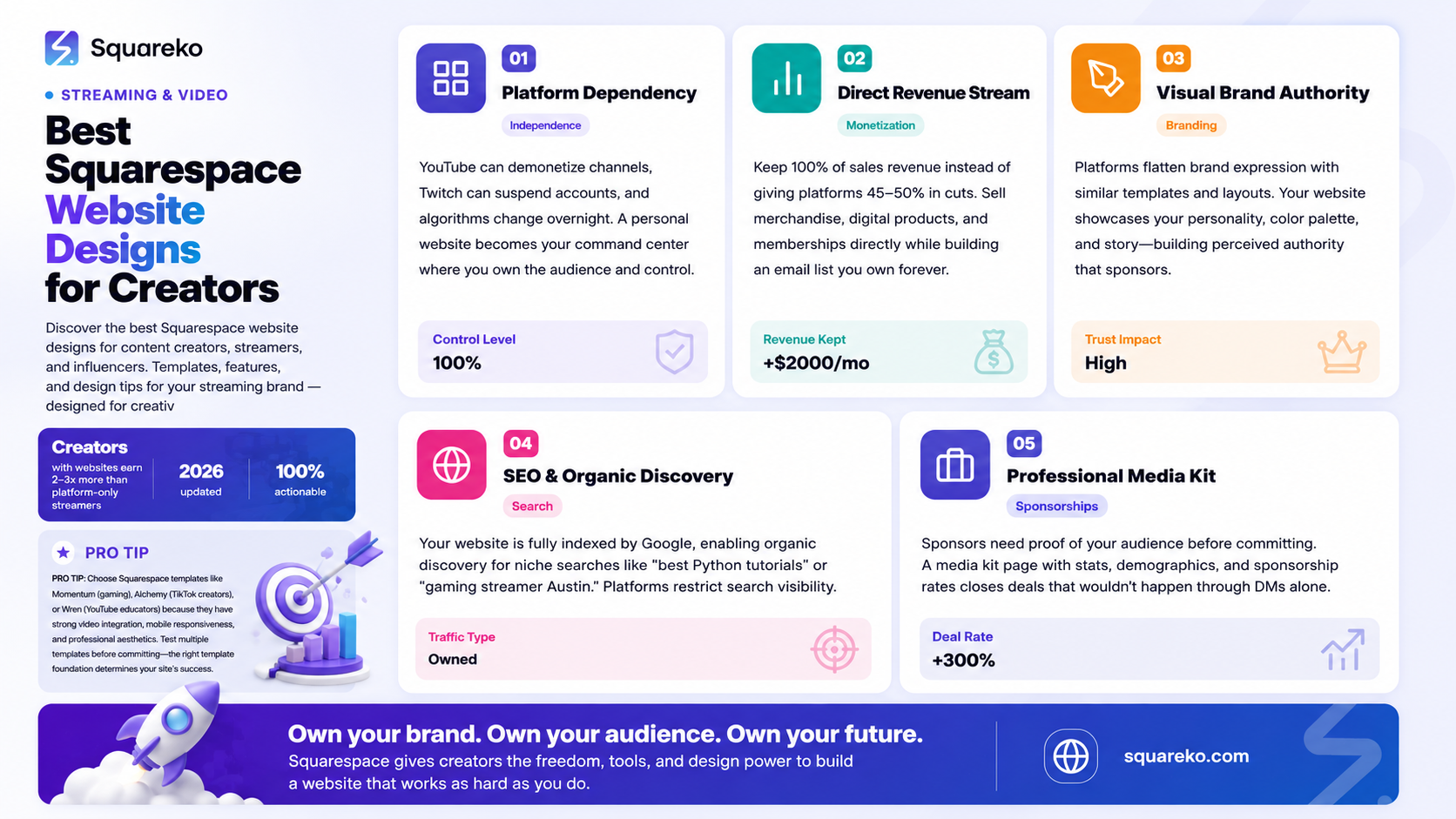
The streaming landscape has shifted dramatically. Five years ago, you could build an audience purely on Twitch or YouTube. Today? You need presence across multiple platforms. But here's the problem: you're renting real estate on every platform.
When platforms change their algorithms, monetization rules, or go down completely, your reach disappears overnight. We saw this with TikTok's regulatory challenges. We saw this with YouTube's demonetization policies. And we see it constantly when streaming platforms make backend changes that hurt creator visibility.
A personal website changes this dynamic. It becomes your command center. Every piece of content, every community interaction, every revenue stream flows through a property you own and control.
Platform Dependency Is a Real Risk
Let's be direct: relying solely on platform algorithms is risky. YouTube can demonetize your channel. Twitch can suspend you. Kick can change its commission structure. TikTok faces existential regulatory threats. Discord can go down. When these things happen, creators without their own infrastructure lose direct audience access.
A website bridges this gap. It's where you:
Collect email addresses (the one audience asset platforms can't take)
Sell digital products and merchandise directly
Offer sponsorship packages with a professional media kit
Host exclusive content for paying members
Maintain a portfolio of your best work
Control the narrative about your brand
The Audience Relationship Problem
Platform algorithms optimize for engagement, not for your success. A YouTube video might get 10,000 views, but if the algorithm decides it's not worthy of the homepage, your next video gets buried. Twitch recommends you to 2% of your followers. TikTok's organic reach is increasingly limited unless you go viral.
Your website cuts through this. When a fan lands on your site, they're not competing with thousands of other creators for attention. They're looking at your content, your story, your offers. This is prime territory for building a real community, not just collecting numbers.
Beyond Platform Dependency: The Real Benefits of Your Own Site
Direct Revenue Streams
On a platform, you're fighting for platform revenue share. YouTube takes 45% of ad revenue. Twitch takes 50% of subscription revenue. TikTok has made monetization nearly impossible for most creators.
On your own site, you keep 100% (minus payment processing fees, which are typically 2-3%).
This changes the math. If you have 10,000 fans who each spend $5/month on a platform, you might earn $2,500-3,000 after cuts. On your own site with Squarespace and Stripe, you can earn $4,850/month from the same 10,000 fans. That's an extra $2,000+ per month just from owning the infrastructure.
Building a Real Brand
Platforms flatten brand expression. Every Twitch channel looks similar. Every YouTube creator uses the same templates. Your site is where your personality comes through—your color palette, your fonts, your layout, your story.
This matters because sponsorship deals, merchandise lines, and brand partnerships all flow from perceived authority and personality. Sponsors want to see a professional site that showcases your media kit and analytics. Fans want to feel like they're supporting a real brand, not just a user handle.
SEO and Organic Discovery
Platforms have closed gardens. Your YouTube video doesn't show up in Google Image Search prominently. Your Twitch stream isn't indexed by Google News. But your website? That's fully searchable, indexable, and discoverable.
When someone searches "best Python programming tutorials," a creator's blog post on their own site will rank. When they search "gaming streamer in Austin," a well-optimized creator portfolio ranks. Platforms don't offer this—your site does.
Email List Building
The most valuable asset in digital marketing is an email list. It's the only direct communication channel you own that platforms can't take away.
On Twitch, if you're banned, your followers disappear. On TikTok, if your account is deleted, you lose access to your audience. But an email list? You can contact those people forever, on any platform.
A proper creator website captures emails in exchange for exclusive content, early stream notifications, or merchandise discounts. Over 2-3 years, an email list of 5,000-10,000 highly engaged fans is worth tens of thousands of dollars.
What Makes a Great Streaming Brand Website on Squarespace
Building a creator website is different from building a business website. It's not about selling products (though you might do that). It's about selling yourself.
Here's what separates an average creator site from one that actually drives engagement, sponsorships, and revenue:
1. Visual Cohesion with Your Personal Brand
Your site should immediately communicate who you are. If you're a gamer, the design should feel gaming-adjacent. If you're an educational creator, it should feel authoritative. If you're a personality-driven streamer, it should showcase your humor and energy.
This isn't about choosing a random template. It's about customizing colors, fonts, imagery, and layout to reflect your brand. Squarespace templates are designed to be customized—choose one with good bones and make it yours.
2. Immediate Call-to-Action
The first thing someone sees on your site should be immediately clear: what do you do, and what should they do next?
For most creators, this is either:
Subscribe to your email list for exclusive content
Watch your latest stream or video
Buy merchandise
Check out your media kit (for sponsors)
Don't bury this under navigation menus. Make it prominent. Above the fold. Unmissable.
3. Clear Information Hierarchy
Visitors should be able to answer these questions in 10 seconds:
Who is this person?
What content do they create?
Where can I watch/follow?
How can I support them?
Use clear section headings, visual breaks, and a logical flow. Don't make people hunt for information.
4. Fast Load Times and Mobile Responsiveness
In 2026, more than half your traffic will be mobile. If your site doesn't load fast and look great on phones, you'll lose people before they even engage.
Squarespace handles this well out of the box, but you need to be mindful of large video files and high-resolution images. Squarespace performance optimization for creators
5. Trust Signals and Social Proof
Include:
A professional bio with credentials or noteworthy achievements
Platform follower counts (if they're impressive)
Testimonials from brands you've worked with
Logos of companies you've partnered with
Featured mentions in media
Subscriber/viewer statistics (if substantial)
These signals tell visitors: "This person is legitimate and worth supporting."
6. Easy Sharing and Discovery
Every important piece of content should be shareable. Every page should have social sharing buttons. Your site should integrate with your streams, videos, and social posts so fans can easily navigate between them.
Best Design Styles for Different Creator Types
Not all creator websites look the same. A music producer's site is different from a fitness coach's. A gaming streamer's site is different from a podcast host's. Let's break down what works for different creator types.
YouTube Content Creator Site Design
YouTube creators typically have longer-form content and established track records. Their sites should showcase:
A portfolio of best videos (embed YouTube playlists)
Channel stats and subscriber count
Clear "Subscribe" CTA linking to YouTube
Blog section (bonus SEO ranking)
Professional bio with credentials
Sponsorship inquiry form
Design approach: Professional with personality. Think clean, modern layouts with high-quality graphics. Video thumbnails should be prominent. Color palette should either match your YouTube branding or be complementary.
Squarespace templates that work: Aviator, Wren, Iota
Twitch Streamer Site Design
Twitch streamers need to emphasize schedule, community, and easy access to their stream. The site should:
Display current streaming status
Show upcoming schedule
Link directly to Twitch channel
Feature clip compilations
Highlight community events and tournaments
Member or subscriber perks
Discord community link
Design approach: Energy-forward and community-focused. This is where you can push bolder colors, gaming aesthetics, and personality. Don't shy away from bold typography or anime-adjacent design if that's your brand.
Squarespace templates that work: Momentum, Reign, Cline
TikTok Creator Site Design
TikTok creators are often personality-driven and trend-focused. Their sites should:
Feature best TikTok videos or short-form content compilations
Emphasize personality and humor
Promote other social platforms (Instagram, YouTube, Discord)
Offer exclusive content or early access for email subscribers
Link to merchandise
Show latest posts or updates
Design approach: Visually bold, mobile-first, personality-centric. This is your chance to be creative and unconventional. TikTok creators can break traditional design rules because that's part of the brand.
Squarespace templates that work:
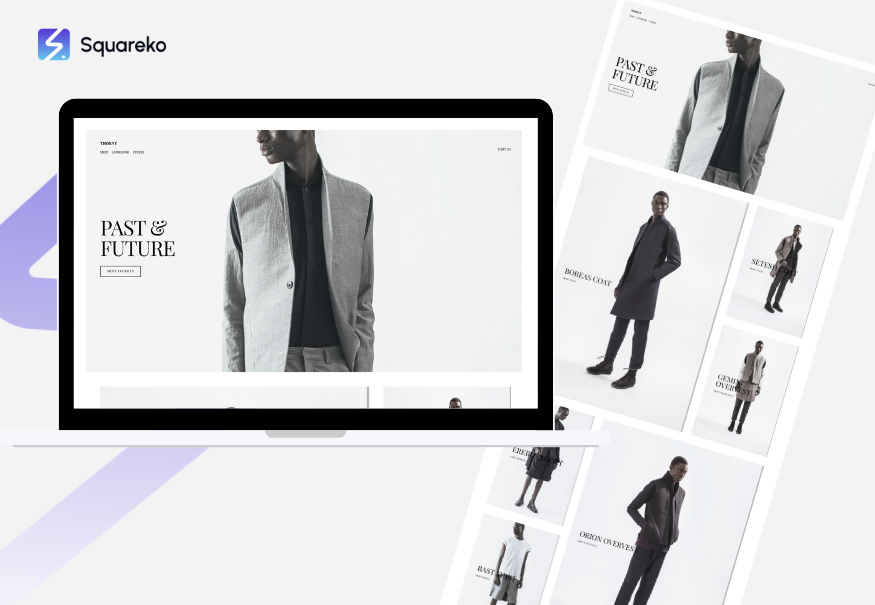
Thorne
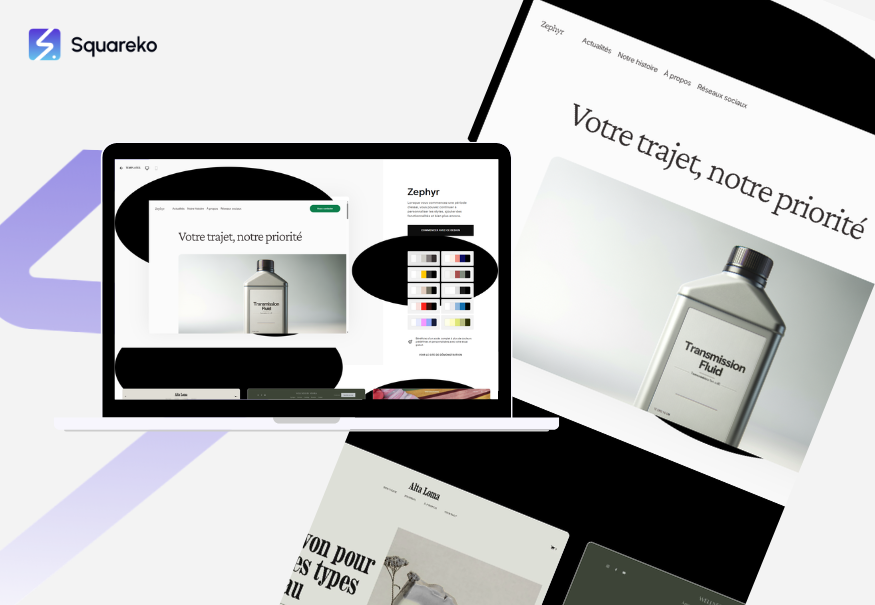
Zephyr
Podcast or Audio Creator Site Design
Podcast and audio creators need:
Prominent podcast player or Spotify embed
Episode archives and transcripts
Guest information and interviews
Sponsorship information
Email signup for episode notifications
Audio equipment recommendations (affiliate links)
Design approach: Professional and information-focused. Use high-quality photography of your setup or yourself. Think minimalist rather than flashy.
Squarespace templates that work: Brine, York, Pacific
Kick or Alternative Platform Creator Site Design
Creators on newer platforms like Kick need to:
Clearly state what platform they stream on
Provide direct links to their channel
Emphasize what makes them unique
Show stream highlights and clips
Build email list (since platform is newer/less stable)
Create community off-platform
Design approach: Professional but distinctive. You're building a moat around your audience because you know your audience is primarily on one platform. Emphasize direct communication channels.
Squarespace templates that work: Jaunt, Soto, Liam
Must-Have Features for Creator Websites
Certain features separate a website from a true content creator platform. Here are the non-negotiables:
1. Media Kit / Press Kit
Sponsors need to see your numbers, demographics, and rates. A professional media kit is table stakes. It should include:
Platform follower counts and engagement rates
Audience demographics (age, location, interests)
Average views/viewers per stream or video
Sponsorship package tiers and pricing
Past brand partnerships
Contact information for inquiries
High-quality headshots or photos
Make this a professional PDF download or a dedicated page. This single feature can increase sponsorship inquiries by 300%+.
2. Merchandise or Digital Products Store
Squarespace has native e-commerce. Use it. Whether you're selling:
Physical merchandise (t-shirts, hats, hoodies with your branding)
Digital products (guides, courses, presets)
Print-on-demand items
Exclusive digital content
Even if you don't have much to sell yet, having a shop page signals that you're a real brand. Start small—maybe just branded apparel—and scale.
3. Email Capture / Newsletter Signup
This is non-negotiable. Every page should have an email signup offer. Consider offering:
Exclusive stream alerts
Behind-the-scenes content
First access to merchandise
Free guides or resources
Monthly community updates
Squarespace integrates natively with email platforms like Klaviyo, Mailchimp, and ConvertKit. Use this. Your email list is your most valuable asset.
4. VOD or Content Archive
Squarespace's video hosting is excellent. Create sections to showcase:
Past streams or videos organized by category
Best clips or highlights
Tutorial or educational content
Community moments or clips
This serves multiple purposes: it's great for SEO, it gives new visitors content to explore, and it showcases your consistency and professionalism.
5. Links Hub or Directory
Create a section (or use Squarespace's built-in link integration) that clearly shows:
Links to all your streaming platforms
Discord community
Social media profiles
Email contact
Sponsorship inquiries
Any external platforms
Don't make fans hunt for ways to connect with you. Make it obvious.
6. Schedule or Events Calendar
If you stream regularly, display your schedule prominently. Squarespace integrates with Google Calendar. Show:
When you go live
Special events or tournaments
Collaboration streams
Meet-and-greets or community events
Fans want to know when you're available. Make it easy to find.
7. Member or Subscriber Perks
If you have paying members or subscribers, showcase the perks:
Exclusive content or VODs
Discord channel access
Monthly Q&A calls
Custom alerts or emotes
Early merchandise access
This incentivizes people to support you directly through your website rather than just watching free content.
8. Contact Form for Sponsorships and Inquiries
Make it easy for brands to reach you. Create a dedicated sponsorship inquiry form that captures:
Brand name and website
Campaign details
Budget range
Timeline
Contact information
Direct sponsorship inquiries to your email or CRM. This is how you turn your audience into revenue.
Top Squarespace Templates for Streamers and Content Creators
1. Cline
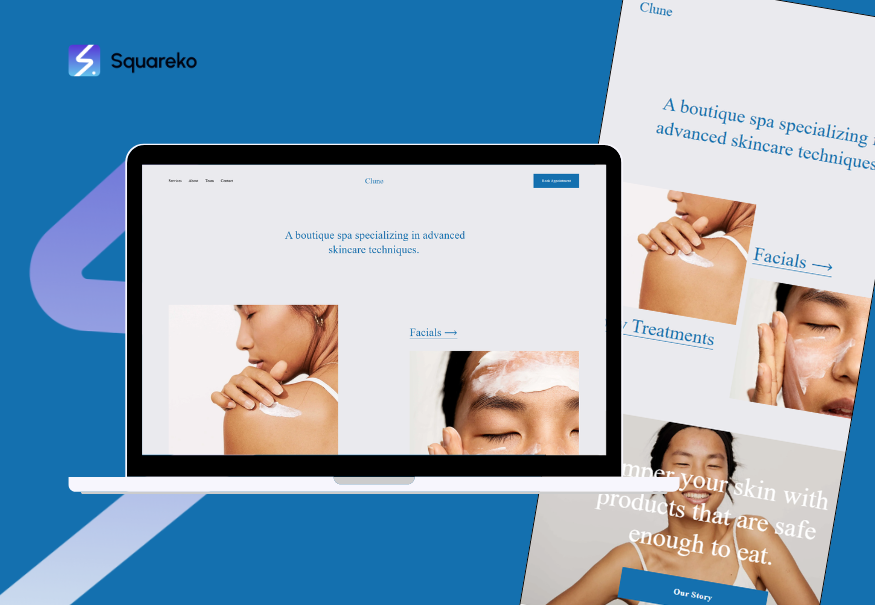
Best for: Multi-platform creators and influencers
Cline is flexible and works for multiple content types:
Large hero area
Multiple content section options
Strong CTA buttons
Gallery and video integration
Customizable footer
Why it works: It doesn't assume a specific creator type. You can adapt it for streams, YouTube, TikTok, or podcasts. Navigation is intuitive. It's mobile-responsive.
Customization tips: Use your most striking image in the hero section. Make your primary CTA (email signup, "follow," "shop") the first thing people see. Organize content by what your audience wants first.
2. Brine
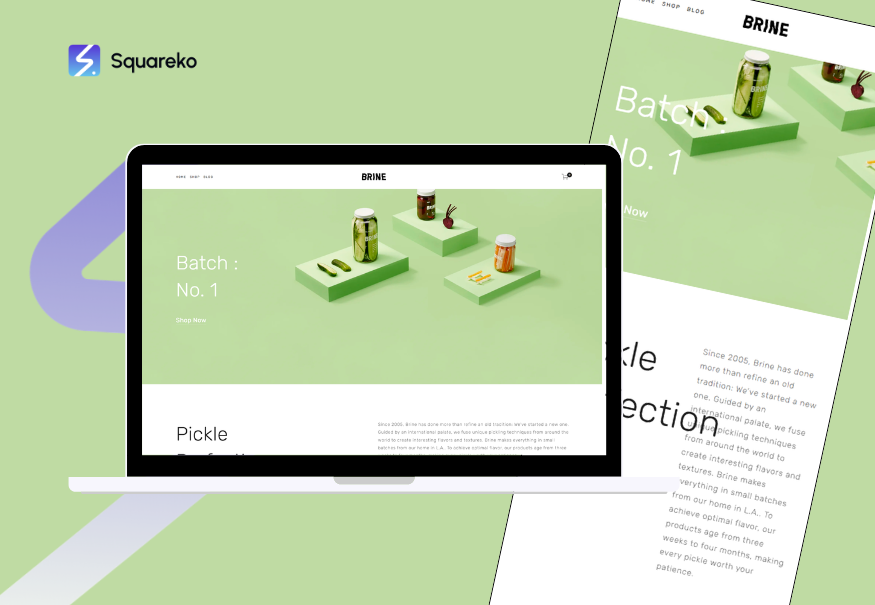
Best for: Podcast creators and written content creators
Brine is optimized for content discovery and exploration:
Blog-first design
Clean typography
Easy content organization
Built-in podcast player options
Professional aesthetic
Why it works: It prioritizes readability and content browsing. Navigation is clear. It's excellent for creators who publish frequently. The blog integration is top-tier for SEO.
Customization tips: Use a professional color palette. Feature your latest podcast episode prominently. Make archives easily browsable. Use the blog section for episode notes and transcripts.
Real-World Examples: What a Squareko-Built Creator Site Looks Like
We build a lot of creator sites at Squareko. While we respect client privacy, here's what a great creator site includes, based on the hundreds we've launched:
Example Structure: A Mid-Level Gaming Streamer
Homepage:
Hero section with latest stream clip
"Schedule" section showing next three stream times
Call-to-action: "Get notified when I go live" (email signup)
Featured clips or highlights section
Links to Twitch, Discord, Twitter
Newsletter signup
About Page:
Professional bio (200-300 words)
Photos showing streaming setup
List of games/categories
Partner logos or brands worked with
Stats (followers, hours streamed, etc.)
Personality comes through
Schedule:
Full streaming calendar
Upcoming events and collaborations
Time zone converter
Discord event links
Merch:
5-10 products (tees, hoodies, hats)
High-quality product photos
Clear sizing information
Easy checkout
Media Kit:
Professional PDF download
Platform stats
Audience demographics
Sponsorship packages
Case studies from past sponsorships
Contact form
Blog:
Game reviews
Streaming tips
Behind-the-scenes stories
Community highlights
Example Structure: A YouTube Educational Creator
Homepage:
Hero with best video embedded
Subscribe on YouTube button
Key stats (subscribers, upload frequency)
Email signup: Get exclusive guides
Latest videos or playlists
Trust signals
Resources Page:
Free downloadable guides
Tools and equipment recommendations (with affiliate links if applicable)
Recommended readings
Tutorials or video playlists
Courses or Products:
Paid course with sample lesson
Masterclass offering
Digital products (templates, presets)
Clear pricing and purchase options
Speaking or Appearances:
Podcasts featured on
Conferences or events
Interview appearances
Media mentions
Email Archive:
Weekly newsletter signup
Back issues accessible
Content upgrade offers
The common thread? Every element serves a purpose. Every section makes it easy for the audience to engage deeper or support the creator. Every page loads fast and looks great on mobile.
Squarespace vs. Other Builders for Streamers
You might be wondering: why Squarespace specifically? There are other options. Let's be honest about the alternatives.
Squarespace vs. Wix
Wix Pros: Large template library, very customizable, good e-commerce
Wix Cons: Slower than Squarespace, steeper learning curve, less beautiful by default, template quality inconsistent
Squarespace wins for creators because: Templates are beautiful out-of-the-box, faster performance, better design consistency, easier for non-designers to use well, superior video integration
Verdict: Squarespace is our choice. Wix requires more customization to look professional.
Squarespace vs. Word Press
WordPress Pros: Maximum customization, huge plugin ecosystem, powerful blogging
WordPress Cons: Steeper learning curve, you need to handle hosting/security, slower if not optimized, requires more maintenance
Squarespace wins for creators because: Simpler to set up, all-in-one platform, better default performance, no hosting concerns, less technical knowledge required
Verdict: WordPress is better if you're highly technical. Squarespace is better if you want professional results without technical headaches.
Squarespace vs. Linktree
Linktree Pros: Simple, specifically designed to aggregate links, free tier available
Linktree Cons: Doesn't build a real brand, limited customization, you don't own the experience, no email capture, no real monetization options
Squarespace wins for creators because: It's a real website, you own it completely, you can sell products, capture emails, build authority, and create a permanent home for your brand
Verdict: Linktree is a quick band-aid. Squarespace is a long-term asset that grows with you.
Squarespace vs. Carrd
Carrd Pros: Extremely affordable ($19/year), minimal learning curve, single-page sites are simple
Carrd Cons: Limited to one page or very limited pages, no real e-commerce, no native blogging, no email integration, looks small
Squarespace wins for creators because: You need multiple pages (schedule, media kit, merch, content), you need real e-commerce, you need email capture, you need professionalism at scale
Verdict: Carrd works for extremely basic link aggregation. Most serious creators outgrow it in months.
Squarespace vs. Custom WordPress Site
Custom WordPress Pros: Maximum flexibility, zero limitations, full control
Custom WordPress Cons: Requires hiring a developer (expensive), ongoing maintenance costs, slower to launch, requires technical knowledge to update
Squarespace wins for creators because: You can launch in days, not months, no ongoing developer dependency, all included in monthly fee, beautiful by default
Verdict: If you have a $5,000+ budget and want unlimited customization, custom WordPress makes sense. If you want professional results within weeks for under $300/month, Squarespace wins.
How to Choose the Right Design for Your Brand
Choosing a Squarespace template and design approach is a significant decision. Here's a decision framework:
Step 1: Identify Your Primary Audience
Who are you trying to reach?
Brands/sponsors looking for partnership opportunities? → Professional design
Fans who want to feel connected to you? → Personality-forward design
Potential customers for products? → E-commerce focused design
People seeking education/tutorials? → Content-focused design
Your primary audience should influence your design choices more than anything else.
Step 2: Evaluate Existing Creator Success in Your Niche
Look at successful creators in your space. What do their sites look like?
What templates seem popular?
What colors do they use?
How do they organize information?
What CTAs are prominent?
You don't want to copy—you want to understand what's working and what your audience expects.
Step 3: Define Your Brand Personality
Is your brand:
Professional and authoritative?
Fun and playful?
Minimalist and clean?
Bold and energetic?
Artistic and creative?
Choose a template that has bones matching your personality. Customization can only take you so far—a template fundamentally mismatched with your brand will fight you.
Step 4: Consider Your Content Format
What's your primary content?
Video-heavy? Choose a template with strong video integration
Image-heavy? Choose a template with gallery strength
Text/blog-heavy? Choose a template with excellent typography
Multi-format? Choose flexible templates
Step 5: Plan Your Essential Pages and Sections
Map out what sections you definitely need:
About
Content showcase
Schedule
Contact / Sponsorship inquiry
Merchandise or products
Media kit
Email signup
Choose a template flexible enough to accommodate all of these without feeling cluttered.
Step 6: Evaluate Performance and Mobile Experience
Load the template on mobile and ensure it's responsive
Check load times on 3G connections
Verify video embeds work smoothly
Test forms and interactive elements
This is non-negotiable. If it doesn't work on mobile, it doesn't work for your audience.
Step 7: Start and Iterate
Choose a template, launch, and iterate. You don't need perfection to start. You can:
Change colors and fonts easily
Add or remove sections
Reorganize information
Update copy
Add new features
Get the site live, gather feedback from your audience, and refine. A good site that's live is better than a perfect site that never launches.
-
Short answer: Yes, if you want to build a sustainable, independent career.
Long answer: Platforms are fickle. YouTube algorithm changes. Twitch policy shifts. TikTok faces regulatory pressure. A website is the one property you own. It's where you build your email list, sell products, present sponsorship opportunities, and maintain a permanent home for your brand. Creators with websites earn 2-3x more than creators who rely solely on platform monetization.
That said, if you're brand new with under 1,000 followers, focus on growing on platform first. A website becomes essential once you have a real audience that you want to monetize or build relationships with. -
We're biased toward Squarespace for these reasons: beautiful templates, native video integration, built-in e-commerce, no coding required, excellent email integration, fast performance, and professional results out-of-the-box.
That said:
If you're highly technical and want unlimited customization: Custom WordPress
If you want maximum budget efficiency: Wix or Squarespace
If you just want to aggregate links: Linktree (though a real website is better)
If you want educational content focus: WordPress.com or Squarespace with blog
For most streamers, Squarespace is the sweet spot: professional, simple, and affordable ($12-33/month depending on plan).
-
Monthly hosting/platform fee: $12-33/month for Squarespace, depending on features you need
Professional design/setup (optional): $1,000-5,000+ to have an agency (like Squareko) build and optimize it for you
Total first-year investment: $500-7,000 depending on DIY vs. agency-built
If you're DIY, expect to spend $200-400 your first year on hosting and a domain. If you want professional results without the learning curve, budget $2,000-3,000 for an agency to build it.
Most creators find it's worth the investment within 3-6 months through increased sponsorships, product sales, and email list monetization.
-
Yes. Squarespace has native e-commerce. You can:
Upload products (physical items, digital downloads, etc.)
Set up inventory management
Process payments via Stripe, Apple Pay, PayPal
Offer discounts and sales
Use Printful or Printshare for print-on-demand (you don't hold inventory)
Many creators start with print-on-demand merchandise (t-shirts, hoodies) since there's no upfront inventory cost. Squarespace handles everything.
-
DIY: 2-6 weeks if you're detail-oriented. Squarespace's template customization is intuitive, but getting everything right takes time.
With a professional designer: 1-2 weeks from kickoff to launch (depends on your responsiveness with feedback).
Ongoing updates: 2-4 hours per month to keep content fresh, update schedule, add new content, etc.
Don't let the timeline intimidate you. You can launch a basic version in a few days and refine over time.
-
Personal Plan ($12/month): Basic site, email signup, simple contact form. Good for getting started.
Business Plan ($18/month): All Personal features + e-commerce (sell products), professional email, advanced SEO tools, video backgrounds. This is the minimum for most creators.
Commerce Plan ($33/month): All Business features + advanced inventory, abandoned cart recovery, gift cards. Only necessary if you're doing substantial e-commerce.
Enterprise: Custom pricing for large operations.
Recommendation for creators: Start with Business Plan ($18/month). It gives you e-commerce (for merch), email integration, and advanced SEO for ~$200/year.
-
Absolutely. Squarespace integrates with Google Calendar. Embedding your real, live stream schedule on your site:
Gives fans a reason to visit your website (not just your platform)
Provides a backup if your platform goes down
Reduces "when are you streaming?" support questions
Increases likelihood of people showing up
Make the schedule prominently visible on your homepage or in main navigation.
-
Yes. You can embed:
Live Twitch stream (shows live when you're streaming, shows past broadcasts when offline)
Twitch clips
YouTube videos
Any video via custom embed code
This is powerful: people can stay on your site to watch you instead of navigating to Twitch directly. They see your site's branding, your merchandise, your sponsorship opportunities, and your email signup while watching.
Ready to Build Your Creator Website?
Here's the truth: every creator we've talked to who launched a website said the same thing: I wish I'd done this sooner.
A website isn't a distraction from growing your audience. It's the backbone of a sustainable creator business. It's where you:
Keep 100% of product revenue instead of giving 45-50% to platforms
Build relationships with sponsors directly
Capture email addresses you own forever
Create a permanent home for your best content
Show the world you're a real brand, not just a user handle
At Squareko, we specialize in building beautiful, high-converting websites for creators just like you. We understand what works because we've built hundreds of them. We know which Squarespace templates perform best. We know how to position your media kit for sponsor inquiries. We know how to structure your site so fans become paying supporters.

From custom website design to SEO strategy, we help businesses launch a site that looks professional and performs better.

About the Author
Walid Hasan | Squareko
I'm Walid Hasan, a Certified Squarespace Expert and Squarespace Circle Platinum Partner with over 12 years of hands-on experience designing and optimizing high-performing websites. Over the years, I've had the privilege of building more than 2,000 Squarespace websites for clients around the world, always focusing on clean design, strong user experience, and conversion-driven results.
