
Best Squarespace Templates for Course Creators and Online Educators
Introduction
If you're launching an online course or building a platform to teach others, your website isn't just a digital storefront—it's your first impression, your credibility marker, and your sales engine all rolled into one. The right Squarespace template for course creators can be the difference between a website that converts students and one that gets lost in the noise.
Here's the thing: not every Squarespace template is built with course creators in mind. Some are designed for portfolios. Others work great for blogs or e-commerce shops. But when you're teaching online—whether you're selling a single course or managing multiple offerings—you need a template that handles course pages, student testimonials, pricing flexibility, and a smooth enrollment process.
That's where this guide comes in. We've tested and analyzed Squarespace's 7.1 template system to identify which templates work best for educators and course creators. We've also included real-world insights from our work at Squareko, where we specialize in building custom course websites that convert. By the end of this post, you'll know exactly which template suits your teaching business and how to make it work for your unique needs.
Key Takeaways Best Squarespace Templates for Course Creators and Online Educators
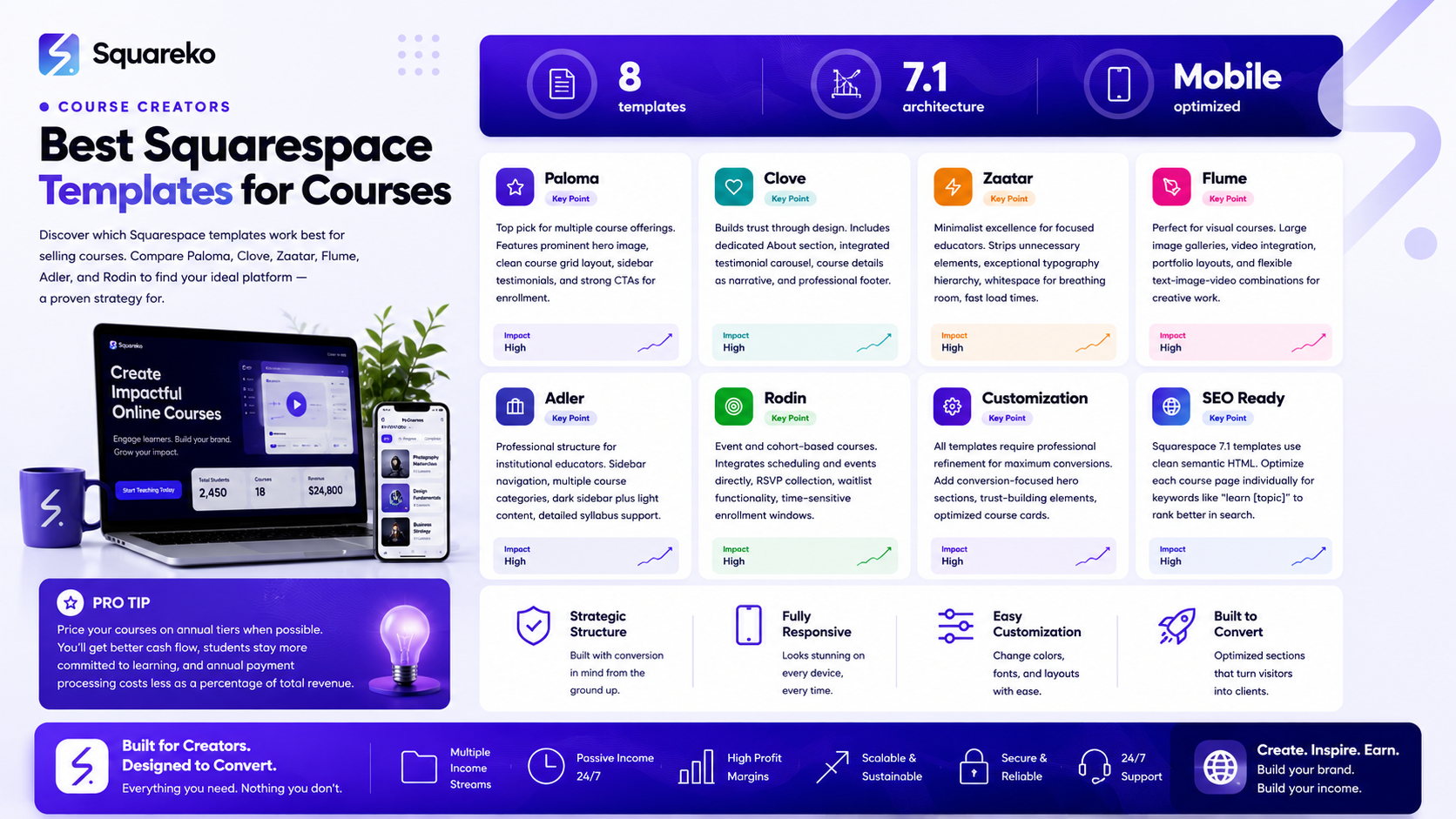
Paloma and Clove are among the top Squarespace templates for course creators because they offer clean layouts, prominent course showcasing, and built-in credibility signals.
Squarespace 7.1 templates include native quarespace scheduling and booking features that can integrate course enrollment and student access management.
A well-chosen template reduces the friction between course discovery and enrollment, directly impacting conversion rates.
While templates provide a solid foundation, customization and professional design refinement can significantly increase perceived course value.
Most Squarespace plans support course sales and digital product delivery, but choosing the right template accelerates your launch timeline.
Why Template Choice Matters for Course Creators
Before we dive into specific templates, let's talk about why this decision matters.
A course website serves multiple purposes. It's where prospective students learn about your teaching approach and credentials. It's where they decide whether your course is worth their time and money. And it's where they complete enrollment and access course materials.
The template you choose affects:
Course discoverability. Can potential students easily find course pages from your homepage? Are testimonials and social proof visible above the fold?
Trust and credibility. Does the design feel professional? Do you have space for an author bio, credentials, and student success stories?
Conversion flow. How many clicks does it take from I'm interested to I'm enrolled? Are pricing and course details transparent?
Mobile experience. Will your course details and enrollment buttons work smoothly on phones and tablets?
SEO performance. Are course pages properly structured for search engines? Can you optimize individual course pages for keywords like learn [your topic]?
The best template for course creators checks all these boxes without requiring you to hand over your entire budget to a developer.
Squarespace 7.1 Template System: What You Need to Know
Squarespace 7.1 introduced a modernized template architecture with several advantages for course creators. Unlike legacy templates, 7.1 templates are built on a more flexible and responsive framework.
Key features of Squarespace 7.1 for educators:
Native course and membership support. While Squarespace isn't primarily a learning management system, its course features allow you to host course descriptions, pricing, and digital product delivery.
Dynamic sections. Templates offer customizable sections that you can reorder and modify without coding. This means you can build a course landing page that highlights your teaching approach, student results, and enrollment CTA exactly as you need it.
SEO-friendly structure. 7.1 templates come with optimized heading structures, meta tag management, and clean URLs that help your course pages rank in search results.
Mobile-first design. Every template is designed mobile-first, which is critical because many course students browse and enroll on mobile devices.
Integrated media handling. You can embed videos (hosted on YouTube, Vimeo, or your own), image galleries, and testimonials directly into course pages.
The 7.1 system is significantly better for course creators than older template generations because it allows more flexibility while maintaining clean design foundations.
Comparison Table: Top Squarespace Templates for Courses
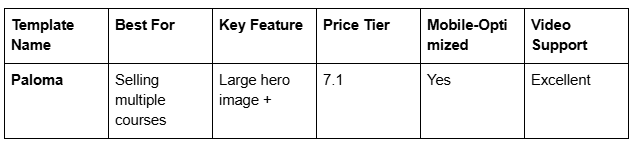
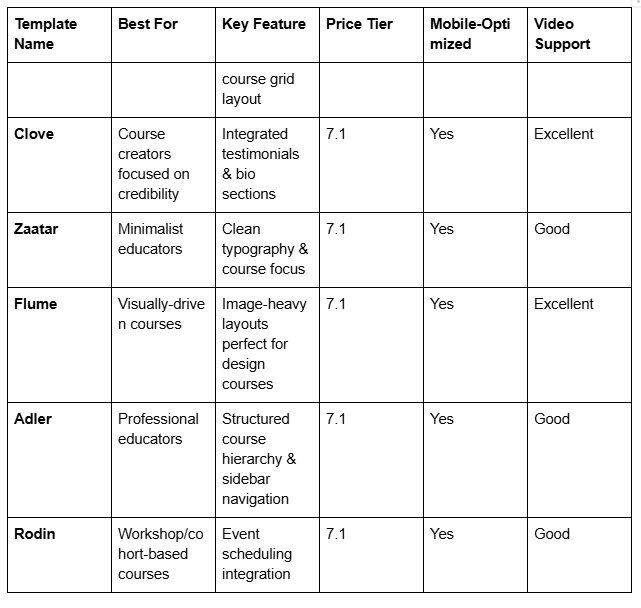
Best Squarespace Templates for Course Creators
1. Paloma: The Top Pick for Multiple Course Offerings
Why it wins for course creators: Paloma is our go-to recommendation for educators with multiple courses or who plan to scale their offerings. The template features a prominent hero section for your lead course, followed by a clean course grid that displays additional offerings beautifully.
What works:
Large hero image with bold headline makes an immediate impact
Course cards are spacious and visually distinct, allowing students to quickly scan offerings
Native pricing display without requiring separate pages
Strong call-to-action buttons for each course
Sidebar testimonials section builds instant credibility
Best for: Course creators launching multiple courses simultaneously, or those planning to add courses regularly. Also excellent for educators who want a portfolio of expertise visible at a glance.
Customization opportunities: Paloma pairs exceptionally well with custom color schemes and photography. Adding instructor credentials and student transformation stories in the testimonial sections amplifies conversion rates significantly.
2. Clove: Building Trust Through Design
Why it wins for course creators: Clove prioritizes credibility and trust signals. If you're a new course creator building authority, or an established educator wanting to establish deeper student relationships, Clove's design naturally leads prospective students toward enrollment.
What works:
Dedicated About the Creator section with ample space for your bio and credentials
Integrated testimonial carousel that displays student success stories prominently
Course details section that feels more like a narrative than a list
Clean typography that emphasizes readability—crucial for longer course descriptions
Professional footer with newsletter signup integration
Best for: Solo course creators or coaches launching their first course, educators with strong testimonials, and anyone building a personal brand around their teaching.
Why students choose this: The Clove template doesn't just show what you teach—it shows who you are and why they should learn from you. This matters tremendously in the course creation space.
3. Zaatar: Minimalist Excellence for Focused Educators
Why it wins for course creators: Sometimes less is more. Zaatar strips away unnecessary design elements and focuses entirely on your course content and value proposition.
What works:
Minimal color palette that doesn't distract from course content
Exceptional typography hierarchy guides readers through course benefits
Whitespace gives your course details room to breathe
Fast-loading pages (minimalist design = better performance)
Clean, distraction-free enrollment flow
Best for: Educators teaching academic or technical subjects where clarity is paramount. Also ideal for course creators who want their content—not flashy design—to be the star.
Ideal student avatar: Serious learners searching for substance over style. If your audience is decision-makers, professionals building new skills, or academic learners, Zaatar's straightforward approach converts well.
4. Flume: For Visually-Driven Courses
Why it wins for course creators: If you're teaching design, photography, art, creative writing, or any visual discipline, Flume lets your work speak. The template features large image galleries and video integration that showcase student work and course examples.
What works:
Full-width image sections make course examples visually stunning
Native video embedding for course trailers and preview content
Gallery layouts perfect for displaying student portfolios
Bold typography that complements visual content
Flexible layout for combining text, images, and video seamlessly
Best for: Course creators in creative fields: graphic design, photography, illustration, web design, creative writing, video production, or any discipline where showing examples accelerates understanding and enrollment.
Conversion advantage: When prospective students see actual examples of what they'll learn to create, objection rates drop significantly. Flume makes this the centerpiece of your course page.
5. Adler: Structure and Credibility for Professional Educators
Why it wins for course creators: Adler uses a sidebar navigation approach that naturally organizes multiple course offerings. It works exceptionally well for corporate trainers, professional educators, and anyone teaching in formal or semi-formal settings.
What works:
Sidebar navigation allows logical course hierarchy
Multiple course category support without cramming everything on one page
Professional color schemes (dark sidebar + light content area)
Institutional credibility—great if you're affiliated with organizations, universities, or professional bodies
Detailed course page templates with space for syllabi, prerequisites, and learning outcomes
Best for: Professional trainers, corporate educators, certification programs, or course creators positioning themselves as institutional/official educators.
When to choose this: If your students are searching for specific course structure, prerequisites, or detailed learning outcomes, Adler's organized approach reduces friction.
6. Rodin: Event and Cohort-Based Courses
Why it wins for course creators: Rodin integrates Squarespace's scheduling and events system directly, making it ideal for cohort-based courses, workshops, webinars, or any course with defined start dates and limited enrollment windows.
What works:
Native event calendar integration showing course start dates
RSVP and registration collection built into the template
Waitlist functionality for cohort-based courses
Strong visual hierarchy for time-sensitive enrollment
Integration with scheduling and booking workflows
Best for: Cohort-based course creators, workshop facilitators, webinar hosts, or educators who operate on semester/session schedules rather than self-paced models.
Conversion advantage: Scarcity and urgency work. When students see defined cohort start dates and limited enrollment windows, decision-making accelerates.
Squarespace for Educators: Native Features and Integrations
Beyond templates, Squarespace offers built-in features that benefit course creators:
Course Pages and Pricing: You can create dedicated course pages within Squarespace and display pricing directly. This removes the need for external course platforms for simple course offerings.
Digital Products: Squarespace allows you to sell digital products—PDFs, video files, course materials—directly through your website with automatic delivery to students.
Email Integration: Connect Squarespace Forms to email marketing platforms like Mailchimp or ConvertKit to capture student leads and send automated welcome sequences.
Payment Processing: Squarespace Payments (and integrations with Stripe, Square, PayPal) handle course payments securely. Students complete enrollment without leaving your site.
Video Integration: Embed YouTube, Vimeo, or Wistia videos throughout your course pages. This is essential for course previews and promotional content.
Member Accounts: For courses requiring student logins, Squarespace's membership feature allows gated content access. Enrolled students log in to access course materials.
The takeaway: Squarespace can serve as a complete front-end for your course offering. Many course creators use Squarespace for the marketing and enrollment side, then use dedicated learning platforms like Kajabi, Teachable, or their own systems for course delivery.
How Squareko Customizes Templates for Maximum Course Sales
At Squareko, we take these templates as starting points and customize them strategically for course creators. Here's what professional customization looks like:
1. Conversion-Focused Hero Sections We redesign hero sections to immediately communicate course value. Instead of a generic welcome message, we craft hero copy that addresses prospective students' pain points and positions your course as the solution. This often increases engagement by 20-40%.
2. Strategic Trust-Building Sections We add or reorganize sections to prominently feature instructor credentials, student testimonials, transformation stories, and after the course success metrics. These elements live above the fold on optimized course pages.
3. Optimized Course Card Design Rather than displaying courses in simple grids, we create visually distinct course cards that communicate course duration, difficulty level, and key outcomes at a glance.
4. Enhanced Enrollment Funnels We simplify the path from interest to enrollment. This might include adding an email capture form before pricing reveal, creating urgency with limited-time bonuses, or integrating payment processing with automatic course access.
5. SEO Optimization for Course Pages We ensure each course has a dedicated page optimized for keywords like learn [topic] or [topic] course. This helps your specific courses rank individually, not just your homepage.
6. Mobile-First Refinement While Squarespace templates are mobile-responsive, professional customization ensures enrollment CTAs are prominent, testimonials are readable, and video plays smoothly on all devices.
7. Integration with Tools You Already Use We connect your Squarespace site with your email marketing platform, webinar software, payment processor, or learning management system to create a seamless student experience.
The difference between a template used out-of-the-box and a customized professional site often translates to 2-3x higher conversion rates. Your template is the foundation; professional customization builds the high-converting structure.
What to Look for in a Course Website Template
If you're evaluating which Squarespace template works best for your specific situation, consider these criteria:
1. Course Visibility Can you feature your courses prominently on the homepage? Do course cards or course descriptions show benefits and outcomes, or just titles? The better your courses are featured, the faster prospective students convert.
2. Social Proof Integration Does the template have dedicated sections for testimonials, student success stories, or case studies? Social proof is the single biggest trust driver in course sales.
3. Author/Educator Bio Do you have adequate space to introduce yourself as an instructor? Can you include credentials, experience, and a professional photo? This matters disproportionately in course marketing.
4. Content Flexibility Can you add text, images, and video to course pages without coding? Squarespace templates should allow drag-and-drop content management. If you need a developer for every change, you've chosen the wrong template for your needs.
5. Mobile Performance Test the template on your phone before committing. Are course details readable? Do CTAs function smoothly? Are images sized appropriately?
6. Pricing Display Can you clearly display course pricing and payment options? Hiding pricing is a conversion killer. Good templates show pricing prominently without requiring clicks to reveal.
7. Integration Capacity Does the template play nicely with email marketing tools, scheduling software, or payment processors? You'll want to connect your Squarespace site to your broader tech stack.
8. Scalability If you're planning to add more courses over time, does the template support multiple course offerings without becoming cluttered? Look for templates with flexible layouts and customizable grids.
Ready to Launch Your Professional Course Website?
Here's what we know from working with dozens of course creators: your template choice matters, but your execution matters more. The best template in the world won't convert students if it's not customized for your specific course, audience, and goals.
At Squareko.com, we specialize in helping course creators launch professional websites that convert. We don't just slap your content on a template and call it done. We analyze your target student, audit competitive course websites, customize your chosen template for maximum conversions, integrate your email marketing and payment systems, and optimize every course page for search visibility.
If you're ready to move from thinking about launching your course to actually selling it, let's talk. We offer a free discovery call where we'll discuss your course offering, evaluate your current website (if you have one), and outline exactly what your professional course website needs to succeed.
Your prospective students are searching for courses right now. They're comparing options. The question is: will your course website be one of the options they choose, or will they find a competitor?
Book your free Squareko discovery call today. We'll spend 30 minutes getting to know your course, your students, and your goals. No pressure, no sales pitch—just honest advice about building a course website that works.
Frequently Asked Questions
-
The best Squarespace template for selling courses depends on your specific needs. Paloma is our top overall recommendation because it displays multiple courses beautifully and handles various pricing models. However, Clove excels if you're building a personal brand around your teaching, Zaatar works best for minimalist educators, and Rodin is optimal for cohort-based courses with fixed start dates. Test a few templates before deciding—many course creators choose based on whether they need to emphasize multiple offerings (Paloma), personal credibility (Clove), or simplicity (Zaatar).
-
Technically, yes. Squarespace's underlying platform supports course sales and digital product delivery across all 7.1 templates. However, not every template is optimized for course sales. Some templates make it difficult to feature courses prominently or lack dedicated sections for instructor credibility. You can force a blog template to sell courses, but you'll spend more time customizing and may see lower conversion rates. Choosing a template designed with course creators in mind—like those listed in this post—saves time and typically improves sales performance.
-
You don't need a special template, but a course-focused template significantly improves your results. Templates like Paloma and Clove include native sections for course showcasing, instructor information, and student testimonials that make course sales straightforward. Using a generic template requires more customization work and may not communicate course value as effectively to prospective students.
-
This depends on your budget, timeline, and technical comfort. Use a template if: you're launching quickly and want to keep costs low, you're comfortable making some design decisions, or you want flexibility to update course details yourself. Hire a designer if: you want a completely custom look, you need complex integrations with other tools, you lack design confidence, or you want professional optimization for maximum course sales. [INTERNAL LINK: Many course creators start with a Squarespace template and upgrade to professional customization later as their business scales.] The hybrid approach minimizes risk: launch with a template, validate your course offering, then invest in professional design refinement once you're generating revenue.
-
SEO optimization starts with template choice. Choose a template like Paloma, Clove, or Zaatar that use clean, semantic HTML. Then, optimize your course pages by: using descriptive page titles and meta descriptions, writing course descriptions that naturally include keywords like "online course in [topic]," adding alt text to images, ensuring fast page loading, building internal links between related courses, and generating backlinks by sharing course announcements on social media and guest posting on education blogs. [INTERNAL LINK: Squareko specializes in Squarespace SEO for course creators and can audit your site's search visibility.]
-
Squarespace plans start at $15/month and go up to $33/month for the standard Business plan (sufficient for most course creators). This covers hosting, template, and basic course functionality. If you hire a designer for customization, expect $1,500–$5,000+ depending on complexity. Digital course delivery and payment processing are included in Squarespace plans—no additional fees. Many course creators operate profitable courses on Squarespace Business plans costing under $400 annually, with customization costs depending on their specific needs.
-
Yes. Squarespace integrates natively with Mailchimp, ConvertKit, ActiveCampaign, and many others via Zapier and custom integrations. You can set up automated workflows where course enrollees automatically receive welcome emails, course access links, and follow-up sequences. This integration is standard for successful course marketing—ensure your chosen platform supports the email tools you're already using.

From custom website design to SEO strategy, we help businesses launch a site that looks professional and performs better.

About the Author
I'm Walid Hasan, a Certified Squarespace Expert and Squarespace Circle Platinum Partner with over 12 years of hands-on experience designing and optimizing high-performing websites. Over the years, I've had the privilege of building more than 2,000 Squarespace websites for clients around the world, always focusing on clean design, strong user experience, and conversion-driven results.
