
Best Squarespace Ecommerce Templates for Online Stores in 2026
Introduction
Launching an online store requires more than just a compelling product—it demands a platform that combines aesthetic appeal, intuitive navigation, and conversion optimised features. Squarespace ecommerce templates have evolved significantly, offering business owners the tools to create professional storefronts without extensive coding knowledge. Whether you're a fashion boutique, beauty brand, food supplier, or digital product creator, the right template serves as the foundation for customer trust and sales growth.
In 2026, Squarespace's ecommerce template library continues to deliver designs that balance visual impact with functional performance. These templates come pre-configured with essential features: product filtering, abandoned cart recovery, inventory management, and integration with payment gateways. Choosing the correct template can reduce setup time by weeks and immediately position your brand as credible and professional.
This guide explores the best Squarespace ecommerce templates for online stores, with detailed recommendations tailored to specific industries. We'll analyse feature sets, design aesthetics, and conversion capabilities to provide the insights you need, aligning with your brand vision and business goals.
Key Takeaways
Squarespace templates are industry-specific, offering pre-built layouts optimised for conversion and customer experience
Paloma, Flatiron, Bailard, Forma, and Hester are five standout templates suited for diverse ecommerce niches
Template selection should prioritise product presentation, page load speed, and mobile responsiveness
Customisation flexibility varies across templates; some offer modular section control, others fixed layouts
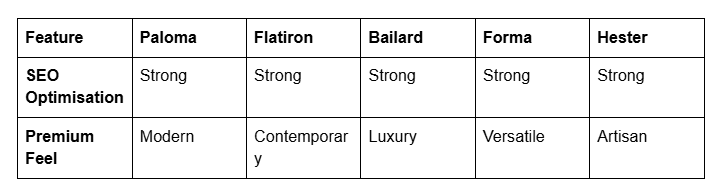
SEO capabilities, including structured data and XML sitemaps, are built into all Squarespace templates
Seasonal optimisation and promotional banners require templates with flexible header and homepage configurations
Understanding Squarespace Ecommerce Templates
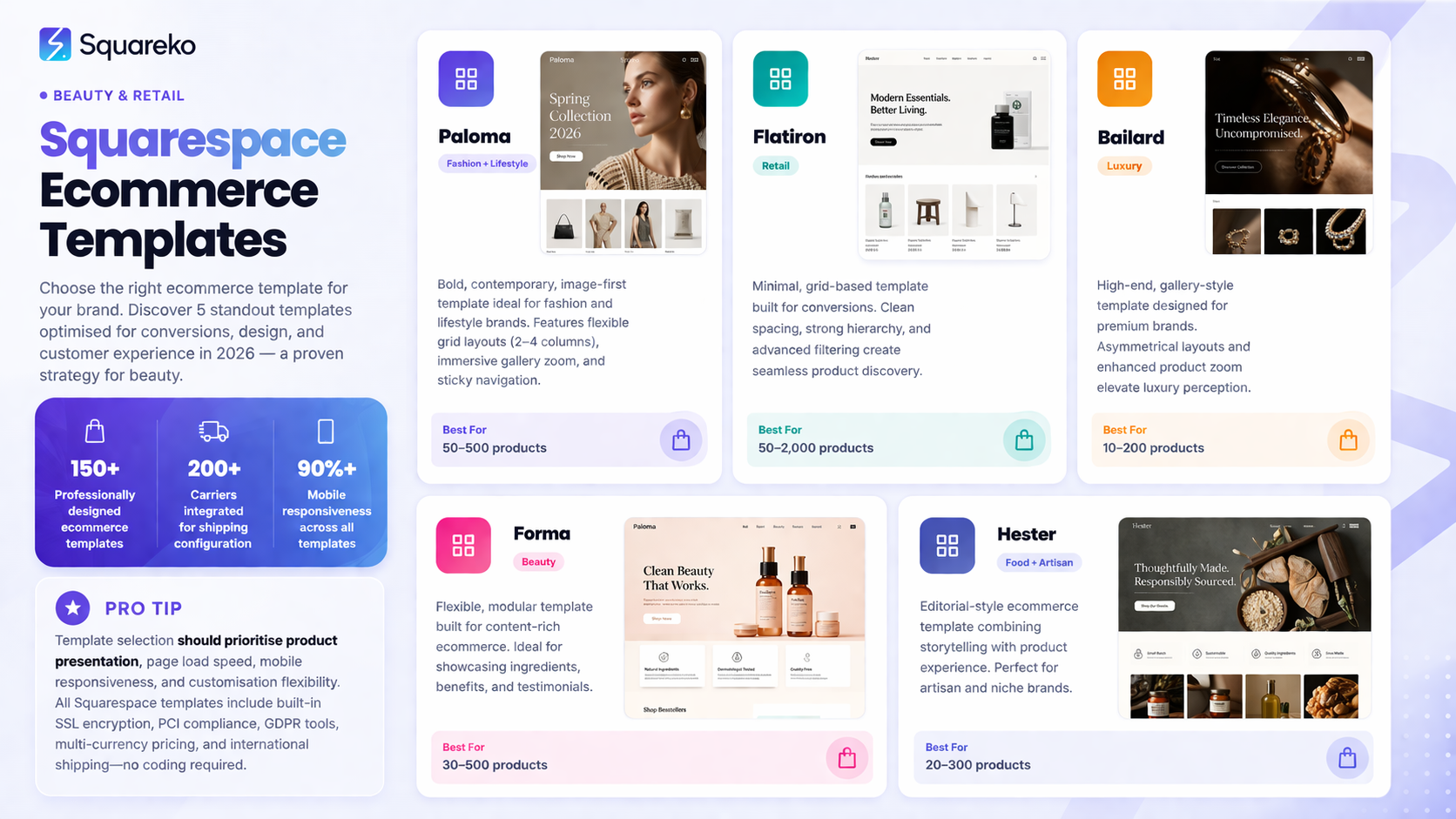
Ecommerce templates on Squarespace differ fundamentally from standard website templates. They incorporate dedicated product pages, collection organisation systems, shopping carts, checkout flows, and customer account management. Each template ships with predetermined colour schemes, typography hierarchies, and layout structures designed to guide customer behaviour towards purchase.
Squarespace templates operate on a responsive design principle, meaning they automatically adjust to desktop, tablet, and mobile screens. This is crucial—over 60% of ecommerce traffic originates from mobile devices. Templates prioritise product imagery, with gallery systems that support multiple angles, zoom functionality, and video embeds. Navigation structures emphasise product discovery through category filtering, search functionality, and related product recommendations.
All Squarespace ecommerce templates include built-in SSL encryption, PCI compliance, and GDPR compliance tools. These aren't optional; they're foundational security features protecting customer data and payment information. Additionally, templates support multi-currency pricing and international shipping configuration, essential for brands expanding beyond their home market.
The template engine also determines customisation scope. Some templates provide granular control via content blocks—modular sections you can add, remove, and reorder. Others employ fixed layouts with colour and typography customisation only. Understanding this distinction helps you anticipate development time and technical complexity.
Template Recommendations by Store Type
Different business models demand different visual and functional approaches. Below is a strategic framework for matching templates to specific ecommerce verticals:
Fashion & Apparel
Fashion retailers benefit from templates emphasising imagery and visual hierarchy. Paloma and Flatiron excel here, offering spacious product galleries, intuitive size/colour variation displays, and bold typography that reinforces brand personality. Both templates support lifestyle photography alongside flat-lay product shots.
Beauty & Cosmetics
Beauty products require close-up imagery and detailed ingredient/benefit information. Forma provides modular section control, allowing you to create custom product specification tables, ingredient lists, and before-and-after galleries. The template's colour-customisation flexibility suits the diverse colour palettes common in beauty branding.
Food & Beverage
Food suppliers need templates showcasing product quality through photography. Hester features full-width image blocks, recipe integration possibilities, and newsletter signup prompts—critical for building repeat customer bases. The template supports detailed product descriptions, ideal for communicating sourcing, flavour profiles, and dietary information.
Accessories & Jewellery
Fine accessories demand sophisticated, minimal design. Bailard offers a refined aesthetic with clean product layouts, ample whitespace, and refined typography. The template supports zoom functionality crucial for jewellery and watches, where customers examine fine details.
Digital Products
Digital product stores (software, templates, courses) require clear benefit communication and easy checkout. Most Squarespace templates support digital delivery, but templates with prominent call-to-action buttons and minimal visual clutter perform best.
Deep Dive: Five Best Squarespace Ecommerce Templates
1. Paloma

Best For: Fashion, lifestyle, multi-product categories Design Philosophy: Bold, contemporary, image-centric
Paloma prioritises large product imagery with a sleek, modern aesthetic. The homepage features full-width hero sections perfect for seasonal campaigns or featured collections. The template includes:
Flexible grid layouts for product collections (2–4 column adjustments based on screen size)
Integrated zoom gallery for detailed product inspection
Sticky navigation keeping shopping cart and menu accessible whilst scrolling
Customisable section backgrounds supporting image, video, or solid colour fills
Paloma excels for fashion brands where aspirational imagery drives purchasing decisions. The template's typography hierarchy guides customers naturally from hero imagery through featured collections to calls-to-action.
2. Flatiron

Best For: Contemporary retail, mixed product categories, bold branding Design Philosophy: Minimalist, grid-based, conversion-focused
Flatiron employs a card-based product grid, offering balanced white space and strong visual separation between products. This design reduces cognitive load, particularly valuable for stores with 50+ SKUs. Key features:
Adjustable product card layouts (image-only, image + price, image + description)
Prominent filtering and sorting controls above product grids
Large, accessible search bar supporting auto-complete functionality
Customisable banner system for promotions, holidays, or sustainability messaging
Flatiron performs particularly well for stores prioritising ease of browsing over narrative storytelling. The grid structure maintains consistent visual rhythm, enhancing perceived professionalism and trustworthiness.
3. Bailard
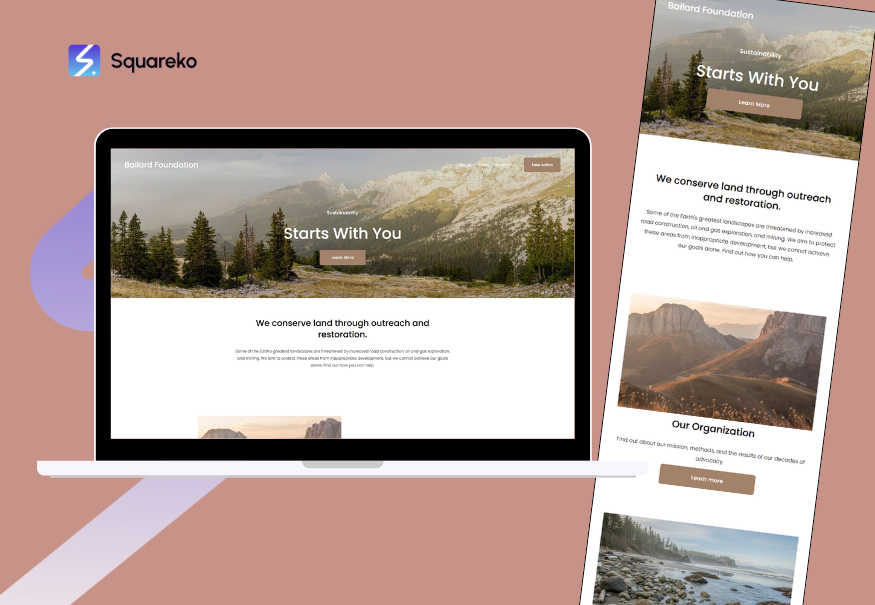
Best For: Premium/luxury goods, jewellery, limited product ranges Design Philosophy: Sophisticated, gallery-inspired, high-end retail
Bailard channels gallery and luxury retail design principles. Asymmetrical product positioning, generous whitespace, and refined typography create an exclusive atmosphere. Notable attributes:
Asymmetrical grid system creating visual interest whilst maintaining elegance
Large product zoom functionality essential for fine details (gemstones, engravings, stitching)
Minimal navigation reducing distraction from product focus
Premium typography options using serif and sophisticated font pairings
Bailard suits brands where perceived value relies on design sophistication and exclusivity. The template's high-end aesthetic attracts customers willing to invest in quality, not bargain hunters.
4. Forma

Best For: Beauty, wellness, ingredient-focused products, complex specifications Design Philosophy: Modular, flexible, content-rich
Forma offers exceptional content flexibility through modular section building. You can customise product pages with ingredient tables, benefit callouts, testimonial sections, and video embeds. Key strengths:
Modular content block system allowing custom page layouts per product
Native comparison table support ideal for multi-variant products
Integrated video hosting for tutorial, application, or demonstration content
Flexible sidebar options for supplementary information
Forma benefits brands requiring detailed product education. Beauty companies, supplement sellers, and wellness retailers can use Forma's flexibility to tell comprehensive product stories, increasing customer confidence and reducing returns.
5. Hester
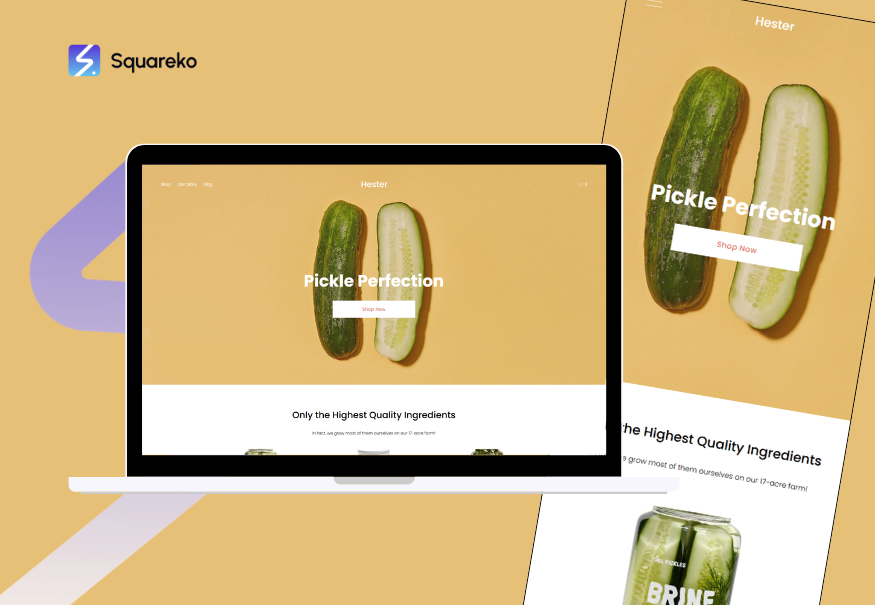
Best For: Food, artisan goods, experiential products, storytelling-focused Design Philosophy: Warm, editorial, community-oriented
Hester combines ecommerce functionality with editorial content systems, perfect for brands where product stories matter as much as specifications. The template includes:
Integrated blog-style product presentation mixing images, testimonials, and narrative text
Full-width section modules for lifestyle imagery and brand storytelling
Newsletter integration prominent throughout, supporting customer relationship building
Community-oriented design suggesting authenticity and craftsmanship
Hester excels for artisan food producers, sustainable brands, and companies where storytelling differentiates from competitors. The template's warm aesthetic reinforces authenticity and personal touch, building emotional connections with customers.
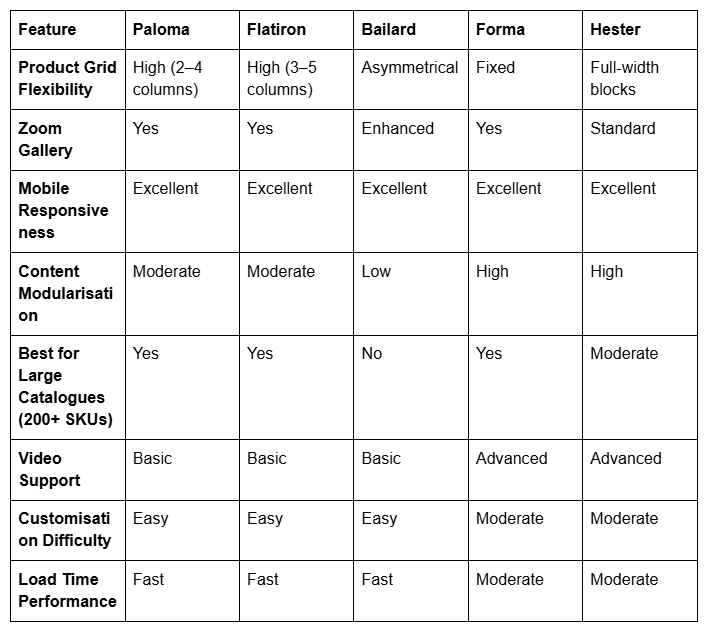
Feature Comparison Matrix
Design Considerations for Maximum Conversions
Template selection is only the beginning. Optimising your store's conversion potential requires intentional design decisions within your chosen template.
Product Imagery Strategy
High-quality photography directly impacts conversion rates. Squarespace templates support multiple image formats and galleries. Implement these practices:
Primary image: Clean, well-lit product shot against neutral or lifestyle background
Secondary images: Alternative angles, detail shots, and scale reference (product in use)
Lifestyle photography: Aspirational images showing product integration into customer lives
Zoom capability: Utilise template-native zoom features for fine detail inspection
Call-to-Action Optimisation
Strategic button placement and copy influence purchase completion. Within your template:
Primary CTA placement: Above the fold, visible without scrolling
Secondary CTAs: Strategically positioned post-description and post-review sections
Button copy: Move beyond generic "Add to Cart"—try "Claim Your [Product]" or "Start Your [Benefit]"
Colour contrast: Ensure CTA buttons contrast sharply against background colours
Trust-Building Elements
Customers require social proof before purchase. Squarespace templates support these conversion elements:
Customer testimonials: Display authentic reviews prominently
Security badges: Display SSL/payment certifications visibly
Return policy clarity: Make policies easily discoverable
Brand credentials: Highlight certifications, awards, or media mentions
Mobile-First Optimisation
All Squarespace templates are responsive, but mobile optimisation requires intentional refinement:
Touch-friendly buttons: Ensure buttons are minimum 44×44 pixels
Streamlined navigation: Simplify mobile menus to essential categories
Fast load times: Compress images and minimise HTTP requests
Checkout simplification: Test mobile checkout flows for friction points
Page Speed Optimisation
Squarespace provides excellent hosting infrastructure, but template-level optimisations matter:
Image optimisation: Use Squarespace's image compression or external tools
Lazy loading: Enable lazy loading for below-the-fold images
Code splitting: Modern templates load only required scripts
CDN utilisation: Squarespace's global CDN delivers content rapidly regardless of visitor location
Migration, Customisation, and Support
Moving From Another Platform
If you're migrating from Shopify, WooCommerce, or another platform, plan these steps:
Audit existing products: Document SKUs, descriptions, pricing, images, and variant data
Select target template: Trial multiple templates using Squarespace's demo stores
Migrate product data: Use Squarespace's CSV import tool or hire migration specialists
Customise design: Apply branding, adjust colours, and configure section layouts
Test thoroughly: Verify product displays, checkout flows, and payment processing
Redirect old URLs: Set up 301 redirects from old product URLs to maintain SEO equity
Customisation Approaches
Basic customisation (colours, fonts, images) requires no coding. Advanced customisation (custom sections, JavaScript interactions) requires familiarity with Squarespace's development tools or hiring a developer. Most templates accommodate both approaches.
Support & Community
Squarespace provides email and live chat support (24/7 for Business plan and above). The community forum hosts thousands of template customisation examples and troubleshooting discussions. Consider this support availability when evaluating platform commitment.
Frequently Asked Questions
-
Flatiron is ideal for beginners. Its straightforward grid layout, intuitive customisation interface, and minimal fixed sections reduce decision paralysis. The template's default styling is professionally polished without requiring design adjustments, allowing you to focus on product imagery and descriptions rather than design refinement.
-
Yes, Squarespace allows template switching, though this process warrants caution. Your product data, customer accounts, and order history transfer smoothly, but custom CSS, custom code sections, and some design configurations may not migrate automatically. Plan template changes during low-traffic periods and test thoroughly on a staging site.
-
Squarespace's native templates support single-vendor (one business) structures. Multi-vendor marketplaces require third-party integrations or custom development. If multi-vendor functionality is essential, consider Shopify or WooCommerce alternatives.
-
All templates support multi-currency pricing, translated product pages (via third-party apps), and international shipping configuration. Squarespace integrates with carriers like DHL, FedEx, and local postal services. Currency conversion happens automatically based on visitor location or customer selection.
-
Squarespace templates are included with all Business and Commerce plans—no additional template purchase required. The template library is identical across all plans. The "trial" phase allows you to explore any template before committing financially to a plan.
-
Squarespace releases new templates quarterly. Existing templates receive regular updates maintaining design freshness whilst respecting brand customisations. You're never locked into outdated templates, and legacy template users can gradually migrate to newer designs.
-
Squarespace's native customisation tools require no coding. Colour schemes, typography, section layouts, and content additions are all point-and-click operations. More extensive customisation (custom JavaScript, CSS, or plugins) requires coding knowledge or hiring developers.
-
All Squarespace templates include identical core SEO features: XML sitemaps, schema markup, clean URL structures, and meta tag customisation. Template selection has negligible impact on SEO performance. Your content quality, backlink profile, and technical optimisation matter far more than template choice.
Ready to Build Your Ecommerce Store on Squarespace?
Choosing the right Squarespace ecommerce template is the critical first step towards launching a professional, conversion-optimised online store. Whether you select Paloma for its visual boldness, Flatiron for its conversion focus, Bailard for its luxury positioning, Forma for its flexibility, or Hester for its storytelling capabilities, you're investing in a platform trusted by thousands of successful ecommerce brands globally.
The templates covered in this guide represent distinct design philosophies and functional approaches. Your selection should align with your brand identity, product category, technical comfort level, and long-term growth ambitions. Consider not only immediate needs but also anticipated growth—choosing a template with scalability ensures you won't outgrow your platform within months.
At Squareko, we specialise in helping ecommerce entrepreneurs select, customise, and optimise Squarespace stores. Our team has guided over 500 businesses through template selection, brand customisation, and conversion rate optimisation. We understand the nuances of Squarespace's capabilities and the specific requirements of different product categories. Whether you're launching a fashion boutique, beauty brand, food enterprise, or digital product store, we're here to translate your vision into a high-performing online presence.
Beyond template selection, success requires ongoing optimisation: A/B testing checkout flows, analysing customer behaviour data, refining product descriptions, and continuously improving page load times. Squarespace provides the foundation, but your strategic decisions determine your conversion potential.
Ready to transform your business idea into an ecommerce reality? Explore Squarespace's full template library, trial your top three choices using Squarespace's demo functionality, and reach out to Squareko for expert guidance throughout your setup journey. We're committed to helping you build not just a store, but a sustainable, profitable ecommerce business.

From custom website design to SEO strategy, we help businesses launch a site that looks professional and performs better.

About the Author
Walid | Founder, Squareko
I'm Walid Hasan, a Certified Squarespace Expert and Squarespace Circle Platinum Partner with over 12 years of hands-on experience designing and optimizing high-performing websites. Over the years, I've had the privilege of building more than 2,000 Squarespace websites for clients around the world, always focusing on clean design, strong user experience, and conversion-driven results.
