
5 IT Services Website Mistakes That Lose You B2B Contracts on Squarespace
Key Takeaways 5 IT Services Website Mistakes
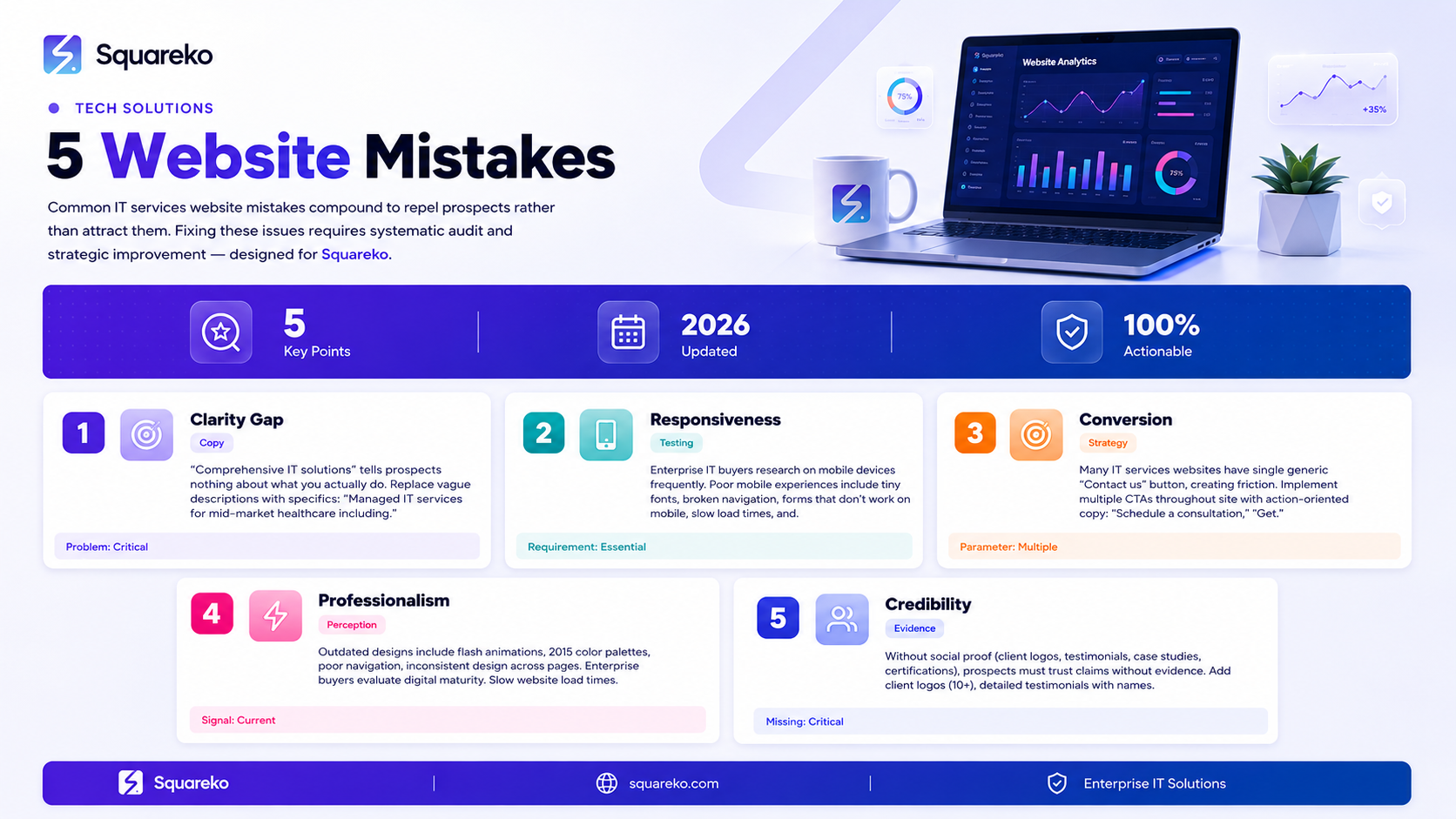
Vague service descriptions that fail to explain exactly what you do and what outcomes you deliver create confusion and cause prospects to contact competitors instead
Mobile optimization is non-negotiable for IT services websites where enterprise buyers research on various devices, but poor mobile experiences still plague many IT company sites
Missing or weak calls-to-action throughout your website create friction in the buying process and allow prospects to exit without taking next steps
Outdated visual design, slow load times, and inconsistent branding signal to enterprise buyers that you may not keep up with industry standards
Absence of social proof (testimonials, case studies, client logos) forces prospects to trust claims without evidence, dramatically reducing conversion rates
Mistake #1: Vague Service Descriptions That Don't Explain What You Do
This is the most common mistake IT services companies make on their websites. They assume prospects understand what they offer.
The Problem: Comprehensive IT Solutions
Walk through an IT services website and you'll see descriptions like:
We provide comprehensive IT solutions designed to meet all your technology needs
Our technology services help businesses achieve their objectives
We offer end-to-end IT services for enterprise organizations
We deliver business transformation through technology
These descriptions tell prospects nothing specific about what you actually do. A prospect landing on your site with a specific need (cloud migration, security assessment, helpdesk support) has no idea if you offer that service.
Why This Matters for Conversion
Enterprise IT buyers have specific challenges and specific time limitations. They're researching whether you can solve their specific problem. Vague descriptions force them to:
Dig through your site searching for specific services
Contact you to clarify what you offer
Give up and visit a competitor's website with clearer descriptions
Each of these outcomes is bad. Buried specifics lose prospects. Inquiry friction means you get fewer leads. Competitors with clear descriptions win the business.
The Solution: Specific Service Descriptions
Replace vague descriptions with specific ones:
Instead of: We provide comprehensive IT solutions
Use: We provide managed IT services for mid-market healthcare companies, including 24/7 network monitoring, patch management, helpdesk support, and disaster recovery. We also offer specialized security consulting and HIPAA compliance support.
This specific description tells prospects exactly what you do and immediately answers the question Is this company relevant to my situation?
Implementation Across Your Site
Audit your entire site for vague descriptions:
Homepage headline and description: Should clearly state what you do and who you serve
Service page titles and descriptions: Should specifically describe that service
Company description: Should explain what your company does, not be generic corporate speak
Team bios: Should explain what each team member actually does
After audit, replace every vague description with specific, benefit-focused language.
Mistake #2: Ignoring Mobile Optimization and Responsive Design
Mobile is no longer a nice to have—it's essential for IT services websites.
The Mobile Reality for Enterprise IT Buyers
Enterprise IT buyers research services on mobile devices frequently:
Between meetings on mobile devices
At industry conferences on tablets
During morning reviews on phones before work
During travel and commuting
If your website doesn't work well on mobile, you're losing prospects at critical moments when they're actively evaluating providers.
Common Mobile Mistakes
Poor mobile experiences include:
Unreadable Text: Tiny fonts that require zooming and horizontal scrolling
Broken Navigation: Mobile navigation menus that are hard to use
Poor Form Design: Form fields that don't work on mobile, requiring manual switching between portrait and landscape
Slow Load Times: Pages that take 5+ seconds to load on mobile networks
Images That Don't Adapt: Desktop-size images that don't resize for mobile, breaking page layout
Hover Elements: Navigation that depends on desktop hover states doesn't work on mobile
Why Squarespace Handles Mobile Well
Squarespace automatically handles responsive design for most elements. However, you still need to:
Test your site on actual mobile devices
Optimize image sizes and formats for mobile
Test forms on mobile to ensure they're easily completable
Check that CTAs are easy to tap on mobile (not tiny buttons)
Ensure navigation is clear and accessible on mobile
Mobile Testing
Test your site thoroughly on mobile:
Use actual mobile devices (not just browser emulation)
Test on different screen sizes (small phones, large phones, tablets)
Test on different mobile networks (fast and slow connections)
Test on different mobile browsers (Safari, Chrome, etc.)
Test with different orientations (portrait and landscape)
If your site doesn't work well on any of these scenarios, prospects in those situations are lost.
Mistake #3: Weak or Missing Calls-to-Action Throughout Your Site
Without clear calls-to-action (CTAs), prospects don't know how to move forward.
The CTA Problem
Many IT services websites have one CTA at the bottom of the page: a contact form or contact us button. This creates friction:
Prospects reading homepage don't know what to do next
Prospects reading service pages don't know how to request a consultation
Prospects watching videos don't know how to express interest
Prospects reading blogs don't know how to take next steps
With a single contact CTA, prospects must:
Remember they wanted to contact you
Scroll to the bottom of the page
Fill out a form
This friction causes many prospects to leave your site without taking any action.
Weak CTA Copy
CTAs with weak language also underperform:
Contact us doesn't create urgency or clarity
Submit doesn't communicate what happens next
Click here doesn't indicate what you're clicking for
Strong CTAs use active, specific language:
Schedule a consultation
Get your cloud migration timeline
Request a security assessment
Download our managed IT services guide
Solution: Multiple, Strategic CTAs
Implement multiple CTAs throughout your website:
Homepage Hero: Schedule a consultation or Get started
Service Pages: Request a quote for this service or Schedule a consultation for [service name]
Blog Posts: Learn more about [service] or Request a consultation
Case Studies: See if we can help your situation or Schedule a consultation
FAQ Section: Still have questions? Schedule a consultation
Different prospects are at different decision stages. Multiple CTAs give prospects opportunities to take next steps that match their current stage.
CTA Button Design
Make CTAs visually prominent:
Use contrasting colors that stand out from the rest of your page
Make buttons large enough to be easily tapped on mobile
Use action-oriented button text, not generic text
Place CTAs where they're visible without excessive scrolling
Include CTA buttons above and below major content sections
Mistake #4: Outdated Design and Slow Load Times
Your website design communicates your professionalism and timeliness to prospects.
Design That Signals Behind the Times
Outdated website designs include:
Design Trends 5+ Years Old: Flash animations, outdated color palettes, designs that look like they're from 2015
Poor Navigation: Confusing navigation structures that don't follow current web standards
Inconsistent Design: Different pages look like they belong to different websites
Low-Quality Images: Grainy stock photos or poorly designed graphics
Cluttered Layouts: Too much information competing for attention, no clear visual hierarchy
Enterprise IT buyers evaluate vendors based partly on their digital maturity. A company with an outdated website might have outdated IT practices. A company with a current, professional design signals they stay current with industry standards.
Site Speed and Performance
Slow website load times harm conversion and rankings:
Mobile Impact: Slow sites on mobile networks are particularly frustrating
Search Rankings: Google factors page speed into rankings
Prospect Perception: Slow sites feel unprofessional and unreliable
Bounce Rates: Many prospects leave if a page takes more than 3-4 seconds to load
Test your site speed using Google PageSpeed Insights. If your score is below 80 for mobile or desktop, you need improvement.
Squarespace Performance
Squarespace generally performs well for site speed. However, you impact performance through:
Image Optimization: Large, unoptimized images slow your site significantly
Large Video Files: Self-hosted video slows load times. Use embedded YouTube or Vimeo instead
Complex Animations: Excessive animations can slow load times
Excessive Plugins or Code: Custom code can impact performance
Solution: Modern, Optimized Design
Ensure your Squarespace site:
Uses a modern template reflecting current design trends
Has consistent design across all pages
Loads in under 3 seconds on fast connections, under 5 seconds on slow connections
Uses optimized images (compressed, right file format, correct size)
Has clear visual hierarchy making it easy to scan
Updates design elements regularly to stay current
Mistake #5: No Social Proof or Client Validation
Without social proof, prospects must trust your claims without evidence.
Why Social Proof Matters
Enterprise IT buyers trust evidence more than claims:
We reduce infrastructure costs by 35% is a claim
We reduced Acme Manufacturing's infrastructure costs by 35% is evidence
Social proof includes:
Client logos (shows recognizable companies trust you)
Testimonials (clients expressing satisfaction)
Case studies (detailed stories of successful projects)
Certifications (third-party validation of expertise)
Review ratings (aggregated client satisfaction)
Awards and recognition (external validation)
The Problem: Absence of Social Proof
Many IT services websites lack social proof entirely:
No client logos
No testimonials from specific clients
No case studies
Certifications not displayed prominently
No review ratings or links to reviews
No recognition or awards mentioned
Without social proof, prospects have only marketing claims to evaluate you on. This is insufficient for enterprise IT buyers.
Implementation: Comprehensive Social Proof
Add multiple social proof elements to your website:
Client Logos: Feature 10+ client logos prominently on homepage and service pages
Detailed Testimonials: Include client name, title, company, and specific results in testimonials
Case Studies: Publish detailed case studies showing challenges, solutions, and outcomes
Certifications: Display certifications prominently (Microsoft Gold Partner, SOC 2, etc.)
Review Links: Link to Google Reviews, G2, Capterra with your ratings
Team Credentials: Include professional credentials and experience in team bios
Each element of social proof reinforces the others, building cumulative credibility.
How These Mistakes Compound: The Website Failure Cycle
These five mistakes often compound, creating a failure cycle:
Vague descriptions cause prospects to be unsure if you can help, so they contact competitors
Poor mobile experience frustrates prospects on mobile, so they leave and never return
Weak CTAs don't give prospects clear next steps, so they exit without taking action
Outdated design signals you're behind the times, so prospects doubt your competence
Lack of social proof makes prospects skeptical of your claims, so they contact more established competitors
Each mistake independently reduces conversions. Combined, they create a website that repels prospects rather than attracts them.
Fixing Your IT Services Website
If your website has these problems, prioritize fixes:
Phase 1: Quick Wins (1-2 weeks)
Audit every page for vague descriptions, replace with specific ones
Add 5-10 client logos to homepage
Add CTAs throughout your site (multiple per page, not just one)
Update team member bios with credentials and experience
Test your site on mobile and fix obvious mobile issues
Phase 2: Medium-Term Improvements (1-2 months)
Develop 3-5 detailed case studies
Add testimonials to service pages
Link to review profiles and display ratings
Optimize images for faster load times
Update outdated design elements
Add certifications prominently if you have them
Phase 3: Strategic Enhancements (2-3 months)
Develop comprehensive blog content addressing prospect questions
Create downloadable guides that drive lead capture
Implement service area pages if you serve specific geographies
Build authority through thought leadership content
Continuously test and optimize for conversion
Let Squareko Help Fix Your Website
Your website is losing you contracts. The question is: by how many?
If your IT services website has multiple of these issues, you're likely losing 30-50% of potential prospects who visit your site. These aren't prospects you never had the chance to talk to—they're prospects who found your website, didn't understand if you could help them, couldn't easily figure out next steps, and left to contact competitors instead.
Fixing these issues requires systematic effort: auditing current state, developing new content, redesigning elements, and optimizing for conversion. It requires understanding not just what's wrong, but why prospects leave and what would make them stay and convert.
At Squareko we specialize in diagnosing why IT services websites underperform and implementing fixes that improve conversion. We help technology solutions companies eliminate these common mistakes and build websites that attract, engage, and convert IT buyer prospects.
FAQs
-
This varies based on how many mistakes you have and how severe they are. If you have one major issue (like poor mobile design), you might be losing 20-30% of prospects. If you have multiple issues, you could be losing 50%+ of potential prospects who visit your site.
-
Prioritize quick wins first (vague descriptions, CTAs, basic mobile fixes) as they require minimal time but have significant impact. Then address medium-term improvements (case studies, social proof, design updates). Build to strategic enhancements over time.
-
You can fix most of these issues on your existing Squarespace site. You don't need a complete redesign. Update copy, add CTAs, improve mobile design, add social proof, and update design elements within your current site structure.
-
Specific enough means a prospect unfamiliar with IT services can understand exactly what you do. Read your descriptions and ask: "Does this tell someone what service we're offering? Does it explain who this service is for? Does it explain the outcome/benefit?" If not, it needs to be more specific.
-
Start collecting them immediately. Reach out to recent clients asking if they'd be willing to provide testimonials. Document outcomes for your best recent projects as the foundation for case studies. You might not have these immediately, but you can build them over the next 2-3 months.
-
Different CTAs for different prospects. A prospect on your managed IT services page should see "Request a managed IT services consultation." A prospect on your security page should see "Request a security assessment." Match CTA copy to the context where it appears.
-
Squarespace templates are designed to be updatable by non-designers. You can likely update colors, images, copy, and layouts yourself. However, if you want significant visual changes, professional design help might be worthwhile.
-
Update design elements every 1-2 years to stay current with design trends. Update case studies and testimonials annually as you complete new client work. Update service descriptions and compliance information as your offerings evolve.

From custom website design to SEO strategy, we help businesses launch a site that looks professional and performs better.

Author Bio
I'm Walid Hasan, a Certified Squarespace Expert and Squarespace Circle Platinum Partner with over 12 years of hands-on experience designing and optimizing high-performing websites. Over the years, I've had the privilege of building more than 2,000 Squarespace websites for clients around the world, always focusing on clean design, strong user experience, and conversion-driven results.
