
5 CPA Website Design Mistakes That Cost You Clients (And How to Fix Them on Squarespace)
Key Takeaways For 5 CPA Website Design Mistakes That Cost You Clients (And How to Fix Them on Squarespace)
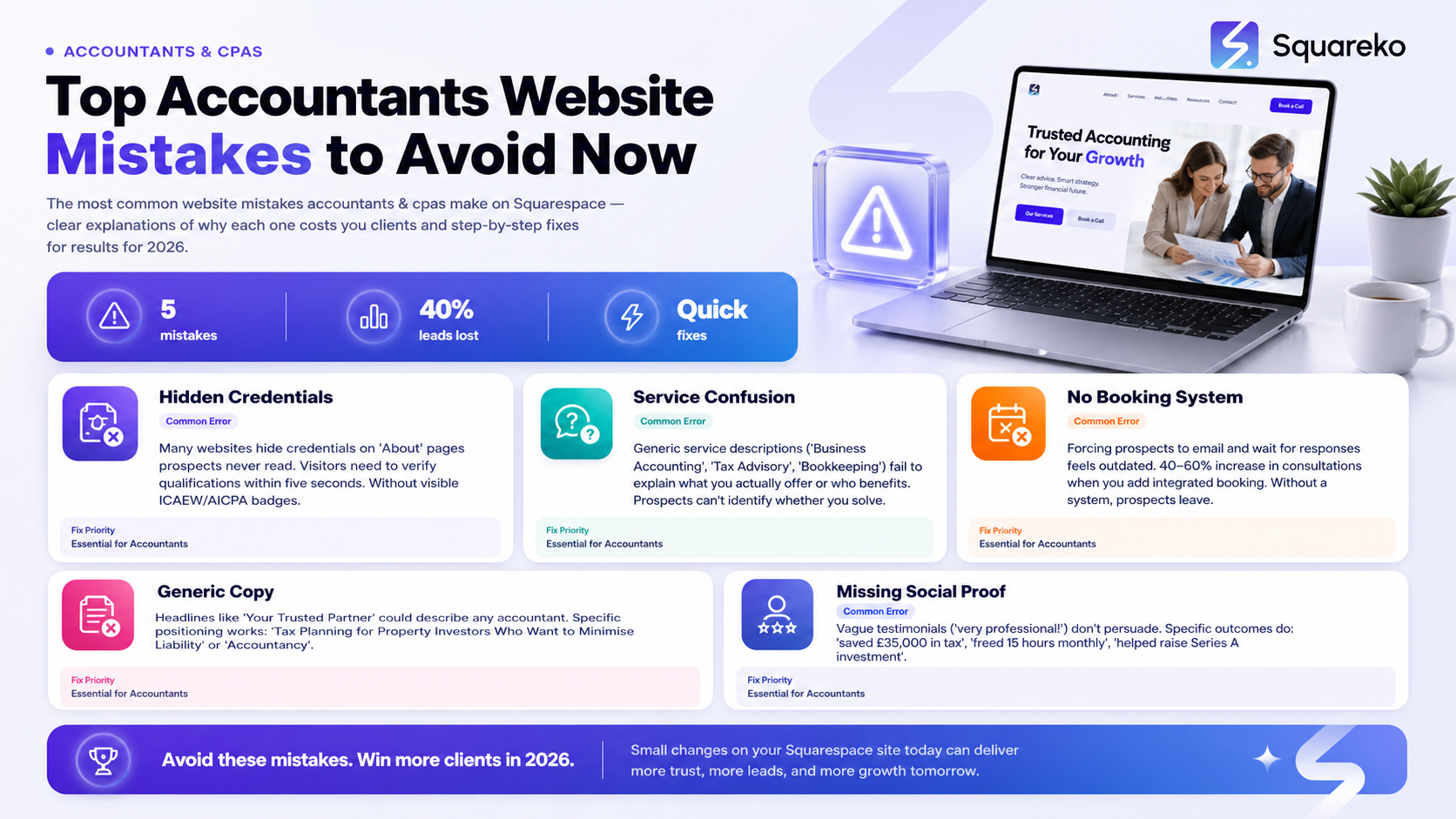
Visible credentials matter: Prospects won't trust you if they can't immediately verify your qualifications and professional body memberships on your homepage.
Service clarity drives enquiries: Vague descriptions of tax or bookkeeping services leave potential clients confused about whether you can actually help them.
Booking systems reduce friction: A missing consultation appointment system means interested prospects have to hunt for your contact form—and many won't bother.
Generic copy loses accountant clients: Copy that could describe any accounting firm fails to attract your ideal clients and differentiate your expertise.
Social proof builds confidence: Client testimonials, case studies, and published results give skeptical prospects the reassurance they need to book a call.
Your website design reflects your professionalism: Poor navigation, outdated layouts, and unclear messaging signal carelessness to the very clients you're trying to impress.
Squarespace fixes these problems fast: Professional templates, built-in booking systems, and intuitive design tools make it easy to correct these mistakes without hiring a specialist.
Your CPA website is often the first impression potential clients have of your firm. Yet many accounting practices make critical design mistakes that undermine trust, confuse visitors, and drive qualified prospects straight to competitors. If you're wondering why your website isn't generating enquiries despite offering excellent services, the answer may be staring back at you on your own homepage.
This guide reveals the five most costly CPA website design mistakes we see holding accounting firms back—and exactly how to fix them on Squarespace. Whether you built your site yourself or inherited it from a previous designer, identifying these issues is the first step towards a website that genuinely converts.
Mistake 1: No Visible Credentials or Professional Body Memberships
The Mistake
Ask yourself: Can a visitor to your homepage identify within five seconds that you're a qualified CPA or chartered accountant? If they have to dig through an About page, scroll past testimonials, or hunt for your credentials in small print, you've already lost them.
Many accountants underestimate how important credential visibility is. Prospects visiting your site are evaluating whether to trust you with sensitive financial information—and they need immediate reassurance that you're professionally qualified.
Why It Costs You Accounting Clients
Accounting is a trust-based profession. Unlike other industries, prospects can't easily evaluate the quality of your work through visual design alone. They need to see proof that you're qualified, insured, and recognized by professional bodies.
When credentials are hidden or unclear, prospects make assumptions:
They wonder if you're actually qualified or just calling yourself a CPA
They question whether you're properly insured and regulated
They experience doubt at the exact moment they should be gaining confidence
They compare your site to competitors who do display credentials prominently—and leave
Prospects in tax season are busy and impatient. They want clarity and reassurance in seconds, not minutes. A missing Chartered Accountant badge or hidden membership numbers send the wrong signal entirely.
The Squareko Fix
On Squarespace, credential visibility is a design choice, not a technical limitation. Here's how to fix it:
Add a credentials section to your homepage hero. Instead of a generic headline like Your Trusted Accounting Partner, use something specific: Chartered Accountant | ICAEW Member #12345 | Tax-Specialist CPA. Include your professional body logo next to your name.
Display memberships prominently in the header or footer. Add ICAEW, ICAS, ACCA, or AICPA logos to your site header so they're visible on every page. Squarespace's logo slider is perfect for this—prospects see at a glance that you're professionally recognised.
Create a dedicated credentials page. Link from your homepage to a full credentials page that includes:
Your qualifications (ACA, ACCA, ICSW, YMCA, etc.)
Professional body memberships and member numbers
Professional indemnity insurance information
Regulatory compliance and FSA/FCA registration (if applicable)
Years in practice and firm size
Use trust badges in testimonial sections. Pair client quotes with a Verified Professional badge or star rating—modern prospects expect to see verification.
This single fix often increases enquiry rates dramatically because you're removing the primary objection: Are they actually qualified?
Mistake 2: Confusing or Absent Service Descriptions
The Mistake
Visit your Services page and answer honestly: Would a small business owner understand exactly what you offer and whether you're the right fit for their problem?
Many CPA websites list service categories but fail to explain them clearly:
Business Accounting (vague—what type of business?)
Tax Advisory (unclear—tax planning, compliance, or strategy?)
Bookkeeping (at what level—monthly reconciliation, annual accounts, both?)
Payroll Services (for how many employees? What's included?)
Prospects arrive at your website with a specific problem. If your service descriptions are generic or unclear, they won't understand whether you solve that problem. So they leave and call a competitor whose website is clearer.
Why It Costs You Accounting Clients
Small business owners and company directors make quick decisions based on clarity. If they can't immediately identify whether you handle their type of accounting issue, they assume you don't.
Consider a common scenario: A property investor visits your site looking for buy-to-let tax planning services. Your Services page lists Tax Advisory but doesn't mention property or investment structures. The visitor doesn't know if you specialise in property taxation, so they move on—even though you do this work every day.
The cost: a qualified prospect lost because of unclear messaging, not because you can't help them.
Confusing service descriptions also create extra work for your team. Prospects book discovery calls without understanding what you offer, so your consultations become qualification meetings rather than sales conversations. This wastes time and reduces conversion rates.
The Squareko Fix
Rewrite each service description to answer three questions:
1. Who is this for? Specify the business type or prospect profile:
Tax Advisory for Property Investors (instead of Tax Advisory)
Bookkeeping for E-Commerce Businesses (instead of Bookkeeping)
Accountancy for Limited Company Directors (instead of Business Accounting)
2. What problem do you solve? Be specific about the outcome:
Minimize tax liability across multiple properties
Automate VAT compliance and reduce filing errors
Prepare accounts for bank financing and investor pitches
3. What's included in this service? List 3–5 concrete deliverables:
Monthly bank reconciliation, VAT compliance, year-end accounts, director tax planning
Real-time bookkeeping dashboard, automated invoice reminders, quarterly profit reports
On Squarespace, use the Services template to create dedicated pages for each service offering. For each, include:
A clear headline that names the service and ideal client
A 2–3 sentence description of what's included
3–5 bullet-pointed benefits or deliverables
A Book a Consultation button linking directly to your booking system (see Mistake 3)
A testimonial or case study from someone in that sector
This clarity dramatically improves the prospect experience. Visitors immediately know if you're the right fit, and qualified leads are more likely to book a call.
Mistake 3: No Consultation Booking System
The Mistake
A prospect arrives at your website, becomes interested in your services, and decides they want to speak to you. Now what?
Many CPA websites force prospects to:
Hunt for a phone number
Fill out a generic contact form
Wait for a response email
Schedule a follow-up call via email back-and-forth
At each step, friction increases. Some prospects abandon the process and call a competitor instead.
A missing booking system means you're asking interested prospects to do extra work at the exact moment when you should be making it dead easy to convert them.
Why It Costs You Accounting Clients
Prospect behaviour has changed. People expect to book appointments online the way they book restaurants on Open Table or doctors on their surgery websites. When your site requires them to send an email and wait for a response, they feel like your firm is outdated—even if your actual accounting is excellent.
The cost isn't just lost enquiries. It's also wasted admin time. Your team spends hours sending follow-up emails, coordinating schedules, and managing the booking conversation—when a simple booking system could automate all of it.
Worse, without a booking system, you have no qualified leads pipeline. Prospects who express interest disappear into your email inbox. You don't know who's hot, who's lukewarm, or who lost interest.
The Squareko Fix
Squarespace integrates smoothly with booking platforms like Acuity Scheduling and Calendly. Here's the implementation:
1. Choose a booking platform (Calendly, Acuity, or Squarespace's native scheduling for premium plans). We recommend Acuity for accountants because it allows you to:
Create different appointment types
Set duration and pricing
Collect intake information before the call
Integrate with your calendar and Zoom
2. Embed the booking widget on your website. Squarespace makes this simple—use the Code Block to embed your Calendly or Acuity iframe on your homepage, Services pages, and contact page.
3. Create a dedicated Book Your Consultation page with:
Clear headline: Schedule Your Free Initial Consultation
2–3 sentences explaining what happens on the call
Your booking widget
2–3 testimonials from clients who booked consultation calls
4. Link prominently from key pages. Add a Book Now button in your navigation, at the end of each service description, and in your CTA sections.
This single fix removes friction from your sales process. Prospects book themselves, your team gets automated reminders, and you build a qualified leads pipeline without manual email management.
Many accounting firms see a 40–60% increase in consultations booked within the first month of adding a booking system.
Mistake 4: Generic Copy That Doesn't Speak to Your Ideal Clients
The Mistake
Read your homepage headline. Could it appear on any accounting firm's website? If so, you've made this mistake.
Examples of generic copy that loses clients:
Your Trusted Accounting Partner
Professional Accountancy Services
We Help Businesses Grow
Expert CPA Services for Small Business
These headlines could describe thousands of accounting firms. They create no differentiation, no sense of specific expertise, and no reason for a prospect to choose you over the next firm they visit.
Why It Costs You Accounting Clients
Prospects don't visit your website thinking, I need a generic accountant. They visit thinking, I need a CPA who understands property investment tax or I need an accountant who can help me prepare for investor funding.
When your copy is generic, you fail to speak directly to their specific situation. They feel like you're trying to be everything to everyone—which signals that you're probably great at nothing.
Worse, generic copy sounds like every other accounting firm. There's no personality, no differentiation, and no compelling reason to choose you.
The cost: qualified prospects with specific needs visit your site, feel like you're not right for them (because you haven't proven otherwise), and leave.
The Squareko Fix
Specialization in your copy is the antidote to generic messaging. Here's how to rewrite for your ideal clients:
Identify your niche. Ask yourself:
Which industries do I serve best? (property, tech startups, healthcare practices, e-commerce)
Which business structures? (sole traders, partnerships, limited companies)
Which client problems am I best at solving? (tax planning, investor readiness, growth planning)
Rewrite your headlines to speak directly to your niche:
Instead of Your Trusted Accounting Partner → Tax Planning for Property Investors Who Want to Minimise Liability
Instead of We Help Businesses Grow → Accountancy for Tech Startups Preparing for Funding Rounds
Instead of Expert CPA Services → Chartered Accountant for Limited Company Directors (ACA | ICAEW)
Use case studies that show specificity. Instead of vague testimonials, feature case studies with:
Client background: property investor with 6 rental properties
Their problem: unplanned tax bill of £25,000 after property disposal
Your solution: restructured property holdings and implemented long-term tax strategy
Outcome: saved £18,000 in tax liability and built a growth plan
On Squarespace, update your homepage hero section to feature your niche. Use clear, specific language that speaks to your ideal client's situation.
Generic copy is easy. Specific, niche-focused copy is what converts. It tells prospects, This person understands my situation and my problems.
Mistake 5: Missing Social Proof and Client Outcomes
The Mistake
How many client testimonials appear on your website? How many include specific outcomes (money saved, time reduced, or processes improved)?
Many CPA websites have zero testimonials or vague ones like, They're great accountants, very professional. These add no credibility and fail to persuade.
Worse, many accountants avoid publishing client outcomes because they worry about confidentiality. But prospects need to see proof that you deliver results—or they won't trust you.
Why It Costs You Accounting Clients
Accounting is a trust-business. Prospects can't evaluate the quality of your work through a website alone. They need social proof: evidence from other clients that you deliver on your promises.
Without testimonials and outcomes, you're asking prospects to trust you based on your word alone. This puts them in a vulnerable position, so they hesitate.
With specific testimonials and outcomes, you're showing proof. Saved our client £35,000 in tax is 100 times more powerful than Great service, very professional.
The cost: qualified prospects who would have become clients see no proof, feel uncertain, and contact three competitors instead.
The Squareko Fix
Start collecting better testimonials immediately:
1. Ask clients for specific outcomes. When requesting a testimonial, ask:
How much did we save you in tax this year?
How many hours per week did our bookkeeping service save you?
What business decision did our accounting advice help you make?
How confident do you now feel about your financial position?
2. Create case studies, not just testimonials. Feature 3–5 detailed case studies that show:
Client background and industry
Their specific problem or challenge
Your solution and approach
Quantified outcome (money saved, time freed, growth enabled)
Client name, title, and photo (with permission)
3. Display outcomes on your homepage and service pages. Use stat blocks like:
Saved our clients £2.1M in tax planning last year
Average time saving: 12 hours per month with our bookkeeping
87% of clients report improved business confidence
4. On Squarespace, use the Testimonials block to feature client quotes. Link to full case studies from your Services pages.
Address confidentiality concerns. You don't need to name clients if they prefer anonymity. Use formats like:
Property Investor | South London | £400k portfolio
E-Commerce Director | Online Fashion Retail | £2.5M turnover
This gives specificity without exposing identities.
Social proof is the single fastest way to build credibility with prospects. If you publish it, conversions improve.
How to Audit Your CPA Website Right Now
You don't need to hire a designer to identify these mistakes on your own site. Use this checklist:
Credentials & Trust
Can a visitor identify your qualifications within 5 seconds of landing on your homepage?
Are professional body logos displayed in the header or footer?
Do you have a dedicated credentials page with full membership details?
Service Clarity
Does each service description name the ideal client type?
Can a prospect tell what problem you solve and what's included?
Is there a clear link from each service to your booking system?
Booking System
Can prospects book a consultation directly from your website?
Is the booking button visible on your homepage?
Do you have automated reminders and intake forms?
Specificity & Differentiation
Does your homepage speak to a specific ideal client?
Are there case studies showing outcomes you've delivered?
Would your copy be distinctive if a competitor saw it?
Social Proof
Do you have at least 5 client testimonials on your site?
Do your testimonials mention specific outcomes (money saved, time freed, results achieved)?
Do you feature case studies with quantified results?
If you scored below 80% on this audit, your website is likely losing clients due to these mistakes.
Frequently Asked Questions
-
There are typically five reasons accounting websites fail to generate enquiries: missing credentials, unclear service descriptions, no booking system, generic copy, and absent social proof.Start by auditing whether your homepage immediately proves your professional qualifications. Most accountants assume their credentials are clear—but prospects need to see them within seconds, not buried on an About page. Next, check if your service descriptions would help a prospect decide whether you're right for them. If a prospect can't clearly understand what you offer and who it's for, they'll leave and contact a competitor who's clearer.Finally, measure friction in your booking process. How many steps does it take for a prospect to schedule a consultation? If it's more than one click from your homepage, you're losing potential
-
Prospects arriving at your website are evaluating three things in this order: qualifications, relevant experience, and results.First, they want to verify you're actually qualified. They look for professional body memberships (ICAEW, ICAS, ACCA), member numbers, and how long you've been in practice. If credentials aren't visible, many prospects assume you're not qualified and leave.Second, they assess whether you understand their specific situation. They look for case studies or testimonials from similar businesses or industries. A property investor wants to see you've worked with property investors. A tech startup wants to see you've helped startups prepare for funding.Third, they seek evidence that you deliver results. They look for testimonials mentioning specific outcomes, client logos on your site, or case studies with quantified results. Generic testimonials like "very professional" have zero impact. Testimonials mentioning "saved £35,000 in tax" or "freed 15 hours per month" are persuasive.Finally, they need easy ways to move forward. They expect a simple booking system, clear contact information, and obvious next steps.
-
If your website was built more than three years ago, it almost certainly needs updating. Web design trends shift rapidly, and prospects expect modern, mobile-friendly experiences. More importantly, ask: Is my website generating the number of enquiries I should expect? If you're a qualified, experienced accountant but your website generates few or no enquiries, the website is the problem, not your services. Use the audit checklist above to identify specific issues, then fix them.You don't necessarily need a complete redesign—many mistakes can be fixed with content updates and template changes on Squarespace. Adding a booking system, rewriting service descriptions, and displaying credentials prominently might be all you need.However, if your site is outdated, doesn't work well on mobile, or has technical issues, a Squarespace redesign is worth considering. Squarespace templates are modern, professional, and specifically designed for service providers. A redesign typically costs £2,000–£4,000 with an agency like Squareko, but generates enough additional enquiries to pay for itself within 3–6 months.
-
Rebuilding a CPA website on Squarespace typically costs between £2,000 and £4,000 depending on complexity. This includes template selection, content migration, design customization, booking system integration, and testing.A simple rebuild (template setup, basic customization, content transfer) costs around £2,000. A more involved project (custom design sections, case study pages, booking system integration, SEO optimization, image editing) costs £3,000–£4,000.This is significantly less expensive than rebuilding on WordPress or hiring a custom developer, but produces professional, modern results. Squarespace also includes hosting, security, and updates in your ongoing plan (£23–£33 per month), so you have no hidden costs.
-
Yes, you can fix most of these mistakes yourself if you're comfortable with basic website editing. Squarespace is designed to be user-friendly, and you don't need technical skills to:
Rewrite service descriptions
Add client testimonials
Update your About or credentials information
Integrate a booking system
However, many accountants prefer to work with a specialist agency to ensure their website reflects their brand, targets the right clients, and produces results. If you're not confident with website design or lack time, hiring a Squarespace specialist makes sense.
-
For most accountants, Squarespace is the better choice. It's simpler to maintain, includes hosting and security, and requires no technical knowledge. It's also more affordable than WordPress (which requires paid hosting, plugin licenses, and ongoing maintenance).The only advantage of WordPress is flexibility if you need a highly customized site. For accountants, Squarespace templates are more than sufficient.
Ready to Build Your Accounting Firm Website on Squarespace?
These five mistakes are costing you clients right now. But the good news? They're all fixable, often without a complete redesign.
If you've audited your website and identified these issues, you have two options:
Option 1: Fix them yourself. Squarespace is intuitive, and you can update service descriptions, add credentials, and integrate a booking system independently. This takes time but costs nothing.
Option 2: Work with Squareko. We specialise in building accounting firm websites on Squarespace. We'll audit your current site, identify the specific mistakes costing you clients, and rebuild your website to convert more prospects into enquiries.
We typically see accounting firms increase enquiry rates by 40–60% within the first three months of launching an optimised Squarespace website.
Get your free CPA website audit. Submit your website URL below, and we'll provide a detailed audit identifying which of these five mistakes is costing you the most clients. No cost, no obligation—just actionable insights you can implement immediately.
Your website should be a client-generating machine, not a digital business card. If it's not, one of these five mistakes is likely responsible. Fix them, and watch your enquiry rate climb.

Author Bio
I'm Walid Hasan, a Certified Squarespace Expert and Squarespace Circle Platinum Partner with over 12 years of hands-on experience designing and optimizing high-performing websites. Over the years, I've had the privilege of building more than 2,000 Squarespace websites for clients around the world, always focusing on clean design, strong user experience, and conversion-driven results.
