
10 Must-Have Pages Every Technology Business Website Needs on Squarespace
Why Page Architecture Matters for Tech Businesses
Most tech company websites underperform not because they're poorly designed, but because they're structurally incomplete. The homepage does too much work. The services section is a single generic page. The blog exists but hasn't been updated in six months. And there's no case study or social proof page in sight.
In search engines, each page is an independent opportunity to rank for a specific keyword. In user experience, each page serves a specific moment in the visitor's decision journey. A well-structured sitemap covers more keywords, serves more visitor intent stages, and builds topical authority faster than a thin, underdeveloped site.
On Squarespace, building a complete site architecture is practical — each page can be built and maintained by a non-developer, and the platform handles hosting and performance automatically.
Here are the 10 pages every technology business website needs.
Key Takeaways 10 Must-Have Pages Every Technology Business Website Needs on Squarespace
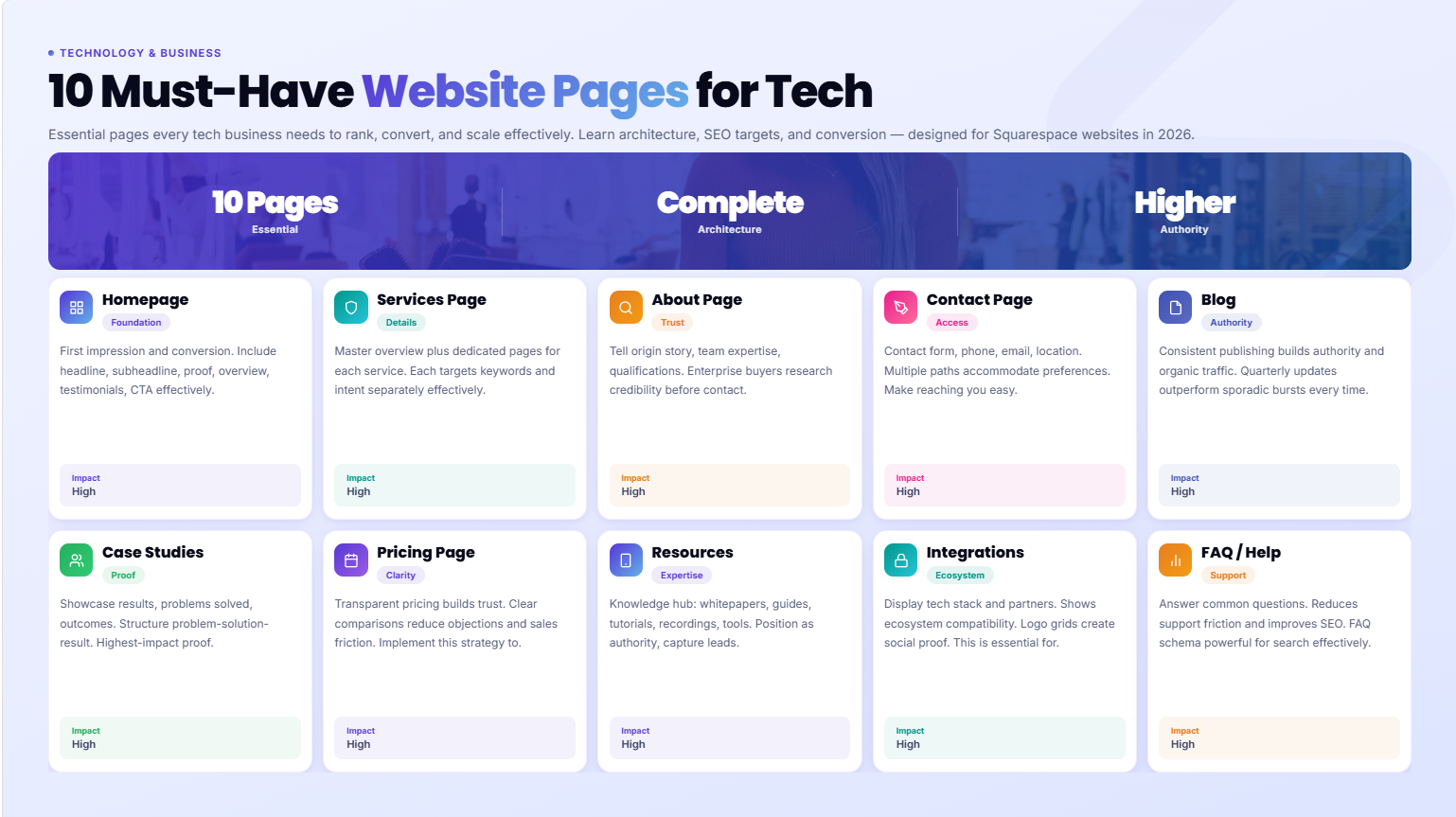
A technology business website needs more than a homepage and contact page to rank, convert, and scale
Each page should serve a specific business purpose: driving traffic (SEO), building trust, or converting visitors
Squarespace's Fluid Engine makes it practical to build all these pages at a professional standard without a developer
Pages 1-5 are non-negotiable for any tech business; pages 6-10 are high-value additions that serious tech companies need
A well-structured sitemap is an SEO asset — the more purposeful your page architecture, the stronger your topical authority.
Page 1: The Homepage
The homepage is your first impression, your brand statement, and your conversion gateway — all at once. For tech companies, it needs to work harder than almost any other page.
What it must include:
A clear headline that states what you do and who for (avoid clever wordplay that sacrifices clarity)
A subheadline that adds the why it matters layer
Social proof above the fold — even a client logo bar signals legitimacy
A brief services or product overview
A problem-solution framing section
Testimonials or case study teasers
A clear, specific CTA — not Contact Us but Book a Free Discovery Call or Start Your Free Trial
Footer with contact information, navigation, and legal links
Squarespace tips: Use Fluid Engine to build a multi-section homepage with distinct visual zones. Keep each section focused on one purpose. Test the mobile layout before publishing every change.
SEO target: Your primary brand keyword — something like Squarespace design agency for tech companies or SaaS website design depending on your business.
Page 2: Services or Product Page
One of the most common structural mistakes tech companies make: combining all services or product information onto a single page. This dilutes SEO impact and makes it harder for visitors to quickly understand a specific offering.
Best practice: Create one master Services or Products overview page plus individual dedicated pages for each major service or product tier.
What each service page needs:
Specific headline with the service name and ideal client (Squarespace Website Design for SaaS Startups)
What's included — specific, detailed, no vague language
Who it's for — help visitors self-qualify
How it works — a 3-5 step process section eliminates uncertainty
Timeline and pricing context
Social proof specific to this service
A clear CTA
Why this matters: A dedicated Squarespace redesign for tech companies page can rank for that specific search term. A generic Services page cannot.
Page 3: About Page
The about page is consistently one of the most-visited pages on most business websites — yet most about pages are wasted opportunities. Generic we're passionate about helping businesses succeed copy tells visitors nothing and converts no one.
What a strong tech company about page includes:
The real story of why the company exists — specific, human, honest
Who the founder and team are (with real names and photos)
Specific expertise signals: years of experience, notable clients or projects, industry recognitions
Your process or philosophy for how you work
A who we work with section that helps ideal clients self-identify
A clear CTA at the bottom
For a tech founder or solo specialist: The about page is where personality and credibility combine. Your potential clients want to know they're working with a real person who genuinely understands their industry — not a faceless agency.
Page 4: Contact Page
The contact page is the last step before a visitor becomes a lead. Yet many tech company contact pages are just a bare form — no context, no expectation setting, no reason to trust that reaching out is worth the effort.
What a high-converting contact page includes:
A headline that confirms what happens next (Book a Free 20-Minute Discovery Call)
2-3 sentences on what the call covers and what you'll walk away with
A short form (name, email, company, brief project description — nothing more)
Response time expectation (We respond within one business day)
Alternative contact options (email address, LinkedIn)
Optional: FAQ at the bottom addressing common questions about working together
In Squarespace: Use the native form builder for clean, spam-filtered form submissions. Connect to your email or CRM via Squarespace's native integrations.
Page 5: Blog
For tech companies building organic traffic, the blog is the highest-ROI page structure on the entire site. A well-structured blog with consistent, high-quality content compounds over time — building topical authority, ranking for hundreds of keywords, and attracting exactly the audience you want.
What a tech company blog needs to be effective:
Category structure aligned with your core topics (not just a chronological dump)
Post titles optimized for specific keywords
Consistent publishing schedule (2-4 posts per month minimum)
Posts that genuinely answer questions your target audience searches for
Internal links from blog posts to service pages and related content
A CTA at the end of every post
On Squarespace: The blog CMS is clean and capable. Categories, tags, author profiles, and scheduling all work well. For tech companies, the blog is the foundation of your SEO strategy — don't treat it as an afterthought.
Page 6: Case Studies or Portfolio
For tech service businesses especially, case studies are among the highest-converting content on your entire site. They answer the question every prospect asks: Has this worked for a company like mine?
What a strong tech case study page includes:
Client context: what they do, what stage they were at
The challenge: what problem brought them to you
Your approach: what you did and the decisions behind it
The result: specific, measurable outcomes (conversion rates, traffic growth, time saved)
A testimonial from the client, placed immediately after the results
A CTA to explore your services
Squarespace structure: Use blog-style individual pages for each case study, with a grid overview page showing all studies as summary cards. This structure works well for both SEO (individual pages can rank for client niche + service keywords) and conversion (visitors can browse and find a study most relevant to their situation).
Page 7: Pricing Page
For tech companies — especially SaaS businesses and service agencies — a pricing page reduces friction in the sales process. Visitors who find relevant pricing information and choose to contact you have already passed the budget filter.
What a tech company pricing page needs:
Tier structure if applicable (Starter, Growth, Enterprise)
Clear listing of what's included in each tier
Feature comparison table if you offer multiple tiers
A highlighted most popular or best value tier
FAQ section addressing common pricing questions (what's not included, payment terms, refund policy)
A clear CTA for each tier
If you don't publish exact prices: At minimum, include Projects typically start from X or a Request a Custom Quote flow with 2-3 questions that pre-qualify the enquiry. Complete pricing opacity increases friction unnecessarily.
Page 8: Resources or Knowledge Hub
For tech companies building authority through content, a dedicated resources or knowledge hub page elevates your content above a standard blog. It positions your company as the go-to source in your niche — which matters both for human visitors and for AI search engines that are assessing your topical credibility.
What a resources hub includes:
Categorized guides, reports, templates, or tools
Featured content highlighted at the top
Search or filter functionality (available in Squarespace via summary blocks and tags)
Gated content (downloadable templates, research reports) to capture email leads
Regular updates to signal that the hub is actively maintained
SEO impact: A well-developed resources hub is one of the strongest signals of topical authority for AI search platforms. Sites that comprehensively cover a specific domain are significantly more likely to be recommended by AI search engines.
Page 9: Technology Stack or Integrations Page
Tech buyers want to know what tools and platforms you work with. An integrations or tech stack page answers a question that comes up early in the evaluation process and signals expertise to technically literate prospects.
For a tech service business (agencies, consultants): List the platforms and tools you specialize in — Squarespace, Webflow, Shopify, specific CRMs, analytics platforms. Each integration can anchor content around we're experienced with [specific tool] for [specific use case].
For a SaaS or software product: Show the integrations your product supports — Slack, Zapier, Salesforce, etc. Use a clean logo grid layout in Squarespace's Fluid Engine. Each integration can link to a dedicated integration overview page, creating a content structure that ranks for [your product] + [integration] integration queries.
Why it matters for SEO: Integration pages can rank for very specific, high-intent queries: Squarespace design agency with HubSpot integration or SaaS tool that integrates with Slack. These are exactly the searches potential clients make when they have a specific technical requirement.
Page 10: FAQ or Help Center Page
A dedicated FAQ or help center page serves two audiences simultaneously: prospective clients with pre-sales questions, and existing clients with common support questions. It also provides significant SEO and AEO value.
What a tech company FAQ page needs:
Questions organized by category (pre-sales, process, technical, pricing)
Concise but complete answers — not single-sentence responses
Schema markup (FAQPage JSON-LD) to qualify for Google's featured snippet boxes and AI-generated answers
A link to the contact page at the end for questions not covered
AEO value: FAQ pages are prime targets for Answer Engine Optimization. AI search platforms like ChatGPT, Perplexity, and Gemini frequently pull FAQ content to answer user questions. A well-structured FAQ page with schema markup significantly increases your chances of being cited in AI-generated answers.
In Squarespace: Build the FAQ as a dedicated page using accordion blocks for the Q&A pairs, then add FAQ schema markup via code injection. This combination of clean UX and structured data maximizes both human readability and AI discoverability.
Build a Complete Tech Website That Performs
Most tech companies launch with 3-4 pages and call it done. The companies that grow their organic traffic, build genuine authority, and consistently attract ideal clients have complete website architectures — purposeful pages that work together.
Squareko builds complete Squarespace websites for tech companies — from homepage architecture to case study systems, resource hubs, and SEO-optimized service pages.
FAQs
-
At minimum, 4-5 pages: homepage, services or product page, about, blog, and contact. For a complete, authority-building site, aim for 10+ pages including case studies, a pricing page, a resources hub, an integrations or tech stack page, and an FAQ page. More purposeful pages means more ranking opportunities and a more complete visitor experience.
-
Yes. Each major service should have its own dedicated page with its own URL, specific title, and targeted content. A single "Services" page can't rank for specific service keywords — individual service pages can. This is one of the most valuable structural changes a tech company can make to their website's SEO performance.
-
For any tech company investing in long-term organic growth, yes. The blog is the primary vehicle for building topical authority, capturing informational search traffic, and establishing expertise that converts visitors into leads over time. Consistent, high-quality blogging typically delivers the highest long-term SEO ROI of any content investment.
-
Investors typically focus on the homepage (does the value proposition make sense?), the about/team page (who is behind this?), and any case studies or traction evidence. A pricing page can also be informative for understanding the business model. A clear, professional website across all these pages signals execution quality and founder credibility.
-
For most tech service businesses and many SaaS products, yes — at least in ranges or tier structure. Pricing transparency reduces friction for well-qualified prospects and pre-qualifies budget expectations before you invest time in sales calls. If exact pricing depends on scope, include a "projects typically start from X" statement and a clear custom quote request process.
-
An integrations page shows the platforms, tools, and systems your product or service works with. For SaaS products, it signals ecosystem compatibility to technical buyers. For tech service agencies, it demonstrates specific platform expertise. Both types of tech companies benefit from the SEO value — integration-specific pages can rank for highly targeted, high-intent search queries.
-
Build individual case study pages using Squarespace's blog CMS or individual portfolio pages, following this structure: client context → challenge → approach → results (specific and measurable) → client testimonial → CTA. Create a portfolio grid overview page that shows all case studies as summary cards. This structure works well for both SEO and conversion.
-
Yes — a dedicated FAQ page serves different purposes than FAQs embedded in blog posts. A standalone FAQ page is more appropriate for FAQPage schema markup, more useful as a pre-sales resource, and more likely to rank for general "frequently asked questions about [your service]" queries. It also provides a clean resource for existing clients with common questions.

From custom website design to SEO strategy, we help businesses launch a site that looks professional and performs better.

Author Bio
I'm Walid Hasan, a Certified Squarespace Expert and Squarespace Circle Platinum Partner with over 12 years of hands-on experience designing and optimizing high-performing websites. Over the years, I've had the privilege of building more than 2,000 Squarespace websites for clients around the world, always focusing on clean design, strong user experience, and conversion-driven results.
