
Squarespace Templates for Coaches: The Full Decision Map
The short answer: A coaching website has one job, and it is not to look calm and beige. It is to take a stranger who has never heard of you and get them onto a discovery call. Choose the template that ships a real enquiry path — a booking page, a testimonial structure, and somewhere to publish what you charge — before you choose one on colour palette. Everything visual in Squarespace 7.1 is easy to change later. Page architecture is not.
"Coach" covers at least seven businesses that sell differently. Work out which one you are first.
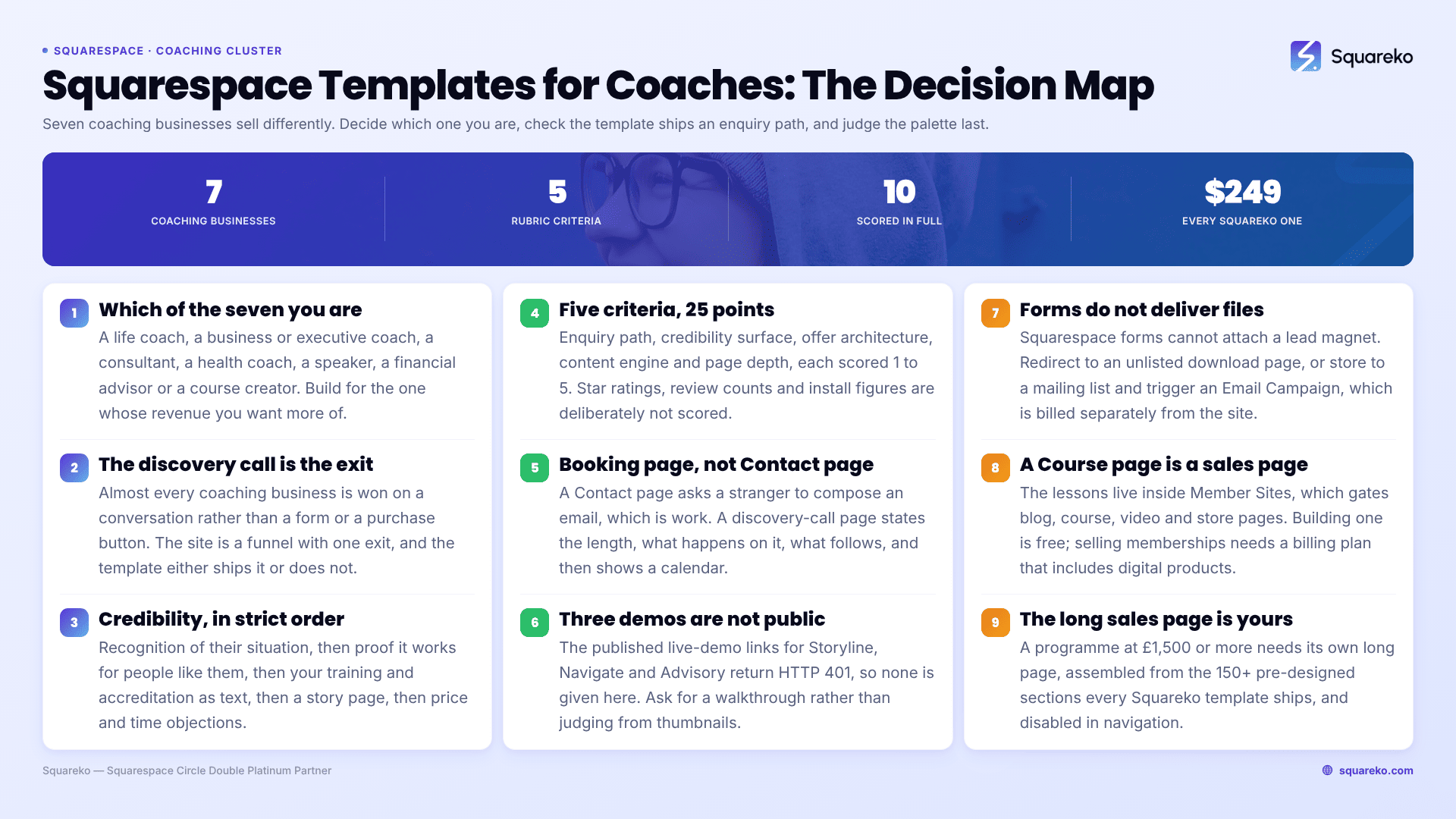
Which kind of coach are you?
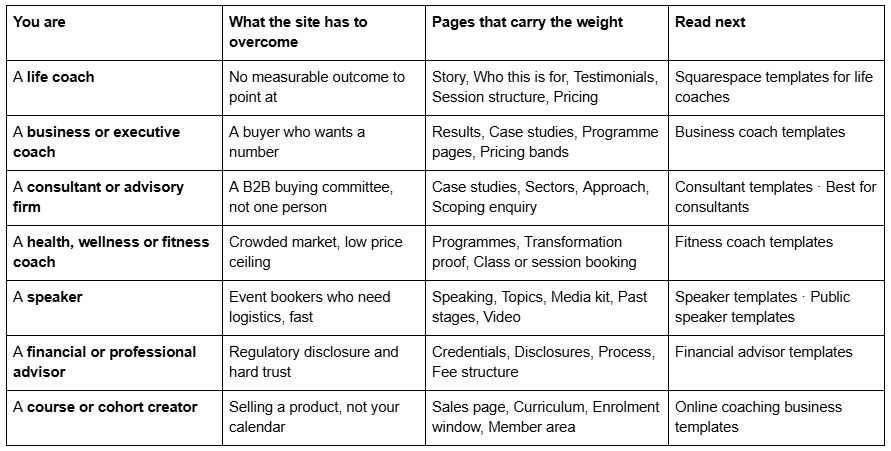
If you sit in two of these — most coaches do — pick the one that produces the revenue you want more of, and build the site for that. A site that hedges between life coaching and corporate consulting converts neither.
The discovery call is the whole architecture
Almost every coaching business converts on a call. Not on a form, not on a purchase button — a conversation. That single fact decides more about your Squarespace template than any design preference, because it means the site is a funnel with one exit, and the template either ships that exit or it doesn't.
Squarespace Scheduling is Acuity Scheduling. The two names refer to the same product; Squarespace's own Help Center now states that Squarespace Scheduling is officially Acuity Scheduling. It is the native booking route on Squarespace 7.1, and there are three ways to put it on a page:
A Scheduling block. Edit a page, Add Block → Scheduling, then pick the scheduler from the dropdown. The booking flow renders inside your page and the visitor never leaves the site. This requires a paid Acuity subscription — the legacy free Acuity plan does not support embedded schedulers. Squarespace charges no transaction fee on bookings taken this way.
A Button block linking to your Acuity scheduling page. Lower friction to set up, and it survives template changes. The visitor lands on an Acuity-hosted page, which looks less like your site.
A booking bar pinned across the top of every page, added through site-wide Code Injection — which requires Core plan or above.
The "Powered by Acuity Scheduling" line on the embedded scheduler can only be removed on Acuity's Premium or Powerhouse plans. Budget for that if a white-label booking experience matters to you.
What actually goes wrong. The most common complaint in the Squarespace Forum is not the embed — it is availability configuration. One thread describes clients seeing minute-by-minute slots instead of hourly blocks; the cause was Business Settings → Availability → Global Availability Limits → Start Time Intervals switched from "Automatically based on your appointment type durations" to "Every 1+ minutes". Set your intervals before you launch, and book a test appointment on a phone before you send anyone to it.
A discovery-call page is not a Contact page. A Contact page asks a stranger to compose an email, which is work, and work is where enquiries die. A discovery-call page says how long the call is, what happens on it, what happens after it, that there is no obligation, and then shows a calendar. That is four short sections and a Scheduling block. Almost no coaching template ships it, which is why the templates below that include an actual Booking page score higher than templates that are visually stronger.
The credibility stack, in the order strangers need it
Coaching is bought on trust that is assembled in a specific order. Sites that get the order wrong lose people who were willing to book.
Recognition. The visitor must see themselves in the first screen. Not "transformational coaching for ambitious humans" — the actual situation they are in.
Proof that this works for people like them. Testimonials with specifics: role, situation, what changed, over what period. A wall of first-name-only praise reads as decoration.
Proof that you are qualified to run it. Credentials, training body, years, and — where it exists — accreditation. Write it as text, not as a logo strip. Logo images are invisible to search engines and to screen readers.
Proof that you are a real person. A story page, a photograph that is not a stock image, and a plain account of why you do this work.
Removal of the last objections. Price, time commitment, what happens if it isn't working. An Accordion block in Squarespace 7.1 renders server-side, so the question and answer text is crawlable — it is the right tool for this and for the FAQ section on your booking page.
Templates help with steps 2 through 5, because those are the pages you either have or have to build. Step 1 is copywriting and no template does it for you.
How these Squarespace coaching templates were scored
This is an editorial rubric, not a lab measurement. It is applied identically to every template so the scores compare to each other, and it is published so you can disagree with the weighting rather than guess at it. The same rubric and the same scores are used in the best-template comparison, so the two posts do not contradict each other.
Five criteria, each scored 1–5, maximum 25:
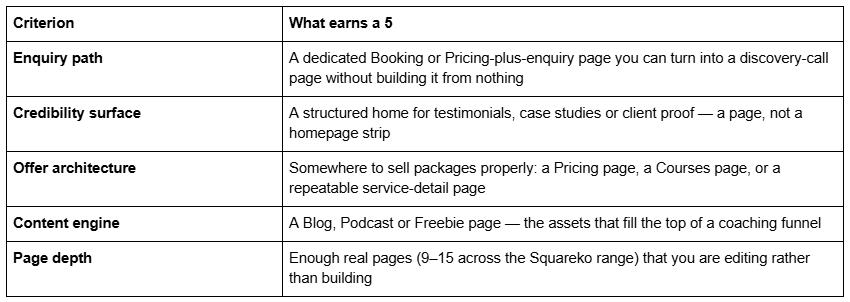
What is not scored: aggregate star ratings, "trusted by" counts and install figures. Those are unverifiable from outside the shop selling them, and this post does not cite them for its own templates either.
A note on demo access. Three of the templates below — Storyline, Navigate and Advisory — do not currently have a publicly viewable demo. Their published live-demo links return HTTP 401, so no demo link is given for them here. Ask for a walkthrough before buying rather than judging from thumbnails. Every other template in this post has a working demo link, tested before publication.
Squarespace templates for one-to-one coaches
One-to-one coaching sells a relationship. The site needs a story, proof, a published price or price band, and a calendar. Depth matters less than sequence.
Storyline — best overall for coaches taking discovery calls
Score: 22/25. Storyline is a 13-page template tagged Author & Coach and Speaker, and it is the only template in the Squareko range that ships a dedicated Booking page and a dedicated Testimonial page in the same build. Those are exactly the two structures a coaching site converts on, and they are the two most coaches end up assembling by hand.
The rest of the page set reads like a working coach's site rather than a brochure: Podcast, Speaking, a Blog, plus the standard Home, About, Contact, legal pages, a 404 and a Style Guide. Podcast and Speaking together mean the top of your funnel already has somewhere to live, which matters more than it sounds — most coaching sites stall because there is no page to send an audience to between "heard of you" and "booked a call".
Enquiry path 5, credibility surface 5, offer architecture 3, content engine 5, page depth 4.
Worst for: anyone who needs to publish package pricing on a dedicated page. Storyline has no Pricing page, so you build the pricing structure inside the Booking or Services page yourself.
Relief — best for coaches who publish their prices
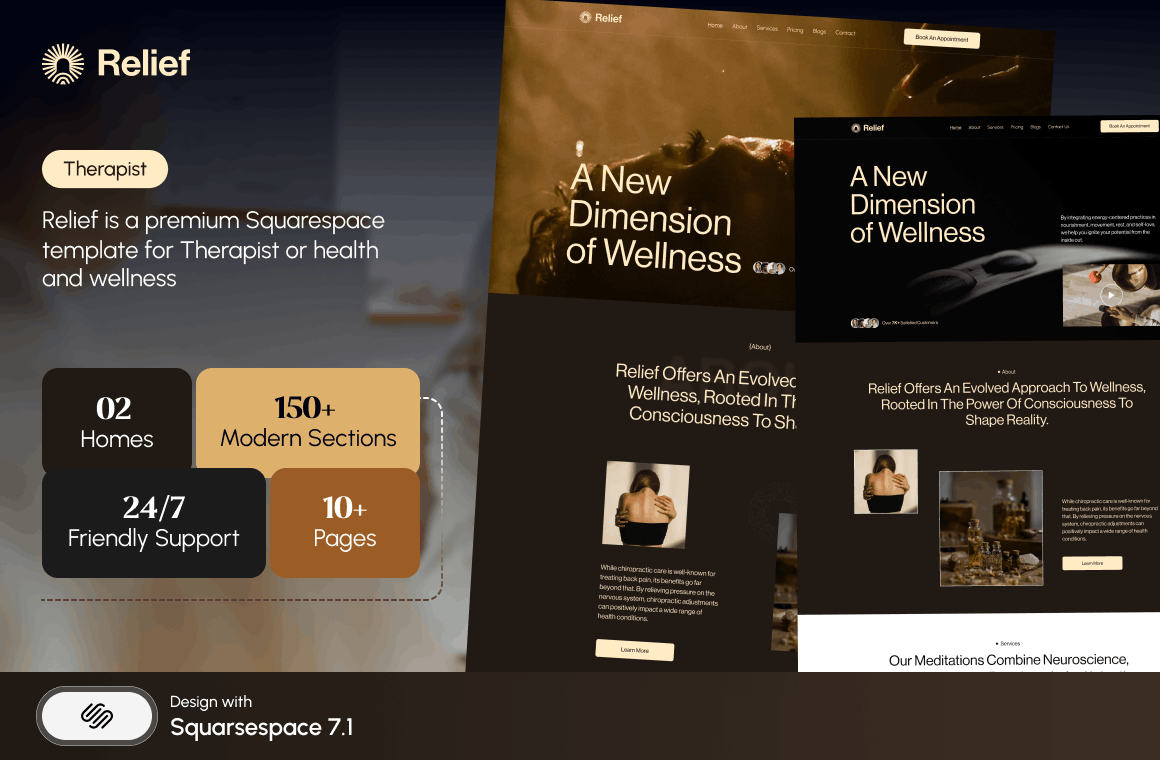
Score: 21/25. Relief is tagged Therapist and Wellness Coach, 11 pages, with a Pricing page, an FAQs page and a Blog. For a life coach, wellness coach or therapist working one-to-one, that pair is the objection-handling layer of the whole site.
Publishing prices is the single most contested decision in coaching, and the evidence from enquiry quality is consistent: a published price or price band filters out the people who were never going to buy and raises the proportion of calls that convert. Relief gives that a page instead of a footnote. The FAQs page, built with Accordion blocks, is where the "how long", "what if it isn't working" and "do you do sessions online" questions go — crawlable, and read far more often than coaches expect.
Enquiry path 4, credibility surface 4, offer architecture 5, content engine 4, page depth 4.
Worst for: speakers and podcasters. Relief has no Speaking or Podcast page and its visual register is quiet clinical calm, which undersells a stage-facing business.
Navigate — best for a coach with an audience
Score: 18/25. Navigate is a 10-page template tagged Author & Coach and Speaker, with Course, Podcast and Speaking pages alongside a Blog. It is built for the coach whose business runs on published work — a podcast, a book, a keynote — rather than on paid traffic.
The Course page is the piece to understand before buying. It is a page, not a product: it gives a course or programme somewhere to be sold from, but whether you gate the content behind Squarespace Member Sites or run enrolment through Acuity is your decision to make, and nothing about the template settles it. Ten pages is the second-smallest coaching-relevant template in the range, and the score reflects a thin enquiry path — there is no Booking page and no Pricing page.
Enquiry path 3, credibility surface 3, offer architecture 4, content engine 5, page depth 3.
Worst for: a new coach with no audience yet. Navigate's structure assumes a podcast and a speaking history exist. Empty, it looks like a site waiting for a career.
Squarespace templates for consultants, advisors and B2B coaches
A consulting or executive-coaching buyer is usually a committee, arrives from LinkedIn, and wants sector evidence before they want a conversation. Case studies do the work that testimonials do in B2C coaching.
Click Crafter — best for consultants and agency-shaped practices
Score: 21/25. Click Crafter is a 12-page agency and service-business template with a Portfolio, a Gallery, a Blog, a Shop and a Freebie page. For a consultant, the portfolio structure is the case-study structure — one page per engagement, with the situation, the approach and the outcome.
The Freebie page is the underrated one. In B2B advisory work the highest-converting asset is usually a document — a benchmark report, a diagnostic, a capability statement — and most consultants email it on request, which loses every enquiry that never asks. A built page for it plus a form is a working lead magnet on day one.
Enquiry path 3, credibility surface 5, offer architecture 4, content engine 5, page depth 4.
Worst for: intimate one-to-one coaching. Click Crafter reads corporate, and corporate reads expensive and impersonal to someone choosing a life coach.
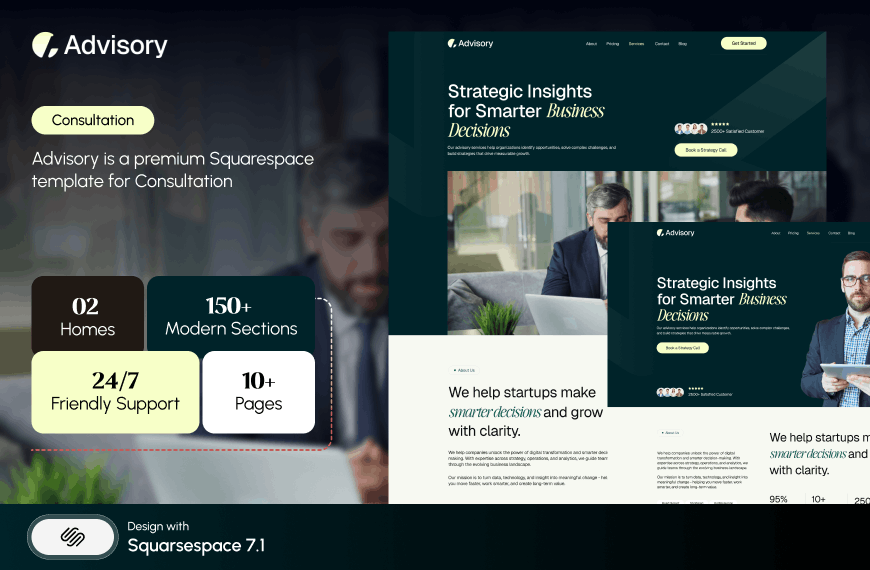
Advisory — best for a consultancy that leads with fees
Score: 20/25. Advisory is an 11-page template tagged Consultation and Speaker, with a Pricing page, a Blog and two legal pages. It is the template in the range built for the consultant-speaker overlap — the person who advises companies and gets paid to talk about it.
The Pricing page matters more in consulting than most people expect. Publishing a fee structure, even as bands or a minimum engagement size, is the fastest qualification tool available to a small firm. Advisory gives it a page. Two legal pages ready to fill is also a genuine convenience for anyone who has to publish terms of engagement.
Enquiry path 4, credibility surface 4, offer architecture 5, content engine 3, page depth 4.
Worst for: visual portfolios. Advisory has no gallery or portfolio structure, so a consultant whose proof is visual — brand work, spatial work, design work — is building it from scratch.
Justify — best when case studies are the entire pitch
Score: 16/25. Justify is built for law firms and is the smallest template in the Squareko range at nine pages, with a Case Study section and a Blog. It scores low overall and is still the right answer for a specific person: the advisor whose credibility comes entirely from documented outcomes, and who wants a site they can maintain in an hour a month.
Enquiry path 3, credibility surface 5, offer architecture 2, content engine 4, page depth 2.
Worst for: anyone selling packages. Nine pages, no pricing structure and no course page means the commercial layer is yours to build.
Squarespace templates for programme, course and cohort coaches
Selling a programme is selling a product. The site needs a sales page long enough to carry the whole argument, an enrolment mechanism, and somewhere for the content to live afterwards.
Luminary — best for coaches selling courses and programmes
Score: 19/25. Luminary is an 11-page template tagged Service-Based, Course and Speaker, with a Courses page, a Shop, a Portfolio, a Gallery and a Freebie page. It is the closest thing in the range to a programme-seller's site out of the box: the funnel from free asset to paid course already has pages.
Enquiry path 3, credibility surface 4, offer architecture 5, content engine 3, page depth 4.
Worst for: anyone who wants to blog. Luminary ships no Blog page, and a coach whose organic traffic strategy is written content will have to add and style one.
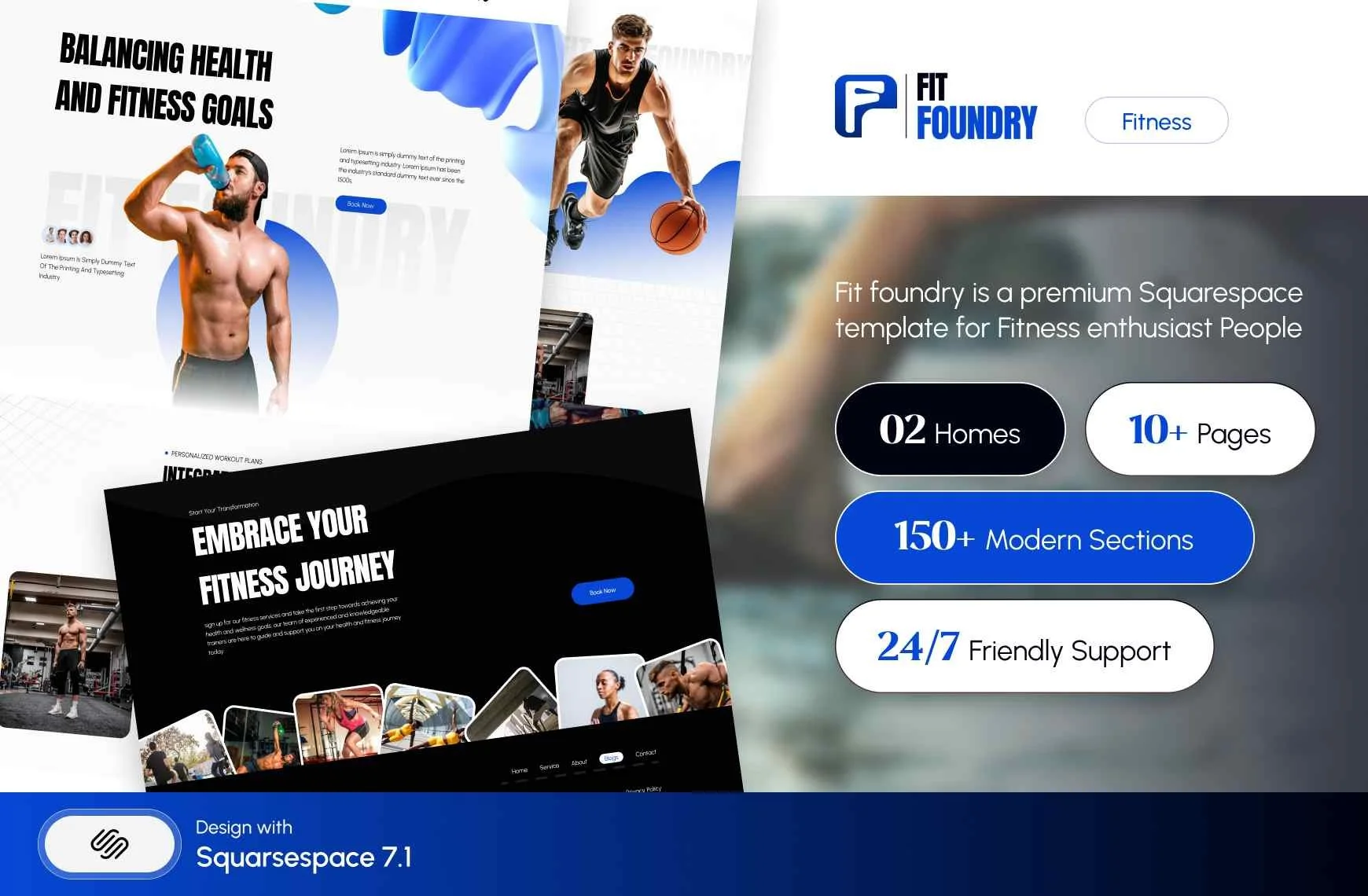
Fit Foundry — best for health and wellness coaching packages
Score: 20/25. Fit Foundry is 11 pages tagged Fitness & Wellness and Coach, with a Shop, a Blog, an FAQs page and a Freebie page. The Shop is doing real work here — a nutrition coach selling a meal plan, a wellness coach selling a self-paced reset, both need a product page rather than an invoice.
Enquiry path 3, credibility surface 4, offer architecture 4, content engine 5, page depth 4.
Worst for: executive and corporate coaching. The register is consumer wellness and a CFO will read it as such. Fitness coach templates covers this segment properly.
Shape Matrix — best for coaches running groups and classes
Score: 19/25. Shape Matrix is 11 pages tagged Fitness & Wellness and Coach, with Training and Classes pages, a Portfolio, a Gallery and a Blog. For any coach whose delivery model is a recurring group rather than a one-to-one calendar — a mastermind, a weekly cohort, a workshop series — Training and Classes are the two pages that would otherwise be built by hand.
Enquiry path 3, credibility surface 4, offer architecture 4, content engine 4, page depth 4.
Worst for: solo executive coaching. The class structure is dead weight if you only ever sell one-to-one.


Lead magnets, and what Squarespace forms actually do
Several templates above ship a Freebie page, and this is where most coaches discover that Squarespace does not do the thing they assumed it does. Squarespace forms do not deliver files. There is no native "send this PDF on submit".
Here is what a Squarespace 7.1 form does. Every form requires at least one storage option, and the options are: a Squarespace mailing list, the form submitters list in the Contacts panel, an email address, Google Drive, Mailchimp or Zapier. Mailchimp and Zapier require Core, Plus or Advanced plans. After submission, the form either shows a confirmation message — which accepts HTML — or redirects to a URL or a page on your site.
That gives you two honest routes to deliver a lead magnet:
Redirect to an unlisted download page. Set the form's post-submit action to a page that is disabled in navigation and holds the download button. Simple, instant, and copyable by anyone who shares the URL.
Store to a mailing list and trigger an automated campaign. Squarespace Email Campaigns can send an automated campaign when someone joins a mailing list. This is the route that actually builds a list. Note that Email Campaigns is billed separately from your site subscription, the entry plan is capped at 500 sends a month, and automations are not available during the free trial.
Whichever you pick, decide it before launch. A Freebie page with a form that emails you the submission and nothing else is the most common half-built thing on coaching websites.
Member Sites, courses, and where the programme content lives
If you run a cohort or a paid programme, the content has to sit somewhere gated. Squarespace Member Sites is the native answer, and it is worth knowing its shape before you design around it.
Member Sites can gate Blog pages, Course pages, Video pages, additional member sites and store pages. Pricing plans come in three forms: free (email signup), a fixed amount paid once or in instalments, or a recurring subscription. There is a cap of ten digital products per pricing plan, and up to five benefit lines per plan at 60 characters each. Building a member site costs nothing; selling memberships requires a billing plan that includes digital products, and that plan is what determines your transaction fee and your video storage limit.
The practical consequence for template choice: a template's "Course" page — Navigate and Luminary both have one — is a sales page for the programme, not the programme itself. The lessons live inside the Member Site. Nothing about any template in this range asserts a Member Sites configuration, and you should not assume one.
Long sales pages are built from sections, not bought
Coaches selling a programme at £1,500 or more need a long sales page: problem, agitation, promise, proof, curriculum, objections, price, guarantee, close. That page is 3,000 words of layout and it does not come with any template.
What it does come from is sections. Squarespace 7.1 pages are stacks of sections, and every Squareko template ships 150+ pre-designed sections you can insert into any page. A long sales page is assembled by duplicating a testimonial section, an FAQ accordion, a pricing section and a call-to-action section in the right order. Budget a day for it, and build it as its own page rather than bolting it onto the Services page. It also wants to be disabled in navigation and linked only from your own funnel, so it is not competing with your homepage for the same search.
What the rest of the market offers
Being fair about this earns more trust than pretending there is one option, and there isn't.
Big Cat Creative is the largest premium Squarespace shop and carries a coaching-specific line at $297 with a genuinely strong self-service education layer — its customisation guides are better than most agencies' onboarding. Applet Studio runs about 30 templates at roughly $225 with industry landing pages including consultancies, and is the closest competitor on breadth. Hold Space Creative and JPK Design Co both build specifically for therapists and coaches, which shows in their copy structure. Go Live HQ, Station Seven, Paper Moon Websites and Square Stylist all sell into this niche.
Squarespace's own free templates are the honest baseline. They are included with every subscription, Squarespace maintains a life coach category, and if your site is four pages and your writing is strong, a free template plus a weekend is a completely reasonable outcome. The free versus premium comparison sets out where that stops being true.
Where the Squareko range differs is delivery, not design. Templates arrive as a Squarespace contributor invitation rather than a file download — there is nothing to upload — and installation onto an existing live site is a manual add-on that takes around 48 hours, which matters if you have a site currently producing enquiries.
What it costs over the life of the site
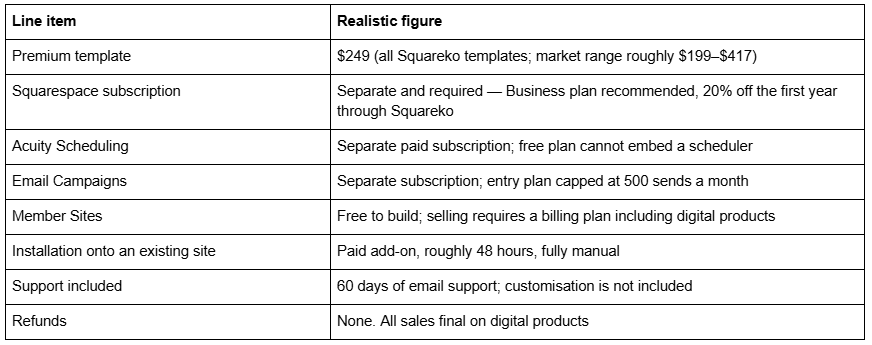
Two things get missed. Demo images are licensed to the template shop, not to you — every one must be replaced before launch, which for a coach means a real photograph of yourself, and that is a booking not a download. And all sales are final: digital products cannot be returned, exchanged or refunded, which is standard across the template market. Use the demo properly first, and where a demo is not publicly viewable, ask for a walkthrough.
Choosing one
Work it in this order. Identify which of the seven coaching businesses you are, and build for that one. Check the template ships an enquiry path you can turn into a discovery-call page — a Booking page, or a Pricing page you can pair with a Scheduling block. Then check the credibility surface: is there a page for proof, or a homepage strip pretending to be one. Aesthetics come last, because in Squarespace 7.1 aesthetics are the easiest thing to change and page architecture is the hardest.
If you would rather not run the install yourself, the premium Squarespace templates in our range are delivered as a contributor invitation and can be installed onto an existing live site without taking it down. Most coaches reading this will do it themselves over a weekend, and the ten templates above are the shortlist worth starting from.
FAQ
-
Four that carry weight: a homepage that names the reader's situation, a work-with-me page holding packages and price, an about page with story and credentials, and a discovery-call page with a scheduler on it. Everything else — blog, freebie, testimonials — is optional depth added once those four convert.
-
Through Acuity Scheduling, which is what Squarespace Scheduling is now called. Add Block → Scheduling embeds the booking flow in your page and requires a paid Acuity subscription; the legacy free plan cannot embed. Alternatively link a Button block to your Acuity scheduling page, which is simpler and survives template changes.
-
Name, Text, Email, Phone, Text Area, Website, Twitter, Dropdown, Checkbox, Radio, Survey, Address, Date, Time, Number, Currency, File Upload (10 MB per file), Password, Line and Hidden. Submissions route to email, Google Drive or Mailchimp. There is no conditional logic, no e-signature and no payment field.
-
Create a £0 appointment type in Acuity Scheduling with a 15- or 20-minute duration and a buffer afterwards, then embed it with a Scheduling block filtered to that appointment type so it appears on its own. Make it the single repeated call to action across the site.
-
Use a Squarespace subscription product set to expire after a fixed number of payments. Subscriptions work only with Squarespace Payments or Stripe — not PayPal, Apple Pay or ACH — and customers cannot pause them. If the payment must also unlock content, use a Content & Memberships plan instead, because subscription products don't work with Member Areas.
-
Relief is the closest fit in the Squareko range: 11 pages including Services, Pricing, FAQ and a privacy policy page, which is the page set a consultation practice actually needs. Fit Foundry suits practitioners selling standardised guides, since it ships a Shop page and a built lead-magnet page but no Pricing page.

Author Bio
I'm Walid Hasan, a Certified Squarespace Expert and Squarespace Circle Platinum Partner with over 12 years of hands-on experience designing and optimizing high-performing websites. Over the years, I've had the privilege of building more than 2,000 Squarespace websites for clients around the world, always focusing on clean design, strong user experience, and conversion-driven results.
