
Best Squarespace Template for Personal Trainers: The 2026 Verdict
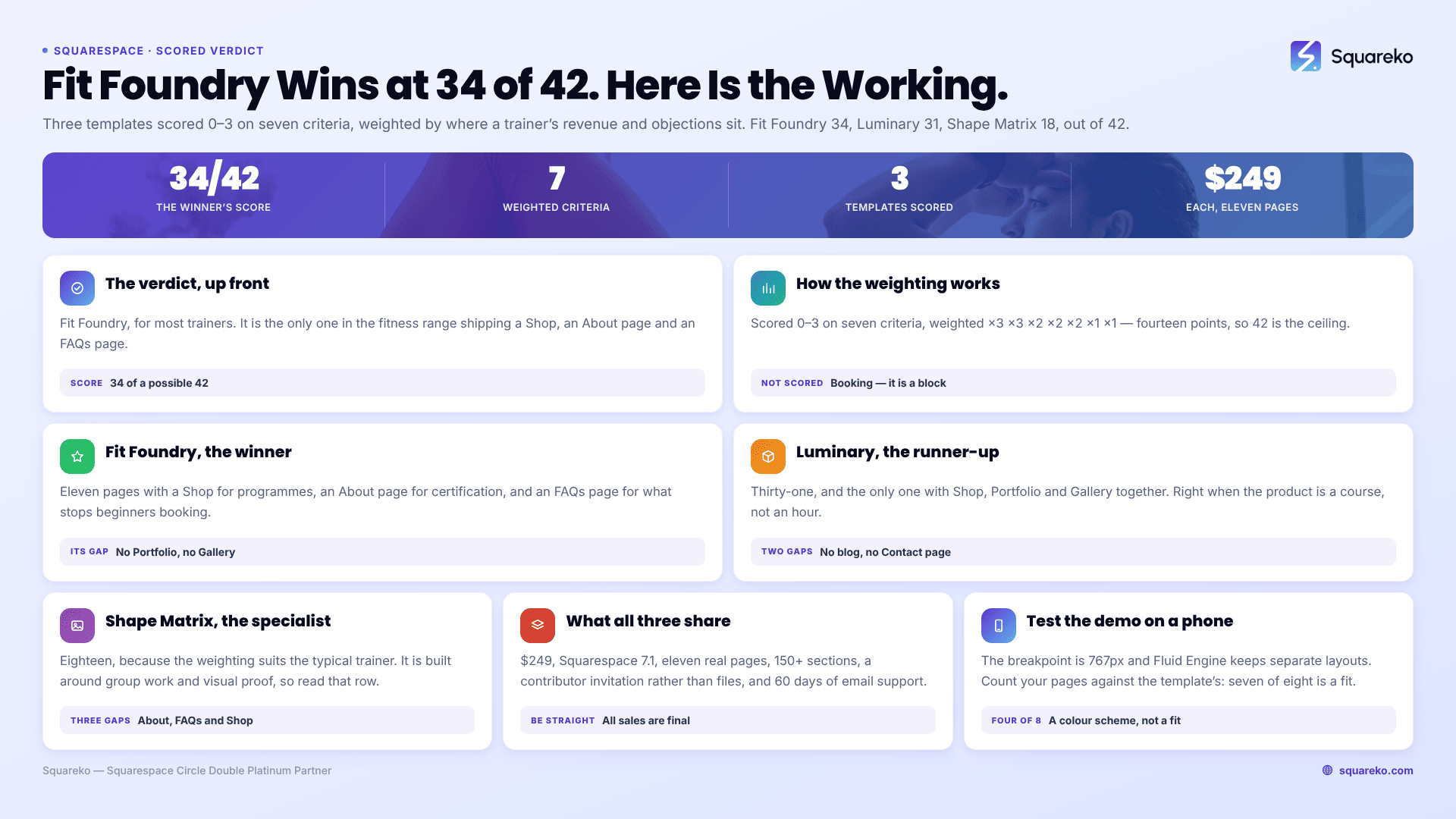
The verdict: Fit Foundry. For the great majority of personal trainers it is the right choice, because it is the only template in the Squareko fitness range that ships all three of the pages a PT's revenue actually depends on — a Shop for online programmes, an About page for credentials, and an FAQs page for the objections that stop people booking. It scores 34 out of 42 against the criteria below. Luminary (31) is better if courses are your main product. Shape Matrix (18) wins on one axis only — visual proof — and is the right pick if group training and transformation photography are how you sell.
Scoring table
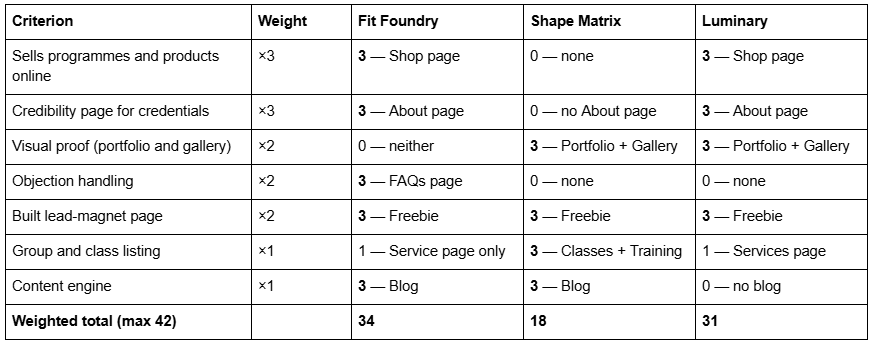
Methodology, stated plainly. Each template was scored 0–3 on whether it ships a built page for the job, judged against the live demo's actual navigation, not against product-page marketing copy. Weights reflect where a personal trainer's revenue and objections sit: selling programmes and proving competence carry ×3, proof and objection handling ×2, class listing and blog ×1. All three templates are 11 pages and $249, so page count and price are not scoring criteria. Booking is not a criterion either, and that is deliberate — see below.
None of these templates ships a booking page, and none should. Booking on Squarespace 7.1 runs through Acuity Scheduling, embedded with a Scheduling block onto any page you like. A template that pre-built a booking page would be pre-building a section you can add in ninety seconds. Any template shop claiming "built-in booking" is describing a block, not a feature.
Fit Foundry — the winner, and why
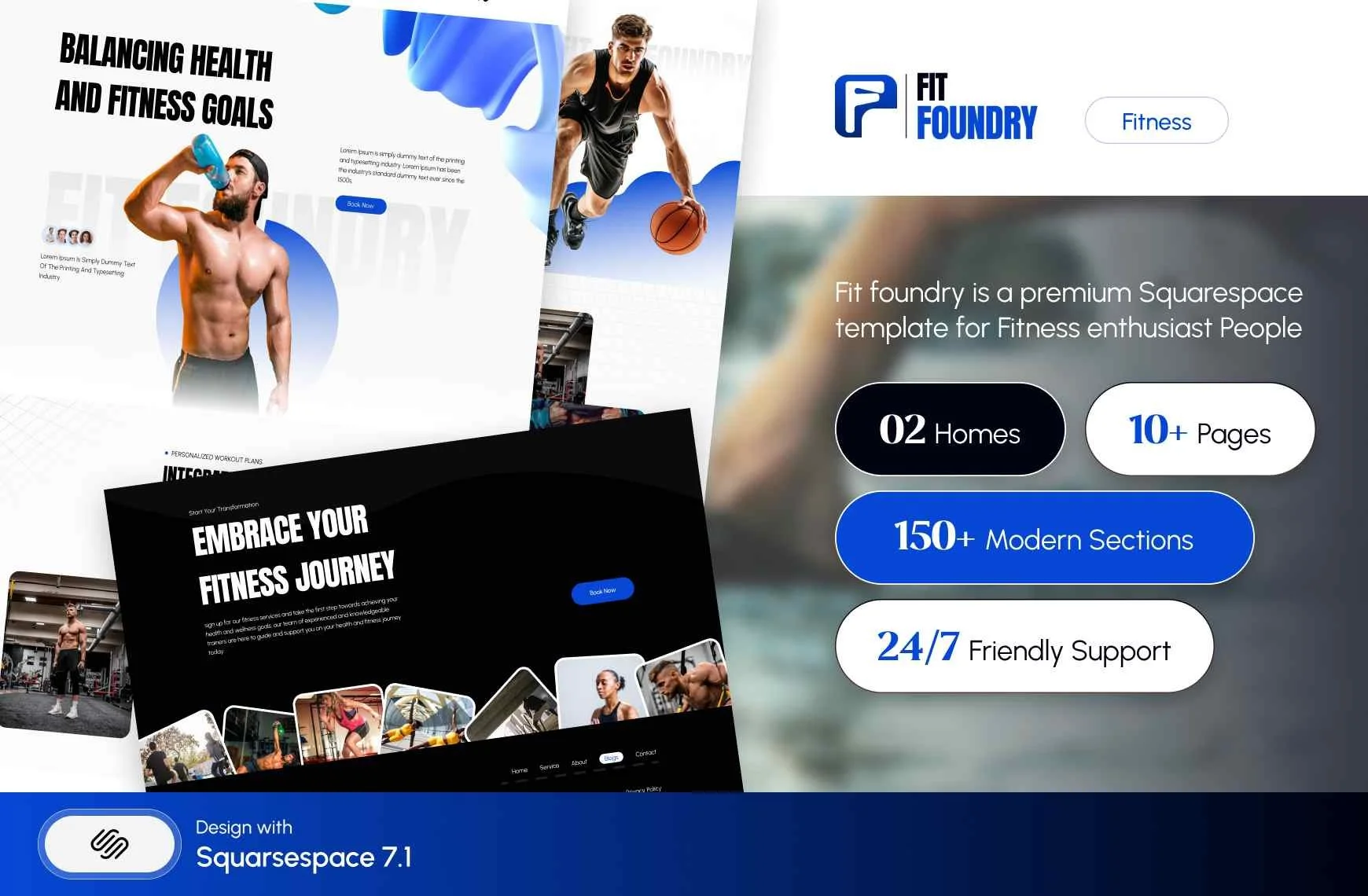
Fit Foundry — 11 pages: Home, a second homepage layout, About, Service, Shop, Blog, FAQs, Freebie, Contact, a 404 page and a Style Guide page. Tagged Fitness & Wellness, Coach.
The reason it wins is not aesthetic, it is arithmetic. A personal trainer's income has two halves: hours sold in person, which are capped by the calendar, and programmes sold online, which are not. The second half is where a website earns its cost, and it needs a Shop. Fit Foundry is the only template in the fitness range with one.
The About page is the second reason. Personal training is largely unregulated, so a certification is a real differentiator and almost nobody publishes it properly. An About page that names your certifying body, your qualification level, your insurance, your specialisms — strength, pre- and post-natal, rehabilitation referral, older adults — and your continuing education does more conversion work than any hero image. Shape Matrix ships no About page at all, and for a PT that is the wrong gap to inherit.
The FAQs page is the third, and it is the one people underrate. Prospective clients do not fail to book because of price. They fail to book because they do not know whether they are too unfit to start, what happens in the first session, whether they need a gym membership as well, what your cancellation policy is, and whether online coaching is worth it if they have never lifted. Those are six FAQ entries and they are the highest-converting copy on a PT website. Build them with the native Accordion block, which renders server-side in 7.1, so question and answer text is fully crawlable.
What Fit Foundry lacks: any Portfolio or Gallery page. Transformation photography goes into Gallery sections on ordinary pages instead, which works — Gallery sections offer six layouts and hold up to 250 images — but note they cannot hold video. If client video testimonials are central to your pitch, that is a real constraint, and you would embed video blocks on a regular page instead.
Luminary — the runner-up, for programme sellers
Luminary — 11 pages: Home, a second homepage layout, About, Services, Courses, Shop, Portfolio, Gallery, Freebie, a 404 page and a Style Guide page. Tagged Service-Based, Course, Speaker.

Luminary scores 31 because it is the only one of the three with Shop, Portfolio and Gallery together. If your business is a 12-week online programme with a video library, a client community and results photography, Luminary carries more of that architecture pre-built than either fitness-tagged template.
Two honest caveats, and they cost it the top spot.
It ships no blog. For a personal trainer that is a meaningful omission, because the searches that bring new clients — "how many times a week should I train", "personal trainer cost", "strength training over 50" — are answered by articles, not by service pages. You can add a blog collection in a minute, but you are then building the layout yourself rather than inheriting one.
It ships no Contact page. Verified from the live demo navigation. That is a strange gap in any service template and it needs building.
Note also that nothing is published about whether Luminary's Courses page uses Squarespace's Courses feature, Member Areas or anything else. Assume it is a designed page and that you are wiring the mechanics yourself.
Shape Matrix — the specialist
Shape Matrix — 11 pages: Home, a second homepage layout, Training, Classes, Blog, Portfolio, Gallery, Freebie, Contact, a 404 page and a Style Guide page. Tagged Fitness & Wellness, Coach.

Eighteen out of 42 looks harsh, and in one specific case it understates the template badly. Shape Matrix is the only one of the three built around group work and visual proof. Training holds one-to-one and small-group offers, Classes holds the timetable and the Scheduling block, and Portfolio plus Gallery carry the transformation images and the training environment.
A bootcamp operator, a small-group strength coach or a trainer who runs classes as well as one-to-ones will get more use out of those four pages than out of Fit Foundry's Shop. The score is low because the weighting is built for the typical PT, who sells programmes and needs to prove credentials. If that is not you, read the table by row rather than by total.
What it lacks is significant and worth naming twice: no About page, no FAQs page and no Shop. Three pages to build, and the first two are the two that convert.
Choose Fit Foundry if…
You sell online programmes, plans or downloadable guides alongside in-person sessions.
Your certification, insurance and specialisms are a genuine differentiator you want stated properly.
Your prospects are beginners, and objection handling matters more than aesthetics.
You want a blog, because you intend to answer training questions and be found for them.
Transformation photography is supporting evidence rather than the main pitch.
This is most personal trainers.
Choose Luminary if…
Your primary product is a structured programme or course, not an hour of your time.
You want Shop, Portfolio and Gallery in one template and are willing to build a Contact page.
You do not plan to blog, or you are happy to lay a blog out yourself.
You sell to an audience that has already heard of you — a following, a list, a podcast — so top-of-funnel search matters less.
Choose Shape Matrix if…
Group classes, bootcamps or small-group training are your main revenue, not one-to-ones.
Your sale is visual: before-and-after images, training environment, community.
You are comfortable building an About page and an FAQ section yourself.
You do not sell products or digital programmes online.
What all three share, and what none of them do
All three are $249, all three are Squarespace 7.1 with Fluid Engine, and all three are 11 real pages rather than a homepage plus placeholders. Each ships 150+ pre-designed sections, a Style Guide page and a 404 page. Delivery is a Squarespace contributor invitation — no files to download, no upload, no FTP — and Squareko will install onto an existing site as a paid add-on, typically around 48 hours, with your current site staying live throughout. Sixty days of email support is included; customisation is not.
Two things to be straight about before you buy. All sales are final — digital products cannot be returned, exchanged or refunded — so use the demo properly first, on a phone, with your own content in mind. And demo images are not licensed for live use: every photograph in the demo has to be replaced with your own before launch. For a personal trainer that is less of a chore than it sounds, because stock gym photography converts badly anyway.
None of the three solves the things Squarespace itself cannot do for a trainer running group sessions: there is no class roster and no check-in, and the waitlist does not cover classes. Acuity added a native appointment waitlist on its higher tiers — clients join, choose preferred dates and get a text when a slot frees — but it applies to appointment types, not classes, and an older Acuity article still documents the manual duplicate-calendar workaround. Confirm which applies to your plan before you promise a waitlist. Trainers who need those pair Squarespace with Punchpass, Momence or TrueCoach and embed the schedule in a Code Block, which requires the Core plan or above, since JavaScript and iframes in Code Blocks are gated to those plans.
How to test a demo before you buy
Sales are final on all three, so the demo is the entire decision. Ten minutes spent properly is worth more than an hour of reading reviews.
Open the demo on your phone, not on a desktop. Squarespace 7.1's mobile breakpoint is 767px, and Fluid Engine maintains separate desktop and mobile layouts for every section — a design that reads beautifully at 1440px can be a stack of orphaned text blocks at 390px. Most personal training traffic is mobile.
Then do four specific things:
Count your own pages against the template's. Write your list first — home, about, services, programmes, testimonials, blog, contact, FAQ — and see how many have an obvious home. Seven of eight is a fit. Four of eight is a colour scheme.
Paste your longest real headline over the hero. Templates are demoed with headlines written to fit. Yours will not be.
Check the Service or Training page structure, because that is where your actual offer has to live and it is the page people most often find does not fit.
Look at what you would have to delete. A template with four pages you will never use is more work to strip than a template with two pages you have to build.
Honest competitor context
A verdict is only worth something if it acknowledges the alternatives.
Big Cat Creative has the largest premium Squarespace template catalogue and the most complete industry taxonomy, which means more fitness-adjacent options and more chance of finding a layout you like without compromise. Applet Studio runs roughly 30 templates at around $225 with proper industry landing pages, and its wellness and fitness designs are strong. Station Seven, Paper Moon Websites, Go Live HQ, Ink and Mortar, SQSPThemes, Square Stylist and Golden Coast Design all sell credible work. If pure design range is your criterion, the larger catalogues win on range and should.
Where Squareko wins is installation and support: the contributor-invite delivery, the option to have it installed onto an existing site, and 60 days of email support afterwards. That is a different axis from design range, and it matters more to a trainer with no evenings than to a designer buying a starting point.
And the honest baseline: Squarespace's own free templates are fine. A premium template and a free one emit the same underlying markup and rank identically. What you buy for $249 is a finished page architecture and the eight to twelve evenings it would take to build one. Across 54 Squareko-built client sites measured in August 2026 (Playwright and Chromium lab test, cloud datacentre, unthrottled, single run per site, load-only CLS — lab data, not field data), median mobile LCP was 2.01s with 74% under Google's 2.5s threshold. That is a property of building carefully on 7.1, not of paying for a template.
The decision, in one paragraph
If you are a personal trainer who sells programmes online and wants credentials and objections handled properly, buy Fit Foundry. If your product is a course and you have an audience already, buy Luminary and budget for a Contact page. If you run groups and sell on visual proof, buy Shape Matrix and budget for an About page and an FAQ section. If none of those descriptions is you, the template is not your bottleneck — your page architecture is, and that is a different question.
That different question is answered next door. This post decides which template; the guide to Squarespace templates for personal trainers decides how to choose one — what pages a PT site needs, in what order, and why. Read that one first if you are still unsure what you are buying. For adjacent niches, see Squarespace templates for gyms, for fitness coaches, and for yoga studios. The cluster hub is Squarespace templates for fitness.
Whichever you choose, the premium Squarespace templates at Squareko are installed for you rather than sent as files, onto a new site or an existing one. Plenty of trainers install and fill a template perfectly well themselves in a fortnight of evenings; this is published for the ones who would rather spend those evenings training clients.
FAQ
-
Fit Foundry, for most trainers. It is the only template in the Squareko fitness range that ships a Shop page for online programmes, an About page for credentials and an FAQs page for objections — the three pages a personal trainer's conversions depend on. It scores 34 out of 42 against Shape Matrix (18) and Luminary (31).
-
If you sell programmes, plans, guides or coaching packages online, yes — that revenue is not capped by your calendar the way in-person hours are, and it needs a Shop. If you sell only in-person sessions and take payment on booking through Acuity Scheduling, an ecommerce page is optional.
-
Name, Text, Email, Phone, Text Area, Website, Twitter, Dropdown, Checkbox, Radio, Survey, Address, Date, Time, Number, Currency, File Upload (10 MB per file), Password, Line and Hidden. Submissions route to email, Google Drive or Mailchimp. There is no conditional logic, no e-signature and no payment field.
-
They convert, but treat them carefully. Get written consent for web use specifically, avoid presenting atypical results as typical, and pair every image with the timeframe and what the client actually did. Shape Matrix ships Portfolio and Gallery pages for this; note Gallery sections cannot hold video.
-
Use a Squarespace subscription product set to expire after a fixed number of payments. Subscriptions work only with Squarespace Payments or Stripe — not PayPal, Apple Pay or ACH — and customers cannot pause them. If the payment must also unlock content, use a Content & Memberships plan instead, because subscription products don't work with Member Areas.
-
Yes. Free and premium Squarespace templates emit the same underlying markup and rank identically — there is no SEO advantage to paying. What $249 buys is a finished page architecture and the several evenings it would otherwise take to build one, plus installation and 60 days of support.

Author Bio
I'm Walid Hasan, a Certified Squarespace Expert and Squarespace Circle Platinum Partner with over 12 years of hands-on experience designing and optimizing high-performing websites. Over the years, I've had the privilege of building more than 2,000 Squarespace websites for clients around the world, always focusing on clean design, strong user experience, and conversion-driven results.
