
Squarespace Templates for Nutritionists: Intake and Booking
The short answer: A nutrition website sells one thing — the discovery call. Everything else on the site exists to get someone onto that call, and everything after it is intake and delivery. The constraint nobody mentions is that Squarespace form blocks cannot legally carry protected health information; Squarespace says so directly. Choose a template on whether it gives you a Services page, a Pricing page and an FAQ, then build the intake in Acuity Scheduling rather than in a form block.
Of the Squareko range, Relief is the closest fit: 11 pages including Services, Pricing and an FAQ page.
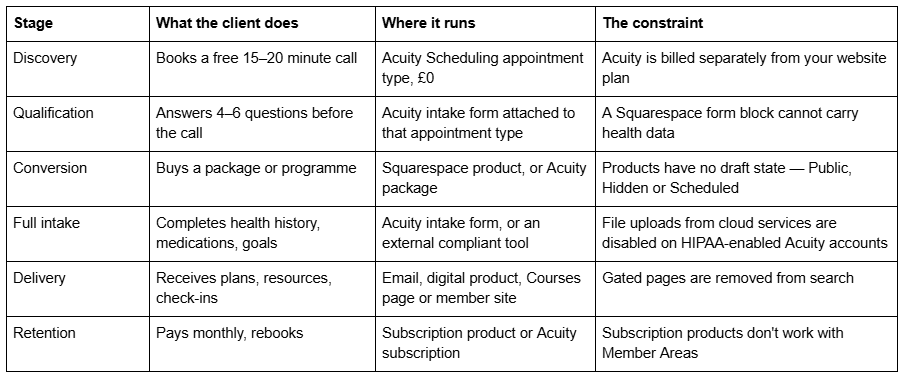
The funnel, stage by stage, and what each stage runs on
The discovery call is the only CTA that matters
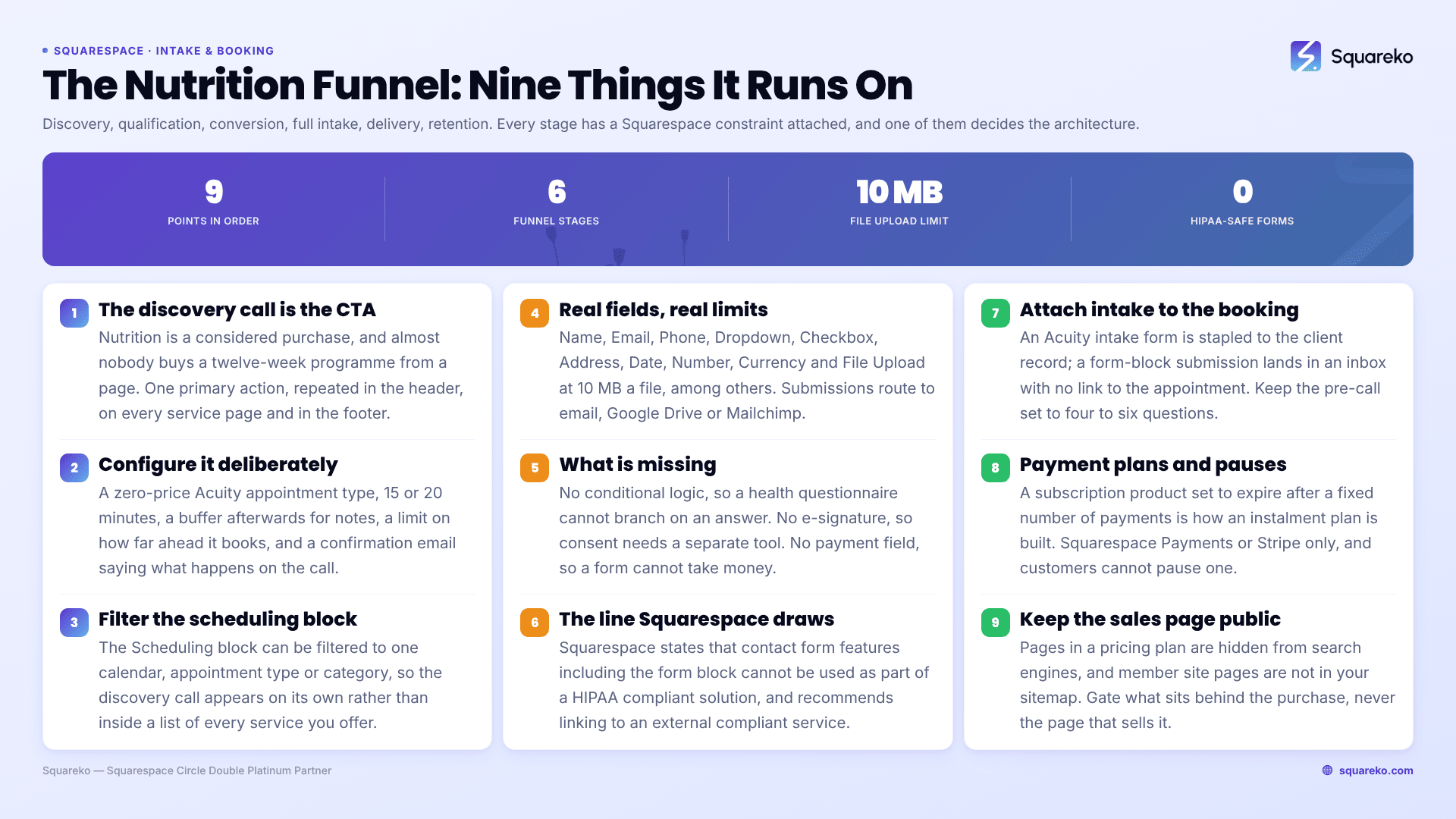
Nutrition is a considered, personal purchase. Almost nobody buys a twelve-week programme from a web page. They book a free call, decide whether they trust you in twenty minutes, and buy afterwards.
So the site has exactly one primary action, repeated in the header, at the end of every service page and in the footer: book a free call. Not "contact me". Not a mailto link.
Build it as an Acuity Scheduling appointment type — the product Squarespace branded as Squarespace Scheduling for several years, and which the Squarespace Help Center now states is "officially Acuity Scheduling" again. Note that Acuity is a separate subscription; Squarespace's documentation says "Your Acuity subscription is separate from your site subscription."
Configure the discovery appointment deliberately: price £0, duration 15 or 20 minutes, a buffer after it so you can write notes, a limit on how far ahead it can be booked, and a confirmation email that says exactly what will happen on the call. Then embed it with a Scheduling block, which can be filtered to a specific calendar, appointment type or category — so the discovery call appears on its own, not inside a list of every service you offer.
Acuity's plan tiers matter here mainly for capacity and features: Starter gives one bookable calendar; Standard gives up to six plus appointment packages, memberships and subscriptions, and gift certificates; Premium gives up to 36, removes the "Powered by Acuity" branding, and is the only tier where a HIPAA Business Associate Addendum is available.
What a Squarespace form can and cannot collect
This section is the reason the post exists, so be precise about it.
Squarespace form blocks do have real fields. The available field types are Name, Text, Email, Phone, Text Area, Website, Twitter, Dropdown, Checkbox, Radio, Survey, Address, Date, Time, Number, Currency, File Upload (images, documents, presentations, video and audio, maximum 10 MB per file), Password, Line and Hidden. Submissions can be routed to email, a Google Drive spreadsheet or Mailchimp.
What they do not have: conditional logic, so you cannot branch a health questionnaire based on an answer; e-signature, so consent forms need a separate tool; and payment fields, so a form cannot take money. Hidden field values passed through query parameters are capped at 100 characters.
And the one that actually decides the architecture. Squarespace's own HIPAA documentation states that "other parts of the Squarespace platform, including contact form features like the form block, can't be used as part of a HIPAA compliant solution", and recommends linking out to an external compliant service for secure patient information. HIPAA coverage exists only for Acuity accounts that have been individually HIPAA-enabled under a separate Business Associate Addendum, on the Powerhouse or Premium plan.
If you practise in the US and handle protected health information, that is not a nuance — it is the whole design. If you practise elsewhere, the equivalent data-protection duty still applies, and the same conclusion follows: do not collect health history through a website contact form.
Note too that switching a HIPAA-enabled Acuity account on disables several conveniences: calendar syncing with Office 365, Outlook and iCloud; the Squarespace Email Campaigns integration; invoices; Reserve with Google; and cloud-service file uploads inside intake forms. Know that before you promise a client a slick automated pipeline.
Where the intake form should actually live
Attach the intake to the appointment type in Acuity, not to a page on your website. Three reasons, in order of importance.
It is the only route with a compliance story. See above.
It arrives attached to the booking. An intake completed through a Form block lands in an inbox with no link to the appointment; an Acuity intake form is stapled to the client record.
It is completed at the right moment. Acuity can present intake questions at booking or send them afterwards. Keep the pre-booking set short — four to six questions — and save the twenty-question health history for after payment, not before the free call. Every field before the discovery call costs you bookings.
The one thing a Squarespace form block is genuinely good for on a nutrition site is the non-clinical enquiry: name, email, what you're looking for, how you heard about me. Keep it to that.
Delivering meal plans and programmes
Four routes, and the right one depends on whether the content is personalised.
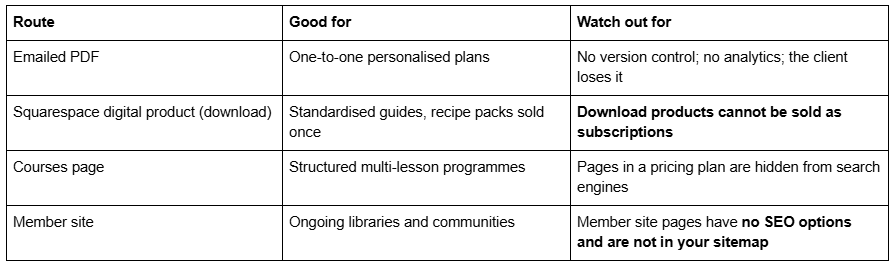
Personalised plans should stay in email or a client portal, because they are individual health advice and do not belong on a URL, however obscure. Standardised material — a low-FODMAP starter guide, a batch-cooking pack, a six-week programme — is where the platform earns its keep.
The rule to hold on to: keep the sales page public and gate only what sits behind the purchase. Gating the sales page is the most common self-inflicted wound on nutrition sites, because it removes the exact page that was meant to bring people in.
Recurring programmes and payment plans
Nutrition practices increasingly sell monthly support rather than one-off consultations. Two mechanisms, and they are not interchangeable.
Squarespace subscription products renew as often as weekly and as infrequently as every twelve months. They require the Basic, Core, Plus, Advanced or Commerce Advanced plan (digital product subscriptions also work on Business and Commerce Basic). They work only with Squarespace Payments or Stripe — not PayPal, Apple Pay or ACH. Customers can buy only one subscription product per transaction and cannot pause a subscription themselves, though you can delay a renewal date. You can set them to expire after a fixed number of payments, which is exactly how a three-instalment payment plan is built.
Content & Memberships pricing plans can be free, a fixed amount paid once or in instalments, or a subscription, and they unlock content. Content and membership sales carry a transaction fee that runs roughly 5–7% on the entry and mid-tier website plans, 1% on Commerce and 0% on Commerce Advanced — check the live pricing page before quoting it.
The trap to avoid: Squarespace states plainly that subscription products don't work with Member Areas. If a monthly payment is supposed to unlock a resource library, it has to be a Content & Memberships subscription plan, not an ecommerce subscription product. Building it the wrong way round means manually granting access to every client, forever.
Acuity memberships and subscriptions (Standard plan or above) are the third option, and the right one when the recurring thing is appointments rather than content.
Credentials, regulated titles and where to put them
"Nutritionist" and "dietitian" are not the same word in law. In many jurisdictions, dietitian is a protected title restricted to people on a statutory register, while nutritionist is not protected and can be used by anyone. Voluntary registers exist in several countries and carry real weight with informed clients.
Whatever applies where you practise, publish it in visible body text on an About or Credentials page: your qualification and awarding institution, your registration body and registration number, your insurance, your continuing professional development, and your scope of practice — including what you do not treat and when you refer to a GP or a registered dietitian.
Two build notes. Put the registering body's name in text and link to your entry on its public register; a logo badge image is invisible to search engines and to AI answer engines. And if you hold a protected title, use it precisely and never let marketing copy blur it — describing yourself with a title you do not hold is a regulatory matter, not a branding one.
The health-claims caution that applies to every line of copy
This is the constraint most nutrition websites breach without noticing, and it applies to page copy, testimonials, blog posts, social embeds and product descriptions equally.
In the US the governing document is the FTC's Health Products Compliance Guidance, which requires competent and reliable scientific evidence behind any health-related claim, treats implied claims the same as explicit ones, and holds that testimonials describing atypical results are not cured by a disclaimer. Comparable rules exist elsewhere — the ASA and CAP Codes in the UK, and in the EU a permitted-claims list for nutrition and health claims.
What that means for the words on the page:
Avoid treat, cure, prevent, reverse and diagnose in relation to any named condition.
Do not publish before-and-after photographs or weight-loss numbers as your primary proof unless you can substantiate them as typical.
Describe the process, not the outcome. "We'll look at your current intake, your bloods and your symptom pattern, and build a plan you can actually follow" claims nothing and sells better than a promise.
A disclaimer does not fix an unsupported claim. It sits alongside a supported one; it does not rescue an unsupported one.
Testimonials are advertising. The same substantiation standard applies to a client's words on your page as to your own.
This is also, incidentally, a search argument. Promotional tone is the single strongest negative signal for AI citation. Documentation-style copy outperforms claim-led copy on both fronts.
Relief and Fit Foundry, by their actual pages
Relief — 11 pages, tagged Therapist & Wellness Coach: Home, a second homepage layout, About, Services, Pricing, Blog, FAQ, Contact, a privacy policy page, a 404 page and a Style Guide page. For a consultation practice this is the strongest base in the range. Services holds your consultation tiers, Pricing solves the page most nutrition sites omit, FAQ is where "do you take insurance", "how long until I see results" and "what happens on the first call" belong, and the privacy policy page is genuinely load-bearing when you collect health data.
Fit Foundry — 11 pages: Home, a second homepage layout, About, Service, Shop, Blog, FAQs, Freebie, Contact, 404 and Style Guide. Choose this if selling standardised guides and recipe packs is a real revenue line, or if a lead magnet is central to how you build a list — the Freebie page is a built landing page most templates make you construct from scratch. It has no Pricing page.
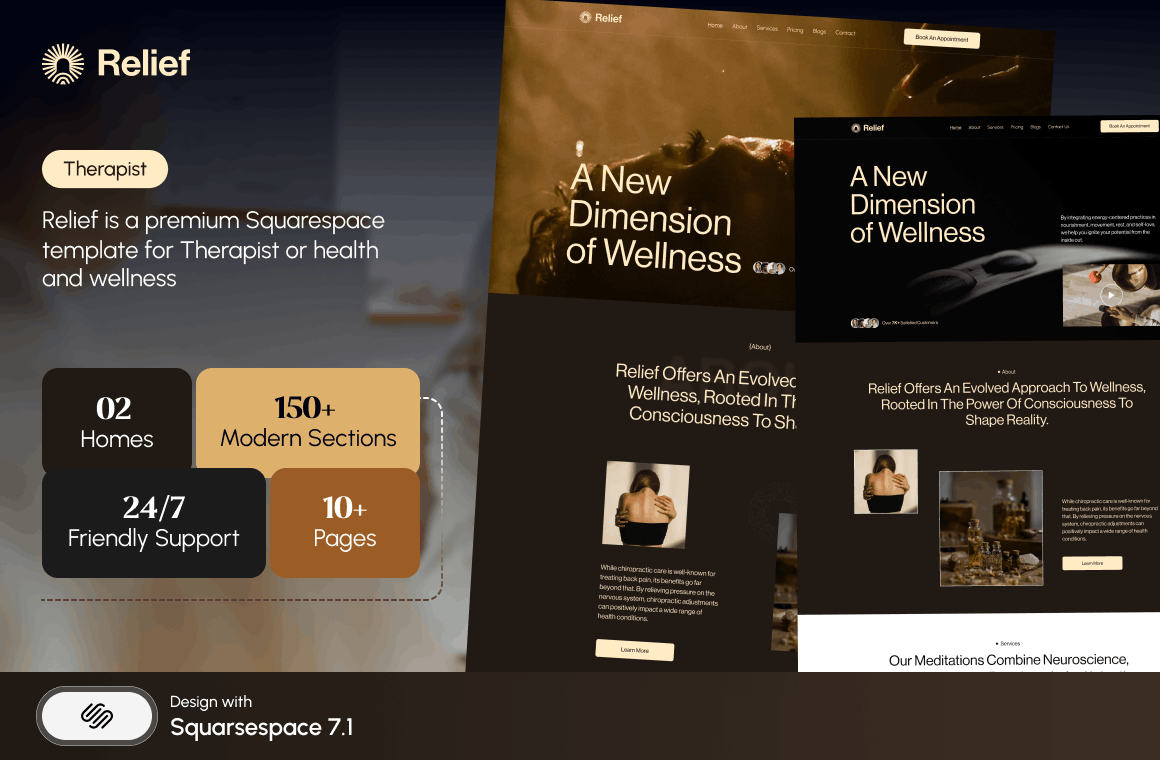
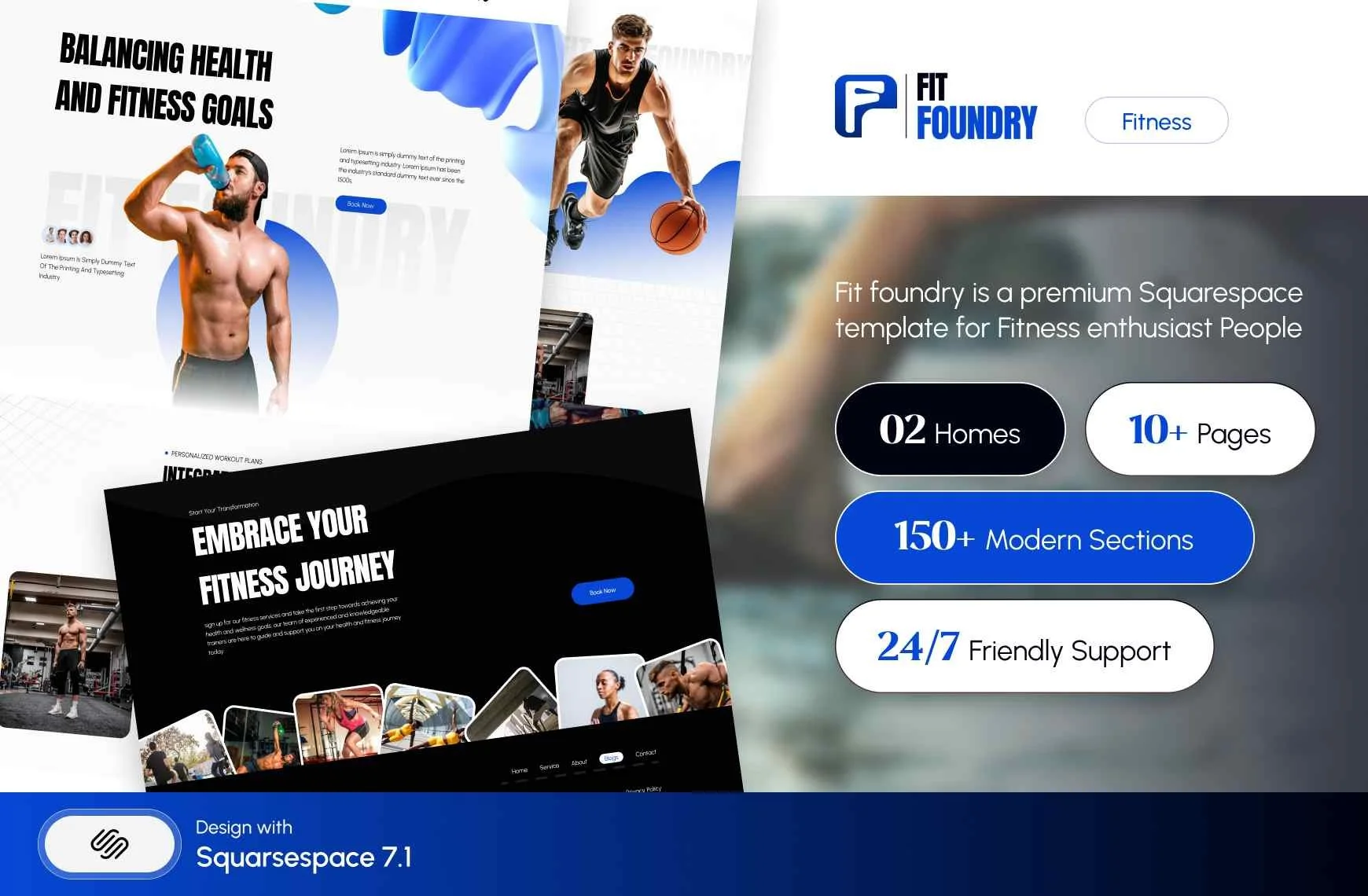
Both are $249, delivered as a Squarespace contributor invitation rather than files to download, with 60 days of email support. Customisation is not included, sales are final, and demo images are not licensed for live use. Nothing is published about which booking or membership features either template ships with, so assume you are wiring Acuity yourself.
Choosing a template for a nutrition practice
Count the pages your funnel actually needs: home, about with credentials, one page per consultation tier, a pricing page, an FAQ, a blog, a privacy notice and a booking page. That is eight to ten, which is why an 11-page template is a sensible fit and a 30-page one is not.
Then write your intake questions, your scope-of-practice statement and your prices before you buy anything. Those three documents stall more nutrition launches than any technical problem, and no template supplies them.
If you would rather not wire Acuity, intake forms and payment plans to a new site yourself, the premium Squarespace templates at Squareko are installed for you, onto a new site or an existing one, with the pages ready for your content. Most practitioners manage this themselves with the structure above; it is published because the structure is the hard part. Compliance advice is not something a web designer supplies — take that from your professional body.
If your practice is closer to a studio than a clinic, the neighbouring posts split it out: Squarespace templates for yoga studios covers recurring timetables, Squarespace templates for Pilates studios covers class capacity, and Squarespace templates for wellness businesses covers offers without a standard shape. The cluster hub is Squarespace templates for fitness.
FAQ
-
No. Squarespace states that parts of its platform including the form block "can't be used as part of a HIPAA compliant solution", and recommends linking to an external compliant service. HIPAA coverage exists only for individually HIPAA-enabled Acuity Scheduling accounts under a separate Business Associate Addendum, on the Powerhouse or Premium plan.
-
Non-clinical enquiries, yes — name, email, what you're looking for. Clinical intake should be attached to the appointment type in Acuity Scheduling instead, which keeps it stapled to the client record and is the only route with a compliance story. Squarespace form blocks also have no conditional logic and no e-signature.
-
Name, Text, Email, Phone, Text Area, Website, Twitter, Dropdown, Checkbox, Radio, Survey, Address, Date, Time, Number, Currency, File Upload (10 MB per file), Password, Line and Hidden. Submissions route to email, Google Drive or Mailchimp. There is no conditional logic, no e-signature and no payment field.
-
Create a £0 appointment type in Acuity Scheduling with a 15- or 20-minute duration and a buffer afterwards, then embed it with a Scheduling block filtered to that appointment type so it appears on its own. Make it the single repeated call to action across the site.
-
Use a Squarespace subscription product set to expire after a fixed number of payments. Subscriptions work only with Squarespace Payments or Stripe — not PayPal, Apple Pay or ACH — and customers cannot pause them. If the payment must also unlock content, use a Content & Memberships plan instead, because subscription products don't work with Member Areas.
-
Relief is the closest fit in the Squareko range: 11 pages including Services, Pricing, FAQ and a privacy policy page, which is the page set a consultation practice actually needs. Fit Foundry suits practitioners selling standardised guides, since it ships a Shop page and a built lead-magnet page but no Pricing page.

Author Bio
I'm Walid Hasan, a Certified Squarespace Expert and Squarespace Circle Platinum Partner with over 12 years of hands-on experience designing and optimizing high-performing websites. Over the years, I've had the privilege of building more than 2,000 Squarespace websites for clients around the world, always focusing on clean design, strong user experience, and conversion-driven results.
