
Squarespace Templates for Consultants and Advisory Firms
The short answer: A consulting website is read by a committee, not a person, and it is read after someone has already found you on LinkedIn. That means it needs case studies with numbers in them, named sectors, a stated way of working, and an enquiry form that scopes the job — not a "let's chat" button. Choose a Squarespace template that ships a Case Study or Portfolio structure and a Pricing page. Design is the least consequential thing on the list.
Consultants get sold coaching templates. The two businesses look similar and buy completely differently.
Consulting buyers versus coaching buyers
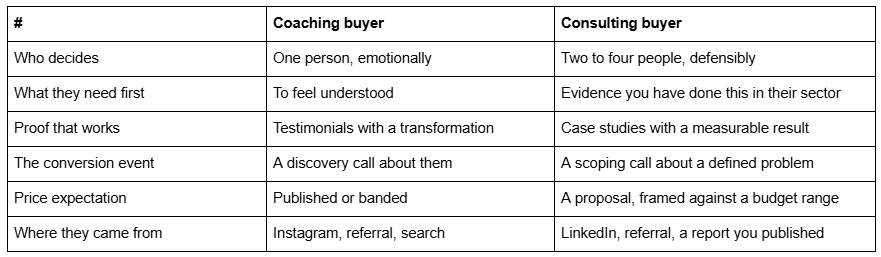
The consequence for template choice is direct. A coaching template optimises for warmth and a booking calendar. A consulting site optimises for evidence and for the moment someone forwards your URL to a colleague with "what do you think of these people". Every page has to survive being read cold, by someone who did not meet you.
The page set a consultancy actually needs
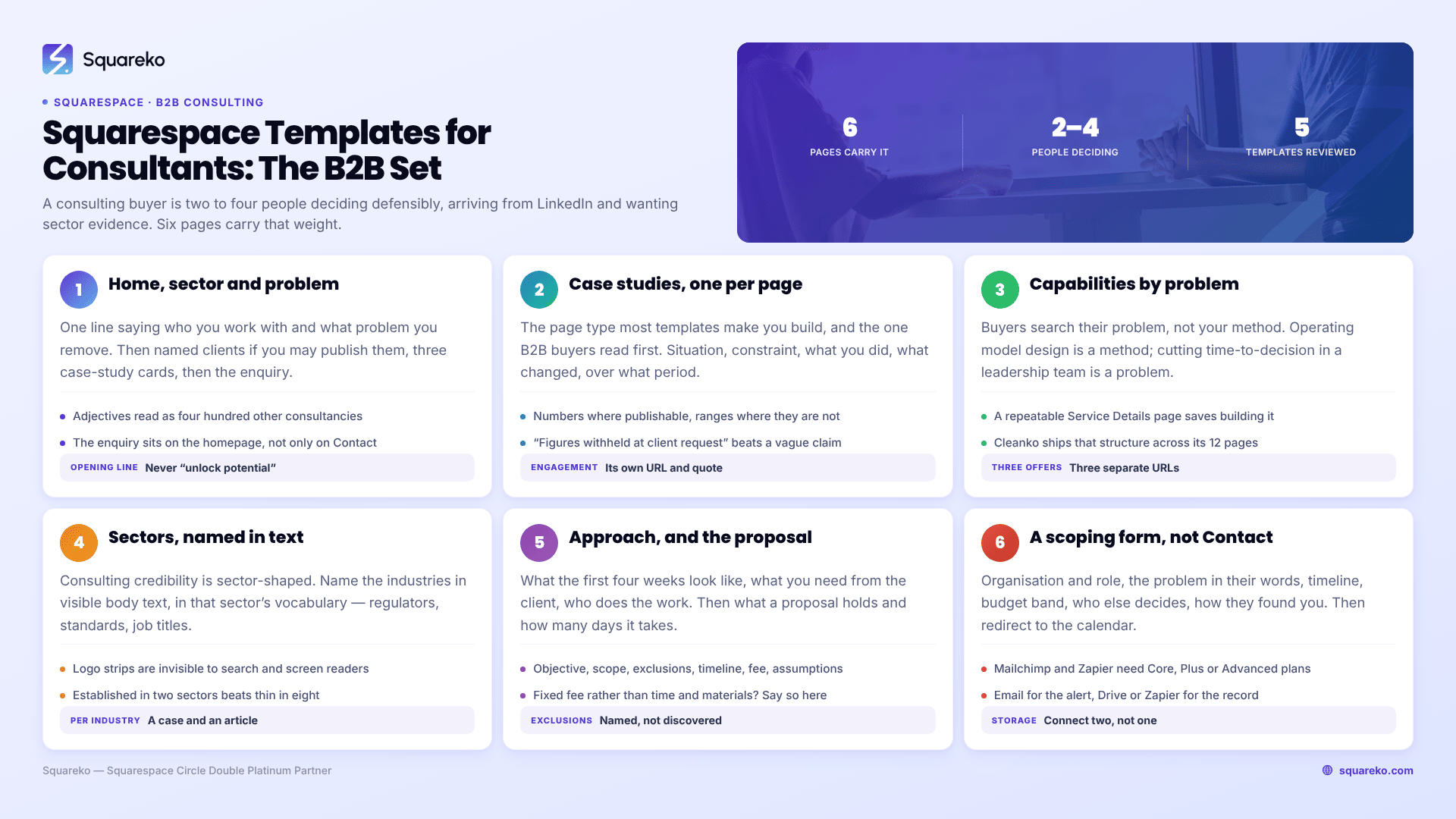
Six pages carry the weight. Build these before anything else.
1. Home. One line stating who you work with and what problem you remove — sector and problem, not adjectives. Then logos or named clients if you can publish them, then three case-study cards, then the scoping enquiry. A consulting homepage that opens with "we help organisations unlock their potential" is indistinguishable from four hundred others.
2. Case studies, one page each. The single highest-value page type in consulting, and the one most templates force you to build by hand. Structure per page: the client's situation, the constraint, what you did, what changed, over what period, and a client quote. Numbers where you can publish them, ranges where you cannot, and an honest "figures withheld at client request" where neither is possible — that line reads better than a vague claim.
3. Services or capabilities, split by problem not by method. Buyers search for their problem. "Operating model design" is a method; "reducing time-to-decision in a distributed leadership team" is a problem. If you have three or four distinct offers, give each its own URL — a template with a repeatable Service Details page saves you building that structure.
4. Sectors. Consulting credibility is sector-shaped. A page naming the industries you have worked in, with one case study each, does more for a cold buyer than any amount of methodology. It is also where the search terms live.
5. Approach or How we work. What the first four weeks look like, what you need from the client, how you report, who does the work. This is the page that answers "are these people going to be difficult to work with", which is the question the committee is actually asking.
6. A scoping enquiry, not a Contact page. Covered in full below.
Optional but useful: an Insights or Blog page for published thinking, a Freebie or report page for the gated document that generates most B2B leads, and a Team page if you are more than one person.
The scoping enquiry, and how to build it in Squarespace
A consultant who puts a "book a 30-minute discovery call" button on the homepage will spend most of their week on calls that were never going to become work. The B2B version of the same mechanism is a qualifying form that comes before the calendar.
Build a Squarespace 7.1 form block with these fields:
Organisation and role
The problem, in the enquirer's own words — a long-text field, not a dropdown
Timeline: exploring / next quarter / already approved
Budget band: three or four ranges, with "not yet determined" as a real option
Who else is involved in the decision
How they found you
Then set the form's post-submit action. Squarespace forms give you two options: a confirmation message, which accepts HTML, or a redirect to a URL or page on your site. Redirect qualified enquirers to a scheduling page holding an Acuity Scheduling block — Squarespace Scheduling and Acuity are the same product — so the calendar appears only after the form is complete. That single ordering change is the difference between a diary full of scoping calls and a diary full of coffees.
Where the submissions go matters too. Every Squarespace form requires at least one storage option, and the choices are a Squarespace mailing list, the form submitters list in the Contacts panel, an email address, Google Drive, Mailchimp or Zapier. Mailchimp and Zapier need Core, Plus or Advanced plans. For consulting, connect two: email for the immediate alert, and Google Drive or Zapier so the enquiry lands somewhere you can track it against a proposal. Squarespace's own guidance is to add a second storage option in case one fails, and consulting enquiries are too expensive to lose.
The proposal is part of the site, even though it isn't a page
The consulting sale has four steps — enquiry, scoping call, proposal, decision — and most consultancy websites only acknowledge the first. That is a mistake, because the two later steps are where deals stall, and the site is the only place you can pre-empt them.
Say on the Approach page what happens after the call: that you send a written proposal within a stated number of working days, what it contains (objective, scope, exclusions, timeline, team, fee, assumptions), and how long it stands. Naming the turnaround does two things. It removes the "when will I hear back" anxiety that kills momentum, and it commits you publicly to a standard you then have to meet.
Name the exclusions habit too. A consultancy that says on its website "every proposal states explicitly what is out of scope" is signalling something a buying committee cares about far more than your methodology diagram: that the project will not quietly grow. If you work to a fixed fee rather than time and materials, say so there as well — it is a differentiator and most firms bury it.
None of this needs a new page. It is three paragraphs on Approach, and it is the part of a consulting site that most reliably converts a sceptical second reader.
Sector credibility beats capability claims
Every consultancy claims capability. Almost none of them proves sector fluency, and sector fluency is what a buyer uses to shortlist.
Concretely: name the industries in visible body text, not in a logo strip. Use the vocabulary of that sector — regulators, standards, job titles, the systems they run. A page that mentions CQC, or MiFID II, or Ofsted, or SAP S/4HANA migrations tells a reader in that industry that you have been in the room. Logos alone tell them nothing, are invisible to search engines and screen readers, and often cannot be published without permission anyway.
Where you have a sector page, pair it with one case study and one piece of published thinking from that sector. Three assets per industry is enough to look established in two or three sectors, which is a far stronger position than looking thin in eight.
Retainer or project — say which, on the page
Most consultancies sell both and describe neither. The site should state the two shapes explicitly because they filter different buyers:
Project work wants a defined outcome, a fixed scope and a price or a price range. Put it on the service page with an indicative range and a typical duration.
Retainer work wants a monthly commitment and continuous access. It converts on a different promise — availability, not deliverables — and it belongs on its own page or its own clearly labelled section with a minimum term stated.
A Pricing page is the right home for both framings even if no number appears on it. "Projects typically run from £12,000 for a six-week engagement; retainers start at £3,000 a month with a three-month minimum" qualifies harder than any form field, and it is the page a buying committee looks for first. Templates that ship a Pricing page — Advisory and Cleanko in the range below — give it structure rather than a paragraph bolted onto Services.
Squarespace templates for consultants, and what each is good at
Five worth considering. Scores use the same 25-point rubric published in the coaching templates pillar — enquiry path, credibility surface, offer architecture, content engine and page depth, each out of 5.
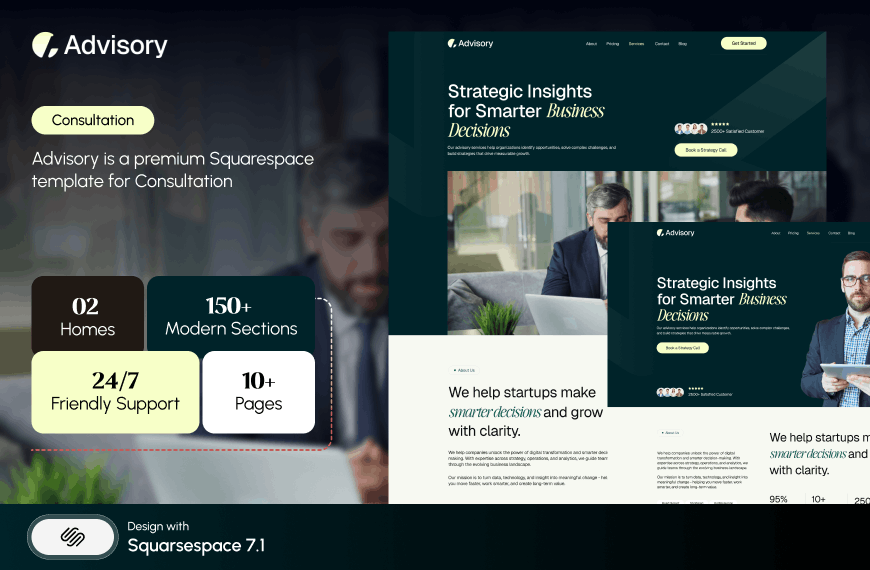
Advisory — 20/25. An 11-page template tagged Consultation and Speaker, with a Pricing page, a Blog and two legal pages. It is the template in the Squareko range built for the consultant-speaker overlap, and the Pricing page plus the pair of legal pages is a genuinely consulting-shaped starting point — terms of engagement and a privacy policy are things advisory firms actually have to publish. Its gap is visual evidence: no portfolio or gallery structure, so case studies live as ordinary pages you build. Advisory does not currently have a publicly viewable demo — its published live-demo link returns a 401 — so ask for a walkthrough rather than judging it from thumbnails.
Click Crafter — 21/25. Click Crafter is a 12-page agency and service-business template with a Portfolio, a Gallery, a Blog, a Shop and a Freebie page. For consultants the Portfolio is the case-study engine — one entry per engagement, each with its own URL. The Freebie page is the piece most consultants under-use: in B2B the highest-converting asset is usually a document, and most firms email it on request, which loses every enquiry that never asks. A built page plus a form makes it a working lead magnet on day one.
Justify — 16/25. Justify is built for law firms, nine pages, with a Case Study section and a Blog. It scores low on the general rubric because it has almost no commercial layer, and it is still the right answer for a specific consultant: the independent advisor whose entire pitch is documented outcomes and who wants a site maintainable in an hour a month. Note the ceiling — no pricing page, no course page, nowhere to sell a productised offer.
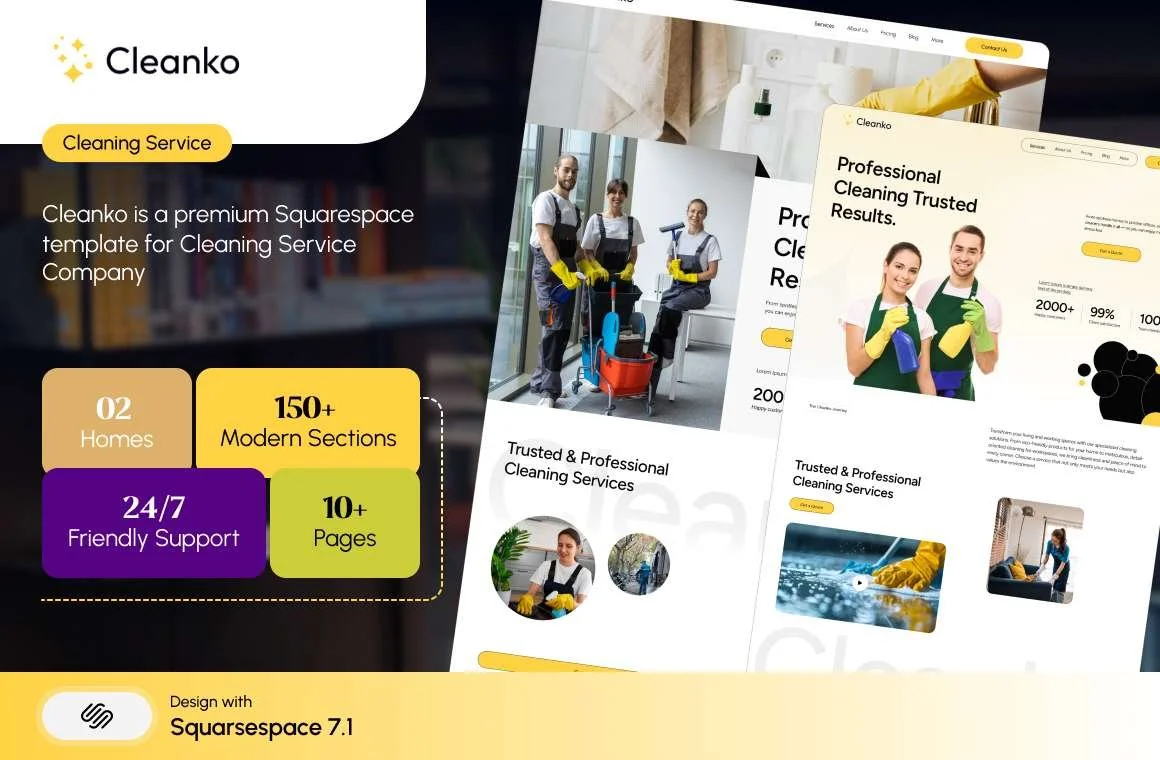
Cleanko — 20/25. Cleanko is tagged Cleaning Service, which sounds wrong and reads right: 12 pages with a Pricing page, a repeatable Service Details page, a Portfolio and a Blog. Service Details is the structure a multi-offer consultancy needs and rarely gets — duplicate it per capability so each one has its own URL and its own headline instead of six paragraphs stacked on one page.
Luminary — 19/25. Luminary is 11 pages tagged Service-Based, Course and Speaker, with a Courses page, a Shop, a Portfolio, a Gallery and a Freebie page. Relevant to consultants who have productised — a diagnostic, a workshop, a training programme sold at a fixed price. It ships no Blog page, which is a real gap if published thinking is your lead source.



Outside the Squareko range, Applet Studio maintains a dedicated consultancy landing page and sells at roughly $225, Big Cat Creative carries the broadest general catalogue at $297, and Squarespace's own free consulting templates are the honest baseline — WhatSquare's roundup covers fifteen of them and they are included with every subscription.
LinkedIn is the traffic source, so build for the second click
Most consulting enquiries arrive from LinkedIn: a profile link, a post link, or someone forwarding a URL. That changes two things.
The page your profile links to should not be your homepage. It should be the page that matches what your profile says you do — a sector page, a service page, or a case study. Homepages are written for everyone and convert nobody who arrived with a specific question.
Your link preview is a design asset. Squarespace lets you set a social sharing image per page under Page Settings → Social Image, and a site-wide default under Settings → Marketing → Social Sharing. If you leave it unset, LinkedIn will pick something arbitrary from the page. A consultancy whose case study previews as a cropped stock photo of a handshake has spent its one impression badly.
Third: publish the thinking on your own site and link to it, rather than only posting it natively. A LinkedIn post disappears in three days. The same argument as a page on your site is still there in three years, and it is the thing that gets found again when the buyer's problem finally has a budget.
Choosing one
Work it in this order. Confirm the template has a case-study or portfolio structure — that is the page type you cannot easily fake and the one B2B buyers read first. Then check there is somewhere to state fees or fee ranges. Then check you can build a qualifying enquiry form that sits in front of the calendar rather than beside it. Visual register comes last, and should match the sector you sell into rather than your own taste.
If you would rather not run the install yourself, the premium Squarespace templates in our range arrive as a Squarespace contributor invitation rather than a file download, and can be installed onto an existing live site without taking it offline — which matters when the site is currently producing enquiries. Most independent consultants will do it themselves over a weekend, and the five above are the shortlist worth starting from.
FAQ
-
Six: a homepage naming the sector and problem, individual case-study pages, capabilities split by problem rather than method, a sectors page, an approach page explaining how you work, and a qualifying enquiry form. Insights, a gated report and a team page are useful additions once those six exist.
-
Publish a range or a minimum, even if not a price. "Projects from £12,000; retainers from £3,000 a month with a three-month minimum" qualifies harder than any form field and is what a buying committee looks for first. It costs you the enquiries that were never going to convert.
-
Name, Text, Email, Phone, Text Area, Website, Twitter, Dropdown, Checkbox, Radio, Survey, Address, Date, Time, Number, Currency, File Upload (10 MB per file), Password, Line and Hidden. Submissions route to email, Google Drive or Mailchimp. There is no conditional logic, no e-signature and no payment field.
-
Advisory is the consultation-tagged template in the Squareko range at 11 pages with a Pricing page and two legal pages. Click Crafter and Cleanko both work well through their Portfolio and Service Details structures. Squarespace also maintains a free consulting template category included with every subscription.
-
Use a Squarespace subscription product set to expire after a fixed number of payments. Subscriptions work only with Squarespace Payments or Stripe — not PayPal, Apple Pay or ACH — and customers cannot pause them. If the payment must also unlock content, use a Content & Memberships plan instead, because subscription products don't work with Member Areas.
-
To the page that matches what your profile says you do — a sector page, a capability page or a case study — not your homepage. Also set a social sharing image under Page Settings → Social Image, or LinkedIn will pick an arbitrary image from the page for your one preview impression.

Author Bio
I'm Walid Hasan, a Certified Squarespace Expert and Squarespace Circle Platinum Partner with over 12 years of hands-on experience designing and optimizing high-performing websites. Over the years, I've had the privilege of building more than 2,000 Squarespace websites for clients around the world, always focusing on clean design, strong user experience, and conversion-driven results.
