
Squarespace Template vs Custom Design: Where the Line Actually Is
The short answer: choose custom design when your brand carries a visual requirement that a template's section library cannot express — a specific typographic hierarchy, a layout logic that isn't stack-of-sections, an image treatment nobody else in your category uses. Below that line, restyle a template. The threshold is brand differentiation, not budget. Budget tells you what you can afford; it does not tell you what the business needs. Most businesses are below the line, and a well-restyled template is the correct answer for them.
This page is about the design artefact specifically: what you get visually from a starting template versus what a designer produces. It is not about project scope or about whether to hire anyone — those are covered in the custom Squarespace templates decision guide.
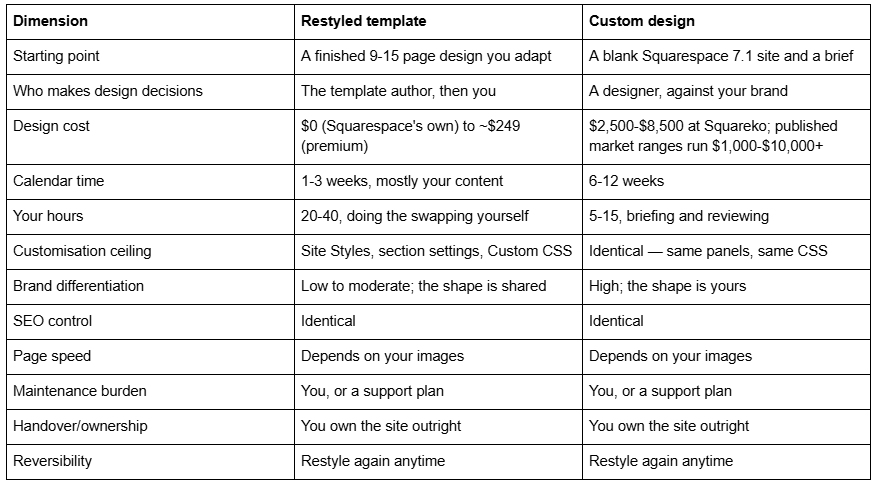
The scoring table
Both routes produce a Squarespace 7.1 site. What changes is who makes the design decisions and how far those decisions are allowed to go.
Both routes ship the same Squarespace 7.1 engine
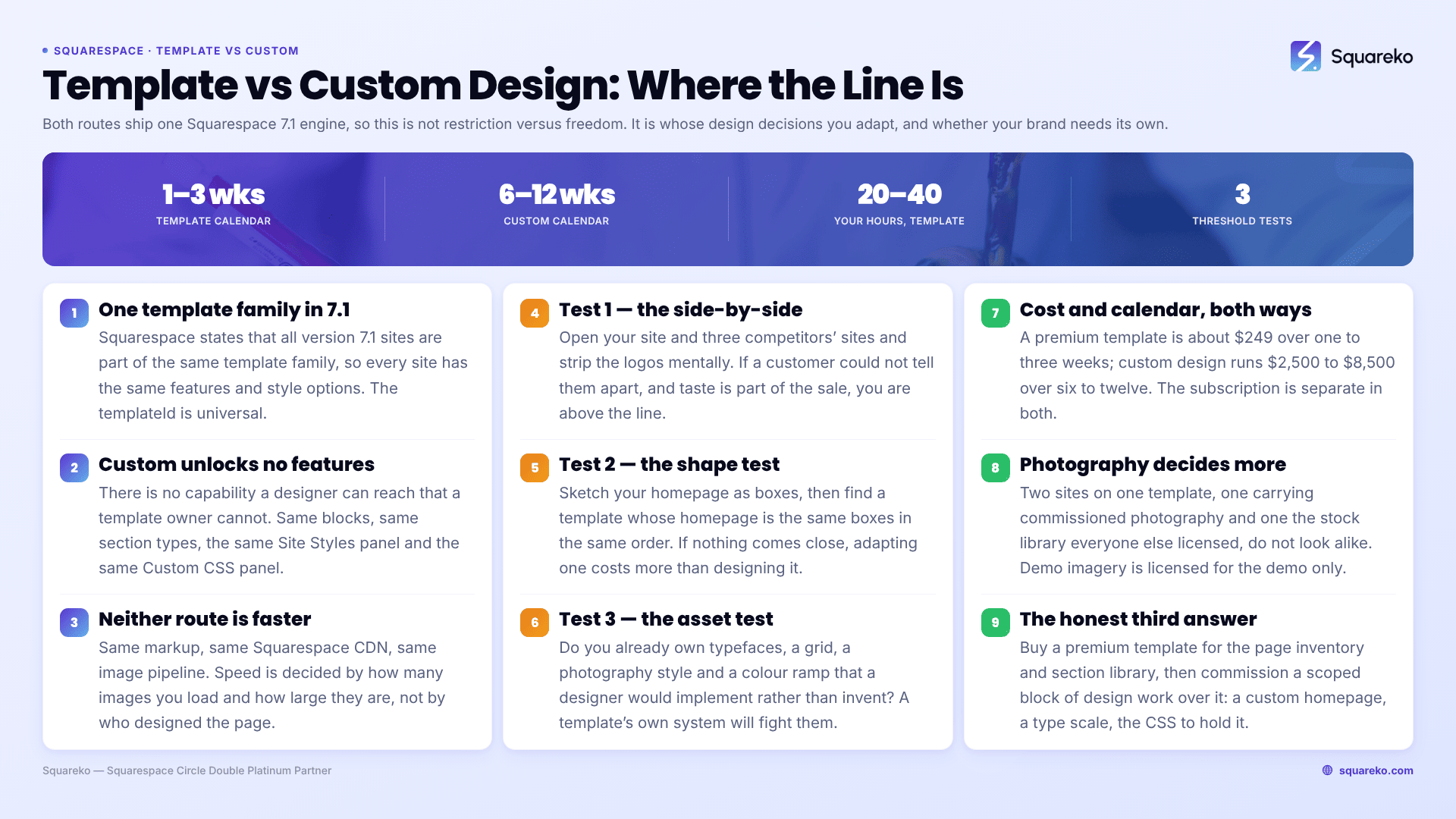
This is the single fact that reframes the whole comparison. Every Squarespace 7.1 site runs on one template family. Squarespace's own documentation states it plainly: all version 7.1 sites are part of the same template family, so every site has the same features and style options. Under the hood the templateId 5c5a519771c10ba3470d8101 is universal — a 7.1 "template" is a starting page and style configuration, not a separate codebase.
That has three consequences people routinely assume are false:
A custom Squarespace design does not unlock features. There is no capability a designer can reach that a template owner cannot. Same blocks, same section types, same Site Styles panel, same Custom CSS panel at Website → Website Tools → Custom CSS.
A custom Squarespace design is not inherently faster. Same markup, same Squarespace CDN, same image pipeline. Speed is decided by how many images you load and how large they are, not by who designed the page.
A template does not have a lower customisation ceiling than a custom build. Both hit the same platform ceiling. The difference is how much of the distance to that ceiling has already been travelled for you, and in which direction.
So the comparison is not "restricted versus unrestricted". It is "someone else's design decisions, adapted" versus "design decisions made for your brand from the start".
What a starting template actually gives you, visually
A premium Squarespace template is a complete set of design decisions already made and already consistent with each other. Concretely, that means:
A page inventory. Squareko's templates run 9 to 15 real pages depending on the template — service detail pages, pricing, FAQs, legal pages, a 404 page, a style guide page. Not a homepage plus placeholders.
A section library. 150+ pre-designed sections you can drop into any page, already styled to match.
A typographic system. Heading sizes, line heights and pairings that hold together across every page rather than being chosen page by page.
A colour theme set. Squarespace 7.1 colour themes applied consistently to section backgrounds, buttons and links.
A mobile layout that has been checked. Fluid Engine keeps separate desktop and mobile layouts per section, and a good template has had both passes done.
What you change is the content layer: fonts, colours, spacing, images, copy. What you generally keep is the shape — the order of sections on a page, the way a hero resolves into a proof block, the rhythm of the scroll.
That shape is the thing a template shares with everyone else who bought it. Whether that matters is the entire question.
What a custom Squarespace design produces that a template doesn't
Custom design on Squarespace 7.1 means the section composition itself is designed against your content rather than your content being poured into an existing composition. In practice a designer produces:
A page structure derived from your sales conversation, not from a generic service-business flow. If your business qualifies leads with a three-question diagnostic, the homepage can be built around that diagnostic instead of around a hero-services-testimonials-CTA stack.
A layout logic that is yours. Asymmetric grids, overlapping image and text blocks, a consistent off-centre alignment — the kind of thing that reads as "designed" rather than "chosen".
A type scale built for your wordmark, including the awkward cases: long service names, a two-line headline that has to break in a specific place, a language with different average word length.
Custom CSS written for your site, commented, and handed over as something maintainable rather than as a pile of overrides fighting a template's defaults.
A saved section library so the design system survives the next ten pages someone adds.
None of that is a feature the platform withholds from template users. All of it is design labour.
For how that labour is actually performed inside Squarespace 7.1 — sections, saved sections, Site Styles, Custom CSS — see custom Squarespace template design.
The differentiation threshold, in three tests
Here is the line, made testable. If you answer yes to any of these, custom design is doing real work. If you answer no to all three, you are paying for something you will not be able to point at afterwards.
Test 1 — the side-by-side test. Open your site and your three closest competitors' sites in adjacent tabs. Strip the logos mentally. Could a customer tell them apart? If the answer is no and your customers choose partly on taste — design studios, architects, photographers, high-end hospitality, luxury retail, anything where the website is a sample of the work — you are above the line.
Test 2 — the shape test. Sketch your homepage as boxes. Now find a template whose homepage is the same set of boxes in the same order. If nothing comes close, you have a structural requirement, and adapting a template into that shape costs more than designing it.
Test 3 — the asset test. Do you have a brand system — typefaces, a grid, an illustration or photography style, a defined colour ramp — that a designer would be implementing rather than inventing? If yes, a template will fight it, because the template's own system is already installed and you will spend the project overriding it.
If none of the three applies, restyle a template. That is not a consolation answer. A template restyled properly, with real photography and real copy, is indistinguishable from a custom build to everyone except other designers.
The variable that decides how custom a template looks: photography
Templates are sold with demo imagery, and that imagery is licensed for the demo only. Every buyer, at every shop, is obliged to replace it before going live. This is the most commonly missed obligation in a template purchase and it is also the single biggest lever on whether the finished site reads as generic.
Two sites built on the same Squarespace 7.1 template, one carrying commissioned photography of the actual business and one carrying the same stock library everyone else licensed, do not look like the same site. The section order is identical; nobody notices. The imagery is different; everybody notices.
This cuts both ways, and it is worth being blunt about it. A custom design applied to generic stock photography will look less distinctive than a template restyled with real photography of your studio, your team and your work. If your budget has to choose between design labour and a photographer, and you are in a category where the images carry the brand, the photographer wins. That is not a comfortable thing for a design agency to write, but it is what the finished sites show.
Cost and timeline, with real numbers
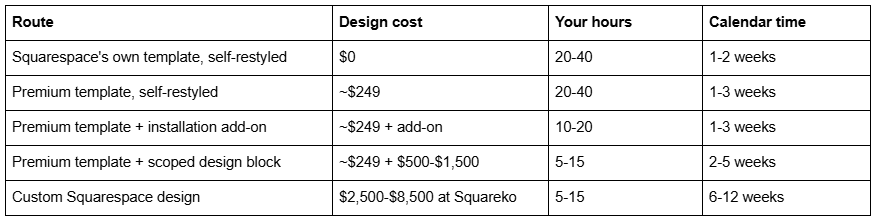
Three notes on these figures:
The Squarespace subscription is separate in every row. Basic $19/mo, Core $29/mo, Plus $49/mo, Advanced $99/mo on annual billing; monthly billing runs roughly 30% higher. Code blocks and code injection require Core or above, which matters if your design depends on custom code.
Published market ranges are wider than ours. Big Cat Creative quotes $1,000-$10,000 for custom Squarespace work, which is a fair reflection of a market containing both solo designers and agencies. Treat any single range, including ours, as one data point.
Calendar time is not effort time. A six-week custom project is not six weeks of design. It is design, then your feedback, then content you have to write, then revisions. The most common cause of an overrunning custom build is client content, not designer capacity — which is also true of template projects, where it is simply more visible.
Choose a restyled template if…
Your differentiation is your service, your prices or your location, not your visual identity.
You need to be live in under a month.
You do not yet have brand photography and will be using licensed stock for now.
Your page inventory is conventional: home, about, services, a few service details, contact, blog.
You want to make changes yourself afterwards without calling anyone.
Your budget for design is under about $1,500 all-in.
This describes most small businesses honestly, and there is nothing second-rate about it. See are Squarespace templates good for the three cases where the answer changes.
Choose custom design if…
The website is a sample of your work, and taste is part of the buying decision.
You have an existing brand system that a designer would implement rather than invent.
Your page structure is genuinely unusual and no template's shape fits it.
You are replacing a site that converts, and the redesign has to beat a measured baseline.
You need the design system documented and handed over for a team to extend.
The honest third answer: a template plus custom design work
For a large share of readers the right route is neither column. You buy a premium template for the page inventory and the section library, then commission a scoped block of design work on top: a custom homepage, a reworked services page, a type scale adjusted to your wordmark, and the Custom CSS to hold it together.
You get most of the differentiation for a fraction of the cost, because the expensive part of a custom build is not the homepage — it is the twelve inner pages nobody talks about. That is what a template customisation service exists to do.
What does not change either way
Search performance. Template choice has no direct ranking effect. Same engine, same markup, same CDN. What differs is page weight from the demo images and the section count you keep — covered properly in do Squarespace templates affect SEO.
Core Web Vitals. "Custom is faster" is the most common claim on this SERP and it does not survive contact with measurement. Across 54 Squareko-built client sites measured in August 2026 — a Playwright and Chromium lab test, single run per site, cloud datacentre, unthrottled network and CPU, load-only CLS, not field data — median mobile LCP was 2.01s with 74% under Google's 2.5s "good" threshold, median mobile CLS was 0.000 with 94% under 0.1, and median TTFB was 514ms. That sample includes both template-based and custom builds. The variable that separated fast sites from slow ones was image weight: median page weight was 3.0 MB across 93 requests, and only 48% of sites came in under 3 MB.
Ownership and portability. You own the Squarespace site either way. Neither route locks you to the designer, and neither creates a licence you have to keep paying.
Which route is yours
Run the three tests. If none of them lands, buy a template, replace every demo image, write real copy, and spend the saved money on photography — it will do more for how the site looks than a custom design applied to stock imagery ever will.
If one or more of the tests lands — particularly the side-by-side test, in a category where taste is part of the sale — a template will keep costing you in small overrides until you rebuild anyway.
That second case is what our custom Squarespace design work is for: brand systems implemented properly on 7.1, documented, and handed over. Most people reading this page are in the first case, and the honest recommendation is to keep your money.
FAQ
-
A template is a finished set of design decisions you adapt — page inventory, section library, type scale, colour themes. Custom design means those decisions are made against your brand from a blank site. Both produce a Squarespace 7.1 site with identical features, because all 7.1 sites share one template family.
-
It is worth it when your brand carries a visual requirement a template cannot express, or when taste is part of how customers choose you. It is not worth it for features or speed, since neither differs. If you cannot point at what the custom design bought after launch, a restyled template was the right call.
-
Yes, and usually convincingly. Replace every demo image with your own photography, set your own type scale and colour themes in Site Styles, cut sections rather than adding them, and add scoped Custom CSS. What survives from the template is the section order, which almost no visitor perceives.
-
No. Both render from the same engine and the same CDN. Across 54 Squareko client sites measured in a lab test in August 2026, median mobile LCP was 2.01s with 74% under 2.5s, and the variable separating fast from slow was image weight, not build route.
-
Squareko's custom design work runs $2,500-$8,500 depending on page count, brand complexity and integration requirements. Published market ranges are wider — one long-running template shop quotes $1,000-$10,000. A Squarespace subscription is separate at $19-$99 per month on annual billing.
-
Not a template in the code sense — Squarespace 7.1 has one template engine and no theme layer. What a designer builds is a custom configuration: composed sections, a saved section library, Site Styles values and Custom CSS. The result is bespoke; the underlying template family is the same as everyone's.

Author Bio
I'm Walid Hasan, a Certified Squarespace Expert and Squarespace Circle Platinum Partner with over 12 years of hands-on experience designing and optimizing high-performing websites. Over the years, I've had the privilege of building more than 2,000 Squarespace websites for clients around the world, always focusing on clean design, strong user experience, and conversion-driven results.
