
Are Squarespace Templates Good? An Honest Assessment
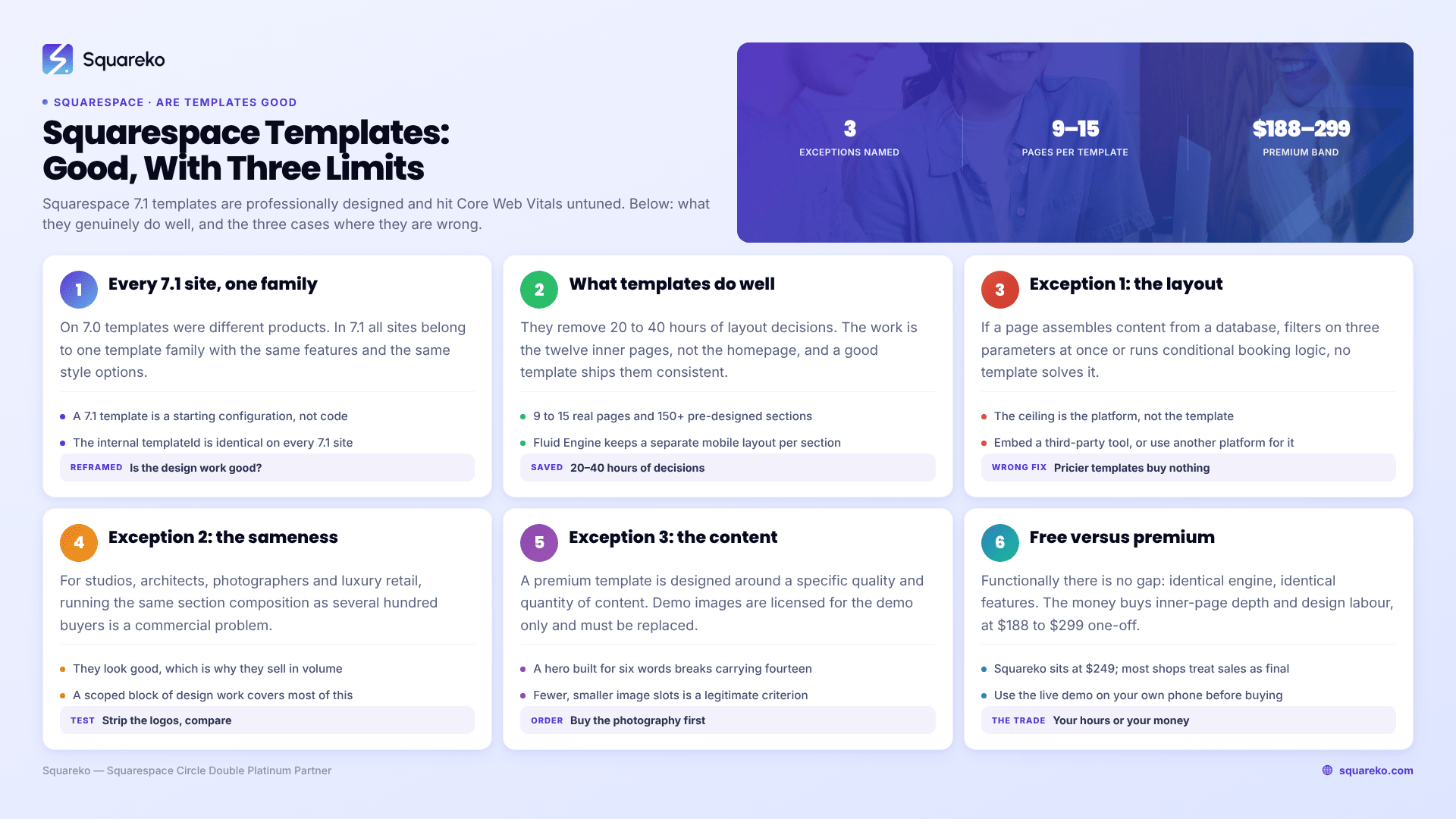
Yes, for most businesses. Squarespace 7.1 templates are professionally designed, responsive by default, and hit Core Web Vitals without tuning. There are three specific cases where they are the wrong choice: when your layout requirement falls outside the section library, when visual differentiation is itself the product, and when you cannot supply the photography and copy the design assumes. Those three are argued in full below. If none applies to you, a template is the correct answer and the money is better spent elsewhere.
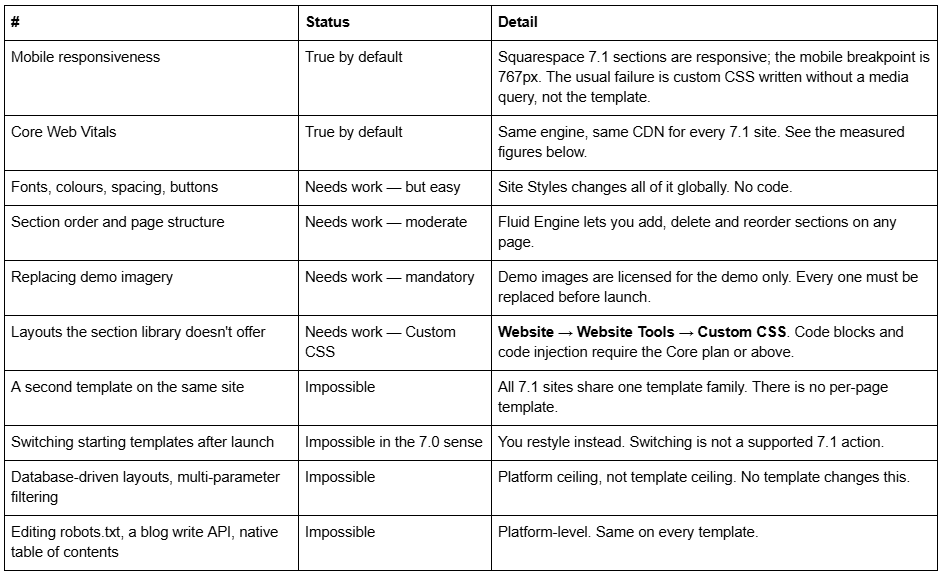
What is true by default, what needs work, and what is impossible
Why "which template is good" is a slightly wrong question in 7.1
On Squarespace 7.0, templates were genuinely different products. Brine could do things Montauk could not. Choosing badly meant living with a real functional limitation, which is why so much of the advice still circulating online is about picking the right template family.
Squarespace 7.1 removed that. All 7.1 sites belong to one template family — Squarespace's own documentation states that every 7.1 site has the same features and style options. The internal templateId 5c5a519771c10ba3470d8101 is identical across every 7.1 site on the platform.
So a 7.1 template is a starting configuration: a set of pages, a set of pre-built sections, a type scale, and a colour theme set. It is not a codebase, it does not gate features, and it cannot make your site capable of something another template's site could not do.
That reframes "are Squarespace templates good" into two more useful questions: is the design work good, and is the page inventory complete. Both are answerable by looking at a demo.
What Squarespace 7.1 templates are genuinely good at
Removing 20 to 40 hours of layout decisions. The homepage is not the work. The work is the twelve inner pages — service details, pricing, FAQs, a 404, legal pages — that have to look like they belong to the same site. A good template arrives with those already consistent. Squareko's own templates run 9 to 15 real pages depending on the template, plus a style guide page and 150+ pre-designed sections.
Enforcing consistency you would not maintain yourself. Type scales drift when every page is a fresh decision. A template's scale is applied everywhere and stays applied.
Mobile behaviour that has already been checked. Fluid Engine maintains separate desktop and mobile layouts per section. Someone has already done the mobile pass on both.
Performance that does not need tuning. Across 54 Squareko-built client sites measured in August 2026 — a Playwright and Chromium lab test, single run per site, cloud datacentre, unthrottled network and CPU, load-only CLS, not field or CrUX data — median mobile LCP was 2.01s with 74% under Google's 2.5s "good" threshold and 96% under 4s; median mobile CLS was 0.000, with 31 of the 54 sites recording exactly zero layout shift on load; median TTFB was 514ms. That sample includes template-based builds. Whatever is holding a Squarespace site back, the template's markup is not it.
Giving you a design system you can extend. A style guide page, a section library and a saved-section store mean the site still looks coherent after you add six more pages next year.
Exception 1 — Your layout requirement is outside the section library
This is the exception that gets misdiagnosed most often, because people blame the template when the ceiling is the platform.
If you need a directory users filter by three parameters at once, a genuinely dynamic product configurator, a members' area with tiered content beyond what Squarespace's own member features do, a booking flow with conditional availability logic, or any page whose content is assembled from a database at request time — no Squarespace template solves it, and neither does a custom Squarespace design. Buying a more expensive template is money spent on the wrong problem.
How to tell in five minutes: describe the page as a sentence starting "the page shows different content depending on…". If the sentence ends with something the visitor chooses interactively, and the combinations run past a handful, you are outside what a stack of sections can express.
What to do instead: either accept a simplified version (a filtered blog by category, a static comparison table), embed a third-party tool that does the job properly, or use a different platform for that one function and keep Squarespace for the marketing site. Do not buy a template and expect it to close the gap. The full list of where the platform stops is in Squarespace template limitations.
Exception 2 — Visual differentiation is the product
For most businesses the website is a brochure and the differentiation is the service. For some, the website is a sample of the work: design studios, architects, photographers, galleries, luxury retail, high-end hospitality, anyone whose customer partly buys on taste.
In those categories, running the same section composition as several hundred other buyers is a commercial problem rather than an aesthetic one. It is not that the template looks bad — premium templates look good, which is exactly why they sell in volume.
How to tell in five minutes: open your site and three competitors' sites side by side and mentally remove the logos. If a customer could not tell them apart, and taste is part of how they choose, you are in this exception.
What to do instead: either commission custom design, or buy a template and commission a scoped block of design work over the top — a reworked homepage, a type scale built for your wordmark, and the Custom CSS to hold it together. The middle route covers most of this exception at a fraction of the cost, and it is laid out in Squarespace template vs custom design.
Exception 3 — You cannot supply the content the design assumes
This is the exception nobody selling templates mentions, and it is the one that ruins the most sites.
A premium template is designed around a specific quality and quantity of content: full-bleed photography, a certain number of words in each heading, three case studies with real images, testimonials with names attached. The demo looks good because the demo content was art-directed to fit.
Demo images are licensed for the demo only. Every buyer has to replace every one before going live. That is a real obligation at every shop, not a technicality. If you replace commissioned demo photography with phone snapshots or the free stock library everyone else uses, the template does not degrade gracefully — it looks worse than a plainer design would, because the layout is built to showcase images that are now weak.
The same applies to copy. A hero designed for a six-word headline looks broken carrying fourteen words.
How to tell in five minutes: open the demo, list every image slot and every headline, and honestly answer whether you have — or will commission — something for each one. If more than a third are blanks you have no plan for, buy the photography first and the template second.
What to do instead: commission photography, then choose a template that matches the images you actually have. A template with fewer, smaller image slots is the right answer for a business without a photo library, and choosing on that basis is a legitimate selection criterion.
Are free Squarespace templates worse than premium ones?
Functionally, no. Squarespace's own templates and third-party premium templates run on the identical 7.1 engine with identical features. A premium template cannot do anything a free one cannot.
What you pay for is design labour and inner-page depth. Squarespace's own starting templates are strong on the homepage and thin after it; premium templates from the established shops — Big Cat Creative, Applet Studio, Station Seven, Go Live HQ, Squareko and others — arrive with the inner pages already designed, which is where the 20 to 40 hours actually go.
Premium templates cluster between $188 and $299 one-off across the market, with Squareko at $249. That is the whole difference: whether you spend the hours or the money. The trade-off is worked through in free vs premium Squarespace templates.
One thing to check before buying anywhere: most template shops treat digital sales as final. Squareko's own policy is that digital products cannot be returned, exchanged or refunded under any circumstances, and the category is broadly the same. Use the live demo properly first — on your own phone, scrolling the inner pages rather than the homepage.
Do Squarespace 7.1 templates work for ecommerce and blogging?
For ecommerce, yes — within Squarespace's own commerce feature set, which is identical on every 7.1 template. A template with a shop gives you product list and product detail layouts already styled to match the rest of the site, which is genuinely useful because those are the two pages people most often leave looking half-finished. What a template cannot do is add commerce capability your plan tier does not include. Check the plan requirement first, then the template.
For blogging there is one structural detail worth knowing before you buy, because it surprises people: Squarespace 7.1 blog posts are edited in the classic editor, not Fluid Engine. The Fluid Engine grid that makes your pages easy to lay out does not apply inside a post. A template's "blog" page is a styled list of posts; the posts themselves inherit typography from Site Styles and are otherwise a stacked block editor. If your content strategy depends on richly laid-out article pages, plan on building those as regular pages rather than blog posts.
Two related platform facts that no template changes: 7.1 blog pagination is cursor-based with a maximum of 20 posts per page and no numbered pages, and there is no native table of contents. Both are platform-level, and a template that shows a table of contents in its demo is showing you a manually built anchor list.
What actually makes a Squarespace template site look cheap
In rough order of how often it is the real cause:
Unreplaced demo content — stock imagery, "Lorem ipsum", the template's own placeholder testimonials.
Too many section styles on one page. Templates ship 150+ sections so you can choose; using twelve different ones on the homepage reads as a scrapbook.
Default type at default sizes. Nothing looks more template-y than the shipped scale untouched.
Heavy, unoptimised images. The Squarespace CDN serves WebP unconditionally, but it cannot fix a 4,000px hero. Upload at 1500-2500px; 2500px is the maximum served, and filenames cannot be changed after upload.
Sections added rather than removed. Good template restyling is mostly deletion.
None of these are template faults. All five are content decisions, which is the honest summary of this whole page.
When the answer flips
The answer flips when the thing you need is structural rather than visual. If your requirement is a layout the section library cannot express, or a brand system a designer would be implementing rather than inventing, a template will keep costing you in small overrides until you rebuild anyway — and buying a more expensive template does not change that.
Everyone else: buy the template, replace every demo image, delete more sections than you add, and put the saved money into photography.
If you want the shortlist, our premium Squarespace templates are 7.1 builds with 9 to 15 real pages, a style guide page and 60 days of email support, installed by contributor invitation rather than shipped as files. Most readers of this page will do fine with any well-built template, ours or otherwise — the three exceptions above are the only part of this that changes the decision.
FAQ
-
Yes for most businesses. Squarespace 7.1 templates are responsive by default, professionally designed, and perform well without tuning. They are the wrong choice in three cases: a layout requirement outside the section library, a business where visual differentiation is the product, and a buyer who cannot supply the photography and copy the design assumes.
-
For nearly everything visual, yes. Site Styles changes fonts, colours, spacing and button shapes globally; Fluid Engine adds, removes and reorders sections; Custom CSS handles what the panels do not reach. What you cannot do is add capabilities the platform lacks, because all Squarespace 7.1 sites share one template family.
-
Yes, and usually convincingly. Replace every demo image with your own photography, set your own type scale and colour themes in Site Styles, cut sections rather than adding them, and add scoped Custom CSS. What survives from the template is the section order, which almost no visitor perceives.
-
Not functionally. Both run the identical 7.1 engine with identical features. Premium templates buy inner-page depth and design labour — service detail pages, pricing, FAQs and legal pages already designed and consistent. Premium templates cluster between $188 and $299 one-off, with Squareko at $249.
-
Squareko's custom design work runs $2,500-$8,500 depending on page count, brand complexity and integration requirements. Published market ranges are wider — one long-running template shop quotes $1,000-$10,000. A Squarespace subscription is separate at $19-$99 per month on annual billing.
-
When you need a layout the section library cannot express, when visual sameness is a commercial problem in your category, or when you have no photography or copy to replace the demo content with. In the first case a custom Squarespace design will not help either — the ceiling is the platform.

Author Bio
I'm Walid Hasan, a Certified Squarespace Expert and Squarespace Circle Platinum Partner with over 12 years of hands-on experience designing and optimizing high-performing websites. Over the years, I've had the privilege of building more than 2,000 Squarespace websites for clients around the world, always focusing on clean design, strong user experience, and conversion-driven results.
