
Inside a Squarespace Template Store: What You Get for $249
The short answer: You are buying a design, not a file. A $249 Squareko template arrives as a Squarespace contributor invitation — there is nothing to download, upload or install yourself. You get 9 to 15 designed pages, a Style Guide page, 60 days of email support and installation. You do not get a Squarespace subscription, the demo photography, or your copy written.
Here is the whole transaction, in the order it happens, including the parts most template stores don't put on the product page.
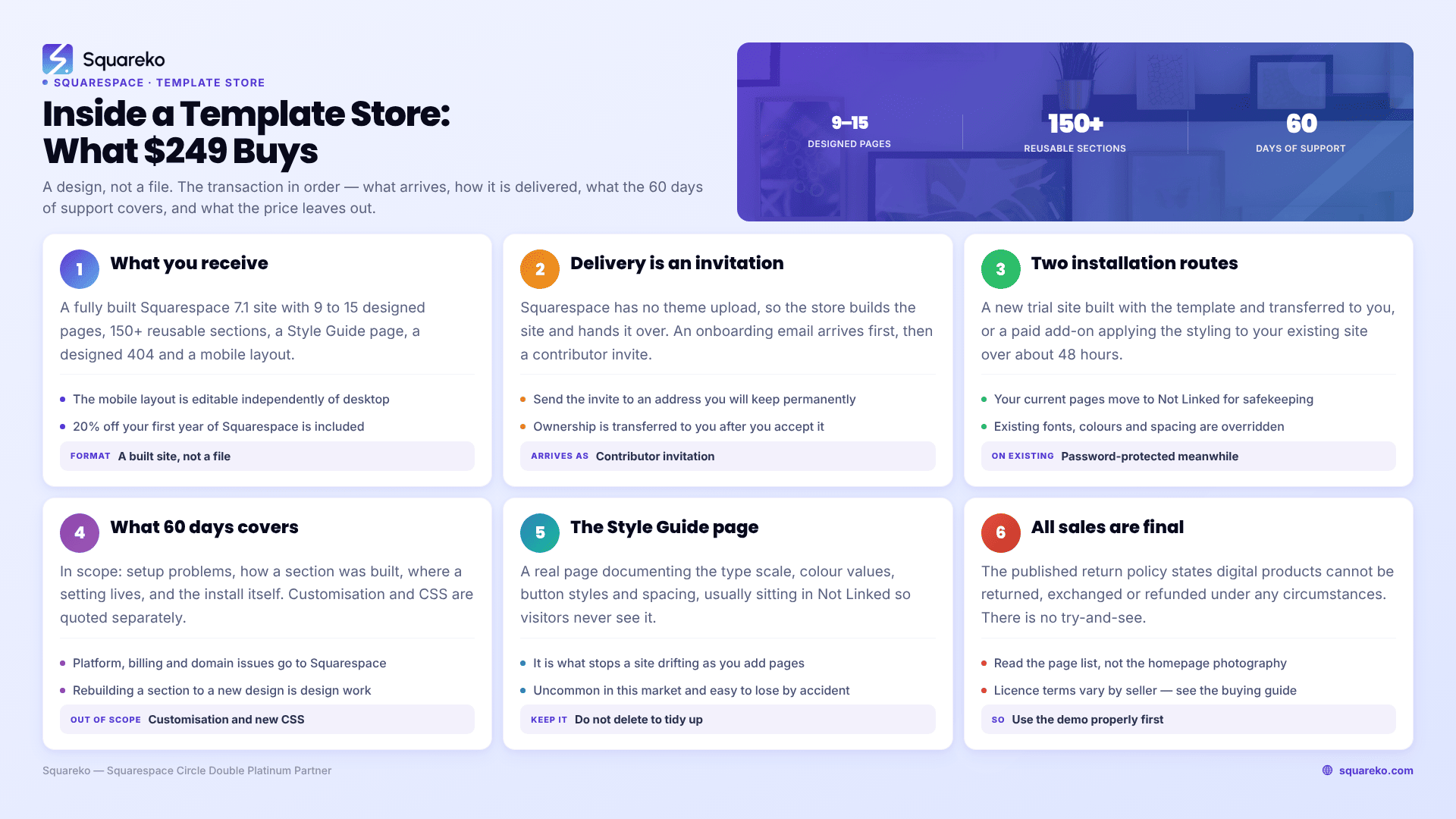
What you actually receive
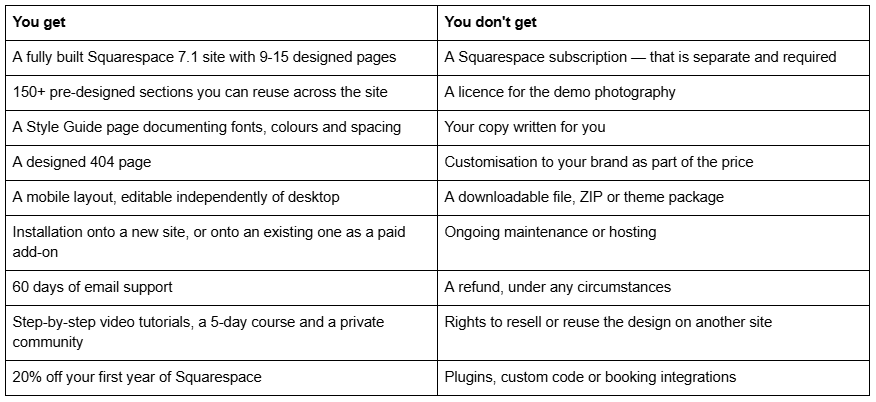
The right-hand column is the part worth reading twice. Nothing in it is unusual for the premium Squarespace template market — but it is rarely stated this directly, and every line of it costs money or time if you discover it after buying.
Delivery: a contributor invite, not a download
This is the single biggest structural difference between buying a Squarespace template and buying a WordPress theme, and it is worth understanding before you buy anything.
WordPress themes arrive as a ZIP file you upload. Squarespace has no equivalent mechanism — there is no theme upload, no FTP, no file manager. So premium Squarespace templates are delivered by building the site and then handing it over.
In practice, after purchase:
An onboarding email arrives with tutorial access and registration details.
A Squarespace contributor invitation follows, sent to the email address you want to manage the site with.
You accept the invitation. Squarespace's own documentation covers this: you log in or sign up using that email address, and if you already have a Squarespace account, you can accept from it directly.
Ownership is transferred to you. Worth being precise here: accepting a contributor invitation is not the same event as becoming the site owner. Squarespace treats contributor permissions and site ownership as separate things. The invite gives you access; the ownership transfer makes the site yours.
The practical benefit is that there is genuinely nothing technical for you to do. The practical caution is that you should accept the invite with the email address you intend to keep — moving a Squarespace site between accounts later is a support ticket, not a settings toggle.
The two installation routes
Squareko installs the template one of two ways, and the right choice depends entirely on whether you already have a live site.
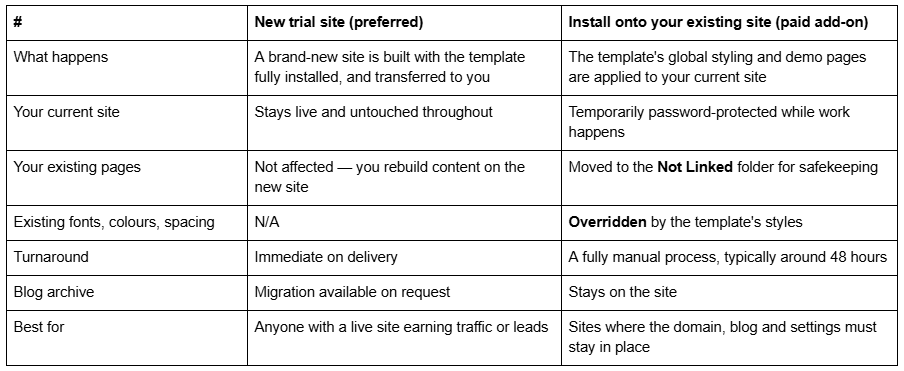
The trade-off is straightforward. The new-site route is safer and cleaner but means moving your content across. The existing-site route keeps your URL structure and blog intact but will visibly change the appearance of sections, buttons, headings and backgrounds you had already styled — because global styles are global.
If you have an active site bringing in traffic and leads, take the new-site route. The disruption of the alternative is not worth the saved content entry.
One thing to plan before you switch: your URLs
If you are moving from an existing site to a new one built on a template, your page slugs are the part that quietly costs money.
Squarespace blog post URLs take the form /blog-page-slug/post-slug, and changing a slug creates no automatic 301 redirect, ever. Nothing warns you. The old URL simply starts returning a 404, and any rankings and backlinks pointing at it go with it.
So before the new template site goes live, export your current URL list, match every page and post to its equivalent on the new site, and add redirects in Settings → Developer Tools → URL Mappings for anything whose slug changed. It is twenty minutes of work that protects however many years of search history you have accumulated.
This applies to the new-site installation route specifically. The existing-site add-on keeps your URLs in place, which is its main argument.
What the 60 days of support actually covers
Sixty days of email support is included with every template. Being specific about the boundary saves everyone a frustrating exchange.
In scope: setup problems, questions about how a section was built, guidance on where a setting lives, help interpreting the tutorials, problems with the install itself.
Out of scope: customisation. Rebuilding a section to a new design, writing custom CSS for you, adding functionality the template does not ship with, or reworking your content is design work and is quoted separately.
Not the same as Squarespace support. Squarespace runs its own 24/7 support for platform issues — billing, domains, outages, feature questions. Template support covers the design; Squarespace support covers the platform. Sending the wrong question to the wrong place is the most common reason people feel unsupported during a launch.
The Style Guide page — the most underrated thing in the box
Every Squareko template includes a Style Guide page, and it is genuinely uncommon in this market.
It is a real page in your site that documents the template's type scale, colour values, button styles and spacing rules. It usually sits in the Not Linked section, so visitors never see it.
Why it matters: six months after launch you will add a page. Without a reference, you will guess at the heading size, pick a nearly-right grey, and the new page will look subtly off. Multiply that by twenty pages and a site drifts. The Style Guide page is what stops that, and it is the difference between a template that still looks designed after a year and one that doesn't.
Keep it. Do not delete it to tidy up your page list.
What is not included, stated plainly
A Squarespace subscription. The $249 buys the design and the right to use it. Hosting, your domain and the platform itself come from Squarespace directly. Squareko recommends the Business plan and confirms the templates work on Basic; buyers get 20% off their first year through Squareko's Circle partner discount.
The demo photography. This one catches people. Squareko's published terms state that demo photographs are copyright-protected and "not licensed for use on live or client websites", and that you are required to replace every demo image with your own licensed or original images before launching. Budget time or money for photography — it is a real task, not a formality.
Your copy. The template ships with placeholder text. Writing the real thing is the longest job in any website launch, template or custom.
Customisation. The template is fully editable and the tutorials cover changing colours, fonts, images, sections and layouts. But if you want someone else to do that work to your brand, that is a separate service.
Plugins, custom code and booking integrations. Nothing of that kind is bundled. Squareko templates are Squarespace 7.1 Fluid Engine designs; anything beyond native Squarespace functionality is added separately.
Resale rights. The licence covers your own use. Reselling, redistributing, sublicensing or presenting a Squareko design as your own original work is explicitly prohibited — relevant if you are a designer thinking about using one on a client project.
The refund policy, without softening
All sales are final. Squareko's published return policy states that digital products "cannot be returned, exchanged, or refunded under any circumstances."
That is standard across the premium Squarespace template market — instant digital delivery makes returns effectively unenforceable — but it changes how you should shop. There is no try-and-see.
Which is why the demo exists, and why it is worth using properly:
Ignore the photography completely. You are replacing every image anyway. Judging a template by its demo photos is the single most common buying mistake.
Read the page list, not the homepage. The homepage is the easiest page to love and the least predictive. Does the template have the pages your business needs — a menu, a case study layout, a pricing page, a services detail page?
Open the demo on your phone. Squarespace 7.1 templates maintain a separate, independently editable mobile layout. Check it, because most of your traffic will see it.
Count the sections you'd actually reuse. A template's real value is the section library you can restack into pages the demo doesn't have.
Ask before buying. Squareko's stated position is to contact them for compatibility questions in advance. A pre-sale email is free; a wrong purchase is $249.
Is $249 a fair price?
Across the premium Squarespace template market, prices run from roughly $189 to $595, with most established shops clustering between $250 and $400. Squarespace's own templates are free and are the honest baseline every paid template competes against.
At $249, a Squareko template sits at the lower end of premium. What you are paying for over a free Squarespace template is the section library, the page count, the Style Guide, the install being done for you, and 60 days of someone to ask. What you are not paying for is exclusivity — other businesses will buy the same design, which is exactly why replacing the demo images and writing your own copy matters more than the template choice does.
Before you buy
Work through the demo properly: page list first, mobile second, sections third, photography never. If the pages you need exist and the sections look reusable, a $249 template will get you live in two to four weeks with most of the design decisions already made.
You can browse the full range on the premium Squarespace templates page — 24 designs, $249 each, 9 to 15 pages depending on the template, installed rather than emailed as files. If your page inventory doesn't fit any of them, or you need memberships, multi-level navigation or a real integration, a template is the wrong purchase and the honest answer is to talk about a custom Squarespace design instead. Either way, ask before you buy — the policy above means there is no undo.
FAQ
-
As a Squarespace contributor invitation, not a file. There is nothing to download or upload, unlike WordPress themes. You receive an onboarding email, then an invite sent to the address you want to manage the site with. Once accepted, site ownership is transferred to you.
-
Yes. The $249 covers the design and the right to use it only. Hosting, your domain and the platform come from Squarespace directly. Squareko recommends the Business plan, confirms templates work on Basic, and passes on 20% off your first year through its Circle partner discount.
-
No. Squareko's published terms state demo photographs are copyright-protected and not licensed for use on live or client websites, and that every demo image must be replaced with your own licensed or original images before launch. Budget time for photography before you launch.
-
No. Squareko's return policy states digital products cannot be returned, exchanged or refunded under any circumstances, which is standard for instantly delivered digital goods. Use the live demo thoroughly first and email pre-sale questions about compatibility — there is no try-and-see.
-
Delivery onto a new site is immediate. Installing onto an existing Squarespace site is a paid add-on and a fully manual process that typically takes around 48 hours. During that work your site is temporarily password-protected and your existing pages are moved to the Not Linked folder.
-
Setup help, questions about how sections were built, and problems with the install. Customisation is not included — rebuilding sections, writing custom CSS or adding functionality is separate design work. Platform issues like billing, domains and outages go to Squarespace's own 24/7 support.

Author Bio
I'm Walid Hasan, a Certified Squarespace Expert and Squarespace Circle Platinum Partner with over 12 years of hands-on experience designing and optimizing high-performing websites. Over the years, I've had the privilege of building more than 2,000 Squarespace websites for clients around the world, always focusing on clean design, strong user experience, and conversion-driven results.
