
Custom Squarespace Templates: When Off-the-Shelf Stops Being Enough
The short answer: Most businesses searching for custom Squarespace templates should buy a premium template instead. Custom design is warranted when your site's logic is unusual — gated content, unusual navigation depth, a third-party system that has to be the source of truth — not when its look is. Aesthetics are the cheapest problem on this list to solve with a template.
That is the whole argument, and the rest of this page is the evidence for it. Below you will find a decision matrix, the five signals that genuinely disqualify a template, and an honest cost comparison including the costs nobody quotes.
First, a terminology problem worth clearing up
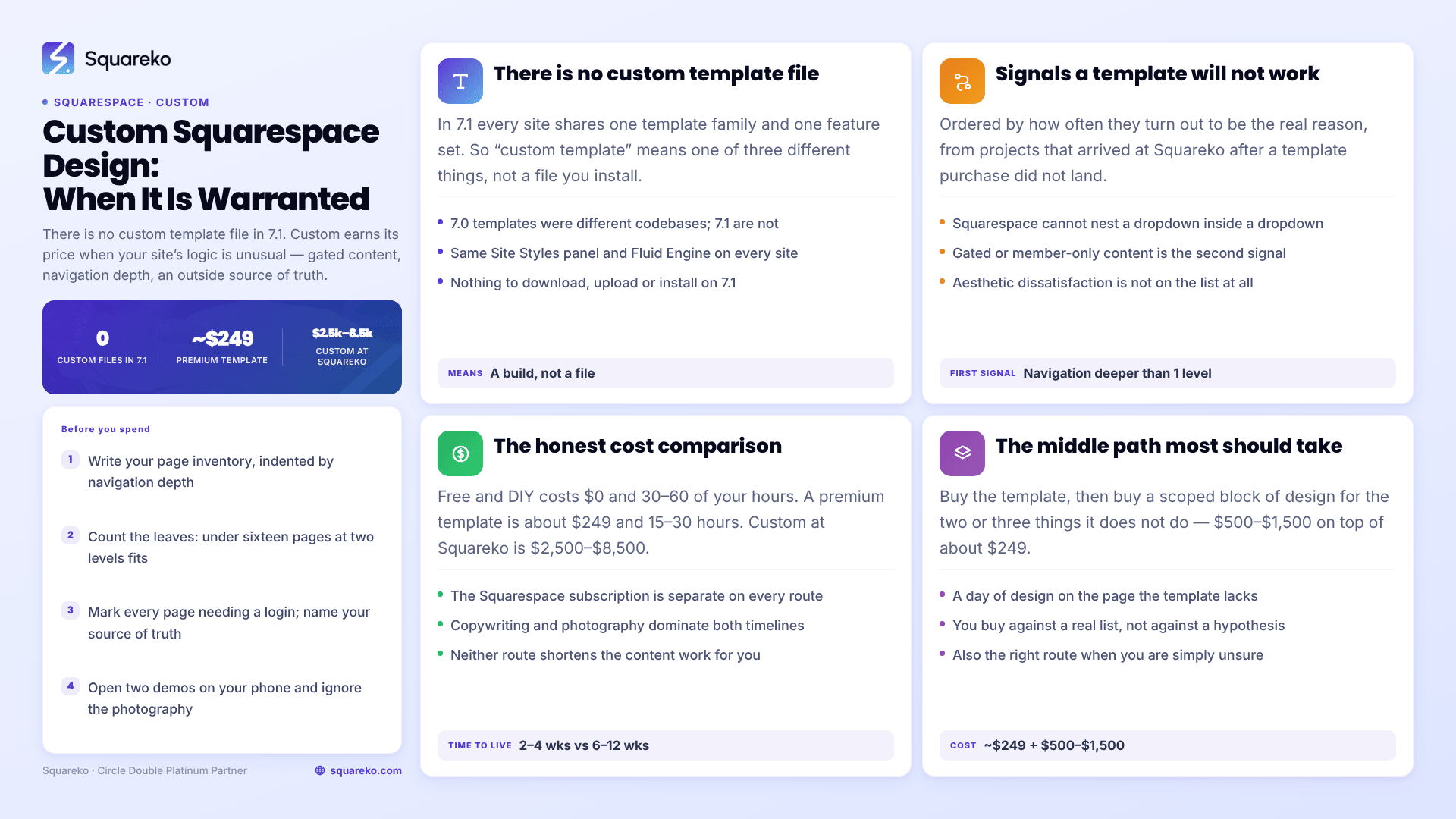
There is no such thing as a custom template file in Squarespace 7.1. This matters because the phrase "custom Squarespace template" sends people looking for a product that does not exist on the platform.
Squarespace's own documentation is explicit: "All version 7.1 sites are part of the same template family, so every site has the same features and style options." In Squarespace 7.0, templates were genuinely different codebases — Brine did things Bedford could not, and switching template meant switching capability. In Squarespace 7.1 that distinction is gone. Every 7.1 site has the same feature set, the same Site Styles panel, and the same Fluid Engine editor. What differs between one 7.1 site and another is the arrangement of sections, the style values, and any custom code.
So when someone says "custom Squarespace template", they mean one of three quite different things:
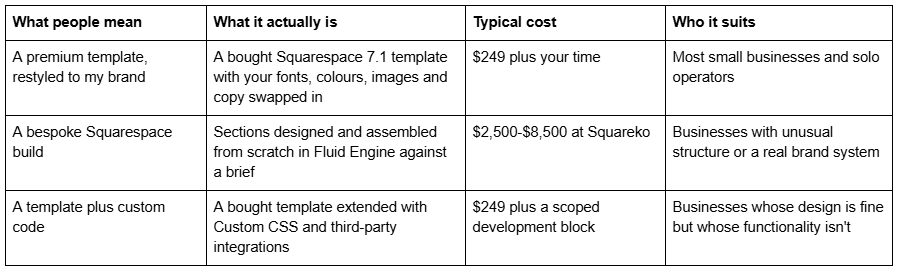
The middle row is what agencies sell as "custom Squarespace design". It is not a template in any technical sense — it is a site built section by section on the same 7.1 foundation everyone else uses. That is worth knowing before you pay for it, because it sets a realistic expectation of what you are buying: design judgement and structure, not a different platform.
The decision matrix
Find the row closest to your situation. The recommendation column assumes you want the site live and earning, not perfect.
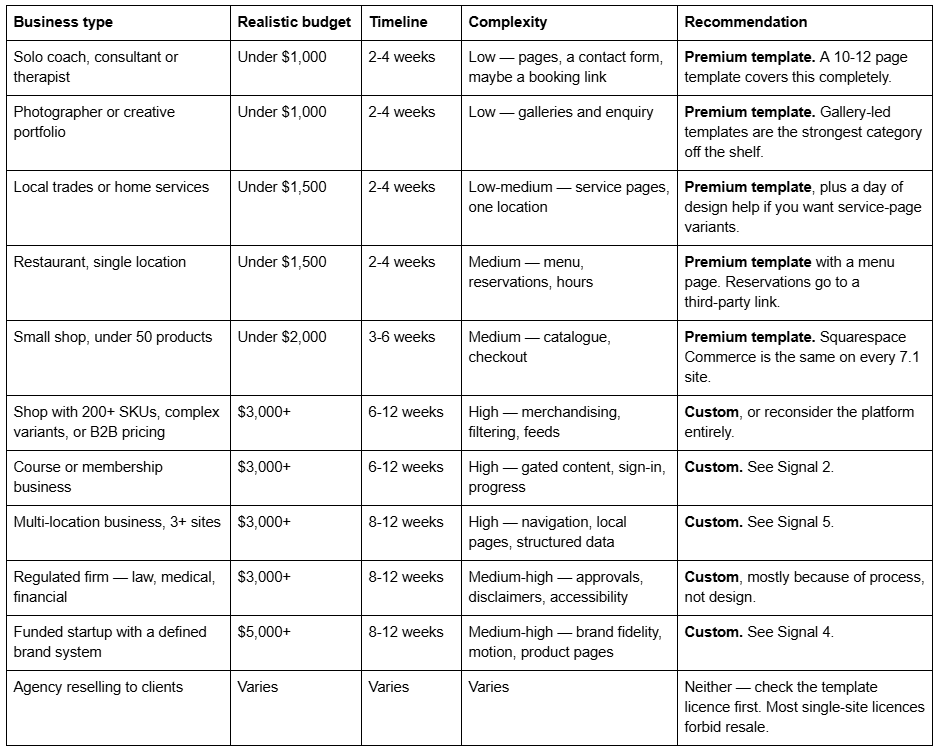
If your row says "premium template" and you are still reading because you want custom, Where most people get this wrong is the section for you.
The five signals a Squarespace template will not work
These are ordered by how often they turn out to be the real reason a template fails, based on projects that came to Squareko after a template purchase didn't land. Aesthetic dissatisfaction is not on this list, because it almost never survives contact with a Style Guide page and two hours of editing.
Signal 1 — Your information architecture needs more than one dropdown level
This is the most common genuine disqualifier and the one nobody checks before buying.
Squarespace navigation supports folders that produce a single dropdown. It does not support folders inside folders. The Squarespace Help Center states it plainly: "It's not possible to nest a dropdown in another dropdown."
For most businesses that is fine. Home, About, Services, Blog, Contact, with four services in a dropdown, is a two-level structure and Squarespace handles it natively. The problem arrives when your real structure is three levels deep — Services → Commercial → Fit-out, Maintenance, Consultancy — and you have twenty-plus destination pages. A template gives you ten to fifteen pages and a one-level menu. Neither is the constraint; the platform is. But a custom build is where somebody sits down and decides which of those three levels becomes a landing page with in-page navigation, which becomes a mega-menu built with Custom CSS, and which gets cut.
How to confirm it in five minutes: write out every page your site needs, indented by depth. If anything sits at depth three or deeper, and you cannot flatten it, a template will not solve your navigation. It will just hide the problem behind a menu that doesn't fit.
Signal 2 — Gated content, courses or memberships are the product
Squarespace 7.1 can do memberships and courses. The question is whether the constraints match your business model, and this is where template shopping goes wrong most expensively.
Squarespace Member Sites put pages behind a paywall, and Course pages support chapters, lessons, videos up to three hours, and an automatic progress bar. The published limits are generous — up to 250 lessons per course. But two constraints reshape a business model:
Member site pages are invisible to search. Squarespace states: "Pages in a member site don't have SEO options and aren't indexed in your site map." If your growth plan was free lessons ranking in Google and converting to paid, that plan does not work behind a Member Site paywall. It needs a public content layer and a gated layer, and deciding where the line falls is architecture work, not template work.
Video storage is limited by default. Course pages include 30 minutes of video storage on a standard site; more requires a Digital Products plan. A twelve-module course is not a 30-minute upload.
Templates in this category also require care. Some templates ship a page called "Course" or "Membership" — including two in Squareko's own range — but a page called Course is a designed layout, not a configured Member Site. Nothing in a template purchase sets up paywalls, member management, pricing plans or drip logic. That is account-level configuration, and it is genuinely custom work.
How to confirm it in five minutes: if a stranger has to log in to get value from your site, you are building a membership product, not a website. Budget accordingly.
Signal 3 — A third-party system has to be the source of truth
Squarespace templates assume your content lives in Squarespace. When it doesn't, the template stops being the thing you are buying.
Common versions of this problem:
A CRM or PMS owns your inventory. Property listings, vehicle stock, class schedules and appointment availability usually live in another system. Getting them onto a Squarespace 7.1 page means an embed, an iframe, or a scheduled sync — and every one of those decisions changes the design.
Booking with real availability logic. A link to a booking tool is trivial. Multi-staff, multi-service, multi-location availability rendered natively on the page is not.
A data feed has to render as pages. There is no blog write API on any Squarespace plan, so nothing can programmatically create posts or pages for you. If your model requires two hundred programmatically generated pages, Squarespace is the wrong platform and a custom Squarespace build will not fix that.
Compliance-driven forms. Anything touching health data, payment data outside Squarespace Commerce, or signed documents will end up in a third-party embed with its own styling.
How to confirm it in five minutes: name the system that would be wrong if the website disagreed with it. If that system is not Squarespace, you have an integration project, and the template is the smallest part of it.
Signal 4 — You have a real brand system to honour
Most businesses have a logo and two colours. That is not a brand system, and a template will carry it happily.
A brand system is a documented set of rules — a type scale with defined ratios, a spacing system, prescribed grid behaviour, a defined motion language, illustration or photographic direction, and rules about what happens at each breakpoint. If a brand guideline exists as a PDF that someone was paid to produce, the site is expected to comply with it, and compliance is the deliverable.
Squarespace 7.1's Site Styles panel will get you close on colour and type. It will not reproduce an asymmetric grid, a bespoke type scale applied consistently across every section, or defined motion. Those come from custom CSS written against the specific brand rules, which means someone has to read the guidelines and translate them — the work a custom build is actually paying for.
Note the direction of the test. "I want it to look unique" is not this signal. "I have a document that defines what unique means and someone will check the site against it" is.
Signal 5 — You operate from three or more locations
Multi-location is where template maths breaks quietly.
Three locations and five services is not eight pages. Done properly for local search, it is fifteen location-service pages plus three location hubs plus the service hubs — and each location page needs its own address, hours, map, staff, reviews and structured data. Squarespace has no native store locator, no location directory with filtering, and no way to generate those pages from a data source. Every one is built by hand.
Then Signal 1 compounds it: eighteen-plus pages will not fit in a one-level dropdown, so the navigation has to be redesigned around hub pages rather than menus.
A template gives you nine to fifteen pages. It is not that the template is bad — it is that a multi-location site is a different shape of site, and the shape is the thing being designed.
How to confirm it in five minutes: multiply locations by services. If the product is over twelve, we need an architecture conversation before we move to design.
The honest cost comparison
Design fees are the number everyone quotes and rarely the number that decides anything. Here is the fuller picture. Squarespace subscription costs are separate in every row, and Squarespace's own pricing page is the authority for current plan rates.
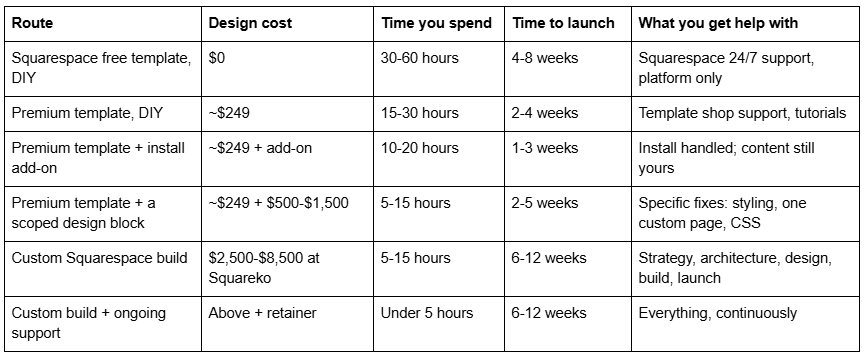
Two things worth naming honestly.
The DIY rows are not free. Thirty hours of your time at any sensible valuation of your own hourly rate is the largest single line in the free-template row. That is the real argument for a $249 template — not that it looks better than a free one, but that it removes most of the thirty hours.
Custom does not automatically mean faster or better-performing. Across 54 Squareko-built client sites measured in August 2026 — lab data, single run per site, cloud datacentre, unthrottled, load-only CLS, not field data — median mobile LCP was 2.01s and median page weight was 3.0 MB across 93 requests. Those numbers are governed by image discipline, section count and third-party embeds far more than by whether the design started from a template. A carefully built template site and a carefully built custom site land in the same performance band. A careless version of either does not.
What actually takes the time, on both routes
People assume design is the long pole. It is not, on either route. Content is.
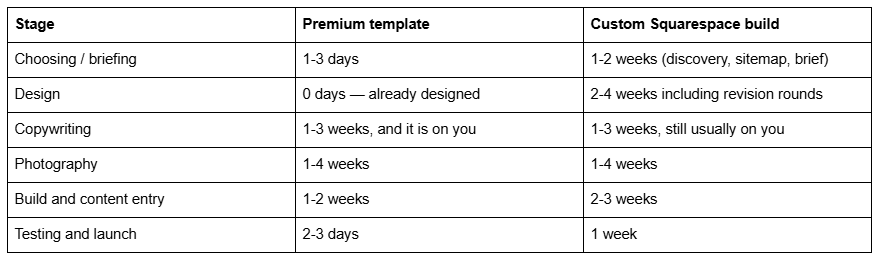
The rows that dominate both columns are copywriting and photography, and they are the two nobody schedules. A template does not shorten them. Neither does a custom build unless you have explicitly paid for copy as part of the scope, which most quotes do not include by default — check.
This has a practical consequence. If your reason for considering custom design is "I need it live faster", custom is the wrong answer; the template route is roughly half the elapsed time. If your reason is "I don't want to think about it", that is a services question rather than a template-versus-custom question, and both routes can be bought with the content work attached.
One more scheduling reality worth naming: the demo images in any premium template are licensed for the demo only. Squareko's published terms state demo photographs are "not licensed for use on live or client websites" and must all be replaced before launch. That is a real task with a real duration, and it belongs on your timeline whichever route you take.
What a custom Squarespace build actually buys you
Stated plainly, so the value is judged on what it is rather than what it is imagined to be:
Architecture. Someone decides what pages exist, what each one is for, and how a stranger moves between them. On a template project, that decision is yours by default.
Structure that fits your business rather than a demo business. Templates are built around a plausible generic version of a niche. If your services do not decompose the way the template assumes, custom is where that gets resolved.
Brand fidelity. Type scale, spacing, grid and motion applied consistently, including at breakpoints nobody thinks about.
Integration work. Embeds styled to match, forms routed correctly, tracking installed, third-party tools made to look native.
Accountability. One named party responsible when something breaks, versus a support inbox scoped to the template you bought.
And what it does not buy:
Rankings. A custom build gives you a technically clean foundation. It does not produce content, backlinks or topical authority.
A different platform. Squarespace's limits are Squarespace's limits. No amount of custom design adds nested dropdowns, a blog write API, an editable robots.txt file or a native table of contents.
Immunity from redesign. Businesses change. Custom sites get outgrown on roughly the same schedule as template sites.
Where most people get this wrong
Two failure modes, both expensive, in opposite directions.
Buying custom for aesthetic reasons. Somebody looks at a template demo, doesn't love the hero image, and concludes the template is wrong. Nine times out of ten what they dislike is demo photography and placeholder copy — both of which they were always going to replace. A demo is not a preview of your site; it is a preview of the structure of your site wearing someone else's clothes. Evaluate the page list and section variety, not the pictures.
Buying a template to solve a complexity problem. This is the more damaging error, because it wastes the purchase and the following month. Someone with a course, three locations or a CRM integration buys a $249 template, spends four weeks discovering the constraint, and then commissions the custom build anyway. The template money is gone — premium templates are typically non-refundable, Squareko's included — and so is the time.
The signals above exist precisely to catch that second case before the purchase, not after.
The middle path most businesses should take
There is a route between $249 and $8,500 that gets recommended far less often than it should, because neither a template shop nor a design studio is naturally incentivised to sell it.
Buy the template. Then buy a scoped block of design or development for the two or three things it doesn't do.
In practice that looks like: a premium template installed onto your site, then a designer spending a day building the one page the template has no equivalent for, writing the custom CSS your brand needs, and configuring the integration you were worried about. You get most of the benefit of custom, for a fraction of the cost, with the risk of the unknown removed — because by then you have a live site and a specific list of complaints rather than a hypothesis.
This is also the correct route when you are unsure. A template is a cheap way to discover exactly what you need custom design for.
A twenty-minute test before you spend anything
Do this before you buy a template and before you brief an agency.
Write your page inventory. Every page, indented by navigation depth. Not what you have now — what the site needs to do its job.
Count the leaves. Under sixteen pages, at two levels of depth: a template fits. Over sixteen, or anything at depth three: read Signal 1 again.
Mark every page that requires a login. Any marks at all: read Signal 2.
Name the system of record for anything that changes weekly. If it isn't Squarespace: read Signal 3.
Open two template demos on your phone. Ignore the photography entirely. Ask only whether the sections you need exist somewhere in the demo.
If step 5 comes back yes and steps 2-4 come back clean, buy the template. Almost everyone lands there, and that is the correct outcome rather than a consolation one.
Which one is right for you
Work the signals in order — navigation depth, gated content, source of truth, brand system, locations. If none of the five apply, a premium Squarespace template will do the job, and the money you save belongs in photography and copy, which affect conversion far more than layout does.
If you have run the test and landed on the template side, the premium Squarespace template range is $249 per template, nine to fifteen real pages each, installed for you rather than sent as files. If two or more of the five signals apply — particularly gated content or multi-location — that is the point where a custom Squarespace design project stops being an indulgence and starts being the cheaper option, because you will otherwise buy the template first and the custom build afterwards.
No obligation either way. Most people reading this should buy a template, and if that is you, the honest advice is to stop researching and go look at page lists.
FAQ
-
Not in the technical sense. Squarespace states that all 7.1 sites belong to the same template family with identical features and style options. What agencies sell as a custom Squarespace template is a site built section by section in Fluid Engine, using the same underlying platform as every other 7.1 site.
-
Squareko's custom builds run $2,500-$8,500 depending on page count, brand complexity and integration work. Published industry ranges are wider — one long-running template shop quotes $1,000-$10,000. Premium templates sit at roughly $189-$595 across the market, with Squareko's at $249. A Squarespace subscription is separate in every case.
-
Five signals: navigation deeper than one dropdown level, gated membership or course content, a third-party system that owns your data, a documented brand system requiring compliance, or three or more locations. Aesthetic dissatisfaction is not a signal — that is usually demo photography, which you replace regardless.
-
Yes, with constraints worth knowing first. Squarespace Member Sites paywall pages, and Course pages support up to 250 lessons with progress tracking. But member site pages have no SEO options and are excluded from your sitemap, and only 30 minutes of video storage is included by default.
-
No. Squarespace supports folders producing a single dropdown level, and the Help Center states it is not possible to nest a dropdown inside another dropdown. Sites needing three levels of depth must be restructured around hub pages with in-page navigation, which is architecture work rather than template work.
-
A premium template is realistically live in two to four weeks, most of which is you writing copy and sourcing images. A custom Squarespace build runs six to twelve weeks including strategy, design, revisions and launch. Content is the bottleneck in both cases, not design.

Author Bio
I'm Walid Hasan, a Certified Squarespace Expert and Squarespace Circle Platinum Partner with over 12 years of hands-on experience designing and optimizing high-performing websites. Over the years, I've had the privilege of building more than 2,000 Squarespace websites for clients around the world, always focusing on clean design, strong user experience, and conversion-driven results.
