
Squarespace Templates for Yoga Studios: The Timetable Problem
The short answer: A yoga studio site is a timetable problem, not a design problem. Squarespace 7.1 has no timetable object — no class list, no roster, no waitlist, no check-in. Every recurring class has to be built as an appointment type inside Acuity Scheduling and embedded back into the page. Pick a template on whether it gives you a Classes page and somewhere to put teacher bios.
Of the Squareko range, Shape Matrix is the closest fit: 11 pages including dedicated Training and Classes pages, plus a Portfolio and a Gallery.
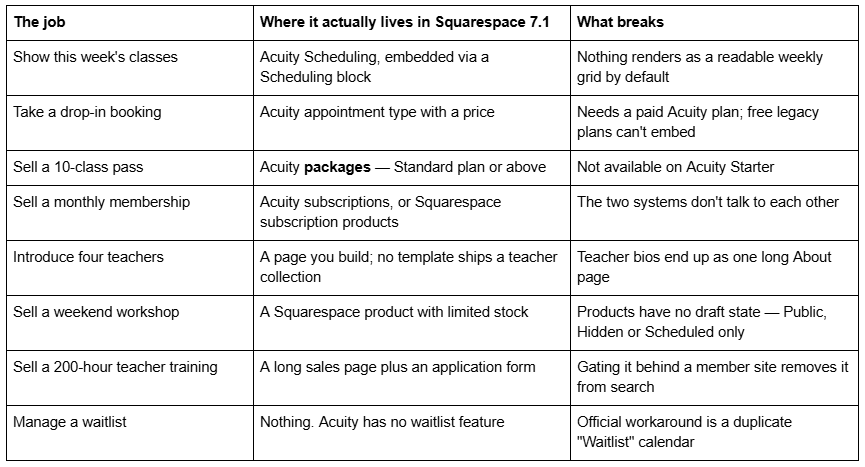
What a yoga studio site has to do, and where each part lives
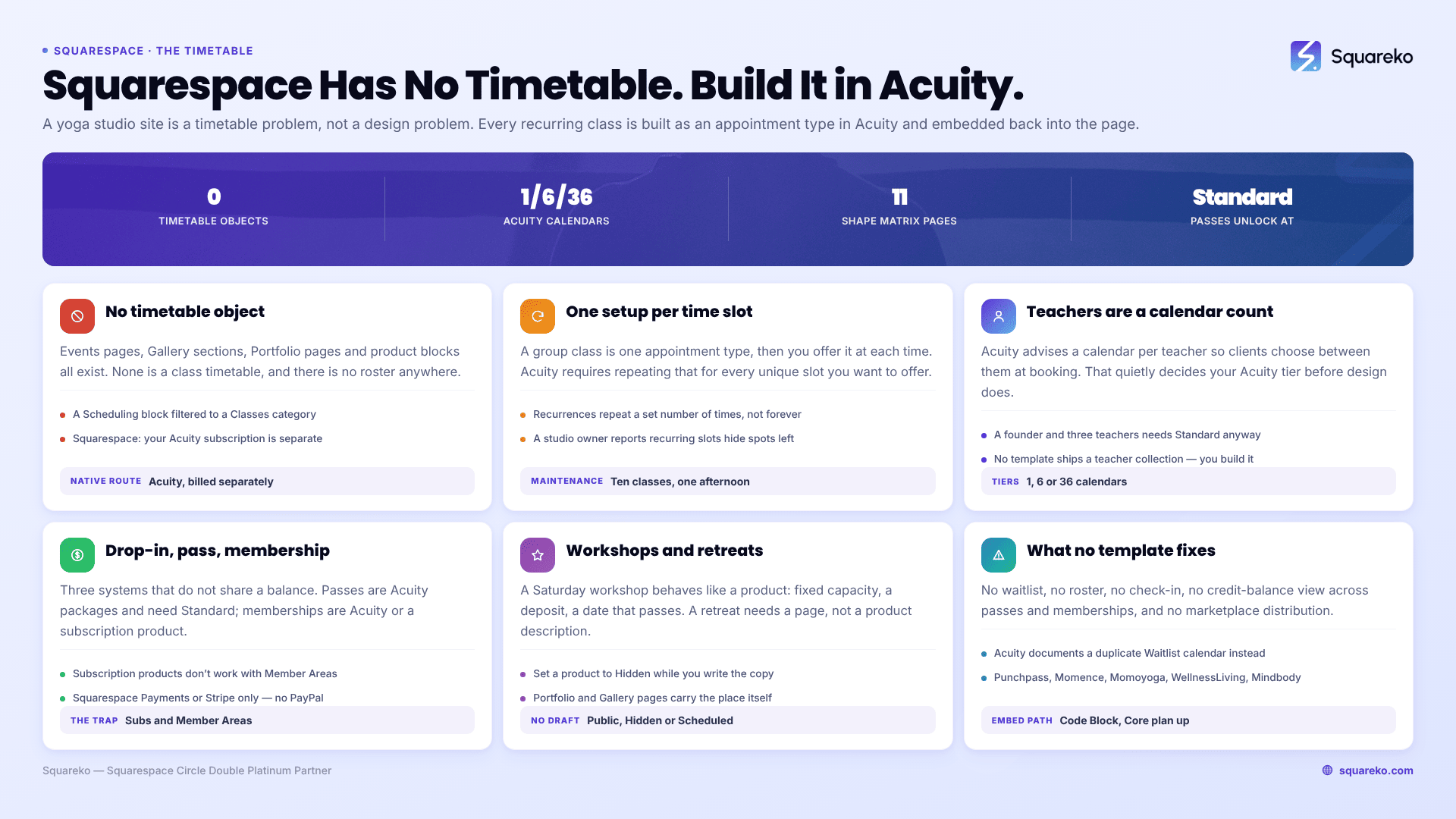
Squarespace has no timetable object. Plan around that first.
This is the sentence most yoga studio owners need before they spend $249 on anything.
Squarespace 7.1 ships Events pages, Gallery sections, Portfolio pages and product blocks. None of them is a class timetable. There is no built-in weekly grid, no "spots remaining" counter, and no roster. The native booking route is Acuity Scheduling — the product Squarespace branded as Squarespace Scheduling for several years and which the Help Center now states is "officially Acuity Scheduling" again.
Acuity is a separate subscription from your website plan. Squarespace's own billing documentation is explicit: "Your Acuity subscription is separate from your site subscription." Budget for both.
What you get on the page itself is a Scheduling block, which embeds your Acuity scheduler and can be filtered to your general scheduler, a specific calendar, a single appointment type, or a category. That last option is what makes a "Classes" page work: create a category called Classes in Acuity, drop one Scheduling block filtered to that category onto the page, and the page stays current without you touching it again.
How a recurring weekly timetable is actually maintained
Here is the part nobody publishes, and it is the reason yoga studio builds overrun.
In Acuity Scheduling a group class is an appointment type that multiple clients book into at a fixed time. When you create one you set a Max number of people — the default is eight — and then you "offer" that class at specific times. Choosing Recurring… lets you set how often and how many times it repeats.
The catch is in Acuity's own wording: you must repeat that offering process for each unique time slot you want to offer. A studio running Vinyasa on Monday at 07:00, Tuesday at 18:30 and Saturday at 09:00 is not creating one recurring class with three times. It is creating one appointment type and then offering it three separate times, each with its own recurrence. Ten weekly classes across five styles is a genuinely tedious afternoon of setup, and every timetable change in September means going back in.
Two consequences worth planning for:
Recurrences run out. A recurring offering repeats a set number of times, not forever. Put a recurring calendar reminder to extend the timetable before it expires, or you will discover in January that the site stopped taking February bookings.
Recurring classes display differently. A studio owner on the Squarespace forum described it precisely: "The recurring ones does not show how many available spots remain, while the ones non-recurring does." If "3 spaces left" is part of how you sell, test that behaviour in your own account before you build the whole timetable on recurrences.
Multiple teachers is a calendar-count problem, not a design problem
Acuity's own guidance for yoga studios is to "create a calendar for each teacher so clients can choose between them during booking." That is correct advice, and it quietly sets your Acuity plan for you.
Acuity's bookable-calendar limits by tier:
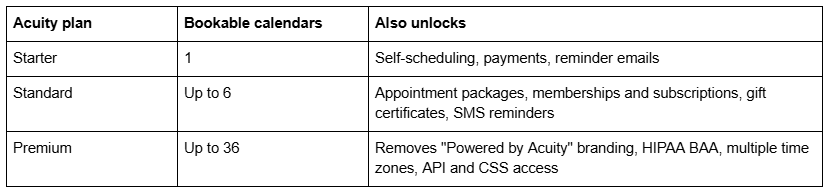
A solo teacher fits on Starter. A studio with a founder and three teachers needs Standard — and would need Standard anyway, because class passes and memberships live there. A studio with more than six teachers is on Premium. Work this out before you price the project, not after.
On the website side, the teacher bios themselves are pages you build. No Squarespace template ships a teacher collection, and Shape Matrix is no exception. Most studios build one Teachers page with an anchor link per person, which is fine and keeps everything on one indexable URL. If you want each teacher to rank for their own name, use a blog collection instead — but note that blog featured images have no alt-text field in Squarespace, so the post title is used as the alt text.
Drop-in, class pass and membership are three different mechanisms
Yoga studios almost always sell all three, and they are not variants of one thing. They are three separate systems that do not share a balance.
Drop-in is the simple case: an Acuity appointment type with a price, paid at booking through Stripe, Square or PayPal.
Class passes are Acuity packages — a bundle of credits a client buys once and redeems against future classes. Packages require the Standard plan or above. This is the single most common reason a yoga studio outgrows Acuity Starter in week two.
Memberships can be built two ways, and the choice matters:
Acuity memberships and subscriptions (Standard plan or above) bill automatically and redeem against classes in the same system that holds your timetable. For a studio, this is normally the right answer.
Squarespace subscription products are ecommerce items that renew as often as weekly and as infrequently as every twelve months. They only work with Squarespace Payments or Stripe — not PayPal, Apple Pay or ACH. Customers can buy only one subscription product per transaction and cannot pause a subscription themselves.
The trap is trying to combine the second with gated content. Squarespace states plainly that subscription products don't work with Member Areas. If your membership is meant to unlock a video library as well as studio classes, you need Squarespace's Content & Memberships pricing plans, not a subscription product — and those carry a transaction fee that runs roughly 5–7% on the entry and mid-tier website plans, 1% on Commerce, and 0% on Commerce Advanced. Check the current rate on the pricing page before you quote it to anyone.
Workshops and retreats are products, not classes
A Saturday workshop, a teacher-led retreat and a six-week beginners' course all behave more like products than like recurring classes: fixed capacity, a deposit, a date that passes, and copy that has to sell rather than list.
Build them as Squarespace products with limited stock, or as Acuity classes if you want them inside the same booking flow. If you use products, remember that Squarespace products have no draft state — a product is Public, Hidden or Scheduled, and there is no halfway house where you can build it quietly with a live URL. Set it to Hidden while you write the copy.
Retreats need their own page rather than a product description. Someone paying for a week in Portugal reads a page with an itinerary, accommodation photographs, a what's-included list, a cancellation policy and a deposit structure. That is a page, with a Buy button on it. Shape Matrix's Gallery and Portfolio pages are genuinely useful here — a retreat sells on photographs of the actual place.
Teacher training needs its own architecture
A 200-hour teacher training is the highest-value thing most studios sell and the thing most studio websites handle worst — usually as a paragraph on the Classes page.
It needs: a long-form page covering syllabus, hours, dates, lead trainers and their lineage, accreditation body, price and payment plan, prerequisites, and graduate outcomes; an application form rather than a Buy button; and somewhere to put the course materials once people enrol.
For the last part, Squarespace offers Courses pages and member sites. Both work. Both come with one consequence you should decide on deliberately: pages inside a member site have no SEO options and are not included in your sitemap, and all pages added to a Content & Memberships pricing plan are hidden from search engines. That is correct behaviour for course materials. It is the wrong behaviour for your training sales page, so keep the sales page public and gate only what comes after enrolment.
What Squarespace genuinely cannot do, and what studios pair it with
Be honest with yourself about this list before you buy a template, because no template changes any of it.
No waitlist. Acuity's own help centre states it "doesn't have a built-in waitlist feature". The documented workaround is to create a separate calendar called Waitlist and duplicate the classes you want a waitlist for. It works; it is manual.
No class roster or check-in. There is no front-desk view for marking attendance as people walk in.
No credit-balance reporting across drop-ins, passes and memberships in one place.
No ClassPass-style marketplace distribution.
Studios that outgrow this pair Squarespace with dedicated studio software — Punchpass, Momence, Momoyoga, WellnessLiving or Mindbody — and keep Squarespace for everything the studio software is bad at, which is marketing pages, SEO and brand. The schedule then embeds as a widget in a Code Block.
One plan requirement catches people here: JavaScript and iframes inside Code Blocks require the Core plan or above (Business, Commerce Basic and Commerce Advanced also qualify). A studio on the entry-level plan cannot embed a Mindbody or Punchpass widget at all. If third-party studio software is in your future, buy the right website plan now.
Shape Matrix and Fit Foundry, by their actual pages
Two templates in the Squareko range are tagged Fitness & Wellness. Judge them on what they contain.
Shape Matrix — 11 pages: Home, a second homepage layout, Training, Classes, Blog, Portfolio, Gallery, Freebie, Contact, a 404 page and a Style Guide page. Training and Classes are the two pages a yoga studio needs most and almost never gets pre-built. Portfolio and Gallery cover the space, the retreats and the community photographs. Its gap is that there is no About page — you build that, and you build the teacher bios into it.
Fit Foundry — 11 pages: Home, a second homepage layout, About, Service, Shop, Blog, FAQs, Freebie, Contact, 404 and Style Guide. The Shop page makes it the better base if you sell mats, props, digital programmes or retreat deposits as products, and the FAQs page handles the "do I need to be flexible" questions that stop beginners booking. It has no Gallery or Portfolio.

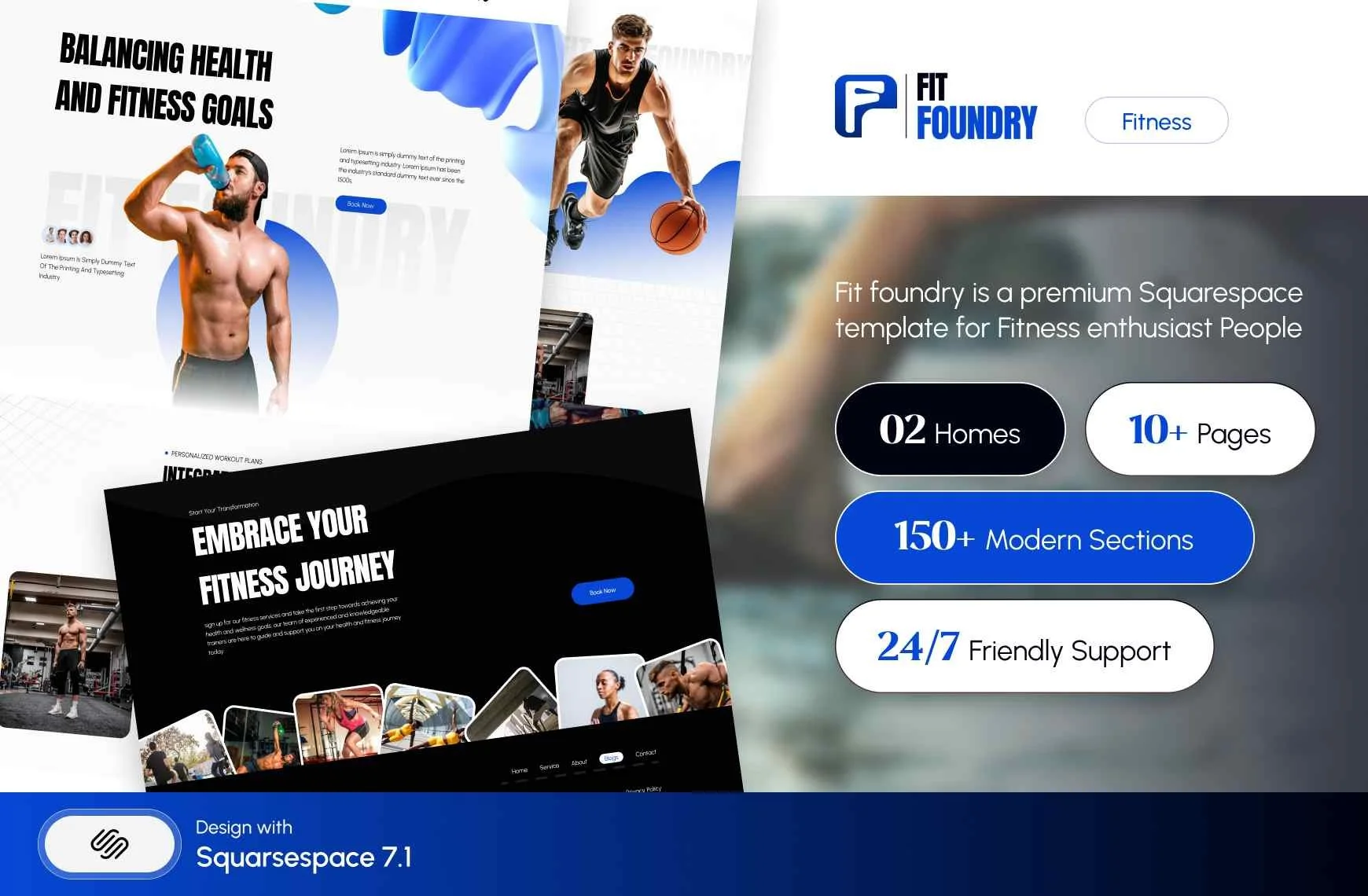
Both are $249, delivered as a Squarespace contributor invitation rather than files to download, with 60 days of email support. Customisation is not included, sales are final, and the demo images are not licensed for live use — you replace every one of them. Every template also ships 150+ pre-designed sections, a Style Guide page and a 404 page.
Choosing a template for a yoga studio
Run any demo against the eight-row table at the top of this post on a phone. If your timetable, your teachers, your class passes and your workshops each have an obvious home, the template will hold. If three of them would land on the same page, you are buying a colour palette.
Then do the thing that decides the project: write out your full weekly timetable, your teacher list and your price list before you build anything. Those three documents are what stop yoga studio websites launching, and no template supplies them.
If you would rather not spend four evenings wiring Acuity to a new site, the premium Squarespace templates at Squareko are installed for you, onto a new site or an existing one, with the pages set up ready for your content. Most studios manage this perfectly well themselves with the structure above — it is published because the structure is the hard part.
For studios where the constraint is reformer capacity rather than timetable breadth, see Squarespace templates for Pilates studios. The cluster hub, Squarespace templates for fitness, covers gyms, coaches and trainers as a whole.
FAQ
-
Four routes. A digital download product for a one-off plan, a Course page for a structured programme taught in order, a Member site for ongoing access you keep adding to, and a Video page for a gated workout library. Connect any of them to money with a pricing plan, which can be free, a fixed amount, or a subscription.
-
Three routes. Acuity packages let a client buy a pack and book against the balance in one system, and require the Acuity Standard tier. A Squarespace service product sells a block through the website checkout. A subscription product bills monthly automatically. For 1:1 training where the client picks their own times, Acuity packages are the right default.
-
Use a Course page when the programme has a beginning, a middle and an end and should be taken in order — it gives lessons and progress tracking, and you can gate the whole course or only specific lessons. Use a Member site when access is ongoing and you keep adding content, such as a growing workout library.
-
Either works, but commit to one. Make a free consultation a distinct Acuity appointment type with its own duration and intake questions so you can measure conversion. If you charge for the first session, publish the price and make it directly bookable. What fails is a free-consultation button that opens a generic contact form.
-
One page per location, each with its own address, hours, timetable, staff and photographs, and each scheduling block filtered to that location's Acuity calendar. Near-duplicate location pages read as thin content. A single page with a location dropdown cannot rank for any individual town, which defeats the purpose.
-
Both, usually. Squarespace plus Acuity handles a single-location studio with a manageable timetable. Studios needing rosters, check-in, waitlists and marketplace distribution run dedicated software such as Punchpass, Momence or Mindbody and embed it in Squarespace — which requires the Core plan or above.

Author Bio
I'm Walid Hasan, a Certified Squarespace Expert and Squarespace Circle Platinum Partner with over 12 years of hands-on experience designing and optimizing high-performing websites. Over the years, I've had the privilege of building more than 2,000 Squarespace websites for clients around the world, always focusing on clean design, strong user experience, and conversion-driven results.
