
Squarespace Templates for Online Fitness Coaches
The short answer: An online fitness coach sells a product, not a diary, and the site is a sales page plus a checkout plus somewhere gated for the programme to live. Squarespace 7.1 has four ways to deliver that, they cost different amounts per sale, and the fee scales with your website plan rather than with the template. Decide the delivery route first — the template choice follows from it, not the other way round.
This is the digital-product post in the fitness template cluster. If you also train people in person, the independent personal trainer guide covers the diary side.
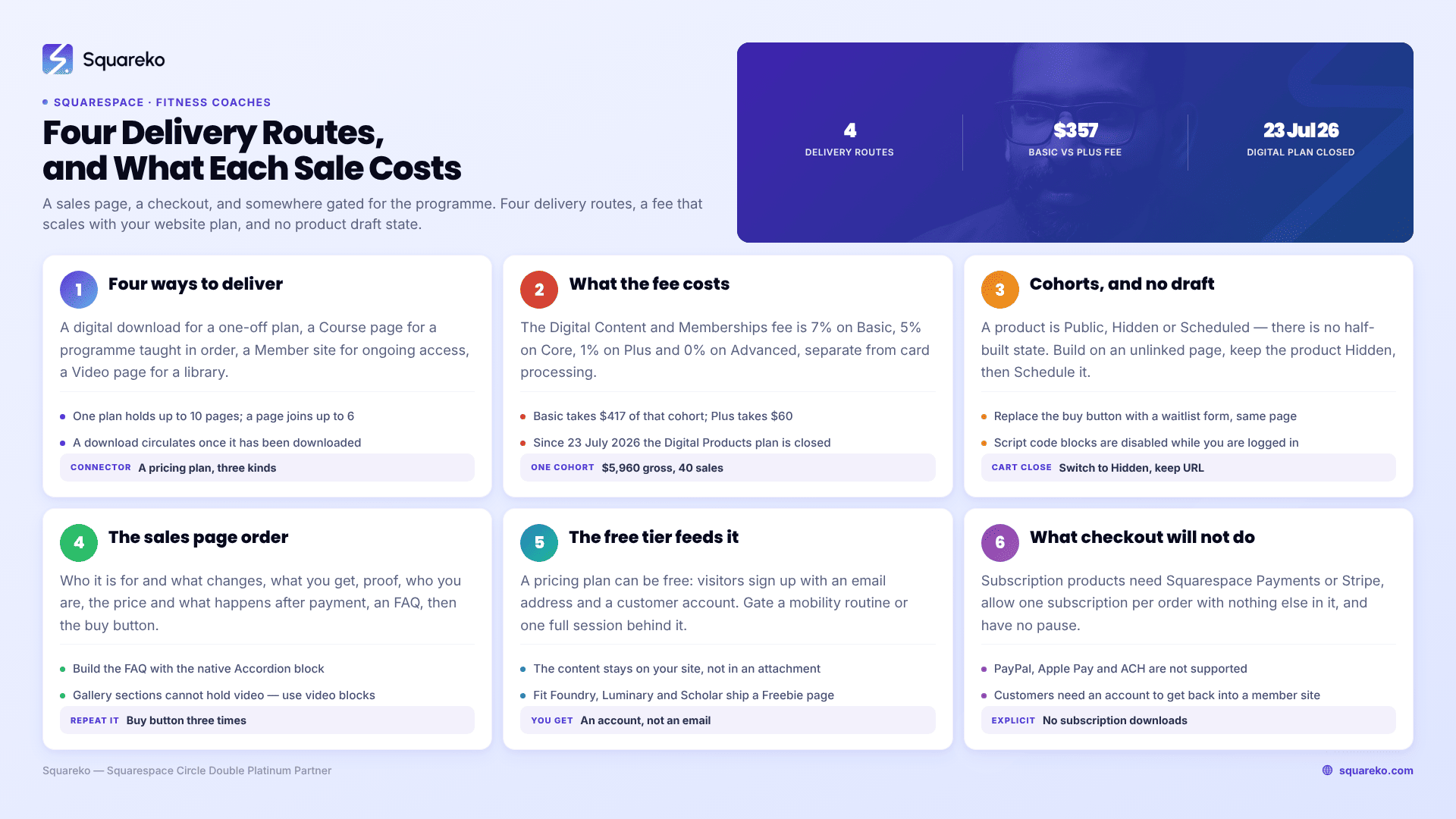
Four ways to deliver an online fitness programme
These are not interchangeable, and picking wrong means rebuilding the delivery layer after you have sold to real people.
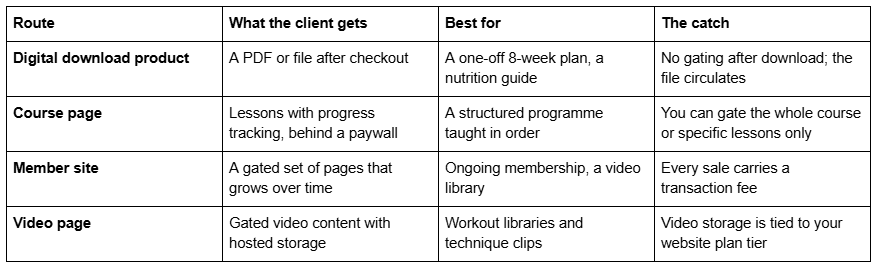
Squarespace's own health and fitness guidance points at the second and third: "To create online classes that only specific clients can access, use Course pages," and you "can create a set of gated pages on your site that contain related content, and are designed for a specific audience, with Member sites."
A practical rule. If the programme has a beginning, a middle and an end, use a Course page. If it is ongoing and you keep adding to it, use a Member site. If it is a single artefact people download and follow, use a digital download product and accept that it will be shared.
Pricing plans are what connect any of these to money. They come in three shapes — free (an email address in exchange for access), a fixed amount paid once or in installments, and a subscription billed weekly, monthly or annually. A single pricing plan can hold up to 10 blog pages, course pages, member sites or video pages, and any one of those can belong to a maximum of six pricing plans. You can have up to 500 pricing plans on a site, which is more than any coach will use.
What the transaction fee actually costs
This is the number that decides your website plan, and almost nobody works it out before launching.
Squarespace charges a Digital Content and Memberships transaction fee on every sale of gated content. It scales down with the website plan: 7% on Basic, 5% on Core, 1% on Plus and 0% on Advanced. That is separate from card processing, which is charged by the payment processor on top.
As of 23 July 2026 the old standalone Digital Products plan is closed to new signups. Squarespace's instruction is now direct: "upgrade your website plan to lower your transaction fees and increase video storage." So the lever is the website plan, not an add-on.
Worked through on a realistic launch — a $149 twelve-week programme, forty sales in a cohort, $5,960 gross:
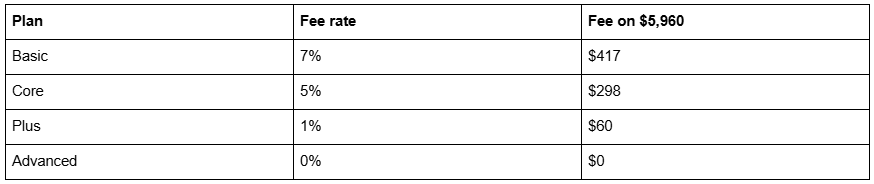
The difference between Basic and Plus on one cohort of forty is roughly $357, which is more than the annual difference between the two plans in most billing configurations. Two cohorts a year and the maths is not close. Run your own numbers before you pick a plan — but run them, because a template comparison is a $249 decision and this is a recurring one.
Cohort launches, and the draft-state problem
If you launch in cohorts — cart opens Monday, closes Friday, programme starts the following week — there is one Squarespace 7.1 constraint that shapes the whole process.
Products have no draft state. A product is Public, Hidden or Scheduled. There is no half-built state you can leave a product in while you finish the sales copy, which means the sales page and the product need to be finished before either goes anywhere near Public.
The practical sequence that works:
Build the product and the sales page while the page is unlinked, not while the product is half-done. An unlinked page is reachable by URL but absent from navigation, which is what you want for internal review.
Use Hidden for the pre-launch period. Hidden keeps the product out of the store and out of search while you finish.
Use Scheduled for the cart-open moment if the launch time is fixed. This is the only way to open a cart at a specific time without being at a laptop.
Close the cart by switching to Hidden, and replace the buy button on the sales page with a waitlist form on the same page. Do not delete the page — the URL is where your ads, your emails and your links point.
Run the waitlist as an email list, captured on the closed sales page. A waitlist form with one field converts better at cart-open than a broadcast to a general newsletter.
One more thing worth knowing before a launch: script-bearing code blocks are disabled while you are logged in and editing your site, showing the message "This block contains embedded scripts. Embedded scripts are disabled while you're logged in and editing your site." If your sales page carries a countdown timer or a tracking pixel in a code block, always verify it logged out before you send traffic.
The programme sales page architecture
A fitness programme sales page is one long page, not a set of small ones, and the order is well-established because it maps to the order people ask questions in.
Who it is for, and what changes. Specific. "A twelve-week strength programme for women returning to lifting after pregnancy" outperforms "transform your body" every time.
What you actually get. Sessions per week, session length, equipment needed, format of the plan, what is delivered when.
Proof. Named clients, specific outcomes, and before-and-after imagery if you have consent. Anonymous quotes read as invented.
Who you are. Credentials with awarding bodies named, and why you are the person to run this specific programme.
The price, and what happens after payment. Uncertainty about delivery is the last objection, and stating it removes it.
FAQ. Equipment, injuries, time commitment, refunds, whether it suits a beginner. Build it with the native Accordion block, which renders server-side in Squarespace 7.1 so the text is crawlable rather than hidden behind JavaScript.
The buy button, repeated. Three times on a long page is normal — after the offer, after proof, and at the end.
Two structural notes for Squarespace 7.1. Gallery sections cannot hold video, so demo clips need video blocks or a Video page. And blog posts use the classic editor rather than Fluid Engine, so if your sales page is a blog post you lose the Fluid Engine layout control — build it as a regular page.
The free tier that feeds the paid one
Cohort launches only work if there is a list to launch to, and the list is built between cohorts rather than during them.
There is a neat mechanism here that most coaches miss: a pricing plan can be free, where "visitors sign up by providing their email address and creating a customer account." That means a member site with two or three genuinely useful pieces — a mobility routine, a first-four-weeks plan, one full session — can be gated behind a free plan rather than sent as a PDF. You get a customer account rather than an email address, the content stays on your site rather than in an attachment, and the person who signed up already knows how your member area works before they are asked to pay for it.
The practical shape is a Freebie or lead-magnet page carrying the offer, a free pricing plan behind it, and an email sequence that runs from signup to the next cart-open. Fit Foundry, Luminary and Scholar all ship a Freebie page, which is the one page in a coaching template that pays for itself.
The checkout, and what it will not do
Subscriptions have hard constraints. If your programme bills monthly, Squarespace states that "you can't sell subscription products using PayPal, Apple Pay, or ACH payments" — so you need Squarespace Payments or Stripe. And "customers can only purchase one subscription product at a time and can't include other types of products in the transaction," which means a client cannot buy your monthly coaching and a one-off nutrition guide in the same order. There is no pause function either; skipping a month means cancelling a pending order manually.
Subscription downloads are not a thing. Squarespace is explicit: "You must sell physical or service products. You can't create subscription download products." A recurring plan delivered as monthly PDFs has to be a member site or a course, not a download subscription.
Customer accounts are how people get back in. A client who buys access to a member site needs an account to return to it. Set expectations on the sales page about what they will be asked to create at checkout, because an unexpected account step at the end of a purchase is a recognised drop-off point.
Delivering the plan without a coaching platform
Squarespace will host and gate your programme. It will not coach with you.
There is no body-metric tracking, no habit tracking, no workout logging and no client check-in feature in Squarespace 7.1. A member site can hold a beautifully organised twelve-week programme; it cannot record whether anyone completed week three. There is no progress dashboard beyond Course page lesson completion.
Coaches who need that pair a Squarespace site with a dedicated coaching platform — Trainerize, TrueCoach, Everfit and similar — and use Squarespace for the marketing, the sales page and the checkout. That is a perfectly good architecture and it is what most established online coaches run. The mistake is expecting one system to do both, then discovering it halfway through a cohort.
The other honest limitation is video. Video storage is tied to your website plan tier, and a coach publishing three new sessions a week will hit a ceiling that a coach publishing a fixed twelve-week library never will. Check the storage on your plan before you commit to a publishing cadence.
Which Squarespace templates suit an online fitness coach
Luminary — eleven pages with a Shop, a Portfolio, a Gallery, a Courses page and a Freebie page. The Courses page is the draw. Squareko does not publish whether it is built as a Squarespace Course page or as a standard page, so verify that on the Luminary demo rather than assuming either way. Luminary has no blog, which is a genuine gap if organic search is part of your acquisition plan.
Fit Foundry — eleven pages: Home, Home 2, Service, About, Blog, Shop, Contact, Freebie, FAQs, a Style Guide and a 404. Weaker than Luminary for course delivery, stronger for everything before the sale. The Service page ships a three-step process, a "what's included" block and a three-tier Packages & Rates section; the Freebie page is a ready-made lead magnet page; and it has the blog Luminary lacks. See the Fit Foundry demo.
Scholar — eleven pages with a Shop, Portfolio, Gallery and Freebie, no blog. A fashion and course template rather than a fitness one, worth knowing about if you want a retail-forward feel to a programme shop. See the Scholar demo.
None of these ship a member site or a course, because no template can — those are page types you create, not designs you buy. What a template gives you is the sales page and the shop around them.
Where to start
Decide the delivery route, then the website plan the fee maths points at, then the launch mechanics, then the template. Reversing that order is how coaches end up on Basic with a 7% fee and a product built as a download that is already circulating in a group chat.
If you want the sales-page scaffolding already built rather than assembled, Fit Foundry and Luminary both sit in our premium Squarespace templates range at $249, delivered as a Squarespace contributor invitation rather than a file download, with 60 days of email support. All sales are final on digital products, so walk the demo properly first — which, given what this post is about, you will appreciate the logic of.
If you already have a programme selling, the highest-return change is usually the fee rate on your plan, not the design of the page.
FAQ
-
Four routes. A digital download product for a one-off plan, a Course page for a structured programme taught in order, a Member site for ongoing access you keep adding to, and a Video page for a gated workout library. Connect any of them to money with a pricing plan, which can be free, a fixed amount, or a subscription.
-
Three routes. Acuity packages let a client buy a pack and book against the balance in one system, and require the Acuity Standard tier. A Squarespace service product sells a block through the website checkout. A subscription product bills monthly automatically. For 1:1 training where the client picks their own times, Acuity packages are the right default.
-
Use a Course page when the programme has a beginning, a middle and an end and should be taken in order — it gives lessons and progress tracking, and you can gate the whole course or only specific lessons. Use a Member site when access is ongoing and you keep adding content, such as a growing workout library.
-
Either works, but commit to one. Make a free consultation a distinct Acuity appointment type with its own duration and intake questions so you can measure conversion. If you charge for the first session, publish the price and make it directly bookable. What fails is a free-consultation button that opens a generic contact form.
-
One page per location, each with its own address, hours, timetable, staff and photographs, and each scheduling block filtered to that location's Acuity calendar. Near-duplicate location pages read as thin content. A single page with a location dropdown cannot rank for any individual town, which defeats the purpose.
-
No. There is no body-metric tracking, habit tracking, workout logging or client check-in in Squarespace 7.1. Course pages track lesson completion and nothing more. Coaches who need progress tracking pair the Squarespace site with a dedicated coaching platform and keep Squarespace for marketing, the sales page and the checkout.

Author Bio
I'm Walid Hasan, a Certified Squarespace Expert and Squarespace Circle Platinum Partner with over 12 years of hands-on experience designing and optimizing high-performing websites. Over the years, I've had the privilege of building more than 2,000 Squarespace websites for clients around the world, always focusing on clean design, strong user experience, and conversion-driven results.
