
Squarespace Templates for Gyms and Fitness Facilities
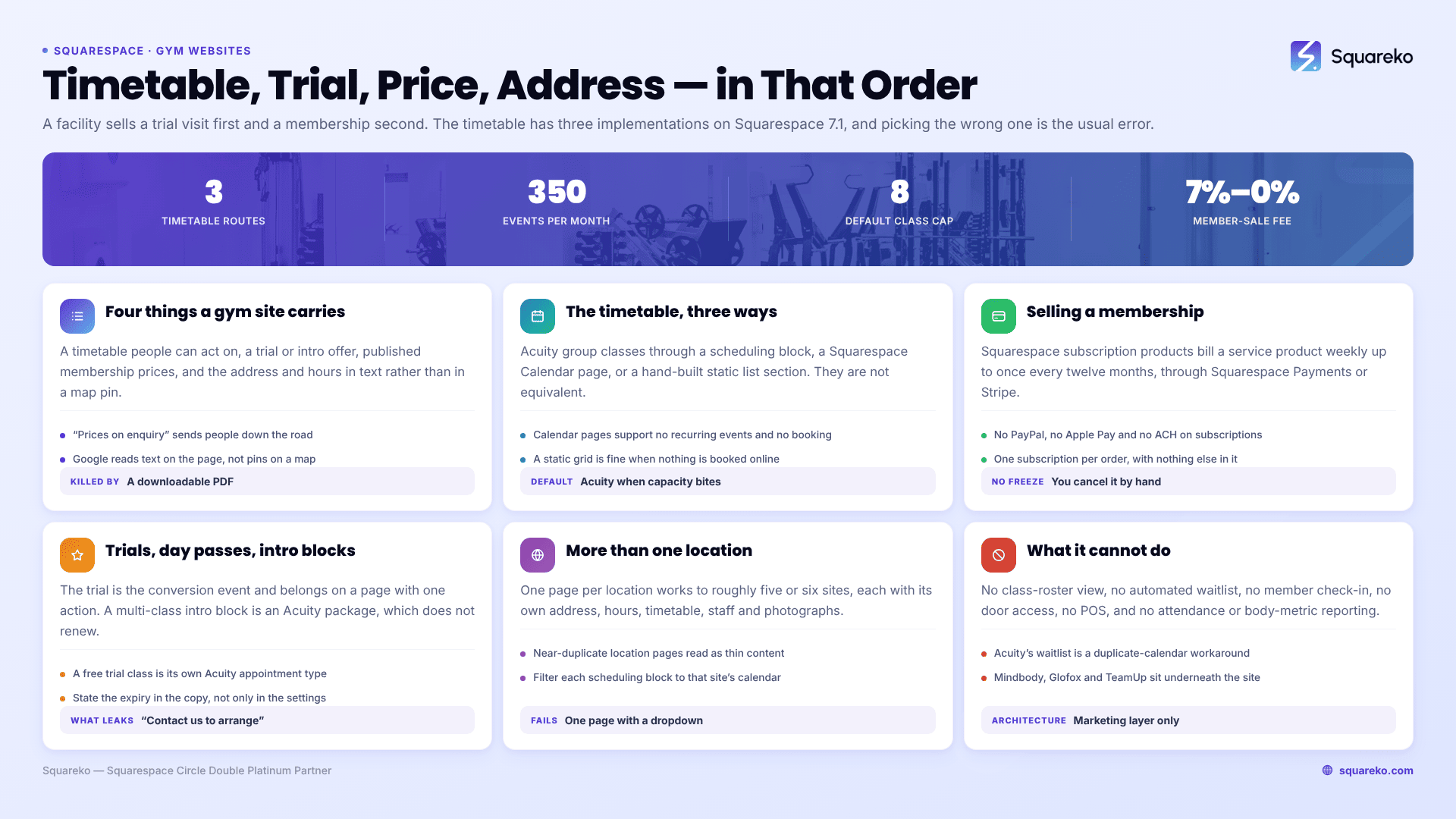
The short answer: A gym website is not selling a website visit, it is selling a physical visit. The three things that decide whether someone walks in are the timetable, the trial offer and the address with real opening hours — in that order. Squarespace 7.1 handles all three, but the timetable has three different implementations with genuinely different trade-offs, and choosing the wrong one is the most common gym-site mistake.
This is the physical-premises post in the fitness template cluster. Online coaches and solo trainers have different problems, covered separately.
The four things a gym website has to carry
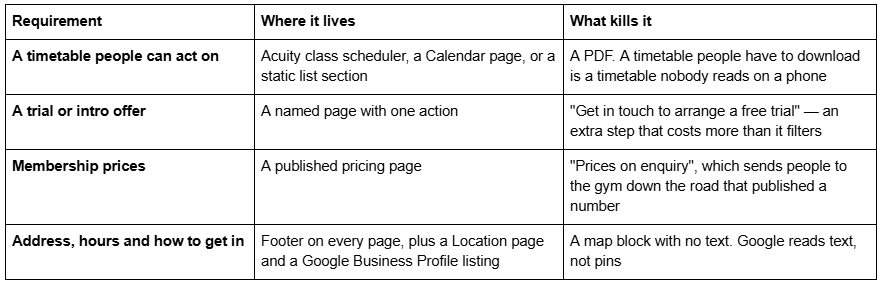
Everything else — the equipment list, the founder story, the transformation gallery — supports those four. It does not replace them.
The timetable problem: three routes compared
This is the decision that defines a gym site on Squarespace 7.1, and it has no single right answer.
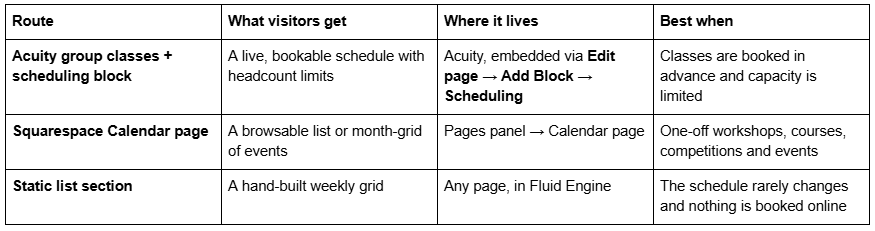
Acuity group classes are the right default for a class-based gym. A group class in Acuity carries a maximum headcount — the "Max number of people" field defaults to eight and is required, and Acuity notes that "leaving this field blank or entering 0 will revert the class to a regular, non-class appointment type." Classes can be assigned to a named calendar, which is how you separate instructors or studios, and can be sold as a series where the price set "is the total cost for all sessions in the series, not the cost for each session."
Calendar pages are for events, not for a weekly timetable. Squarespace is explicit about two limitations that matter here. First: "It's not possible to set up recurring or repeating events." A weekly 6am spin class has to be created as a separate event for every occurrence, which is unmaintainable. Second: "Calendar pages don't support booking. For scheduling events or booking classes and appointments, we recommend adding Acuity Scheduling to your site." Calendar pages also cap at 350 events per month and display 250 upcoming and 30 past events.
A static list section is not the wrong answer if nothing is booked. An open-access gym with a fixed weekly class schedule and no capacity limits genuinely does not need a booking engine. A clean, readable weekly grid built as a list section loads instantly, needs no second subscription and can be edited in two minutes. Do not add Acuity because it feels more professional; add it because you need to stop overfilling a class.
One practical note whichever route you choose: Acuity is a separate subscription from your Squarespace website plan. Group classes are available on every Acuity tier, but packages and memberships with automated billing start at the Standard tier.
Selling gym memberships on Squarespace
Recurring membership billing is possible on Squarespace 7.1, with constraints that are easier to design around than to discover afterwards.
Squarespace subscription products bill a service product on a recurring cycle — weekly or monthly, at intervals up to once every twelve months, either indefinitely or expiring after a set number of payments. Three constraints matter for a gym:
No PayPal, Apple Pay or ACH. Squarespace states it directly: "You can't sell subscription products using PayPal, Apple Pay, or ACH payments." You need Squarespace Payments or Stripe.
One subscription per order, alone. "Customers can only purchase one subscription product at a time and can't include other types of products in the transaction." A new member cannot buy a membership and a starter pack in one checkout.
No pause. If a member wants to freeze for a month, you cancel the pending order manually. There is no member-facing freeze.
Acuity subscriptions are the alternative when the membership is a set of appointments — an eight-classes-a-month membership, for instance. They require the Acuity Standard tier and only work with Stripe or Square as the processor.
Member sites are the third route, and they solve a different problem: gating content rather than selling access to a building. They are free to build, and every membership sale carries a Digital Content and Memberships transaction fee that scales with your website plan — 7% on Basic, 5% on Core, 1% on Plus, 0% on Advanced. For a gym selling a $60/month membership, that difference is real money over a year, and it is a plan decision rather than a template decision.
Trials, day passes and intro offers
The trial is the conversion event on a gym website, and it needs to be a page with one action rather than a line on the pricing page.
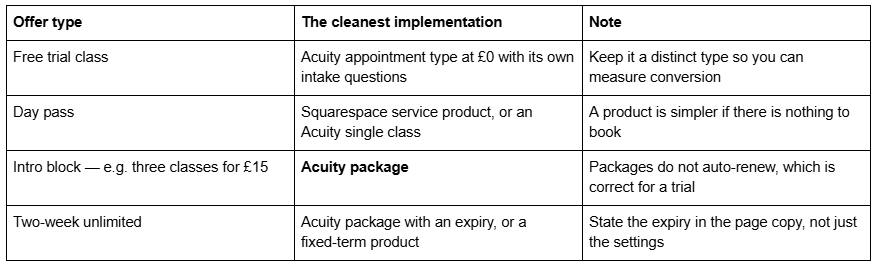
The mistake to avoid is making the trial an enquiry. "Contact us to arrange your free trial" adds a human step between intent and commitment, and most of the drop-off in gym websites happens exactly there. If capacity genuinely has to be managed by a human, say so and give a response time.
Location, hours and getting found locally
A gym's catchment is a few miles wide, which makes local search the highest-value channel and the one most templates ignore entirely.
Four things belong in text, not in an image or a map pin:
The full address, in the footer on every page, formatted as an address rather than a sentence.
Opening hours, including staffed versus access hours if they differ. A 24-hour gym that only staffs 6am–8pm should say both.
How to get in and where to park. For a unit on an industrial estate this is the difference between a first visit and a cancelled one.
The neighbourhoods you actually serve, named. Google reads text.
None of that comes from a template. Nor does a Google Business Profile listing, which is where the map results come from and which no website can substitute for.
Staff and trainer pages
A gym sells access, but people choose a gym because of who is in it. Named trainers with real qualifications and one specialism each outperform a generic "our team" paragraph in every test I have seen.
Three practical notes. Get written consent before publishing a photograph and name. Keep it maintainable — a trainer page listing three coaches who left last year is worse than no trainer page. And if turnover makes profiles impractical, publish the standard instead: what every coach at your gym is qualified to, and how they are assessed.
In Squarespace 7.1 this is a list section or a set of image-and-text blocks in Fluid Engine. No plugin, no special page type.
Booking a tour or first visit
For a facility without class booking — a strength gym, a 24-hour access gym — the tour is the conversion event. Build it as an Acuity appointment type with a fixed duration, assigned to whichever staff calendar covers that slot, with two intake questions: what they train for now, and when they want to start. That is enough to make the tour useful and short enough that people complete it.
Put the booking block on the Location page as well as the Membership page. People decide to visit when they work out how far away you are.
Handling multiple gym locations
Two workable patterns, and one that fails.
One site, one page per location works up to roughly five or six sites. Each location page needs genuinely distinct content — its own address, its own hours, its own timetable, its own staff, its own photographs. Google treats near-duplicate location pages as thin content, and swapping the town name in one paragraph is the fastest way to generate that problem at scale.
Separate sites per location works for franchises where each site is separately owned and marketed. It costs a Squarespace plan per site and duplicates every content update, so only do it when the operators are genuinely separate businesses.
What fails is a single page listing all locations with a dropdown. It cannot rank for any individual town, and local intent is the entire point.
Whichever you choose, the timetable is the hard part: each location needs its own Acuity calendar, and the scheduling block on each location page should be filtered to that calendar rather than showing everything.
Which Squarespace templates ship a gym page set
Shape Matrix is the closest fit. Eleven pages: Home, Home 2, Training, Classes, Blog, Portfolio, Gallery, Contact, Freebie, a Style Guide and a 404. The Classes page ships as a class list with an online booking section beneath it — the natural home for a scheduling block — and the Training page carries three named coach profiles alongside personal training and nutrition blocks. Portfolio and Gallery give transformation work and facility photography real homes. See the Shape Matrix demo.
Worst for: anyone expecting About and membership pricing pages in the box. Shape Matrix ships neither, and a gym without a published membership price loses to the gym that published one. Both are buildable from the included sections; budget an afternoon.
Fit Foundry is the alternative when pricing presentation matters more than the timetable. Eleven pages — Home, Home 2, Service, About, Blog, Shop, Contact, Freebie, FAQs, Style Guide and 404 — with a Service page carrying a three-step process, a "what's included" block and a three-tier Packages & Rates section. The Shop page gives day passes and merchandise somewhere to live. It has no gallery or portfolio. See the Fit Foundry demo.
Click Crafter is worth knowing for multi-location operators: twelve pages with a repeatable service-detail pattern that adapts into distinct location pages. See the Click Crafter demo.
What Squarespace cannot do for a gym
Be clear about this before you build, because the answer is usually a second system rather than a different template.
No class-roster management. Acuity holds attendees against a class and lets you add and remove them, but there is no front-desk roster view and no attendance history that affects a member's pack balance automatically.
No automated waitlist. Acuity's documentation describes a manual workaround: create a second calendar named Waitlist, duplicate the classes, allow multiple bookings per slot, and move people over by hand when someone cancels. It states that "Acuity won't prompt you to review incoming requests."
No check-in, door access or POS. Nothing in Squarespace 7.1 or Acuity handles member check-in at the door, card or fob access, or till transactions at reception.
No member management beyond billing. No attendance reporting, no lapsed-member flags, no body-metric tracking.
Facilities that need those pair a Squarespace site with a gym management system — Mindbody, Glofox, TeamUp and similar — and keep Squarespace as the marketing and sales layer. That is a perfectly good architecture, and it is the one most well-run studios end up with.
Where to start
Decide the timetable route first, because it determines whether you need Acuity at all and which tier. Then publish a membership price and build the trial as a page with one action. Then the address, the hours and the staff. Design last — Site Styles in Squarespace 7.1 makes styling the easiest thing on the list to change.
If you want the Classes and Training pages already built rather than assembled, Shape Matrix sits in our premium Squarespace templates range at $249, is delivered as a Squarespace contributor invitation rather than a file download, and can be installed onto an existing live site as a paid add-on in around 48 hours. All sales are final on digital products, so walk the demo first.
If your gym already fills its classes and your problem is retention rather than acquisition, a gym management system will move more numbers than a new website will.
FAQ
-
Three routes. Acuity group classes embedded through a scheduling block give a live, bookable schedule with headcount limits, and it is the right default when capacity matters. A Squarespace Calendar page suits one-off workshops and events. A static list section works fine when the schedule rarely changes and nothing is booked online.
-
Three routes. Acuity packages let a client buy a pack and book against the balance in one system, and require the Acuity Standard tier. A Squarespace service product sells a block through the website checkout. A subscription product bills monthly automatically. For 1:1 training where the client picks their own times, Acuity packages are the right default.
-
Yes. Squarespace subscription products bill service products recurring through Squarespace Payments or Stripe — not PayPal, Apple Pay or ACH — with one subscription per order and no member-facing freeze. Acuity subscriptions suit memberships that are really a set of appointments and need the Standard tier with Stripe or Square.
-
Either works, but commit to one. Make a free consultation a distinct Acuity appointment type with its own duration and intake questions so you can measure conversion. If you charge for the first session, publish the price and make it directly bookable. What fails is a free-consultation button that opens a generic contact form.
-
One page per location, each with its own address, hours, timetable, staff and photographs, and each scheduling block filtered to that location's Acuity calendar. Near-duplicate location pages read as thin content. A single page with a location dropdown cannot rank for any individual town, which defeats the purpose.
-
Yes — every Squarespace template is included with a subscription at no extra cost, and independent reviewers most often name Cole, Lakshi, Klipsan, Rotate and Bogart for fitness businesses. The trade-off is page count: free templates give you a design, not a pre-built packages layout, class page or trainer page.

Author Bio
I'm Walid Hasan, a Certified Squarespace Expert and Squarespace Circle Platinum Partner with over 12 years of hands-on experience designing and optimizing high-performing websites. Over the years, I've had the privilege of building more than 2,000 Squarespace websites for clients around the world, always focusing on clean design, strong user experience, and conversion-driven results.
