
Squarespace Templates for Pilates Studios: Capacity First
The short answer: A Pilates studio website is built around one number — how many reformers you own. That number is a hard cap on every class you sell, it has to be enforced at the point of booking, and Squarespace 7.1 cannot enforce it. Acuity Scheduling can, through the Max number of people field on a group class. Choose a template on whether it gives you somewhere to explain the apparatus and prove the instructor's training.
Of the Squareko range, Shape Matrix is the closest fit: 11 pages including dedicated Training and Classes pages plus a Portfolio and a Gallery.
Mat and reformer are two different businesses on one site
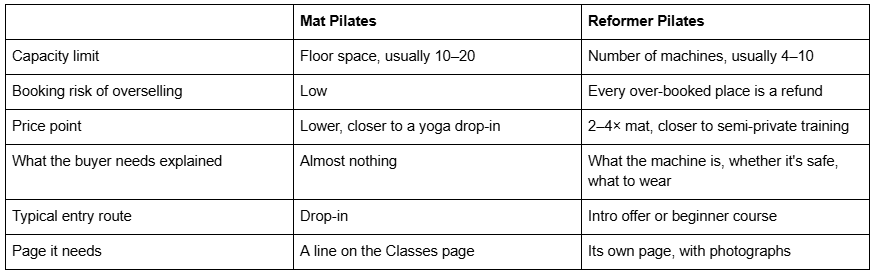
If your studio runs both, that table is your information architecture. Two prices, two capacities, two buyer states, two pages.
Capacity is the whole problem, and it lives in Acuity
Squarespace 7.1 has no concept of a class with a fixed number of places. Events pages do not cap attendance, products cap stock rather than seats per session, and there is no roster anywhere on the platform.
The native route is Acuity Scheduling — the product Squarespace branded as Squarespace Scheduling for several years, which the Squarespace Help Center now states is "officially Acuity Scheduling" again. Acuity is billed separately from your website plan; Squarespace's own documentation says "Your Acuity subscription is separate from your site subscription."
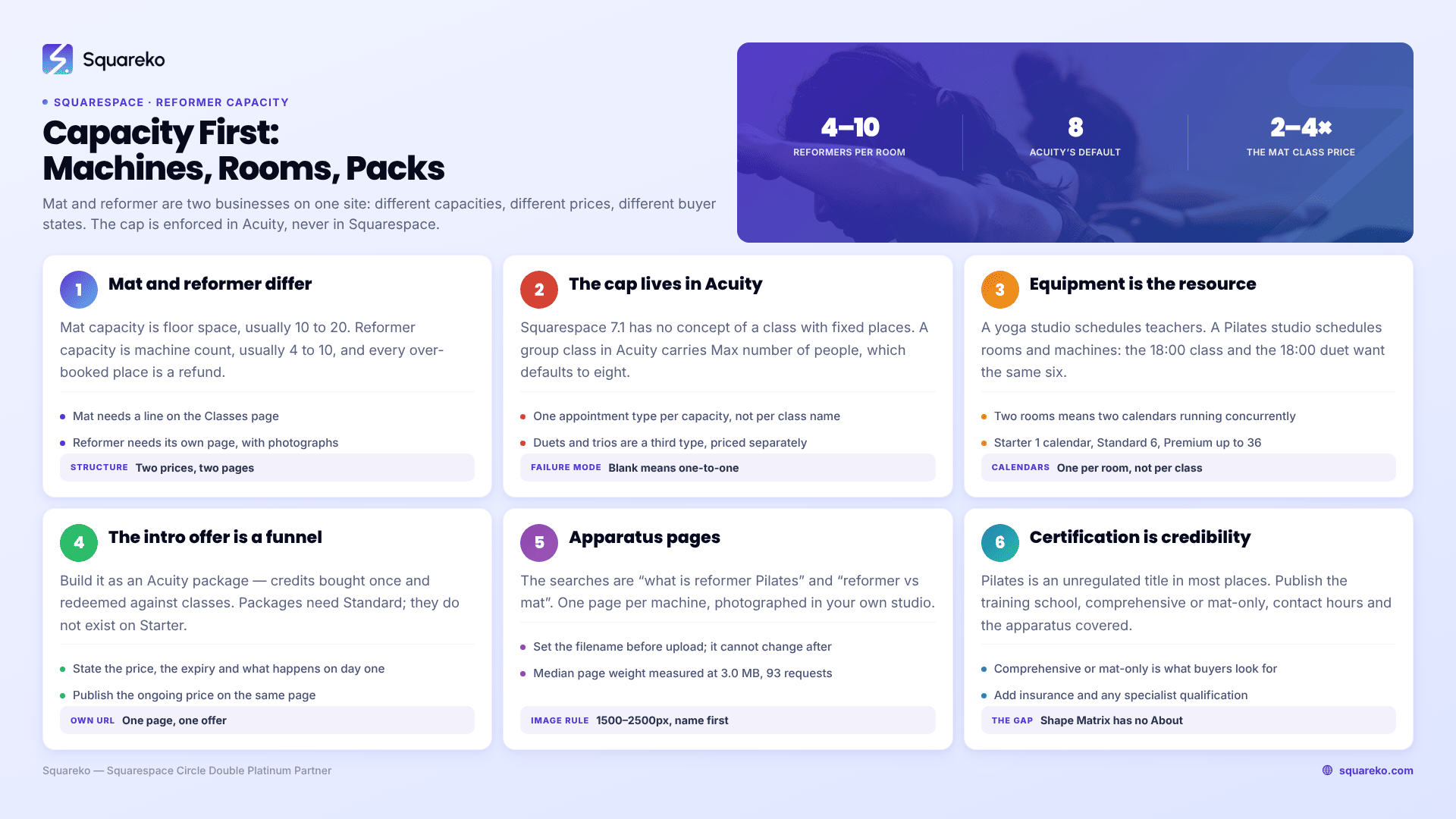
In Acuity, a group class is an appointment type that multiple clients book into at a fixed time. When you create one you set a Max number of people, which defaults to eight. For a reformer studio that field is not a preference — it is your machine count. Set it to zero or leave it blank and Acuity converts the class back into a one-to-one appointment type, which is exactly the failure mode that oversells a room.
Three capacity rules worth writing down before you build:
One appointment type per capacity, not per class name. If your reformer room holds six and your mat room holds sixteen, those are two different appointment types even if both are called "Beginners".
Semi-private is a third appointment type. Duets and trios are group classes with a max of two or three, priced separately. Do not try to run them as a discounted version of the six-person class.
Test the "spots left" display before you commit. A studio owner on the Squarespace forum reported it plainly: "The recurring ones does not show how many available spots remain, while the ones non-recurring does." If "2 spaces left" is part of how you fill Tuesday evenings, check that behaviour in your own account first.
Equipment is the scheduling resource, not the instructor
This is where Pilates diverges hardest from yoga, and where most studio websites are built wrong.
A yoga studio schedules teachers — Acuity's own guidance for the sector is to "create a calendar for each teacher so clients can choose between them during booking." A Pilates studio schedules rooms and machines. Your Tuesday 18:00 reformer class cannot run at the same time as your Tuesday 18:00 duet, because both need the same six machines.
Acuity models this through calendars, and calendars are capped by plan:
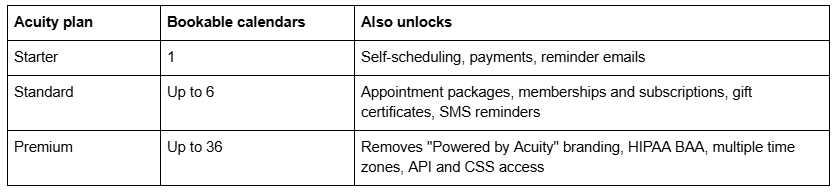
The practical mapping for a Pilates studio:
One room, one set of apparatus — one calendar. Capacity is handled by Max number of people. Acuity Starter is technically enough, right up until you want to sell an intro pack.
Two rooms (reformer studio plus mat studio) — two calendars, so the two timetables can run concurrently without colliding.
Reformer studio plus a private tower or Cadillac room — a third calendar, because a private booking on the Cadillac must block that machine and nothing else.
Almost every Pilates studio ends up on Standard anyway, because intro packs and memberships live at that tier. Price the Acuity subscription into the project at the start.
The intro offer is a funnel, not a price
Reformer Pilates has a genuine conversion problem: the class costs two to four times a yoga drop-in and the buyer has never been on the machine. The industry answer is the intro offer — three classes for the price of one, or two weeks unlimited — and it is the single highest-value thing on a Pilates studio website.
Build it as an Acuity package: a bundle of credits the client buys once and redeems against future classes. Packages require the Acuity Standard plan or above; they do not exist on Starter.
Four things the page around it has to do, in this order:
State the price and what it includes in the first line. Three reformer classes, £45, valid 30 days.
State the expiry. An intro pack with no expiry does not convert anybody; an intro pack with a 30-day expiry creates the second visit, which is where retention actually happens.
Say what happens on day one. Arrive fifteen minutes early, wear grip socks, tell the instructor about injuries. Beginners do not book because they are afraid of looking foolish, not because of the price.
Say what it converts into. Publish the ongoing price on the same page. Hiding it makes the intro offer feel like a trap.
Give this its own page with its own URL, not a section on the homepage. It is the page you will link from every advert, every Instagram bio and every local listing, and it needs to be linkable and measurable on its own.
Apparatus pages earn the search traffic
The searches that bring a new Pilates client to your site are not "Pilates studio near me". They are "what is reformer Pilates", "is reformer Pilates good for back pain", "reformer vs mat Pilates", "what is a Cadillac in Pilates", "can I do reformer Pilates while pregnant".
Every one of those is a page. This is the most underused opportunity on Pilates studio websites, and it costs nothing but writing time.
Give the reformer its own page. Then the tower, the Cadillac, the Wunda chair and the barrel if you own them — one page each, with a photograph of your actual machine in your actual studio, an explanation of what it does, who it suits, and one clear line about who should check with a clinician first. Link each from the Classes page and from the intro offer page.
Two Squarespace notes for building them. Upload photographs at 1500–2500px wide — 2500px is the maximum Squarespace serves — and set filenames before you upload, because filenames cannot be changed after upload. The Squarespace CDN serves WebP unconditionally regardless of your source format, which helps with weight; across 54 Squareko-built client sites measured in August 2026 (Playwright and Chromium lab test, cloud datacentre, unthrottled, single run per site, load-only CLS — lab data, not field data), median page weight was 3.0 MB across 93 requests, and the heaviest sites were consistently the image-led ones. Six apparatus pages with four photographs each is fine. One apparatus page with forty is not.
Instructor certification is the credibility layer
Pilates is an unregulated title in most jurisdictions, which means the buyer has no way to tell a 500-hour comprehensively trained instructor from someone who did a weekend course — unless you tell them.
Publish, per instructor: the training school, the certification type (comprehensive versus mat-only), the number of contact hours, which apparatus the certification covers, continuing-education credits, insurance, and any specialist qualification such as pre- and post-natal, hypermobility, scoliosis or post-rehabilitation. Then one sentence in their own voice, because that is what people actually read.
Comprehensive versus mat-only is the distinction most worth publishing plainly. It is the one thing a knowledgeable buyer looks for and the one thing almost no studio website states.
Note a structural gap: Shape Matrix ships no About page, so instructor credentials are a page you build. Budget for it rather than assuming it exists.
What Squarespace and Acuity cannot do for a Pilates studio
No template changes any of this, so decide about it before you buy one.
No waitlist. Acuity's help centre states it "doesn't have a built-in waitlist feature". The documented workaround is a second calendar named Waitlist with the relevant classes duplicated onto it. For a six-place reformer class that fills every week, that manual process is the thing most likely to push a studio onto dedicated software.
No class roster or check-in. There is no front-desk attendance view.
No machine-level assignment. Acuity caps a class at six; it does not let a client choose reformer number four.
No unified credit-balance view across intro packs, class packs and memberships.
Studios that outgrow this keep Squarespace for the marketing site and run Punchpass, Momence, WellnessLiving or Mindbody underneath, embedding the schedule in a Code Block. One plan requirement catches people out: JavaScript and iframes inside Code Blocks require the Core plan or above (Business, Commerce Basic and Commerce Advanced also qualify). A studio on the entry-level website plan cannot embed a third-party booking widget at all.
Shape Matrix and Fit Foundry, by their actual pages
Shape Matrix — 11 pages: Home, a second homepage layout, Training, Classes, Blog, Portfolio, Gallery, Freebie, Contact, a 404 page and a Style Guide page. Classes carries the timetable and the Scheduling block; Training is the natural home for private and semi-private work; Portfolio and Gallery cover the studio and the apparatus. The gap is the missing About page, which for a Pilates studio is where certifications go, so plan to build it.
Fit Foundry — 11 pages: Home, a second homepage layout, About, Service, Shop, Blog, FAQs, Freebie, Contact, 404 and Style Guide. The About page and the FAQs page are the two Shape Matrix lacks, and both matter here — FAQs is where "do I need to be fit", "what do I wear", "is it safe with a disc injury" get answered. The Shop page handles grip socks, gift vouchers and digital programmes. It has no Gallery or Portfolio, so apparatus photographs sit in Gallery sections on regular pages instead. Gallery sections have six layouts, a 250-image cap and cannot hold video.

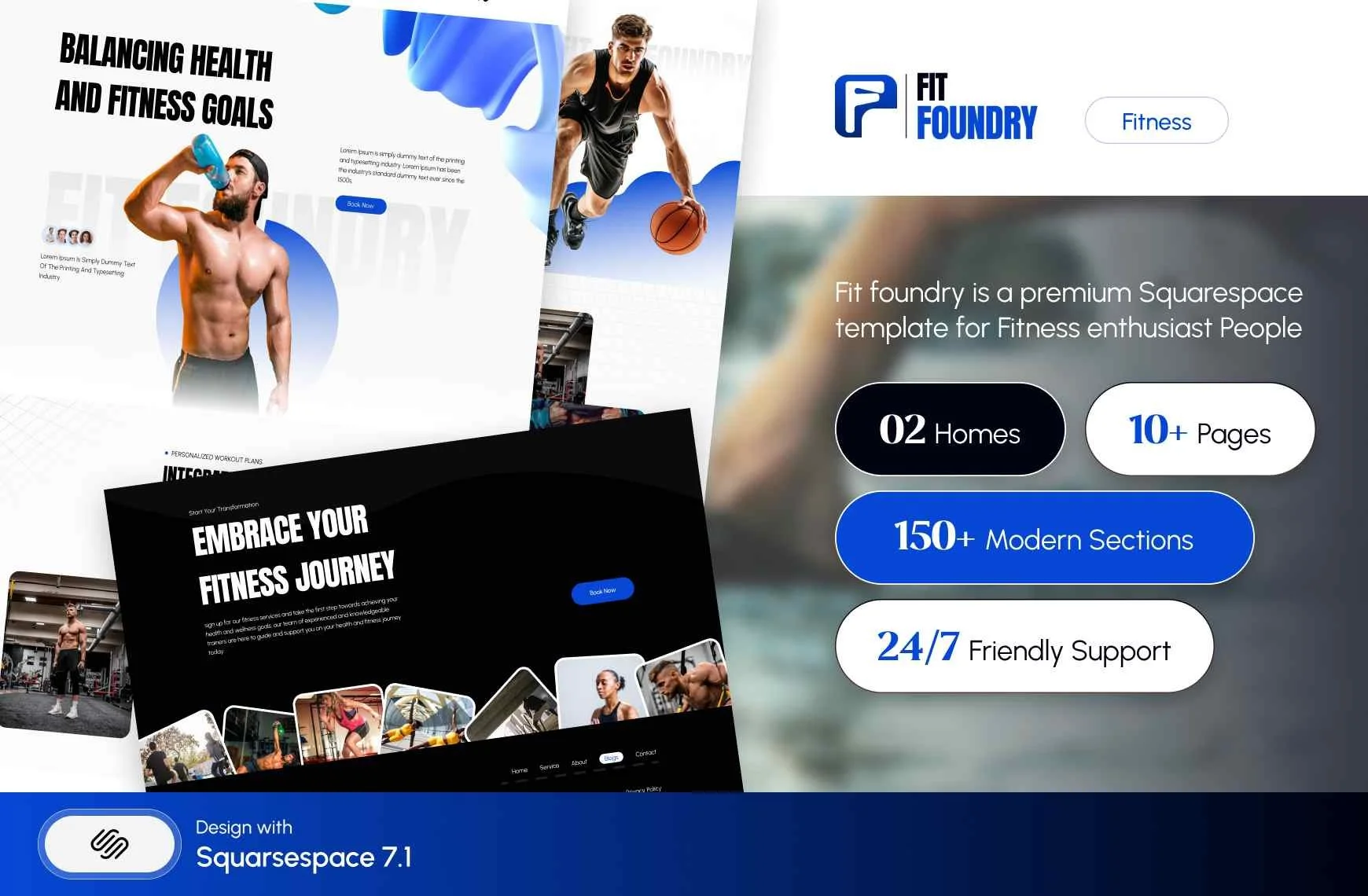
Both are $249, delivered as a Squarespace contributor invitation rather than files to download, with 60 days of email support. Customisation is not included, sales are final, and demo images are not licensed for live use — you replace every one. Every template also ships 150+ pre-designed sections, a Style Guide page and a 404 page.
Choosing a template for a Pilates studio
Open a demo on a phone and check three things: is there a page where a beginner learns what a reformer is, is there a page where the instructor's training is stated, and is there an obvious place to embed a booking block. If all three have a home, the template holds.
Then write down your machine count, your class sizes, your intro offer and your instructor certifications before you build anything. Those four items are what stop Pilates websites launching, and no template supplies them.
If you would rather not wire Acuity, capacities and packages to a new site yourself, the premium Squarespace templates at Squareko are installed for you, onto a new site or an existing one, with the pages ready for your content. Most studios do this perfectly well themselves with the structure above — it is published because the structure is the hard part.
The split with the neighbouring post is worth stating plainly: yoga is a timetable-breadth problem, Pilates is a capacity-and-equipment problem. If you run many weekly classes across several teachers and sell drop-ins, passes and memberships side by side, read Squarespace templates for yoga studios instead. For spa, breathwork, sound and holistic practices, see Squarespace templates for wellness businesses. The cluster hub is Squarespace templates for fitness.
FAQ
-
Squarespace itself cannot cap class size. You do it in Acuity Scheduling by creating the class as a group appointment type and setting Max number of people, which defaults to eight. For a reformer studio, set that number to your machine count. Leaving it blank turns the class back into a one-to-one appointment.
-
Yes, with limits. Acuity enforces a per-class capacity and takes payment, which covers the core requirement. It does not assign specific machines to specific clients, offer a waitlist, or provide a front-desk check-in view. Studios needing those features run dedicated software and embed it in Squarespace.
-
Use a Course page when the programme has a beginning, a middle and an end and should be taken in order — it gives lessons and progress tracking, and you can gate the whole course or only specific lessons. Use a Member site when access is ongoing and you keep adding content, such as a growing workout library.
-
Yes. They have different capacities, different prices and different buyer states. A mat class needs a line on the timetable; a reformer class needs a page explaining the machine, what to wear, and who should check with a clinician first. Separate pages also let each rank for its own searches.
-
One page per location, each with its own address, hours, timetable, staff and photographs, and each scheduling block filtered to that location's Acuity calendar. Near-duplicate location pages read as thin content. A single page with a location dropdown cannot rank for any individual town, which defeats the purpose.
-
Shape Matrix is the closest fit in the Squareko range — 11 pages including Training, Classes, Portfolio and Gallery — but it ships no About page, so instructor credentials need building. Fit Foundry has About, FAQs and Shop but no Gallery or Portfolio. Choose on which gap you would rather fill.

Author Bio
I'm Walid Hasan, a Certified Squarespace Expert and Squarespace Circle Platinum Partner with over 12 years of hands-on experience designing and optimizing high-performing websites. Over the years, I've had the privilege of building more than 2,000 Squarespace websites for clients around the world, always focusing on clean design, strong user experience, and conversion-driven results.
