
Squarespace Template for Wedding Photographers: Build the Booking Pipeline, Not Just the Gallery
The short answer: A wedding photography site is a five-stage pipeline, and the template only builds the first stage. Couples arrive, check whether you are free, look for a number, look for proof you deliver, and then enquire — in that order, usually on a phone, usually at night. Choose a template on whether it ships pages for stages two through five, because every template on the market handles stage one. And know the platform constraint before you start: Squarespace has no native client proofing, so delivery lives somewhere else and links back.
Here is the pipeline, what Squarespace 7.1 gives you at each stage, and where it does not.
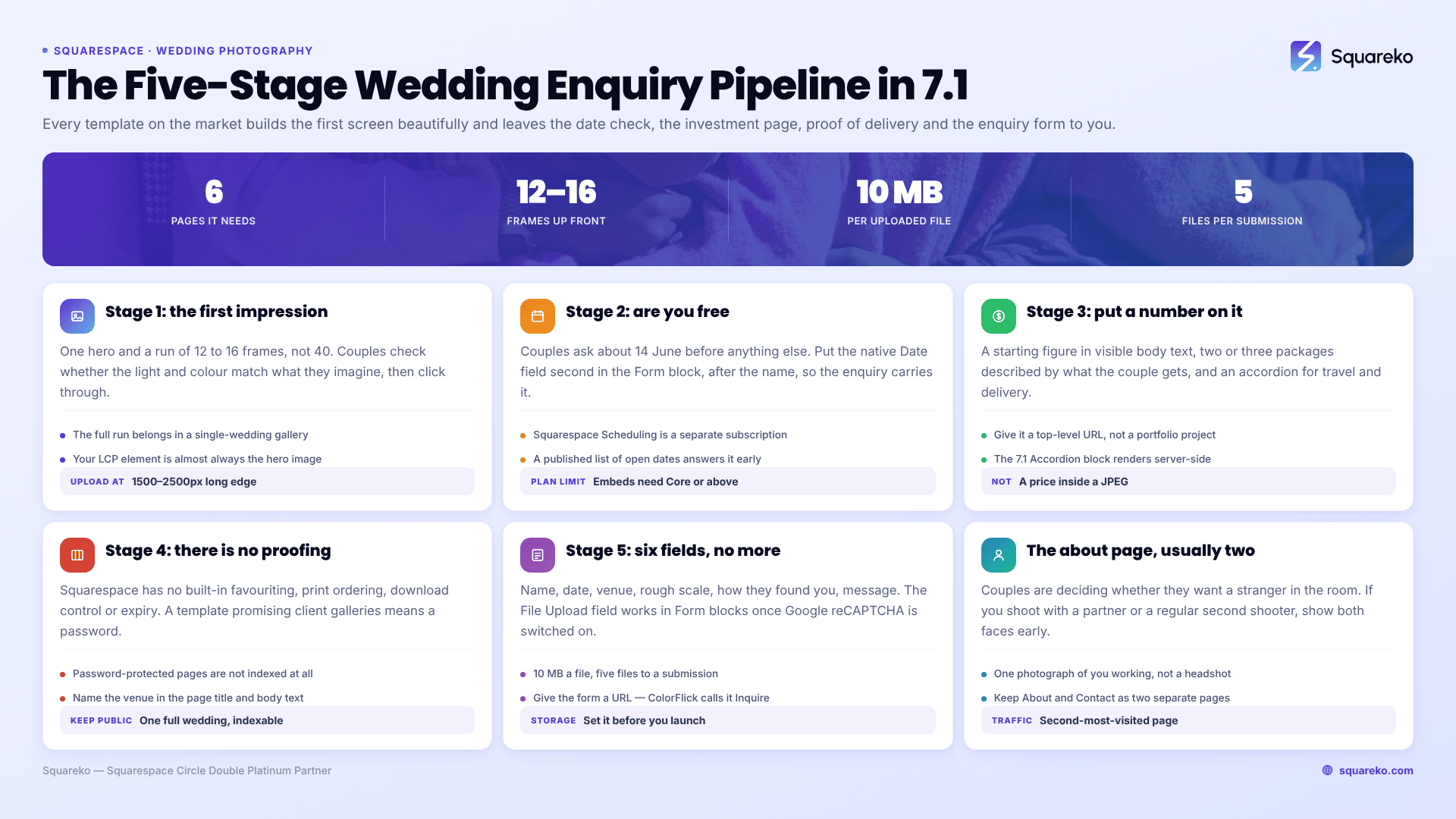
The five-stage wedding enquiry pipeline
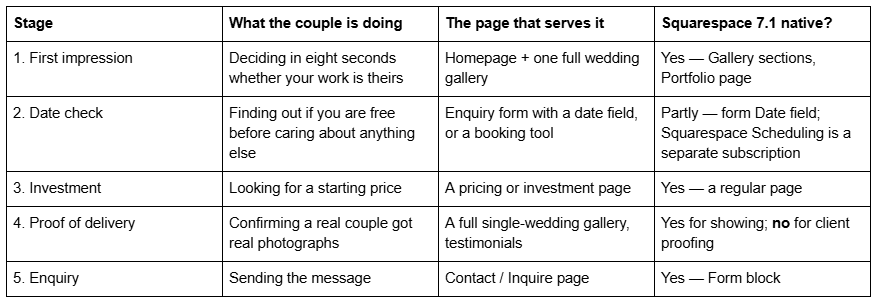
Most wedding photography templates build stage 1 beautifully and leave the other four to you. The two Squareko templates below are chosen specifically for what they ship at stages 2–5.

Disclosure: Squareko sells both. Big Cat Creative, Studio Founded and Station Seven all publish wedding-specific templates that are worth comparing; Studio Founded in particular builds only for wedding photographers and its editorial pacing is the best in the category.
Between the two, the deciding question is whether you intend to write. ColorFlick puts four subject pages — Weddings, Engagements, Portraits, Photo Booth — on their own top-level URLs alongside a Journal and a named Inquire page, which serves stages 1 and 5 better than anything else in the range: four service URLs can each target a different search, and one Journal post per venue is the most reliable local ranking engine on the platform. Aura Capture trades the Journal for a dedicated FAQs page, which is stage 3 work done in advance — travel, second shooter, turnaround, deposit, cancellation — answered before a couple has to ask for it. Be clear about what neither of them ships, though: there is no investment or pricing page in either page set, so stage 3 is a page you build yourself whichever you buy.
Stage 1 — the first impression, and how many frames it takes
One decision: how many photographs go above the fold and on the first scroll. The answer is fewer than you want.
A wedding homepage needs one hero and a run of 12 to 16 frames, not 40. Couples do not audit a portfolio; they check whether the light, the colour and the emotional register match what they imagine. That judgement is made in the first six images and confirmed by the next ten. Everything else belongs in a full single-wedding gallery one click away.
There is a performance reason too. Across 54 Squareko-built client sites measured in August 2026 — Playwright/Chromium, cloud datacentre, unthrottled, single run per site, load-only CLS, so lab data rather than field data — median page weight was 3.0 MB across 93 requests and median mobile LCP was 2.01s, with 74% under Google's 2.5s "good" threshold. Wedding sites sit at the heavy end. Your Largest Contentful Paint element is almost certainly the hero image; upload at 1500–2500px on the long edge, since 2500px is the maximum Squarespace serves, and set the filename before upload because it cannot be changed afterwards.
Stage 2 — the date check, which is the real first question
Before a couple cares about your work, they care whether you are free on 14 June. Sites that hide this behind a generic contact form lose enquiries to sites that do not.
Three routes on Squarespace 7.1:
A Date field in the Form block. Simplest and free. Squarespace forms include a native Date field; put it second, immediately after the name, so the enquiry itself carries the date. You still reply manually, but you never have to ask.
Squarespace Scheduling (formerly Acuity). The native booking route, added with a scheduling block. It is a separate subscription from your Squarespace plan, so budget for it. It is built for appointments rather than whole-day bookings, which suits consultation calls better than wedding dates.
A published availability list. A plain text section that says which dates in the coming season are still open, updated monthly. Unglamorous, and it converts, because it answers the question before it is asked.
Note the plan constraint if you go third-party: JavaScript and iframes inside Code Blocks require the Core plan or above, as do site-wide Code Injection. A Basic-plan site can link out to an external booking page but cannot embed one.
Stage 3 — the investment page, and whether to put a number on it
Put a number on it. "Investment starts at £2,400" filters your enquiries better than any qualifying question you could write, and the couples who leave were never going to book.
What an investment page needs on Squarespace 7.1:
A starting figure in visible body text, not inside an image and not behind an email gate. Text inside a JPEG is invisible to search engines and to AI answer engines, and a pricing PDF behind a form loses the couples who will not trade an email address for a number.
Two or three packages, described by what the couple gets — hours of coverage, number of photographers, what is delivered and when — rather than by deliverable count alone.
An accordion for the objections. Squarespace 7.1's native Accordion block renders server-side, so both question and answer text are crawlable. Travel, second shooter, albums, turnaround, deposit, cancellation. Aura Capture ships a dedicated FAQs page for exactly this.
Do not build the investment page as a Portfolio project. It is a service page and it needs a top-level URL, because "wedding photography prices [city]" is a real search and a project buried at /portfolio/pricing will not win it.
Stage 4 — client galleries, and the thing no template shop tells you
Squarespace has no native client proofing. There is no built-in gallery where a couple favourites images, orders prints, or downloads a set with an expiry date. No template changes this, from any shop, at any price. Any product page promising "client galleries" means a password-protected page.
What Squarespace actually gives you:
Per-page password protection. Every page — including an individual Portfolio project — can carry its own password, set in the page's settings. Good enough to show one couple one gallery. Note that password-protected pages are not indexed by search engines, which is the point, and also means a sneak-peek gallery you want found must not be protected.
Member Areas, a paid add-on, which gates content behind a login rather than a shared password. Better for an ongoing relationship, overkill for a single delivery.
What working wedding photographers actually do is run delivery on a dedicated platform — Pic-Time, Pixieset, ShootProof or CloudSpot — and link to it from the Squarespace site, usually from a "Client Access" navigation item. Those platforms handle favouriting, print fulfilment, download limits and expiry, which is a product category of its own, and none of it is something a website template can substitute for.
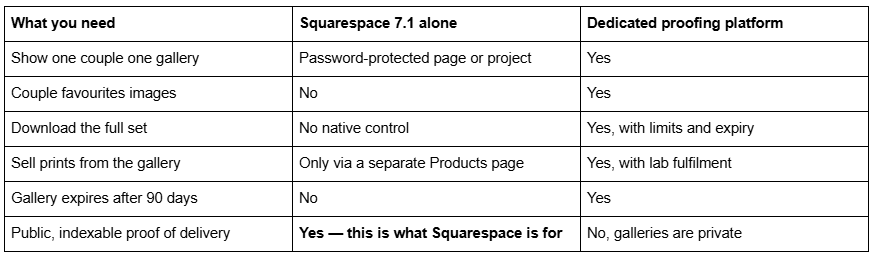
The structural rule: keep one public, indexable "recent wedding" gallery on the Squarespace site as proof of delivery, and keep the actual client galleries off it. The public one is marketing and needs to be found. The private ones are delivery and need to be fast, unlimited and downloadable.
That public gallery is worth building properly. One complete wedding — 40 to 60 frames in the order the day happened, on its own URL, with the venue named in the page title and in body text — does more for a wedding photography site than a best-of grid of 200 images from 30 weddings. It proves you can carry a whole day rather than produce six good frames, and it gives you a page that can genuinely rank for "[venue name] wedding photographer", which is the single most bookable search in the category. Build it as a Portfolio project so it gets its own URL, or as a regular page if the venue is one you shoot at often enough to want it in the navigation.
Stage 5 — the enquiry form, and the fields that matter
Six fields, no more: name, wedding date, venue or location, guest count or rough scale, how they found you, and a free-text message. Anything longer and mobile completion falls off a cliff.
Two Squarespace 7.1 specifics worth knowing:
The File Upload field exists, but it is only available in Form blocks — not in Add to Cart or custom checkout forms — and Google reCAPTCHA must be turned on in the form block's storage tab before you can add the field. Each file is capped at 10 MB and a submission accepts up to 5 files. That is enough for a couple to attach a mood board or a venue floor plan, which is a genuinely useful differentiator on an enquiry form.
Set the storage before you launch. A form with no storage destination configured still submits and still emails, but the record-keeping is on you. Check it on the live site, logged out.
Put the enquiry form on its own URL — ColorFlick calls it Inquire — rather than only in the footer. A named page can be linked from a Journal post, an Instagram bio and a venue's supplier list.
The about page a wedding photographer needs, and why it is usually two people
The About page is the second-most-visited page on every wedding photography site I have built, and most of them are written as a CV. Couples are not hiring a résumé; they are deciding whether they want a stranger in the room during the most emotional hour of their lives.
Two structural notes specific to wedding work:
If you shoot as a couple or with a regular second shooter, say so early and show both faces. A couple booking a two-person team wants to know who is turning up. A single portrait and the word "we" throughout reads as evasion.
Put one photograph of yourself working, not only a headshot. It answers a question nobody asks out loud: what will you be like on the day.
A template that ships a distinct About page and a separate Contact page — Aura Capture does — saves you from the common failure of merging the two, which forces a couple who only wants to read about you through a form they are not yet ready to fill in.
The pipeline matters more than the template. If your site already ranks and enquiries are arriving, the highest-value change is almost never a redesign — it is putting a starting price on a page and a date field at the top of the form.
Where a rebuild genuinely earns its cost is when the URL structure is wrong: one Portfolio page carrying every service, no separate wedding page, no investment URL, and a form in the footer. Unpicking that after two years of rankings is delicate work, because slug changes on Squarespace create no automatic 301, ever. That is the situation worth a second opinion on, and it is why the premium Squarespace templates in our shop are listed with their full page structure. Most wedding photographers reading this can fix stages 2, 3 and 5 in an afternoon without changing a template at all.
FAQ
-
A Portfolio page is a collection of projects, each with its own URL, capped at 60 projects across five layouts. A gallery section is a block of images inside a page, capped at 250 images across six layouts, with no individual URLs. Portfolio pages rank; gallery sections display.
-
Sixty. Squarespace states you can add up to 60 projects to a portfolio page. If you need more indexable bodies of work than that, put the archive in a blog with categories and keep the Portfolio page for the projects you actively want to be commissioned for.
-
No. Squarespace's documentation states it is not possible to upload videos or add blocks to a gallery section. If your portfolio includes video, use a gallery block, which supports embedded video, or put the video in a video block inside a Portfolio project.
-
Not from the code, which visitors never see. They notice unchanged demo photography and an unchanged homepage section sequence. Replace the images and cut the homepage to the sections your business actually needs, and the recognisable signals are gone.
-
Not as designed. Hover: Background, Hover: Fixed and Hover: Follow Cursor all depend on a hover state that does not exist on a touchscreen. They collapse to a text list of project titles at the 767px breakpoint. Check the mobile result before building a site around one.
-
No. Squarespace Scheduling, formerly Acuity, is a separate subscription and is added to a site with a scheduling block. It is built around appointments rather than whole-day bookings, so it suits consultation calls better than holding a wedding date.

Author Bio
I'm Walid Hasan, a Certified Squarespace Expert and Squarespace Circle Platinum Partner with over 12 years of hands-on experience designing and optimizing high-performing websites. Over the years, I've had the privilege of building more than 2,000 Squarespace websites for clients around the world, always focusing on clean design, strong user experience, and conversion-driven results.
