
Squarespace Portfolio Template for Photographers: How to Sequence the Work
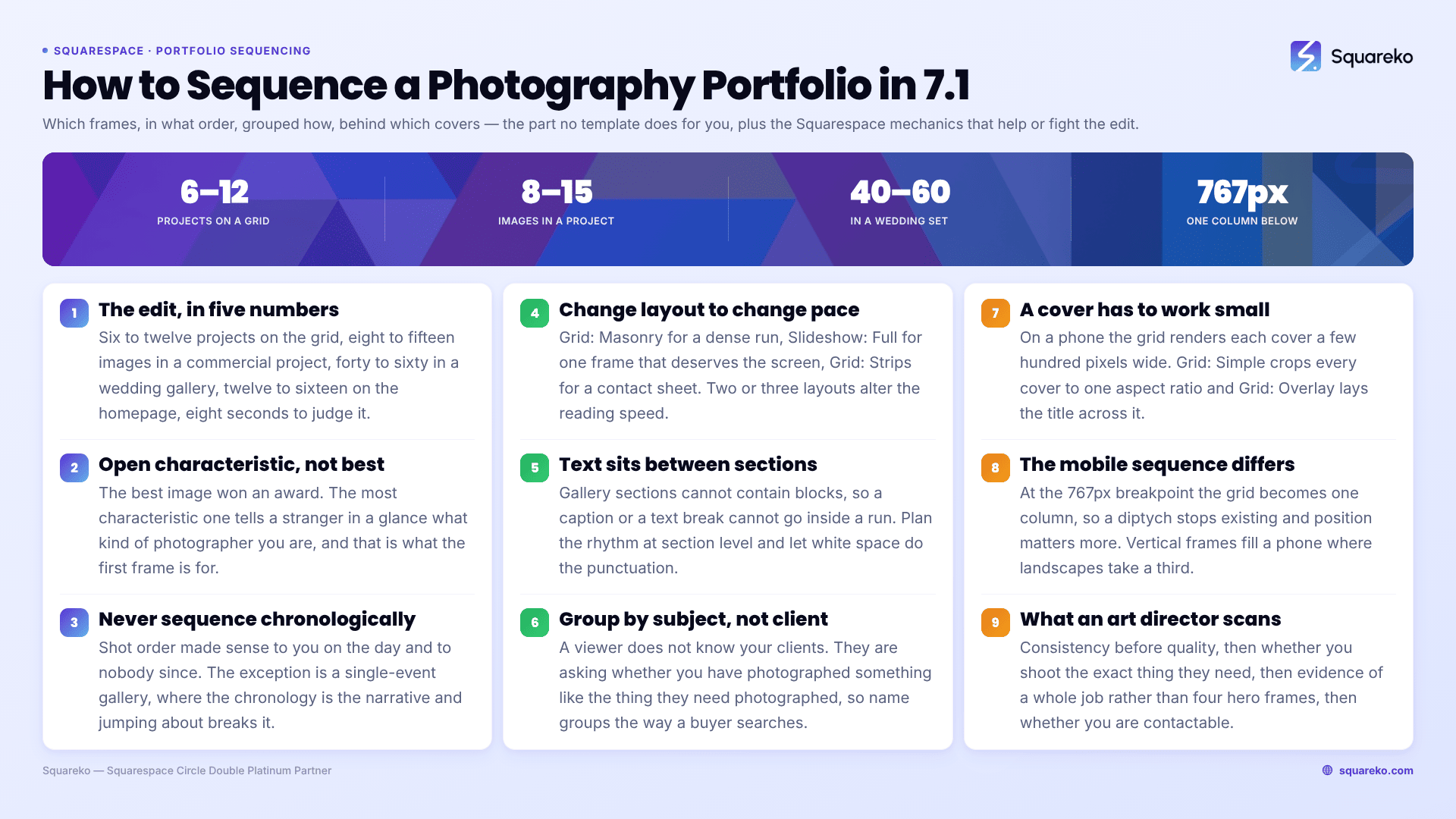
The short answer: The template is not the reason your portfolio is not converting. The edit is. Most photography portfolios on Squarespace fail because they show too many images, in the order they were taken, with covers chosen for beauty rather than for legibility at thumbnail size. Fix the sequence and a plain grid outperforms an expensive design. Here is how to build the edit, and the Squarespace 7.1 mechanics that either help or fight you.
A note on scope: this post is about presentation — the order, the pacing, the grouping and the covers. The structural decision that comes before it — whether your work belongs in a Portfolio page, a Gallery section or a single stacked landing page, and the caps on each — is resolved in the photography portfolio structure guide. Read that first if you have not built the site yet.
The edit, in five numbers
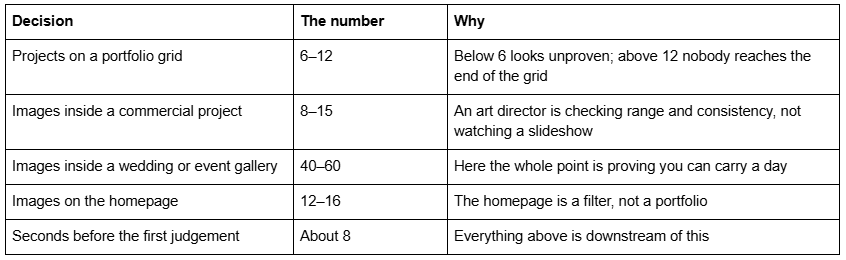
Squarespace's own caps sit far above all of these — 60 projects per Portfolio page, 250 images per gallery section — which is precisely the trap. The platform will let you publish 200 images. The platform is not your editor.
Sequence: the first six frames do all the work
Portfolios are not read left to right and top to bottom. They are scanned in a rough Z, then abandoned. Whatever a viewer concludes about you, they conclude from roughly the first six frames they land on.
Open on your most characteristic image, not your best one. Those are different pictures. The best image is the one that won an award. The most characteristic is the one that tells a stranger, in one glance, what kind of photographer you are — the light you like, the distance you stand at, whether people look at the camera. A viewer who cannot categorise you in one frame moves on.
Then vary the register immediately. Frame two should not resemble frame one. A wide followed by a wide reads as one idea; a wide followed by a tight portrait reads as range. Alternate scale — wide, tight, medium, wide — for the first six frames, then settle.
Never sequence chronologically. Shot order is the order that made sense to you on the day and makes no sense to anyone else. The only exception is a single-event gallery, where chronology is the narrative and jumping around breaks it.
End deliberately. The last frame in a run is the second-most-remembered after the first. Do not let it be whatever was left over.
In Squarespace 7.1: image order inside a gallery section is set by drag-and-drop in the section's content editor, and inside a Portfolio page project by the order of the blocks. There is no auto-sort by date to fight, which is a small mercy — but there is also no version history for an edit, so if you are reordering a large run, screenshot the grid first.
Pace: how to break a long run so people finish it
A run of 40 images at one rhythm is exhausting on a phone regardless of quality. Pacing is what makes a long gallery finishable.
Three devices, all native to Squarespace 7.1:
Change the gallery layout between sections. Grid: Masonry for a dense run, then Slideshow: Full for a single frame that deserves the whole screen, then Grid: Strips for a contact-sheet feel. Six gallery-section layouts exist — Grid: Simple, Grid: Strips, Grid: Masonry, Slideshow: Simple, Slideshow: Full, Slideshow: Reel — and using two or three in sequence changes the reading speed.
Insert a full-bleed single image. One picture with nothing around it is a paragraph break. It resets attention, and it is the cheapest pacing device on the platform.
Use white space as punctuation. Section padding in Squarespace 7.1 is a per-section setting. A generous gap before a new body of work signals a chapter change more clearly than a heading does.
One constraint to design around: gallery sections cannot contain blocks, so you cannot put a caption or a text break inside a gallery run. Text has to sit in its own section between two gallery sections. Plan the rhythm at section level, not image level.
Group: by subject, not by client
The most common structural mistake in a photography portfolio is grouping by who paid.
A viewer scanning your grid does not know your clients and does not care. They are asking one question: have you photographed something like the thing I need photographed? Grouping by client answers a question nobody asked. Grouping by subject — Interiors, Portraits, Food, Live Music — answers the only one that matters.
Three rules:
Group by what is in the picture, not by the logo on the invoice. The exception is when the client name is itself the credential, which is true for perhaps four brands in any given market.
Name groups the way a buyer searches, not the way you think about them. "Editorial Portraiture" is how you describe it; "Portraits" is what gets typed.
Keep groups to a similar size. Three groups of nine read as a considered body of work. One group of twenty-two and two groups of three read as an archive you did not edit.
On Squarespace 7.1 there are two ways to express grouping and they behave differently. Portfolio projects give each group its own URL, so "Interiors" can rank on its own — this is the right choice when the groups are things people search for. Gallery sections stacked on one page keep everything on one URL under one heading, which is right when the groups are chapters of a single story rather than services you sell.
Covers: the image that has to work at 300 pixels wide
Every project on a Portfolio grid is represented by its featured image, and choosing those covers is a different skill from choosing the images inside.
A cover has one job: be legible small. On a phone your Portfolio grid renders each cover at a few hundred pixels wide. An image whose subject occupies 8% of the frame is a grey rectangle at that size. Covers need a dominant shape, a strong tonal separation, and a subject that survives being shrunk.
Covers must differ from each other. Six covers all shot at golden hour in the same colour palette collapse into one texture. Look at your grid at thumbnail size — genuinely, on your phone, logged out — and check that you can tell the projects apart without reading the titles.
Do not use your single best image as a cover. A cover is a promise; the best image is the payoff. Spend it inside the project where it can be seen large.
Watch the crop. Grid: Simple crops every cover to a uniform aspect ratio, so a composition that depends on its edges will lose them. Grid: Overlay additionally lays the project title across the image, which kills any cover with detail in the centre. If your covers are compositionally tight, Grid: Simple with generous negative space in the source files is the safer pairing.
In Squarespace 7.1, a project's cover is its featured image, set in the project's own settings rather than by placing an image in the project body. Templates that ship with a Portfolio page already configured — Click Crafter (Portfolio + Gallery + Shop + Blog, 12 pages) and Scholar (Portfolio + Gallery + Shop, 11 pages) — save you the setup, but they do not choose the covers. Nothing does.
The mobile sequence is a different sequence
Everything above assumes a grid. On a phone there is no grid — Squarespace 7.1 collapses multi-column layouts at the 767px breakpoint, and your carefully balanced three-across arrangement becomes a single vertical column read one frame at a time.
That changes the edit in three ways.
Pairs stop existing. A diptych that works because two frames sit side by side becomes two unrelated images stacked vertically. If a pairing carries meaning, it needs to survive being read sequentially, or it needs to be one composite image rather than two.
Position matters more, not less. In a single column, frame three is genuinely the third thing seen, not something glimpsed peripherally. The first-six-frames rule tightens to the first three.
Vertical images win. A landscape frame in a phone-width column occupies a third of the screen; a portrait frame fills it. If your portfolio is entirely horizontal, the mobile experience is a strip of small pictures separated by white space. Mixing in vertical crops is a mobile decision that most photographers make for desktop reasons and get backwards.
Check the result the way a viewer will: on a phone, on the live site, logged out. The Squarespace editor's mobile preview is close but not identical, and hover-dependent Portfolio layouts in particular behave differently outside the editor.
What a hiring art director actually scans for
Commissioning editors and art buyers look at portfolios differently from couples and differently again from other photographers. Four things, in the order they check them.
Consistency, before quality. The first question is whether you can repeat this. Twelve images that look like one photographer beat twenty that look like four. A portfolio with two visual identities in it reads as a portfolio with one lucky shoot in it.
Whether you can shoot the thing they need. Not something adjacent. If they are commissioning environmental portraits in offices, they are looking for environmental portraits in offices. This is why subject grouping matters more than beauty.
Evidence of a full job, not a highlight. One project that shows a wide, a detail, a portrait and a still life from the same shoot proves you can deliver a set. Four single hero frames from four shoots prove nothing about your delivery.
Whether you are findable and contactable in one click. Name, location, what you shoot, a phone number or a form. An art director working to a deadline abandons a portfolio that hides its contact page inside a hamburger menu.
Two practical consequences for a Squarespace build: put your location in visible body text on the homepage, because "[city] + [specialism] photographer" is how commissioning searches begin; and give the contact route a named page in the top-level navigation rather than only a footer form.
The performance side of a good edit
Editing tighter is also the fastest performance work available to a photographer. Every frame you cut is a request removed.
Across 54 Squareko-built client sites measured in August 2026 — Playwright/Chromium, cloud datacentre, unthrottled, single run per site, load-only CLS, so lab data rather than field data — median page weight was 3.0 MB across 93 requests, median mobile LCP 2.01s with 74% under Google's 2.5s "good" threshold, and 86% of images were served as WebP by the Squarespace CDN, which converts unconditionally regardless of your source format. The CDN handles format. It does not handle a 40-image homepage.
Upload at 1500–2500px on the long edge — 2500px is the maximum Squarespace will serve — and set filenames before upload, because they cannot be changed afterwards. A portfolio edited to 10 projects of 12 frames is both a better portfolio and a faster one, which is a rare case of craft and engineering agreeing.
Sequencing is the part of a photography site that no template can do for you and no plugin can automate. If your portfolio is not producing enquiries, cut it in half before you change anything else — the edit is almost always the problem, and it costs nothing to test.
Where outside help genuinely earns its cost is when the edit is fine and the structure underneath it is wrong: subjects buried inside one Portfolio page, covers that all look alike at thumbnail size, no top-level URL for the thing you actually sell. That is why the premium Squarespace templates in our shop are listed with their full page structure rather than a homepage screenshot. Most photographers reading this will get more from an afternoon with the delete key than from any template purchase.
FAQ
-
Six to twelve projects on the grid, eight to fifteen images inside a commercial project, and forty to sixty inside a single-event or wedding gallery where proving you can carry a whole day is the point. Squarespace allows 60 projects and 250 images per gallery section, but those are caps, not targets.
-
Never chronologically, except in a single-event gallery where the day is the narrative. Open with your most characteristic image rather than your best one, vary scale immediately so frames one and two do not resemble each other, and choose the closing frame deliberately — it is the second-most-remembered image in any run.
-
No. Squarespace's documentation states it is not possible to upload videos or add blocks to a gallery section. If your portfolio includes video, use a gallery block, which supports embedded video, or put the video in a video block inside a Portfolio project.
-
Pick for legibility at thumbnail size, not for beauty. A cover renders a few hundred pixels wide on a phone, so it needs a dominant shape and strong tonal separation. Make sure covers differ from each other, and never spend your single best image as a cover — save it for inside the project.
-
Not as designed. Hover: Background, Hover: Fixed and Hover: Follow Cursor all depend on a hover state that does not exist on a touchscreen. They collapse to a text list of project titles at the 767px breakpoint. Check the mobile result before building a site around one.
-
Not inside a gallery section — Squarespace states it is not possible to add blocks to the section. Text must sit in its own section between two gallery sections. If you need captions interleaved with images, use gallery blocks inside a Portfolio project or a regular page instead.

Author Bio
I'm Walid Hasan, a Certified Squarespace Expert and Squarespace Circle Platinum Partner with over 12 years of hands-on experience designing and optimizing high-performing websites. Over the years, I've had the privilege of building more than 2,000 Squarespace websites for clients around the world, always focusing on clean design, strong user experience, and conversion-driven results.
