
Squarespace Template for a Photography Business: The Pages That Take Money
The short answer: The portfolio is the part of a photography site that gets all the attention and none of the revenue. The pages that actually convert are the pricing page, the packages, the booking route and the local-search surface — and most photography templates ship none of them. Choose a template on whether it has a shop, a pricing page and a blog, then build the operational layer on top: Squarespace handles invoicing natively, does not handle contracts at all, and its local SEO output needs checking rather than trusting.
Scope note: this is the business site. Portfolio structure is covered in the photography portfolio guide, image sequencing in the portfolio sequencing guide, and the wedding-specific enquiry pipeline in the wedding photographer guide.
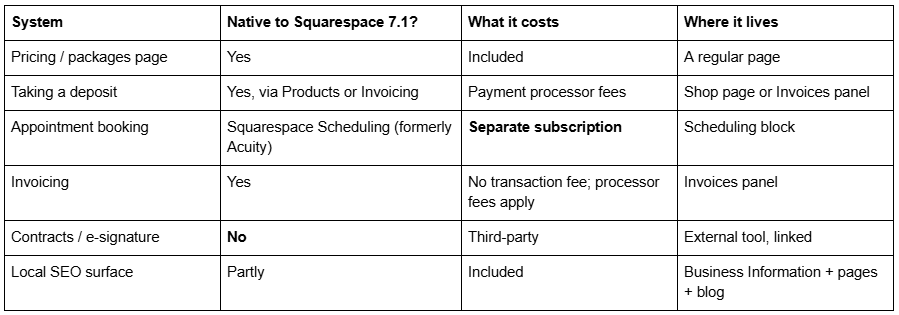
The six business systems, and what Squarespace 7.1 gives you
Two templates in the Squareko range ship the commercial pages a photography business needs rather than only a portfolio: Click Crafter — Portfolio, Gallery, Shop, Blog and a Freebie page across 12 pages — and Scholar — Portfolio, Gallery and Shop across 11 pages. Aura Capture adds an FAQs page, which does more conversion work on a session-photography site than most people expect. All are $249. Disclosure: Squareko sells all three.
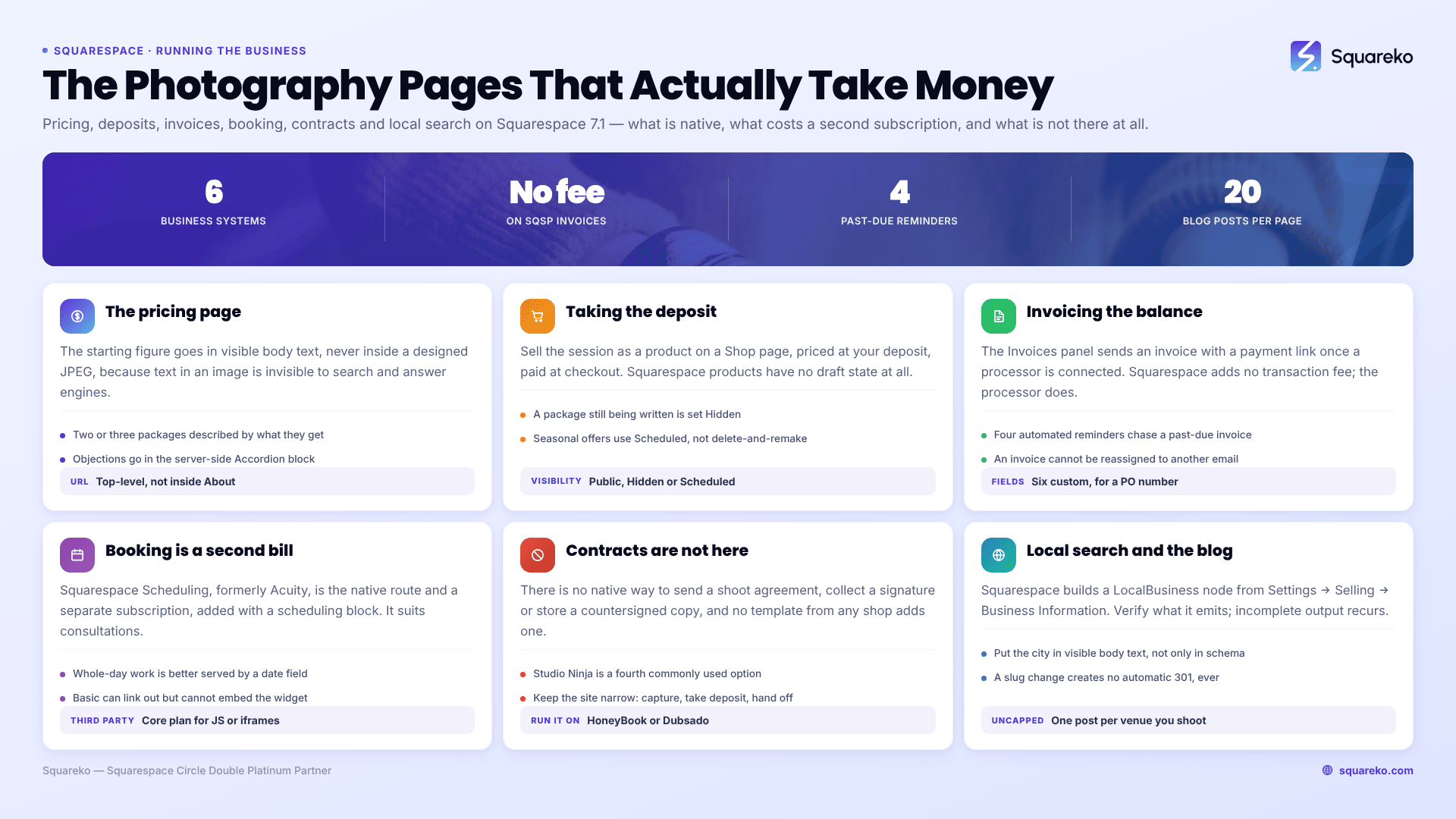
The pricing page, and why "starting at" belongs in body text
Put a number on the site. Photographers who hide pricing generate more enquiries and fewer bookings, because the extra enquiries are people who were never going to pay your rate.
Four rules for a Squarespace 7.1 pricing page:
The starting figure goes in visible body text, not inside a designed JPEG. Text inside an image is invisible to search engines and to AI answer engines, both of which are increasingly how people compare photographers before contacting any of them.
Give the page its own top-level URL. "Photography prices [city]" and "[genre] photography packages" are real searches. A pricing section buried inside an About page cannot rank for them.
Two or three packages, not five. Describe what the client gets — hours, deliverables, turnaround — rather than listing feature counts. Squarespace 7.1's Fluid Engine makes three-column pricing layouts straightforward; the constraint is that on mobile they stack vertically at the 767px breakpoint, so the package you most want booked should be first, not middle.
Handle objections in an Accordion block. The native 7.1 Accordion renders server-side, so both question and answer text are crawlable rather than hidden behind JavaScript. Travel, rescheduling, deposits, delivery time, print rights.
Taking a deposit, and the Products constraint that catches people
Two native routes on Squarespace 7.1, and they suit different businesses.
Route 1 — sell the session as a product. A "Portrait Session Deposit" product on a Shop page, priced at your deposit amount, paid at checkout. Fast, and it works on any plan that supports selling. The constraint to plan around: Squarespace products have no draft state. The only visibility options are Public, Hidden and Scheduled, so a package you are still writing must be set Hidden rather than saved as a draft, and a seasonal offer is best handled with Scheduled rather than by deleting and recreating.
Route 2 — invoice it. Squarespace's Invoices panel creates and sends client invoices with a payment link. A payment processor must be connected first. Invoice payments carry no Squarespace transaction fee, though the payment processor's own fees still apply. Practical limits worth knowing: line item quantities must be round numbers, images cannot be uploaded to line item fields, you can add up to six custom fields at the bottom of an invoice, up to four automated reminder emails can chase a past-due invoice, and an invoice cannot be reassigned to a different client email address once issued.
For most photographers the answer is both: a product for the deposit so it can be paid instantly from the site, and an invoice for the balance so it carries proper documentation.
Booking, and the one cost people do not budget for
Squarespace Scheduling — formerly Acuity — is the native booking route and it is a separate subscription from your Squarespace plan. It is added to a page with a scheduling block, which surfaces your public appointment types.
It suits consultations, mini sessions, headshot slots and anything with a defined duration. It is less suited to whole-day bookings like weddings, where a manual date check in the enquiry form does the job better.
If you use a third-party booking tool instead, note the plan constraint: JavaScript and iframes inside Code Blocks require the Core plan or above, as does site-wide Code Injection. A Basic-plan site can link out to an external booking page with a button block but cannot embed the widget.
Contracts, and the gap Squarespace does not fill
Squarespace has no contract or e-signature feature. There is no native way to send a shoot agreement, collect a signature, or store a countersigned copy. No template changes this.
Photography businesses run this on a dedicated studio-management tool — HoneyBook, Dubsado, Táve and Studio Ninja are the ones most commonly used — and link to it from the site, usually from a client-facing navigation item. The same tools generally handle proposals and questionnaires, which removes the temptation to build a fourteen-field intake form on the website itself.
Keep the website's job narrow: capture the enquiry, take the deposit, and hand off. A site that tries to be a CRM ends up doing both badly.
Local SEO for a photography business on Squarespace
Photography is a local-intent category — almost every commercial search carries a place name — and Squarespace gives you three surfaces plus one you have to check.
Surface 1: Business Information. Squarespace holds your business name, address, phone, email and hours in Settings → Selling → Business Information. Squarespace generates a LocalBusiness structured-data node from this. Verify what it actually outputs before relying on it: the Squarespace Forum carries recurring reports of the auto-generated snippet being "incomplete for my website (even though all of my business information is filled out)" and of it carrying an old address after a move. Run the page through Google's Rich Results Test and read what is emitted rather than assuming.
Surface 2: location in visible body text. Put the city or region in the homepage copy, the About page and every service page. Visible text is what both search engines and AI answer engines extract; a location that appears only in the footer or only in schema is a weak signal.
Surface 3: a page per service and place. Not a doorway page for every town within fifty miles — that ages badly. One well-written page per genuine service, with the location named naturally, beats twenty thin ones.
Off-site, and more important than any of the above: Google Business Profile. For a local photography business the profile does more work than the website's own schema. Squarespace cannot manage it for you; nothing can.
Two platform constraints worth knowing: robots.txt cannot be edited on Squarespace, and ?author=, ?tag=, ?month= and ?view= are disallowed by default. And changing a page slug creates no automatic 301, ever — if you restructure a ranking service page, you must add the redirect yourself.
The trust signals a business client checks and a private client does not
Commercial and corporate clients run a different check from couples and families. Before a purchase order is raised, somebody usually confirms four things, and none of them are on a typical photography site.
Is this a business? A trading name, a registered address or at least a city, and a phone number. Store them once in Settings → Selling → Business Information, then put the phone number and city in visible footer text on every page. It takes five minutes.
Are you insured? Public liability cover is a routine requirement for shooting on commercial premises. One line on the About or Contact page — that you carry it, and that a certificate is available — removes a back-and-forth email from every corporate enquiry.
How fast do you reply? A stated response time ("enquiries answered within one working day") is a small, checkable promise that outperforms any adjective on the page.
Have you invoiced businesses before? Naming the fact that you invoice on standard terms, and that purchase order numbers can go on the invoice, tells a procurement contact you will not be a problem. Squarespace's Invoices panel supports up to six custom fields at the bottom of an invoice, which is where a PO number belongs.
None of this needs a new page. It needs four sentences placed where a business client will read them, which is the Contact page rather than the portfolio.
Blogging for a photography business: sessions, venues and locations
The blog is the only place on a Squarespace photography site where you can publish unlimited indexable pages, and it is where local rankings actually come from. A Portfolio page caps at 60 projects; a blog does not cap.
What to write, in order of return:
One post per venue or location you have shot at. Titled with the venue name. This is the highest-converting post type in photography because the search — "[venue] wedding photographer", "[park] family photos" — is made by someone who has already chosen the place and only needs a photographer.
Session recaps with the location named. Eight to fifteen images, two hundred words of context, the location in the title and the body text.
Preparation guides. What to wear, what to expect, how to plan a shoot at a specific location. These earn links and answer the questions your enquiry emails keep asking.
Pricing explainers. Why photography costs what it does, written honestly, converts better than it has any right to.
Three Squarespace 7.1 blog mechanics that shape this:
Blog posts use the classic editor, not Fluid Engine. You get blocks in a single column, which is fine for image-and-text recaps and frustrating if you expected drag-anywhere layout.
Blog featured images have no alt-text field — Squarespace uses the post title as the alt text. Write titles that describe the picture as well as the post.
Blog pagination in 7.1 is cursor-based, capped at 20 posts per page, with no numbered pages and no infinite scroll. Deep archive posts get less crawl exposure, so use categories to create shorter, well-linked entry points.
A note on weight: across 54 Squareko-built client sites measured in August 2026 — Playwright/Chromium, cloud datacentre, unthrottled, single run per site, load-only CLS, so lab data rather than field data — median page weight was 3.0 MB across 93 requests and median mobile LCP 2.01s, with 74% under Google's 2.5s "good" threshold. A session recap with 40 images will sit well above that median. Ten to fifteen images per post is the working limit, uploaded at 1500–2500px on the long edge.
If your photography site has a portfolio and a contact form and nothing else, the highest-return work is not a redesign. It is a pricing page with a real number on it, a deposit product, and one blog post per venue you shoot at regularly. All three can be built on any Squarespace 7.1 template you already have.
Where outside help earns its cost is restructuring an established site that already ranks — adding service URLs and a shop without breaking the pages currently bringing in enquiries, given that Squarespace creates no automatic 301 when a slug changes. That is why the premium Squarespace templates in our shop are listed with their full page structure rather than a homepage screenshot. Most photographers reading this will get further this month by writing the pricing page than by buying anything.
FAQ
-
Yes. The Invoices panel creates and sends client invoices with a payment link, once a payment processor is connected. Invoice payments carry no Squarespace transaction fee, though processor fees apply. Limits include six custom fields per invoice, four automated past-due reminders, and no reassigning an invoice to a different client email.
-
Never chronologically, except in a single-event gallery where the day is the narrative. Open with your most characteristic image rather than your best one, vary scale immediately so frames one and two do not resemble each other, and choose the closing frame deliberately — it is the second-most-remembered image in any run.
-
No. There is no native way to send a shoot agreement, collect a signature or store a countersigned copy, and no template adds one. Photography businesses run contracts through a studio-management tool such as HoneyBook, Dubsado, Táve or Studio Ninja and link to it from the site.
-
Pick for legibility at thumbnail size, not for beauty. A cover renders a few hundred pixels wide on a phone, so it needs a dominant shape and strong tonal separation. Make sure covers differ from each other, and never spend your single best image as a cover — save it for inside the project.
-
Squarespace generates a LocalBusiness node from Settings → Selling → Business Information, but verify the output rather than assuming it. Forum reports of incomplete snippets and stale addresses are common. Run the page through Google's Rich Results Test, and treat Google Business Profile as the more important local surface.
-
Not inside a gallery section — Squarespace states it is not possible to add blocks to the section. Text must sit in its own section between two gallery sections. If you need captions interleaved with images, use gallery blocks inside a Portfolio project or a regular page instead.

Author Bio
I'm Walid Hasan, a Certified Squarespace Expert and Squarespace Circle Platinum Partner with over 12 years of hands-on experience designing and optimizing high-performing websites. Over the years, I've had the privilege of building more than 2,000 Squarespace websites for clients around the world, always focusing on clean design, strong user experience, and conversion-driven results.
