
Minimal Squarespace Template for Photographers: What You Actually Gain and Lose
The short answer: A minimal Squarespace template for photographers is not a style, it is a subtraction. You are removing interface chrome so the ratio of photograph to non-photograph on screen goes up, and every one of those subtractions has a cost — usually a ranking URL, a navigation route or a conversion prompt. Decide what you are removing and why before you pick a template, because in Squarespace 7.1 all of it is a Site Styles decision anyway.
Here is what the word "minimal" actually means in practice, what each subtraction buys, and what it takes away.
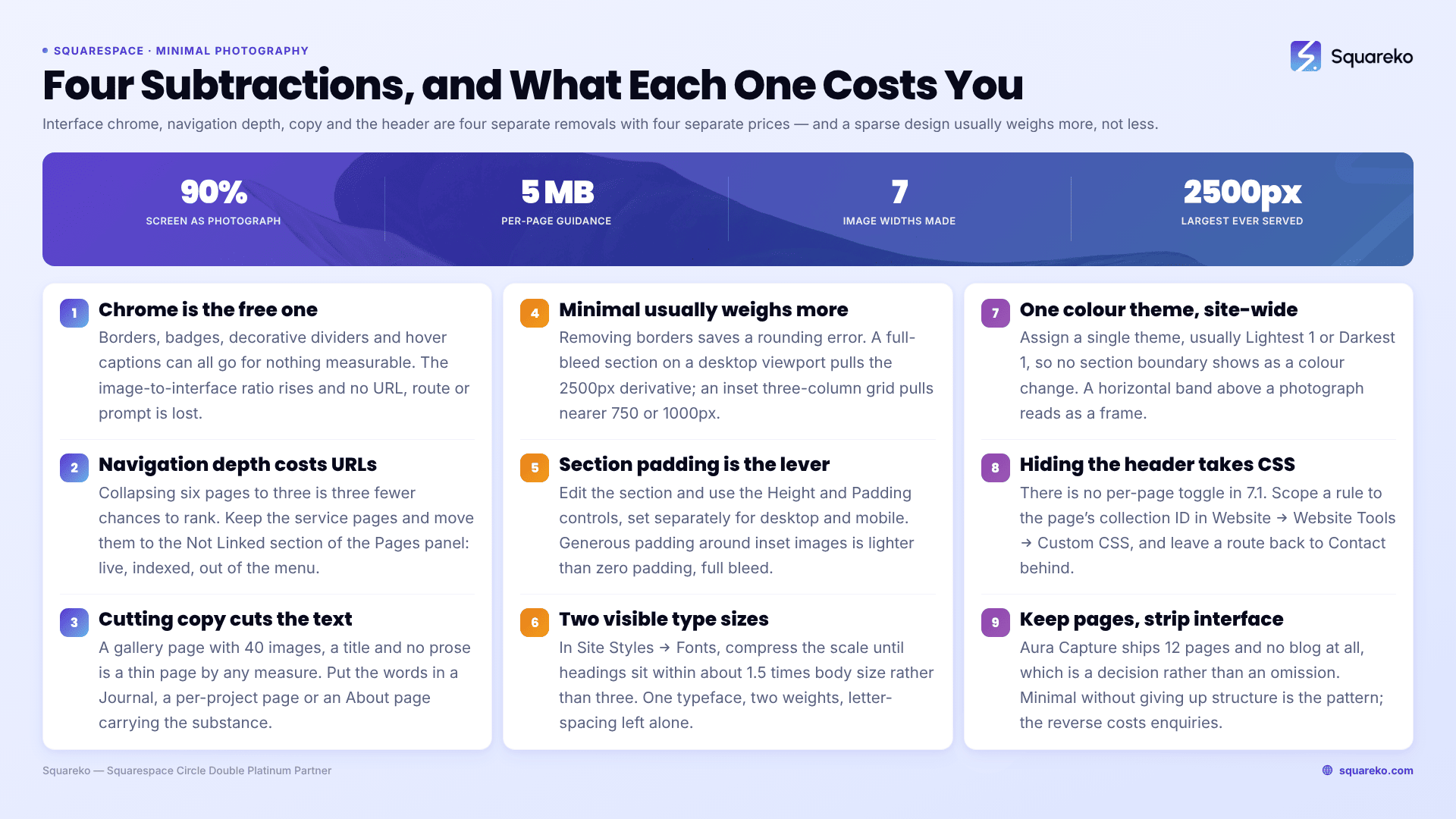
The four subtractions, and what each one costs
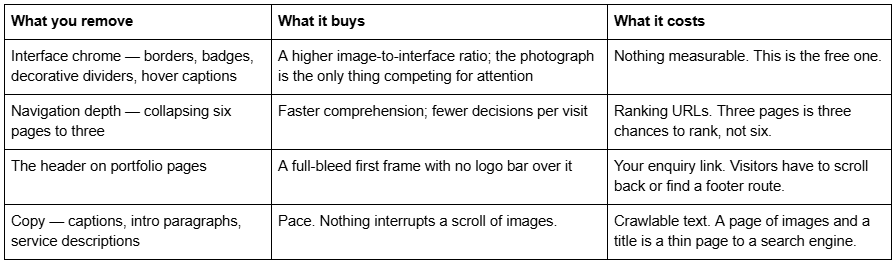
The first row is free. The other three are trades, and the point of this post is that they are trades a photographer should make deliberately rather than inherit from a template that happened to look clean in the demo.
What minimal does to page weight, and what it does not
There is a persistent belief that a minimal photography template loads faster. On Squarespace 7.1 that is only half true, and the half that is false matters more.
Removing chrome removes almost no bytes. Borders, dividers and text labels are CSS and characters — a rounding error against a single 1500px JPEG. Every Squarespace 7.1 site loads the same core scripts regardless of how sparse the design is, because every 7.1 template runs the same engine.
What genuinely changes page weight is how many images render before the fold and how many exist on the page at all. And here minimal design frequently makes things worse, because the classic minimal photography homepage is a full-bleed hero image at 2500px followed by a full-width grid. Squarespace serves images from a set of seven generated widths — 100, 300, 500, 750, 1000, 1500 and 2500 pixels — and a full-bleed section on a desktop viewport pulls the largest one. A boxed, inset layout with three columns pulls smaller derivatives.
Across 54 Squareko-built client sites measured in August 2026 (Playwright/Chromium lab test, cloud datacentre, unthrottled network and CPU, single run per site, load-only CLS) the median page weight was 3.0 MB across 93 requests and median mobile LCP was 2.01s, with 74% under Google's 2.5s threshold. Those are lab figures, not field data. The relevant point for a minimal build is that the sites in that set which came in heaviest were not the busiest designs — they were the sparest ones, because a sparse design is usually a large-image design.
Squarespace's own published guidance is to "keep each page on your site to 5 MB or less", and that "1 MB is the safest size for cellular connections". A minimal homepage with one 2500px hero and eight full-bleed grid images will clear 5 MB comfortably. Minimal does not exempt you from the arithmetic; it usually raises the per-image cost.
The image-to-interface ratio is the only metric that matters here
If you want one measurable definition of minimal, use this: what percentage of the first screen is photograph?
Open your homepage on a phone at 375px wide and count. Header bar, logo, hamburger, hero caption, scroll prompt, cookie banner — subtract all of it. On a typical Squarespace 7.1 photography demo the answer is somewhere between 55% and 75%. On a genuinely minimal build it should be above 90%.
That number is worth more than any adjective because it tells you which subtraction to make next. If your header is 80px on mobile and your hero is 100vh, you have already lost roughly 11% of the first screen before the photograph starts. That is the header decision, and it is covered below.
Navigation depth: fewer pages means fewer ranking URLs
This is the subtraction photographers regret.
A minimal photography site usually collapses to Home, Work, About, Contact. Four URLs. A structured photography site keeps a page per discipline — Weddings, Engagements, Portraits, Events — and each of those is a separate URL that can rank for a separate intent.
Squareko's ColorFlick ships with that split already built: alongside Home, Home 2, Journal, Gallery, Portfolio, Inquire, Freebie, a Style Guide page and a 404 page, it carries dedicated Weddings, Engagements, Portraits and Photo Booth pages — 12 pages in total. Four service URLs means four pages each targeting one query, rather than one "Work" page trying to rank for all four. You can see the structure on the ColorFlick demo.
The minimal version of that same site deletes three of those pages and folds them into one gallery. Visually it is cleaner. Structurally you have just given up three ranking surfaces.
The compromise that works: keep the service pages, remove them from the primary navigation. Squarespace 7.1 lets a page exist in the Not Linked section of the Pages panel — it stays live, stays in the sitemap, stays indexable, and simply does not appear in the header menu. Link to it from the body of your Work page instead. You keep four URLs and a three-item nav.
How to build minimal in Squarespace 7.1: section padding
Section padding is the single biggest lever on how sparse a 7.1 page feels, and it is a native control — no code required.
Open any page, click Edit, hover the section, click the pencil / Edit Section icon, and use the Height and Padding controls. Squarespace 7.1 gives you a section height slider plus top and bottom padding, set independently for desktop and mobile.
Two patterns, both defensible:
Generous padding, few images. Large top and bottom padding around a small number of inset images. Reads as a gallery wall. Lighter on page weight because inset images pull smaller derivatives.
Zero padding, full bleed. Padding at minimum and section width set to Full Bleed so images butt against each other with no gutter. Reads as a contact sheet. Heavier, because every image pulls the 2500px derivative.
Photographers default to the second and then wonder why mobile feels slow. Pick the first unless the work genuinely needs edge-to-edge.
How to build minimal in Squarespace 7.1: the typography scale
Minimal typography is not "use a small sans-serif". It is using fewer distinct sizes.
In Squarespace 7.1, open Site Styles → Fonts. You get a base size and a scale, and Squarespace derives Heading 1 through Heading 4, paragraph sizes and buttons from it. The minimal move is to compress the range: bring H1 down and paragraph text up until there are effectively two visible sizes on the page rather than five.
Practical settings that hold up on a photography site:
One typeface, two weights. A second typeface is a decorative decision, not a minimal one.
Heading sizes within roughly 1.5× of body size, not 3×.
Letter-spacing left alone. Wide-tracked uppercase headings read as a design flourish, which is chrome by another name.
Buttons set to text-link style rather than filled, so the only filled shapes on the page are photographs.
That last one has a conversion cost, covered below.
How to build minimal in Squarespace 7.1: the colour theme
Squarespace 7.1 does not let you set colours per block in any meaningful way. Colour is a section colour theme system: you build one palette and then assign one of ten themes to each section. The path is Edit → Site Styles (paintbrush icon) → Colors.
For a minimal photography site the correct move is to use one theme across the entire site — usually Lightest 1 or Darkest 1 — so that no section boundary is visible as a colour change. Nothing else in the system produces a cleaner result, and it takes about ninety seconds.
The reason this matters more on a photography site than any other kind: a colour theme change between sections creates a visible horizontal band, and a horizontal band above a photograph reads as a frame. If you want the full explanation of how the ten themes and the five-colour palette interact, that is covered in the colourful photography Squarespace template guide.
How to remove the header on portfolio pages in Squarespace 7.1
There is no native toggle for this. Squarespace 7.1 has no per-page "hide header" switch in Page Settings, and anyone telling you otherwise is describing 7.0 Cover Pages.
The route is Custom CSS, scoped to one page by its collection ID. Find the ID by opening the page, right-clicking, choosing Inspect, and scrolling up to the opening <body> tag — it carries id="collection-XXXXXXXXXXXX".
/* Hide header and footer on one portfolio page only. Replace the ID with the one from that page's body tag. */
#collection-5b9fdeae8a922d1b3d0a0452 #header,
#collection-5b9fdeae8a922d1b3d0a0452 #footer-sections {
display: none;
}
Paste that into Website → Website Tools → Custom CSS, which is available on every Squarespace plan including Basic.
Do not do this without a replacement route. A portfolio page with no header and no footer has no navigation and no enquiry link at all. Either keep the footer (drop #footer-sections from the selector) or place a text link back to Contact at the bottom of the page manually. A photography portfolio page that a client cannot leave except by hitting Back is a design that costs you enquiries.
Where minimal genuinely costs you
Three honest costs. None of them are reasons not to go minimal; all of them are reasons to go minimal on purpose.
Discoverability. Removing pages removes URLs. Removing captions and intro copy removes the text a search engine reads. A gallery page with 40 images, a title and no prose is a thin page by any measure. The fix is not to abandon minimal design — it is to put the copy somewhere. A Journal, a per-project page, or an About page carrying the substance the galleries do not.
SEO surface on images specifically. Squarespace image alt text is set per image in the gallery editor, and gallery section captions are a separate field. Minimal builds tend to skip both because neither is visible. Fill them anyway — they cost nothing visually and they are the only text on an image-only page.
Conversion prompts. Text-link buttons convert worse than filled buttons. A single enquiry route at the bottom of a long scroll converts worse than a persistent header link. Aura Capture takes the honest version of this trade: 12 pages including Weddings, Engagements, Events, a Gallery, About, FAQs, Contact, a Freebie page, a Style Guide and a 404 — and no blog at all. That is a real minimal decision rather than an omission, and it keeps the FAQs and Contact pages that actually close bookings. The Aura Capture demo shows the structure.
If you want minimal without giving up structure, the pattern is: keep the pages, strip the interface. Not the reverse.
Where to go next
Choosing between the photography templates on structure — the best Squarespace template for photographers, scored
Gallery mechanics in detail — layouts, caps, lightbox and load: Squarespace gallery templates for photography
What premium actually buys — premium photography Squarespace templates
The full cluster — Squarespace templates for photographers
Most photographers reading this should build minimal themselves. The four levers above — padding, type scale, one colour theme, and a scoped header rule — are an afternoon's work on any Squarespace 7.1 template, free or paid, and they get you 90% of the way to any minimal demo you have bookmarked.
The case for buying is narrower than the shops suggest: it is worth it when you want the page structure prebuilt rather than the aesthetic, because rebuilding a four-service-page architecture from scratch is the part that takes a week rather than an afternoon. That is what the premium Squarespace templates in our shop are listed by — full page lists, not homepage screenshots — so you can check whether the structure is one you would have built anyway.
FAQ
-
Subtraction, not style. A minimal template removes interface chrome, navigation depth, copy and colour variation so a higher share of each screen is photograph. In Squarespace 7.1 every template runs the same engine, so minimal is a Site Styles configuration — padding, type scale and one colour theme — rather than a property of the template you bought.
-
Not automatically, and often the reverse. Removing borders and labels saves a negligible number of bytes, while the full-bleed hero and edge-to-edge grid typical of minimal photography design pull Squarespace's 2500px image derivative. Inset, boxed layouts pull smaller derivatives and load lighter. Layout width affects weight far more than visual density does.
-
There is no native toggle. Use Custom CSS at Website → Website Tools → Custom CSS, scoped to the page's collection ID from its body tag: #collection-XXXX #header { display: none; }. Add a manual link back to Contact, because a page with no header and no footer leaves visitors with no navigation route.
-
Only through what it removes. Fewer pages means fewer ranking URLs, and removing captions and intro copy removes the text search engines read. Keep the service pages and move them into the Pages panel's Not Linked section — they stay live and indexable while your header menu stays at three items.
-
Enough for one page per service you want to rank for. Premium photography templates typically ship 12 pages; Squareko's ColorFlick and Aura Capture both do. Collapsing four discipline pages into one gallery is the most common minimal mistake, because it gives up three ranking surfaces to save two navigation items.
-
Yes. All roughly 200 Squarespace templates are free with a subscription and run 7.1, so the same four levers apply: reduce section padding, compress the typography scale, apply one colour theme site-wide, and remove the header on portfolio pages with scoped CSS. Beaumont and Balboa start closest to minimal.

Author Bio
I'm Walid Hasan, a Certified Squarespace Expert and Squarespace Circle Platinum Partner with over 12 years of hands-on experience designing and optimizing high-performing websites. Over the years, I've had the privilege of building more than 2,000 Squarespace websites for clients around the world, always focusing on clean design, strong user experience, and conversion-driven results.
