
Photography Portfolio Squarespace Template: Choose the Structure Before the Design
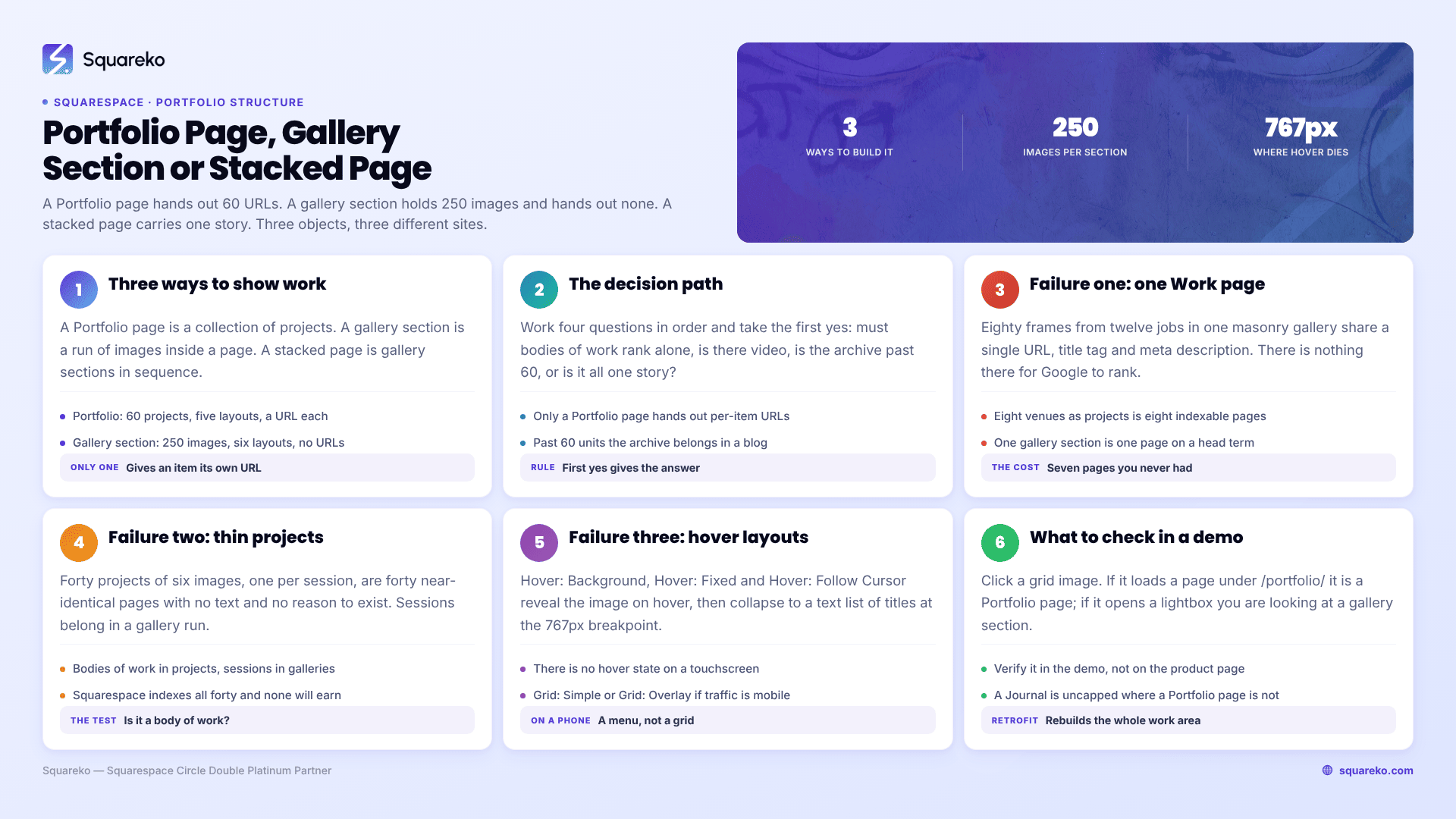
The short answer: "portfolio" is not a style on Squarespace 7.1, it is a specific object with specific limits — and most photographers pick the wrong one. A Portfolio page gives every body of work its own URL but caps at 60 projects and offers three layouts that do nothing on a phone. A Gallery section holds 250 images in six layouts but hands out no URLs at all and cannot hold video. Decide which one your work needs, then pick a template that already ships with it configured.
Here is the whole decision in one table, then the path through it.
The three ways to build a photography portfolio on Squarespace 7.1
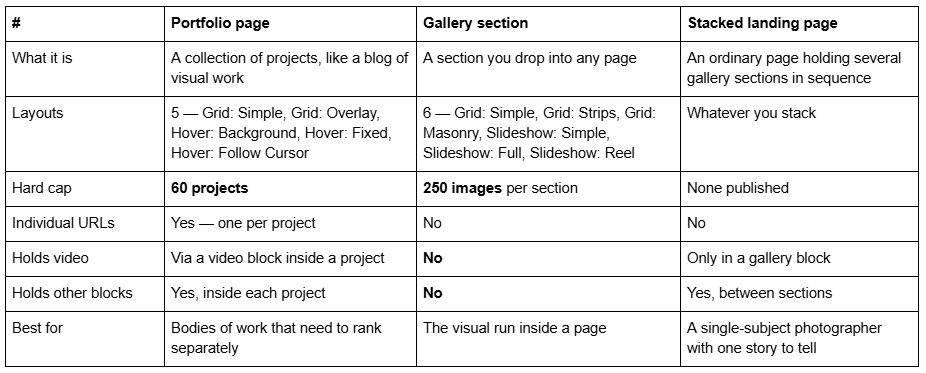
Squarespace's own documentation settles two of these outright. On projects: "It's not possible to turn projects into standalone pages outside the portfolio. Projects are collection items, dependent on the main portfolio collection page, similar to blog posts in a blog page." On gallery sections: "It's not possible to upload videos or add blocks to the section."
Those two sentences decide more photography sites than any design consideration.
The decision path, in four questions
Work these in order. The first "yes" gives you your answer.
Do individual bodies of work need to rank on their own in Google? If a wedding at a named venue, a campaign for a named client, or a project with a name should have its own page — you need a Portfolio page. Nothing else on Squarespace 7.1 hands out per-item URLs for visual work.
Does any of it include video? If yes, the work sits in a Portfolio project (which can hold a video block) or a gallery block (which supports embedded video). Not a gallery section. Gallery sections cannot hold video, full stop.
Do you have more than 60 distinct bodies of work you want indexed? If yes, the archive belongs in a blog with categories, and the Portfolio page holds only the projects you actively want commissioned for. The 60-project cap is a real ceiling, not a soft limit.
None of the above? You are a single-subject photographer with one continuous body of work. A stacked landing page — three or four gallery sections in sequence on one URL — is simpler, faster and better than a portfolio you will never fill.
Why most photographers pick the wrong one
Three failure patterns, in the order I see them.
Failure 1 — a Gallery section used where a Portfolio page was needed. The photographer builds one page called Work, drops in a masonry gallery section with 80 frames from twelve different jobs, and wonders why nothing ranks. It cannot rank, because there is nothing to rank: twelve jobs share one URL, one title tag and one meta description. A wedding photographer who shoots eight venues a year and gives each venue a Portfolio project ends up with eight indexable pages targeting eight local searches. The same photographer with one gallery section has one page competing on a head term.
Failure 2 — a Portfolio page used where a gallery section was needed. The opposite mistake, and it is quieter. A portrait photographer creates a Portfolio page with forty projects, one per session, each holding six images. Nothing is a body of work; every project is a thin page with no reason to exist and no text on it. Squarespace will happily index forty near-identical pages, and none of them will earn anything. Sessions belong in a gallery run. Bodies of work belong in projects.
Failure 3 — a hover layout chosen on a laptop. Three of the five Portfolio layouts — Hover: Background, Hover: Fixed and Hover: Follow Cursor — display project titles as text and reveal the image on hover. They look extraordinary in a demo and there is no hover state on a touchscreen. Squarespace collapses them to a usable list at the 767px breakpoint, but what your mobile visitor gets is a text menu of project names where you thought you had a visual grid. If most of your traffic is mobile, and for photography it is, choose Grid: Simple or Grid: Overlay and use a hover layout only where you have checked the mobile result yourself.
How Portfolio projects actually behave
Six things worth knowing before you build a photography portfolio on a Portfolio page.
A project's URL nests under the portfolio page. /portfolio/coastal-elopement, not /coastal-elopement. You cannot lift a project into the top-level navigation. If a subject needs a top-level URL — because it is a service you sell, like Weddings — that subject needs its own regular page, not a project.
Each project has a featured image, which is what the grid shows. Choosing those covers is a separate craft from choosing the images inside, and it is where most portfolios fall down. That is covered in the portfolio sequencing guide.
Inside a project you have the full section editor. Gallery sections, text, a video block, a form. A project is a page in everything but URL structure.
Projects can be password-protected individually, using the same per-page password mechanism as any other page. It is not a client proofing system — there is no favouriting, no ordering, no download control — but for showing a single client a single gallery it is enough.
A password-protected project is not indexed. That is the point, and it is also the trap: do not password-protect work you want found.
The cap is 60 and it is per portfolio page. You can add a second Portfolio page if you genuinely need more, at the cost of splitting your work across two URLs.
How Gallery sections actually behave
250 images is the technical cap, not a recommendation. Squarespace's own guidance is that "Large image files or excessive number of images can cause your site to load slowly, especially on mobile." A 250-image gallery section on a phone is a bad site regardless of how good the pictures are.
No blocks means no captions of your own. You get the image's own caption field and nothing else — no text block between frames, no button, no form. If your work needs writing around it, use a Portfolio project.
Slideshow: Reel is the underused layout. It shows several frames at once and moves horizontally, which reads as a contact sheet and suits editorial and documentary work far better than a masonry grid.
Grid: Masonry preserves aspect ratios. If you mix portrait and landscape crops, masonry is usually the honest choice; Grid: Simple will crop to a uniform shape.
Gallery blocks are the escape hatch. Where a gallery section will not do — because you need video, or a caption, or a button — a gallery block inside a Portfolio project or a regular page gives you Slideshow, Carousel, Grid and Stack layouts and does support embedded video.
The index-style stacked landing page, and when it beats both
The third structure gets ignored because it has no name in the Squarespace interface. It is just a regular page holding three or four gallery sections in sequence, with text sections between them — the modern 7.1 equivalent of what 7.0 called an index page.
It is the right answer more often than photographers expect. If your work is one continuous voice rather than a set of discrete commissions — a documentary photographer with a single long-running subject, a fine art photographer with one series, a portrait photographer whose whole offer is one kind of session — then splitting it into projects invents divisions that do not exist. A stacked page lets you control the order of every frame across the whole scroll, put writing between the runs, and end on a form. A Portfolio page cannot do any of that on its landing view; it can only show a grid of covers.
The costs are real and worth stating. One URL means one title tag, one meta description and one target keyword for the entire body of work. Every image loads on that single page, so the weight of the whole portfolio lands in one request waterfall. And you have no natural place to add work later — a Portfolio page grows by adding a project, whereas a stacked page grows by getting longer until it stops being usable.
Rule of thumb: under about 30 images total and one subject, stack it. More than that, or more than one subject, use a Portfolio page.
What to look for in a photography portfolio Squarespace template
Once you know which object you need, template selection becomes narrow and quick. Four checks.
1. Does it ship with a Portfolio page already configured? Not every photography template does. Among Squareko's range, Click Crafter (12 pages, Portfolio + Gallery + Shop + Blog) and Scholar (11 pages, Portfolio + Gallery + Shop) both do. ColorFlick pairs a Portfolio page with four separate subject pages — Weddings, Engagements, Portraits, Photo Booth — which is the structure I would put most wedding photographers on. Verify this in the demo rather than on the product page: a Portfolio page is the one whose grid items each open to their own URL under /portfolio/. If clicking a grid image opens a lightbox instead of loading a page, you are looking at a gallery section, and retrofitting a real Portfolio page afterwards means rebuilding the entire work area rather than changing a setting.
2. Does it ship with top-level subject pages, or only a portfolio? A template with one Portfolio page and nothing else forces every subject through one URL. A template with named subject pages gives you somewhere for "wedding photographer [city]" to live that is not a project buried two levels down.
3. What Portfolio layout is the demo using? If the demo's grid is a hover layout, look at it on your phone before you buy. The layout is changeable in three clicks, but if the whole design was drawn around a hover reveal, changing it changes the design.
4. Does it have a writing surface? A Journal or Blog is not decoration on a photography site. It is the only place on Squarespace where you can publish unlimited indexable pages about specific venues, locations and shoots, and it is not capped at 60. Aura Capture deliberately ships without one, which is right for a photographer who will not write and wrong for one who will.
The performance consideration nobody puts in a portfolio post
A portfolio page is the heaviest page a photographer builds, and the structure you chose determines how heavy. A stacked landing page with four gallery sections loads every image on one URL. A Portfolio page loads only the featured images on the grid, and defers each project's full run until someone clicks.
That difference is why the Portfolio page is usually the faster structure for a large body of work, even though it looks like more pages. For calibration, across 54 Squareko-built client sites measured in August 2026 — Playwright/Chromium, cloud datacentre, unthrottled, single run per site, load-only CLS, so lab data rather than field data — median page weight was 3.0 MB across 93 requests and median mobile LCP was 2.01s, with 74% under Google's 2.5s "good" threshold. Gallery-led sites sit at the heavy end of that distribution. Upload at 1500–2500px on the long edge, because 2500px is the maximum Squarespace serves, and keep any single gallery run to something a person will actually scroll.
If your work divides into named projects that each deserve a page, build on a Portfolio page and pick a template that ships with one. If it is one continuous body of work, a stacked page of gallery sections is simpler and will launch faster.
Where this gets genuinely difficult is the middle case — a photographer with two or three distinct services and an archive that outgrew the 60-project cap — because that needs a portfolio, subject pages and a categorised blog working together, and getting the URL structure wrong there is expensive to unpick later. That is the situation worth a second opinion on, and it is why the premium Squarespace templates in our shop are listed with their full page structure rather than a homepage screenshot. Most photographers will resolve this from the table above in ten minutes.
FAQ
-
A Portfolio page is a collection of projects, each with its own URL, capped at 60 projects across five layouts. A gallery section is a block of images inside a page, capped at 250 images across six layouts, with no individual URLs. Portfolio pages rank; gallery sections display.
-
Sixty. Squarespace states you can add up to 60 projects to a portfolio page. If you need more indexable bodies of work than that, put the archive in a blog with categories and keep the Portfolio page for the projects you actively want to be commissioned for.
-
No. Squarespace's documentation states it is not possible to upload videos or add blocks to a gallery section. If your portfolio includes video, use a gallery block, which supports embedded video, or put the video in a video block inside a Portfolio project.
-
Not from the code, which visitors never see. They notice unchanged demo photography and an unchanged homepage section sequence. Replace the images and cut the homepage to the sections your business actually needs, and the recognisable signals are gone.
-
Not as designed. Hover: Background, Hover: Fixed and Hover: Follow Cursor all depend on a hover state that does not exist on a touchscreen. They collapse to a text list of project titles at the 767px breakpoint. Check the mobile result before building a site around one.
-
In order of frequency: oversized images, too many sections on one page, background video, and third-party scripts added through Code Injection. Squarespace recommends no more than 20 sections and 60 blocks per page. Demo images left in place from a template are a common cause on new sites.

Author Bio
I'm Walid Hasan, a Certified Squarespace Expert and Squarespace Circle Platinum Partner with over 12 years of hands-on experience designing and optimizing high-performing websites. Over the years, I've had the privilege of building more than 2,000 Squarespace websites for clients around the world, always focusing on clean design, strong user experience, and conversion-driven results.
