
Squarespace Templates for Photographers: 12 Picks, Segmented by What You Shoot
The short answer: stop choosing on the homepage. Every Squarespace 7.1 template runs the same engine, so any look one template shows, another can be configured to show in an afternoon of Site Styles work. What genuinely differs between templates is the page set they ship with — and the page set a wedding photographer needs has almost nothing in common with the one a product photographer needs. Choose on structure, then style it.
Below are 12 templates sorted into five kinds of photography, each scored against the same rubric, plus the one structural decision that matters more than the template you pick.
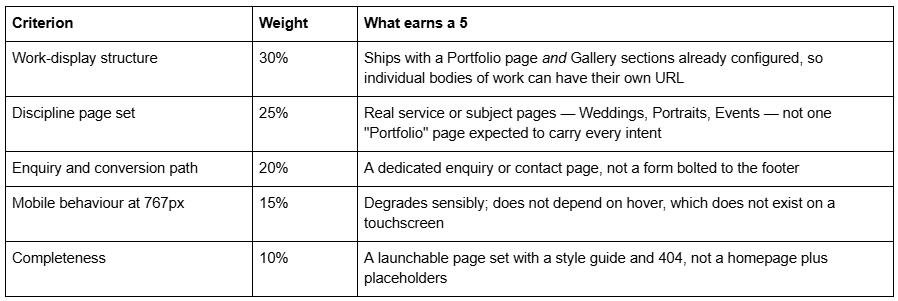
How these Squarespace photography templates were scored
Every template here was judged on five weighted criteria. Scores are out of 5.
What this scoring is and is not. It is a structural assessment made from each template's published page list, its live demo where one resolves, and 12 years of building photography sites on Squarespace. It is not a lab benchmark of the demo sites. Demos ship with lightweight placeholder imagery that bears no relationship to the 40 full-bleed frames you are about to upload, so a Lighthouse score run against a demo tells a photographer nothing. Performance figures below are either Squarespace's own published guidance or Squareko's own client-site measurements, labelled as lab data.
Disclosure: Squareko sells five of the 12 templates below, marked (Squareko, $249). Squarespace's own templates are included with a subscription and are the correct answer for at least one segment here — I have said so where it is true. Competitor templates from Big Cat Creative, Studio Founded, ilovecreatives, and Station Seven are included because they do specific things the Squareko range does not.
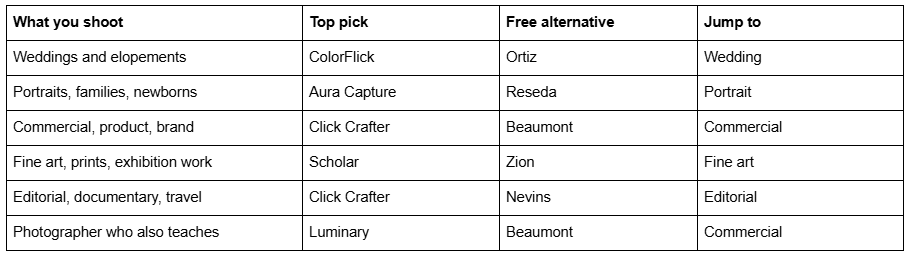
Quick pick by kind of photography
The decision that comes before the template: Portfolio page or Gallery section
Read this before you look at a single design. On Squarespace 7.1 there are three ways to show photographs, and they are not interchangeable. Most photographers pick the wrong one and then blame the template.
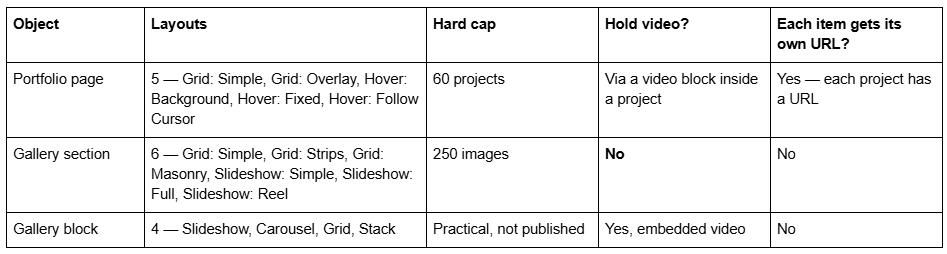
Three consequences follow, and they decide the shape of a photography site.
A Portfolio page is a collection, not a set of pages. Squarespace's documentation is explicit: "It's not possible to turn projects into standalone pages outside the portfolio. Projects are collection items, dependent on the main portfolio collection page, similar to blog posts in a blog page." That is fine — it is what gives each wedding, each shoot, each campaign its own indexable URL. But it means a project lives at /portfolio/project-name, and you cannot lift one out to sit in the top-level navigation.
Gallery sections cannot hold video and cannot hold blocks. Squarespace states plainly that "It's not possible to upload videos or add blocks to the section." If you shoot hybrid photo-and-video, your gallery section is a dead end and you need a Portfolio project or a gallery block instead.
Three of the five Portfolio layouts are hover-dependent. Hover: Background, Hover: Fixed and Hover: Follow Cursor are beautiful on a laptop and meaningless on a phone, where there is no hover state. Most photography traffic is mobile. If you choose a hover layout, check what it collapses to at the 767px breakpoint before you build the whole site on it.
The practical rule: Portfolio page for bodies of work that need to rank individually; Gallery sections for the visual runs inside those pages; gallery blocks anywhere video has to sit next to stills. The full breakdown, including when an index-style stacked landing page beats both, is in the photography portfolio structure guide.
Squarespace templates for wedding photographers
Wedding photography is sold on feeling and booked on responsiveness. The site has one job on the first screen and a second job two clicks later: show a run of images that reads like a day, then answer are you free, what does it cost, and what happens next without a phone call.
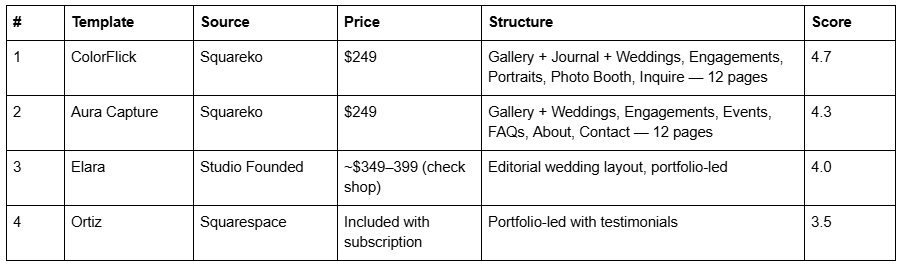
ColorFlick (demo) is the strongest wedding pick in the Squareko range, and the reason is its URL structure rather than its look. It ships with separate Weddings, Engagements, Portraits and Photo Booth pages alongside a Gallery, a Journal and a dedicated Inquire page across 12 pages. Four service URLs means four pages that can each rank for a different intent — "wedding photographer Manchester" and "engagement photographer Manchester" are different searches, and a single Portfolio page cannot win both. The Journal is a genuine asset for a wedding photographer: one post per venue is the most reliable local SEO engine on the platform. Its honest weakness is that the demo's colour treatment is bolder than a lot of wedding brands want, so budget an hour in Site Styles.
Aura Capture (demo) is the quieter alternative: Weddings, Engagements and Events pages, a Gallery, an FAQs page and a Contact page across 12 pages, with no blog. That is a decision, not an omission. A photographer with no intention of writing is better off without an empty Journal to explain, and the FAQs page does real work on a wedding site — turnaround time, travel, second shooter, deposit — that most templates leave you to invent. If you do intend to write, take ColorFlick.
Elara from Studio Founded is worth naming because Studio Founded builds specifically for wedding photographers and its editorial pacing is genuinely better resolved than anything in the Squareko range at the same brief. It costs noticeably more and arrives as a template you install yourself.
Ortiz is Squarespace's own portfolio-led option with a testimonial pattern already built in. For a first season with no budget it is enough.
Wedding sites live or die on what happens after the gallery, not in it. The enquiry-to-booking pipeline — client galleries, date checks, investment pages and the two-person about page — is covered in the wedding photographer template guide.
Squarespace templates for portrait and family photographers
Portrait, family and newborn work is a volume business with a repeat customer. The site is doing something different from a wedding site: it needs session types priced and explained, a booking route, and enough reassurance that a nervous parent books without emailing first.
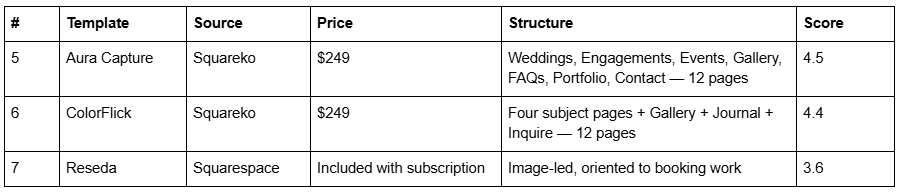
Aura Capture takes the top spot in this segment specifically because of its FAQs page. Portrait photographers answer the same eight questions in every enquiry email — what to wear, how long, how many images, where do we shoot, what if the baby cries — and a template that ships with a page for them saves a working photographer an hour a week forever. Rename Weddings, Engagements and Events to your actual session types (Newborn, Family, Seniors) and the structure holds unchanged. It has no shop, so if you sell print packages through the site you will be adding Products yourself.
ColorFlick is the pick if you want the Journal. Portrait photography benefits from session recaps more than any other discipline, because "family photographer + [neighbourhood]" is a low-competition search and a recap post targets it naturally.
Reseda is the free Squarespace template most often pointed at portrait work. It is a configuration of the same 7.1 engine with no supporting pages, no style guide and nobody to ask.
The portrait-specific structural rule: put pricing on a page, not in a PDF behind an email gate. Session photography is a considered purchase with a short decision window, and the enquiries you lose are the ones who could not find a number.
Squarespace templates for commercial and product photographers
Commercial and product clients are hiring on credibility, not on mood. An art buyer or marketing manager wants to see who else you have shot for, what the process looks like, and whether you can be trusted with a budget and a deadline. That means individually rankable project pages with a client name and a brief, not an undifferentiated grid.
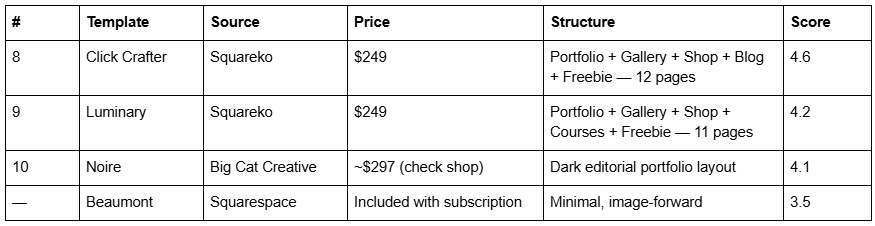
Click Crafter (demo) is the best-structured template in the Squareko range for commercial photography and it is not tagged for photography at all — it is tagged Agency and Service-Based. Twelve pages, and every one is doing a job: a Portfolio page so each campaign gets its own URL, Gallery sections for the visual run inside each project, a Shop for licensing, presets or productised packages, a Blog, and a Freebie page for a lead magnet. It reads as a studio rather than a solo shooter, so a one-person operation strips the team section in five minutes.
Luminary (demo) is the pick for the photographer whose second income is teaching. Portfolio plus Gallery plus Shop plus Courses across 11 pages. Note that Squareko does not publish whether the Courses pages use Squarespace Member Areas — which is a paid add-on — so do not assume gated content is configured. Treat the Courses pages as a layout you can point at whatever platform you already use.
Noire from Big Cat Creative deserves naming honestly: Big Cat Creative is the largest premium Squarespace template shop, its industry taxonomy is deeper than anyone else's, and its documentation and setup videos are the best in the category. If you want the widest possible choice of photography-specific designs, that is where to look first.
Squarespace templates for fine art photographers and print sellers
Fine art photography has a commerce problem no other discipline has: the work is the product, the print is the product, and both need to sit on the same site without the shop cheapening the gallery.
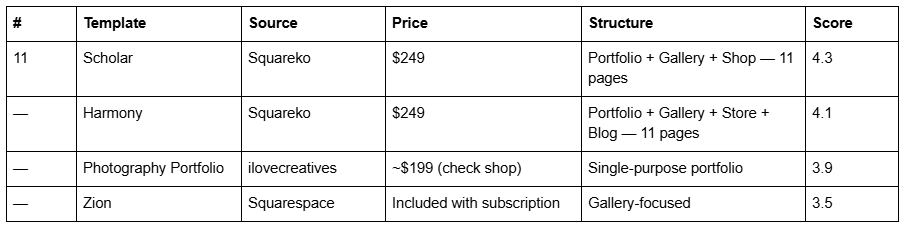
Scholar (demo) pairs a Portfolio page and Gallery sections with a working Shop across 11 pages, which is the exact combination a print seller needs and a surprisingly rare one — most photography templates omit commerce entirely. Two Squarespace constraints to plan around before you build: products have no draft state (Public, Hidden, or Scheduled only), so an edition you are not ready to sell must be set to Hidden rather than saved as a draft; and print sizes are variants, which means your edition sizes and paper choices need deciding before you build the product, not after.
Harmony (demo) is the alternative if you also want a blog alongside the store.
The fine art structural rule: keep the gallery and the shop on separate URLs and link one to the other. A gallery that prices every frame reads as a shop, and a shop with no gallery in front of it has nothing to sell on.
Squarespace templates for editorial, documentary and travel photographers
Editorial and documentary work is sold as a body of work with a narrative, not a service list. The site needs long-form project pages — captions, sequence, context, a written frame around the pictures — and a writing surface.
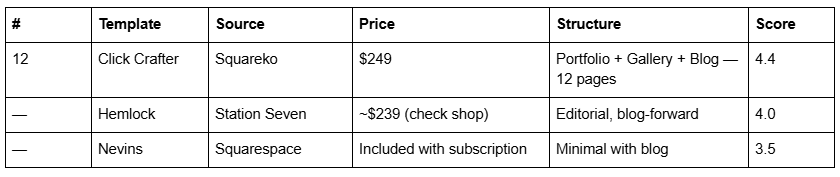
Click Crafter (demo) takes this segment as well as the commercial one, and for a different reason. Documentary work needs three surfaces at once, and Click Crafter is one of the few templates in the Squareko range that ships all three: a Portfolio page so each body of work gets its own indexable URL, Gallery sections inside each project to carry the sequence, and a Blog to carry the written frame — the captions, the context, the reporting that turns a set of frames into a story an editor can commission from. Twelve pages, and the Shop page that earns its place in the commercial segment does honest work here too, because a documentary photographer selling a zine or a book needs somewhere to sell it. Strip the agency team section and it reads as a single author.
Station Seven builds genuinely blog-forward templates and is the better choice if your written work carries equal weight with the photographs.
The editorial structural rule: the Portfolio page's 60-project cap is not a problem for a documentary photographer and is a real one for a travel photographer with 200 destinations. If your archive is bigger than 60 units, the archive belongs in a blog with categories, and the Portfolio page holds only the 12 projects you want commissioned for.
Free Squarespace templates for photographers, honestly assessed
Squarespace's own photography-oriented templates — Beaumont, Ortiz, Reseda, Nevins, Zion, Tepito, Nolan, Quinn — are included with a subscription and are genuinely adequate for a first site. They are configurations of the same 7.1 engine, which means the ceiling is identical.
What you do not get is the page set. A free template gives you a homepage and a handful of generic pages; a premium template's value is the eight or ten other pages already written into the site map, plus a style guide page that keeps the site consistent after handover. If you are launching in a weekend with no work booked, start free. If you have paying clients and your time has a rate, the page set is what you are buying.
Page weight is the constraint photography sites actually hit
This is the section every competitor omits, and it is the one that costs photographers bookings.
A photography homepage is, structurally, the heaviest kind of page on the web: a full-bleed hero, a gallery run below it, and often a slideshow. Squarespace helps in two ways — the CDN serves WebP unconditionally, regardless of your source format, and it generates responsive sizes automatically. It does not help with count. Squarespace's own guidance is to "keep each page on your site to 5 MB or less", and a 40-image masonry gallery blows through that without trying.
For calibration: across 54 Squareko-built client sites measured in August 2026 — Playwright/Chromium, cloud datacentre, unthrottled, single run per site, load-only CLS, so lab data rather than field data — the median page weight was 3.0 MB across 93 requests, median mobile LCP was 2.01s with 74% under Google's 2.5s "good" threshold, and 86% of images were served as WebP. Those numbers include gallery-led sites. They are achievable, and they are achievable because of image discipline, not template choice.
Three rules that do the work:
Upload at 1500–2500px on the long edge. 2500px is the maximum Squarespace will serve; anything above it is bandwidth you paid for and nobody sees. Set the filename before you upload — filenames cannot be changed afterwards.
Cap the homepage gallery at 12 to 16 frames. The full run belongs on a Portfolio project. Nobody scrolls 40 images on a homepage; they scroll six and decide.
Watch the hero. Your Largest Contentful Paint element is almost always the hero image. One oversized hero is worth more than twenty optimised thumbnails.
What a Squarespace photography template cannot do for you
Four things worth knowing before you buy anything, from any shop.
Squarespace has no native client proofing. There is no built-in gallery where a client selects, favourites and orders. Password-protected pages exist — each page can carry its own password, set per page — and Member Areas exist as a paid add-on, but neither is a proofing system. Working photographers pair Squarespace with Pic-Time, Pixieset, ShootProof or CloudSpot and link out. Any template promising "client galleries" means a password-protected page.
Demo images are not licensed for live use. Every template you buy, from every shop, ships with placeholder photography you must replace. For a photographer this is usually the easiest obligation on the list — you have the pictures — but it still applies to the About and Contact pages.
A template is a starting configuration, not a different Squarespace. All 7.1 templates run one engine. What you pay for is the configuration, the page set, and depending on the shop, someone installing it. Squareko templates arrive as a Squarespace contributor invitation rather than a file download — there is no upload step at all — and installation onto an existing site is a manual process taking around 48 hours. All sales are final, which is a good reason to walk the demo properly first.
The Squarespace subscription is separate. The $249 covers the design and use of the template only. Squareko recommends the Business plan and buyers get 20% off their first year.
Where to go next in this photography cluster
Portfolio structure — Portfolio pages vs Gallery sections vs stacked landing pages, and why most photographers pick wrong: photography portfolio Squarespace template
Sequencing and pacing — how the work is ordered, grouped and covered, and what an art director actually scans: Squarespace portfolio template for photographers
Weddings — the enquiry-to-booking pipeline end to end: Squarespace template for wedding photographers
The business site — pricing, packages, booking, invoicing and local SEO: Squarespace template for a photography business
Full roundup — every photography-capable template compared by discipline: Squarespace photography templates
Minimal designs — when restraint is the brief: minimal Squarespace template for photographers
Premium tier — what the money actually buys: premium photography Squarespace template
Gallery-led builds — templates built around the gallery section: Squarespace gallery template for photography
Single verdict — if you want one answer rather than five: best Squarespace template for photographers
Colour-forward work — for photographers whose work is not muted: colorful photography Squarespace template
If you have worked the segments and you are still between two templates, the deciding question is almost never the homepage. It is the second click — whether the template gives each body of work its own URL, and whether there is somewhere sensible to put the caption, the client and the context.
That is worth a second opinion before you commit, which is why the premium Squarespace templates in our shop are listed with their full page structure rather than a homepage screenshot. Most photographers reading this will pick correctly from the tables above without any help — the segments exist so you do not have to ask.
FAQ
-
Yes, Squarespace publishes photography-oriented templates including Beaumont, Ortiz, Reseda, Nevins and Zion, included with a subscription. All Squarespace 7.1 templates run the same engine, so the real difference between them is the page set they ship with rather than what they are capable of.
-
It depends on what you shoot. For weddings, ColorFlick, because it ships separate Weddings, Engagements, Portraits and Photo Booth pages that can each rank for a different search. For portraits, Aura Capture. For commercial work, Click Crafter. For prints, Scholar. For documentary, Click Crafter again — it is the one that pairs a Portfolio page with a blog.
-
They can. Across 54 Squareko-built sites measured in August 2026 — lab data, single run, unthrottled — median mobile LCP was 2.01s with 74% under Google's 2.5s threshold, and median mobile CLS was 0.000. Field data on throttled mobile connections will be slower.
-
A gallery section holds up to 250 images. That is the technical cap, not a recommendation — Squarespace warns that large files or an excessive number of images slow a site, especially on mobile. Twelve to sixteen images on a homepage gallery is a more useful working limit.
-
Not natively. Squarespace has no built-in proofing, favouriting or ordering system. You can password-protect individual pages, and Member Areas exist as a paid add-on, but working photographers pair Squarespace with Pic-Time, Pixieset, ShootProof or CloudSpot and link to those galleries.
-
Not inherently. The Squarespace CDN serves WebP unconditionally and generates responsive sizes automatically. Slowness comes from image count and hero size. Across 54 Squareko-built client sites measured in August 2026 in a Playwright lab test, median mobile LCP was 2.01s and median page weight 3.0 MB.

Author Bio
I'm Walid Hasan, a Certified Squarespace Expert and Squarespace Circle Platinum Partner with over 12 years of hands-on experience designing and optimizing high-performing websites. Over the years, I've had the privilege of building more than 2,000 Squarespace websites for clients around the world, always focusing on clean design, strong user experience, and conversion-driven results.
