
Squarespace Template for Speakers: What Bookers Look For
The short answer: A professional speaker's website is not a personal brand site with a contact form bolted on. It is a due-diligence tool for one reader — the event organiser holding a shortlist. Give them a reel above the fold, named signature talks, real stages with audience sizes, a downloadable one-sheet, hi-res headshots, a tech rider, and an enquiry form that asks for the date. Everything else is decoration.
The organiser is not browsing. They have a slot to fill, a budget, a date, and five other names open in other tabs. Your site's job is to answer their questions faster than the other five.
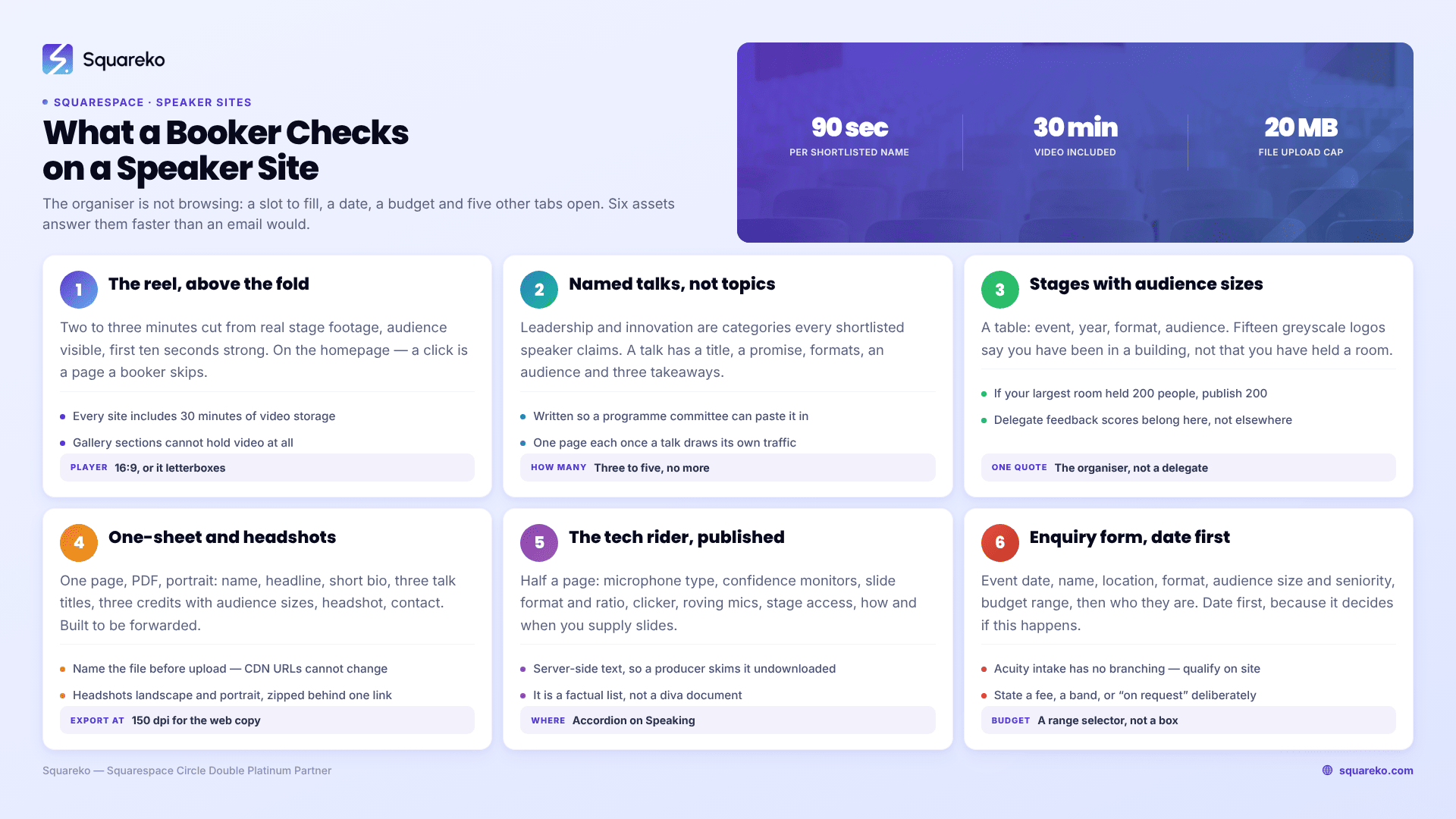
The booker's ninety seconds
This is the order a conference producer or bureau researcher actually works in, and where each answer has to live on a Squarespace 7.1 site.
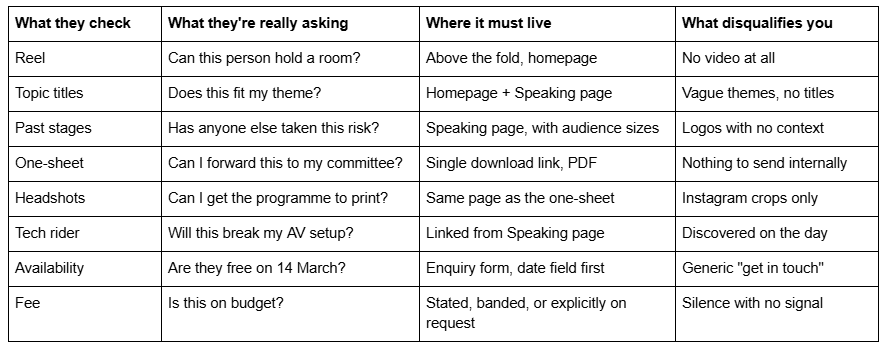
If a booker cannot get through that list without emailing you, some of them will simply move to the next name. The site exists to remove that email.
Put the reel above the fold, and get the Squarespace video setup right
Nothing else on a speaker site does the work a reel does. Two to three minutes, cut from real stage footage, audience visible, opening ten seconds strong. A booker will judge you on it before they read a word.
On Squarespace 7.1 you have three routes and they are not equivalent:
Video block with a YouTube or Vimeo URL. Simplest, no storage used, and the platform's player handles delivery. The cost is a third-party chrome and, on YouTube, related-video behaviour you do not control.
Video block with an uploaded file. Squarespace includes 30 minutes of high-resolution video storage on every site, and individual videos are capped at 30 minutes. A reel is two or three minutes, so this fits comfortably. Additional storage comes through the Digital Products subscription.
Background video on a section. Effective for a homepage hero, but it plays muted and loops. Use it as atmosphere behind your name and topic line, never as the reel itself.
Two constraints worth knowing before you plan the page. The Squarespace video player is 16:9 — anything shot in another aspect ratio gets letterboxed, so cut your reel to 16:9 rather than fighting it afterwards. And Gallery sections cannot hold video. If you were planning a gallery of stage clips, that is not a gallery; it is a set of video blocks in a section, or a single reel plus stills.
A practical sequencing point: put the reel on the homepage, not on a separate "Media" page. A page that requires a click is a page a shortlisted booker skips.
Name your talks. Do not list "topics"
"Leadership", "innovation" and "the future of work" are not talks. They are categories, and every speaker on the shortlist claims all three.
A signature talk has a title, a promise, a length, an audience and three takeaways. That is what a programme committee copies into their agenda, so give it to them in a form they can paste:
Title. Something a delegate would choose to attend. One-line promise. What the room leaves with. Formats. Keynote 45 minutes, workshop half day, panel, fireside — say which you actually do. Audience fit. Senior leadership, technical teams, mixed conference plenary. Three takeaways. Three lines, verbs first.
Three to five talks is the right number on a speaker site. More than that reads as unfocused, and the Squarespace 7.1 page limit is never the constraint here — attention is.
If you have four or more talks and each one draws its own search traffic, give each a page and link them from a Speaking index. Squareko's Navigate template carries a dedicated Speaking page alongside a Podcast page and a Course page across its 10 pages, and Storyline runs to 13 pages with Speaking, Podcast, Testimonial and Booking pages already built — both structures assume this split rather than making you invent it.
Past stages, with audience sizes, not a logo wall
The logo wall is the single most over-used and least informative element on speaker sites. Fifteen greyscale logos tell a booker that you have been in a building. They do not tell them you have held a room.
Replace it, or at minimum caption it. What a booker wants is a table:

Audience size is the number that changes the conversation. A speaker who has held 1,200 people is a different booking risk from one who has run 60-person workshops, and pretending otherwise wastes everybody's time. If your largest room is 200 people, say 200. Bookers who need 200 exist in far greater numbers than bookers who need 2,000.
Two supporting elements belong here rather than on a separate testimonials page: one organiser quote — from the person who booked you, not a delegate — and delegate feedback scores if the event shared them. An organiser quote is worth ten delegate quotes because it answers the only question the reader has, which is what happens to them if they book you.
The one-sheet and the headshots: make forwarding effortless
Almost every booking involves an internal step you never see. Someone on the committee has to sell you to three colleagues, usually in an email. The speaker one-sheet exists for that email.
One page, PDF, portrait. Name, headline, one-paragraph bio, three talk titles, three stage credits with audience sizes, a headshot, contact details, and your website URL. That is the whole thing. A four-page "media kit" is a document nobody forwards.
On Squarespace, this is a file link rather than a page. In the link editor choose File, upload, and link it from a button. Three practical notes:
Uploads are capped at 20 MB. A one-page PDF has no business being anywhere near that, but an uncompressed 300 dpi headshot inside it easily can be. Export at 150 dpi for the web version.
Name the file before you upload it. firstname-lastname-speaker-one-sheet-2026.pdf is what appears in the booker's downloads folder and in their email to the committee. Untitled-3-FINAL-v2.pdf is not the impression you want on the committee's screen.
Squarespace's CDN assigns file URLs automatically and they cannot be changed. If you re-upload a revised one-sheet you get a new URL, so update the button rather than assuming the old link now serves the new file.
Headshots sit alongside it: two or three, landscape and portrait, high resolution, in a ZIP if you want a single link. Programmes and holding slides need print-quality images, and "can you send a hi-res headshot" is an email you can delete from your life permanently by putting the ZIP on the page.
The tech rider, before the AV team asks
A rider is not a diva document. It is a short, factual list that stops a production team improvising at 8am on the day: microphone preference (lavalier, headset, handheld), whether you need confidence monitors, slide format and aspect ratio, clicker, whether you use audience interaction that needs roving mics, stage access requirements, and how you supply slides and by when.
Half a page. Put it on the Speaking page as an accordion, or link it as a second PDF next to the one-sheet. Squarespace 7.1 Accordion blocks render server-side, so the text stays crawlable and a booker can skim it without a download.
Speakers who publish a rider get booked by producers who like working with people who publish riders. That is the entire mechanism.
Availability and the enquiry form: ask for the date first
A generic contact form is a downgrade for a speaker site. The enquiry form should ask, in this order: event date, event name, location and format (in person, virtual, hybrid), audience size, audience seniority, format required, budget range, and then who they are.
Date first matters for a mundane reason: it is the field that decides whether the conversation happens at all, and putting it first means an unqualified enquiry gets abandoned before it costs you a reply.
Budget as a range selector, not a free-text box. Ranges get answered; open boxes get skipped.
For enquiries a Squarespace Form block is the right tool — it is native, submissions land in Squarespace, and you control the field order. If you want an actual bookable slot for a discovery call after the enquiry, that is Acuity Scheduling — now the official name of what was Squarespace Scheduling — embedded via a scheduling block. Acuity's intake forms support text boxes, dropdowns, checkboxes, yes/no and file upload up to 5 MB, but they have no conditional or branching logic, so do not design an enquiry flow that depends on questions appearing conditionally. Keep qualification in the site form and use Acuity only for the calendar.
Fees: state them, band them, or say "on request" deliberately
There is no universal right answer, but there is a wrong one, which is total silence with no signal at all. That produces enquiries from organisers with a £500 budget and from ones with a £15,000 budget, and you waste time on both.
Publish a number if your fee is consistent and you want to filter hard. Fewer enquiries, higher conversion.
Publish a band — "keynotes typically £X–£Y depending on format and travel" — which is what most working speakers should do. It filters without locking you in.
Say "fees on request, and we'll always work with charity and community budgets" if your rate genuinely varies by sector. This is a real position; the point is to say it rather than leave a hole.
Squareko's Advisory template ships with a Pricing page and two legal pages among its 11, which is the right shape if you publish bands and need terms alongside them. If you would rather keep fees off the site entirely, use that page for formats and packages instead and let the enquiry form carry the budget question.
Which template shape actually fits a speaker
Judge a template by its page list, not its homepage. A speaker needs, at minimum: Home, Speaking (or Topics), About, Media/Press, Contact. Add Podcast if you host one, Book if you have written one, Blog if you will actually write.
Across the Squareko shop, four are built on that shape. Navigate (10 pages) carries Speaking, Podcast, Course and Blog — the tightest fit for a speaker who also teaches. Storyline (13 pages) adds Testimonial and Booking pages to the same core, which suits a speaker running an active enquiry pipeline. Advisory (11 pages) leans consultative, with Pricing, Blog and two legal pages, and works for the speaker whose talks feed advisory work. Luminary (demo, 11 pages) has Courses, a Shop, Portfolio and Gallery, and is the right pick when speaking is one revenue line among several.
All are $249, delivered as a Squarespace contributor invitation rather than a file download, and demo images are not licensed for live use — every image gets replaced with yours, which for a speaker site is the point anyway. Your face is the design.
Where the site stops being the problem
Work the booker's list in order — reel, talk titles, stages with audience numbers, one-sheet, headshots, rider, enquiry form, fee signal. A speaker site that does those eight things well beats a beautiful one that does four.
The build itself is not usually where speakers get stuck. Where they get stuck is deciding what evidence they are allowed to publish, how to phrase a fee band, and which of eleven half-written talks are the three that go on the site. That is editorial work, not design work, and it is worth doing before anyone touches a template.
If you would rather start from a page structure that already assumes a Speaking page, a Podcast page and a proper enquiry path, our premium Squarespace templates are built on that shape and installed for you. Most speakers do this themselves perfectly well — the eight elements above are the whole brief.
FAQ
-
Eight things, in this order: a two-to-three-minute reel above the fold, named signature talks with formats and takeaways, past stages with audience sizes, a downloadable one-page PDF one-sheet, hi-res headshots, a tech rider, an enquiry form that asks for the event date first, and a clear fee signal — a number, a band, or an explicit "on request".
-
Publish a band rather than a number or silence. A band like "keynotes typically £X–£Y depending on format and travel" filters out enquiries far below your rate without locking you into a single price. Total silence with no signal produces enquiries from every budget level and wastes time on both ends.
-
Use a Video block, either with a YouTube or Vimeo URL or with an uploaded file. Squarespace includes 30 minutes of video storage on every site and caps individual videos at 30 minutes, so a reel fits. Cut to 16:9 — the player letterboxes anything else. Gallery sections cannot hold video.
-
One page, PDF, portrait: name, headline, one-paragraph bio, three talk titles, three stage credits with audience sizes, a headshot, contact details and your site URL. It exists so a committee member can forward you internally. Squarespace file uploads cap at 20 MB, and file names cannot be changed after the CDN assigns a URL.
-
Yes, if you speak on real stages. Half a page covering microphone preference, confidence monitors, slide format and aspect ratio, clicker, roving mics and your slide deadline. Publish it as an Accordion block on the Speaking page — Squarespace 7.1 accordions render server-side, so producers can skim it without downloading anything.
-
One whose page list already includes a Speaking page. Navigate (10 pages: Speaking, Podcast, Course, Blog) is the tightest fit; Storyline (13 pages) adds Testimonial and Booking; Advisory (11 pages) suits speakers whose talks feed advisory work; Luminary (11 pages) fits when speaking is one line among courses and products.

Author Bio
I'm Walid Hasan, a Certified Squarespace Expert and Squarespace Circle Platinum Partner with over 12 years of hands-on experience designing and optimizing high-performing websites. Over the years, I've had the privilege of building more than 2,000 Squarespace websites for clients around the world, always focusing on clean design, strong user experience, and conversion-driven results.
