
Squarespace Template for Business Coach: Proof and Programmes
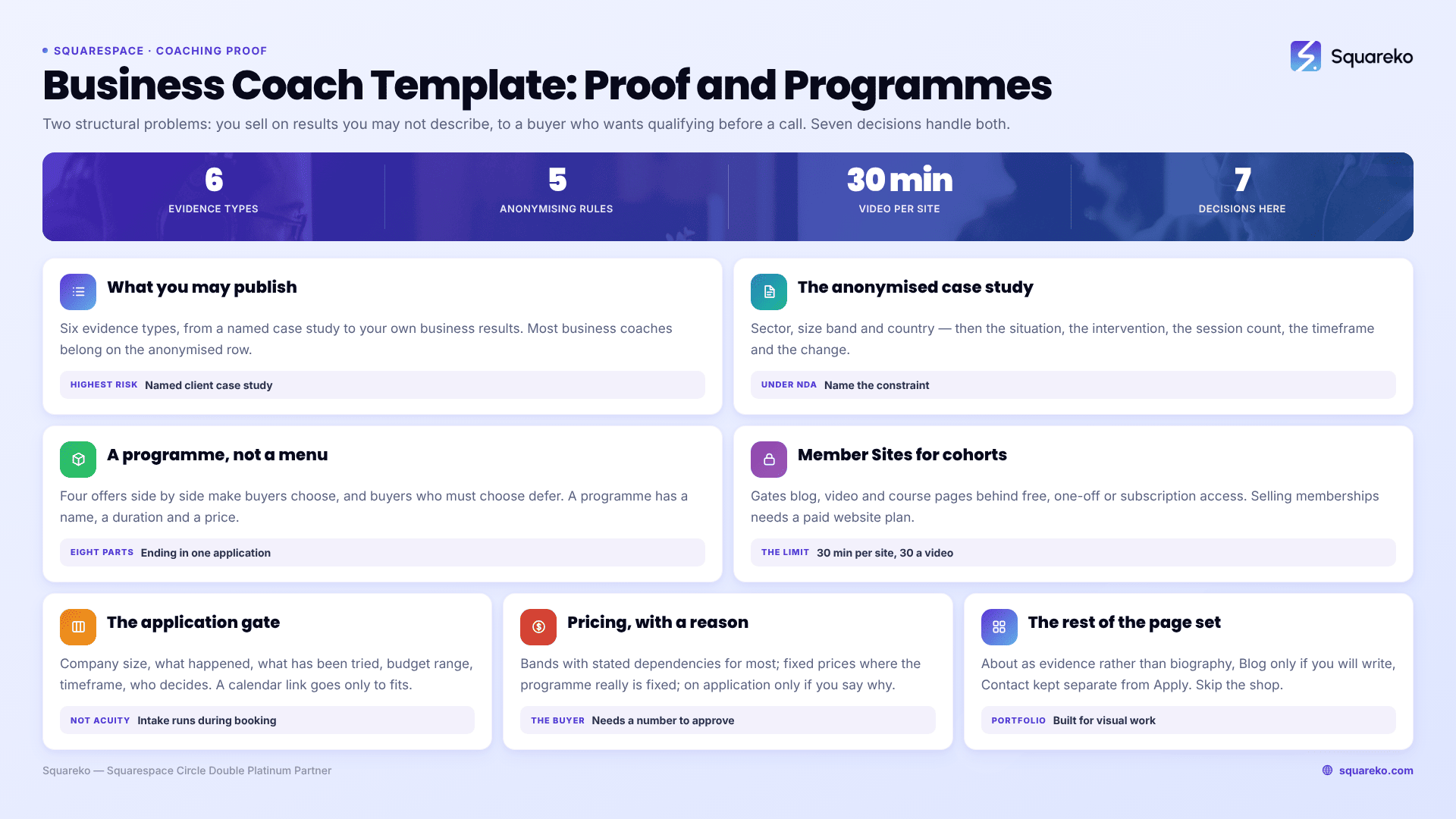
The short answer: A business coach's website lives or dies on evidence of results, and most of that evidence is confidential. The fix is not to go vague — it is to publish anonymised, structured outcomes with permission, in a fixed format: role, sector, company size, the problem, the intervention, the change, the timeframe. Build the rest of the site around a programme, not a service list, and put an application form where most coaches put an open booking link.
Everything a business coach's site has to do follows from one fact: the buyer is spending company money on an intangible outcome and needs to justify it to someone. Your site is the justification.
What you can publish, what it proves, and what it risks
Start here, because this decides the page structure. The options are not equally strong, and they are not equally risky.
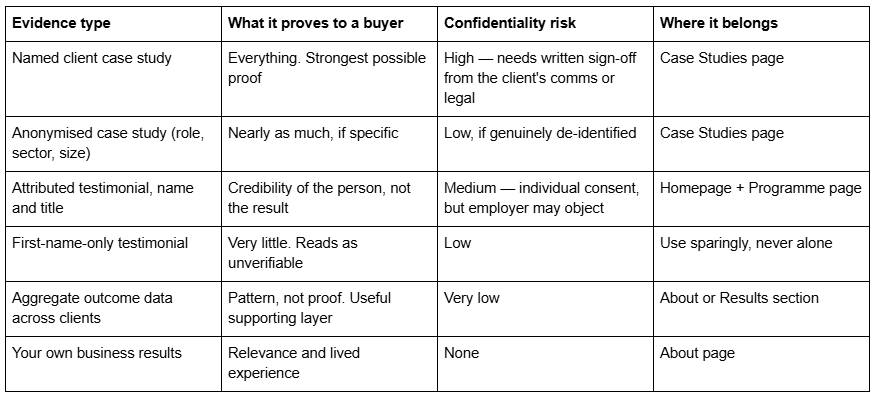
The middle row is where most business coaches should live. An anonymised case study written well is close to as persuasive as a named one, because what persuades is the specificity of the problem, not the logo at the top.
Writing an anonymised case study that still convinces
Vagueness is what kills these, not anonymity. "Helped a client double their revenue" convinces nobody. This does:
Operations director, 40-person specialist engineering firm, UK. Founder-led, in the third year of flat revenue, with the founder still approving every quote. Six sessions over four months, focused on delegation of the quoting process and a weekly leadership rhythm. Quote turnaround went from nine days to under two. The founder's diary went from 31 meetings a week to 12. Revenue growth resumed in the following two quarters.
Nothing there identifies the company. Everything there is checkable in shape and recognisable to a reader in the same position — which is the whole job.
Five rules that keep these both persuasive and safe:
Get written permission anyway. Even for anonymised work. An email saying "happy for you to describe this without naming us" takes one message and removes the entire argument later.
De-identify properly. Sector, size band and country — not "a well-known fintech in Manchester with 43 staff", which identifies the company to anyone in that market.
Publish the intervention, not just the outcome. The number is not the proof; the mechanism is. Buyers are trying to work out whether the same mechanism applies to them.
Name the timeframe. "Six sessions over four months" is credible. "Transformed their business" is not.
Do not imply typicality you cannot support. If one client tripled revenue and eleven improved margins slightly, say so. A results page that reads as a highlight reel invites the reader to discount all of it.
Where your work is under an explicit NDA, say that on the page: "Much of my work is under NDA; the examples below are published with permission and de-identified at the client's request." Naming the constraint is itself a credibility signal to a corporate buyer.
Build the site around a programme, not a service list
"1:1 coaching, team coaching, leadership workshops, strategy days" is a menu. Menus make buyers choose, and buyers who have to choose defer.
A programme has a name, a duration, a defined cohort or client type, a structure, an outcome and a price or price band. It converts because it removes the decision. On a Squarespace 7.1 site the programme page is the page everything else points at, and it needs these sections in roughly this order:
Who it's for — stated as a person and a situation, not a demographic. Two or three lines that let the wrong reader leave.
The problem it solves — in the buyer's words, before yours.
How it runs — sessions, length, cadence, group size, format, what happens between sessions.
What changes — outcomes tied to the mechanism, with an anonymised example.
What's included — materials, member area access, async support, and the boundaries of each.
Price or band, and what it depends on.
The application — one route out of the page, not four.
FAQ — objections in an Accordion block, which renders server-side in 7.1 so the text stays crawlable.
If you run more than one programme, give each its own page and keep a thin index above them. Two well-built programme pages outrank one page listing six offers, and they also let you send different traffic to different pages.
Squareko's Advisory template ships with 11 pages including a Pricing page, a Blog and two legal pages — the shape of a consultative coaching business that publishes bands. Navigate (10 pages) carries a Course page, a Podcast page and a Blog, which suits a coach whose programme has a taught component. Judge either by that page list rather than by the homepage image.
Member Sites: gate the cohort content, not the marketing
Coaches routinely ask whether the whole programme can live inside Squarespace. Partly, yes — through Member Sites, the feature previously known as Member Areas.
What it does well: it puts pages behind a paywall or a login, and those pages can hold blog posts, video pages, course pages and ordinary content blocks. Members can be signed up free, with a one-off payment, or on a recurring subscription. For a coaching cohort that needs a workbook library, session recordings and a resource archive, that is a genuinely good fit and it keeps everything on one domain.
What to know before you plan around it:
Selling memberships requires a paid Squarespace website plan, and Squarespace applies a transaction fee that varies by plan. The Digital Products add-on subscription reduces that fee and adds video storage. Check the current plan terms before you price a cohort, because the fee is a real line in your margin.
Video storage is the constraint people hit. Every site includes 30 minutes of uploaded video, with individual videos capped at 30 minutes. A twelve-week cohort recording ninety-minute sessions will exceed both, immediately. Either host session recordings on Vimeo or YouTube unlisted and embed them, or budget for the storage add-on.
Gate the delivery, not the sales pages. Case studies, the programme page and pricing must stay public. Members-only content that search engines cannot read contributes nothing to acquisition, and that is fine — it is not supposed to.
If your programme needs drip scheduling, per-module completion tracking and quizzes, you have outgrown Member Sites and belong on a dedicated course platform with the marketing site staying on Squarespace. Say that to yourself early rather than discovering it in week three.
The application form as a qualification gate
Most coaching sites put a "Book a free call" button everywhere. For a business coach selling a multi-thousand engagement, that is usually the wrong gate — it fills your calendar with people who are curious rather than buying, and it signals that your time is free.
The stronger pattern is two-step: application first, calendar second.
The application asks the questions that decide whether a call is worth either party's time:
Company size and your role in it
What is happening now that made you look
What you have already tried
Budget range, as a selector rather than a free-text box
Timeframe for starting
Whether the decision is yours alone
Then: "If it looks like a fit, I'll send a link to book a 45-minute call." That sentence does more qualifying work than any other on a coaching site.
Two Squarespace 7.1 implementation notes that matter here:
Use a Form block for the application, not an Acuity intake form. Acuity's intake forms — Acuity Scheduling is now the official name of Squarespace Scheduling — support text boxes, dropdowns, checkboxes, yes/no and file upload up to 5 MB, but they have no conditional or branching logic, and they run during booking rather than before it. An intake form cannot gate a booking; by the time it appears, the slot is being taken. Qualification has to happen in a site form.
Then send the calendar link manually, or automate it. Squarespace form submissions can be routed onward — email, a Google Sheet, or a connected service — and the booking link goes out in your reply. If you would rather automate, connect the form to your scheduling tool through the integration route you already use; just keep the gate in front of the calendar rather than behind it.
Where an open booking link is right: low-ticket sessions, an established referral pipeline where everyone arriving is pre-qualified, and diagnostic calls you charge for. If the call is paid, gating it twice is friction for no gain.
Pricing: the page corporate buyers look for first
Business coaching buyers are usually spending someone else's money and need a number to take to an approver. A site with no pricing signal at all forces them into an enquiry they may not have authority to make.
Three defensible positions, in order of how often they are right for a business coach:
Bands with dependencies. "Six-month engagements typically run £X–£Y depending on cohort size and on-site days." Most coaches should do this.
Fixed programme prices. Right when the programme genuinely is fixed. Highest conversion, least flexibility.
"Pricing on application", stated explicitly with a reason. Defensible for bespoke corporate work, but only if you say why — "every engagement is scoped after a diagnostic" — rather than leaving a blank.
Whichever you choose, the page needs to exist. Advisory ships one; if your chosen template does not, a Pricing page is a page you add, not a template you reject over.
The rest of the page set
Beyond Home, Programme(s), Case Studies, Pricing and Apply, a business coach needs:
About, written as evidence rather than biography. Your own operating experience, the sectors you have worked in, credentials and accreditations, and what you do not do. The last one builds more trust than the first three.
Blog, only if you will write. Two posts from 2024 is worse than no blog. If you will write, the business coach's blog has a specific job — it is where you demonstrate the thinking that the confidential case studies cannot show. Squarespace 7.1 blog posts use the classic editor rather than Fluid Engine, which is worth knowing before you plan an elaborate post layout.
Contact, kept separate from Apply. People with a speaking enquiry, a podcast invitation or a partnership question should not have to complete a coaching application.
Skip the shop unless you sell something. Skip the portfolio — Squarespace Portfolio pages are built for visual work and cap at 60 projects, which is not the shape of a coaching practice.
Where the build stops being the hard part
The template question is genuinely secondary here. What decides whether a business coach's site works is whether the proof section is specific enough to be believed and whether the enquiry path filters or floods. Both are writing decisions, and both are worth settling before anyone picks a colour.
Get permission for three anonymised case studies. Write them in the fixed format. Name one programme. Put an application in front of the calendar. A plain site that does those four things converts better than a beautiful one that offers a menu and a free call.
If you would rather start from a page structure that already has the Programme, Pricing and legal pages in place, our premium Squarespace templates are built on that shape and installed onto your site for you. Most coaches assemble this themselves without help — the four decisions above are the actual work.
FAQ
-
Anonymise by role, sector, size band and country, then be extremely specific about everything else: the situation, the intervention, the number of sessions, the timeframe and the measurable change. Specificity is what persuades, not the client's name. Get written permission even for anonymised versions.
-
Publish bands with stated dependencies — "six-month engagements typically run £X–£Y depending on cohort size and on-site days". Corporate buyers usually need a number to take to an approver. If you genuinely scope every engagement, say "pricing on application" and give the reason rather than leaving the page blank.
-
For workbooks, resources and session recordings, yes. Member Sites gate pages behind free, one-off or subscription access. Selling memberships needs a paid website plan and Squarespace charges a plan-dependent transaction fee. Video is the limit — 30 minutes included per site, 30 minutes per video, so host long recordings externally.
-
An application form, for multi-thousand engagements. Ask about company size, current situation, what has been tried, budget range and timeframe, then send a calendar link only to fits. Open booking suits low-ticket sessions, paid diagnostics and pre-qualified referral traffic.
-
Yes, if you speak on real stages. Half a page covering microphone preference, confidence monitors, slide format and aspect ratio, clicker, roving mics and your slide deadline. Publish it as an Accordion block on the Speaking page — Squarespace 7.1 accordions render server-side, so producers can skim it without downloading anything.
-
One whose page list already includes a Speaking page. Navigate (10 pages: Speaking, Podcast, Course, Blog) is the tightest fit; Storyline (13 pages) adds Testimonial and Booking; Advisory (11 pages) suits speakers whose talks feed advisory work; Luminary (11 pages) fits when speaking is one line among courses and products.

Author Bio
I'm Walid Hasan, a Certified Squarespace Expert and Squarespace Circle Platinum Partner with over 12 years of hands-on experience designing and optimizing high-performing websites. Over the years, I've had the privilege of building more than 2,000 Squarespace websites for clients around the world, always focusing on clean design, strong user experience, and conversion-driven results.
