Squarespace Template for Podcasters
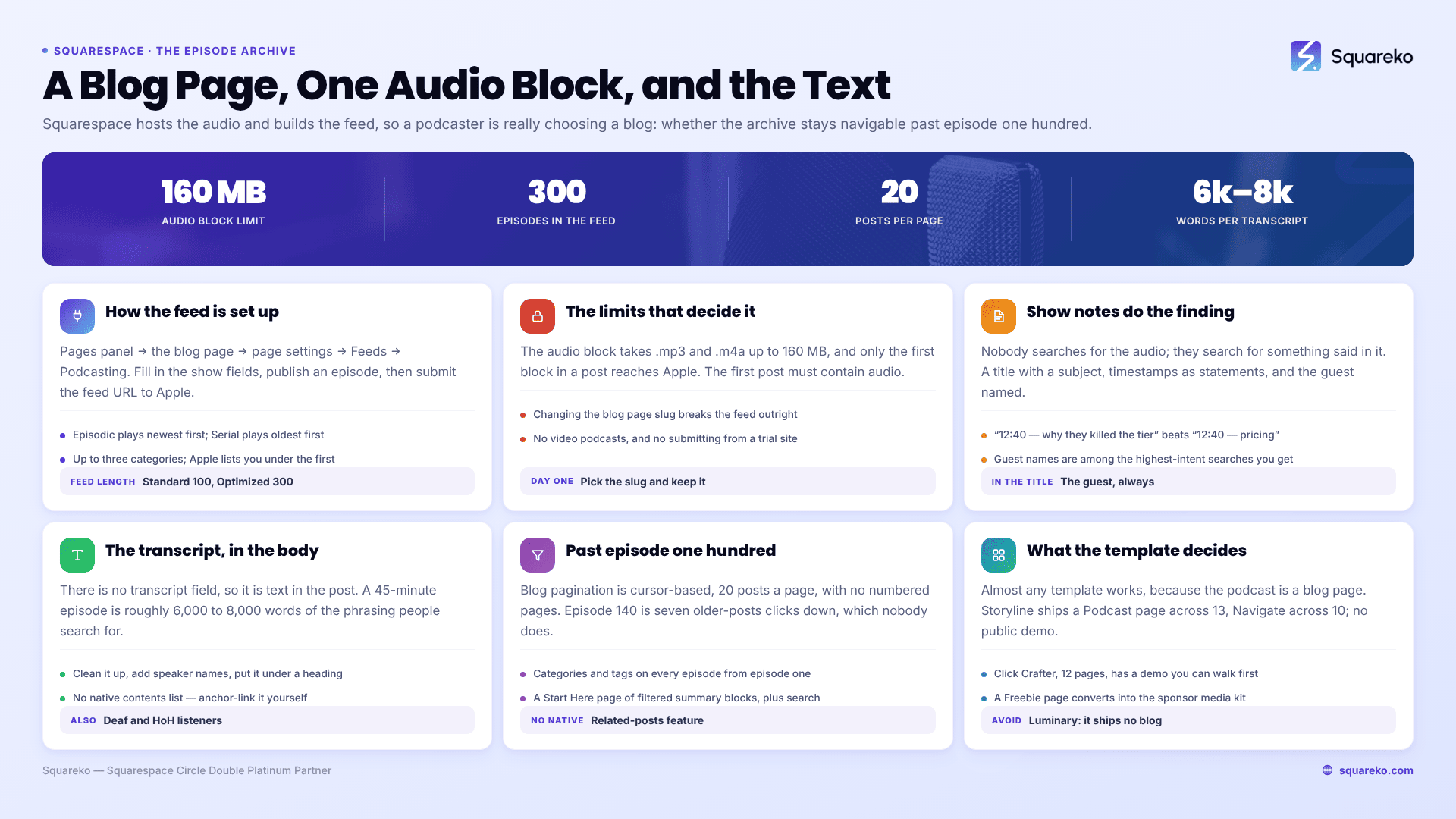
The short answer: on Squarespace 7.1 a podcast is a blog page, and every episode is a blog post containing one audio block. That is the whole architecture, and it means your template choice is really a question about the blog: does it ship a Podcast page, does it have a blog at all, and can the archive stay navigable past 100 episodes. Squarespace hosts the audio and generates the RSS feed itself — you do not need a separate podcast host.
Which also means the visual template matters less here than in almost any other niche. What matters is what you put in each post.
How podcasting on Squarespace 7.1 actually works
Squarespace has native podcast hosting, and it is more complete than most template roundups suggest — with a few hard limits that decide things.
The setup: create a blog page, then open Pages panel → hover the blog page → page settings → Feeds tab → Podcasting. Fill in the show-level fields, publish an episode, and submit the feed URL to Apple Podcasts.
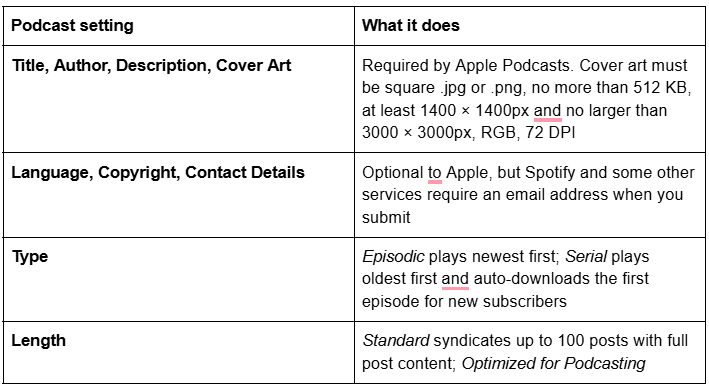
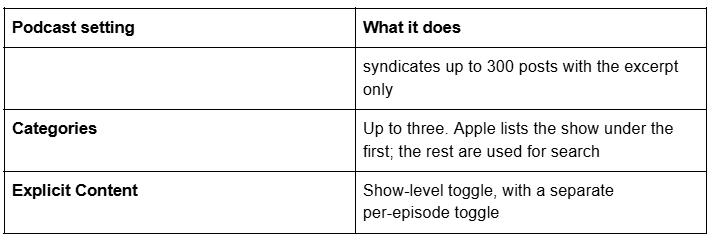
Your feed URL is https://yoursitename.squarespace.com/blogname?format=rss. Squarespace recommends using the built-in .squarespace.com domain rather than a custom one for stability, and the URL is never shown to subscribers.
The limits that matter:
The audio block accepts .mp3 and .m4a only, with a 160 MB upload limit. For larger files, use Add File Link to point at an externally hosted file — you then enter the file size in bytes and the MIME type manually.
One audio block per post counts. If a post contains two, only the first appears in Apple Podcasts.
The first post on the blog page must contain an audio block, or Apple cannot validate the feed.
Feeds display up to 300 of the most recent episodes. Older episodes stay on your site but drop out of the feed.
Squarespace does not support video podcasts. Audio only.
A podcast cannot be submitted if the site is private, has a site-wide password, has a page password on the blog page, sits inside a member site, or is behind a paywall. Trial sites cannot be submitted either.
Changing the blog page URL slug breaks the feed. Choose the slug you will keep, on day one.
Per-episode metadata lives in the audio block, under Podcast: episode Title, Subtitle, Summary, Episode notes, Episode type (Full, Trailer or Bonus), Season number, Episode number, Duration as hh:mm:ss, Explicit content, File size, MIME type, and a Podcast Analytics URL for a third-party prefix. Season number, episode number and duration are all required for Apple submission. On Squarespace 7.1 you can also set a per-episode featured image via the blog post's featured image.
Show notes and transcripts are the actual SEO surface
Nobody finds a podcast by searching for the audio. They find it by searching for something that was said in it. Which means the text on the episode page is the entire discoverable surface of your show, and most podcast sites publish four sentences and a play button.
A working episode post contains:
A title that describes the content, not the number. "Episode 47" ranks for nothing. "Episode 47 — why most DTC brands stop growing at £2m, with Sara Okonjo" is a page with a subject.
The audio block, high on the page.
Show notes with timestamps. Ten to twenty lines, each a real statement rather than a topic label. "12:40 — why they killed the subscription tier after nine months" is searchable; "12:40 — pricing" is not.
Every link and reference mentioned, with real anchor text. This is also the section guests share.
The guest, named, with role, company and a link. Guest names are one of the highest-intent searches that reach podcast sites.
A transcript. This is the single biggest lever and the most commonly skipped.
On transcripts specifically: Squarespace has no transcript field and no native transcript feature, so a transcript is text in the post body. Paste it at the foot of the post, under a heading, cleaned up and lightly formatted with speaker names. A 45-minute episode is roughly 6,000 to 8,000 words of highly specific language — the exact long-tail phrasing an AI answer engine can quote. It also makes the episode accessible to deaf and hard-of-hearing listeners, which is reason enough on its own.
Squarespace 7.1 has no native table of contents, so for a long transcript add an anchor-linked list of speakers or sections by hand at the top using a text block with in-page links.
The archive problem after episode 100
This is where podcast sites on Squarespace 7.1 degrade, and it is worth knowing before you launch rather than after.
Blog pagination is cursor-based, capped at 20 posts per page, with no numbered pages and no infinite scroll. Episode 140 is therefore seven "older posts" clicks from the top. Nobody clicks seven times.
Three things fix it, and none of them come with a template:
Categories and tags on every episode, applied from the first episode. Topic, guest type, season. Squarespace blog posts support both, and they are what everything below depends on.
Summary blocks as curated indexes. A summary block pulls from a blog page and can filter by category or tag, with Wall, Carousel, List or Grid layouts and a set number of items. Build a "Start here" page holding five or six filtered summary blocks — best episodes, by topic, by season. This is the real navigation for a large archive.
A search block in the header or on the archive page. On a 200-episode show with transcripts, site search is genuinely the most-used feature.
Squarespace 7.1 also has no native related-posts feature. The documented approach is a summary block at the foot of each post filtered to a shared category or tag — which is another reason to be disciplined about categories from episode one.
The subscribe row, and where new listeners actually convert
Most people who arrive at a podcast website came from a search or a share, not from a directory, and they are one decision away from subscribing in the app they already use. That decision needs to be available in the first screen of every episode post and on the show page — not only in the footer.
Build it as a row of plain text or button links to your show's page on Apple Podcasts, Spotify, YouTube and Pocket Casts, plus one to the raw feed. Squarespace 7.1 has an RSS block for the last of those, which surfaces the feed URL for anyone using a podcast app that takes a direct URL. Keep the row identical everywhere so returning visitors stop looking for it.
Two things worth measuring rather than assuming. Squarespace's RSS subscribers analytics panel reports traffic from Apple Podcasts. For download and listen data across every app, add a third-party analytics prefix in the audio block's Podcast Analytics URL field, which routes each request through your measurement service before it reaches the file.
Guest pages, sponsor pages, and schema
Guests. Once a show has 40 episodes, guests are a traffic source. Two options: a tag per guest with a "browse by guest" page built from filtered summary blocks, which is cheap and automatic; or a proper guest page per recurring guest, which is only worth it for people who appear repeatedly. Either way, always name the guest in the post title and in the first paragraph, because that is what people search.
Sponsors. A sponsor page has one job: make it easy for a media buyer to say yes. Downloads, listener demographics, episode cadence, past sponsors, ad formats and rates or a rate request. Two structural notes for Squarespace: the Freebie page that several templates ship converts neatly into a media-kit download page, and a form-to-download flow works the same way as any lead magnet — Squarespace forms do not attach files, so either redirect to an unlisted download page after submission or store to a mailing list and trigger an automated Email Campaign, which is billed separately from the site plan.
Schema. Squarespace automatically generates structured data for Blog post, Event, Local business, Organization, Product and Website, and you cannot edit or remove it. There is no PodcastEpisode or PodcastSeries markup, and Squarespace already emits an Article node for every blog post. If you want PodcastEpisode, add it via a Code Block in the post body set to HTML mode — there is no per-post header injection in 7.1 — and do not re-declare Article or BlogPosting alongside it. Note that script-bearing code blocks are disabled while you are logged in, showing "This block contains embedded scripts. Embedded scripts are disabled while you're logged in and editing your site." Verify logged out. Be realistic: this markup earns no rich result, and the RSS feed is what podcast directories actually consume.
Which Squarespace templates suit a podcaster
Because the podcast is a blog page, almost any template works — which makes two specific facts the whole selection criteria.
Storyline is the strongest structural fit in the Squareko range: 13 pages including a dedicated Podcast page, a Speaking page, a Testimonial page, a Booking page, a Consulting page, a Blog, About, two legal pages, two homepage variants, a Style Guide and a 404. For a podcaster who also speaks, consults or coaches — which is most podcasters with a business behind the show — that is the complete set. Its published live demo returns HTTP 401, so no demo link is given here; ask for a walkthrough rather than judging from a thumbnail.
Navigate is the leaner version at 10 pages: a Podcast page, a Speaking page, a Course page, a Blog, About, Contact, two homepage variants, a Style Guide and a 404. It suits the podcaster whose business is a course or a paid community. Its demo is also 401, so again no link.
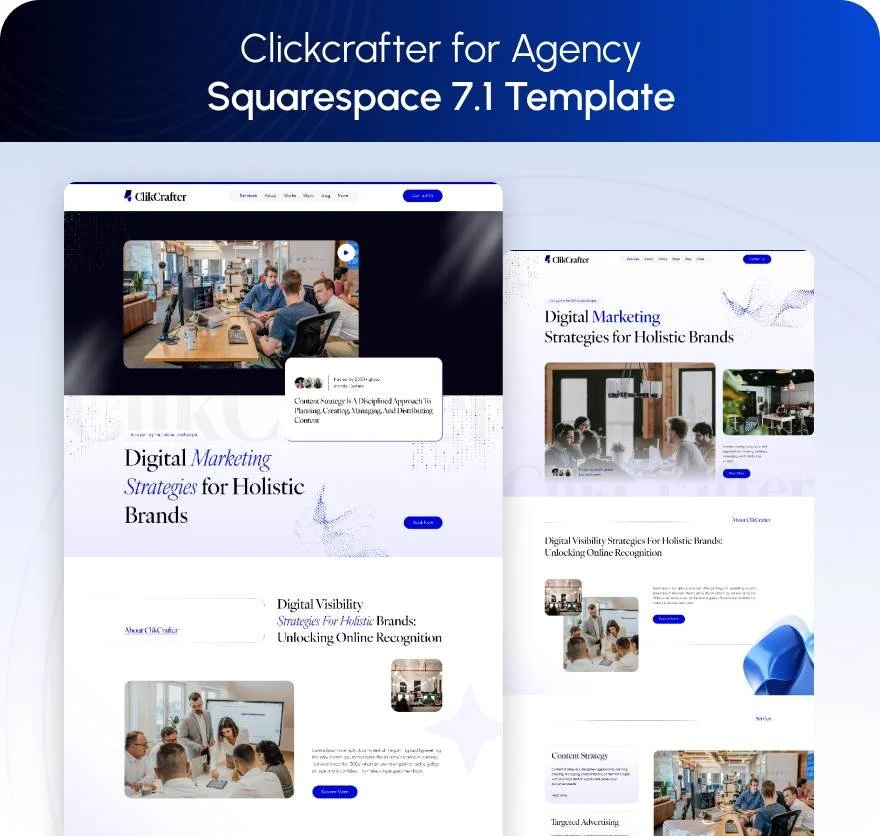
Click Crafter is the pick if you want a working demo you can inspect before buying: 12 pages tagged Agency and Service-Based, with a Blog (which becomes the episode collection), a Portfolio, a Gallery, Services, Shop, Contact and a Freebie page that converts into a sponsor media kit.

Fit Foundry and Relief are both reasonable for a show attached to a coaching or wellness practice — Fit Foundry has a Blog, a Shop, FAQs and a Freebie page across 11 pages; Relief has a Blog, Pricing, FAQ and two legal pages across 11.
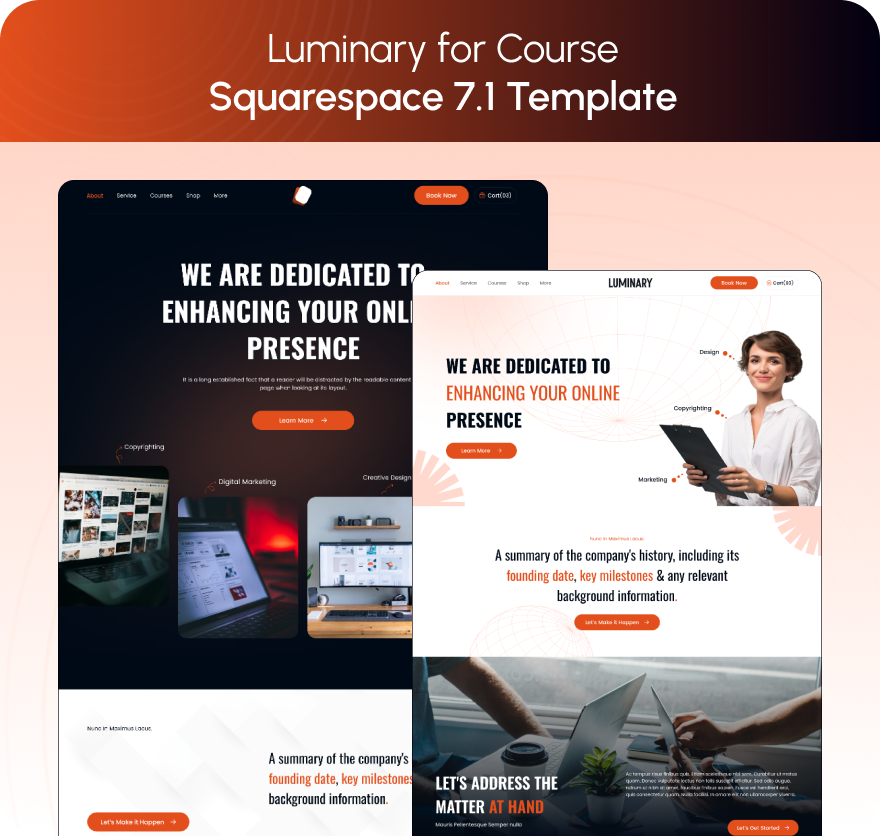
Luminary is the one to avoid for a podcast. It is an 11-page Service-Based, Course and Speaker template with a Portfolio, Gallery, Courses page and Shop, but Luminary ships no Blog page and no Contact page. Since the podcast is a blog page on Squarespace 7.1, that is the one missing structure a podcaster cannot work around without building it.
Choosing one
Pick the blog page slug on day one and never change it, because changing it breaks the RSS feed. Choose a template that ships a blog and, ideally, a dedicated Podcast page. Then spend your effort on show notes with timestamped statements, a named guest in every title, and a transcript on every episode — that is what makes an archive findable. The design is the least consequential decision here.
If you would rather not run the install yourself, the premium Squarespace templates in our range arrive as a Squarespace contributor invitation rather than a file download, and can be installed onto an existing live site in around 48 hours without taking it down. Most podcasters reading this will set the blog page up themselves in an afternoon, and the mechanics above are the part worth getting right.
FAQ
-
Yes. A blog page hosts the podcast, each episode is a blog post containing one audio block, and Squarespace generates an Apple-formatted RSS feed you submit to Apple Podcasts, Spotify and others. Set it up under page settings → Feeds → Podcasting. No separate podcast host is required.
-
The audio block accepts .mp3 and .m4a only, with a 160 MB upload limit; larger files must be hosted externally and linked with Add File Link. Only the first audio block in a post appears in Apple Podcasts, and the feed displays up to 300 of the most recent episodes.
-
No. Squarespace states it supports audio podcasts only. You can add a video block or an embed to the episode post for a YouTube or Vimeo version, but the RSS feed Squarespace generates carries the audio file, not video.
-
In the blog post body — Squarespace has no transcript field. Paste the cleaned-up transcript at the foot of the episode post under a heading, with speaker names. A 45-minute episode is roughly 6,000 to 8,000 words of specific language, and it is the largest single search surface a podcast site has.
-
With categories and tags applied from episode one, plus summary blocks filtered by category to build curated index pages, plus a search block. Blog pagination in 7.1 is cursor-based and capped at 20 posts per page with no numbered pages, so episode 140 is otherwise seven clicks deep.
-
No. Squarespace auto-generates Blog post, Event, Local business, Organization, Product and Website structured data only, and these cannot be edited or removed. Adding PodcastEpisode means a Code Block in the post body in HTML mode, and it earns no rich result — the RSS feed is what directories consume.

Author Bio
I'm Walid Hasan, a Certified Squarespace Expert and Squarespace Circle Platinum Partner with over 12 years of hands-on experience designing and optimizing high-performing websites. Over the years, I've had the privilege of building more than 2,000 Squarespace websites for clients around the world, always focusing on clean design, strong user experience, and conversion-driven results.