Squarespace Template for Attorneys: Building the One-Lawyer Site
The short answer: a solo attorney's website is not a small firm website. It sells one person's judgement, so its structure should be credential-first and depth-first — a short set of pages covering one or two practice areas properly, with bar admissions, certifications and courts stated plainly, and an intake path that works when nobody is answering the phone. Justify is the strongest starting layout; the work is in the credential and intake pages.
If you have partners or associates, this is the wrong post. The roster, multi-office and referral architecture is in law firm Squarespace template. That post is about many lawyers; this one is about one.
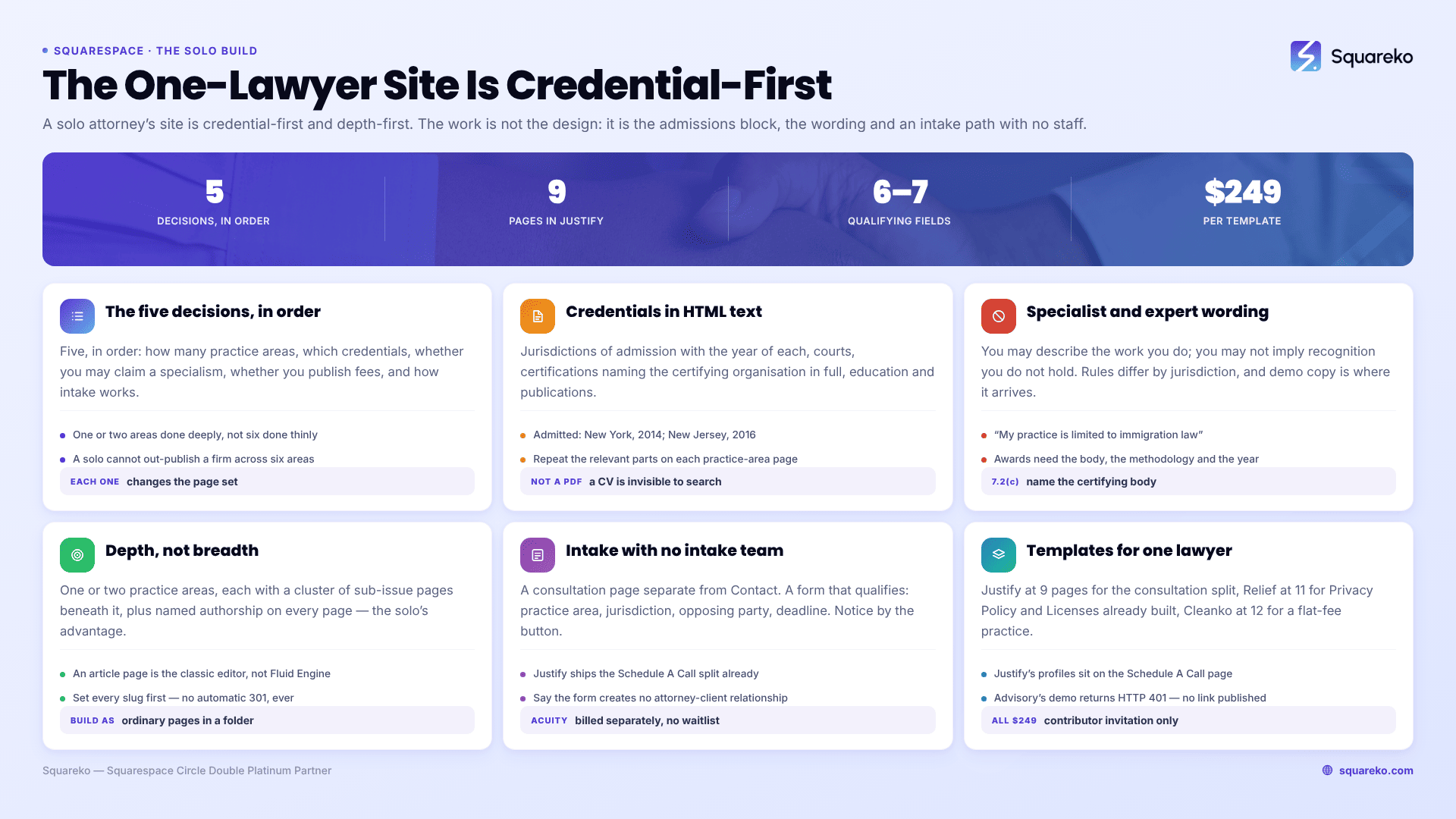
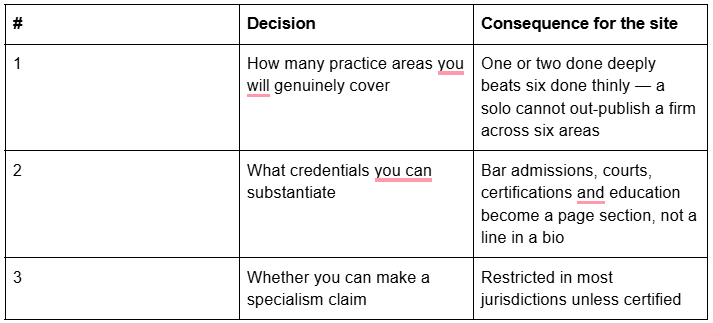
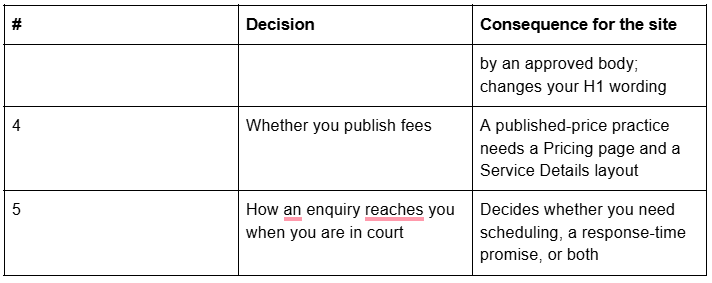
The five decisions a solo attorney makes before choosing a template
In order. Each one changes the page set.
Bar admissions and credentials belong on the page, not in a PDF
For a solo attorney the credential block is the highest-value content on the site, because it is the only thing a stranger can verify. Put it in HTML text on the About page and repeat the relevant parts on each practice-area page. Do not put it in a downloadable CV — that content is invisible to search and to AI answer engines.
What to include, in this order:
Jurisdictions of admission, with the year of each. "Admitted: New York, 2014; New Jersey, 2016."
Courts admitted to practise before, where relevant to the work.
Certifications, with the certifying organisation named in full. This is not optional dressing — ABA Model Rule 7.2(c) permits a certified-specialist claim only where the lawyer has been certified by an organisation approved by an appropriate authority and "the name of the certifying organization is clearly identified in the communication."
Education, including degree and year.
Publications, speaking and teaching, each linked to the original where one exists.
Bar association and section memberships.
Languages, if you practise in more than one.
Two things to keep off it. Unverifiable superlatives — "leading", "top", "premier" — fall squarely inside ABA Model Rule 7.1's prohibition on communications that are false or misleading, including one that "omits a fact necessary to make the statement considered as a whole not materially misleading". And awards or ratings without the awarding body, its methodology and the year, which several jurisdictions restrict specifically.
Requirements differ by bar, regulator and jurisdiction, and they change. Treat everything above as the shape of the requirement and confirm the actual wording and placement against the rules of every jurisdiction where you are admitted before publishing.
Specialist, expert and "specialising in": the wording that gets solos in trouble
This is the most common compliance failure I see on solo attorney sites, and it is almost always accidental — the phrase arrives in the template's demo copy and survives into launch.
The general shape of the rule across jurisdictions: you may describe the work you do; you may not imply formal recognition you do not hold. "I represent clients in employment disputes" is a description. "Employment law specialist" or "certified expert" may be a claim, and in most US jurisdictions a claim of certification is permitted only when a recognised body has certified you and you name that body.
Three practical substitutions that carry the same commercial weight and are far easier to defend:
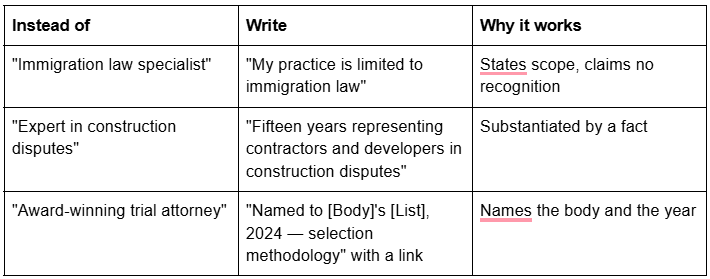
Check the demo copy line by line before launch. Template demos are written by designers filling a layout, not by lawyers — Justify's demo, for example, carries a heading reading "We specialise in all types of cases", which is exactly the sort of line that has to go. Demo copy and demo images are placeholders you are obliged to replace anyway; treat the compliance pass as part of that replacement, not as a separate job.
How a one-lawyer site beats a twelve-lawyer firm: depth, not breadth
A solo cannot win "personal injury lawyer" against a firm with sixty attorneys and a decade of links. A solo can win the long tail, and the long tail is where the qualified enquiries are anyway.
The winning structure is narrow and deep:
One or two practice areas, each with its own page, rather than six thin ones.
A cluster of specific sub-issue pages beneath each, targeting the questions a firm's marketing department considers too small to write: "what happens if my employer withdraws a job offer after I resign", "how a guardianship petition works in [county]". These pages get few searches each and convert at a rate a category page never will.
A blog that answers process questions, not news. Nobody hires a lawyer because of their commentary on a statutory amendment.
Named authorship on everything. Your name, your photograph, your credentials on every page. This is the one advantage a solo has over a firm site where every page is written by "the team".
Squarespace mechanics for that: build the sub-issue pages as ordinary pages inside a navigation folder (unlimited, full Fluid Engine layout) rather than as blog posts, because blog posts use the classic editor, not Fluid Engine. Keep the folder shallow — /employment-law/constructive-dismissal — and set every slug before publishing, because changing a slug on Squarespace creates no automatic 301, ever.
Intake when there is no intake team
The enquirer who fills in your form has usually contacted two or three other lawyers in the same session. Whoever replies first, with something specific, gets the call. A solo cannot always be the fastest, so the site has to do part of the job.
Five things to build:
A consultation page separate from Contact. Different intent, different form. Justify ships exactly this split — a Schedule A Call page alongside Contact.
A form that qualifies. Practice area, jurisdiction, opposing party (for the conflict check), when the matter arose, whether a deadline exists, preferred contact method. Six or seven fields, not two.
A confidentiality notice beside the submit button. A Squarespace form block is an ordinary web form, not a privileged channel — Squarespace's own position is that its form blocks cannot be part of a HIPAA-compliant solution, and the same reasoning applies to legal intake. Say plainly that submitting the form creates no attorney-client relationship and that the enquirer should not send confidential details.
A response-time promise you will actually keep, stated on the page. "I reply to every enquiry within one business day" outperforms any amount of design.
A scheduling route for people who prefer to book than to wait. The Squarespace scheduling product is officially Acuity Scheduling again and is billed separately from the website plan, with calendar limits of 1 / 6 / 36 by tier. Acuity has no built-in waitlist — only a documented manual duplicate-calendar workaround — which is fine for a solo taking consultations and a genuine limitation if you run clinics.
The conflict check is the reason the form asks for the opposing party. Do it before you reply with anything substantive, and say on the page that you do — it reads as competence, not as friction.
Which Squarespace templates suit a solo attorney
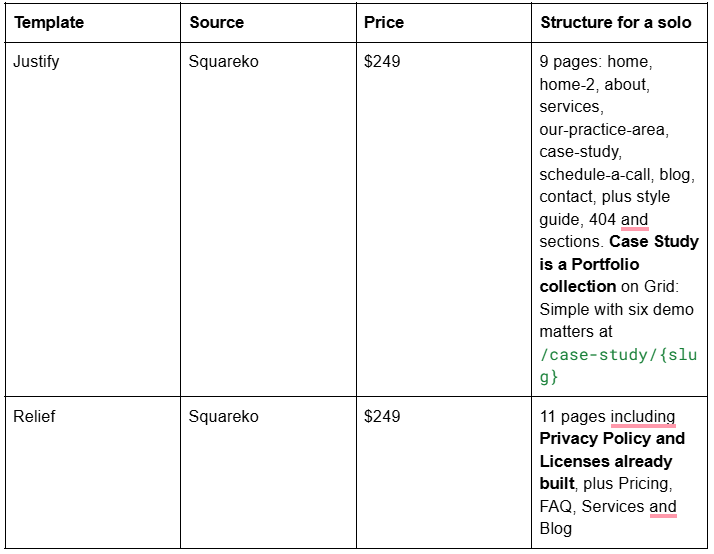

Justify (demo) is the pick for most solo attorneys, and the reason is the Schedule A Call page. A separate consultation page with its own form is the single hardest thing to retrofit into a template built around one contact modal. Its Case Study Portfolio collection gives each matter its own URL, which is what makes outcome content work as SEO — subject to whatever qualifying notice your jurisdiction requires beside the claims. Two honest notes: Justify is the smallest template in the Squareko range at 9 pages, and its demo attorney profiles sit as a section on the Schedule A Call page rather than as pages, so a solo should rebuild that section as a proper About page.

Relief (demo) is the quiet option, and it is the only template in the range that ships a Privacy Policy page and a Licenses page already designed and in the navigation — verified live. For a solo with no marketing help, having the legal furniture already built is worth more than it sounds, because those pages are the ones that get postponed indefinitely.
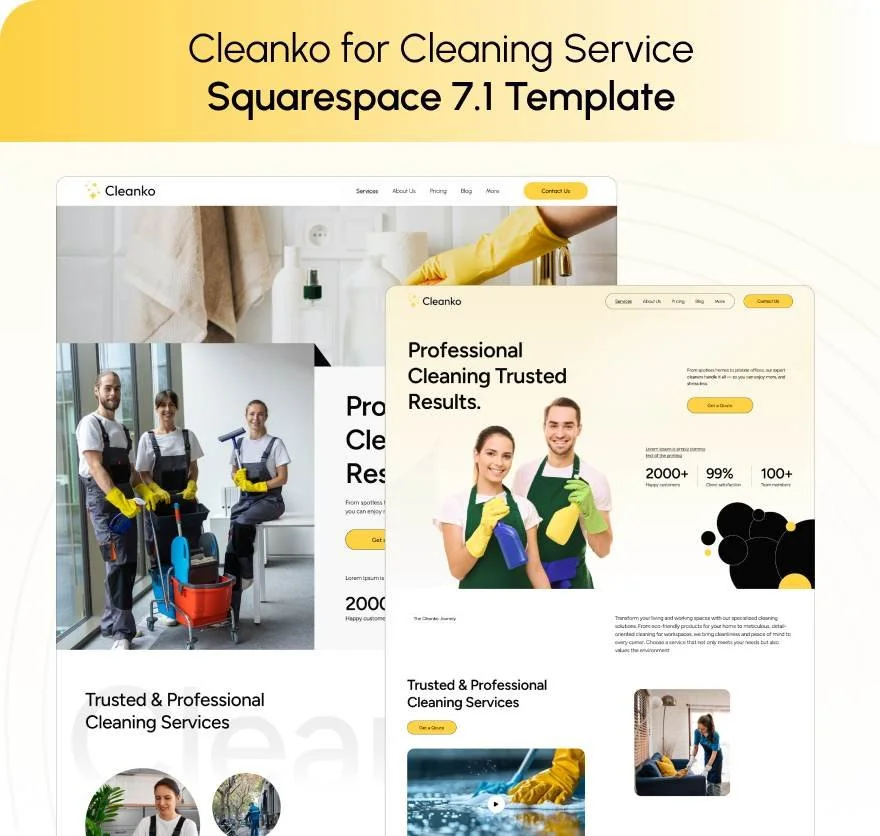
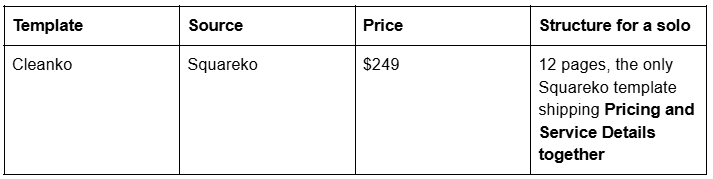
Cleanko (demo) is the build for a flat-fee practice — immigration, estate planning, uncontested matters — where the Pricing page and a Service Details page per package do the selling.
All Squareko templates are $249, delivered by Squarespace contributor invitation rather than a file download, with installation onto an existing site available as a paid add-on taking around 48 hours. Demo images are not licensed for live use, and sales are final — use the demos properly first. Advisory's live demo returns HTTP 401, so no link is published for it, as with BRIX Construction, Kiddo, Navigate, Storyline and Streamify.
Structured data and Google Business Profile for one lawyer
Mark the practice up as LegalService, not Attorney — Schema.org's own entry for Attorney states "This type is deprecated - LegalService is more inclusive and less ambiguous." Then add Person schema on the About page with alumniOf, knowsAbout, hasCredential and sameAs pointing at your bar profile, LinkedIn and any directory listing you control. For a solo those two nodes should reference each other: the person is the practice.
On Google Business Profile, a solo attorney is an individual practitioner in Google's terms — permitted a profile where they "operate in a public-facing role" and can be contacted directly at the verified location during stated hours. If you practise under a branded firm name at a location where you are the only public-facing professional, Google's stated naming format is "[brand]: [practitioner name]". Point the profile at your About page, not the homepage.
One expectation to set: Google deprecated FAQ rich results on 7 May 2026, so FAQ markup on your practice pages will not produce a visible SERP feature. Keep it for AI answer extraction.
What Squarespace will not do for a solo attorney site
Form blocks are not confidential. Notice beside every form.
Portfolio pages cap at 60 projects and projects cannot become standalone pages outside the portfolio.
Blog posts use the classic editor, not Fluid Engine.
Changing a slug creates no automatic 301, ever.
There is no native table of contents for long sub-issue pages.
Acuity Scheduling is billed separately and has no built-in waitlist.
Custom CSS is on every plan at Website → Website Tools → Custom CSS; JavaScript and iframes in Code Blocks and site-wide Code Injection need Core or above.
Whatever template you start from, the launch checklist for a solo is short: credentials in HTML text, every superlative removed, a confidentiality notice beside the form, a response-time promise you will keep, and one practice area covered properly rather than six covered thinly.
That is a fortnight of work, and most attorneys will do it themselves. The premium Squarespace templates in our shop are published with their full verified page lists so you can check the consultation page and the legal pages exist before buying rather than after. If you are a solo with a live site that already ranks and no capacity to rebuild it around court dates, that is the point at which handing it over is genuinely the cheaper option.
FAQ
-
Justify, for most solo practitioners. It is the only purpose-built legal template in the Squareko range and it ships a Schedule A Call page separate from Contact, plus a Case Study Portfolio collection giving each matter its own URL. Choose Relief if you want privacy policy and licenses pages already built, or Cleanko for a flat-fee practice.
-
In HTML text on the About page, repeated on relevant practice-area pages — never only in a downloadable CV, which search engines and AI answer engines cannot read. List each jurisdiction with its year of admission, courts you are admitted before, certifications with the certifying organisation named in full, and education.
-
It depends on your jurisdiction, and the wording matters. ABA Model Rule 7.2(c) permits a certified-specialist claim only where an approved organisation has certified you and its name is clearly identified. Safer phrasing that carries the same weight: "my practice is limited to immigration law", or a substantiated fact such as years of experience.
-
A solo site is credential-first and depth-first: one or two practice areas covered properly, personal authorship on every page, and an intake path that works with no staff. A firm site is an organisation directory — practice-area architecture, per-attorney pages, offices and referral routes — which is a different build entirely.
-
No form is a privileged channel. Squarespace states its form blocks cannot be part of a HIPAA-compliant solution, and legal intake deserves the same caution. Place a plain-language notice beside the submit button saying that submitting creates no attorney-client relationship and that the enquirer should not send confidential information.
-
Yes, where you meet Google's practitioner criteria — operating in a public-facing role and contactable directly at the verified location during stated hours. If you practise under a branded name and are the only public-facing professional there, Google's stated naming format is "[brand]: [practitioner name]". Point the profile at your About page.

Author Bio
I'm Walid Hasan, a Certified Squarespace Expert and Squarespace Circle Platinum Partner with over 12 years of hands-on experience designing and optimizing high-performing websites. Over the years, I've had the privilege of building more than 2,000 Squarespace websites for clients around the world, always focusing on clean design, strong user experience, and conversion-driven results.