Squarespace Templates for Lawyers: 9 Picks, Segmented by How You Practise
The short answer: pick a Squarespace template for a law practice on two things — whether it gives every practice area its own page, and whether it has somewhere sensible to put the notices your regulator requires. Aesthetics are the cheapest thing to change on Squarespace 7.1. Structure is not. Justify is the only purpose-built legal template in the Squareko range, and the right starting point for most firms.
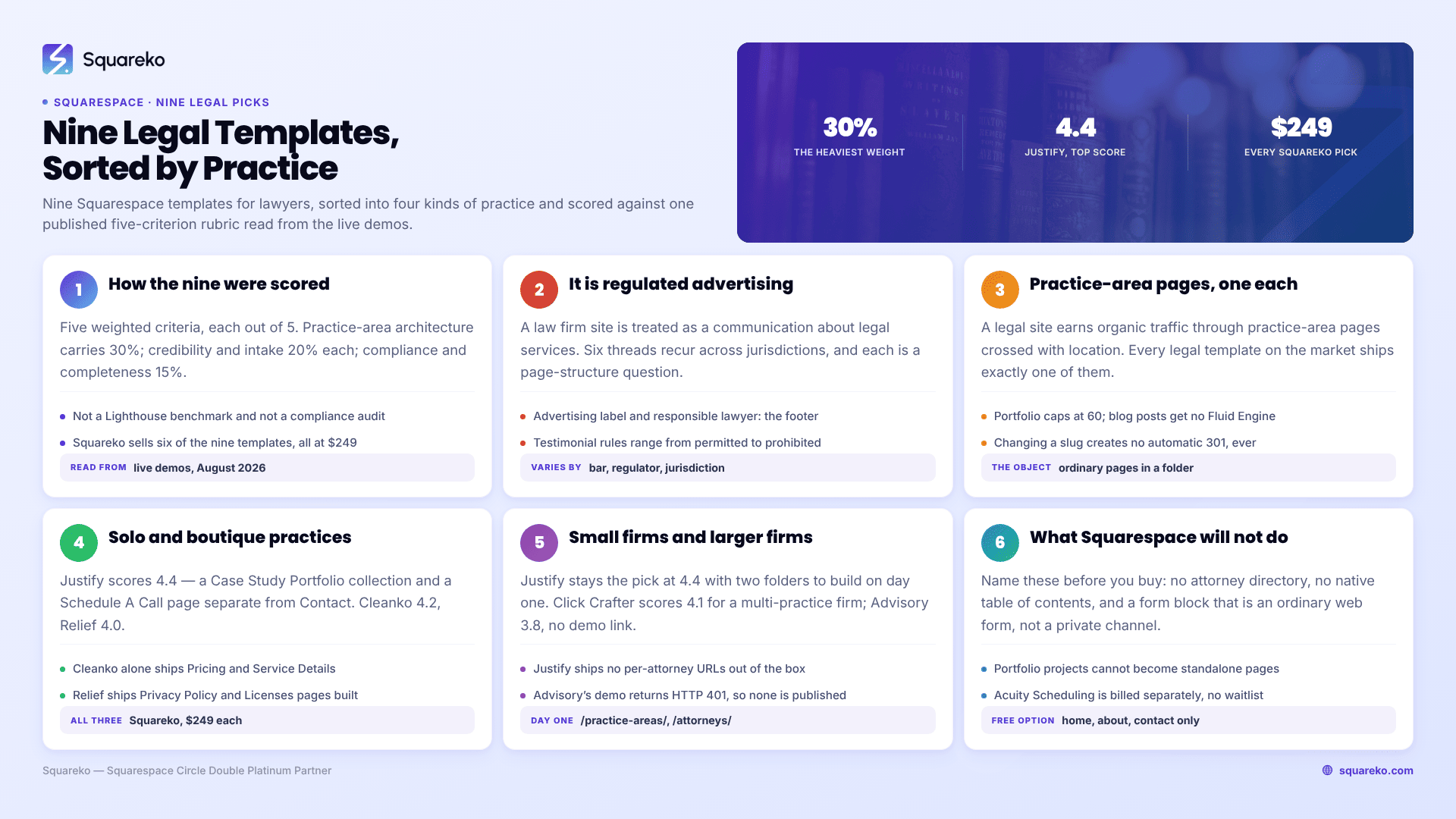
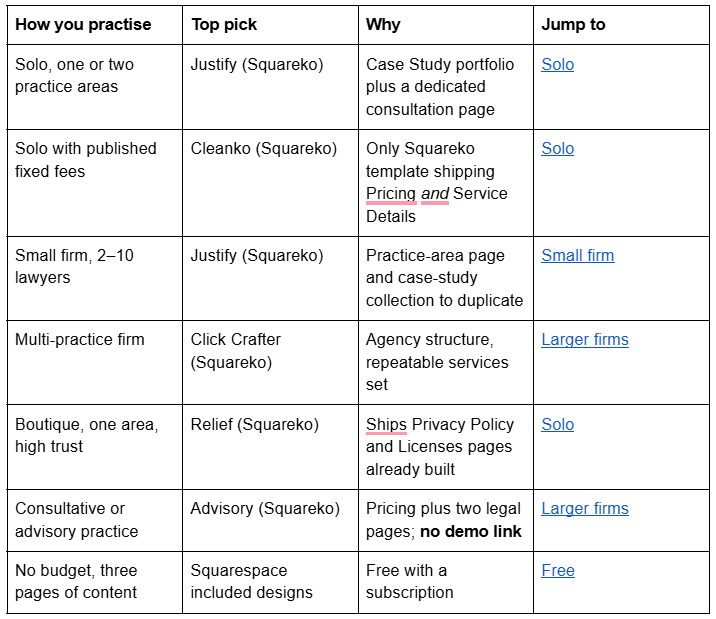
Nine templates follow, sorted into four kinds of practice, scored against one published rubric.
Not legal advice, and deliberately not universal. Lawyer advertising rules differ by bar, regulator and jurisdiction, and they change. Everything below describes the shape of the requirement so you can build the page for it. Confirm the wording, placement and exemptions against your own admitting jurisdiction's rules before publishing.
How these Squarespace templates for lawyers were scored
Five weighted criteria, each scored out of 5.
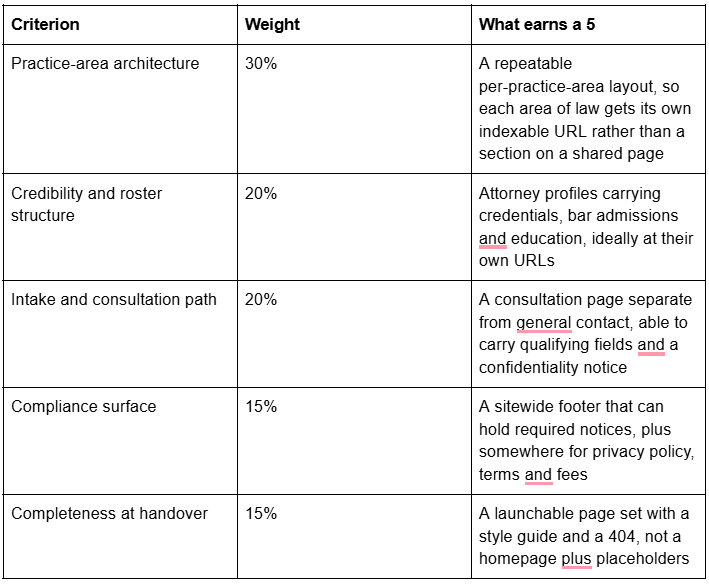
What this scoring is and is not. Every score comes from the template's live demo — navigation, page slugs and the Squarespace collection type of each page, read from page source in August 2026 — plus 12 years of building professional-services sites on Squarespace. It is not a Lighthouse benchmark and not a compliance audit. No template ships compliant; a template can only make compliance cheap to build.
Disclosure: Squareko sells six of the nine templates below, all at $249. Squarespace's own included designs are here because for some readers they are the correct answer, and Big Cat Creative and Applet Studio because a fair roundup names its competitors.
Quick pick by kind of practice
Decision one: your website is regulated advertising, not marketing copy
With wide variation between jurisdictions, a law firm website is treated as a communication about legal services and is subject to conduct rules. The ABA Model Rules — adopted in some form by most US states, but adopted differently in each — put it plainly in Rule 7.1: "A lawyer shall not make a false or misleading communication about the lawyer or the lawyer's services. A communication is false or misleading if it contains a material misrepresentation of fact or law, or omits a fact necessary to make the statement considered as a whole not materially misleading."
Six threads recur across jurisdictions. Every one is a page-structure question.
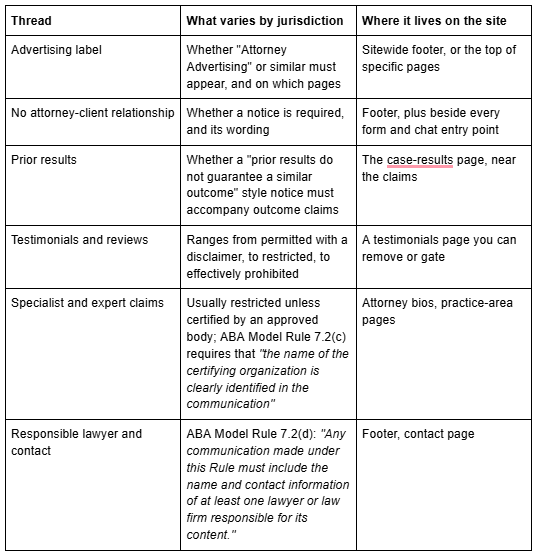
Two more catch firms out. Fee display is regulated in several jurisdictions — some require published fees to be honoured for a period, and the UK requires publication outright for named work types. And confidentiality: a Squarespace form block is an ordinary web form, not a privileged channel, and its contents may create a conflict rather than a client. Say so above the submit button. That is the single most common omission I see on lawyer sites built from templates.
The consequence for template choice: you need a sitewide footer that can carry text, a separate case-results page you can qualify or remove, and a form you can put a notice beside. The full treatment — exact placements, the copy patterns that get firms in trouble, privacy policy and accessibility — is in legal Squarespace website template.
Decision two: practice-area pages are the SEO engine, and no template ships enough of them
A legal site earns organic traffic almost entirely through practice-area pages crossed with location. "Divorce lawyer in Leeds", "H-1B visa attorney Austin", "construction defect litigation" — each needs its own page with its own URL, its own H1 and its own intake path.
Every legal template on the market ships one practice-area page. Justify ships a page at /our-practice-area — singular — and its Services page lists four areas of law (business, insurance, family and real estate) as sections on one page. That is a demo, not an architecture. What you buy is the layout; the work is duplicating it.
Three ways to build the set on Squarespace 7.1, and they are not equivalent:
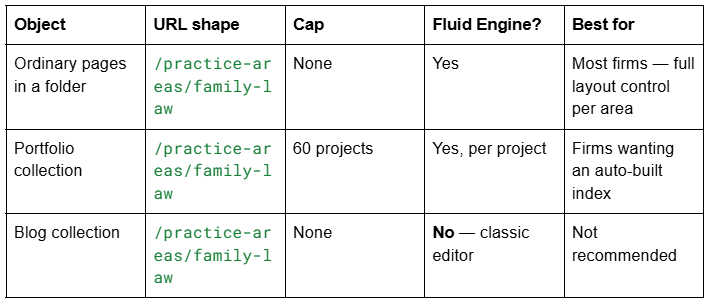
For nearly every firm the answer is ordinary pages inside a navigation folder: unlimited in number, full Fluid Engine layout on each, complete control of the URL. Set those URLs before you publish, because changing a slug on Squarespace creates no automatic 301, ever, and a practice-area page that has earned links is exactly the page you cannot afford to break.
Where firms go wrong is writing near-identical pages for adjacent areas — "car accident" and "auto accident", "estate planning" and "wills and trusts" — then competing with themselves. That is the subject of law firm Squarespace template, which covers the practice × location matrix in full.
Squarespace templates for solo practitioners and boutique firms
A solo practice sells one person's judgement. The site's job is to convince a stranger that this specific lawyer has handled their specific problem before, and to get them to a consultation without a receptionist in the loop.
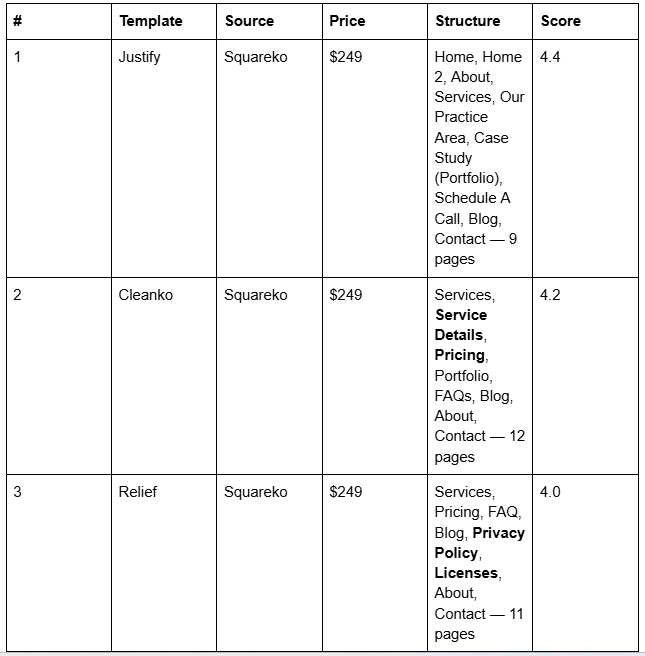

Justify (demo) is the only template in the Squareko range built for law, and its structure holds up. Verified from the live demo rather than the product page: the Case Study page is a genuine Squarespace Portfolio collection running the Grid: Simple layout, with six demo matters at /case-study/{slug} — child support and alimony, consumer product liability, corporate tax evasion, IP theft, land use and zoning, tax implications of mergers. Each has its own URL, which is what makes a results page work as SEO rather than decoration. It also ships a Schedule A Call page separate from Contact — the right split, because general enquiries and consultation requests are different intents needing different forms.
Two honest caveats. Justify is the smallest template in the Squareko range at 9 pages. And the attorney roster in the demo — four named profiles — sits as a section on the Schedule A Call page, not as its own page or collection, so out of the box there are no per-attorney URLs. For a solo that does not matter; for a firm it matters a lot, and law firm Squarespace template covers how to rebuild it.
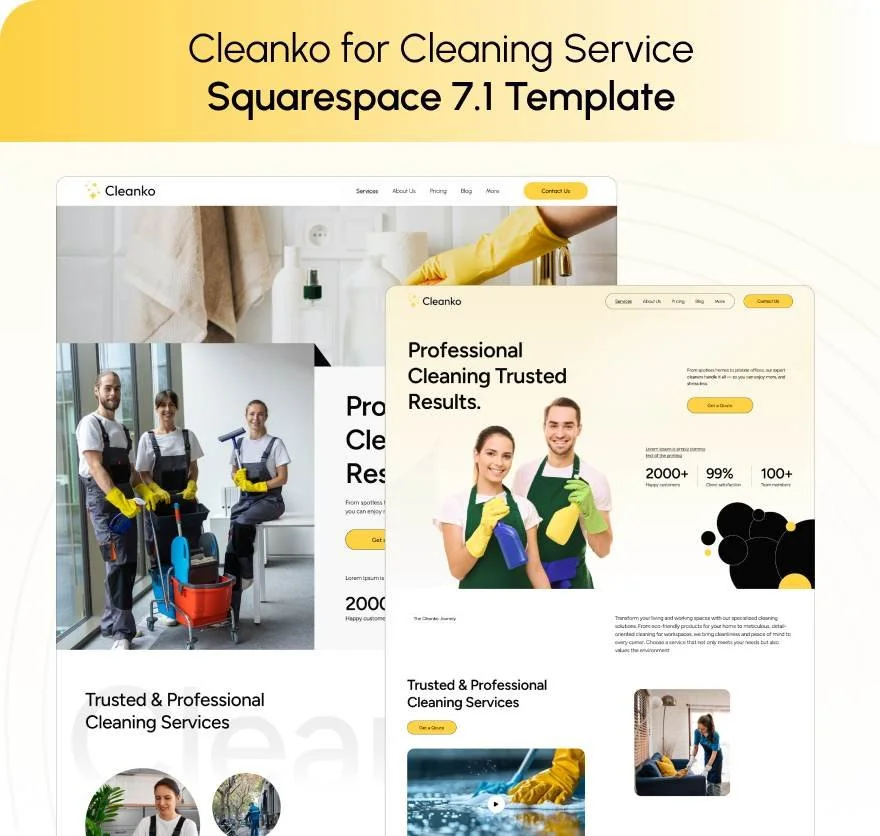
Cleanko (demo) is sold as a cleaning-service template and is the best fixed-fee legal architecture in the range anyway, because it is the only Squareko template shipping a Pricing page and a Service Details page together. Verified pages: home, home-2, about, services, service-details, pricing, portfolio, faqs, blog, contact-us, style-guide, 404, sections. Published prices plus a per-service detail page plus FAQs is the shape a flat-fee immigration, conveyancing or estate-planning practice needs — and the shape the SRA Transparency Rules require in England and Wales.

Relief (demo) is the quiet, high-trust option, and it ships something no other template here does: a Privacy Policy page and a Licenses page already built, alongside Pricing, FAQ and Blog. Verified pages: home, home-2, about, services, pricing, faq, blog, privacy-policy, licenses, contact, style-guide, 404, sections. You will replace the copy entirely, but having those pages designed and in the navigation means the legal furniture does not get postponed to "after launch".
Squarespace templates for small firms of two to ten lawyers
A small firm has to look like an organisation rather than a shared office: a roster with real depth, a practice-area set that does not overlap itself, and one intake path regardless of which lawyer the enquiry names.

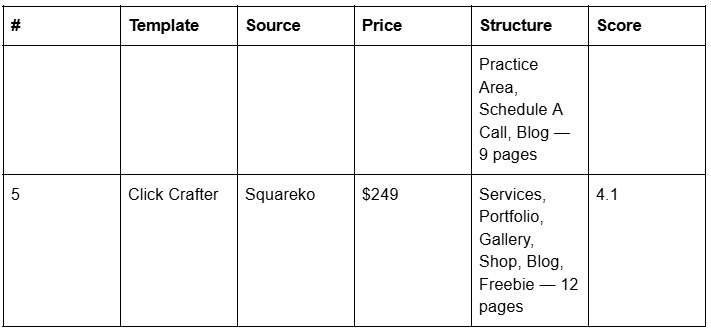
Justify remains the pick at this size, with two builds on day one: a /practice-areas/ folder holding one page per area, and an /attorneys/ folder holding one page per lawyer. Both are ordinary pages, both take Fluid Engine, and both will earn the firm's links.
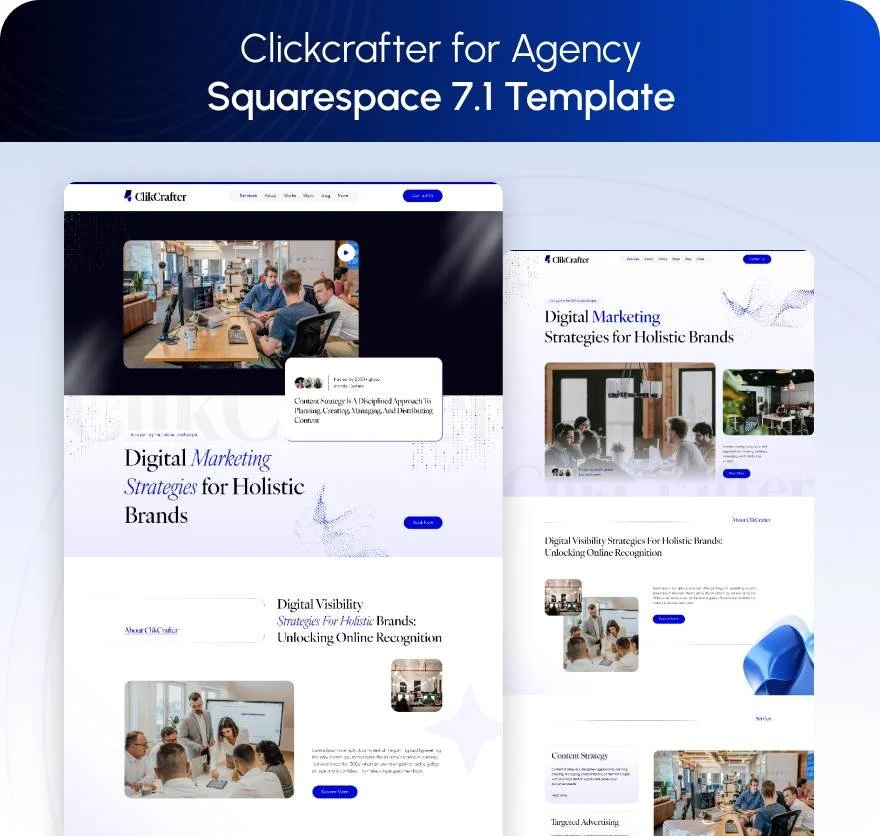
Click Crafter (demo) is an agency template, and a multi-practice firm is structurally an agency. Verified pages: home, home-2, about, services, portfolio, gallery, shop, blog, freebie, contact, style-guide, 404-error, sections. The Freebie page works well as a gated guide — "what to bring to your first employment tribunal consultation" — the most reliable lead magnet in legal, because it is genuinely useful and carries no outcome claim.
Squarespace templates for larger and multi-office firms
Above roughly ten lawyers the site becomes a directory: many practice areas, many people, several offices and jurisdictions, and a referral network. Squarespace handles this as structured folders of ordinary pages, not as a database.
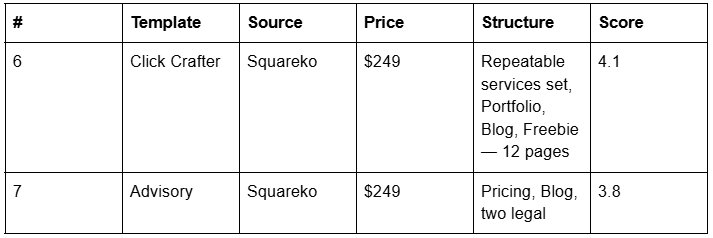

Advisory is the consultative-practice template: 11 pages including a Pricing page, a Blog and two pre-built legal pages. Advisory's live demo returns HTTP 401, so no demo link is published here — judge it on the page list or ask for a walkthrough before buying. The same applies to BRIX Construction, Kiddo, Navigate, Storyline and Streamify.
The honest limit at this size: Squarespace has no native attorney directory, no self-updating filter-by-practice-area index unless you use a collection, and no native table of contents. The firm guide covers the workarounds.
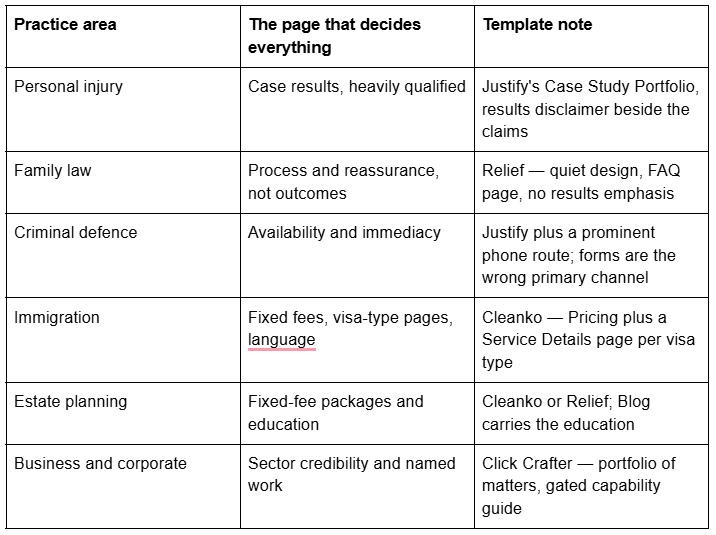
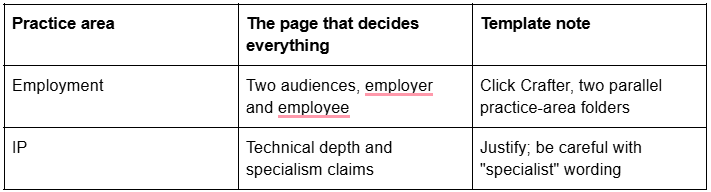
Practice area changes the page set more than firm size does
Free Squarespace templates for lawyers, honestly assessed
Squarespace's own designs are included with a subscription and all run Squarespace 7.1 with Fluid Engine. There is no dedicated law category in the browse view, so pick from the professional-services and consulting designs.
A free Squarespace template gives you a homepage, an about page and a contact page. It does not give you the other eight — a practice-area layout, a case-results collection, a consultation page distinct from contact, a privacy policy page, a style guide. Every Squareko template ships 9 to 15 real pages, 150+ pre-designed sections and a Style Guide page; Justify is the smallest at 9.
Big Cat Creative ($297) is the largest premium shop and does excellent work, but its published industry taxonomy has no legal, law or attorney category — the nearest fit is its generic "service based business" designs. Applet Studio (~$225, around 30 templates) is likewise strong and likewise general.
Three purchase facts before buying premium, from any shop. Demo images are not licensed for live use. Squareko delivers by Squarespace contributor invitation, so there is no file to download or upload, and installation onto an existing site is a paid add-on taking around 48 hours. And Squareko's digital products are final sale — a good reason to spend twenty minutes in the demo rather than twenty seconds.
Structured data and local visibility for a law firm site
Use LegalService, not Attorney. Schema.org lists Attorney as a more specific type of LegalService, but its own entry states: "This type is deprecated - LegalService is more inclusive and less ambiguous." Mark the firm up as LegalService — a subtype of LocalBusiness — with address, telephone, areaServed, openingHoursSpecification and hasOfferCatalog for practice areas. Individual lawyers get Person schema on their own bio pages, linked to the firm.
Google Business Profile has a specific rule for professional practices. Google permits an individual practitioner their own profile where they "operate in a public-facing role" and can be contacted directly at the verified location during stated hours; support staff are not eligible, and practitioners "should not maintain separate profiles for each specialization". Where multiple practitioners share a location, the organisation keeps one profile and each practitioner's profile carries only their name.
Google deprecated FAQ rich results on 7 May 2026, so FAQ markup on a practice-area page no longer produces a visible SERP feature. Keep it for AI answer extraction, not for a rich result.
What Squarespace will not do for a law firm site
Name these before you buy, not after.
Squarespace form blocks are not a confidential channel. Squarespace states its form blocks cannot be part of a HIPAA-compliant solution, and a HIPAA BAA is available only on Powerhouse/Premium. Treat legal intake the same way: use the form to open a conversation, not to receive facts.
A Portfolio page caps at 60 projects, and projects cannot become standalone pages outside the portfolio.
Blog posts use the classic editor, not Fluid Engine.
Changing a page slug creates no automatic 301, ever. Set practice-area URLs before publishing.
There is no native table of contents.
Custom CSS is available on every plan at Website → Website Tools → Custom CSS. JavaScript and iframes inside Code Blocks, and site-wide Code Injection, need Core or above.
The scheduling product is Acuity Scheduling, billed separately, with calendar limits of 1 / 6 / 36 by tier and no built-in waitlist.
Where to go next in this legal cluster
The firm as an organisation — attorney roster, offices, referral network, and avoiding cannibalisation between your own practice pages: law firm Squarespace template
The individual lawyer — credentials, bar admissions, and intake with no intake team: Squarespace template for attorneys
One scored verdict: best Squarespace template for law firms
Compliance and content in full — required notices, disclaimer placement, privacy, accessibility: legal Squarespace website template
UK solicitors — SRA Transparency Rules, the digital badge, complaints and the Legal Ombudsman: Squarespace website template for solicitors
The deciding question is never which homepage you prefer. It is whether you can produce your twelfth practice-area page in an afternoon, with the right notice in the footer and the right disclaimer beside the form, without rebuilding the layout.
That is why the premium Squarespace templates in our shop are listed with their full verified page structure rather than a homepage screenshot, and why installation onto an existing site is offered as a service. Most firms will pick correctly from the tables above without help; if you have a live site with ranking practice-area pages that cannot go dark for a weekend, that is where a hand is genuinely useful.
FAQ
-
Squarespace's own template browse has no dedicated legal category, and its template grid renders client-side. Premium shops fill the gap unevenly: Squareko sells Justify, a purpose-built legal template with a Case Study portfolio collection, while Big Cat Creative's published industry list contains no legal, law or attorney category at all.
-
Justify for most solo practitioners: nine pages including a Case Study Portfolio collection, a practice-area layout and a Schedule A Call page separate from Contact. Choose Cleanko instead if you publish fixed fees, because it is the only Squareko template shipping a Pricing page and a Service Details page together.
-
Budget one page per practice area, one per attorney, plus home, about, contact, a consultation page, case results, a blog and privacy and terms pages. A three-lawyer firm with five practice areas is already at sixteen pages. Templates ship 9 to 15; the practice-area set is what you build.
-
Requirements vary by bar, regulator and jurisdiction, and change. Common threads are an advertising label, a "no attorney-client relationship" notice, a qualifier accompanying any prior results, and identification of a responsible lawyer. Confirm the exact wording and placement against your own admitting jurisdiction's rules before publishing.
-
LegalService. Schema.org's own entry for Attorney states the type is deprecated and that LegalService is more inclusive and less ambiguous. Mark the firm up as LegalService, a subtype of LocalBusiness, and give individual lawyers Person schema on their own biography pages, linked back to the firm.
-
No. A Squarespace form block is an ordinary web form, not a privileged channel — Squarespace itself states its form blocks cannot be part of a HIPAA-compliant solution. Place a plain-language notice beside the submit button telling enquirers not to send confidential details, and that submitting creates no attorney-client relationship.

Author Bio
I'm Walid Hasan, a Certified Squarespace Expert and Squarespace Circle Platinum Partner with over 12 years of hands-on experience designing and optimizing high-performing websites. Over the years, I've had the privilege of building more than 2,000 Squarespace websites for clients around the world, always focusing on clean design, strong user experience, and conversion-driven results.