
Free Squarespace Templates vs Premium: An Honest Side-by-Side
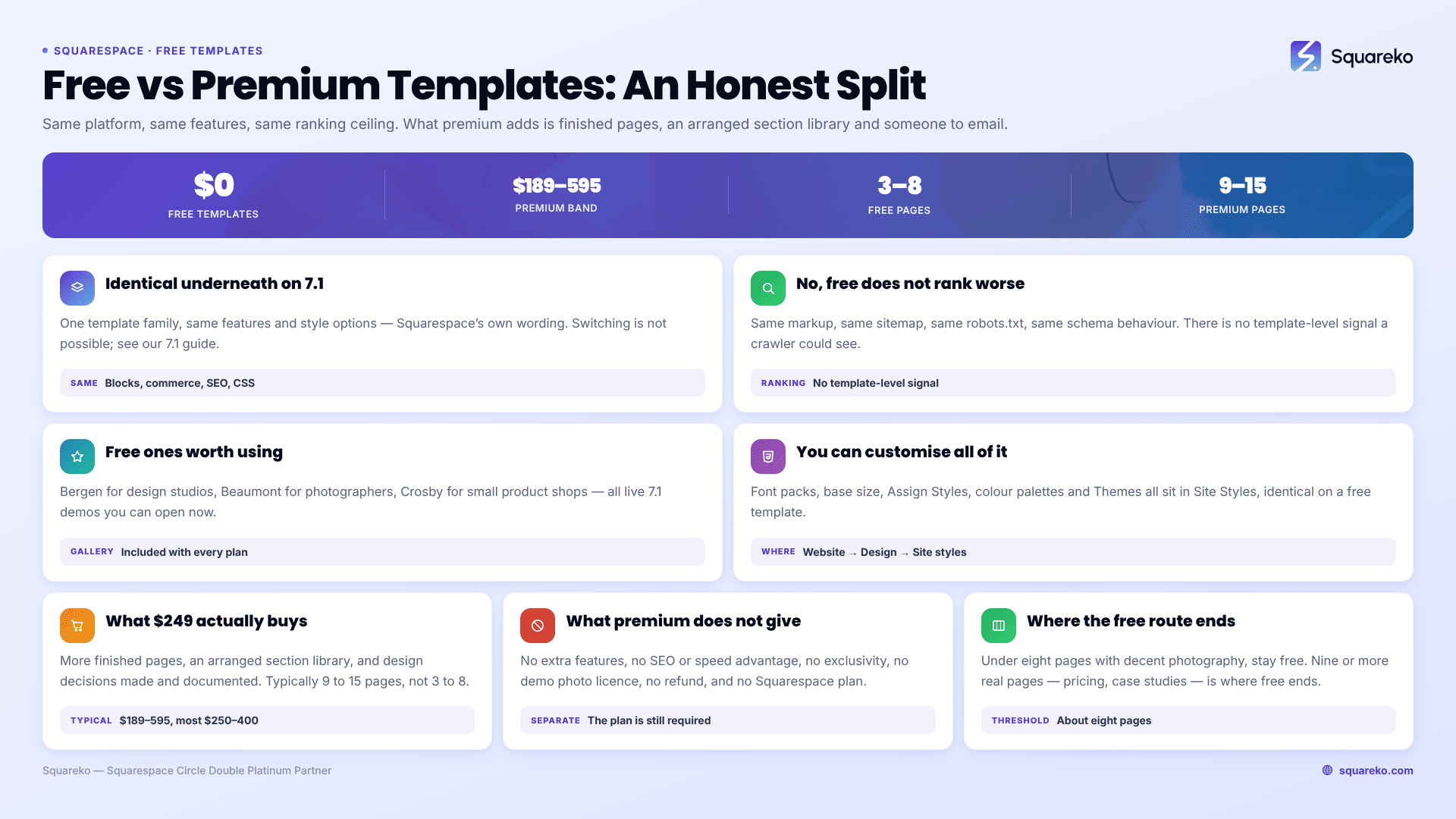
The verdict, first. Free Squarespace templates are not a cut-down version of premium ones. In Squarespace 7.1 every site — free template or $249 template — runs on the same underlying system with the same features, blocks, commerce tools and SEO controls. What you buy with a premium template is layout, a larger section library, more finished pages and someone to email. You are not buying capability, speed or search performance. For a site under about eight pages, a free Squarespace template is often the correct choice.
Here is the full comparison, and the evidence behind that verdict.
The comparison, in one table
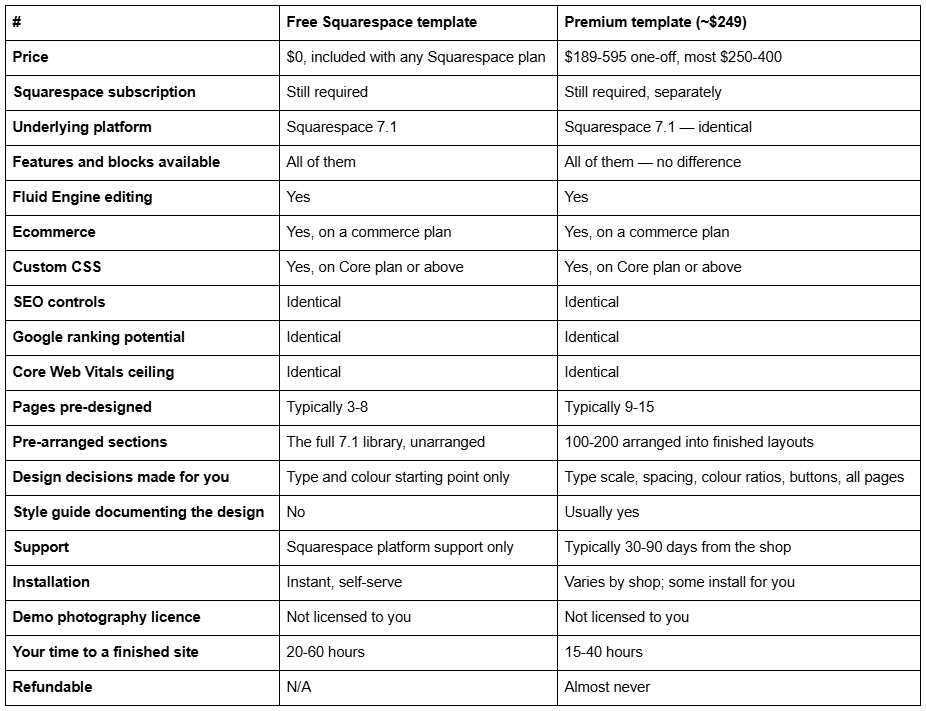
The rows that are identical outnumber the rows that differ. That is the whole point, and it is the thing most free-template listicles avoid saying because they are published by shops that sell the paid ones.
Why free and premium are functionally identical on Squarespace 7.1
This is the fact that decides the argument, and it is not opinion — it is Squarespace's own documentation.
In version 7.1, every Squarespace site belongs to the same template family. The Squarespace Help Center states it directly: "All version 7.1 sites are part of the same template family, so every site has the same features and style options."
It goes further, on why that design decision was made: "We designed version 7.1 to remove the need to switch templates, so the template you choose when creating a 7.1 site is only meant as a starting point."
And the corollary, from the Help Center's template-switching FAQ: "It's not possible to change templates on a version 7.1 site."
Read those three statements together and the practical picture is clear. On Squarespace 7.1 a "template" is a starting arrangement of pages, sections and style settings. It is not a theme in the WordPress sense — there is no separate codebase, no feature set that ships with one template and not another, no upload mechanism, and nothing that can go out of date.
This was not true in version 7.0. In 7.0, each template genuinely did have a fixed set of style settings and special features that could not be changed, which is why "choose your template carefully, you'll be stuck with it" was correct advice for years. Squarespace 7.1 removed that constraint entirely. A great deal of the advice still circulating about free versus premium Squarespace templates was written before that change and has simply never been updated.
What this means when you buy a premium template. You are buying a designer's arrangement of the same components you already have. That is a real thing to buy — arrangement is most of what design is — but it is worth being precise about, because the alternative framing ("premium templates unlock more") is false on 7.1.
Do free Squarespace templates rank worse in Google?
No. And this myth is worth killing carefully, because it is the single most common reason people spend money they did not need to spend.
All Squarespace 7.1 sites render from the same system and emit the same underlying markup structure. A free starting layout and a paid template produce the same heading hierarchy options, the same image handling, the same auto-generated sitemap, the same robots.txt (which cannot be edited on any plan), the same SEO title and description fields, and the same schema behaviour — Squarespace auto-emits one Article JSON-LD block per blog post regardless of which template you started from.
There is no ranking signal that can distinguish a free Squarespace template from a premium one, because from a crawler's perspective there is nothing to distinguish.
What does affect your search performance on Squarespace:
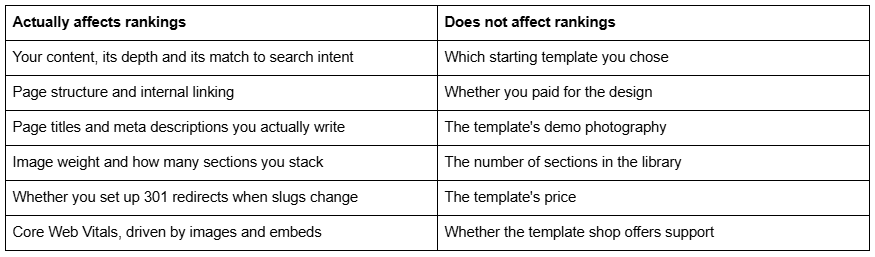
A note on that last row, since performance is often used as an argument for premium templates. Across 54 Squareko-built client sites measured in August 2026 — Playwright/Chromium lab test, cloud datacentre, unthrottled, single run per site, load-only CLS, so this is lab data rather than field data — median mobile LCP was 2.01s, 74% were under Google's 2.5s "good" threshold and 96% under 4s. Median mobile CLS was 0.000 and 31 of the 54 recorded exactly zero layout shift on load. Median page weight was 3.0 MB across 93 requests, and 53 of the 54 run Squarespace 7.1.
Those results come from disciplined image sizing and restrained section counts. Nothing in them is attributable to a template being paid for. A free template loaded with 4 MB of unoptimised hero images will perform worse than a premium one, and vice versa — the variable is you, not the template.
Free Squarespace templates genuinely worth using
Squarespace's own gallery is better than its reputation suggests, and every template in it is built by the team that builds the editor, so nothing in them fights the platform. All of the following are live 7.1 demos you can open right now.
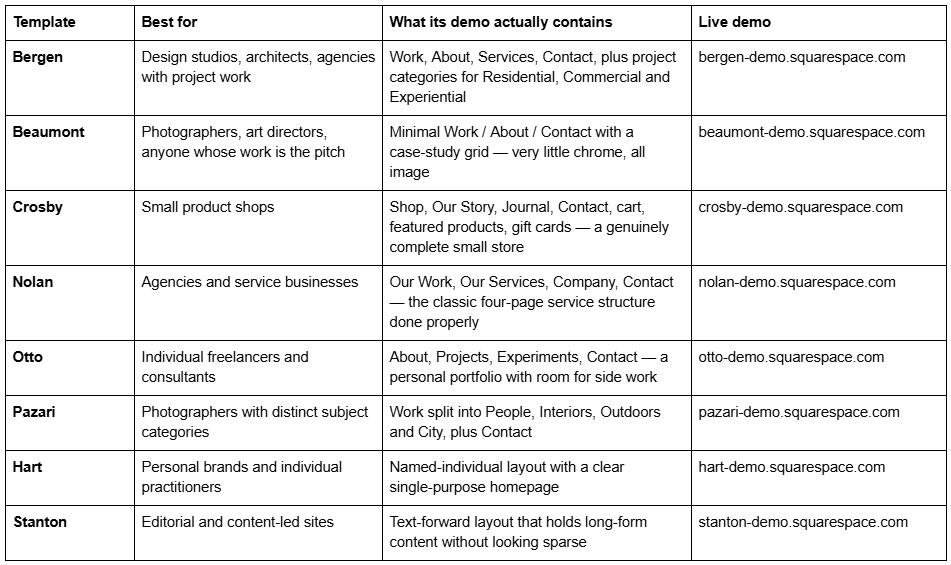
How to actually pick one. Do not pick by the homepage. Open the navigation and the footer, and check whether the pages your business needs exist. Then open it on your phone — Squarespace 7.1 keeps a separate, independently editable mobile layout for every section, and most of your visitors will see that one.
And remember point two from earlier: because you cannot switch templates in 7.1 anyway, picking "wrong" costs you rearranging sections, not starting over. The stakes on this decision are lower than they feel.
How far can you actually customise a free Squarespace template?
All the way. This is worth spelling out, because "you can't really change a free template" is the second most common misconception after the SEO one.
Every control below is available on a free Squarespace 7.1 template exactly as it is on a $249 one. Open Site Styles by clicking the paintbrush icon while editing any page, or via Website → Design → Site styles.
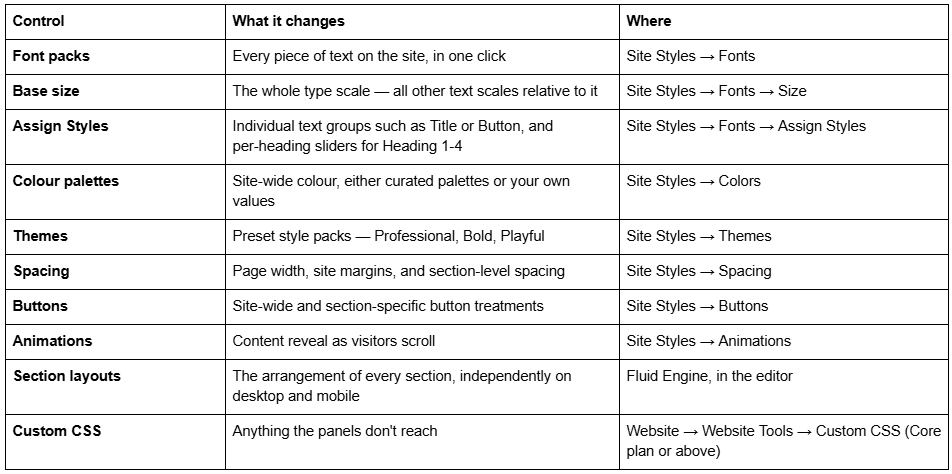
Two of these deserve emphasis because they do the most work for the least effort. Base size rescales your entire type hierarchy proportionally — one slider, and the whole site's typographic weight changes. Themes applies a coherent preset across fonts, colours and spacing together, which is a far better starting point than adjusting fifteen individual settings.
The only thing you cannot do on Squarespace 7.1, free or paid, is switch to a different template. That constraint applies equally to both.
What you actually get for $249
The honest case for paying, stated without inflation.
More finished pages. A free Squarespace template typically ships three to eight pages. Premium templates typically ship 9 to 15. Squareko's 24 run from Justify at 9 pages to WeDecorefy at 15, and the extras are usually the pages that are hardest to design well from scratch — pricing pages, service detail pages, case studies, menus, FAQs, team pages.
A section library, arranged. Squareko templates include 150+ pre-designed sections. The 7.1 section library is available to everyone, but arranged, styled, consistent sections that already match each other are what let you build a page the demo never had in twenty minutes rather than two hours. This is the part that keeps paying back long after launch.
Design decisions, made and documented. Type scale, spacing rhythm, colour ratios and button treatments applied consistently across every page. Squareko templates also include a Style Guide page, sitting in the Not Linked section, documenting exactly those values. That page is the difference between a site that still looks designed after a year and one that has drifted, because six months from now you will add a page and guess at a heading size.
Somebody to ask. Squareko includes 60 days of email support, video tutorials, a 5-day course and a private community. Squarespace's own support covers the platform — billing, domains, outages — but will not tell you how a particular section in a third-party design was built.
Installation, in some cases. This varies more than any other factor between shops. Squareko delivers by Squarespace contributor invitation and installs the template for you — there is nothing to download or upload, unlike WordPress themes. Installation onto an existing live site is a paid add-on and a fully manual process taking around 48 hours. Other shops send you instructions and you do it yourself. Ask before comparing prices, because this is the single largest difference in what you are actually buying.
Twenty to forty saved hours. The real currency. If a $249 template saves twenty evenings of arranging sections and second-guessing spacing, the arithmetic is not close for most business owners.
What premium templates do not give you
Being equally honest in the other direction:
No extra features. Nothing in a premium template is unavailable to a free one.
No SEO advantage. Covered above.
No speed advantage. Covered above.
No exclusivity. Other businesses buy the same design. Which is exactly why your photography and copy matter more than your template choice does.
No Squarespace subscription. Separate and required. Squareko recommends the Business plan, confirms the templates work on Basic, and passes on 20% off the first year through its Circle partner discount.
No licence for the demo photography. Squareko's terms state demo images are copyright-protected and not licensed for live or client sites; every one must be replaced before launch. This is standard across the premium market.
No refund. Squareko's policy is that digital products cannot be returned, exchanged or refunded under any circumstances. Standard for instant digital delivery, but it means the demo is your only test drive.
The decision, honestly
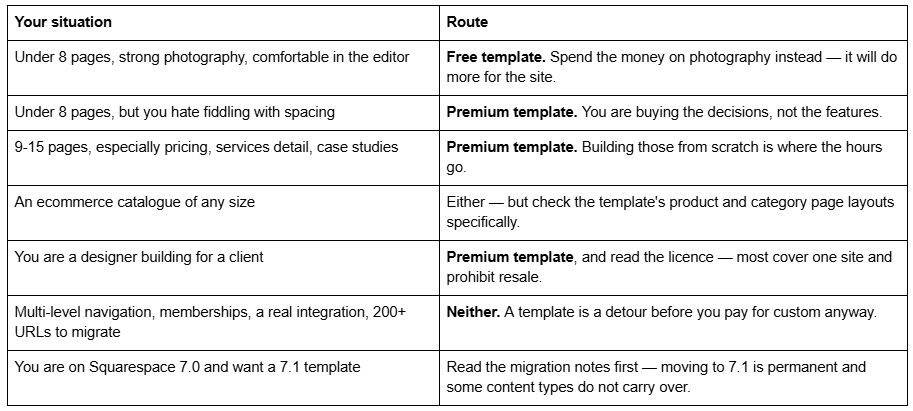
That last row is worth expanding briefly, because it catches people. Squarespace's own guidance on moving from 7.0 to 7.1 is blunt: "This is a permanent update—After completing the steps in this guide, you can't revert to version 7.0." Site structure, SEO settings, orders, customer data, members, domains and URL mappings carry across, but Album pages disappear, Cover pages with audio layouts do not import, share buttons are removed, and some header features go. Plan that migration on its own terms before you shop for a template.
The three things that matter more than free-versus-premium
Having spent 2,500 words on the comparison, here is the uncomfortable part: it is not the most important decision you will make about your site.
1. Your photography. Whatever template you use, you must replace every demo image — free Squarespace templates use licensed demo imagery too, and it is not licensed to you either. Photography is the single biggest visual differentiator between two sites built on the same template. Upload at 1500-2500px wide, and set the filename before uploading, because Squarespace filenames cannot be changed afterwards.
2. Your copy. Placeholder text is placeholder text at every price point. Writing the real thing is the longest job in any website launch and the one that determines whether visitors do anything.
3. Restraint. The most common way both free and premium Squarespace sites go wrong is too much: too many fonts, too many section types on the homepage, too many accent colours, too many hero images. A free template used with discipline beats a premium one used maximally, every time.
Which to choose
If your site is small and you have decent photography, start free. There is no penalty, no ranking disadvantage, no missing feature, and you can rearrange sections indefinitely because you cannot switch templates in 7.1 anyway. Spend the $249 on a photographer instead.
If you need nine or more real pages, or you would simply rather not spend twenty evenings on spacing, you can look at the premium Squarespace templates we build — 24 designs, $249 each, 9 to 15 pages, delivered by contributor invite and installed rather than emailed to you as files, with 60 days of support. And if your page inventory doesn't fit any template on the market, or you need memberships, multi-level navigation or a real integration, neither route is right and the honest answer is custom Squarespace design. Most readers of this post should stay free — that is genuinely the recommendation.
FAQ
-
Yes. In Squarespace 7.1 every site shares one template family with identical features and style options, so a free template can do everything a paid one can. The gallery is designed by Squarespace's own team, so nothing in it fights the platform. Bergen, Beaumont, Crosby, Nolan, Otto and Pazari are all strong starting points.
-
No. All Squarespace 7.1 sites render from the same underlying system, so there is no ranking signal that can distinguish a free template from a premium one. Search performance comes from your content, page structure, internal linking, image weight and redirects — never from the price of the design.
-
Layout, page count, section library, documentation and support. Free templates typically ship three to eight pages; premium ones nine to fifteen, plus 100-200 arranged sections, a style guide and usually 30-90 days of email support. Capability, speed and SEO are identical between the two.
-
Fully. Site Styles controls fonts, colour palettes, themes, spacing, buttons and animations across the whole site, Fluid Engine controls section layouts, and Custom CSS is available on the Core plan and above. Nothing about a free template limits how far you can take the design.
-
Yes, on a commerce plan. Ecommerce on Squarespace is a plan feature, not a template feature, so any 7.1 template can sell products. The practical difference is that some templates ship pre-designed product, category and cart-adjacent pages while others need you to build them.
-
They are worth it if they save you more time than they cost you money, or if you need nine or more finished pages. They are not worth it for extra features, better rankings or faster loading, because none of those differ. Premium templates are also usually non-refundable, so use the demo properly first.

Author Bio
I'm Walid Hasan, a Certified Squarespace Expert and Squarespace Circle Platinum Partner with over 12 years of hands-on experience designing and optimizing high-performing websites. Over the years, I've had the privilege of building more than 2,000 Squarespace websites for clients around the world, always focusing on clean design, strong user experience, and conversion-driven results.
