
Templates for Squarespace: Free, Premium and Custom Compared
The short answer: There are only three routes. Squarespace's own free templates are included with any plan and are genuinely good — for a simple site with strong photography they are often the right choice. Premium third-party templates, typically $200-400, buy you more pages, a larger section library and someone to ask when you get stuck. Custom design, from roughly $3,000, is for sites where the structure itself is the problem. Most people over-buy.
Here is what each route actually costs, in money and in hours.
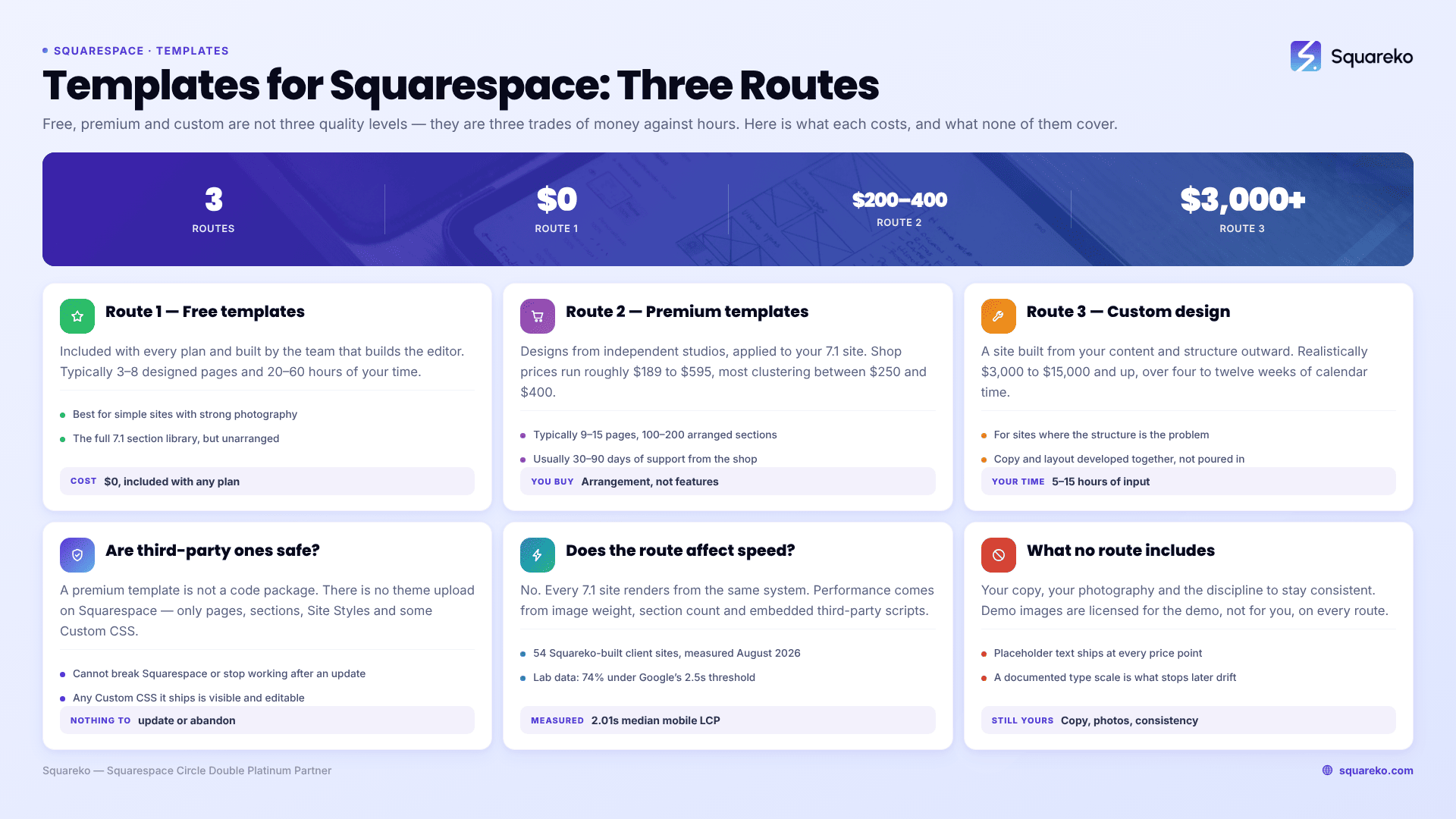
The three routes at a glance
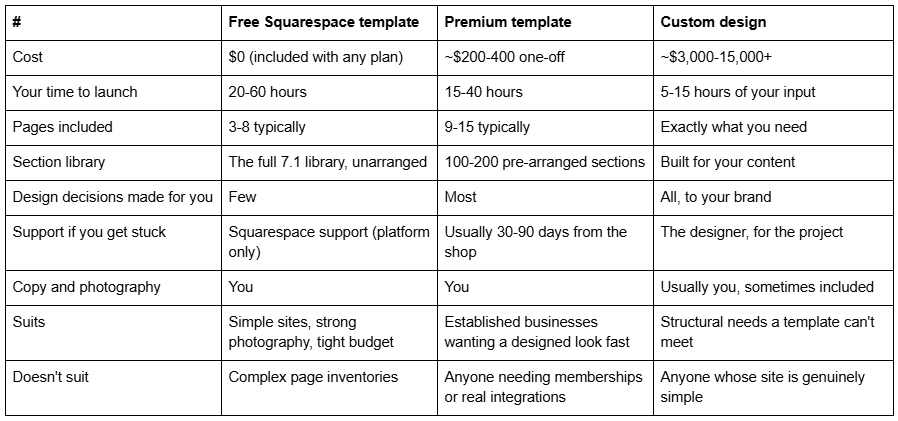
The row that decides it for most people is "your time to launch". A free template is not free — you pay for it in evenings. If your hourly rate is meaningful, a $249 premium template that saves twenty hours has already paid for itself.
First, a platform fact that changes the whole comparison
Before comparing anything, understand what "template" means on Squarespace 7.1, because it is not what it means on WordPress or Shopify.
In Squarespace 7.1, every site is built on the same underlying template family. The Squarespace Help Center is explicit: "All version 7.1 sites are part of the same template family, so every site has the same features and style options." And it goes further — "We designed version 7.1 to remove the need to switch templates, so the template you choose when creating a 7.1 site is only meant as a starting point."
Three consequences follow, and they matter for every route below:
A free template and a $249 premium template are functionally identical. Same blocks, same Fluid Engine, same commerce features, same SEO controls, same Core Web Vitals ceiling. What differs is layout, section arrangement, page count and support — not capability.
You cannot switch templates in 7.1. The Help Center states plainly: "It's not possible to change templates on a version 7.1 site." Changing your site's look means changing Site Styles and rebuilding sections, not swapping a template.
A premium template is applied to your 7.1 site, not installed as a theme package. There is no theme upload, no FTP, no ZIP.
If you have read older advice about picking the right Squarespace template because you will be stuck with its features, that advice was written for version 7.0 and no longer applies.
Route 1 — Squarespace's own free templates
Squarespace includes its full template gallery with every plan. There is no upsell and no premium tier from Squarespace itself. Their own framing on the templates page: "Every template is just a starting point."
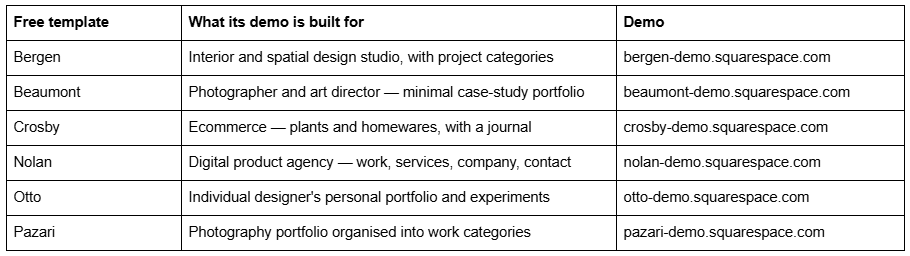
They are better than their reputation. The 7.1 gallery is genuinely well designed, and the templates are built by the same team that builds the editor, so nothing in them fights the platform. A few worth looking at, all live and all on 7.1:
What free templates genuinely cost you. Not money — time and decisions. A free Squarespace template gives you a handful of pages and leaves the rest of the build to you. You will be choosing type scales, spacing, colour ratios and section order yourself, and those are the decisions that separate a site that looks designed from one that looks assembled.
Choose a free Squarespace template if: your site is under about eight pages, you have strong photography, you enjoy the fiddling, or your budget genuinely has no room. There is no shame in this route and no penalty for it.
One myth to kill: free Squarespace templates do not rank worse in Google. Ranking has nothing to do with which starting layout you picked — all 7.1 sites emit the same markup from the same system. What affects your rankings is your content, your page structure, your image weight and your internal linking.
Route 2 — Premium third-party templates
Premium Squarespace templates are designs built by independent studios and applied to your 7.1 site. Prices across the established shops run from roughly $189 to $595, with most clustering between $250 and $400.
What you are actually buying. Not features — you already have all of those. You are buying:
A larger, arranged page set. Where a free template gives you three to eight pages, premium templates typically ship 9 to 15, already designed. Squareko's 24 templates run from Justify at 9 pages to WeDecorefy at 15.
A section library. 150+ pre-designed sections you restack to build pages the demo doesn't have. This is the part that keeps paying off.
Design decisions already made. Type scale, spacing rhythm, colour ratios and button styles, set consistently across every page.
Support. Usually 30-90 days of email support from the shop that built it. Squareko's is 60 days.
Sometimes, installation. This varies enormously between shops and is worth checking before you buy.
The shops worth knowing. Big Cat Creative is the largest and has the deepest industry taxonomy. Applet Studio has around 30 templates at roughly $225 with well-built industry landing pages. Go Live HQ, Station Seven, Paper Moon Websites, Ink and Mortar, SQSPThemes, Square Stylist and Golden Coast Design are all real, established options with distinct visual styles. Squareko sells 24 at $249. Look at all of them — the visual style you want is a bigger factor than any feature list, because the features are identical.
The delivery difference worth checking before you buy. Most template shops send you a file or a set of instructions and you do the install. Squareko delivers by Squarespace contributor invitation and installs it — there is nothing to download or upload, unlike WordPress themes. If installing a design onto a live site is the part you were dreading, ask each shop how delivery works before comparing prices.
Two things premium templates almost never include, at any shop:
A Squarespace subscription. Hosting and the platform are separate and required.
A licence for the demo photography. Squareko's terms state demo images are copyright-protected and not licensed for live use; every one must be replaced before launch. This is standard across the market and catches people out constantly.
Also worth knowing before you spend: premium templates are typically non-refundable. Squareko's policy is that digital products cannot be returned, exchanged or refunded under any circumstances. Use the live demo properly first — page list, then mobile view, then section count.
Choose a premium Squarespace template if: your business needs 9 or more distinct pages, you want the design decisions made, you would rather spend $249 than three weekends, or you want somebody to email when a section doesn't behave.
Route 3 — Custom Squarespace design
Custom design means a Squarespace 7.1 site built from your content and structure outward, rather than your content poured into an existing shape.
What it costs. Realistically $3,000 to $15,000 and up, depending on page count, ecommerce complexity and how much strategy and copywriting is included. Your own time commitment is lower than either template route — typically five to fifteen hours of briefing, feedback and content supply — but the calendar time is longer, usually four to twelve weeks.
What you get that a template cannot give you. Not better features; the platform is the same. You get:
A page structure designed around your actual services, not adapted to a template's page list
Navigation designed for how your customers actually decide
Copy and layout developed together, rather than copy squeezed into fixed sections
Design decisions that are defensible against your brand, not against a demo
When custom is genuinely the right answer. When a template can't hold your structure. Multi-level navigation with a dozen service pages. A membership area. A booking flow that has to integrate with something. A product catalogue with real variant complexity. A migration from another platform with hundreds of URLs to preserve. In those cases a template is not cheaper — it is a $249 detour before you pay for custom anyway.
When custom is the wrong answer. When your site is genuinely simple and you have just been told custom is more professional. A five-page service business site does not become more effective for having been built from scratch. It becomes more expensive.
Are third-party Squarespace templates safe?
This question comes up constantly and deserves a direct answer, because "third-party" sounds riskier than it is on Squarespace.
A premium Squarespace template is not a code package. There is no theme upload mechanism on Squarespace, no plugin directory, and no way for a template to install code you cannot see. What a premium template actually is: pages, sections, Site Styles settings and occasionally some Custom CSS, arranged inside a standard Squarespace 7.1 site. Everything it does, you could do yourself in the editor given enough evenings.
That has two practical implications. First, a third-party template cannot break Squarespace, cannot be abandoned by its author in a way that breaks your site, and cannot stop working after a platform update the way an outdated WordPress theme can — because there is nothing to update. Second, if a template does include Custom CSS, that CSS is visible to you in Website → Website Tools → Custom CSS, and you can read it, edit it or delete it.
The real risks are commercial rather than technical, and they are worth checking before you pay:
Delivery method. Some shops send a duplication link, some send a file of instructions, some install it for you. Ask.
Refund policy. Almost universally non-refundable across the market.
Licence scope. One site, usually. Reselling or reusing on a second site is normally prohibited.
Support window and what it excludes. Setup help is usually in scope; customisation almost never is.
Demo photography. Never licensed to you. Assume you are replacing all of it.
Does the route affect site performance?
No, not directly — and this surprises people who assume premium means faster.
All Squarespace 7.1 sites, free-template or premium-template or custom, render from the same system on the same infrastructure. Performance is determined by what you put on the page: image weight, how many sections you stack on the homepage, embedded third-party scripts.
For a reference point on what a well-built Squarespace 7.1 site achieves: across 54 Squareko-built client sites measured in August 2026 — Playwright/Chromium lab test, cloud datacentre, unthrottled, single run per site, load-only CLS, so lab data rather than field data — median mobile LCP was 2.01s, with 74% under Google's 2.5s "good" threshold and 96% under 4s. Median mobile CLS was 0.000, with 31 of the 54 sites recording exactly zero layout shift on load. Median page weight was 3.0 MB across 93 requests, and 53 of the 54 run Squarespace 7.1.
Those numbers come from restraint in image sizing and section count, not from the template that started the site.
Choosing between the three, in three questions
1. How many distinct pages does your business genuinely need? Under 8 → free template is viable. 9-15 → premium template. More than 15, or with a membership, booking flow or complex catalogue → custom.
2. What is an evening of your time worth? Free templates cost 20-60 hours. Premium templates cost 15-40. If twenty saved hours is worth more than $249 to you, that decision has already made itself.
3. Is your problem the look, or the structure? Look → a template, either kind, will solve it. Structure → no template will, and buying one first is the expensive route to finding that out.
What none of the three routes include
Whichever route you take, three jobs remain yours and they are the ones that actually determine whether the site works:
Your copy. The longest job in any website launch. Templates ship with placeholder text; custom projects usually assume you supply the words unless copywriting is quoted in.
Your photography. Demo images are licensed for the demo, not for you. Budget a shoot or a stock licence.
Keeping it consistent afterwards. Six months in you will add a page. Without a documented type scale and colour set, you will guess, and the site will drift. Squareko templates include a Style Guide page for exactly this — it sits in the Not Linked section, documents the fonts, colours, buttons and spacing, and is the single most underrated thing in the box. Whatever route you take, make sure you end up with the equivalent.
Which route to take
Count your pages first. Under eight, start with a free Squarespace template and spend the saved money on photography — it will do more for the site than any template will. Nine to fifteen, a premium template is the better use of both your money and your evenings. If your structure is the problem rather than the look, skip templates entirely.
If you land in the middle bracket, you can browse the premium Squarespace templates we build — 24 designs, $249 each, 9 to 15 pages, delivered by contributor invite and installed rather than emailed to you as files. If your page inventory doesn't fit any template on the market, or you need memberships, multi-level navigation or a real integration, the honest answer is custom Squarespace design instead — and it is worth saying that plainly rather than selling you a template that won't hold your site.
FAQ
-
Squarespace's own templates are included with every plan at no extra cost — there is no premium tier from Squarespace itself. Third-party premium templates from independent studios are separate purchases, typically $200-400 one-off, and always require an active Squarespace subscription on top.
-
Layout, page count, section library and support — not capability. All Squarespace 7.1 sites share one template family with identical features and style options, so a free template can do everything a premium one can. Premium templates ship more pre-designed pages and sections, and usually include email support.
-
No. The Squarespace Help Center states it is not possible to change templates on a version 7.1 site. Instead you change the look through Site Styles — fonts, colour palettes, themes, spacing — and by swapping section layouts. Template switching only ever existed in version 7.0.
-
No. All Squarespace 7.1 sites render from the same underlying system, so the starting layout you picked has no bearing on rankings. Search performance comes from your content, page structure, internal linking and image weight — not from whether you paid for the design.
-
Realistically $3,000 to $15,000 and up, depending on page count, ecommerce complexity and whether strategy and copywriting are included. Calendar time is typically four to twelve weeks. Custom is worth it when your site's structure is the problem, not when only its appearance is.
-
It depends on the licence. Most premium Squarespace template licences cover use on a single site and prohibit reselling or presenting the design as original work. Squareko's licence works this way. Check the specific shop's terms before quoting a client, because licences vary meaningfully.

Author Bio
I'm Walid Hasan, a Certified Squarespace Expert and Squarespace Circle Platinum Partner with over 12 years of hands-on experience designing and optimizing high-performing websites. Over the years, I've had the privilege of building more than 2,000 Squarespace websites for clients around the world, always focusing on clean design, strong user experience, and conversion-driven results.
