
Custom Squarespace Website vs Template: The Real Numbers
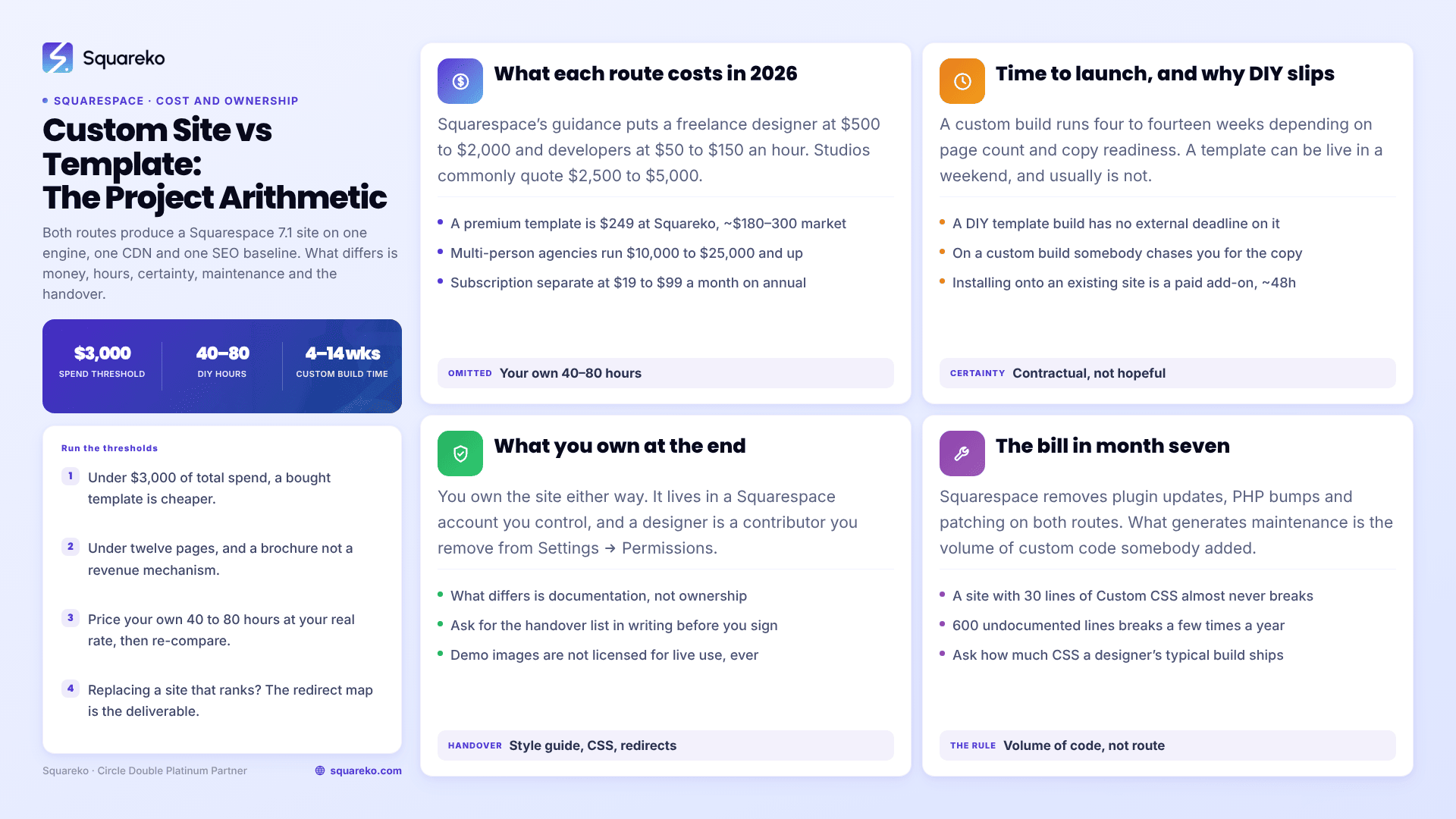
The short answer: the line sits at roughly $3,000 of total project spend, twelve pages, and one revenue mechanism. Below all three, a bought template plus your own time is not just cheaper — it launches sooner and leaves you with less to maintain. Above any one of them, a custom Squarespace build is usually the cheaper project once you price your own hours honestly and count the cost of a launch that slips. Both routes produce a Squarespace 7.1 site on the same engine, the same CDN and the same SEO baseline, so the comparison is entirely about money, time and who is accountable.
This post compares the two as projects. If you want the design comparison — whether a template can produce a site that looks and fits like yours — that is Squarespace template vs custom design. If you want the hiring case specifically, that is why hire a designer instead of using a template. This one is the arithmetic.
The seven dimensions that actually differ
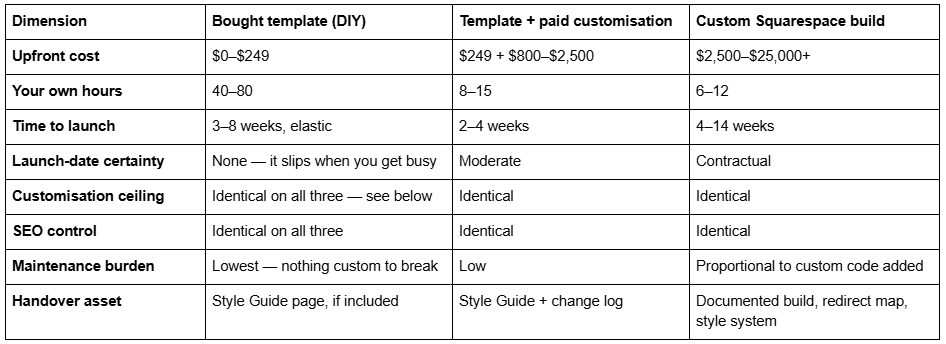
Two rows in that table are the ones people get wrong. Customisation ceiling and SEO control are the same on all three routes, because a Squarespace 7.1 "template" is not a codebase. Every 7.1 site in existence runs the same template engine — templateId 5c5a519771c10ba3470d8101 is universal — and a template is a saved arrangement of pages, sections and style values on top of it. A designer starting from blank and a buyer starting from a template are editing the same object. Nothing a custom build can do is locked away from a template site.
What genuinely differs is the four columns nobody quantifies: hours, certainty, maintenance and what you are handed at the end.
What each route costs in 2026
Squarespace subscription is unavoidable on every route and is quoted separately from design.
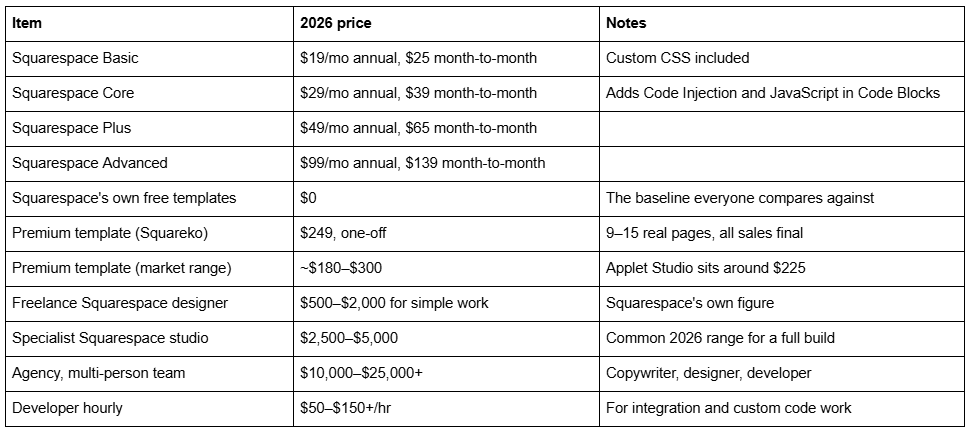
Sources for these are listed at the end — the designer and developer ranges are Squarespace's own published figures, not agency marketing.
The number most people omit is their own time. A first-time builder finishing a template properly — replacing every demo image, writing the copy, setting the SEO fields, wiring the forms, testing mobile — spends 40 to 80 hours. That is not a criticism of templates; it is what building a website is. If your own billable rate is $60/hour, a 60-hour DIY build carries $3,600 of opportunity cost on top of the $249. That single line is what moves most readers from column one to column two or three, and it is the line the rest of this SERP leaves out.
Time to launch, and why templates slip
A custom Squarespace build runs 4 to 14 weeks depending on page count, copy readiness and how many revision rounds the contract allows. A four-week build is a five-page brochure with copy already written. Fourteen weeks is a fifteen-page site with a booking flow, a store and copy being written as you go.
A template can be live in a weekend. In practice it usually is not, and the reason is structural rather than personal: a DIY template build has no external deadline. Nothing on the project fails if you do not touch it this week. Client-supplied copy is the single biggest cause of overrun on both routes, but on a custom build somebody chases you for it.
Installation timing is worth knowing before you commit either way. A premium template bought from Squareko is delivered as a Squarespace contributor invitation, not a file download — there is nothing to upload, and no FTP step. Two routes exist: a fresh 12-month trial site that Squareko builds and then transfers ownership of, which leaves your existing site live throughout, or a manual installation onto an existing site as a paid add-on, which typically takes around 48 hours. Neither route involves downtime on the site you already have.
Set a launch date on either route and treat it as real. The template route's speed advantage is only realised by people who impose the deadline that the route does not impose on them.
Ownership: what you actually own on each route
This is the most misunderstood dimension of custom Squarespace website vs template, and the honest answer is anticlimactic.
On Squarespace, you own the site either way. The site lives in a Squarespace account you control. There are no theme files, no licence keys and no hosting to migrate. A designer working on your site is added as a contributor to your account and can be removed in one click from Settings → Permissions. A template you bought is a set of pages and styles inside your own site — the seller retains nothing and cannot revoke it.
What differs is not ownership but documentation. When a custom build ends, the things that make the site maintainable by someone else are:
a Style Guide page recording the type scale, colour values and button styles actually in use
the Custom CSS commented so a future editor can tell which rule targets which section
a redirect map in URL Mappings if the build replaced an existing site
a written note of any third-party embed and the account it depends on
A good custom build hands those over. A cheap one hands over a site with 400 lines of uncommented CSS and no record of why any of it exists — which is functionally worse than a template, because the template at least came with a Style Guide page. Every Squareko template includes one; most template shops do not. Ask for the handover list in writing before you sign anything.
Two ownership caveats that apply on the template route specifically. Demo images are not licensed for live use — every one has to be replaced with your own photography or a licensed stock image before launch. And template sales are usually final: Squareko's policy is that digital products cannot be returned, exchanged or refunded under any circumstances. Use the live demo properly, on a phone, before buying.
Maintenance: the bill that arrives in month seven
Squarespace removes the entire category of maintenance that makes WordPress expensive. There are no plugins to update, no PHP version to bump, no security patching and no hosting to renew. Both routes inherit that.
What generates maintenance on a Squarespace site is custom code you added, and this is where the two routes genuinely diverge. Squarespace ships platform changes continuously, and the thing most likely to break is Custom CSS written against a class name that has since changed, or JavaScript targeting a DOM structure that has been restructured. A site with 30 lines of Custom CSS almost never breaks. A site with 600 lines of undocumented CSS breaks a few times a year, and each break costs a diagnostic session.
That produces a rule that is the opposite of the usual sales pitch:
A template you barely customised is the cheapest site to maintain.
A heavily customised site is the most expensive, whether the customisation came from a template shop, a freelancer or an agency.
So "custom" is not a maintenance cost by itself — volume of custom code is. A custom build that achieves its look through Site Styles and section settings rather than CSS overrides carries the same near-zero maintenance load as an untouched template. Ask any designer you are considering how much Custom CSS their typical build ships with. The answer tells you what the next three years cost.
Speed and SEO are not a differentiator, and it is worth saying so plainly
Custom-build sales pages routinely claim custom sites are faster and rank better. On Squarespace 7.1 that claim has no mechanism behind it. Both routes produce the same server-rendered markup, from the same engine, served through the same CDN, which delivers WebP unconditionally regardless of the format you uploaded. The per-page SEO fields, the automatic sitemap.xml, the free SSL and the automatic structured data are identical on both.
The one real performance variable is page weight, and it is driven by images and section count, not by who built the site. A template loaded with unreplaced demo photography is heavy. So is a custom build with a full-bleed video hero.
For evidence rather than assertion: across 54 Squareko-built client sites measured in August 2026 — Playwright and Chromium, cloud datacentre, unthrottled, single run per site, load-only CLS, so lab data and not field data — median mobile LCP was 2.01s with 74% under Google's 2.5s "good" threshold, median mobile CLS was 0.000 with 31 of the 54 recording exactly zero layout shift, and median TTFB was 514ms. That set is a mix of template-derived and custom builds. The distribution is not split by route; it is split by image discipline.
Whether template choice moves rankings is answered separately in do Squarespace templates affect SEO, and the platform's SEO feature list in are Squarespace templates SEO friendly.
Choose a template if…
Your site is a brochure: home, about, services, contact, maybe a blog. Under about twelve pages.
Your brand already exists — logo, colours, fonts decided — and the site needs to wear it, not invent it.
You have 40 to 80 hours you are genuinely willing to spend, and a date you will hold yourself to.
Nothing on the site takes money or bookings in a flow more complicated than a form or standard Squarespace checkout.
You are not replacing a site that already ranks.
The realistic path here is buying a premium template rather than starting from a Squarespace free template, because the difference you are paying for is the section arrangement and the page inventory — 9 to 15 built pages rather than a homepage and placeholders. How to choose a Squarespace template covers the selection criteria that actually predict regret.
Choose a custom build if…
The site is a revenue mechanism — booking, membership, multi-step enquiry, a store with real merchandising — rather than a brochure.
You are replacing a site that already ranks, which makes the redirect map the most valuable deliverable in the project. Squarespace creates no automatic 301 when a slug changes; every old URL has to be mapped by hand in URL Mappings using /old-url -> /new-url 301. Getting this wrong is the single most expensive mistake in a rebuild.
Your hourly rate makes 60 hours of DIY the expensive option.
You need a fixed launch date with someone accountable to it.
Your brand identity does not exist yet and the site is where it gets defined.
The honest third answer: a template plus a customisation pass
For most readers who land on this comparison, neither column wins outright. The right project is a bought template with a paid customisation pass on top — someone else does the 40 hours of build, structure and mobile testing, you keep the template's page inventory, and the total lands between $1,000 and $2,800 rather than $3,000+.
This works because of the platform fact stated earlier: the template and the custom build are the same object. A designer can restructure a purchased template as freely as a blank site, so nothing about starting from a template constrains the finished result. What it removes is the several weeks of layout work you would otherwise pay for.
Squarespace template customisation service documents what that engagement includes, what it costs and what is out of scope. How to customise a Squarespace template covers doing it yourself.
Where this leaves you
Run the three thresholds. Under $3,000 of total spend, under twelve pages, no revenue mechanism — buy a template, set a launch date, and spend the saved money on photography, which will change the outcome more than the build route does. Over any one of them, price your own hours at your real rate and re-run the comparison; the custom column usually wins on arithmetic rather than on aesthetics.
If your project is a rebuild of a site that already ranks, or it carries a booking or membership flow that has to work on day one, that is the situation where custom Squarespace design is worth paying for — mostly because of the redirect map and the accountability, not because the pixels are better. If it is a brochure site and you have the weekends, the template route genuinely is the right answer, and the rest of this cluster is written to help you do it well.
FAQ
-
A scoped block — one page, one layout, or a styling correction — typically runs $500 to $1,500. A full-site customisation across 9 to 15 pages runs $1,500 to $3,500. The template itself is separate at $188 to $299 across the market, and the Squarespace subscription is separate again at $19 to $99 per month.
-
Less than most advice suggests. All Squarespace 7.1 sites share one template family with identical features and style options, so no template unlocks anything another lacks. What you are choosing is design labour: which pages arrive already designed and how they are composed.
-
Three to four weeks for a full site of 9 to 15 pages; one to two weeks for a scoped block. The variable is almost always content rather than design capacity. Projects that overrun are usually waiting on copy, so agree a content deadline at kick-off.
-
Installation places the template on a Squarespace site with its demo content intact — around 48 hours for the existing-site route. Customisation is the branding, restructuring and content work that comes after. Buying a template usually includes installation on a new trial site; it never includes customisation.
-
Not necessarily, but the template must be chosen before scope can be agreed, because the amount of work depends entirely on how close its structure is to your page inventory. Choosing badly and customising heavily costs more than choosing well.
-
Squarespace access with Administrator permission, logo files, brand fonts and colours, final copy for every page, images for every slot at 1500 to 2500px, an agreed page inventory, access to any third-party tools, and one named decision-maker.

Author Bio
I'm Walid Hasan, a Certified Squarespace Expert and Squarespace Circle Platinum Partner with over 12 years of hands-on experience designing and optimizing high-performing websites. Over the years, I've had the privilege of building more than 2,000 Squarespace websites for clients around the world, always focusing on clean design, strong user experience, and conversion-driven results.
