
Are Squarespace Templates Customisable? Exactly How Far
Yes — and further than almost anyone expects, because in Squarespace 7.1 a template is not a codebase. Every 7.1 site runs the same template engine; templateId 5c5a519771c10ba3470d8101 is universal. A "template" is a saved arrangement of pages, sections and style values sitting on top of that engine. So anything one Squarespace 7.1 site can do, your template site can do too. Nothing is locked.
What varies is not whether you can change something but what it takes — a setting, a line of CSS, or a Code Block.
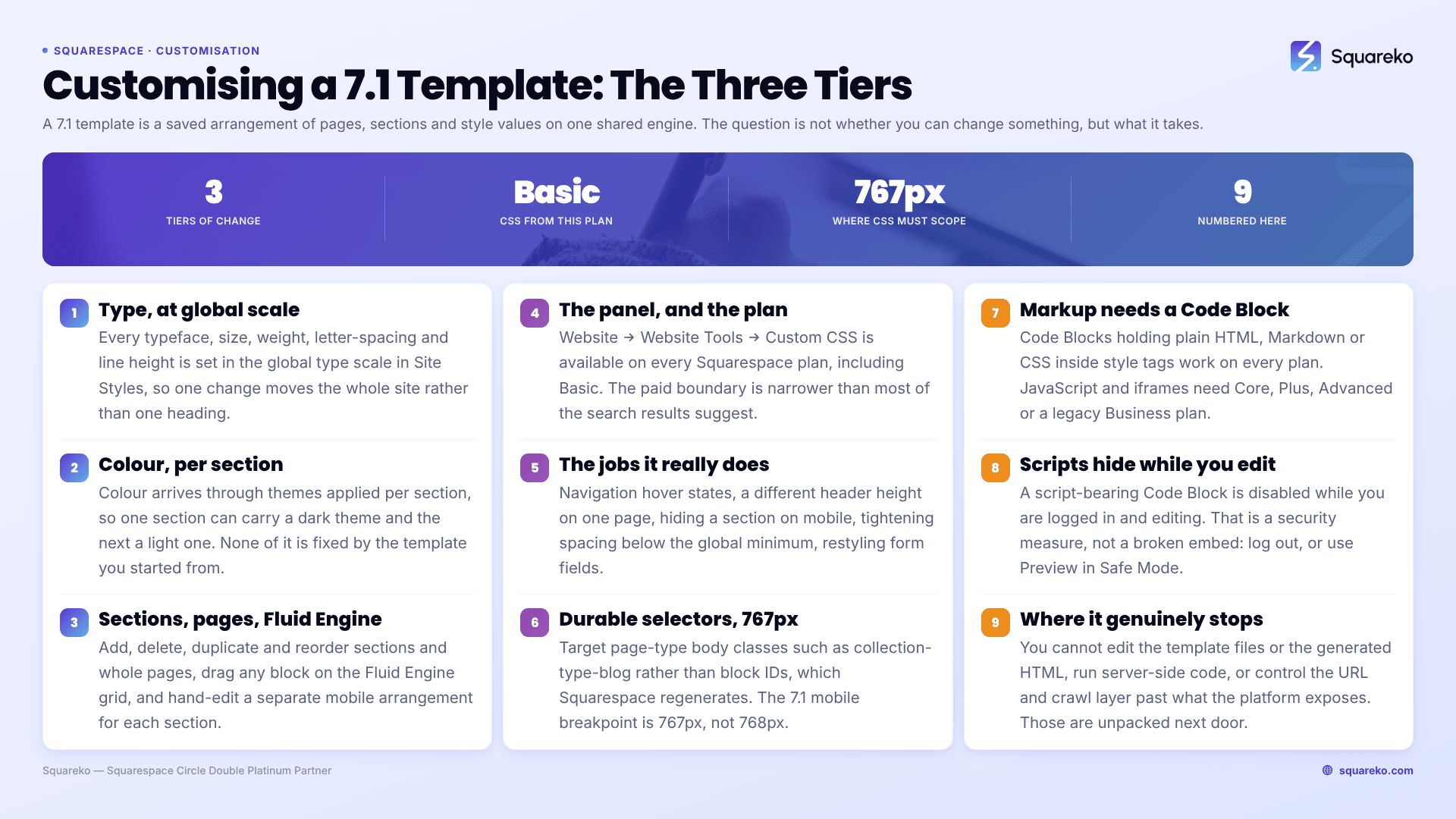
The three tiers of Squarespace 7.1 customisation
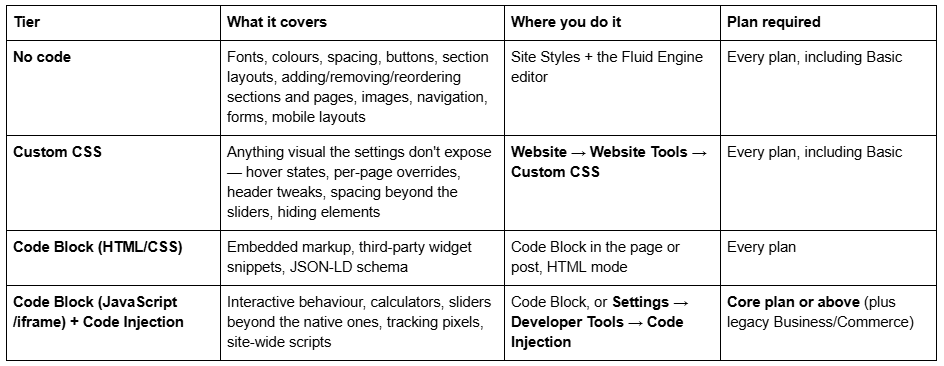
Almost everything people imagine needs a developer sits in the first two rows. The paid tier boundary is narrower than the SERP suggests: Custom CSS is available on every Squarespace plan, including Basic. It is JavaScript and site-wide Code Injection that need Core or above.
What you can change without touching any code
More than the word "template" implies. In Squarespace 7.1 the no-code tier includes:
Every typeface, size, weight, letter-spacing and line height, via the global type scale in Site Styles
Every colour, through colour themes applied per section — you can give one section a dark theme and the next one a light one
Section layouts: each section has its own layout options, background, height and content width
Adding, deleting, duplicating and reordering sections on any page, and adding, deleting and reordering whole pages
Fluid Engine positioning — drag any block anywhere on a grid, resize it, overlap it
Separate mobile layouts — Fluid Engine keeps a distinct mobile arrangement per section, edited by hand
Navigation structure, footer, buttons, forms and animations
That last point matters for expectation-setting: the mobile view is not a scaled-down desktop. You can rearrange it independently, which is why "the template broke on mobile" is nearly always an editing gap rather than a template fault.
Every Squareko template also ships with 150+ pre-designed sections and a Style Guide page, so restyling usually means swapping in a different pre-built section rather than building one.
What needs Custom CSS
Custom CSS covers the visual details the settings deliberately don't expose. Typical real jobs:
underline or colour change on navigation hover
a different header height on one page only
hiding a section on mobile
tightening spacing below the site's global minimum
restyling form fields or the cookie banner
The panel is at Website → Website Tools → Custom CSS and is available on every plan. Two rules save most of the pain. First, target durable selectors — page-type body classes such as collection-type-blog, or a collection ID — rather than block IDs, which Squarespace regenerates when a block is deleted and rebuilt. Second, use the real breakpoint:
/* Squarespace 7.1's mobile breakpoint is 767px, not 768px */
@media screen and (max-width: 767px) {
.section-title { font-size: 1.75rem; }
}
Almost every "the template isn't responsive" complaint traces back to Custom CSS written without a media query, not to the template. That is covered in full in are Squarespace templates responsive.
What needs a Code Block or Code Injection
A Code Block placed in the page content handles anything that needs markup: an embedded widget, a booking snippet, a JSON-LD schema block. Code Blocks containing plain HTML, Markdown or CSS inside <style> tags work on every plan. JavaScript and iframes inside a Code Block require Core, Plus, Advanced or a legacy Business/Commerce plan, and so does site-wide Code Injection at Settings → Developer Tools → Code Injection.
One behaviour catches everybody the first time. Script-bearing Code Blocks are disabled while you are logged in, showing:
"This block contains embedded scripts. Embedded scripts are disabled while you're logged in and editing your site."
That is not an error and not a broken embed. Log out, or use Preview in Safe Mode, before debugging anything.
Note also that Squarespace 7.1 has no per-post header code injection for blog posts. Anything that has to load on a single post — schema, a widget — goes in a Code Block in the post body.
Can you restructure the template's pages and sections, or are you stuck with them?
You are not stuck with any of it. Delete pages, add pages, reorder them, strip a section out of the homepage, paste a section from another page in. Because every Squarespace 7.1 site shares one engine, a purchased template is editable in exactly the same way a blank 7.1 site is — there is no protected region and no locked layout.
Two practical caveats, both about the platform rather than the template. Blog posts still use the classic editor, not Fluid Engine, so post bodies are a stacked block layout rather than a drag grid. And changing a page's slug creates no automatic 301 redirect, ever — if the page has been live and indexed, add the mapping by hand in URL Mappings with /old-url -> /new-url 301 before you rename anything.
One thing that is not a customisation task: in 7.1 you do not "switch templates" the way 7.0 sites did. You restyle. Changing your Squarespace template explains what that actually involves.
Where template customisation genuinely stops
Being straight about the ceiling is what makes the rest of this credible. Three things are off the table on Squarespace 7.1 no matter how much you spend: you cannot edit the underlying template files or the generated HTML — Squarespace's Developer Platform explicitly excludes 7.1 — you cannot run server-side code or your own database, and you cannot control the URL architecture and crawl layer beyond what the platform exposes.
Those limits are unpacked, with the workarounds that exist below each, in can you fully customise a Squarespace website and Squarespace template limitations.
The one situation where the answer flips
"Customisable" stops being the useful question when the amount of customising exceeds the value of having started from a template. If your first pass involves deleting most sections, rewriting the type scale and adding 300 lines of Custom CSS, you did not buy a starting point — you bought a slightly furnished blank site, and you would have got there faster from scratch.
The tell is the shortlist. If nothing in a template shop looks close and you are choosing on "I can change it later", that is the moment to stop and reconsider selection rather than customisation. How to choose a Squarespace template covers picking on structure rather than on the demo photography.
For everyone else — the large majority — the honest answer is that a premium Squarespace template plus an afternoon in Site Styles gets you where you wanted to go, and Custom CSS covers the last five per cent without a developer. Hiring only makes sense when the change list is long enough that someone else doing it saves you more hours than it costs.
FAQ
-
Yes, and this covers most of what people want. Fonts, colours, spacing, buttons, section layouts, section order, page structure, navigation, images and separate mobile layouts are all editable in Site Styles and the Fluid Engine editor, on every plan including Basic. Code is only needed for details the settings deliberately do not expose.
-
None in particular — the Custom CSS panel at Website → Website Tools → Custom CSS is available on every Squarespace plan, including Basic. What requires Core or above is JavaScript and iframes inside Code Blocks, plus site-wide Code Injection at Settings → Developer Tools → Code Injection.
-
Yes, completely. You can add, delete, duplicate and reorder sections and pages, change each section's layout, background and height, and drag blocks freely in Fluid Engine. Every Squarespace 7.1 site shares one template engine, so a purchased template is as editable as a blank site.
-
Installation places the template on a Squarespace site with its demo content intact — around 48 hours for the existing-site route. Customisation is the branding, restructuring and content work that comes after. Buying a template usually includes installation on a new trial site; it never includes customisation.
-
Squarespace disables embedded scripts while you are logged in, showing "This block contains embedded scripts. Embedded scripts are disabled while you're logged in and editing your site." It is a security measure, not an error. Log out or use Preview in Safe Mode to check it.
-
Squarespace access with Administrator permission, logo files, brand fonts and colours, final copy for every page, images for every slot at 1500 to 2500px, an agreed page inventory, access to any third-party tools, and one named decision-maker.

Author Bio
I'm Walid Hasan, a Certified Squarespace Expert and Squarespace Circle Platinum Partner with over 12 years of hands-on experience designing and optimizing high-performing websites. Over the years, I've had the privilege of building more than 2,000 Squarespace websites for clients around the world, always focusing on clean design, strong user experience, and conversion-driven results.
