
Are Squarespace Templates SEO Friendly? The Feature List
Yes — and the template is not the variable. Every Squarespace 7.1 site runs the same template engine, so every template ships an identical SEO baseline: clean semantic markup, an automatic sitemap.xml, free SSL, per-page SEO title and description fields, automatic canonical handling and automatic structured data. There is no such thing as an SEO-optimised 7.1 template, because there is no such thing as a non-optimised one.
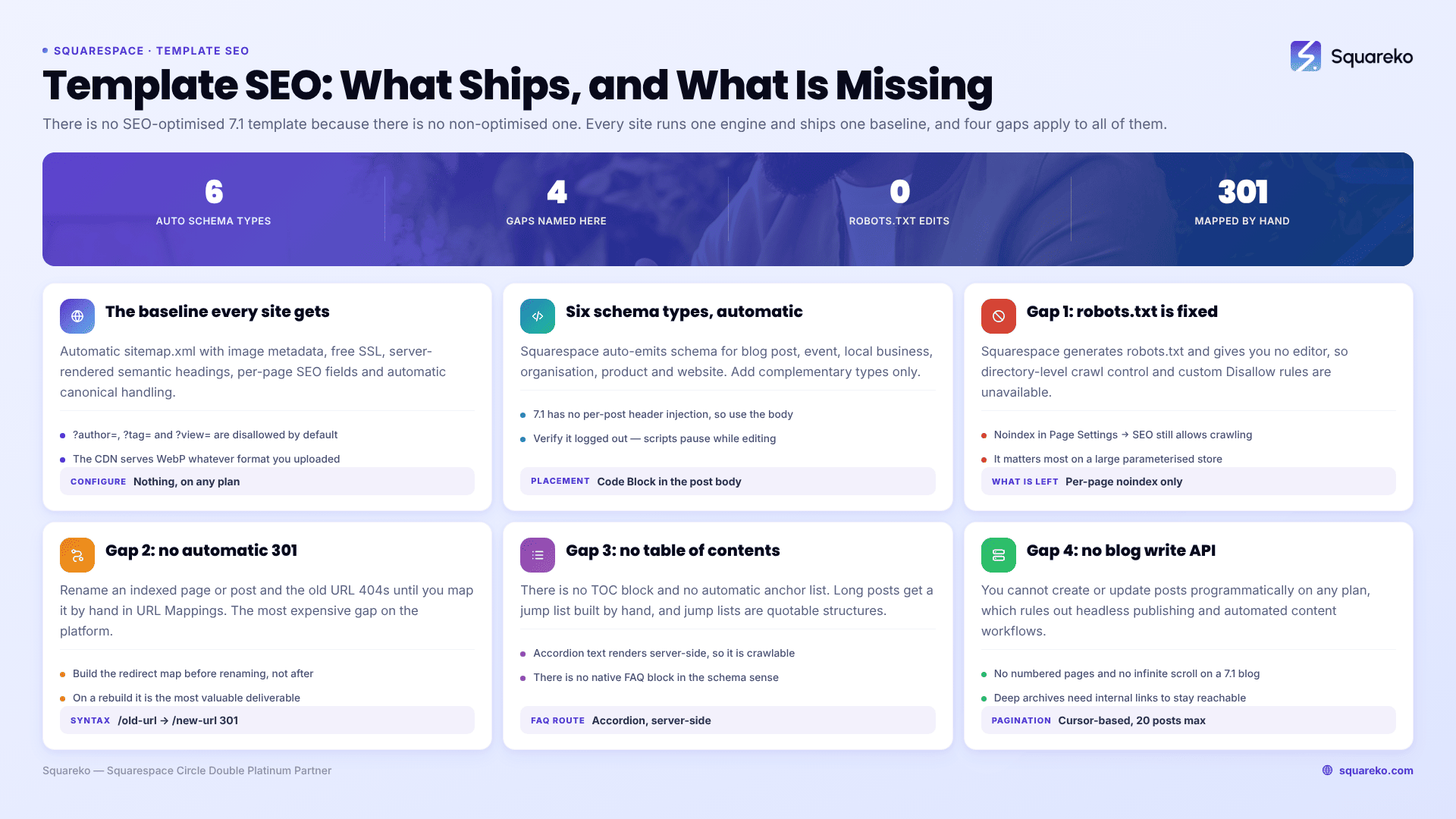
Four things Squarespace does not do are worth knowing before you build. They are listed below the checklist.
What every Squarespace 7.1 template gives you by default
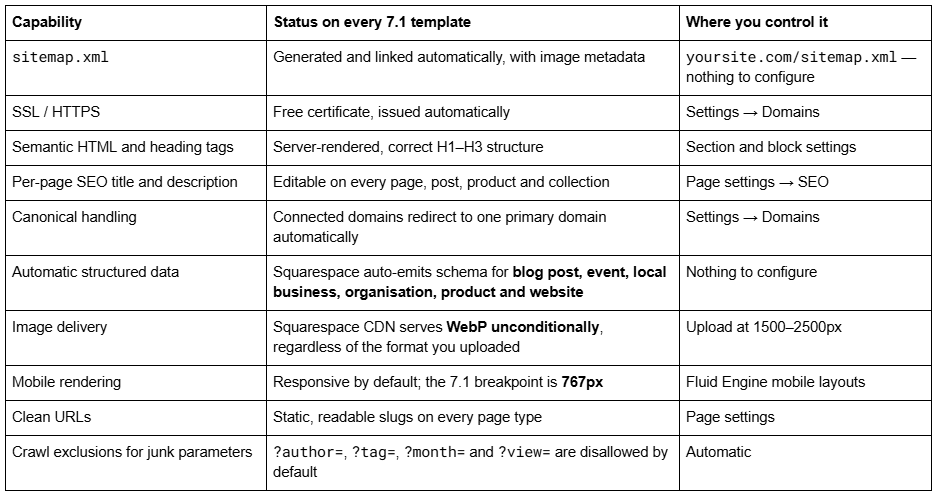
That list is the whole reason the "best templates for SEO" listicles are misleading. They are ranking templates on a variable that does not exist. Squarespace's own documentation states it plainly: version 7.1 sites "are part of the same template family, so every site has the same features and style options."
If you want the separate question of whether template choice moves rankings — and what genuinely differs between two templates — that is answered in do Squarespace templates affect SEO.
One default is worth changing on day one regardless of template. Squarespace appends your site name to every title through a format string at Settings → Marketing → SEO → Search Appearance, where the Items pattern ships as %s — Site Name. Google truncates titles at roughly 60 characters, so on a site with a long name that suffix spends a fifth of every title on words nobody searches. Remove the — %s suffix and write the site name into the titles that genuinely need it. It is a two-minute change and it applies to every page a template produces.
The four things Squarespace does not do
Being specific about the gaps is more useful than another list of what works. These four are the SEO-relevant subset of the platform's constraints; the full inventory is in Squarespace template limitations.
1. You cannot edit robots.txt. Squarespace generates it and gives you no editor. You can noindex an individual page in Page Settings → SEO, and you can add a meta robots tag in a page header injection, but directory-level crawl control and custom Disallow rules are not available. In practice this matters for very few sites; it matters a lot if you have a large parameterised store.
2. Changing a slug creates no automatic 301 redirect — ever. This is the single most expensive gap on the platform. Rename a page or a blog post that has been indexed and the old URL returns a 404 until you map it by hand in URL Mappings:
/old-url -> /new-url 301
Build the redirect map before you rename anything, not after you notice the traffic drop. On a rebuild, this is the most valuable single deliverable in the project.
3. There is no native table of contents. No TOC block, no automatic anchor list. On long posts you build one manually with anchor links, which is worth doing — a jump list is one of the more reliably quoted structures in AI answers. There is also no native FAQ block in the schema sense, though the Accordion block renders server-side, so accordion question and answer text is fully crawlable and is the correct way to build an FAQ section.
4. There is no blog write API, on any plan. You cannot create or update posts programmatically, which rules out headless publishing, bulk imports beyond the built-in importers, and any automated content workflow. Related: 7.1 blog pagination is cursor-based with a maximum of 20 posts per page, no numbered pages and no infinite scroll, so deep archives sit several clicks from the blog landing page and need internal linking to stay reachable.
None of the four is caused by your template. All four apply to every Squarespace 7.1 site including a fully custom build.
What actually differs between two Squarespace templates
Two things, and neither is a ranking factor by itself.
Page weight. A template whose demo is built around full-bleed photography and a video hero starts heavier than one built around type and white space. That difference survives into your site only if you keep the same number of images at the same sizes — and since demo images are not licensed for live use and must all be replaced anyway, the weight is ultimately yours to control.
Section inventory and heading structure. A template with a sensible section order gives you a coherent H1–H3 hierarchy for free. A template that leans on stylised text blocks may need heading levels corrected. Both are editable in minutes.
Do template-built Squarespace sites actually pass Core Web Vitals?
Yes, in aggregate. Across 54 Squareko-built client sites measured in August 2026 — Playwright and Chromium, cloud datacentre, unthrottled network and CPU, single run per site, load-only CLS, so this is lab data rather than field data:
Median mobile LCP 2.01s, with 74% under Google's 2.5s "good" threshold and 96% under 4s
Median mobile CLS 0.000, with 94% under 0.1 and 31 of the 54 recording exactly zero layout shift
Median TTFB 514ms, with 85% under 800ms
Median page weight 3.0 MB across 93 requests; median 86% of images served as WebP
Two honest caveats. Desktop CLS is weaker — median 0.029, with only 80% in the "good" band — so this is not an unqualified "Squarespace sites never shift" claim. And only 48% of the set came in under 3 MB, which is the number to watch: page weight, not template choice, is what separates a fast Squarespace site from a slow one. The template-specific version of this is in does the Squarespace template affect site speed.
The one situation where the answer flips
Squarespace templates stop being SEO-friendly enough when your requirement is crawl-control or publishing-automation, not on-page. Three signals, any one of which means the platform is the constraint rather than the template:
you need directory-level robots.txt rules or crawl-budget management on thousands of URLs
you need programmatic publishing — a feed, a product database, a content pipeline that writes posts
you need URL architecture Squarespace will not mint, such as arbitrary nesting depth or category-based blog paths
Below those three, the template is never the reason a Squarespace site does not rank. The reasons are the ordinary ones: no keyword targeting, thin service pages, no internal linking, unfilled SEO description fields and 4 MB of unoptimised photography. The Squarespace SEO checklist works through them in order, and most owners can close the gap without help.
Where a second pair of eyes earns its money is a rebuild — a site that already ranks, being moved onto a new template, where the redirect map and the heading structure have to survive the move intact. That is the situation Squarespace SEO work is genuinely worth paying for; a new site with no rankings to protect rarely needs it on day one.
FAQ
-
None of them, in the sense the question implies. Every Squarespace 7.1 site runs the same template engine and ships the same SEO baseline — automatic sitemap, SSL, semantic markup, per-page SEO fields and automatic structured data. Choose on layout and page inventory instead; SEO outcomes come from content, internal linking and image discipline.
-
None in particular — the Custom CSS panel at Website → Website Tools → Custom CSS is available on every Squarespace plan, including Basic. What requires Core or above is JavaScript and iframes inside Code Blocks, plus site-wide Code Injection at Settings → Developer Tools → Code Injection.
-
Yes, completely. You can add, delete, duplicate and reorder sections and pages, change each section's layout, background and height, and drag blocks freely in Fluid Engine. Every Squarespace 7.1 site shares one template engine, so a purchased template is as editable as a blank site.
-
Installation places the template on a Squarespace site with its demo content intact — around 48 hours for the existing-site route. Customisation is the branding, restructuring and content work that comes after. Buying a template usually includes installation on a new trial site; it never includes customisation.
-
Squarespace disables embedded scripts while you are logged in, showing "This block contains embedded scripts. Embedded scripts are disabled while you're logged in and editing your site." It is a security measure, not an error. Log out or use Preview in Safe Mode to check it.
-
Generally yes. Across 54 Squareko-built client sites measured in August 2026 — lab data, single run, unthrottled — median mobile LCP was 2.01s with 74% under 2.5s, and median mobile CLS was 0.000. Desktop CLS is weaker at a 0.029 median. Page weight, not template choice, is the variable that matters.

Author Bio
I'm Walid Hasan, a Certified Squarespace Expert and Squarespace Circle Platinum Partner with over 12 years of hands-on experience designing and optimizing high-performing websites. Over the years, I've had the privilege of building more than 2,000 Squarespace websites for clients around the world, always focusing on clean design, strong user experience, and conversion-driven results.
