
Can You Fully Customise a Squarespace Website? Honestly, No
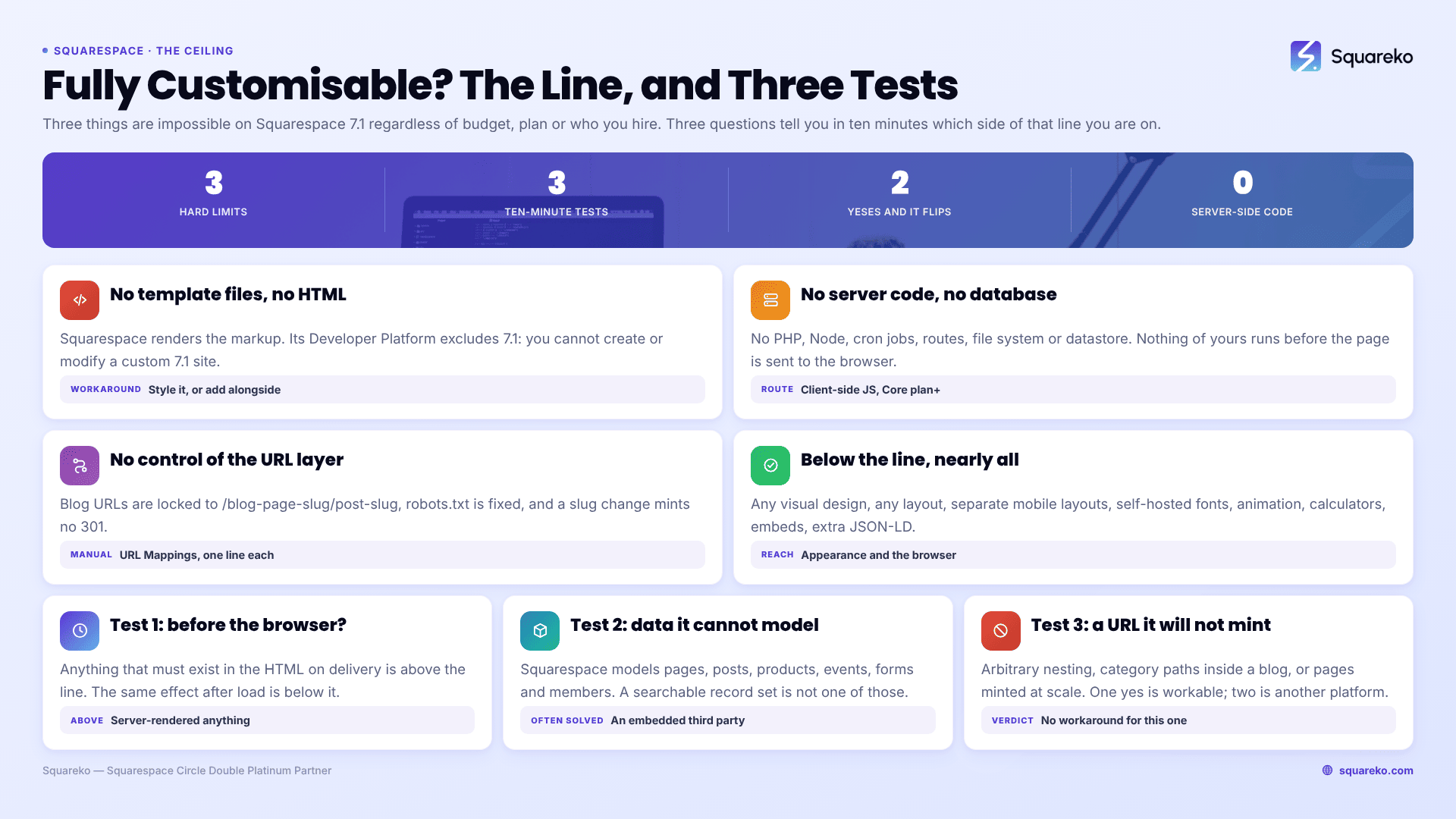
No — and "fully" is where the honest answer lives. Three things are impossible on Squarespace 7.1 regardless of budget, plan or who you hire: you cannot edit the template files or the generated HTML, you cannot run server-side code or your own database, and you cannot control the URL and crawl layer beyond what the platform exposes. Everything below that line — every visual, layout, typographic and client-side interactive change — is achievable.
Most people asking this question have a requirement that sits comfortably below the line. A few have one that does not, and finding out on day one is worth more than any workaround.
The three hard limits
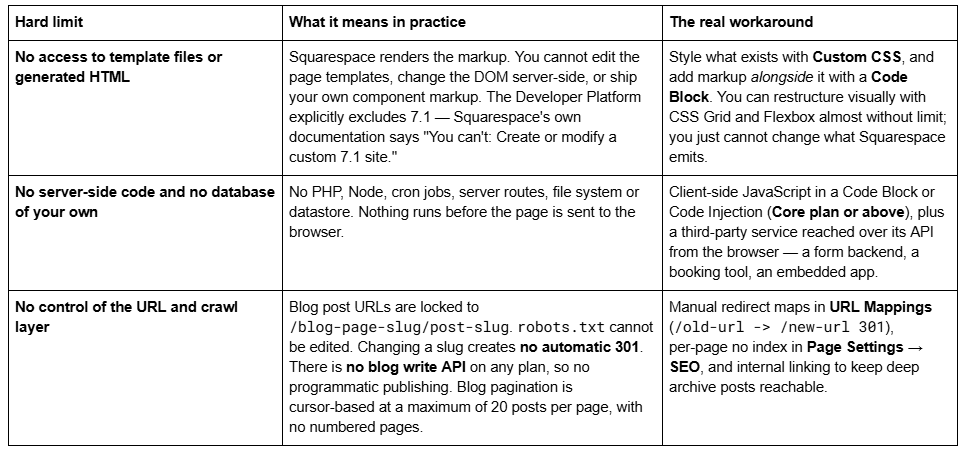
Those three are platform limits, not template limits. They apply identically to a $249 template and a $25,000 agency build, because both produce the same object: a Squarespace 7.1 site running the universal template engine, templateId 5c5a519771c10ba3470d8101.
Everything below the line, which is nearly all of it
The list of what is achievable is longer than most people assume, and it includes almost every request that arrives described as "custom":
Any visual design. Type scale, colour system, spacing, buttons, borders, shadows, section backgrounds — all in Site Styles, with Custom CSS for anything the sliders do not expose.
Any layout. Fluid Engine positions blocks on a grid with free overlap; Custom CSS can rebuild a section with CSS Grid entirely.
Separate mobile layouts per section, edited by hand. The 7.1 breakpoint is 767px.
Custom fonts, self-hosted or from a service, via Custom CSS @font-face.
Animation and interaction — scroll effects, hover states, custom cursors, sliders and marquees, all client-side.
Calculators, quizzes, filters and configurators, built in JavaScript that runs in the visitor's browser.
Third-party functionality through embeds and APIs: booking, memberships, reviews, chat, CRM, payment flows.
Structured data beyond the six types Squarespace auto-emits, added as JSON-LD in a Code Block in the post body — there is no per-post header injection in 7.1, so the body Code Block is the only route.
The honest summary: on Squarespace 7.1 you have near-total control over appearance and browser-side behaviour, and effectively none over server-side rendering and data. Most of the visual half is reachable without hiring anyone — how to customise a Squarespace template works through the Site Styles and Custom CSS routes, and custom Squarespace template design covers what a designed-from-scratch 7.1 build actually involves.
How to tell in ten minutes which side of the line you're on
Three questions. Answer them about the specific feature you are worried about, not about the site as a whole.
1. Does it have to happen before the page reaches the browser? Server-rendered personalisation, geo-based content swapping that must be in the HTML, or anything that must exist for a crawler that does not execute JavaScript — that is above the line. The same effect applied after load, in the browser, is below it and is usually acceptable.
2. Does it need to store or query data that Squarespace does not model? Squarespace models pages, blog posts, products, events, forms and members. A booking history, an inventory feed, a user-generated directory or a searchable database of records is not one of those. Above the line — though a third-party service embedded in the page often solves it.
3. Does it need a URL Squarespace will not mint? Arbitrary nesting depth, category paths inside a blog, or programmatically generated pages at scale. Above the line, with no workaround.
One "yes" is usually workable. Two or three, and Squarespace is the wrong platform for that project — and it is better to hear that from a page than from an invoice.
The limits people expect that are not real
Three things get listed as Squarespace limits that are not, and repeating them wastes the reader's decision-making.
"You're stuck with the template's structure." You are not. Delete, add, duplicate and reorder any section or page. A purchased template is as editable as a blank 7.1 site because every 7.1 site shares one engine. This is the single most common misconception in the category, and it is covered in are Squarespace templates customisable.
"Custom CSS needs an expensive plan." The Custom CSS panel at Website → Website Tools → Custom CSS is available on every plan, Basic included. It is JavaScript and iframes inside Code Blocks, and site-wide Code Injection, that require Core or above.
"Squarespace is slow, so custom code is needed to fix it." Across 54 Squareko-built client sites measured in August 2026 — Playwright and Chromium, cloud datacentre, unthrottled, single run per site, load-only CLS, so lab data rather than field data — median mobile LCP was 2.01s and median mobile CLS was 0.000, with 31 of the 54 recording exactly zero layout shift. Desktop CLS is weaker at a 0.029 median, and only 48% of the set came in under 3 MB, so page weight is the real variable. Adding custom JavaScript makes that number worse, not better.
The full inventory, including the ones that are genuinely annoying rather than fatal, is in Squarespace template limitations.
The one situation where the answer flips
If two or more of the three diagnostic questions came back "yes", stop looking for a Squarespace workaround. A site that needs server-side rendering, its own datastore and URL architecture the platform will not produce is a build for a framework and a host, not for a hosted website builder — and the cost of discovering that after launch is a second rebuild.
For everyone else, the practical decision is not whether Squarespace can do it but how many hours it takes and whether those are your hours. A requirement list that is entirely below the line but forty items long is still a real project. That is the point at which custom Squarespace design is worth paying for — someone who already knows which of your forty items is a Site Styles toggle and which is 200 lines of CSS. If your list is five items long, work through them yourself; nearly all of them will turn out to be settings.
FAQ
-
Not the HTML Squarespace generates. You can add your own markup alongside it in a Code Block, and restyle anything with Custom CSS, but the page templates and the emitted DOM are not editable. Squarespace's Developer Platform, which allowed template file editing on 7.0, explicitly does not support version 7.1.
-
No. Developer Mode and the Squarespace Developer Platform apply to version 7.0 templates only. Squarespace's own documentation states you cannot create or modify a custom 7.1 site through it. On 7.1 the routes are Custom CSS, Code Blocks and Code Injection.
-
Yes, client-side. JavaScript inside a Code Block, and site-wide Code Injection, require the Core plan or above. It runs in the visitor's browser after the page loads — there is no server-side execution, so anything that must exist in the HTML before delivery is not possible.
-
Installation places the template on a Squarespace site with its demo content intact — around 48 hours for the existing-site route. Customisation is the branding, restructuring and content work that comes after. Buying a template usually includes installation on a new trial site; it never includes customisation.
-
Only within the fixed pattern. Blog post URLs are always /blog-page-slug/post-slug, with no arbitrary nesting or category paths. Changing a slug creates no automatic 301, so map old URLs by hand in URL Mappings using /old-url -> /new-url 301 before renaming anything indexed.
-
Generally yes. Across 54 Squareko-built client sites measured in August 2026 — lab data, single run, unthrottled — median mobile LCP was 2.01s with 74% under 2.5s, and median mobile CLS was 0.000. Desktop CLS is weaker at a 0.029 median. Page weight, not template choice, is the variable that matters.

Author Bio
I'm Walid Hasan, a Certified Squarespace Expert and Squarespace Circle Platinum Partner with over 12 years of hands-on experience designing and optimizing high-performing websites. Over the years, I've had the privilege of building more than 2,000 Squarespace websites for clients around the world, always focusing on clean design, strong user experience, and conversion-driven results.
