
Why Hire a Designer Instead of Using a Template? Four Cases
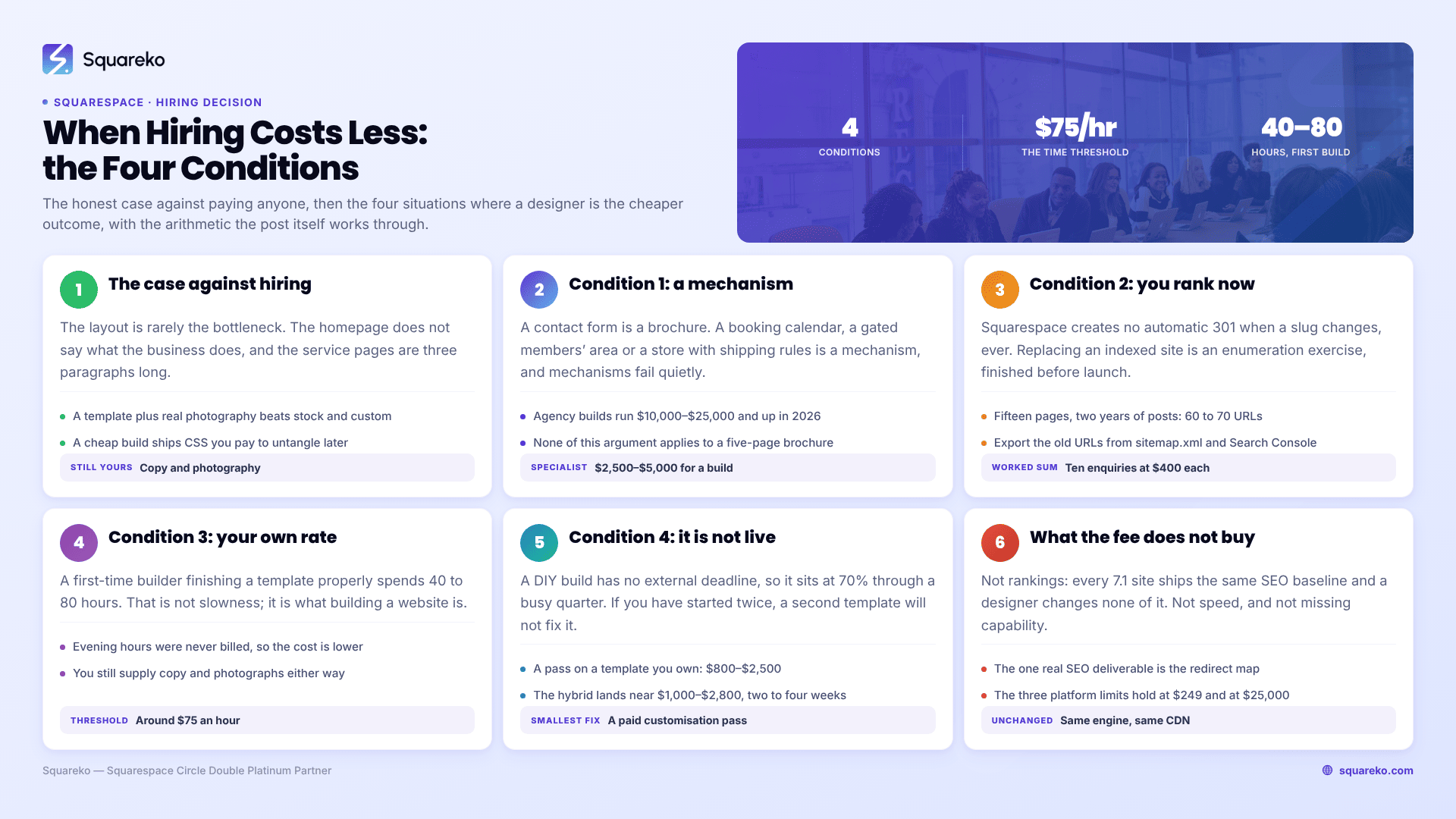
Most people reading this should not hire anyone. If your site is a brochure of under about ten pages, your brand already has a logo and colours, and you can give the project 40 to 60 focused hours, buy a template and build it yourself — you will spend $249 instead of $3,000 and the outcome will be indistinguishable to your customers.
Hiring becomes the cheaper decision when one of four specific things is true: the site is a revenue mechanism rather than a brochure; you are replacing a site that already ranks; your own time is billable above roughly $75 an hour; or you have already tried and the site is still not live. Those four are the whole case. Everything else in this category is a designer arguing for their own invoice.
This post is about the hiring decision specifically. The full cost, timeline and ownership comparison is in custom Squarespace website vs template; the design-quality comparison is in Squarespace template vs custom design.
The decision, in one table
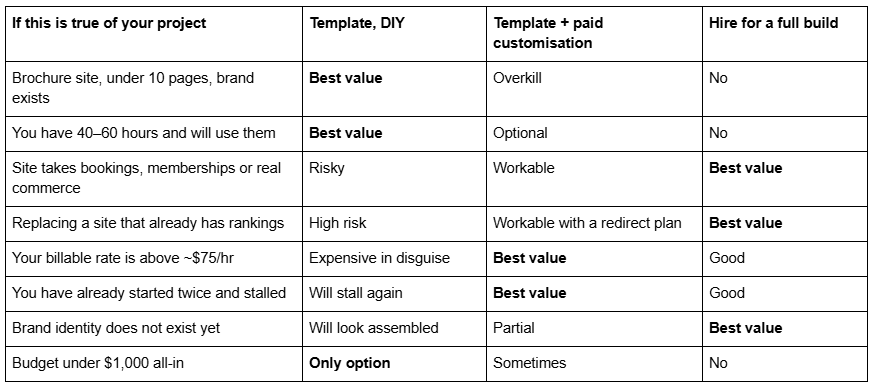
Read down the left column first. If none of rows three to seven describe you, stop here and go and buy a template — the rest of this post is not about your project.
The case against hiring, made properly
Three reasons not to hire, all of them real, none of them usually admitted on a designer's blog.
1. The design is not usually the bottleneck. On the sites people are unhappy with, the problem is almost never the layout. It is that the homepage does not say what the business does in the first screen, the service pages are three paragraphs long, and there are no photographs of the actual work. A designer can fix the first of those. The other two are yours regardless of who builds the site, and a template plus good photography beats a custom build with stock images every time.
2. Squarespace 7.1 removed most of the technical reason to hire. Every 7.1 site runs the same template engine — templateId 5c5a519771c10ba3470d8101 is universal — so a "template" is a saved arrangement of pages, sections and styles rather than a separate codebase. There is no code to inherit, no theme to configure, no plugin stack to assemble and nothing to maintain. Squarespace also handles the SEO baseline automatically: sitemap.xml, SSL, semantic markup, per-page SEO fields and structured data for blog posts, products, events, local business and organisation. A designer does not add any of that; it is already there.
3. Hiring badly is worse than not hiring. A cheap build often ships with several hundred lines of undocumented Custom CSS, no Style Guide page and no record of which rule targets which section. Squarespace ships platform changes continuously, so uncommented CSS written against a class name that later changes becomes a recurring bill. A template you customised lightly yourself is the cheapest site in the world to maintain. Ask any designer you are considering how much Custom CSS their typical build ships with — the answer predicts your next three years better than their portfolio does.
If none of the four conditions below apply to you, those three reasons are the honest answer, and are Squarespace templates good covers why the template route works for most businesses.
Situation 1: the site is a revenue mechanism, not a brochure
The line is whether money or commitments move through the site. A contact form is a brochure. A booking calendar that has to reflect real availability, a members' area gating paid content, a store with variants and shipping rules, a multi-step enquiry that routes to different inboxes — those are mechanisms, and mechanisms fail in ways layouts do not.
The cost of getting it wrong is not aesthetic. A booking flow that breaks on mobile loses bookings silently for weeks; nobody emails to tell you their appointment did not go through. A store with the wrong shipping rule refunds its way through a season.
The arithmetic: a specialist Squarespace build with a working revenue mechanism runs $2,500–$5,000 in 2026, agency builds $10,000–$25,000+. If the mechanism handles even $2,000 a month, a three-week outage while you debug it yourself costs more than the build. That is the whole argument, and it does not apply at all to a five-page brochure.
What you are actually buying is not design — it is somebody who has already discovered that Squarespace has no server-side execution, that anything dynamic runs as client-side JavaScript needing the Core plan or above, and which third-party services integrate cleanly.
Situation 2: you're replacing a site that already ranks
This is the most under-priced reason on the list, and the one people discover afterwards.
Squarespace creates no automatic 301 redirect when a URL slug changes. Ever, on any plan. Rename a page or a post that Google has indexed and the old URL returns a 404 until someone maps it by hand in URL Mappings:
/old-services-page -> /services 301
On a fifteen-page site with two years of blog posts, that is a mapping exercise across sixty or seventy URLs, and it has to be finished before the new site goes live, not after. Miss a third of them and you lose the rankings those pages held — sometimes permanently, because the replacement pages start from zero rather than inheriting.
The arithmetic: if your site currently brings in ten enquiries a month from organic search and each is worth $400, that channel is worth $48,000 a year. A redesign that drops it 40% for two quarters costs roughly $9,600. A build that includes a redirect map costs $2,500–$5,000.
There is no DIY version of this that is meaningfully cheaper, because the work is not skilled design — it is disciplined enumeration, and it is exactly the kind of task that gets abandoned at URL forty when you are also writing the copy. If you do it yourself, export the old URL list from sitemap.xml and Google Search Console before you touch anything, and treat the map as the first deliverable rather than the last.
Situation 3: your own hourly rate makes DIY the expensive option
A first-time builder finishing a Squarespace template properly — replacing every demo image, writing the copy, setting SEO titles and descriptions, wiring forms, checking every section at mobile width — spends 40 to 80 hours. That is not slowness; that is what building a website is.
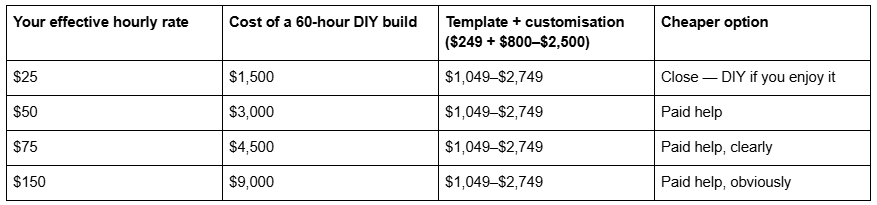
Two honest caveats on that table. Those 60 hours are not all recoverable — many people build the site in evenings that would not otherwise have been billed, which makes the opportunity cost lower than the arithmetic suggests. And you still have to supply the copy and the photographs on the paid route, which is 10 to 15 hours regardless. The table is a prompt to price your time, not a proof.
The threshold in practice is around $75 an hour. Above it, paying someone to do the build while you write the copy is almost always the cheaper project.
Situation 4: you've already tried, and the site still isn't live
This is the most common reason people finally hire, and the least discussed.
A DIY template build has no external deadline. Nothing fails if you skip a week. The site sits at 70% finished through a busy quarter, and the version live at the domain is either the old one or nothing. Meanwhile the business is running — you are just running it without the site you decided you needed nine months ago.
Two-thirds of the value of hiring, on projects like this, is not skill. It is that somebody else's calendar now depends on your copy arriving, and there is a launch date in an agreement rather than in your intentions.
The tell: if you have started the site more than once, or the draft has been at "nearly there" for over a month, the constraint is not the template. Buying a second template will not fix it. The smallest intervention that works is usually a paid customisation pass on the template you already own — someone finishes the build in two to four weeks while you supply copy against their deadline.
What hiring a designer does not buy you
Being clear about this is what makes the four situations above credible.
It does not buy rankings. Every Squarespace 7.1 site ships the same SEO baseline, and a designer changes none of it. Rankings come from keyword targeting, page depth, internal linking and time. The one genuine SEO deliverable in a build is the redirect map from Situation 2. What templates do and do not do for SEO is set out in are Squarespace templates SEO friendly.
It does not buy speed. Both routes produce the same markup from the same engine on the same CDN, which serves WebP unconditionally. Across 54 Squareko-built client sites measured in August 2026 — Playwright and Chromium, cloud datacentre, unthrottled, single run per site, load-only CLS, so lab data rather than field data — median mobile LCP was 2.01s with 74% under Google's 2.5s threshold, and median mobile CLS was 0.000. That set mixes template-derived and custom builds, and the distribution does not split by route. It splits by image discipline: only 48% of the sites came in under 3 MB. Desktop CLS is weaker at a 0.029 median, so this is not an unqualified claim in either direction.
It does not buy uniqueness past a point. A template restyled with your own type scale, colour system and photography is not recognisable as that template to anyone who is not a Squarespace designer. Your customers are not.
It does not buy capability the platform lacks. Nobody can edit Squarespace 7.1's generated HTML — the Developer Platform explicitly excludes 7.1 — run server-side code, or produce URL structures the platform will not mint. Those limits are the same at $249 and at $25,000, and they are set out in can you fully customise a Squarespace website.
The middle option most people should take
For readers who match one of the four situations but not two, the right answer is neither column: buy the template, then pay someone for a customisation pass on it.
This works because of the platform fact above. Since every 7.1 site shares one engine, a designer can restructure a purchased template exactly as freely as a blank site — nothing about starting from a template constrains the finished result. What it removes is the layout and section-building work you would otherwise pay a professional day rate for. Total lands around $1,000–$2,800 rather than $3,000 and up, and the timeline is two to four weeks rather than four to fourteen.
Squarespace template customisation service documents what that engagement includes, what it costs and what falls outside it.
Choose the template if… / Choose to hire if…
Choose the template, and build it yourself, if: the site is a brochure under about ten pages; your logo, colours and fonts already exist; you have 40 to 60 hours and a date you will hold; nothing on the site takes bookings or payments beyond a form and standard checkout; and you are not replacing a site with existing rankings. How to choose a Squarespace template covers selecting on structure rather than on the demo photography — and remember that demo images are not licensed for live use, so all of them have to be replaced regardless of route.
Choose to hire if: the site carries a revenue mechanism that has to work on day one; you are replacing a site that already ranks and the redirect map matters more than the design; your hourly rate is above $75; you have already stalled once; or your brand identity does not exist yet and the site is where it has to be defined.
Where this leaves you
Run the four conditions honestly. If none of them describe your project, the template route is the right answer and this post has done its job by talking you out of a purchase — spend the saved money on photography, which will change your outcome more than the build route ever does.
If one or two of them do describe it, the middle option is usually enough: your own template, finished by someone else, on their deadline. If three or four apply — a booking-driven site, replacing a ranked one, on a fixed launch date — that is the situation where custom Squarespace design is genuinely the cheaper project, and the redirect map and the accountability are what you are paying for rather than the pixels. Either way, decide on the four conditions rather than on how the finished examples look.
FAQ
-
Usually not, if it is a brochure under ten pages with an existing brand. Hiring becomes cheaper when one of four things is true: the site carries a booking or payment mechanism, you are replacing a site that already ranks, your billable rate is above roughly $75 an hour, or you have already tried and it is still not live.
-
Squarespace's own guidance puts a freelance designer at $500–$2,000 for simpler work and developers at $50–$150 an hour. Specialist Squarespace studios commonly quote $2,500–$5,000 for a full build, and multi-person agencies $10,000–$25,000 and up. A customisation pass on a template you already own typically runs $800–$2,500.
-
Yes, client-side. JavaScript inside a Code Block, and site-wide Code Injection, require the Core plan or above. It runs in the visitor's browser after the page loads — there is no server-side execution, so anything that must exist in the HTML before delivery is not possible.
-
Forty to eighty hours of actual work for a first-time builder, spread across whatever calendar you give it. The work is replacing every demo image, writing the copy, setting SEO titles and descriptions, wiring forms and checking each section at mobile width. The calendar slips because a DIY build has no external deadline.
-
Only within the fixed pattern. Blog post URLs are always /blog-page-slug/post-slug, with no arbitrary nesting or category paths. Changing a slug creates no automatic 301, so map old URLs by hand in URL Mappings using /old-url -> /new-url 301 before renaming anything indexed.
-
Generally yes. Across 54 Squareko-built client sites measured in August 2026 — lab data, single run, unthrottled — median mobile LCP was 2.01s with 74% under 2.5s, and median mobile CLS was 0.000. Desktop CLS is weaker at a 0.029 median. Page weight, not template choice, is the variable that matters.

Author Bio
I'm Walid Hasan, a Certified Squarespace Expert and Squarespace Circle Platinum Partner with over 12 years of hands-on experience designing and optimizing high-performing websites. Over the years, I've had the privilege of building more than 2,000 Squarespace websites for clients around the world, always focusing on clean design, strong user experience, and conversion-driven results.
